Most clubs do not fail at keeping a member list. They fail at the subscription cycle – the invoice that should have gone out six weeks before expiry, the part payment somebody wrote on a receipt book, the member who lapsed quietly and was never called. The Club & Association Membership Management System Web App is a finished Google Apps Script application built around that cycle: 19 pages, 17 exportable reports, 24 Google Sheets database tabs, 6 permission-checked roles and 37 permissions, seeded on first run with roughly 10,700 rows – 220 members across 8 tiers, 300 dependents, 900 subscription invoices, 1,135 receipts, 80 events with 1,641 registrations, 1,750 facility bookings, 10 committees and 70 minuted meetings. It deploys into your own Google account in about fifteen minutes, and there is a live demo below you can sign into right now.
🚀 Try the Live Demo Before You Buy
We have deployed this web app in our own Google account so you can test every page, every role and every report – with real sample data – before purchasing. No signup, no email required.
🔑 Test Login Credentials – all 6 roles, all 8 seeded accounts
Sign in as admin to reach everything, then sign back in as frontdesk to see the point of the product: the gate role sees the member register, the events calendar and the facility diary, and no money at all. Subscription values, receipts and facility revenue are stripped from the server payload for that role, not merely hidden in the browser.
These are the seeded logins of a shared public demo instance that resets – they are published on purpose and belong to no real club. What you get after purchase: the full source (Code.gs + Index.html) and a step-by-step deployment guide, so your own private instance runs in your own Google account in under fifteen minutes.
Key Features of the Club & Association Membership Management System Web App
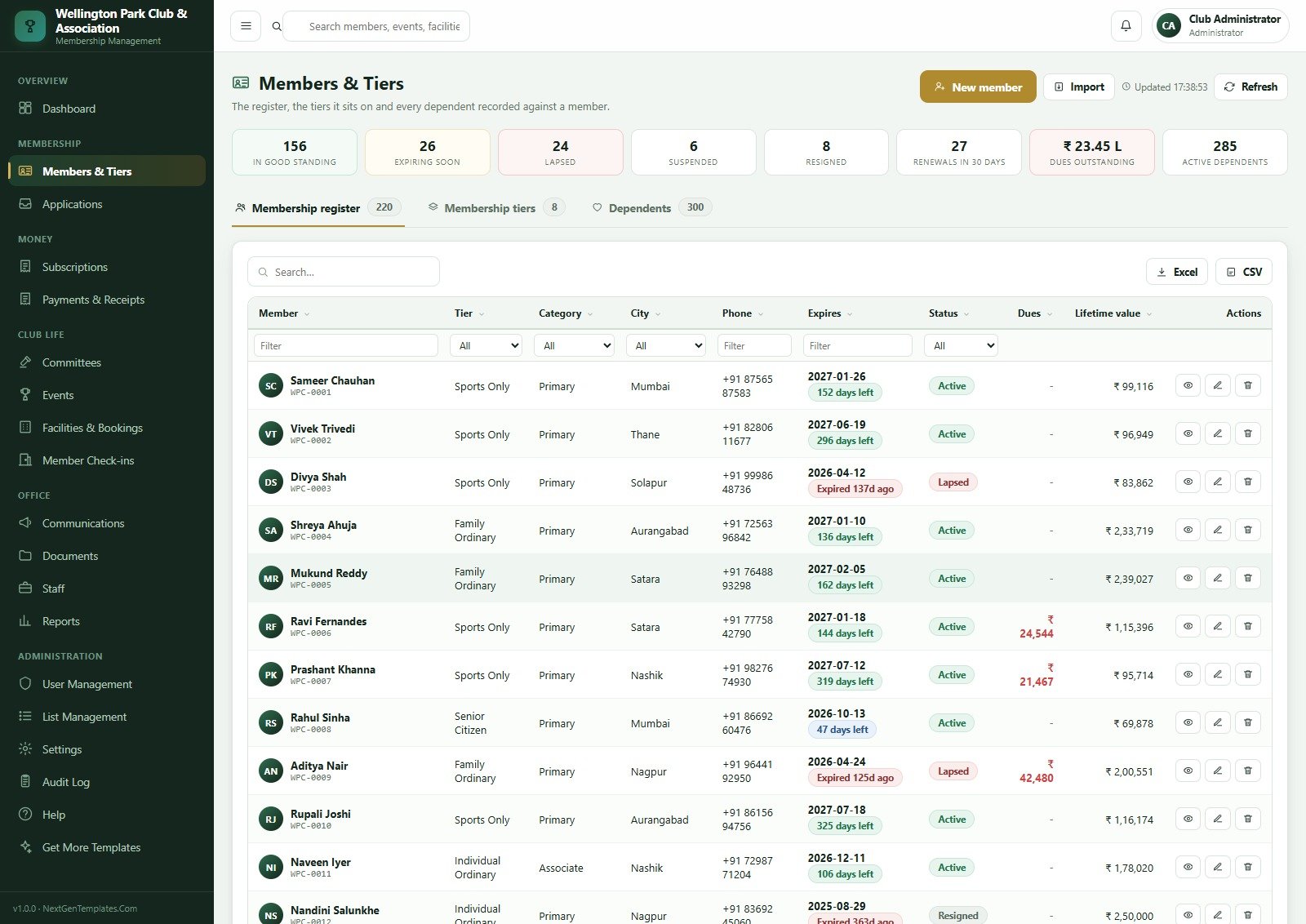
- A register that carries the whole relationship – 220 members on 8 tiers, 4 categories, 300 dependents each with their own card number, plus per-member dues, expiry countdown and lifetime value on one row.
- The subscription cycle modelled properly – one invoice per member per period, part payments, expiry, a grace window and a lapse that stays recoverable rather than disappearing.
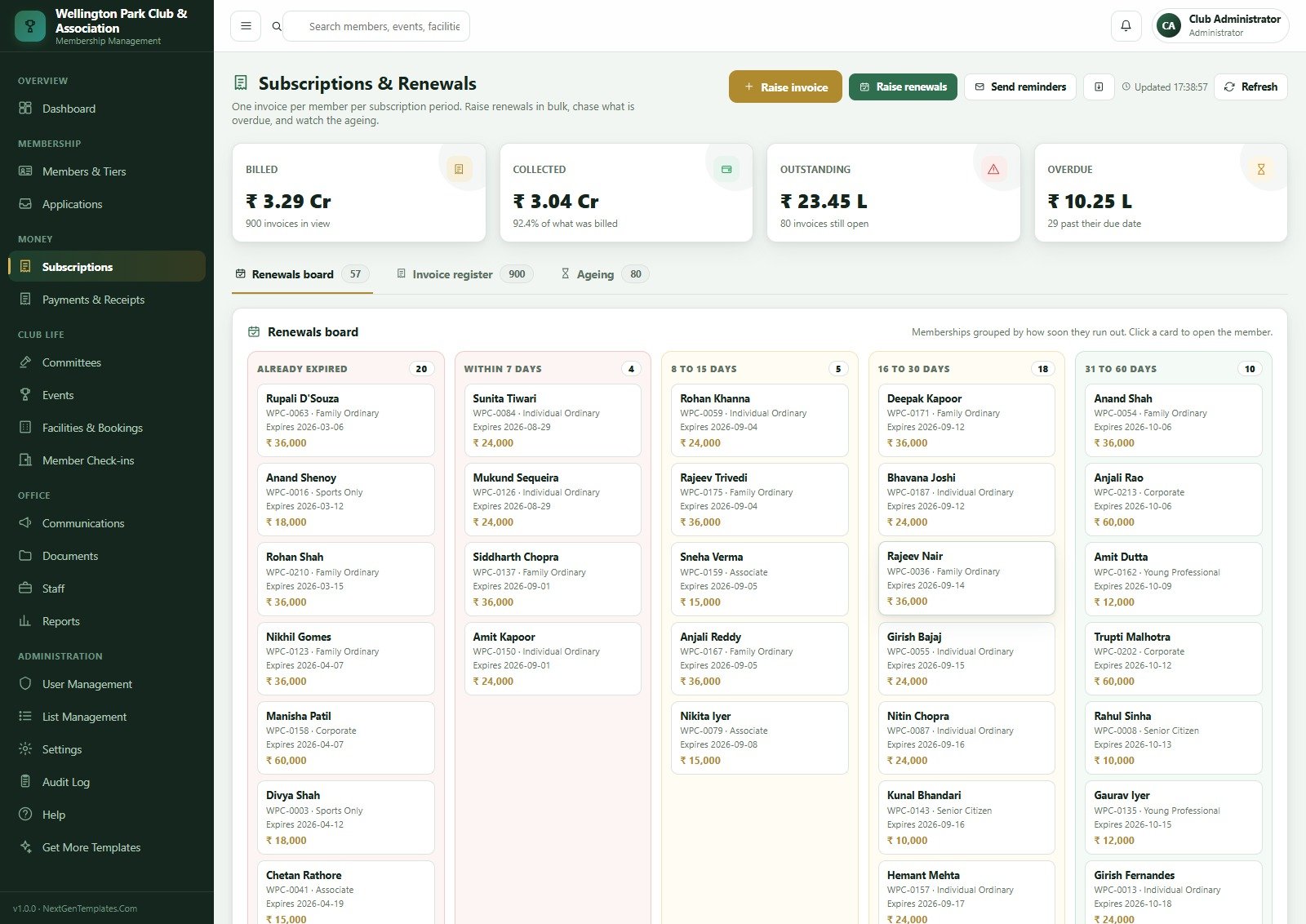
- A renewals board, not a renewals spreadsheet – every membership bucketed Already Expired (20), Within 7 Days (4), 8-15 (5), 16-30 (18) and 31-60 days (10), each card clickable straight through to the member.
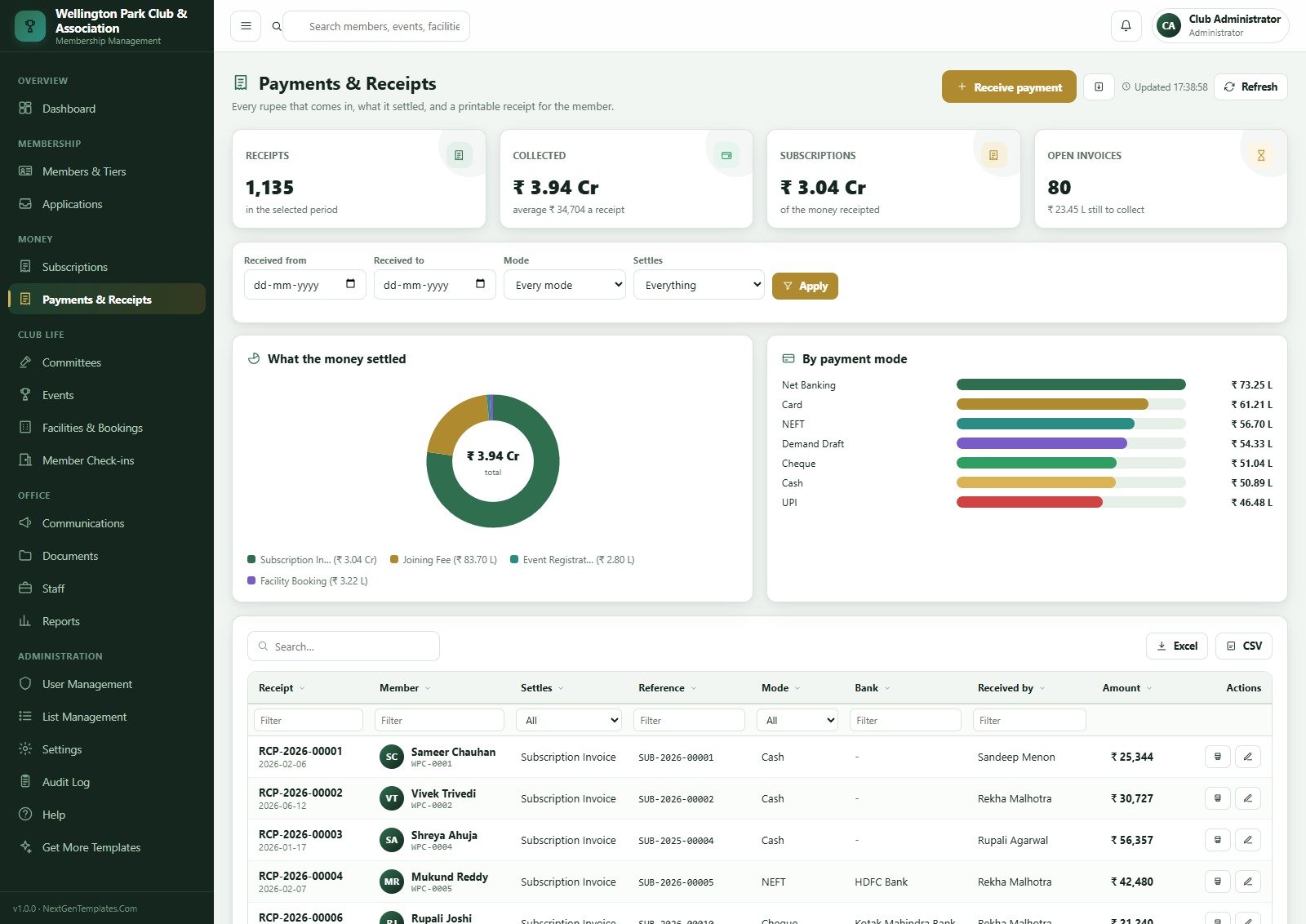
- Payments with printable receipts – 1,135 seeded receipts across seven recorded modes, a settlement donut and a by-mode bar chart, printing on A4, 4 inch or 3 inch stationery.
- A seven-stage application pipeline ending in the committee decision that admits a member, with the proposer, the source and the days waiting on every row.
- Governance as a first-class module – 10 committees, 65 office bearers with term end dates, 70 meetings with turnout and quorum. This is the part associations get asked about at audit and almost no generic CRM records.
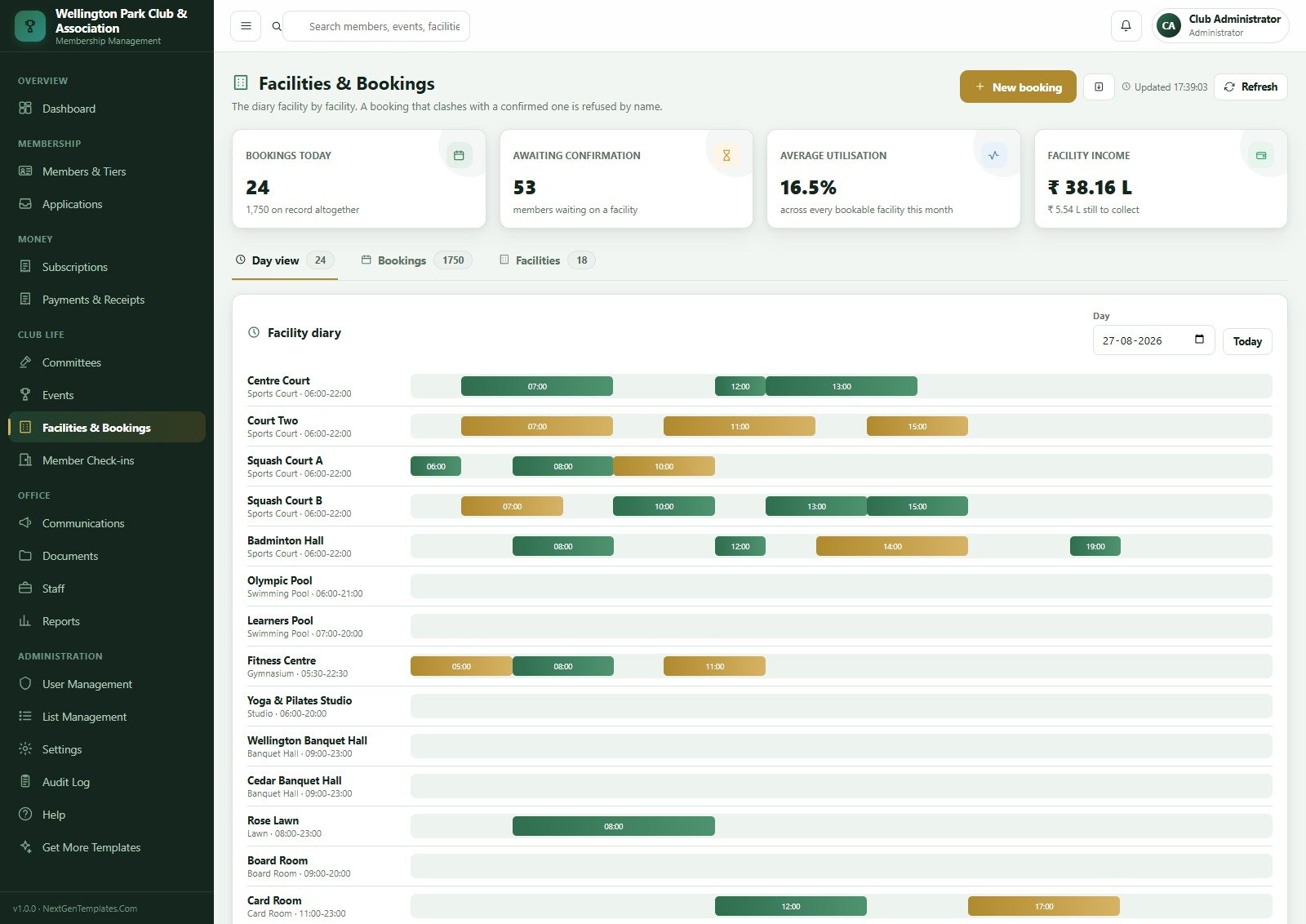
- A facility diary that refuses clashes by name – 18 bookable facilities on a day view, from Centre Court and Squash Court A to the Olympic Pool, Fitness Centre, two banquet halls, Rose Lawn, Board Room and Card Room.
- A gate register with quick check-in by name, code or phone, purpose, entry point and guest count, a live inside-the-club list and a fourteen-day footfall chart.
- Segmented email to the membership – the resolved recipient count is always shown before anything sends, and delivery and failure counts land against the campaign afterwards.
- Role security enforced on the server – 6 roles and 37 permissions drive the sidebar and the endpoint check, so a role that cannot see a page cannot call its endpoints either.
Every Page, Explained
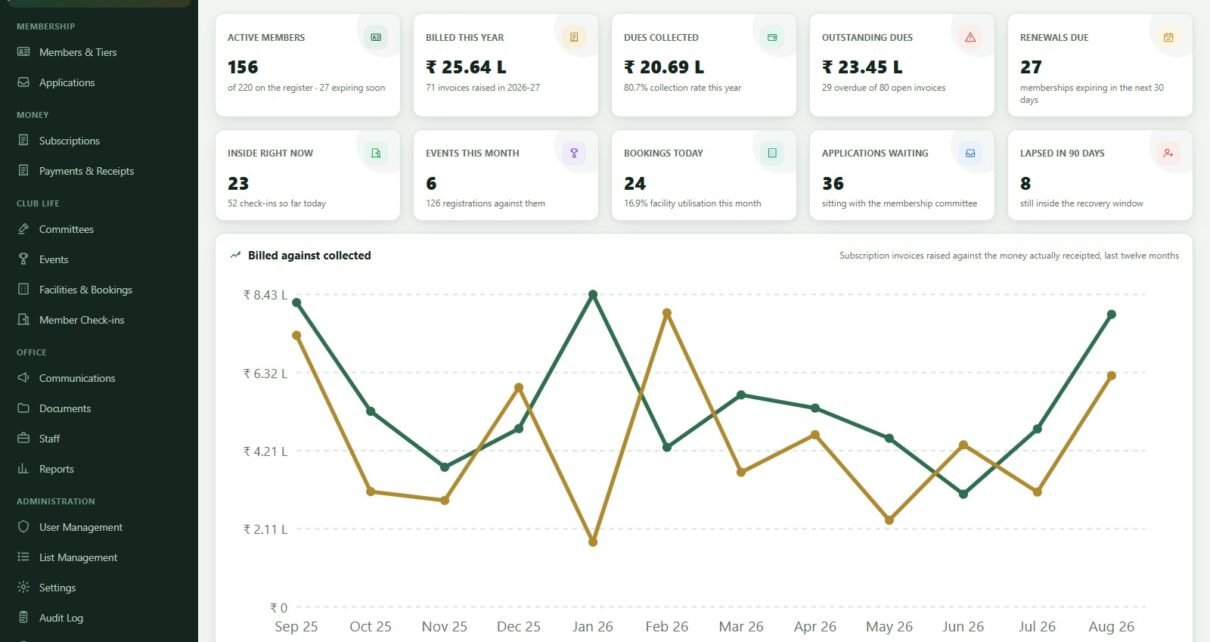
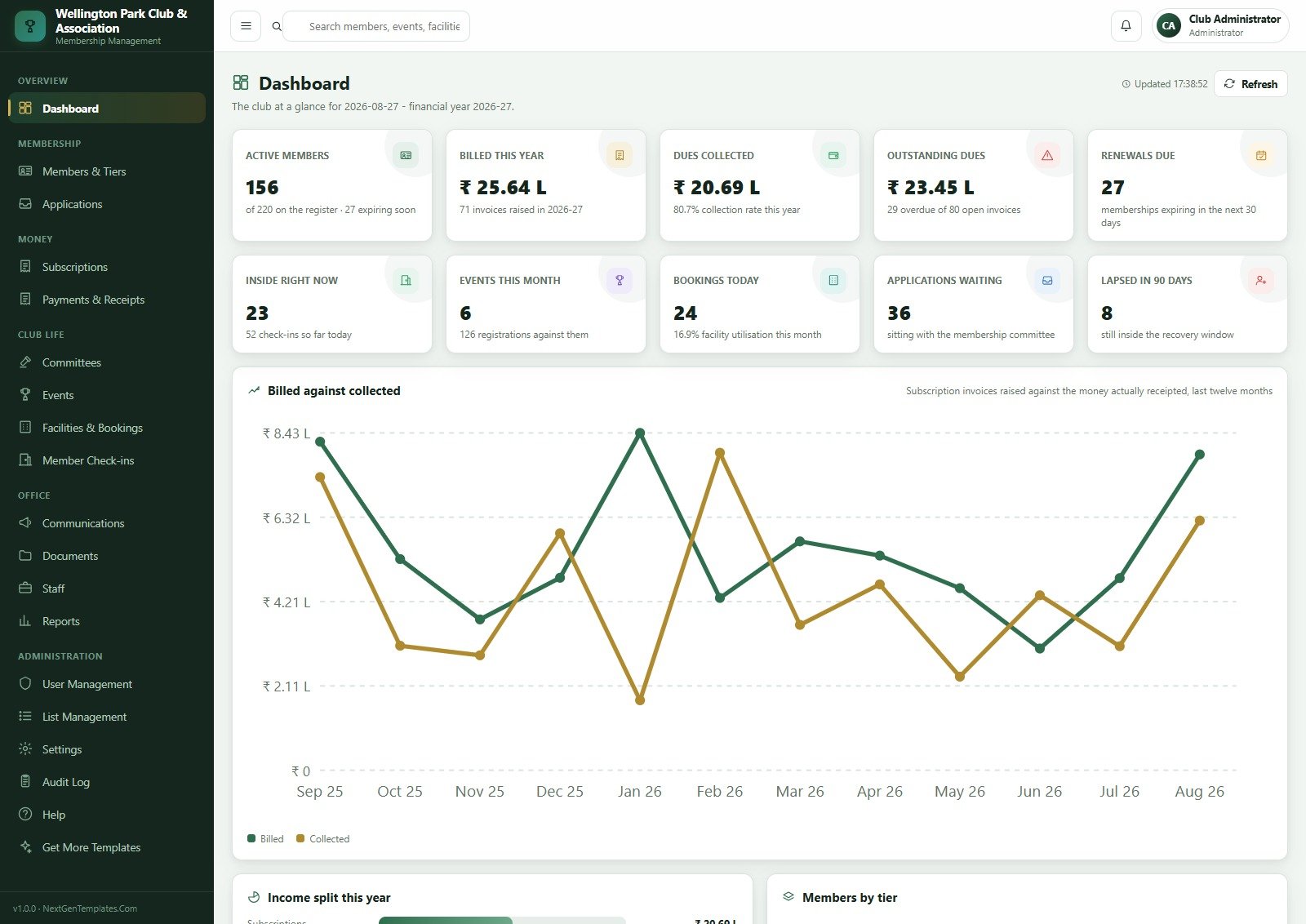
Dashboard. Ten cards – Active Members, Billed This Year, Dues Collected, Outstanding Dues, Renewals Due, Inside Right Now, Events This Month, Bookings Today, Applications Waiting and Lapsed in 90 Days – over a twelve-month “Billed against collected” line chart, an income split and a members-by-tier breakdown.
Members & Tiers. The register, the tiers it sits on and every dependent. Header cards read In Good Standing, Expiring Soon, Lapsed, Suspended, Resigned, Renewals in 30 Days, Dues Outstanding and Active Dependents; the table filters by tier, category, city, expiry and status, and exports to Excel or CSV.
Applications & Approvals. 90 applications across the seven stages, with the tier applied for, how the applicant found the club, who proposed them and how long they have been waiting.
Subscriptions & Renewals. Billed, Collected, Outstanding and Overdue at the top; then three tabs – the renewals board, a 900-row invoice register and an ageing view of the 80 invoices still open. Raise invoices, raise renewals in bulk and send reminders from the same header.
Payments & Receipts. Every rupee that comes in, what it settled and a printable receipt for the member. Filter by date, mode and what it settles; see the settlement split – subscription invoices, joining fees, event registrations and facility bookings – and the by-mode ranking.
Committees & Office Bearers. Ten committees – Managing, Executive, Membership, Finance, Sports, Cultural, House, Disciplinary, Election and Library & Heritage – each with its chair, its office bearer count and its term end date, plus every meeting on record.
Events & Registrations. 80 events with category, capacity, registrations, fill rate, attendance, income and status, and a registrations tab holding all 1,641 rows.
Facilities & Bookings. A day-view diary across all 18 facilities with their operating hours, plus a 1,750-row booking register and the facility master.
Member Check-ins. Quick check-in, the live inside-the-club list with a check-out button per member, the fourteen-day footfall chart and the day’s gate register.
Communications. 45 campaigns, 5,876 addressed member emails, a 98.5% delivery rate on the seeded book, campaigns-by-audience and the delivery of the last ten sends.
Documents. 80 documents across 10 types – minutes, circulars, notices, audited accounts, receipt copies, forms, identity proofs and member photographs – filed against the club, a member, a committee or an event, at five visibility levels from Public to Confidential.
Staff. 30 staff across 9 departments with designation, joining date, salary and reporting line. These are the names the system stamps on receipts, bookings, check-ins and meetings.
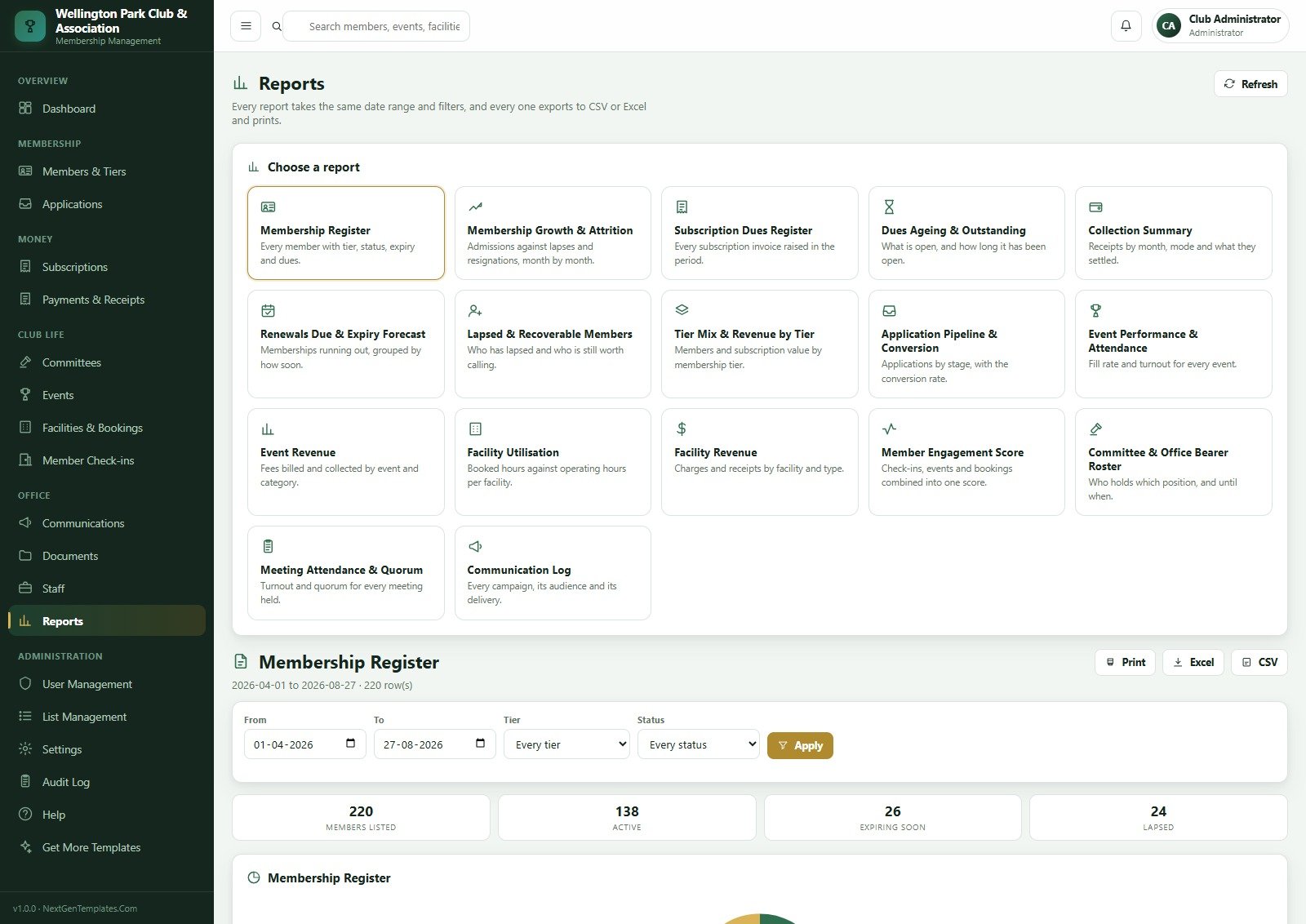
Reports. All 17, on one page, sharing one date range and one filter set: Membership Register, Membership Growth & Attrition, Subscription Dues Register, Dues Ageing & Outstanding, Collection Summary, Renewals Due & Expiry Forecast, Lapsed & Recoverable Members, Tier Mix & Revenue by Tier, Application Pipeline & Conversion, Event Performance & Attendance, Event Revenue, Facility Utilisation, Facility Revenue, Member Engagement Score, Committee & Office Bearer Roster, Meeting Attendance & Quorum and Communication Log.
User Management, List Management, Settings, Audit Log and Help. Accounts and a roles-and-permissions matrix; 31 dropdown lists holding 195 values that change everywhere at once; eight settings tabs including six theme colour tokens that rebrand the application; a log of every create, change, delete, approval, payment and sign-in; and a built-in manual with a troubleshooting FAQ.
Club Membership Management System vs. a Shared Spreadsheet vs. Paid Club SaaS – Feature Comparison
| This Web App | A shared spreadsheet | Paid club SaaS | |
|---|---|---|---|
| Cost | One payment, yours forever | Free | Typically USD 50-350 per month, often scaling with member count |
| Platform | Google Apps Script + Google Sheets, in your own account | Google Sheets or Excel | Vendor cloud |
| Setup time | About 15 minutes, arrives seeded with 10,700 rows | Weeks of building | Days to weeks of onboarding |
| Real-time team collaboration | Yes – a separate login per staff member | Yes, but everyone sees everything | Yes |
| Mobile access | Yes – responsive in any browser | Clumsy | Yes |
| Customizable fields and rules | Yes – you own the source | Yes | Only what the vendor exposes |
| Share with link | Yes – one web app URL for all staff | Yes | Yes |
| Role-based money hiding | Yes – enforced on the server, not the browser | No | Usually yes |
| Committee and meeting records | Yes – 10 committees, office bearer terms, quorum | Manual | Varies; often an add-on |
| Who holds your member data | You – it never leaves your Google account | You | The vendor |
| Year-1 cost at 5 staff users | The purchase price | Free, plus your time | Roughly USD 600-4,200 |
Who Should Use This Template
Sports and recreation clubs, gymkhanas, residents’ and housing societies, professional associations, alumni bodies, service clubs, yacht and golf clubs, cultural societies and trade associations – any body with tiers, a subscription cycle, a committee and a gate. It sits comfortably at roughly 100 to 3,000 members with two to ten staff, and it fits particularly well where a committee has to be able to prove who approved what.
It is not the right tool if you need a member-facing self-service portal, online card payments taken inside the app, turnstile or RFID hardware at the gate, a native mobile app, or a database larger than Google Sheets comfortably holds before the built-in Archive starts earning its keep.
Real-World Use Cases
The honorary secretary of a 40-year-old gymkhana. Her committee’s worst audit finding was that nobody could show which office bearer approved which membership. Applications now move through the seven-stage pipeline with the committee decision recorded against each one, and the Committee & Office Bearer Roster and Meeting Attendance & Quorum reports print straight into the AGM pack.
The general manager of a 220-member sports club. Renewal collection used to be a monthly argument over a spreadsheet. The renewals board shows him 20 memberships already expired and 4 falling due inside a week, the 8 a.m. trigger sends the reminders without him touching anything, and he watches “Billed against collected” and the ageing tab for the rest.
The front desk on an evening shift. She checks members in by name or card number with a purpose and a guest count, sees the 23 people still inside, and books a squash court – and cannot see a single subscription figure, receipt or revenue number, because the server never sends them to her role.
Advantages of the Club & Association Membership Management System
- It arrives working. Setup builds 24 sheets and seeds a full club, so you evaluate a populated system rather than an empty shell.
- Setup is staged and resumable. A free Google account stops any script at six minutes; setup gives itself a four-minute budget, records the stage it reached and schedules its own resume trigger. Every stage is idempotent, so nothing is ever seeded twice.
- The permission model is real. One registry drives the sidebar and the server-side endpoint check, and money fields are stripped from the payload for the Front Desk role rather than hidden with CSS.
- It has a self-test. The Database health check runs ten assertions – paid plus balance equals the invoice total, no membership expires before it starts, no two confirmed bookings overlap on one facility, attendance never exceeds registrations, no orphan foreign keys, no negative dues.
- Two nightly jobs do the boring work – a 2 a.m. maintenance pass that recomputes statuses, overdue flags and dues, and an 8 a.m. renewal reminder mail-out.
- Sensible security defaults – salted SHA-256 password hashes that are never returned by any endpoint, configurable session timeouts, account lockout after failed attempts, and a must-change-password flag on every seeded account except the administrator.
- Your data stays yours. The whole thing runs inside your own Google account. There is no vendor holding your members’ names, and no seat fee.
Opportunities for Improvement
Three things worth knowing before you deploy, all observed on the shipped build:
- Two cards labelled “expiring soon” use different windows. The dashboard’s Active Members card reads “27 expiring soon” – which is the 30-day renewals figure – while the Members & Tiers header shows an Expiring Soon card of 26 and a separate Renewals in 30 Days card of 27. The numbers are each correct for their own window; the shared wording is what invites the double-take.
- Facility utilisation is computed twice and lands 0.4 points apart. The dashboard reports 16.9% facility utilisation this month while the Facilities page reports an average utilisation of 16.5% for the same month. Treat the Facilities page as the authority and reconcile the dashboard tile if the difference matters to your committee.
- The Audit Log starts effectively empty. Seeding builds the club’s history but does not backfill audit entries, so a fresh install shows only the setup event and your own sign-ins. It fills from the moment your staff start working – just do not read the empty log as a fault.
None of these affects the money: the invoice register, the receipt ledger and the ageing view reconcile against each other on the seeded book.
Best Practices
- Do the Settings pass before the import, not after. Currency, financial year, tax percent, due days, renewal warning window, grace days and the member code prefix all shape records as they are created.
- Make the tiers match reality first. Membership tiers are data, not code – fix them before you load 800 members onto the wrong ones.
- Give every staff member their own account. The audit log is only worth having if it names a person, and shared logins destroy that immediately.
- Install the nightly triggers on day one. Without them, statuses, overdue flags and renewal reminders wait for somebody to remember.
- Run the Database health check after every import or hand edit – that is exactly what it is for.
- Remember that Apps Script serves the last deployed version. After any edit, go to Deploy > Manage deployments > edit > Version: New version > Deploy, or your change will not appear.
- Mind the Gmail quota – roughly 100 emails a day on a free account and 1,500 on Workspace, so send large campaigns in batches. Google’s Apps Script quota documentation has the current limits.
- Use Settings > Archive before the sheet gets slow, not after. It always copies before it removes, and never touches master data or anything still open.
Explore Relevant Templates
If a club is one part of a bigger operation, these pair naturally with it: the CrossFit Box Management System Web App for a membership body built around class attendance, the Bowling Alley Management System Web App for a front-desk and lane-booking operation, the Adventure Sports Booking Management System Web App for activity bookings, and the Access Control and ID Card Management System Web App where the gate itself is the product. For lighter reporting alongside it, look at the Gym Membership Tracker in Google Sheets and the Sports and Recreation Dashboard in Google Sheets.
Want to build skills like this step by step? The NextGenTemplates Academy learning paths cover trackers and membership sheets with practice files you can work through at your own pace.
Frequently Asked Questions
Can I try it before buying?
Yes. Use the green box near the top of this post – the live demo is deployed, seeded and open, and all eight seeded accounts across all six roles are published there. No signup and no email are required.
Where is my club’s member data stored?
Entirely in your own Google account. You deploy the script yourself and it creates its Google Sheets database inside your own Drive. NextGenTemplates never holds, sees or processes your members’ data – this is source code you buy, not a hosted service. The one shared instance we do host is the public demo, which carries invented sample data only.
Does it process card payments or subscription auto-debits?
No. It records how a payment arrived – Cash, UPI, Card, Net Banking, Cheque, NEFT or Demand Draft – and prints a receipt against it. There is no payment gateway, no card storage and no auto-debit anywhere in the source. Money still moves through whatever channel your club already uses.
Does it make my club GDPR, PCI or data-protection compliant?
No, and no such claim is made. Compliance depends on how you configure, secure and operate your own deployment, what you collect, and the law where your club sits. What you get are building blocks – role-based access, salted SHA-256 password hashing, session timeouts, account lockout and a full audit log – not a certificate.
How many members can it handle?
The seeded demo carries about 10,700 rows across 24 sheets comfortably. Google Sheets has practical size limits, so a large or long-running club should use Settings > Archive, which always takes a copy before removing a single row and never archives master data or anything still open.
Do I need to know how to code?
No. Deployment is copy, paste and click Deploy – the manual walks it through with screenshots. You only need code if you want to change behaviour, and because the whole source ships with the product, you or any developer can.
Can members log in themselves?
No. This is a staff-facing system with its own login, deliberately separate from Google accounts so your team can sign in without one. There is no member self-service portal.
About the Author
Built by PK – Microsoft Certified Professional with 15+ years of Excel, Google Sheets, and Power BI experience. Founder of NextGenTemplates, reaching 300K+ subscribers across YouTube channels. Every template is hand-built and tested before release.
Conclusion
A club is not hard to list. It is hard to run – because the register, the money, the committee, the calendar, the diary and the gate all describe the same member and usually live in six different places. This system puts them in one, with a role model strict enough that the front desk can use it on a Saturday night and still never see a rupee, and reports honest enough to print for the AGM.
Open the live demo and sign in as frontdesk first – it is the fastest way to understand what you are buying. If what you see is the club your committee has been trying to keep in a spreadsheet, you can get the system here.