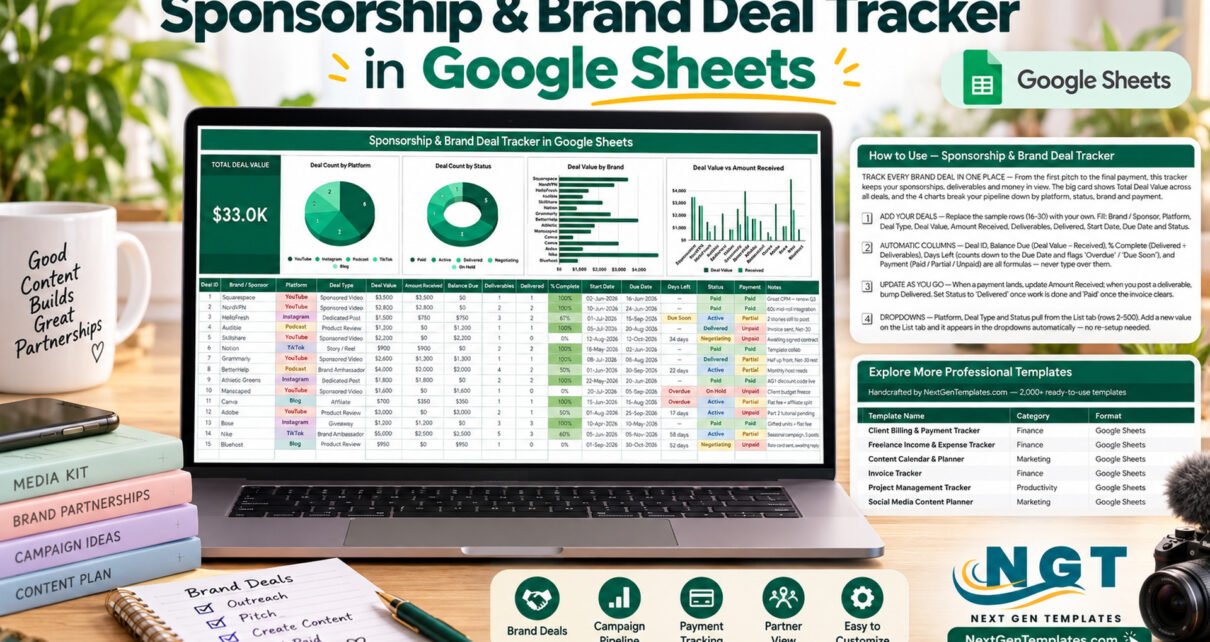
The Sponsorship & Brand Deal Tracker in Google Sheets is a brand deal tracker that keeps every sponsorship on one page: a 16-column deal log covering YouTube, Instagram, Podcast, TikTok and Blog deals, 5 deal statuses, a Total Deal Value card and 4 live charts. Five columns calculate themselves, so after you sign a deal you only update what was delivered and what was paid. The sample file ships with 15 deals worth $33.0K in total.
Once a channel starts attracting sponsors, the admin grows quickly. Rates and deliverables sit in email threads, due dates in a calendar and payments in a bank app, and it gets hard to answer simple questions: which brands still owe money, which videos are late and how much the pipeline is really worth. A single shared Google Sheet answers all three.
Key Features of the Brand Deal Tracker
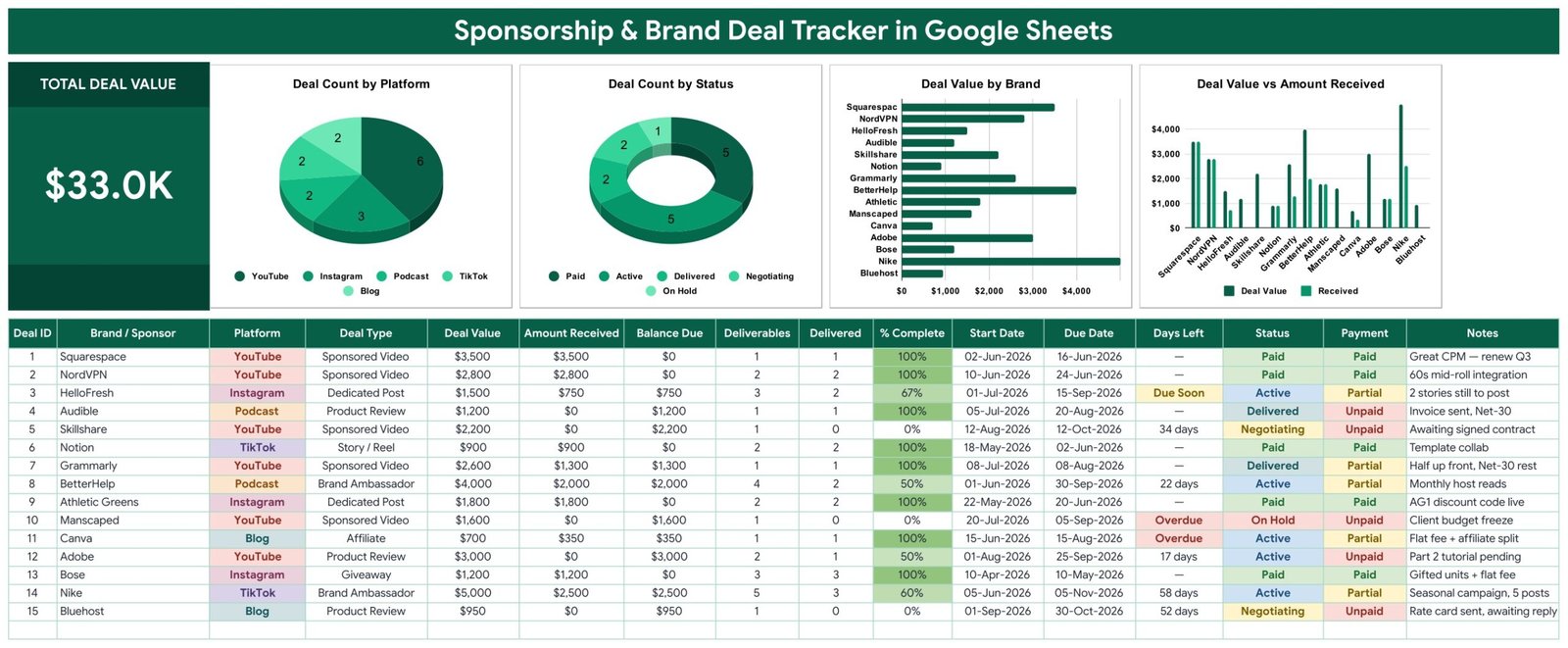
- 🤝 One log for every sponsor. Each row records Brand / Sponsor, Platform, Deal Type, Deal Value, Amount Received, Deliverables, Delivered, Start Date, Due Date, Status and Notes. Sample deal types include Sponsored Video, Dedicated Post, Product Review, Story / Reel, Brand Ambassador, Affiliate and Giveaway.
- 🔄 A five-stage deal pipeline. Status moves each deal from Negotiating to Active to Delivered to Paid, with On Hold for anything frozen. The Deal Count by Status chart shows the pipeline at a glance.
- 🧮 Five automatic columns. Deal ID, Balance Due (Deal Value minus Amount Received), % Complete (Delivered ÷ Deliverables), Days Left and Payment are formulas, so nobody retypes a balance.
- 💵 Paid, Partial or Unpaid. The Payment column works out payment status from the money actually received, which keeps split-fee and Net-30 deals honest.
- ⏳ Days Left countdown. Open deals count down to their Due Date and are flagged Due Soon or Overdue, so late deliverables surface early.
- 📊 A Total Deal Value card plus 4 charts. Deal Count by Platform, Deal Count by Status, Deal Value by Brand and Deal Value vs Amount Received read the data columns directly, rows 16 to 1000.
- 🗂️ Self-extending dropdowns. Platform, Deal Type and Status draw from the List tab (rows 2-500). Add a value there and it shows up in the dropdown straight away.
Tracker Pages Explanation
The file has a tracker sheet, a List tab for the dropdown values, a How to Use tab and an Explore More Templates tab.
Page 1: Sponsorship & Brand Deal Tracker Sheet
The top band holds the Total Deal Value card ($33.0K in the sample) and four charts. Deal Count by Platform shows YouTube leading with 6 of the 15 sample deals, Deal Count by Status splits them into 5 Paid, 5 Active, 2 Delivered, 2 Negotiating and 1 On Hold, Deal Value by Brand ranks every sponsor, and Deal Value vs Amount Received places what was agreed next to what has arrived. Under the charts sits the colour-coded deal log with sample sponsors from Squarespace and NordVPN to Adobe, Nike and Bluehost.
Page 2: How to Use
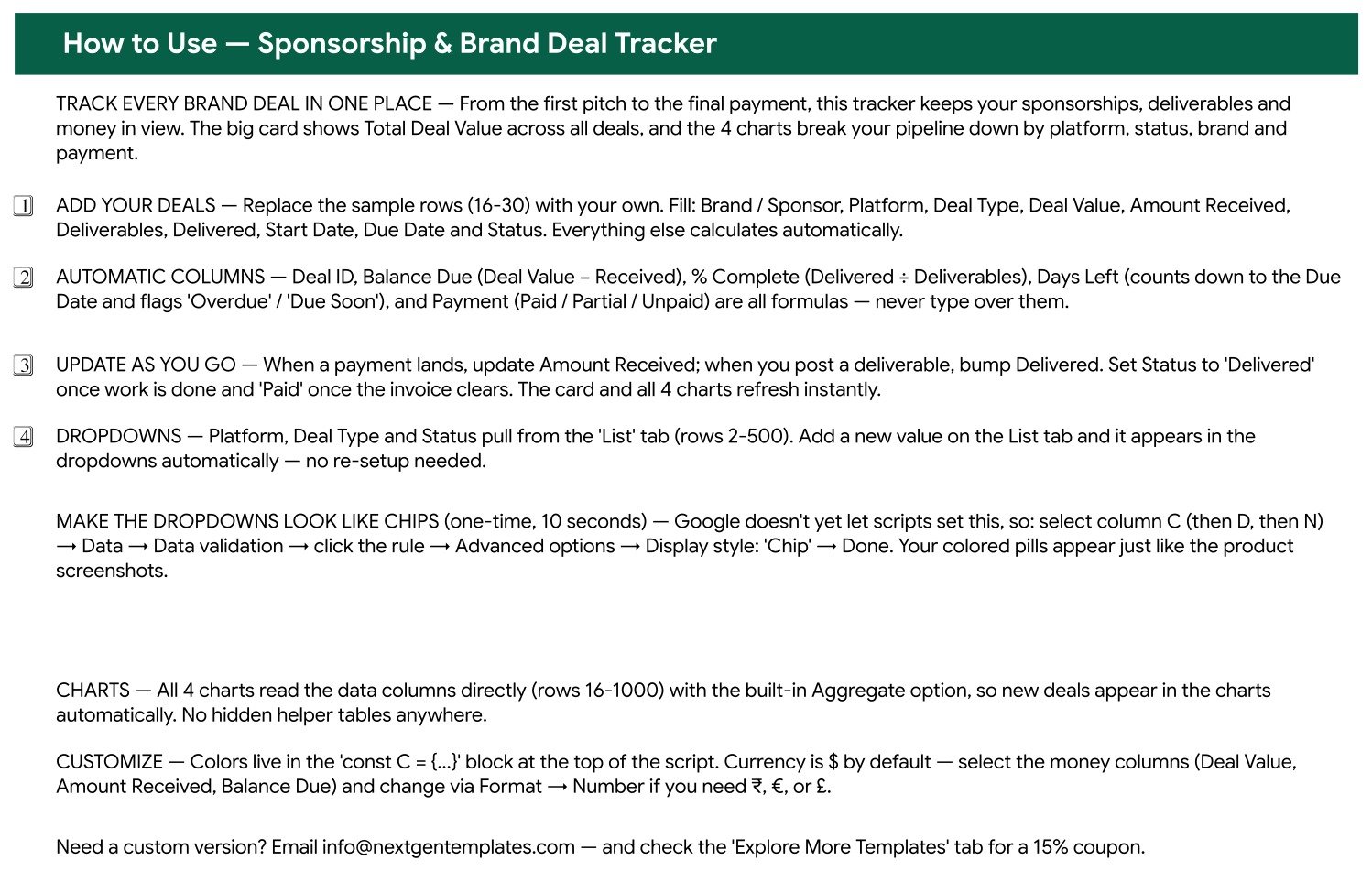
This tab walks through four steps: add your deals, leave the automatic columns alone, update Amount Received and Delivered as you go, and extend the dropdowns from the List tab. It also covers the one-time chip display style for columns C, D and N, explains that the charts pick up new rows by themselves, and shows how to switch the money columns to ₹, € or £.
Page 3: Explore More Templates
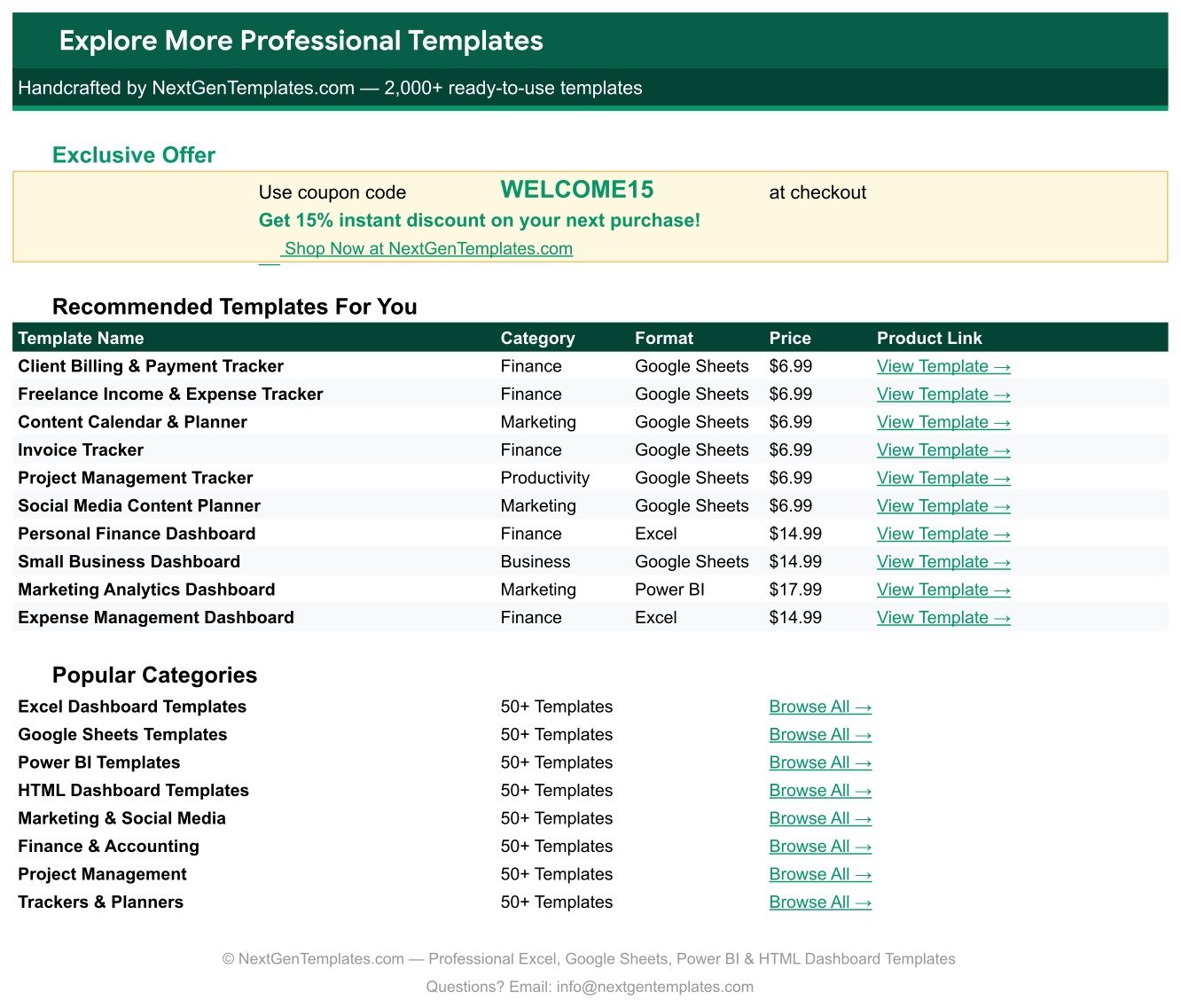
The last tab lists recommended finance, marketing and productivity templates and a WELCOME15 coupon for 15% off your next purchase at NextGenTemplates.com.
Google Sheets Tracker vs. Excel Spreadsheet vs. Creator Deal Platforms – Feature Comparison
| Feature | This Google Sheets Tracker | Microsoft Excel Spreadsheet | Paid Creator CRM / Deal Platforms |
|---|---|---|---|
| Cost | ✅ $6.99 one-time | Build it yourself, plus an Excel licence | Recurring subscription or commission |
| Platform | ✅ Any browser, free Google account | Excel desktop or Microsoft 365 | Vendor web app |
| Setup time | ✅ Minutes: make a copy, replace 15 sample rows | Hours to build formulas and charts | Account setup and onboarding |
| Share with a manager or agent | ✅ Built into Google Sheets | Only with OneDrive / SharePoint | Invite users, often per seat |
| Balance due and payment status | ✅ Calculated automatically | Only if you write the formulas | ✅ Usually |
| Deliverable progress | ✅ % Complete and Days Left per deal | Only if you build it | Varies by vendor |
| Customizable fields | ✅ Edit any column or dropdown list | ✅ Yes | Limited to the vendor’s fields |
| Mobile access | ✅ Google Sheets app | ✅ Excel app | ✅ Native apps |
| Contracts, invoices and brand marketplace | No, it tracks the deals you already have | No | ✅ Often included |
For creators and talent managers who want one shared view of every sponsorship without a monthly subscription, this Google Sheets tracker sits in the sweet spot. If you need contracts, invoicing or brand matchmaking, you still need a dedicated platform.
Who Should Use This Template
✅ Perfect for:
- YouTubers, podcasters, Instagram and TikTok creators and bloggers who sign several brand deals a year.
- Talent managers and small creator agencies who track sponsorships for a handful of clients.
- Freelance content producers who need to know exactly what each brand still owes.
❌ Not a fit if:
- You are a brand measuring influencer campaign reach and engagement. This tracker follows deal money and deliverables, not campaign analytics.
- You want invoices, contracts or bank payments synced automatically. Every amount is typed in.
Real-World Use Cases
Maya runs a tech YouTube channel with a weekly podcast. She logs every integration and host read as a row the day a brand says yes. When a split-fee deal pays its first half, she updates Amount Received and the Payment column switches to Partial, so the second invoice is never forgotten.
Jordan manages three lifestyle creators. He keeps one copy per creator and shares each by link. Before his weekly calls he opens a filter view on Negotiating deals, and Days Left shows him which deliverables are about to turn Overdue.
Sofia is a food blogger who works with meal-kit and kitchen brands. She uses Deal Value by Brand to see which partners are worth renewing and the Notes column to record discount codes and renewal reminders.
Advantages of the Brand Deal Tracker
- 💸 No subscription. A one-time $6.99 purchase replaces a sponsorship spreadsheet you would otherwise build and debug yourself.
- ⚡ Less manual maths. Balance Due, % Complete, Days Left and Payment are already formulas, so every deal is measured the same way.
- 👥 Easy to share. A manager, agent or accountant works in the same Google Sheet, with version history built in.
- 🧩 Fits your own workflow. Add platforms such as Twitch or LinkedIn, or deal types such as Livestream, on the List tab without touching a formula.
Opportunities for Improvement
- Payments and deliverables are entered by hand. Nothing syncs from invoicing tools, banks or platform dashboards.
- The charts cover every row in the log. There is no built-in date or platform filter, so use a Google Sheets filter view to focus on one quarter.
- Status is a manual dropdown while Payment is a formula, so a deal can read Paid in Status and Partial in Payment until you update Amount Received.
- Long brand names are cut short on the Deal Value by Brand chart axis (for example “Squarespac”), so keep brand names short or widen the chart.
- The How to Use text mentions a payment breakdown, but none of the four charts splits deals by Payment. Use the Payment column or a filter for that view.
- The coloured chip look on dropdowns has to be switched on once by hand, because Google does not let scripts set it.
Best Practices
- Log a deal the day terms are agreed, even while it is still Negotiating, so the pipeline value stays complete.
- Count deliverables precisely (for example 5 posts, not 1 campaign) so % Complete means something.
- Update Amount Received the moment a payment lands and keep invoice terms such as Net-30 in Notes.
- Switch the dropdown columns to chip style in Google Sheets data validation for the coloured pill look shown in the screenshots.
- Resize or restyle any of the four charts with Google’s guide to adding and editing a chart. They keep reading the data columns directly.
Explore Relevant Templates
- 💰 Want the bigger income picture? Read about the Content Creator Revenue Dashboard in Google Sheets.
- 📅 Plan the sponsored posts you owe with the Social Media Content Calendar Tracker in Google Sheets.
- 🤳 On the brand side of influencer work? See the Social Media Influencer Tracking Dashboard in Google Sheets.
- 🔁 Monthly ambassador fees fit well in the Retainer and Recurring Client Tracker in Google Sheets.
- 🏢 Measuring a sponsorship programme for an organisation? See the Sponsorship KPI Dashboard in Google Sheets, a separate KPI template.
- 💎 Building a full marketing stack? The Marketing Manager Toolkit – 9 Premium Templates bundles Excel and Google Sheets templates in one purchase.
Frequently Asked Questions
What does the Sponsorship & Brand Deal Tracker in Google Sheets track?
It logs each deal’s brand, platform, deal type, deal value, amount received, deliverables, delivered count, start date, due date, status and notes. It then calculates Deal ID, Balance Due, % Complete, Days Left and Payment, and summarises everything in a Total Deal Value card and four charts.
How long does setup take?
Most users are running in under 15 minutes. Open the PDF in your download, click the link to make your own copy, check the List tab, then replace the 15 sample rows with your deals. The formulas and charts already point at rows 16 to 1000.
How is the Payment column worked out?
Payment compares Amount Received with Deal Value: nothing received shows Unpaid, part of the fee shows Partial and the full fee shows Paid. Balance Due shows the exact amount still outstanding.
Can I track deals in another currency?
Yes. Select Deal Value, Amount Received and Balance Due and change the number format through Format > Number to ₹, €, £ or any other currency.
Can I add platforms like Twitch or LinkedIn?
Yes. Type the new platform on the List tab, anywhere in rows 2 to 500, and it appears in the Platform dropdown immediately. Deal Count by Platform picks it up as soon as a deal uses it.
Do I need Excel or any paid software?
No. The template runs in Google Sheets with a free Google account, in any modern browser or the Google Sheets mobile app. Nothing needs installing.
About the Author
Built by PK, a Microsoft Certified Professional with 15+ years of Excel, Google Sheets and Power BI experience. PK founded NextGenTemplates and reaches 300K+ subscribers across YouTube channels. Every template is hand-built and tested before release.
Conclusion
If your sponsorships are scattered across inboxes, calendars and banking apps, this brand deal tracker pulls them into one shared Google Sheet: a dated deal log, a five-stage pipeline, automatic balance and payment status, deliverable progress and four charts that show where your sponsorship money comes from.
👉 Click here to Purchase the Sponsorship & Brand Deal Tracker in Google Sheets
✅ Instant download · One-time payment · No subscription
🎥 Watch step-by-step tutorials at Youtube.com/@NeoTechNavigators
Last updated: September 2026