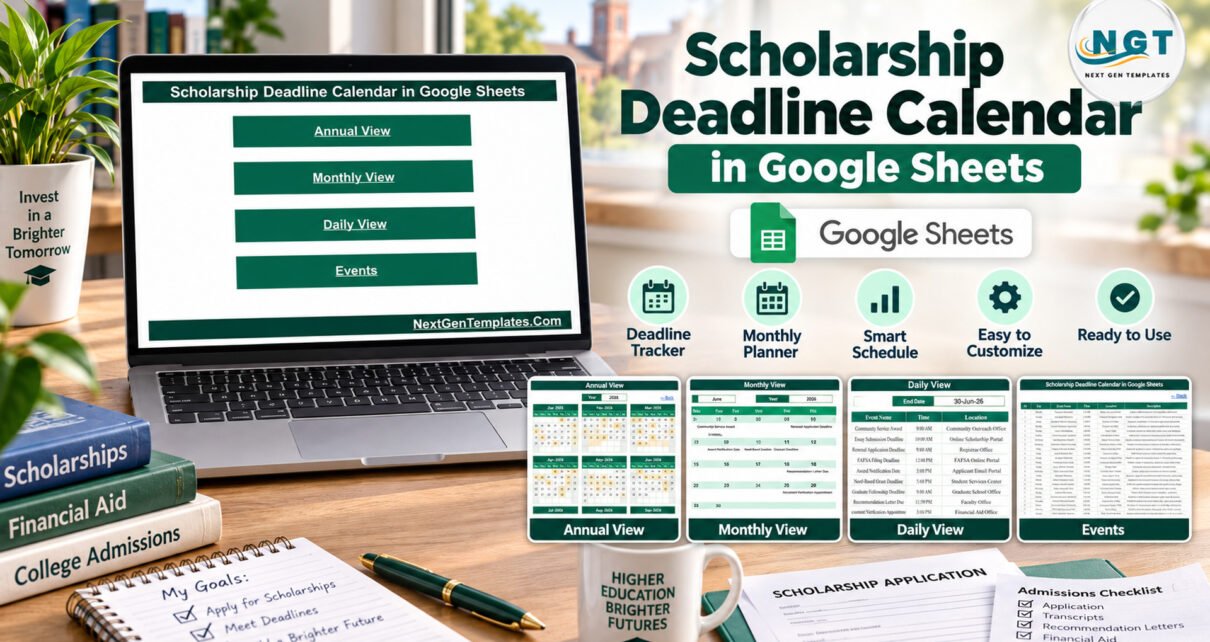
The Scholarship Deadline Calendar in Google Sheets turns a pile of application dates into one plan you can actually follow. It has 5 working tabs (Home, Annual View, Monthly View, Daily View and Events), 100 sample entries numbered 1 to 100, and a sample year that runs from 1 January to 27 December 2026. Those entries cover 20 event types at 27 locations, with 8 or 9 entries in every month and start times from 9:00 AM to the 11:59 PM online cut-off.
Anyone who has applied for more than one award knows how quickly essay deadlines, recommendation letters, transcript uploads and finalist interviews end up split across email threads, portal dashboards and sticky notes. A scholarship deadline calendar kept in Google Sheets gives a student, a parent and a counsellor one version of the dates they can all open in a browser. You make your own copy with a Google account, replace the sample rows, and every view follows.
Key Features of the Scholarship Deadline Calendar
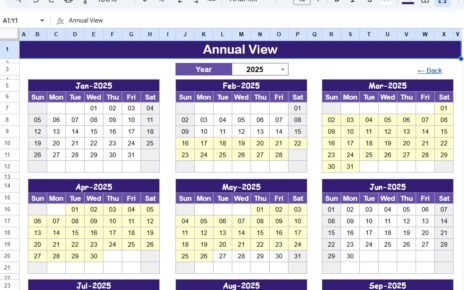
- Annual View with a year selector. Choose a year and twelve month grids redraw. Every day holding at least one deadline, appointment or payout is shaded, which shows the shape of a whole application year on one screen.
- Monthly View with Month and Year dropdowns. A Sunday-to-Saturday grid writes the entry name under its date. If two entries share a date it shows the first and adds a “1 more…” note.
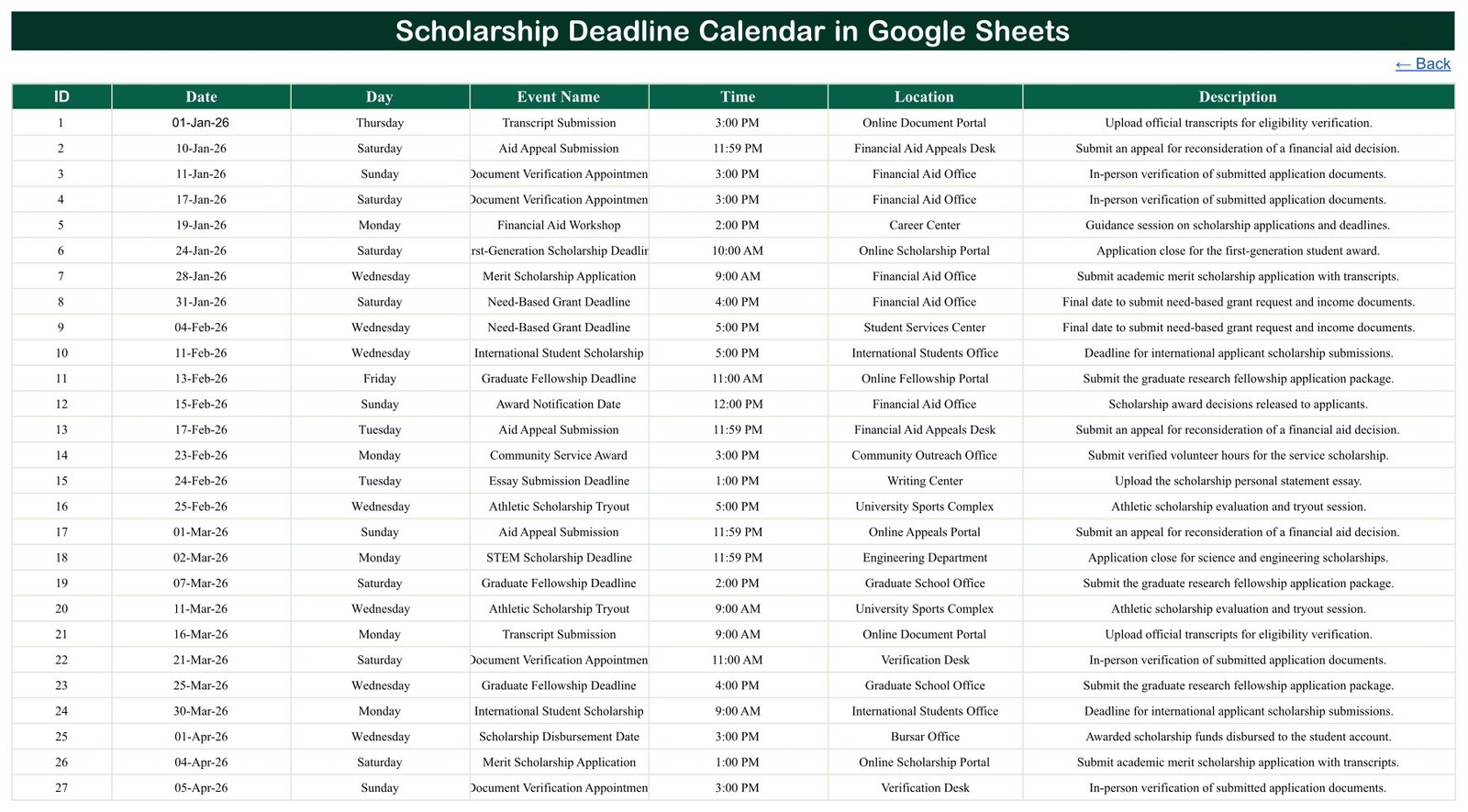
- Daily View by date range. Enter a Start Date and End Date and the table lists each entry in that window with ID, Date, Day, Event Name, Time, Location and Description.
- A single Events tab drives all three views. Seven plain columns, so a new row appears everywhere at once.
- Sample data written for scholarship season. Merit Scholarship Application, Need-Based Grant Deadline, First-Generation Scholarship Deadline, STEM Scholarship Deadline, International Student Scholarship, Athletic Scholarship Tryout, Arts & Music Audition, Essay Submission Deadline and more. Every entry is a fictional example.
- Simple navigation. Four Home buttons and a Back link on each tab keep the file easy for occasional users.
- No scripts or add-ons. The calendar runs on standard Google Sheets formulas and dropdowns, so there is nothing to authorise when you make a copy.
Sheets Explanation
Home
The first tab is a menu with four buttons: Annual View, Monthly View, Daily View and Events. It is the page to share with a parent or adviser who only needs to look up a date.
Annual View
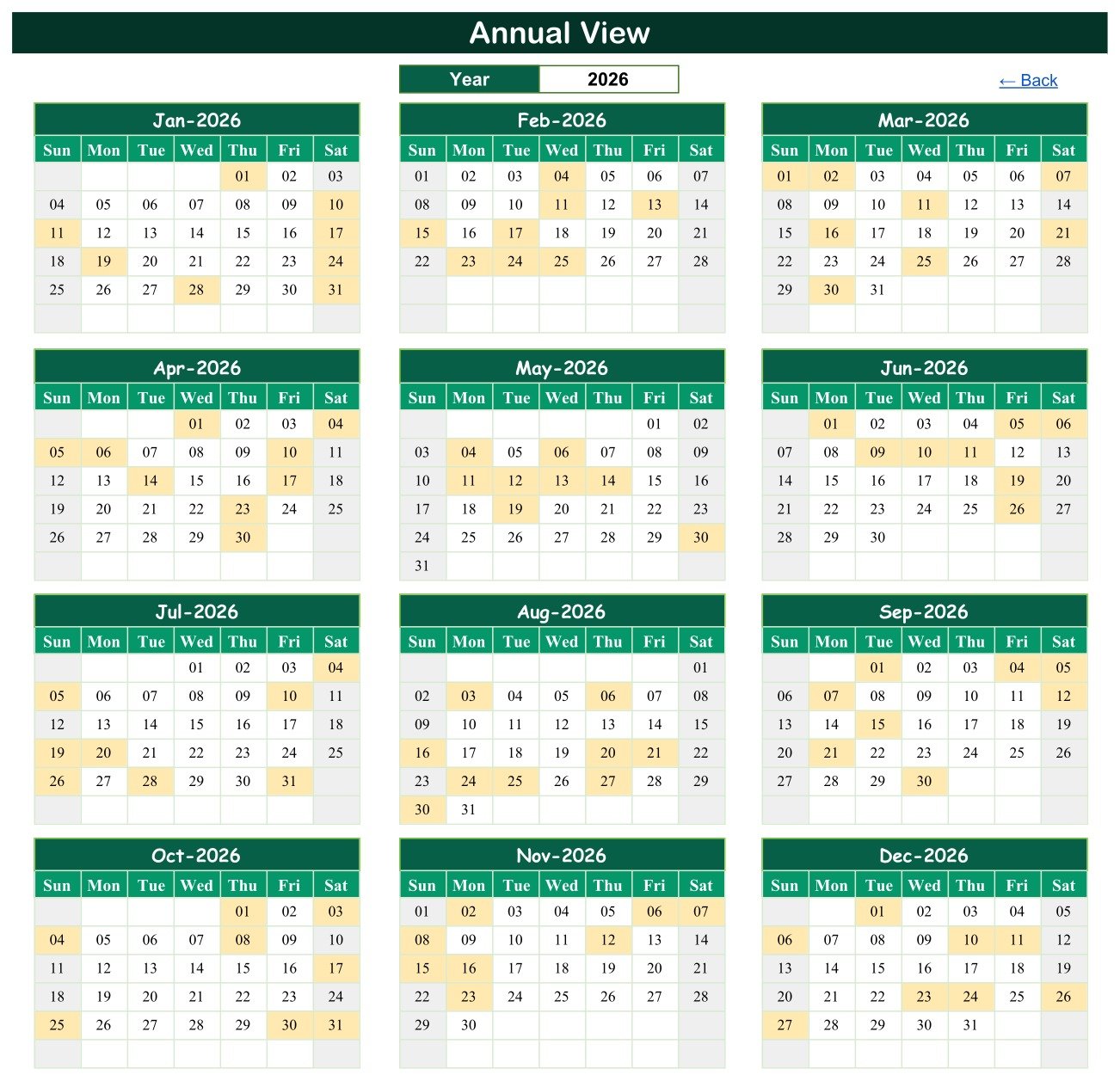
The Year box at the top controls twelve month grids from January to December. Shaded days are the dates with something due, so you can spot a crowded fortnight weeks ahead and start those essays early instead of the night before.
Monthly View
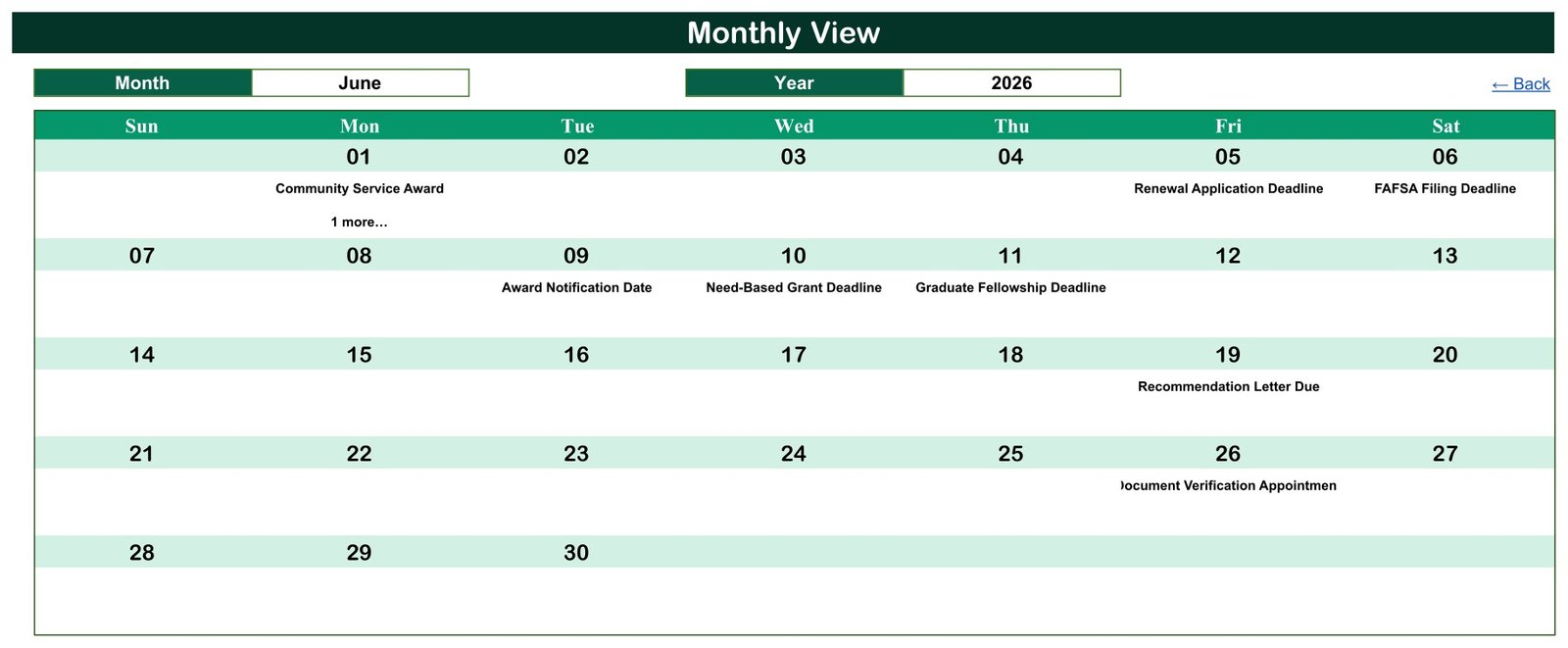
Select a Month and a Year to see a full month grid with entry names under each date. The June 2026 example shows Community Service Award on the 1st (plus one more entry), Renewal Application Deadline on the 5th, FAFSA Filing Deadline on the 6th, Award Notification Date on the 9th, Need-Based Grant Deadline on the 10th, Graduate Fellowship Deadline on the 11th, Recommendation Letter Due on the 19th and Document Verification Appointment on the 26th.
Daily View
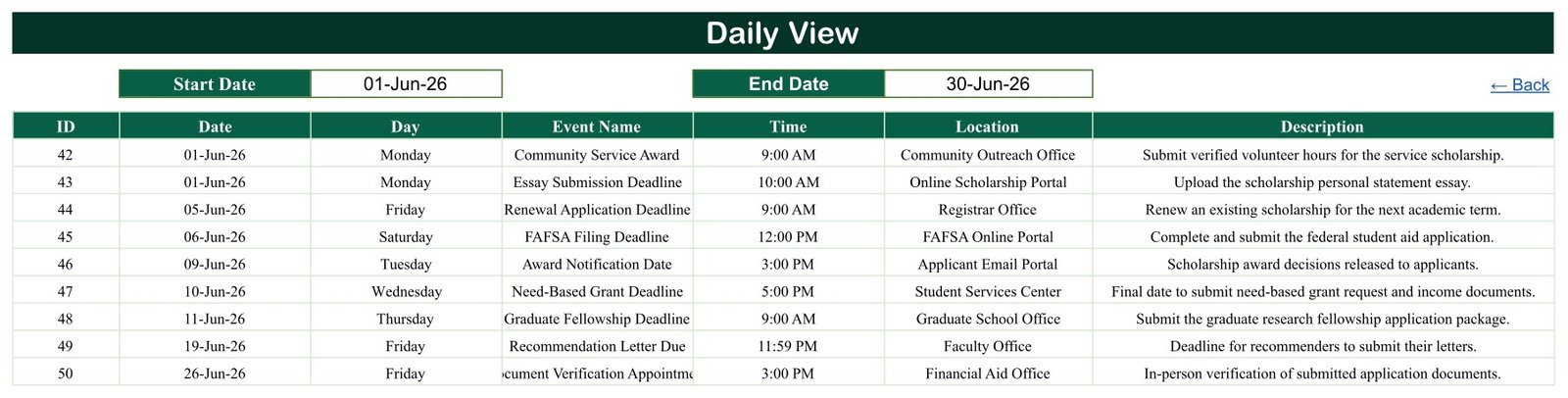
Type a Start Date and End Date and the table below fills with every entry in that range. The 1 to 30 June 2026 sample returns entries 42 to 50, including two on 1 June: the Community Service Award at the Community Outreach Office and an Essay Submission Deadline on the Online Scholarship Portal.
Events
The Events tab is the data source. Award Notification Date is the most frequent sample type (9 entries), followed by Document Verification Appointment and FAFSA Filing Deadline (8 each). The Financial Aid Office and the Online Scholarship Portal are the busiest locations, and fourteen entries close at 11:59 PM.
Google Sheets Calendar vs. Microsoft Excel Calendar vs. Paid Scholarship Apps – Feature Comparison
| Feature | Scholarship Deadline Calendar (Google Sheets) | Microsoft Excel calendar | Paid scholarship-search or application apps |
|---|---|---|---|
| Cost | ✅ $4.99 one-time (regular $8.99) | Template price plus an Excel licence | Free tiers with upsells, or a subscription |
| Platform | ✅ Any browser with a Google account | Excel desktop | Vendor app and website |
| Setup time | ✅ Make a copy, replace the sample rows | Open the file, replace the sample rows | Create a profile, answer eligibility questions |
| Share with a parent or counsellor | ✅ Built-in Google Sheets sharing | Needs OneDrive or SharePoint | Usually single-user |
| Mobile access | ✅ Google Sheets app (views are easiest on a laptop) | Excel mobile app | ✅ Dedicated app |
| Any scholarship, grant or fellowship | ✅ Type any name in the Events tab | ✅ Yes | Limited to the vendor’s database |
| Annual, monthly and date-range views | ✅ All three included | Depends on the template | Usually a list or dashboard |
| Scholarship search and reminders | ❌ Not included | ❌ Not usually included | ✅ Typically included |
| Where your data lives | ✅ Your own Google Drive | Your own files | Vendor servers |
For applicants who already know which awards they are chasing and need every date in one shared place, this Google Sheets calendar sits in the sweet spot.
Who Should Use This Template
Perfect for:
- High-school seniors, undergraduates and graduate students applying to several scholarships, grants or fellowships
- School counsellors and college advisers keeping one deadline list for a group of applicants
- Parents helping a student keep essays, transcripts and recommendation letters on schedule
Not a fit if:
- You want a scholarship search engine – the calendar holds only the dates you enter and does not find awards or check eligibility
- You run a scholarship programme and need applicant records, scoring, approvals or payments – this is not an application-management system
- You must work offline in desktop Excel – an Excel edition is in preparation
Real-World Use Cases
A high-school senior applying to seven awards enters every essay deadline, recommendation-letter request and finalist interview in September. The Annual View shows three deadlines landing in the same fortnight in February, so she drafts those essays over the winter break and asks her teachers for letters a month earlier than planned.
A college counsellor keeps one copy for a cohort of first-generation applicants. Financial aid workshops, transcript submissions and document verification appointments sit in one list, and every Monday he sets the Daily View to the coming week and shares it with the group.
A graduate student tracks fellowship deadlines, an interview slot and the expected award notification and disbursement dates, and gives a supervisor view-only access so reference letters arrive on time.
Advantages of the Scholarship Deadline Calendar
- Low one-time cost. One purchase covers a job that only needs dates, times and places.
- Shared by default. Google Sheets sharing lets a parent or counsellor view the same plan without emailing files.
- Three ways to read one list. A year overview, a month grid and a date-range list all come from the same Events rows.
- Works for any award. Names, locations and descriptions are plain text, so scholarships, bursaries, grants and fellowships all fit.
- Your data stays in your Drive. Nothing is sent to a third-party service.
Opportunities for Improvement
- Busy days in Monthly View. Only the first entry name prints on a double-booked date, followed by “1 more…”. The sample has two such dates (1 June and 17 October 2026); use the Daily View for them.
- Day column is typed. The Day value in the Events tab is text, not a formula, so update it by hand if you change a date.
- Long names clip. Longer names such as Document Verification Appointment and First-Generation Scholarship Deadline are cut off in the Monthly View cells and the Events and Daily View columns; widen the column or shorten the name.
- No status column. There is no submitted or awarded flag and no end time; add a column if you want to track progress.
- No reminders or search. It is a planning calendar, not a notification or scholarship-matching tool.
Best Practices
- Take every real date from the scholarship provider or your financial aid office. The sample dates, including the federal aid filing entries, are illustrations only.
- Enter a reminder entry a week or two before each big deadline, such as a request for recommendation letters.
- Keep IDs unique and in date order so the Events tab stays easy to scan.
- Check new dates in the Monthly View after entering them, and confirm double-booked days in the Daily View.
- Keep passwords, ID numbers and financial documents out of the sheet; store only dates and short notes.
- Read Google’s help on the FILTER function and in-cell dropdown lists before changing the view formulas.
Explore Relevant Templates
A deadline is only half the job. Our walkthrough of the Scholarship Application Checklist in Google Sheets covers the documents for each application, and the College Savings Goal Tracker in Google Sheets post shows how to plan the money side of tuition.
Students juggling coursework can add the Exam Timetable Calendar in Google Sheets so exam weeks and essay deadlines never collide, and families can see the School Fee Due Calendar. Programme managers who award scholarships rather than apply for them should look at the Scholarship Program KPI Dashboard in Google Sheets, a different template built for providers.
All of these, plus more Google Sheets calendars, are available on NextGenTemplates.
Frequently Asked Questions
What do I get with the Scholarship Deadline Calendar in Google Sheets?
You receive a PDF containing the Google Sheets copy link. The sheet includes a Home menu, Annual View, Monthly View, Daily View and an Events tab with 100 fictional entries across 20 event types and 27 locations, ready to replace with your own deadlines.
Are the sample scholarship deadlines real?
No. Every sample date, time and location in the Scholarship Deadline Calendar is invented for illustration, including entries named after federal student aid filing. Always copy real deadlines from the provider or your financial aid office. The template does not find awards, confirm eligibility or guarantee funding.
Do I need Microsoft Excel to use it?
No. It runs in Google Sheets in any modern browser. Sign in with a Google account, open the link from the PDF and use File > Make a copy to save an editable version in your own Drive. No macros, Apps Script or add-ons are involved.
How long does it take to set up?
Making the copy takes under a minute. The rest is typing your deadlines into the Events tab – date, day, event name, time, location and description. The Annual, Monthly and Daily views of the Scholarship Deadline Calendar read those rows directly and update as you type.
Can two deadlines fall on the same day?
Yes. Both entries are stored in the Events tab and both appear in the Daily View. The Monthly View prints the first entry for that date with a “1 more…” note. The 2026 sample includes two dates with two entries each.
How does this compare to a scholarship search app?
Search apps match you to awards and often send reminders, but they keep only the awards in their own database. The Scholarship Deadline Calendar holds any award you type in, costs a one-time price and keeps the data in your Google Drive. Many students use both.
About the Author
Built by PK – Microsoft Certified Professional with 15+ years of Excel, Google Sheets and Power BI experience, and founder of NextGenTemplates. Every template is hand-built and tested before release.
Conclusion
A missed deadline can cost more than any template. The Scholarship Deadline Calendar puts every application, letter, interview and payout date in three views driven by one list, with a realistic 100-entry sample to learn from and replace.
👉 Click here to Purchase the Scholarship Deadline Calendar in Google Sheets
✅ Instant download · One-time payment · No subscription
🎥 Watch our tutorials at Youtube.com/@NeoTechNavigators
Last updated: September 2026