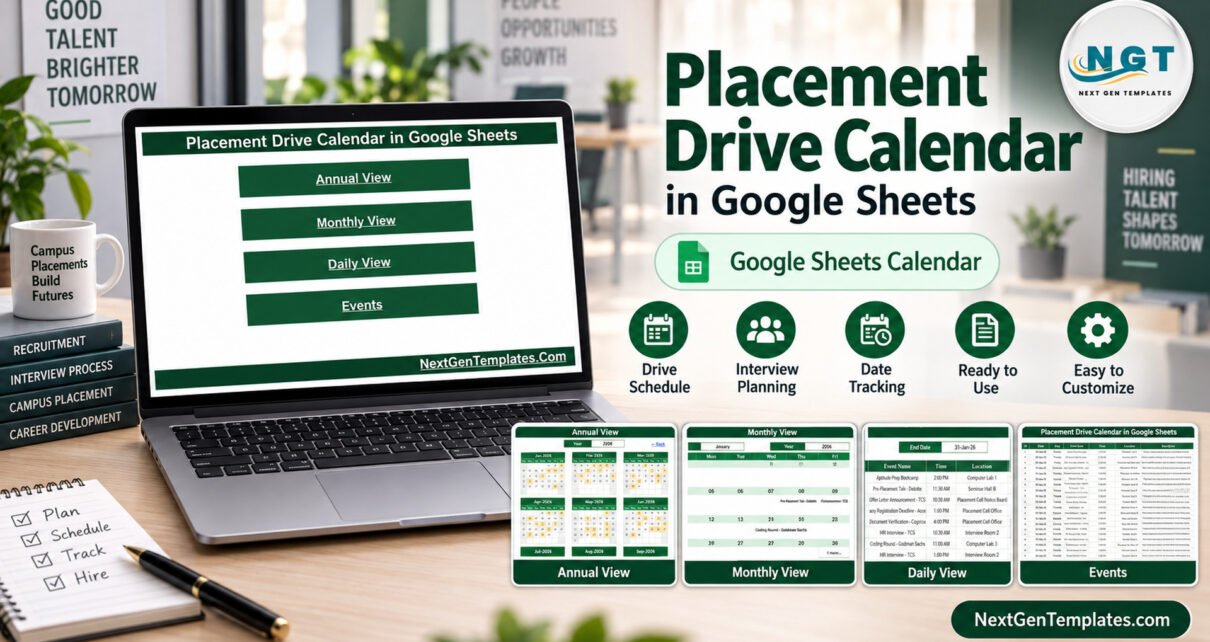
The Placement Drive Calendar in Google Sheets is a ready-made scheduling calendar for college training and placement cells. It ships with 100 sample events dated 3 January to 31 December 2026, 15 placement event types, 13 campus venues, and four linked views (Annual, Monthly, Daily and an Events master list) that all read from one table.
Pre-placement talks, registration deadlines, aptitude tests, interview rounds and document checks usually live in scattered emails, notice-board printouts and a coordinator’s diary. This template gathers them into one shared spreadsheet that anyone with a free Google account can open, so faculty, placement volunteers and final-year students all read the same season of dates. You can get the Placement Drive Calendar here and make your own copy in Google Drive in seconds.
Get the Placement Drive Calendar
Key Features of the Placement Drive Calendar in Google Sheets
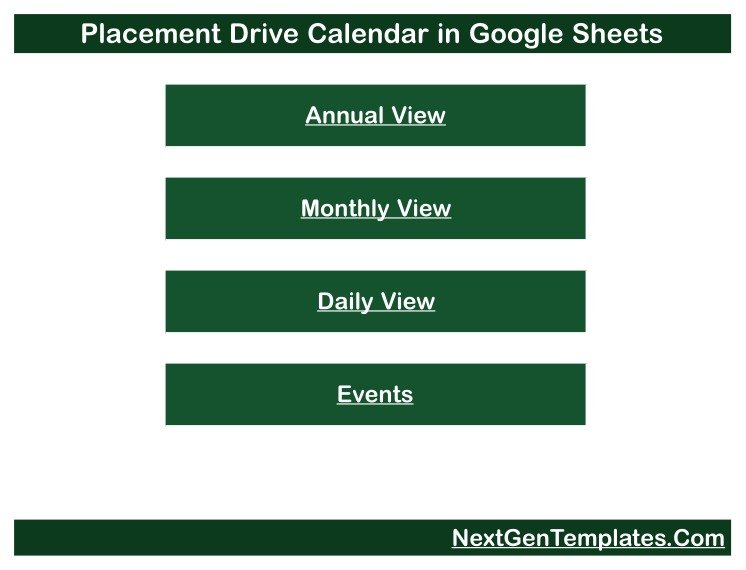
- Four linked views. A Home page with four buttons opens the Annual View, Monthly View, Daily View and Events sheet, and every view has a “← Back” link.
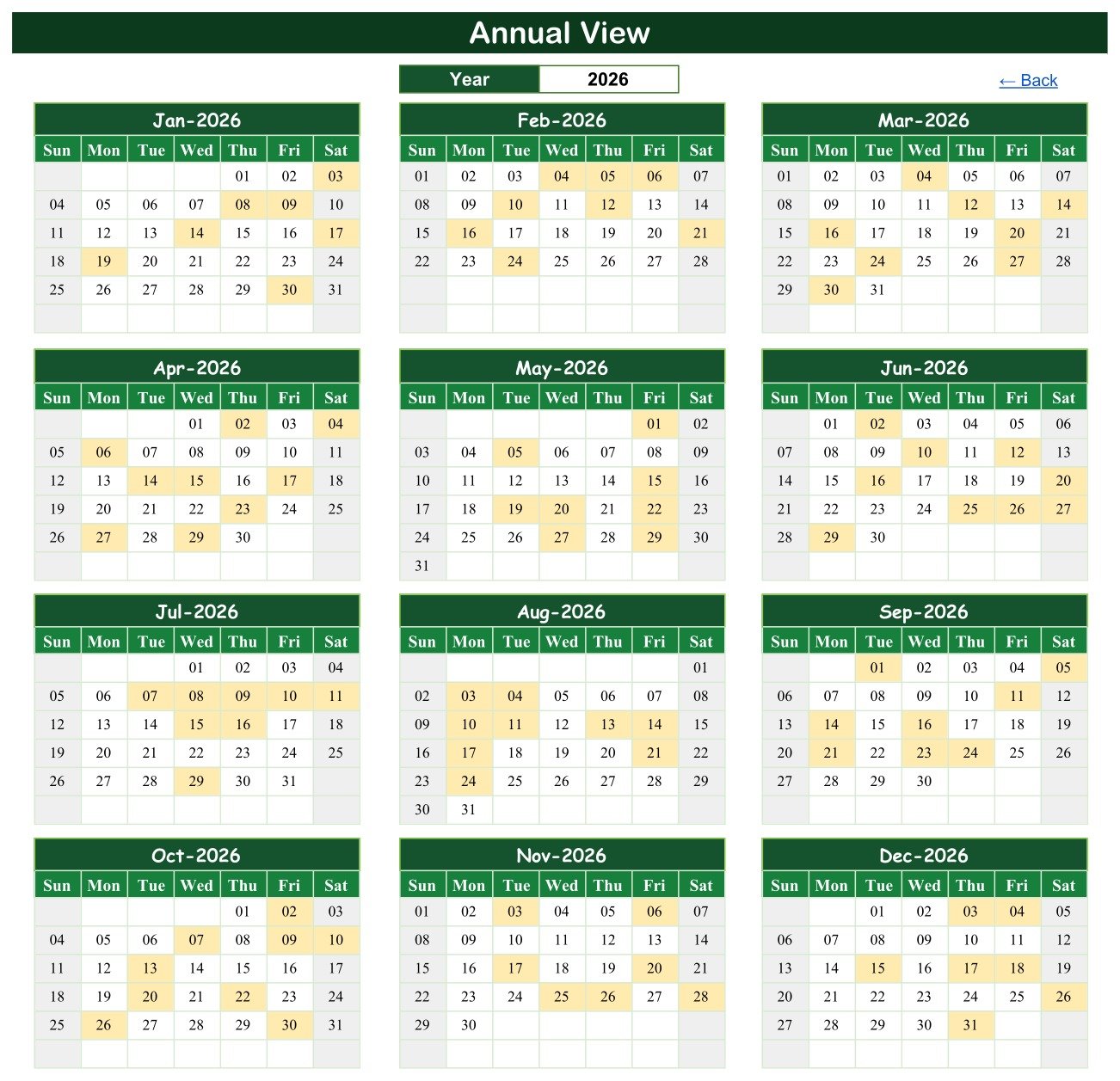
- A whole placement season on one screen. The Annual View draws twelve month grids for the selected year and shades every date that holds an event.
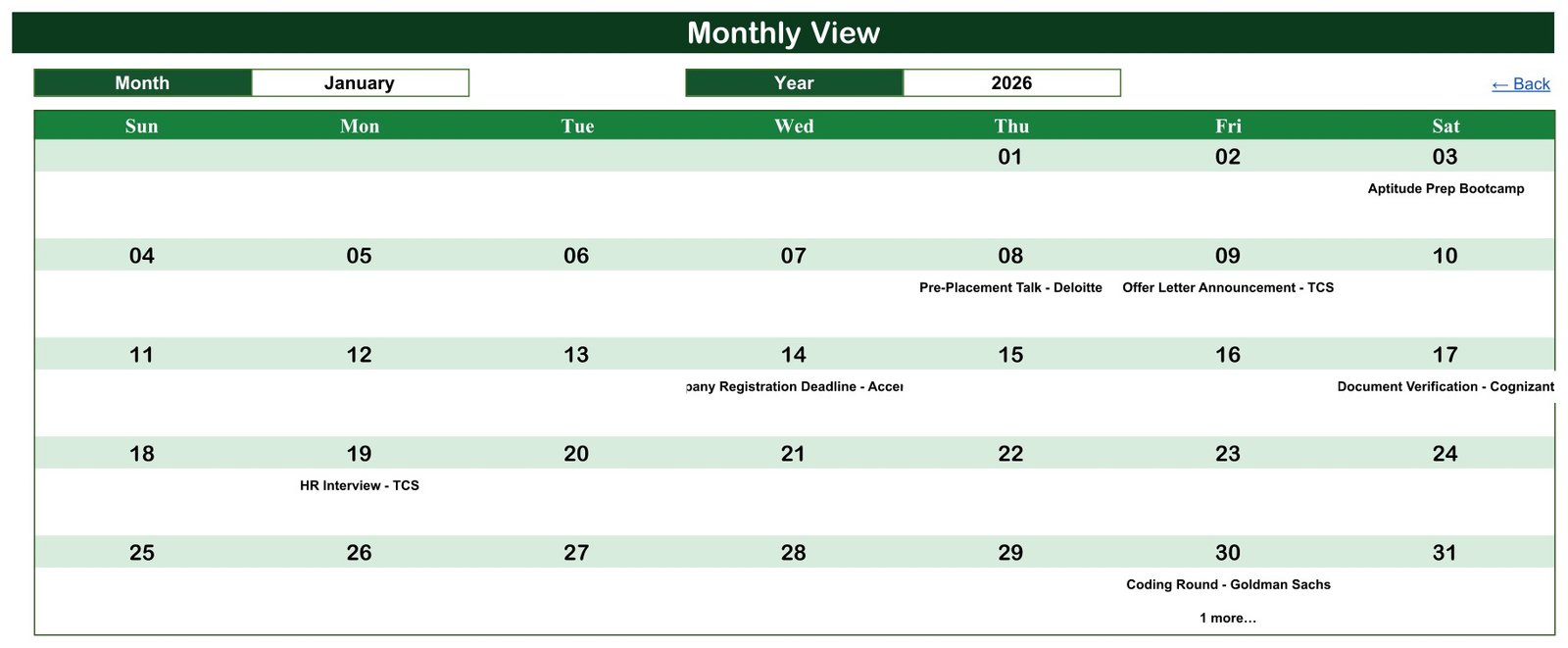
- A month at a time. The Monthly View has Month and Year selectors and prints the first event name under each date, adding “1 more…” when two events share a day.
- Any date range as a list. The Daily View takes a Start Date and an End Date and lists every matching event with ID, date, weekday, name, time, location and description.
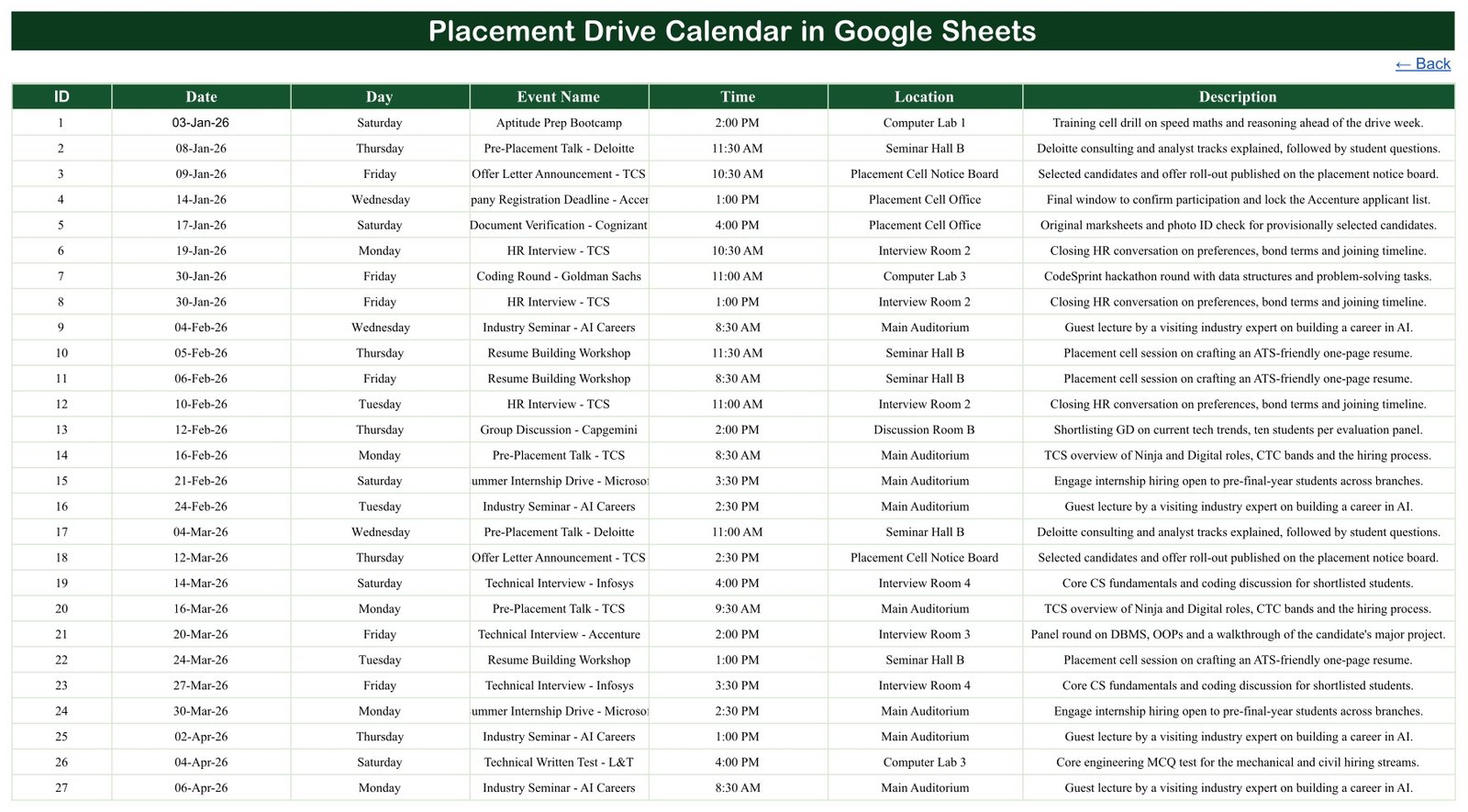
- One source table. The Events sheet holds seven columns: ID, Date, Day, Event Name, Time, Location and Description. Change a row there and the three calendar views follow.
- Placement-specific sample data. 15 event types and 13 venues show how a recruitment season might look, and all of it is fictional.
Three facts worth quoting: the sample holds exactly 100 events with IDs 1 to 100 and no gaps; every one of the 100 weekday labels matches its date; and the events fall on 97 separate days, with only 30 January, 3 November and 4 December holding two.
Calendar Pages Explanation
Home
The Home page is the menu. It carries the calendar title and four dark green buttons labelled Annual View, Monthly View, Daily View and Events, so a new placement volunteer can reach the right view in one click.
Annual View
Set to 2026, this page shows January to December side by side. Shaded cells mark event dates; in January they are the 3rd, 8th, 9th, 14th, 17th, 19th and 30th, which match the first eight rows of the Events sheet (the 30th holds two). It is the page to share when departments plan internal exams around the recruitment season.
Monthly View
The sample shows January 2026. Aptitude Prep Bootcamp sits on Saturday the 3rd, a Pre-Placement Talk on Thursday the 8th, an Offer Letter Announcement on the 9th, a Company Registration Deadline on the 14th, Document Verification on the 17th, an HR Interview on Monday the 19th and a Coding Round plus “1 more…” on Friday the 30th.
Daily View
With the range 01-Jan-26 to 31-Jan-26 the list returns eight events, IDs 1 to 8. It reveals the event hidden behind “1 more…”: an HR Interview at 1:00 PM on 30 January in Interview Room 2, after the 11:00 AM Coding Round in Computer Lab 3.

Events
The master sheet lists all 100 events in date order. The first row is the Aptitude Prep Bootcamp on Saturday 03-Jan-26 at 2:00 PM in Computer Lab 1 and the last is Document Verification on Thursday 31-Dec-26 at 3:30 PM in the Placement Cell Office; sample times run from 8:30 AM to 4:00 PM, and 12 events fall on Saturdays. This is the only sheet you type into.
The 15 sample event types are Pre-Placement Talk, Technical Interview, Industry Seminar, Resume Building Workshop, Coding Round, HR Interview, Summer Internship Drive, Company Registration Deadline, Document Verification, Aptitude Prep Bootcamp, Offer Letter Announcement, Profile Shortlisting Checkpoint, Group Discussion, Technical Written Test and Mock Interview Drive. The 13 venues are Main Auditorium, Placement Cell Office, Placement Cell Notice Board, Seminar Hall A, Seminar Hall B, Computer Lab 1, Computer Lab 2, Computer Lab 3, Interview Rooms 1 to 4 and Discussion Room B.
About the company names: the sample uses names such as TCS, Infosys, Accenture, Deloitte, Microsoft, Amazon, Goldman Sachs, Wipro, Capgemini, Cognizant and L&T as placeholder labels only. NextGenTemplates has no affiliation with any of them, the rows do not describe real drives, and the template does not guarantee any placement, interview or job offer.
Placement Calendar vs. Excel Calendar vs. Campus Placement Software: Feature Comparison
| Feature | Placement Drive Calendar (Google Sheets) | Desktop Excel calendar | Campus placement software |
|---|---|---|---|
| Cost | ✅ $4.99 one-time (regular $8.99) | Template plus an Excel licence | Usually a recurring subscription |
| Platform | ✅ Any browser, free Google account | Excel desktop | Vendor web app |
| Setup time | ✅ Minutes | Minutes | Days to weeks |
| Real-time team editing | ✅ Yes | Limited | ✅ Yes |
| Mobile access | ✅ Google Sheets app | Reduced | ✅ Usually |
| Share with a link | ✅ View-only or edit | File sharing | Staff and student logins |
| Editable views and columns | ✅ Fully editable | ✅ Yes | Vendor-defined |
| Student registration and eligibility | ❌ No | ❌ No | ✅ Typical |
| Offer records and notifications | ❌ No | ❌ No | ✅ Typical |
For a placement officer who handles applications elsewhere and just needs the season’s dates on one shared calendar, this template sits in the sweet spot.
Who Should Use This Template
Perfect for:
- Training and placement officers scheduling company visits, tests and interview rounds
- Placement coordinators lining up registration deadlines, document checks and offer announcements
- Department heads planning resume workshops, aptitude bootcamps and mock interviews
- Student placement committees sharing a read-only calendar with final-year batches
Not a fit if:
- You need an applicant tracking system, eligibility filters or offer and package records
- You need placement statistics or accreditation reports
- You need recurring events, end times or automatic reminders, which the Events sheet does not model
Real-World Use Cases
A training and placement officer at an engineering college enters every Pre-Placement Talk, Coding Round and Technical Interview for the season, then checks the Annual View so that two company visits never land in the same week. Seeing the whole year at once makes a crowded month obvious long before it arrives.
A placement coordinator adds each Company Registration Deadline and Document Verification date and shares a view-only link with final-year students, so nobody misses a cut-off because an email went unread.
A department placement committee sets the Daily View to the coming fortnight, lists the Resume Building Workshops and Mock Interview Drives, and prints the page for the department notice board.
Advantages of the Campus Placement Calendar Template
- One-time price. $4.99 on sale with no subscription or per-user fee.
- Nothing to install. It runs in the browser on Google Sheets.
- One place to edit. Three calendar views update from a single Events table.
- Easy to share. Google Drive link sharing lets students view without editing; Google explains the options in Share files from Google Drive.
- Handles busy days. When two rounds share a date, the Monthly View flags “1 more…” and the Daily View lists both.
Opportunities for Improvement
- The Day column is typed, so enter the weekday yourself or add a TEXT formula when you add rows.
- The Monthly View names only the first event on a date; use the Daily View to see the rest.
- There is no end time, duration or repeat rule, so a multi-day drive must be entered as separate rows.
- Long event names are cut off in narrow cells: “Company Registration Deadline – Accenture” is clipped in the Monthly View and “Summer Internship Drive – Microsoft” on the Events sheet until you widen the column.
- It sends no reminders, stores no student records and does not sync with Google Calendar.
Best Practices
- Delete all 100 sample rows before entering real dates so placeholder company names never appear in your calendar.
- Keep event names consistent (for example always “Technical Interview – Company”) so the Monthly View stays easy to scan.
- Use the Location column for the venue, never for student names or phone numbers.
- Share a view-only link with students and give edit access to one or two placement coordinators.
- If you extend the Month or Year selectors, follow Google’s guide to in-cell dropdown lists.
Explore Relevant Templates
Several related templates on this blog pair well with a placement calendar. Read the Job Application Tracker in Google Sheets guide for students logging applications, the Recruitment Applicant Tracking System Web App walkthrough when you need candidate records, the Admission Season Calendar in Google Sheets article for the intake side of the year, and the Exam Timetable Calendar in Google Sheets post for exam weeks.
In the store you will find the Job Application Tracker, the Admission Season Calendar and more Google Sheets calendars. An Excel edition of this placement calendar is being prepared.
Want to build skills like this step by step? The NextGenTemplates Academy learning paths walk you through spreadsheet skills with practice files.
Get the Placement Drive Calendar
Frequently Asked Questions
What do I need to use the Placement Drive Calendar in Google Sheets?
A free Google account and a web browser. After purchase, open the PDF in your download and click its link to make your own editable copy in Google Drive. No add-ons, scripts or extra software are required.
Are the companies in the sample real drives?
No. Company and programme names are placeholder labels with no affiliation, and all 100 events, times and venues are fictional 2026 demo rows. Delete them from the Events sheet before you add the companies visiting your campus.
Does the calendar track which students were placed?
No. It is a scheduling calendar that displays placement dates. It has no student list, eligibility check, offer record or placement percentage, and it does not guarantee any interview or job offer.
What happens when two rounds fall on the same day?
The Monthly View prints the first event and a “1 more…” note, and the Daily View lists both. The sample shows this on 30 January, 3 November and 4 December.
How long does setup take?
Making the copy takes seconds. Typing a season of drives usually takes a few minutes, because you only edit the Events sheet and the Annual, Monthly and Daily views update from it.
How does this compare with campus placement software?
Placement portals handle student registration, eligibility, applications and offer letters, usually on a subscription. This template schedules and displays placement dates only, for a one-time price, so it suits colleges that manage applications elsewhere.
About the Author
Built by PK, a Microsoft Certified Professional with 15+ years of Excel, Google Sheets and Power BI experience and the founder of NextGenTemplates. Every template is built and tested before release.
Conclusion
If your pre-placement talks, tests, interview rounds and deadlines are scattered across emails and notice boards, the Placement Drive Calendar in Google Sheets puts them on one shared season planner with Annual, Monthly and Daily views. It is honest about its scope: a scheduling calendar, not a placement portal.
✅ Instant download · One-time payment · No subscription
Last updated: September 2026