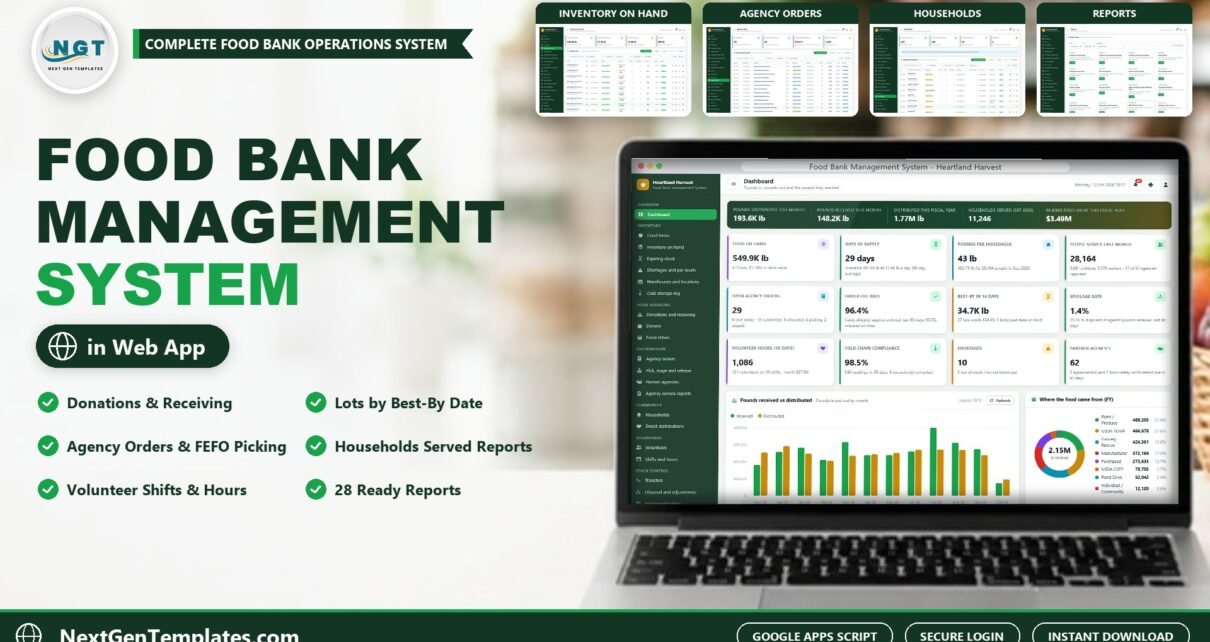
A food bank management system should tell you, at any moment, how many pounds you hold, where each lot sits, when it reaches its best-by date and which partner agency it is promised to. The Food Bank Management System Web App from NextGenTemplates does exactly that on Google Apps Script: donations, purchases and USDA receipts, the volunteer sort line, inventory lots by location and best-by date, partner agency orders with FEFO picking, households, volunteers, a cold storage log, pallet labels and 28 reports, with 7 role-based logins and the data in a Google Sheet you own.
In this post you will see every main screen, the login details for the live demo, how the roles divide the work, and how it compares with a shared spreadsheet or paid food bank software.
Watch the Food Bank Management System Web App walkthrough
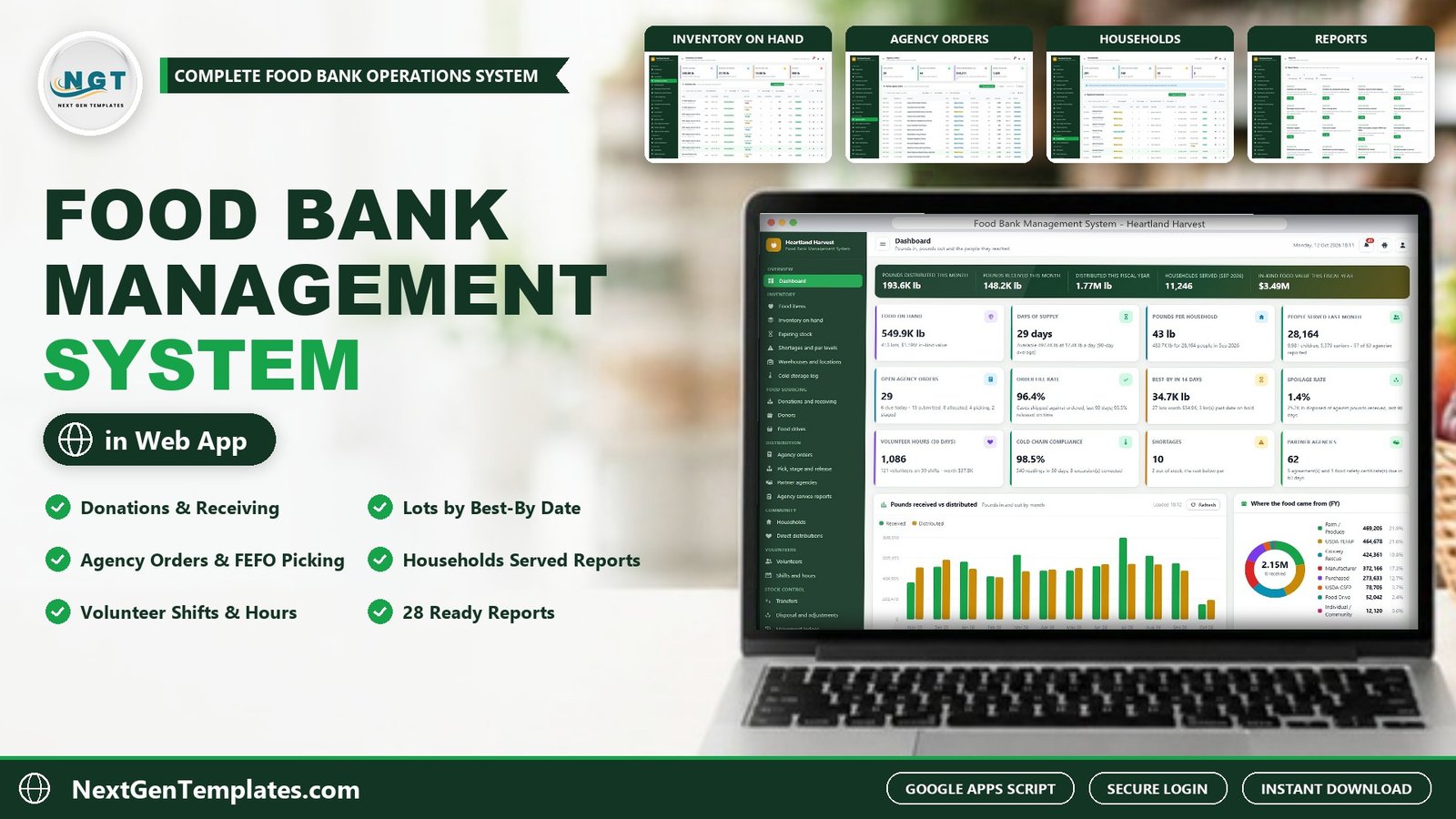
🚀 Try the Live Demo: Login Details
Open the working Food Bank Management System in your browser right now: no download, no sign-up, nothing to install. Sign in as any role below and see exactly which screens that person can and cannot reach.
Demo sign-in details: all 7 roles
| Role | Username | Password | What this role can reach |
|---|---|---|---|
| Administrator | admin |
Admin@123 |
Everything, including users and roles, settings, the audit log, the database archive and backups |
| Operations Director | manager |
Manager@123 |
All operations: food items, inventory, receiving, agency orders and approvals over an agency’s monthly limit, agencies, households, volunteers, transfers, disposal, reports, lists, audit log, import and export |
| Warehouse Lead | warehouse |
Warehouse@123 |
Food items, inventory, locations, the cold storage log, receiving and sorting, pick, stage and release, transfers, disposal, labels and reports |
| Receiving Coordinator | receiving |
Receiving@123 |
Donations and sorting, donors and acknowledgement letters, food drives, cold storage readings, lot moves, labels and reports |
| Agency Relations | agency |
Agency@123 |
Agency orders and approvals, partner agencies, service reports, households and direct distributions, reports |
| Volunteer Coordinator | volunteer |
Volunteer@123 |
Volunteers, shifts, attendance, households and direct distributions |
| Viewer | viewer |
Viewer@123 |
Read only: dashboard, inventory, donations, orders, agencies, volunteers, the ledger and reports |
These credentials are public on purpose. The demo is a shared instance seeded with a fictional organization (Heartland Harvest Food Bank, Des Moines, Iowa, with a main warehouse, two branch warehouses and a mobile pantry depot) and it may be reset at any time. It is not anybody’s live food bank. Your own copy gets its own database, its own users and its own passwords, and the setup notes ask you to change every seeded password before anyone else signs in.
🛒 Get the Food Bank Management System Web App
What Is the Food Bank Management System?
It is a complete food bank management system built as a Google Apps Script web app. You deploy it once on your own Google account, and your team signs in through the browser with their own username and role. Behind the screens, a Google Sheet in your Drive holds 28 tables: food items, warehouses, locations, inventory lots, donors, donations, agencies, agency orders, service reports, households, distributions, volunteers, shifts, transfers, adjustments, the temperature log, users, settings and the audit log.
Because it runs on Google Sheets, it also works as food pantry software with a proper front end: forms with validation, role-based menus, a live dashboard and printable pick tickets and labels, instead of a shared spreadsheet that anyone can overwrite.
The download includes realistic starter data so every screen is populated the moment you sign in: about 14,900 seeded rows across 28 tables, including 4 sites with 93 storage locations, 110 food items, 60 donors, 20 food drives, 734 donations, 413 inventory lots, 62 partner agencies, 1,429 agency orders, 739 agency service reports, 320 households, 1,023 direct distributions, 150 volunteers and 223 shifts. All figures are in US dollars and pounds, and the organization is fictional. Replace it with your own data from the screens or with Import.
🔑 Key Features of the Food Bank Management System
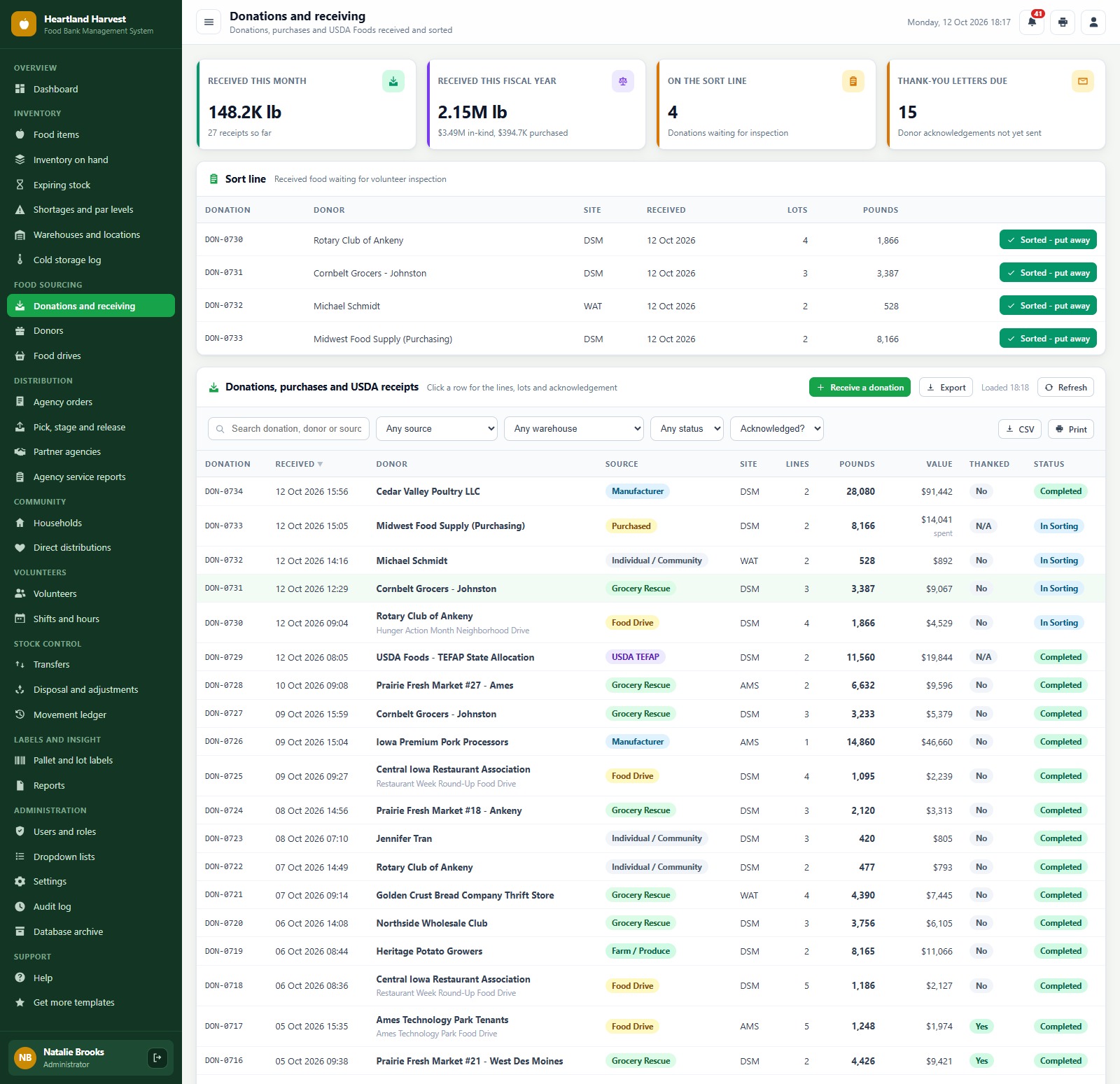
📥 Donations, purchases and USDA receipts. Receive donor gifts, purchased food and USDA TEFAP and CSFP deliveries line by line with cases, lot and best-by date. New receipts wait on the sort line until volunteers inspect them and press “Sorted, put away”. Donor thank-you and tax acknowledgement letters go out by email or are marked as mailed.
📦 Inventory lots by location and best-by date. Every lot sits in a real location (dry rack, floor, cooler, freezer, receiving dock, sort line or quarantine) with its best-by date, cases, reserved cases, pounds and in-kind value. Move a lot, put it on hold, dispose of it or print its pallet label from its row.
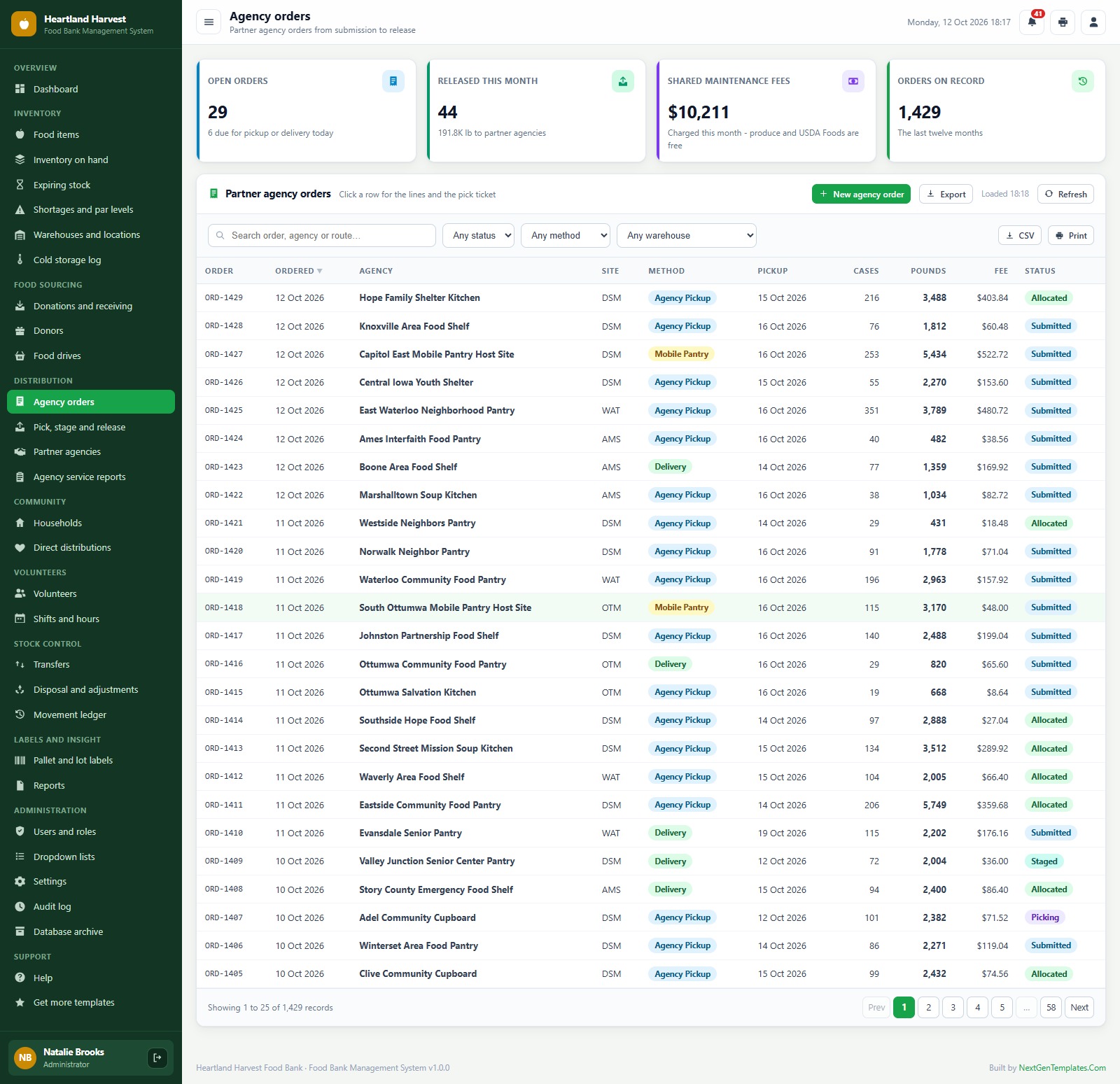
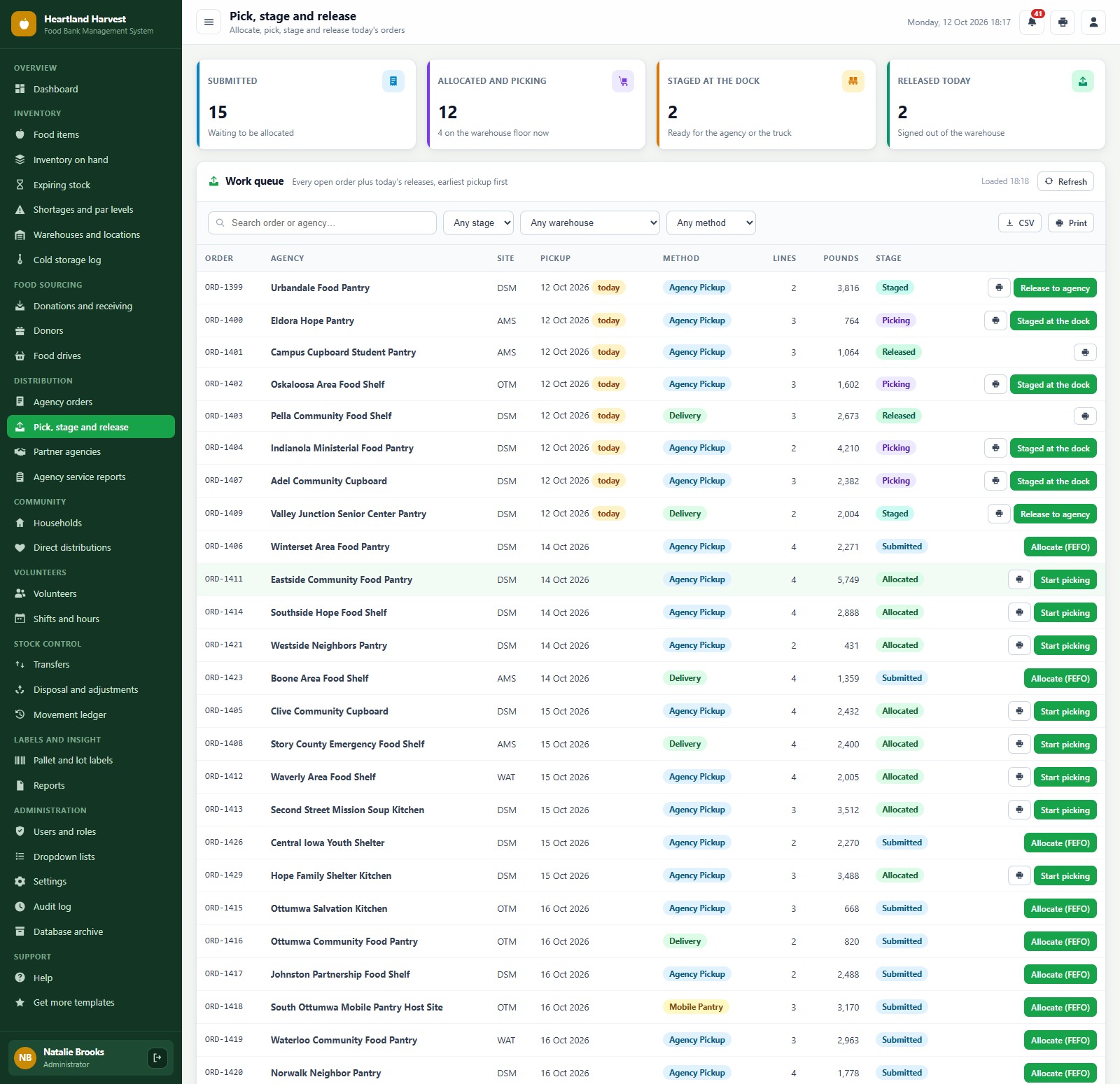
🚚 Agency orders with FEFO picking. Partner agency orders check the agency’s monthly allocation limit and TEFAP eligibility, are allocated earliest best-by first (FEFO), picked from a printable pick ticket in location order, staged at the dock and released at pickup or delivery. Shared maintenance fees are charged per pound on release.
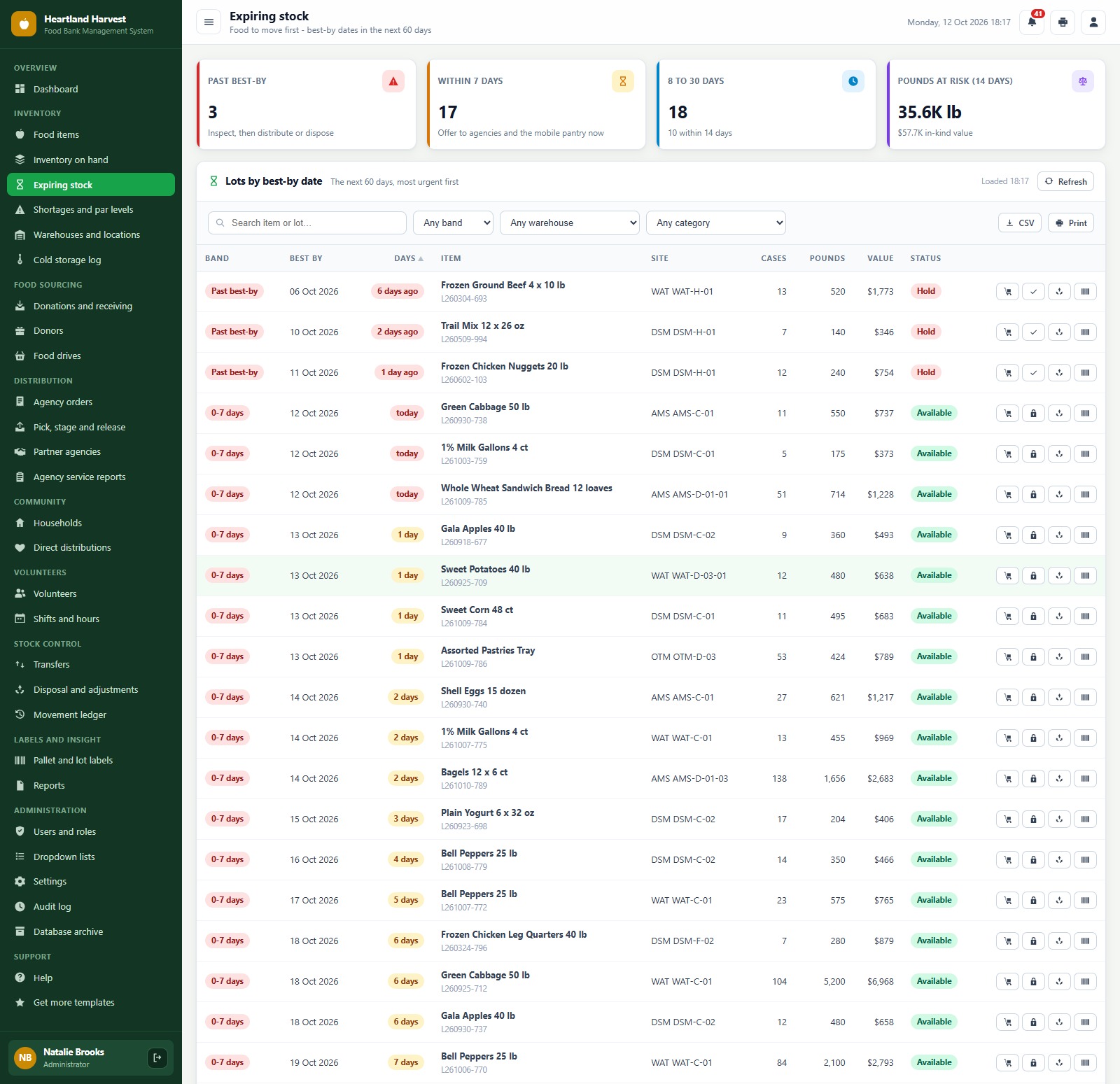
⏰ Expiring stock and shortages. The Expiring Stock screen groups lots into best-by bands (past, 0 to 7, 8 to 14, 15 to 30 and 31 to 60 days) with pounds at risk. The Shortages screen lists staples under or near par with daily use, days of supply and a suggested restock.
🏠 Households, agencies and people served. Direct-service households (senior box and mobile pantry) with size, children, seniors, income level and recertification date, every check-in as a direct distribution, plus monthly agency service reports with households, individuals, children, seniors and meals.
🙋 Volunteers and shifts. Volunteers with type, group, skills and waiver, shifts by activity and site, booking, attendance and pounds sorted, with volunteer hours and their dollar value on the dashboard.
🌡️ Cold storage log. The latest reading for each cooler and freezer, 30-day compliance and excursions. A reading outside the safe range needs a corrective action before it is saved.
📊 Live dashboard and 28 reports. Pounds in and out, days of supply, pounds per household, people served, order fill rate, spoilage rate and cold chain compliance at a glance, plus 28 ready-made reports with date range, warehouse filter, print and CSV export.
🔐 7 roles and 42 permissions. Administrator, Operations Director, Warehouse Lead, Receiving Coordinator, Agency Relations, Volunteer Coordinator and Viewer, each seeing only the screens their job needs. Passwords are stored as salted SHA-256 hashes, and every change is written to the audit log.
🏷️ Labels, settings, import and archive. Code 128 pallet, lot, item and location labels at 3 inch, 4 inch or A4. Settings cover the organization profile, value per pound, fiscal year start, FEFO, expiry alert days, shared maintenance fees, volunteer hour value and print size. Lists are editable, master data and opening stock can be imported from a pasted sheet, and old closed records can be moved to a database archive.
The Main Screens, One by One
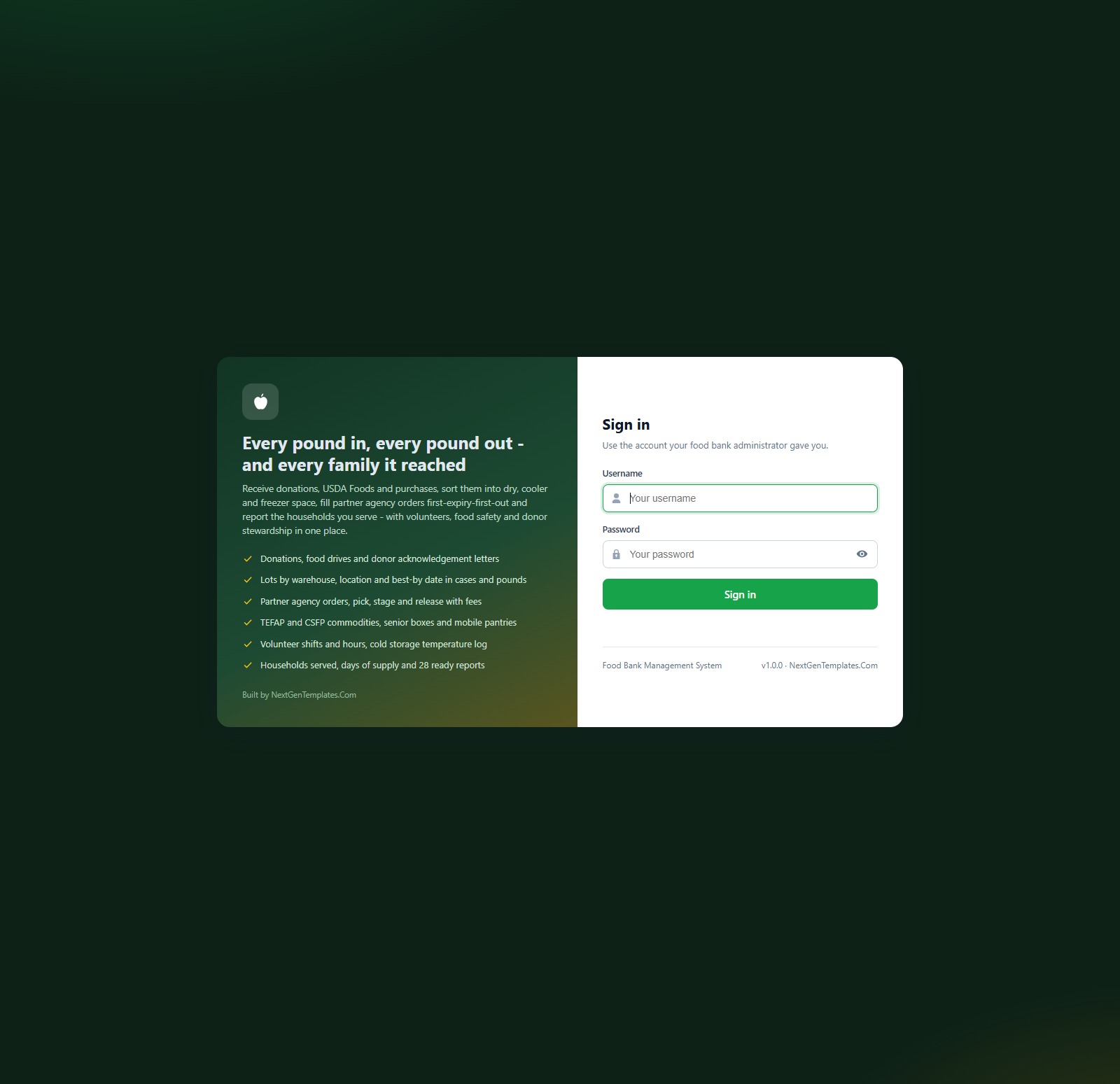
Sign-in page
A branded sign-in card with a show/hide password button. The default credentials are never printed on the sign-in screen, and a fresh install shows a first-run panel that builds the database for you.
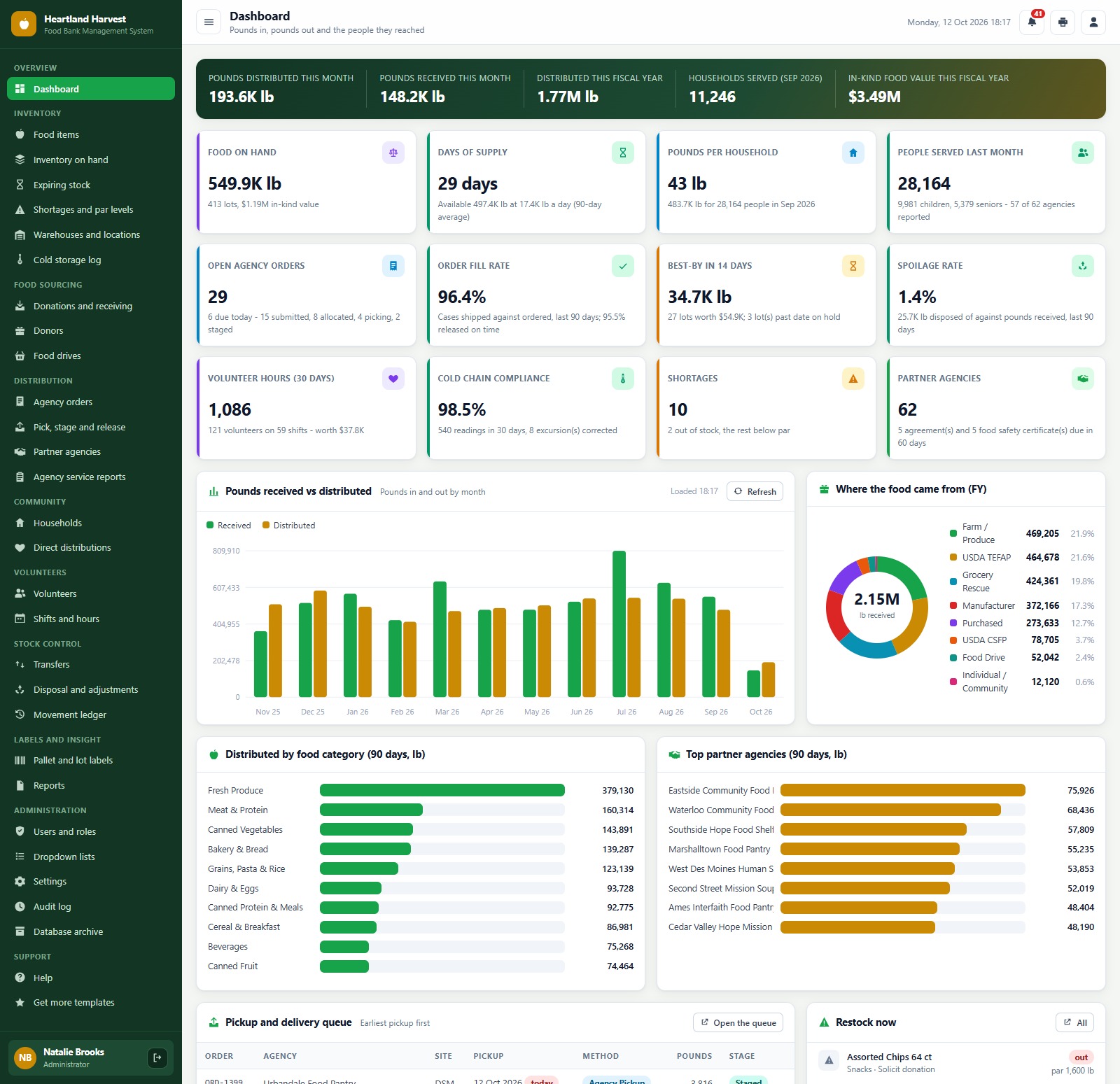
Dashboard
A hero band with pounds distributed and received this month, distributed this fiscal year, households served and in-kind food value, then twelve KPI cards: food on hand, days of supply, pounds per household, people served last month, open agency orders, order fill rate, best-by in 14 days, spoilage rate, volunteer hours, cold chain compliance, shortages and partner agencies. Below them sit Pounds Received vs Distributed by month, Where the Food Came From, Distributed by Food Category, Top Partner Agencies, the pickup queue and a Restock Now list.
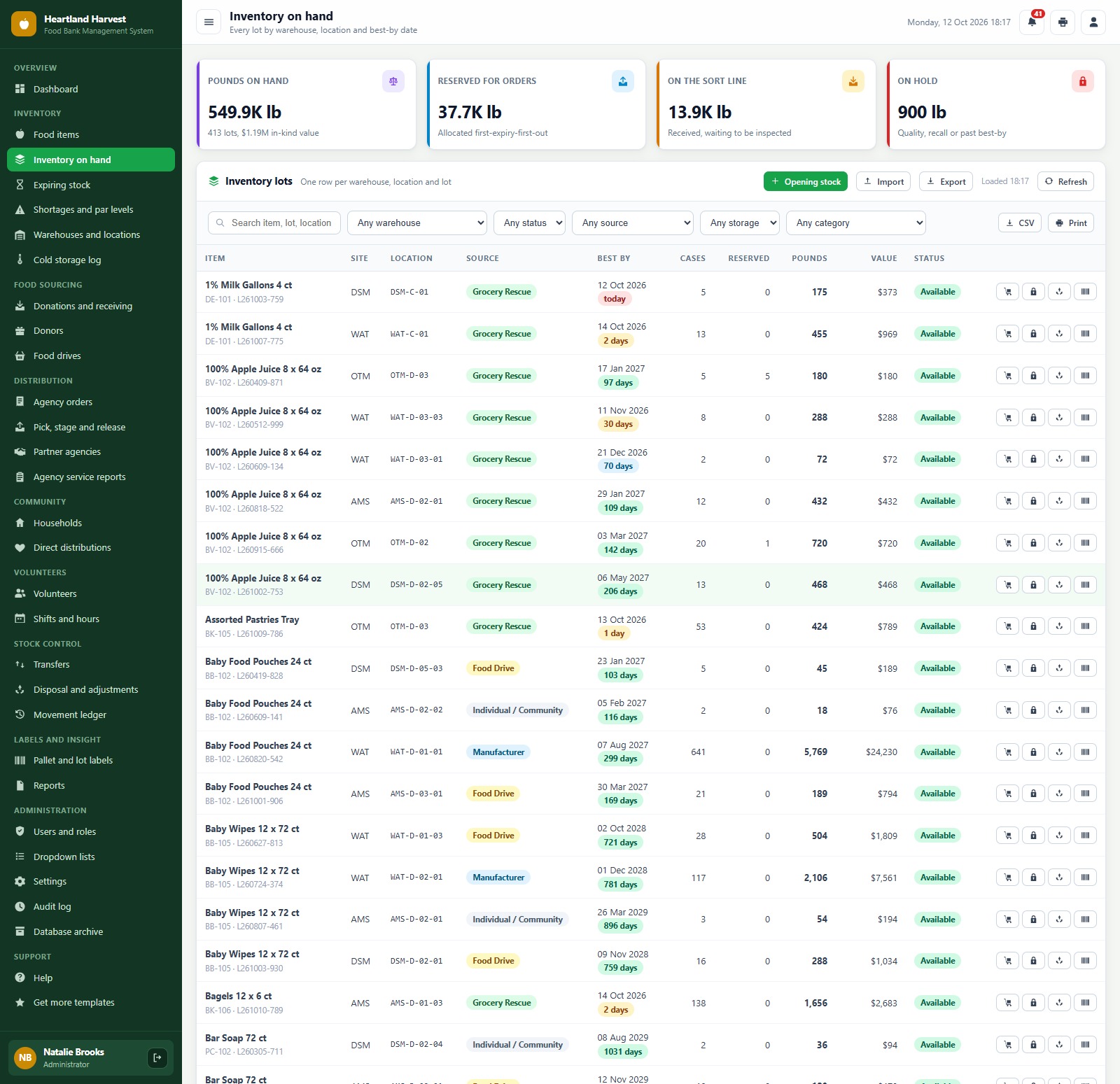
Inventory on hand
One row per warehouse, location and lot with source, best-by date, days left, cases, reserved, pounds, value and status. Cards show pounds on hand, reserved for orders, on the sort line and on hold. Filter by warehouse, status, source, storage and category, add opening stock or import it.
Expiring stock
Lots grouped by best-by band with the pounds and value at risk, so the warehouse team knows what to move first.
Donations and receiving
Received this month and this fiscal year, the sort line queue and thank-you letters due, then every donation, purchase and USDA receipt with donor, source, site, lines, pounds, value, acknowledgement and status.
Agency orders
Partner agency orders with pickup date, method, lines, pounds and stage (Submitted, Allocated, Picking, Staged, Released or Cancelled), with the monthly limit check and an email confirmation to the agency.
Pick, stage and release
A work queue by stage, earliest pickup first: Allocate (FEFO), Start picking, Staged at the dock and Release to agency, with a printable pick ticket for every order.
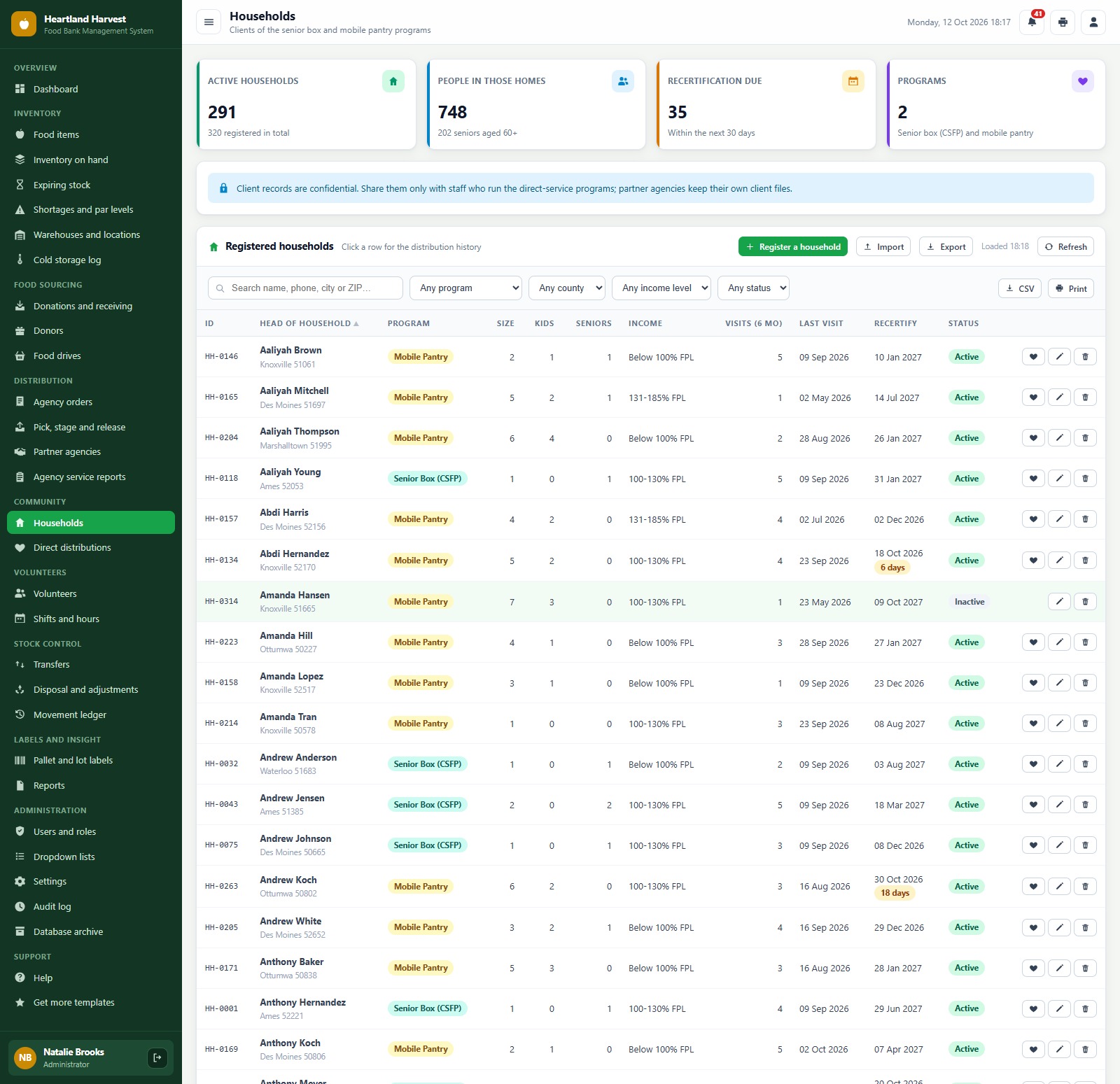
Households
Registered direct-service households with program, size, children, seniors, income level against the poverty line, TEFAP eligibility and recertification date.
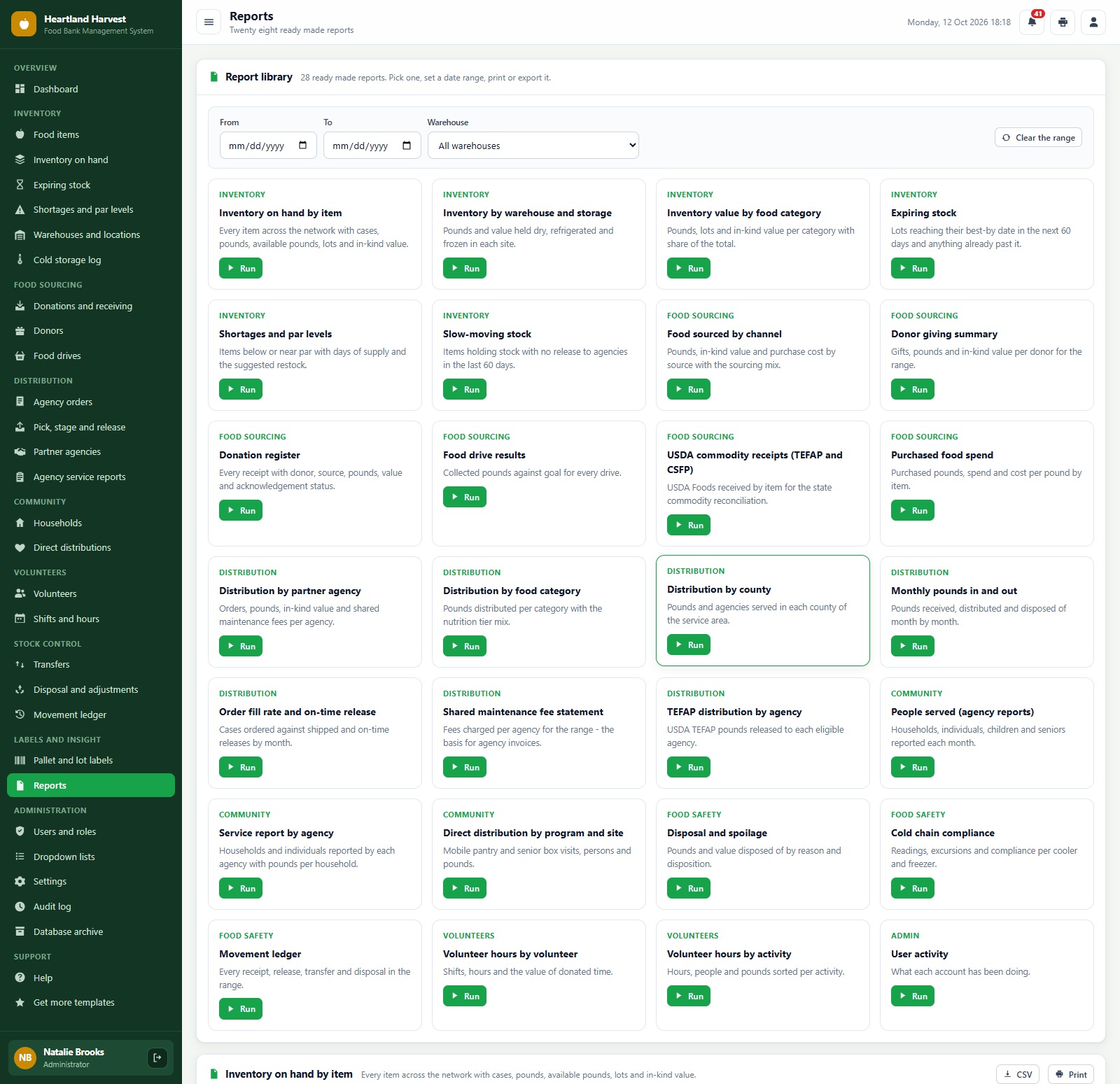
Reports
A library of 28 ready-made reports across inventory, food sourcing, distribution, community, food safety, volunteers and admin: inventory on hand by item, expiring stock, food sourced by channel, donor giving summary, USDA commodity receipts, distribution by partner agency and by county, order fill rate, shared maintenance fee statement, TEFAP distribution by agency, people served, disposal and spoilage, cold chain compliance and volunteer hours. Set a date range and warehouse, then print or export.
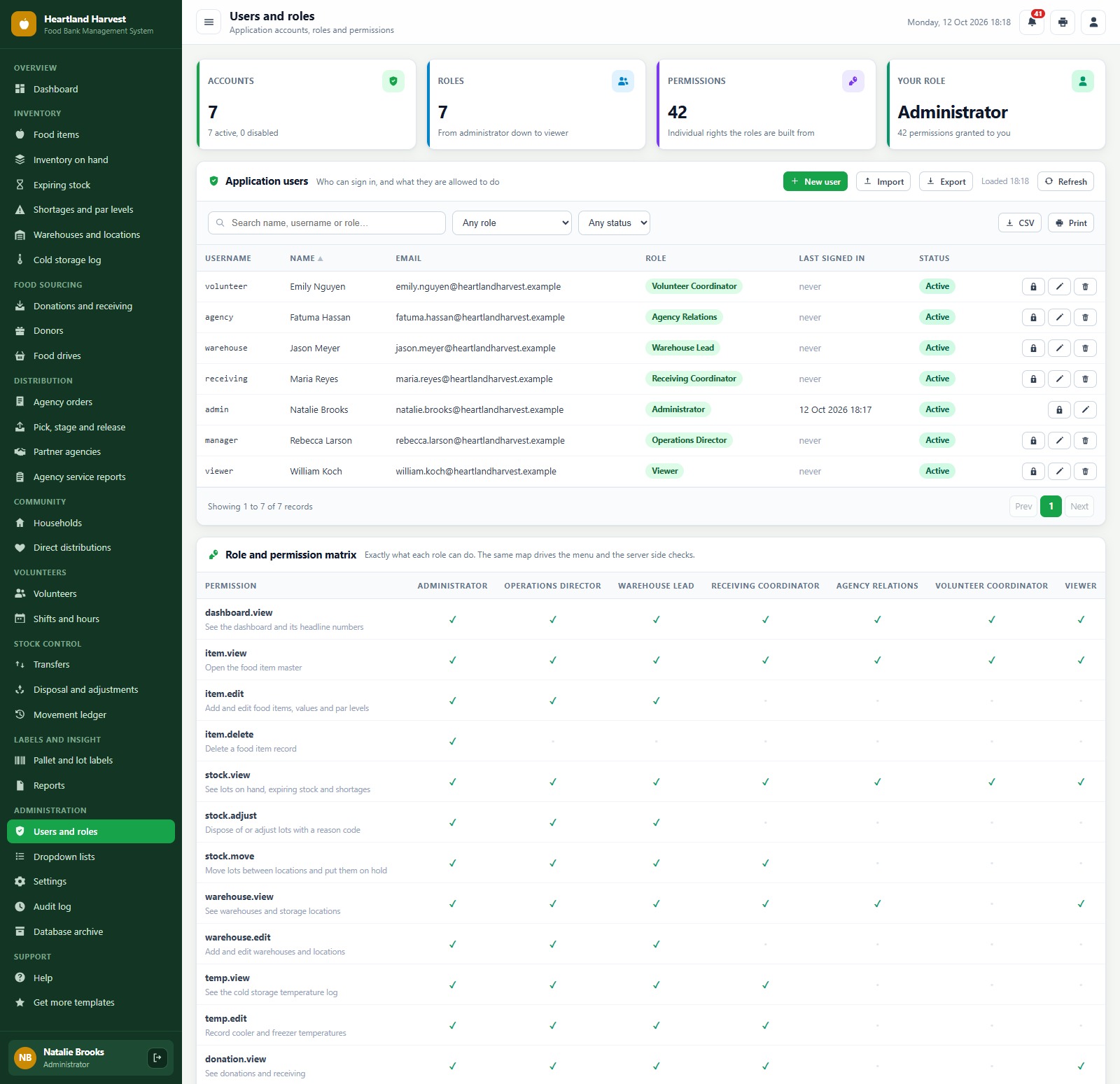
Users and roles
Application users with role and status, and the full role and permission matrix: 42 individual permissions across 7 roles. The same map drives the menu and the server-side checks, so a hidden screen cannot be reached by calling the server directly.
How the 7 Roles Divide the Food Bank Work
Role separation is what turns food bank software from a shared list into a controlled process. Each role sees only the screens its job needs, and the server checks the same permission map, so a hidden screen cannot be reached by calling the server directly either.
- Administrator: everything, including users and roles, settings, the audit log, archive and backups.
- Operations Director: all operations, including approving agency orders over the monthly limit.
- Warehouse Lead: inventory, locations, cold storage, pick, stage and release, transfers and disposal.
- Receiving Coordinator: donations, the sort line, donors, acknowledgement letters and food drives.
- Agency Relations: agency orders, partner agencies, service reports, households and direct distributions.
- Volunteer Coordinator: volunteers, shifts, attendance, households and direct distributions.
- Viewer: read-only access to the dashboard, inventory, orders and reports, for example a board treasurer.
Food Bank Inventory Management by Best-By Date
Most food bank inventory management problems come from old stock sitting behind new stock. Here every lot carries its best-by date, the Expiring Stock screen shows the pounds at risk in each band, and agency orders are allocated earliest best-by first, so the pick ticket already tells the warehouse team which pallet to pull.
📊 Food Bank Management System vs. Spreadsheet vs. Paid Food Bank Software
| Feature | Food Bank Management System | Shared spreadsheet | Paid food bank software |
|---|---|---|---|
| Cost | ✅ One-time purchase | Free to low cost | Monthly or annual subscription, often per user |
| Platform | ✅ Browser, on your own Google account | A file everyone edits | Vendor cloud |
| Lots by location and best-by date | ✅ Built in, with FEFO allocation | Manual | Varies by plan |
| Partner agency orders and monthly limits | ✅ Orders, pick tickets, release | Email and phone | ✅ Yes |
| Households, volunteers and cold storage log | ✅ All in one app | Separate sheets | Often separate add-ons |
| Role-based logins | ✅ 7 roles, 42 permissions | No | ✅ Yes |
| Pallet and lot labels | ✅ Code 128, 3 inch / 4 inch / A4 | Add-on needed | Varies by plan |
| Your data stays in your Drive | ✅ A Google Sheet you own | ✅ Yes | No, vendor hosted |
| Source code you can change | ✅ Full Apps Script code | ✅ Yes | No |
👥 Who This Web App Is For, and Who It’s Not For
✅ Built for:
- Regional food banks that receive donated, purchased and USDA food and supply a network of partner pantries, soup kitchens and shelters
- Food pantries and community food programs that want food pantry software with lots, best-by dates and households in one place
- Nonprofit teams that want food bank management software without a per-user subscription
❌ Not built for:
- Operations that need handheld scanner apps or client self check-in kiosks
- Organizations that need fundraising CRM, grant accounting or tax filing; this system tracks food, people and volunteers, not your books
- Teams that must work offline; the app runs in the browser and needs an internet connection
⚙️ How to Set Up the Food Bank Management System
- Try the live demo first with the login details above, one role at a time.
- Create a new Google Apps Script project, paste Code.cs.txt into Code.gs, and add an HTML file named exactly
Indexcontaining Index.txt. - Deploy it as a web app (Execute as: Me, choose who has access) and accept the Google permission prompt.
- Open the web app URL and press Run setup now on the first-run panel, or run
setuponce from the editor. Setup creates the database spreadsheet, its 28 tabs and the Drive folders, and resumes by itself if Google’s time limit interrupts it. - Sign in as admin and change every seeded password (or delete the accounts you do not need).
- In Settings, enter your organization details, value per pound, fiscal year start, FEFO and expiry options, shared maintenance fees, print size and label size.
- Add your warehouses and locations, food items, donors, partner agencies and volunteers, then import your opening stock.
The ZIP contains Code.cs.txt, Index.txt and the PDF user manual with every screen explained.
Want to sharpen the spreadsheet skills behind systems like this? The NextGenTemplates Academy learning paths build them up step by step, with practice files.
❓ Frequently Asked Questions
Can I try the Food Bank Management System before buying?
Yes. The live demo above runs the full system with fictional data. Sign in with any of the 7 demo accounts to see the dashboard, the screens each role can reach and all 28 reports before you spend anything.
What do I need to run it?
A Google account. The web app runs on Google Apps Script and creates its own Google Sheet database in your Drive during setup. Your team signs in with the usernames you create, so they do not need their own Google accounts.
Does it handle USDA TEFAP and CSFP food?
Yes. Food items carry a program (Donated, Purchased, USDA TEFAP or USDA CSFP), TEFAP food can only go to eligible agencies, CSFP is kept for senior boxes, and there are reports for USDA commodity receipts and TEFAP distribution by agency.
Does it track best-by dates and FEFO?
Yes. Every lot carries a best-by date, the Expiring Stock screen shows what reaches its date in the coming weeks, and agency orders are allocated earliest best-by first (FEFO), which you can switch in Settings.
Can it send donor acknowledgement letters?
Yes. From a donation you can email the donor a thank-you and tax acknowledgement letter, or mark it as mailed. The Donations screen counts the letters still due.
Can I change the currency, units and print size?
The demo uses US dollars and pounds. Settings lets you change the currency symbol, organization details, value per pound, print size (3 inch, 4 inch or A4) and label size.
Related Posts and Templates
- Warehouse Inventory Management System Web App: multi-warehouse stock by bin, batch and expiry.
- Cold Storage Management System Web App: temperature-controlled storage with lots and expiry.
- Animal Shelter Management System Web App: another nonprofit system with volunteers and donations.
- Nonprofit Organizations Dashboard in Google Sheets: nonprofit KPIs without the full system.
- Donation Allocation and Beneficiary Dashboard in Google Sheets: where donations go and who they reach.
Conclusion
If you run a food bank or pantry network and want lots by best-by date, FEFO agency orders, households, volunteers and role-based logins without a per-user subscription, this food bank management software gives you all of it on your own Google account. Start with the live demo above, sign in as two or three different roles, and then get the Food Bank Management System Web App from NextGenTemplates.
🛒 Get the Food Bank Management System Web App
👤 About the Author
Built by PK, Microsoft Certified Professional with 15+ years of Excel, Google Sheets, Apps Script and Power BI experience, founder of NextGenTemplates and the YouTube channels @PKAnExcelExpert, @NextGenTemplates and @NeoTechNavigators. Every template is hand-built and tested before release.