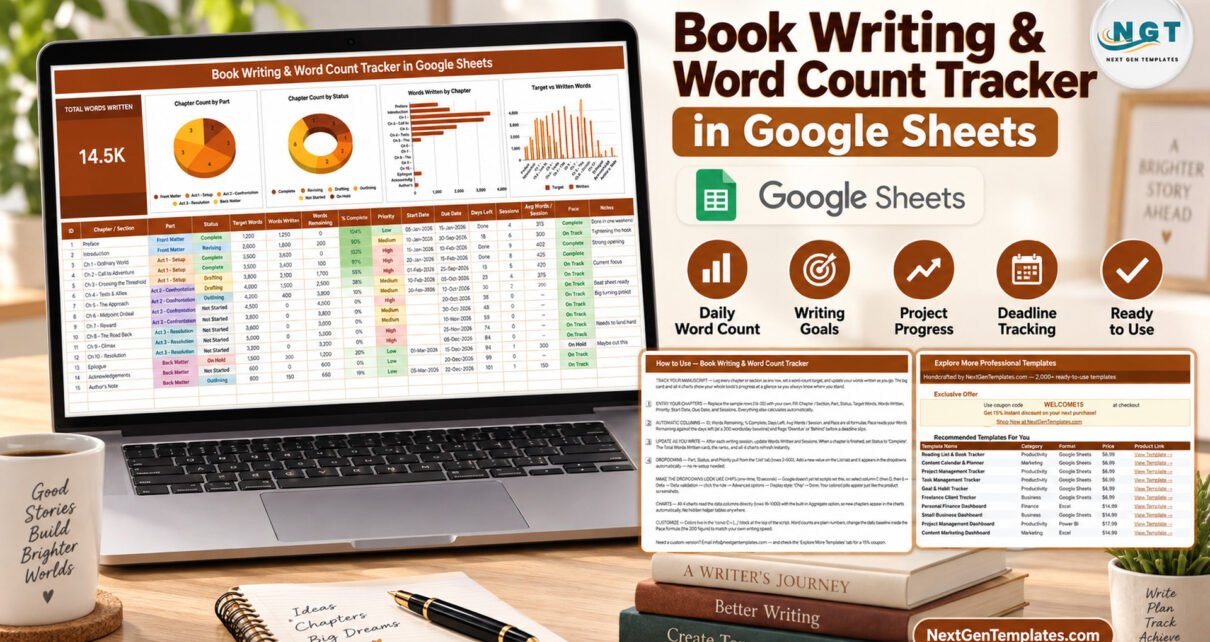
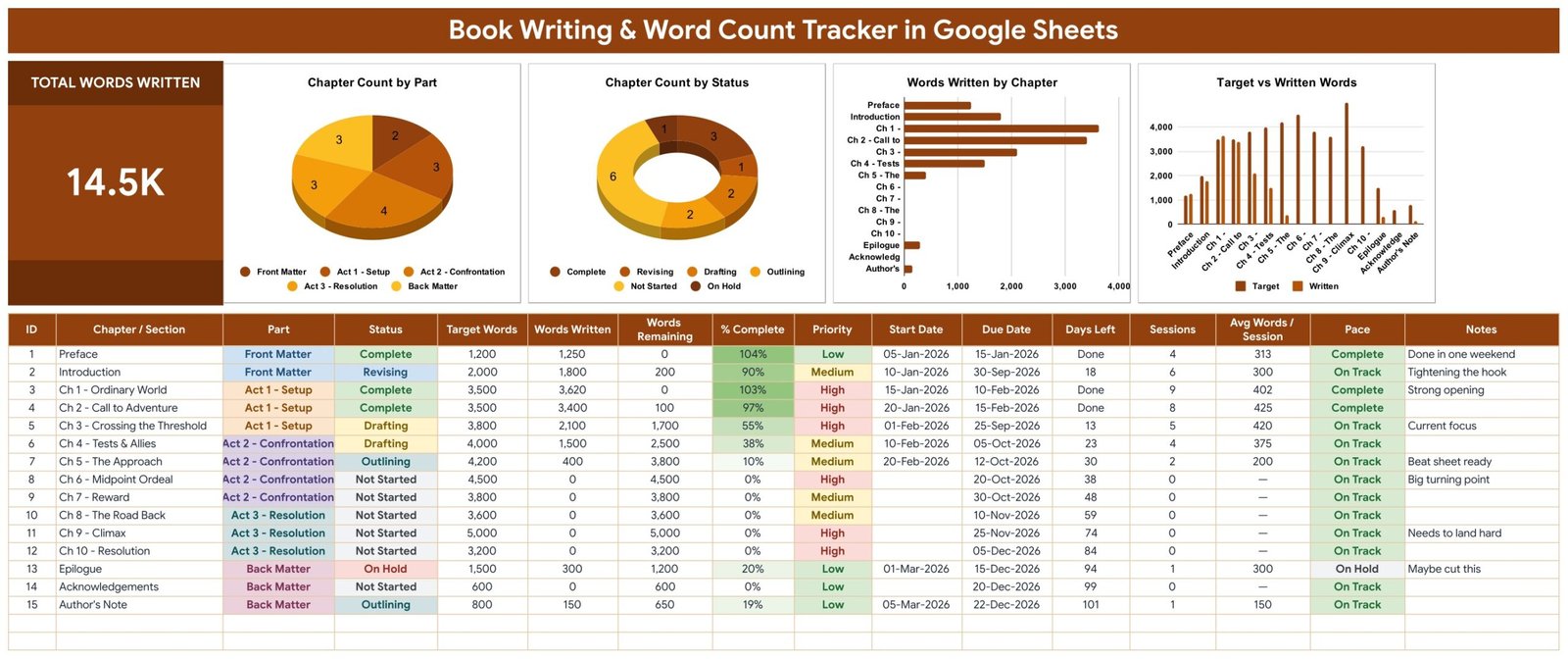
Most manuscripts do not stall because the writing is bad. They stall because nobody can say, on a Tuesday in month four, how much of the book is actually finished. The Book Writing and Word Count Tracker in Google Sheets answers that in one screen: a live Total Words Written card, 4 charts, a 16-column writing log and 15 worked sample chapters running from Preface to Author’s Note. Six columns are formulas, so the only things you ever type are your target and your words written.
It is a single-page Google Sheets tracker, not a multi-page dashboard and not an Excel workbook. There are no macros to enable and nothing to install: the download is a PDF carrying a Make a copy link, so a free Google account and a browser are the whole setup. Copy it, replace the sample rows, and the card and all four charts redraw as you type.
Get the Book Writing & Word Count Tracker
Key Features of the Book Writing & Word Count Tracker
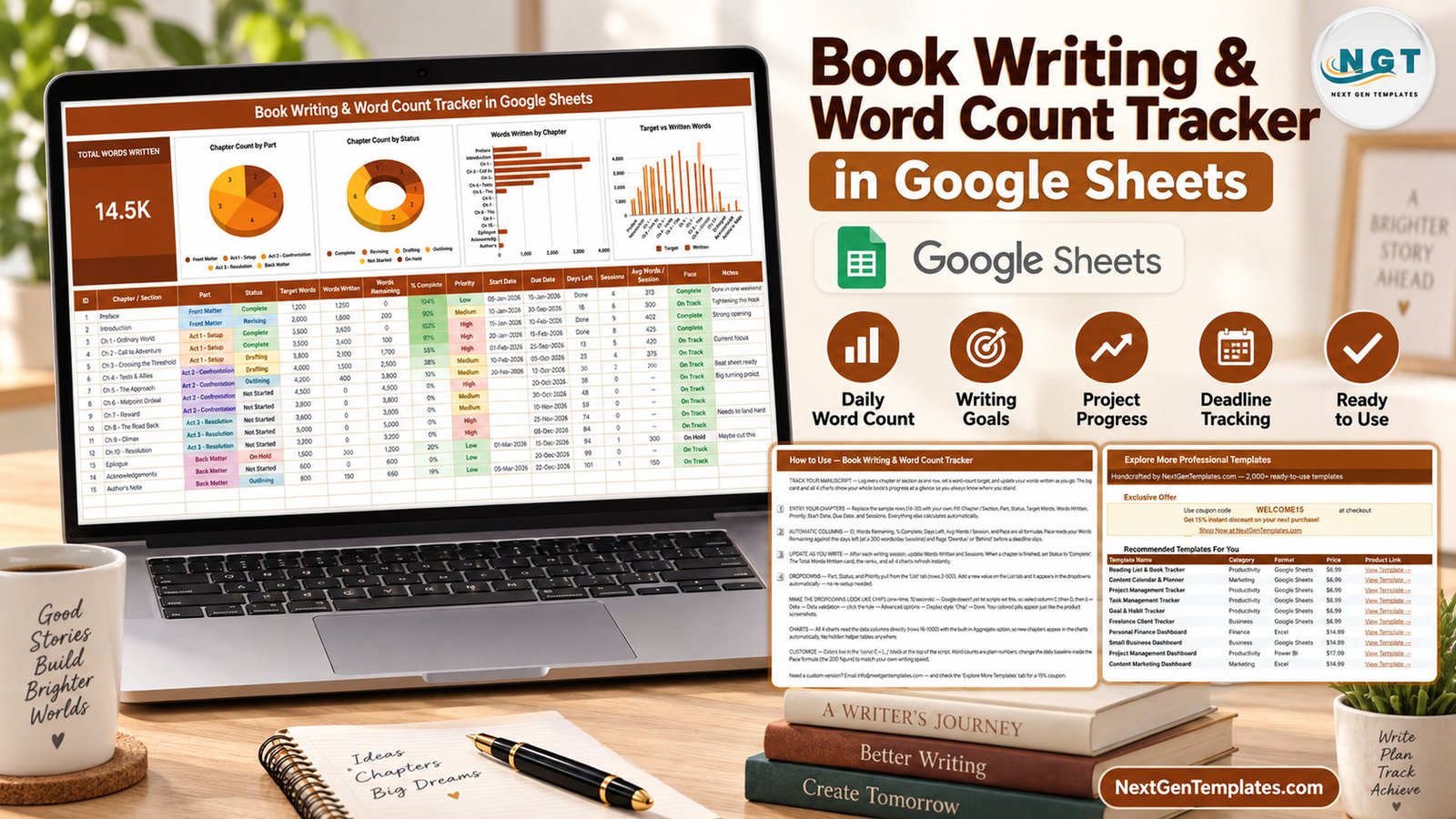
- One Total Words Written card. The banner card sums the Words Written column across every chapter you have logged. The sample manuscript shows 14.5K words written against a 41,400-word plan.
- Four charts wired straight to the data. Chapter Count by Part, Chapter Count by Status, Words Written by Chapter and Target vs Written Words all read the writing log directly through the built-in Aggregate option across rows 16-1000. No hidden helper tables exist anywhere in the file.
- Six automatic columns. ID, Words Remaining, % Complete, Days Left, Avg Words / Session and Pace are formulas. You never maintain them.
- A Pace column that warns you early. Pace weighs your Words Remaining against the days you have left at a 200-words-per-day baseline and flags Behind or Overdue before a deadline slips. That 200 is a single number inside the formula, so you can set it to your own speed.
- Three self-expanding dropdowns. Part, Status and Priority read a List tab across rows 2-500. Add a value there and it appears in the dropdown immediately.
- Chapter-level dates. Start Date, Due Date and Days Left sit beside Sessions and Avg Words / Session, so speed and calendar are visible together.
Template Structure: Every Tab Explained
The file opens on the tracker page and carries three supporting tabs – List (the dropdown source), How to Use and Explore More Templates.
Page 1: The Manuscript Tracker
The only working page. The Total Words Written card and the four charts sit above a 16-column writing log: ID, Chapter / Section, Part, Status, Target Words, Words Written, Words Remaining, % Complete, Priority, Start Date, Due Date, Days Left, Sessions, Avg Words / Session, Pace and Notes. Part ships with Front Matter, Act 1 – Setup, Act 2 – Confrontation, Act 3 – Resolution and Back Matter; Status ships with Complete, Revising, Drafting, Outlining, Not Started and On Hold; Priority ships High, Medium and Low.
Page 2: How to Use
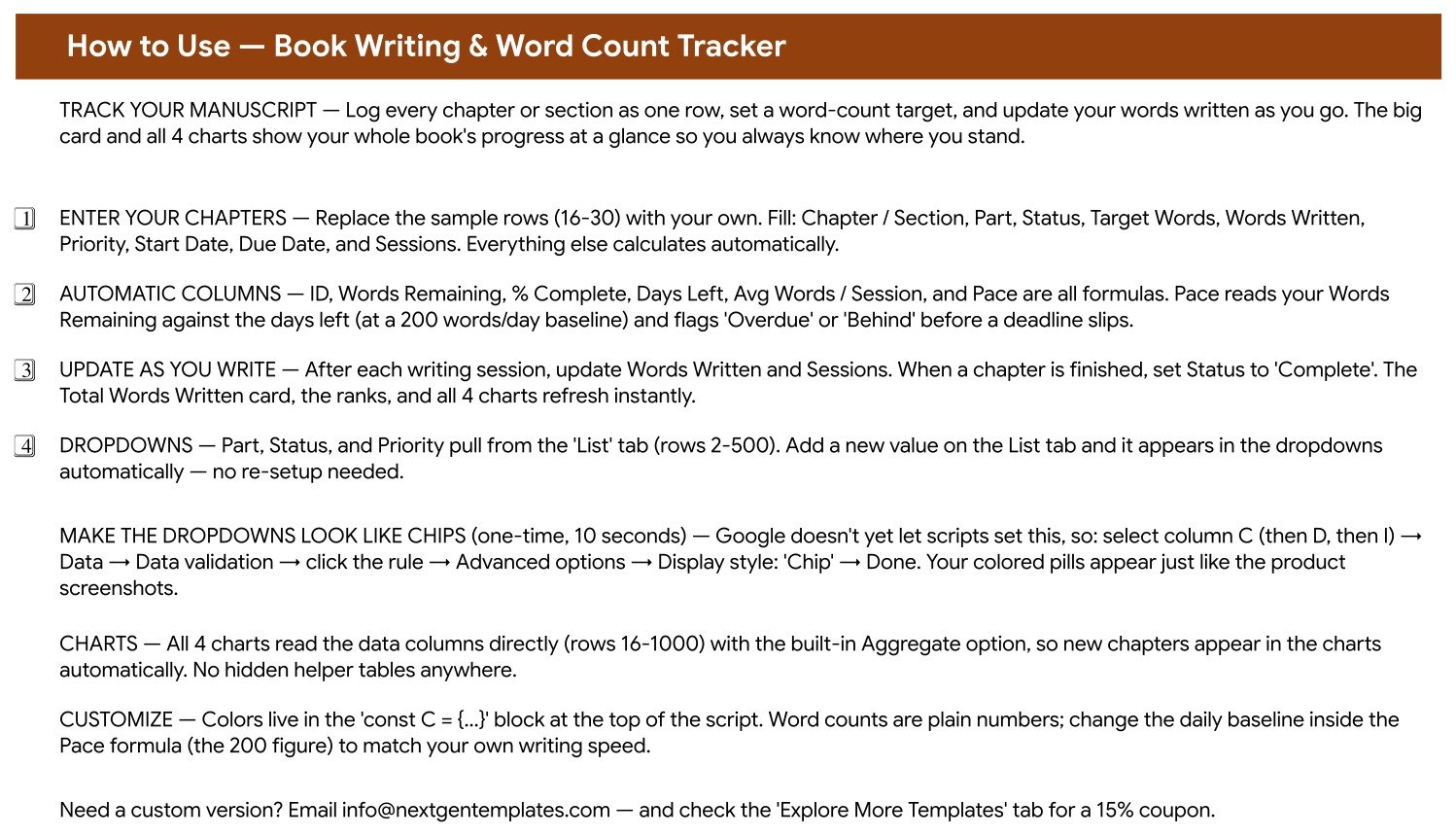
A setup tab in plain English. It names the columns you fill, the six that calculate themselves, how the List tab feeds the dropdowns, and the one-time ten-second step that turns Part, Status and Priority into coloured chips through Data validation, Advanced options, Display style: Chip. It also points at the one number to edit if 200 words a day is not your pace.
Page 3: Explore More Templates
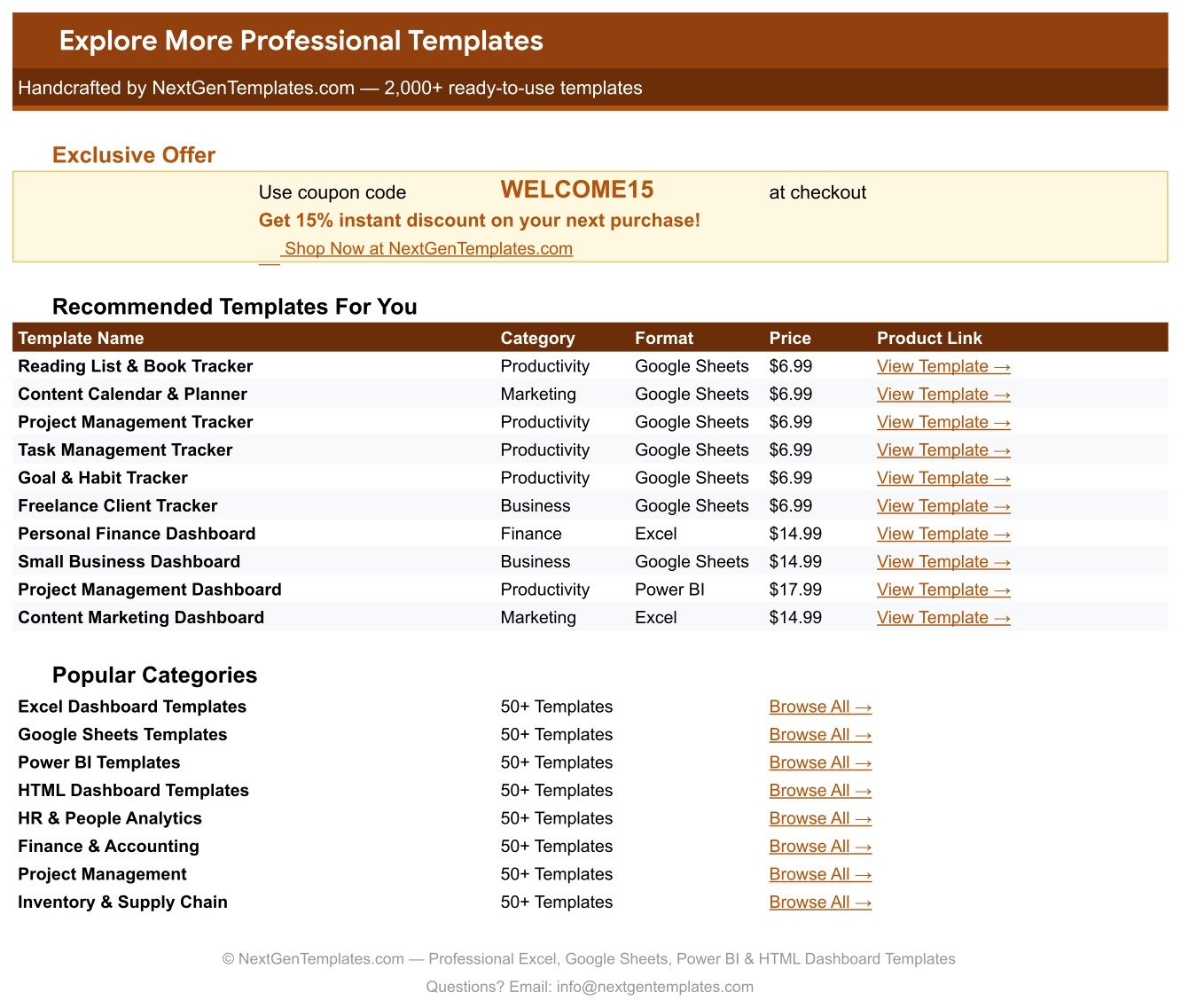
A curated list of related NextGenTemplates products with category, format and product links, plus a WELCOME15 coupon code worth 15% off a future purchase.
Book Writing and Word Count Tracker in Google Sheets vs. Excel vs. Paid Writing Apps
| Feature | This Tracker | Excel writing tracker | Scrivener / NovelPad / Dabble |
|---|---|---|---|
| Cost | $12.99 one-time (currently $6.99) | $5-$25 one-time | $49 one-time or $10-$15 / month |
| Platform | Browser, any OS | Desktop Excel | Desktop app or web app |
| Setup time | Under 10 minutes | 15-30 minutes | 1-2 hours to learn |
| Real-time co-author access | Yes, native | Only via OneDrive | Paid tiers only |
| Mobile access | Google Sheets app | Limited | Varies by app |
| Chapter-level word targets | Built in | You build it | Yes |
| Pace and deadline warning | Automatic Behind and Overdue flags | You build it | Some apps |
| Customisable dropdowns | Edit the List tab | Manual validation lists | Fixed taxonomy |
| Year-1 cost for 5 co-authors | $12.99 total | $25-$125 | $245-$900 |
For authors who want chapter-level targets and an early deadline warning without learning a writing suite or paying monthly, this tracker sits in the sweet spot.
Who Should Use This Template
Perfect for:
- Novelists and non-fiction authors drafting a 30,000-120,000 word manuscript
- Self-publishing writers who want a visible book writing tracker and an honest finish date
- Ghostwriters and co-authors sharing one manuscript progress tracker with a client or editor
- Thesis, memoir and serial writers who work in chapters rather than in daily streaks
Not a fit if:
- You want a place to write – this tracks progress, it does not hold your prose
- You expect word counts to be pulled automatically out of Word or Google Docs; you type them in
- You cannot use a Google account, because delivery is a Make a copy link
- You need royalty, rights or sales reporting rather than drafting progress
Real-World Use Cases
Maya is drafting her second novel around a day job. She logs 15 chapters across three acts with a 4,000-word target each. When Pace turns Behind on two Act 2 chapters, she moves a weekend rather than discovering the slip in December.
Daniel ghostwrites business books for two clients. He keeps one copy per book and shares each as a viewer link. Target vs Written Words is now the weekly status update, which quietly ended the “how far along are we?” email.
Priya is finishing a PhD thesis. She renames Parts as chapters and appendices, uses Status for Outlining, Drafting and Revising, and reads Days Left against her submission date – a novel word count spreadsheet repurposed for academia.
Advantages of the Book Writing & Word Count Tracker
The obvious saving is money: one payment instead of a monthly writing-app subscription, and nothing extra for a second or fifth collaborator. The less obvious saving is rework. Because the four charts read the writing log directly rather than a helper table, you can add, delete and reorder chapters without ever repairing a chart range – the failure mode that kills most home-made tracking spreadsheets after a month.
The Pace column is the part writers keep. A percentage tells you where you are; Pace tells you whether the plan is still true. Seeing Behind in week six is worth more than seeing 38% complete, because it is still cheap to fix.
Opportunities for Improvement
Be clear about what this is not. Word counts are entered by hand – nothing reads your document, so the tracker is exactly as current as your last entry. There is no daily writing-streak log either; progress is recorded per chapter and per session, not per calendar day. The Pace baseline is a single fixed figure rather than a rolling average of your recent sessions, so very uneven writers should revisit it occasionally. And the coloured chip styling on the dropdowns is a manual ten-second setting, because Google Apps Script still cannot set it for you.
Best Practices
- Set Target Words for every chapter before you start, including the ones you have not outlined – an honest plan total is what makes Words Remaining useful.
- Update Words Written and Sessions at the end of each writing session, not weekly; Avg Words / Session only tells the truth if Sessions is accurate.
- Edit the 200-words-per-day figure in the Pace formula in week one, after you know your real speed.
- Use Notes for the decision, not the task – “maybe cut this” on the Epilogue is the sort of line that saves an argument with yourself in month five.Book Writing & Word Count Tracker in Google Sheets
- Add statuses such as Beta Read or Copyedit on the List tab rather than overloading Notes.
Explore Relevant Templates
Writers who run a publishing business rarely stop at one sheet. The Podcast Episode Planning Tracker in Google Sheets handles the promotion tour, and the Digital Product Sales Tracker in Google Sheets takes over once the book is selling. If you monetise an audience while you write, read our walkthroughs of the Sponsorship & Brand Deal Tracker in Google Sheets and the Online Course Sales & Student Tracker in Google Sheets. On the store side, the Blog Content & SEO Tracker in Google Sheets is the usual companion for platform-building.Book Writing & Word Count Tracker in Google Sheets
Want to build skills like this step by step? The NextGenTemplates Academy learning paths take you through spreadsheet tracking with practice files.
Get the Book Writing & Word Count Tracker
Frequently Asked Questions
What does the tracker actually measure?
It measures Total Words Written, Words Remaining, % Complete, Days Left, Sessions, Avg Words / Session and a Pace flag for every chapter, plus chapter counts by Part and by Status across four charts on one page.Book Writing & Word Count Tracker in Google Sheets
Does it count my words automatically?
No. You type Words Written after each session and the tracker does everything else – the card, the four charts, the percentages, Words Remaining and the Pace warnings all recalculate from that single number.Book Writing & Word Count Tracker in Google Sheets
Do I need Excel or any software?
No. This is a Google Sheets template. Your download is a PDF holding a Make a copy link, so a free Google account and a browser are enough. There are no macros and no add-ons to approve.
How long does setup take?
Under ten minutes. Copy the sheet, delete the 15 sample rows, type your own chapters. The only optional extra is the ten-second chip display setting explained on the How to Use tab.Book Writing & Word Count Tracker in Google Sheets
Can I change the parts, statuses and priorities?
Yes. All three dropdowns read the List tab across rows 2-500. Adding “Act 4” or “Beta Read” there makes it available immediately, and the charts pick the new value up without any edit.Book Writing & Word Count Tracker in Google Sheets
How does it compare to Scrivener or Dabble?
Those are writing environments that hold your prose; this is a progress tracker that sits beside whatever you draft in. It is paid for once rather than monthly, opens in any browser, and every column and dropdown is yours to rename.Book Writing & Word Count Tracker in Google Sheets
Can co-authors and editors share it?
Yes. Share your Drive copy like any Google Sheet. A co-author can edit and an editor can view the same live tracker, which is the practical advantage over a desktop spreadsheet file.Book Writing & Word Count Tracker in Google Sheets
About the Author
Built by PK – Microsoft Certified Professional with 15+ years of Excel, Google Sheets and Power BI experience. Founder of NextGenTemplates, reaching 300K+ subscribers across YouTube. Every template is hand-built and tested before release. If you want the underlying mechanics, Google documents dropdown lists and data validation and charts in Sheets in its own help centre.Book Writing & Word Count Tracker in Google Sheets
Conclusion
A manuscript tracker earns its place the week it tells you something uncomfortable. This one does that with a Pace flag and a Words Remaining column instead of a motivational streak counter, and it does it on one page you can read in five seconds.Book Writing & Word Count Tracker in Google Sheets
Instant download · One-time payment · No subscriptionBook Writing & Word Count Tracker in Google Sheets
Last updated: September 2026Book Writing & Word Count Tracker in Google Sheets