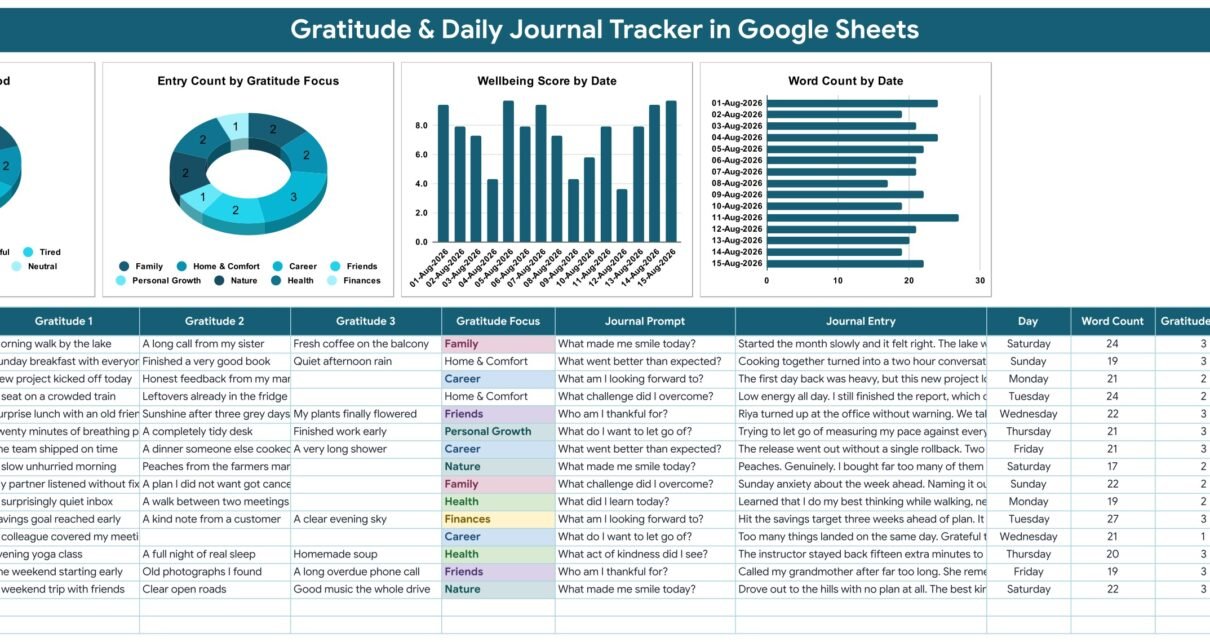
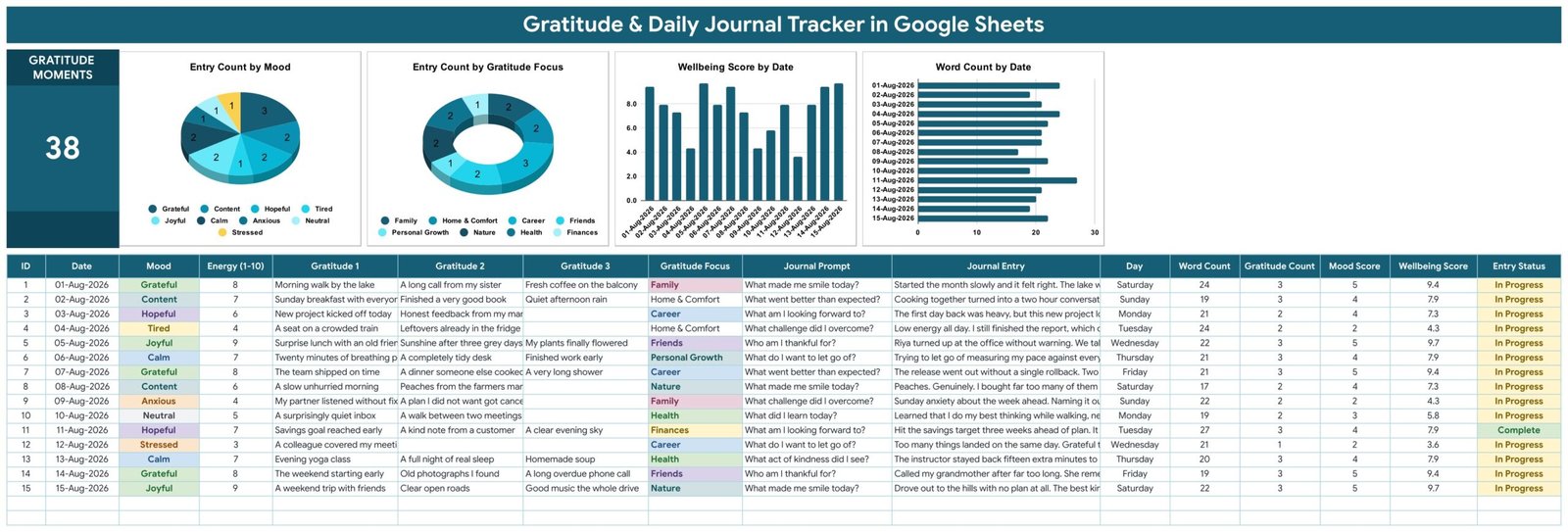
The Gratitude & Daily Journal Tracker in Google Sheets is a four-tab daily journal tracker in Google Sheets that puts a 16-column journal log, four live charts and one running counter on a single screen. Six of those sixteen columns calculate themselves, three dropdown lists ship with 28 editable values between them, and the shipped sample of 15 days holds 38 logged gratitude moments. Setup takes under ten minutes.
Most gratitude journals fail for the same reason: the writing survives, but nothing ever gets read back. A notebook cannot tell you that your best weeks were the ones tagged Friends and Nature, or that you have quietly slipped into one-line entries for a fortnight. This daily journal tracker in Google Sheets keeps the writing and the pattern in the same file, so the review takes thirty seconds instead of an evening.
Get the Gratitude & Daily Journal Tracker in Google Sheets
A note before anything else: this is a personal journaling and reflection template. It is not a medical or mental-health record, not a diagnostic tool and not a substitute for therapy. It contains no validated clinical scale such as PHQ-9 or GAD-7, and the Wellbeing Score is plain arithmetic over numbers you type yourself. If a low mood persists, please speak with a qualified professional.
Key Features of the Gratitude & Daily Journal Tracker
- One row is one day. You type nine things: Date, Mood, Energy on a 1-10 scale, Gratitude 1, Gratitude 2, Gratitude 3, Gratitude Focus, Journal Prompt and the Journal Entry itself.
- Six columns are automatic. Day, Word Count, Gratitude Count, Mood Score, Wellbeing Score and Entry Status are all formula-driven and never typed.
- Mood Score is a lookup, not a guess. Each of the ten shipped moods carries a score from 1 to 5 on the List tab — Low scores 1, Tired, Stressed and Anxious score 2, Neutral scores 3, Content, Calm and Hopeful score 4, and Grateful and Joyful score 5.
- The Wellbeing Score is out of ten and fully exposed. It is (Mood Score ÷ 5) × 6 + (Energy ÷ 10) × 3 + (Gratitude Count ÷ 3) × 1 — mood weighted 6, energy weighted 3, gratitude weighted 1. Every one of the 15 sample rows reconciles to that formula exactly.
- Entry Status catches rushed days. A row reads Complete only when all three gratitudes are filled and the entry runs to at least 25 words. In the shipped sample only one day of fifteen clears both bars, which is exactly the point.
- Three dropdowns you control. Mood, Gratitude Focus and Journal Prompt read the List tab from rows 2 to 500, so new values appear in the dropdowns the moment you type them.
- Four charts wired straight to the log. Every chart reads rows 16 to 1000 of the journal sheet directly. There are no hidden helper tables and nothing to refresh.
Inside the Daily Journal Tracker in Google Sheets — What Each Tab Does
The file ships as four tabs and nothing more: Gratitude Journal, List, How to Use and Explore More Templates. There is no separate reports page and no menu page — everything you look at lives at the top of the journal sheet itself.
Tab 1: Gratitude Journal
The dashboard band carries one KPI card, GRATITUDE MOMENTS, counting every individual gratitude ever logged, and four charts: Entry Count by Mood, Entry Count by Gratitude Focus, Wellbeing Score by Date and Word Count by Date. Directly underneath sits the 16-column journal table, pre-filled with 15 worked days running 01-Aug-2026 to 15-Aug-2026.
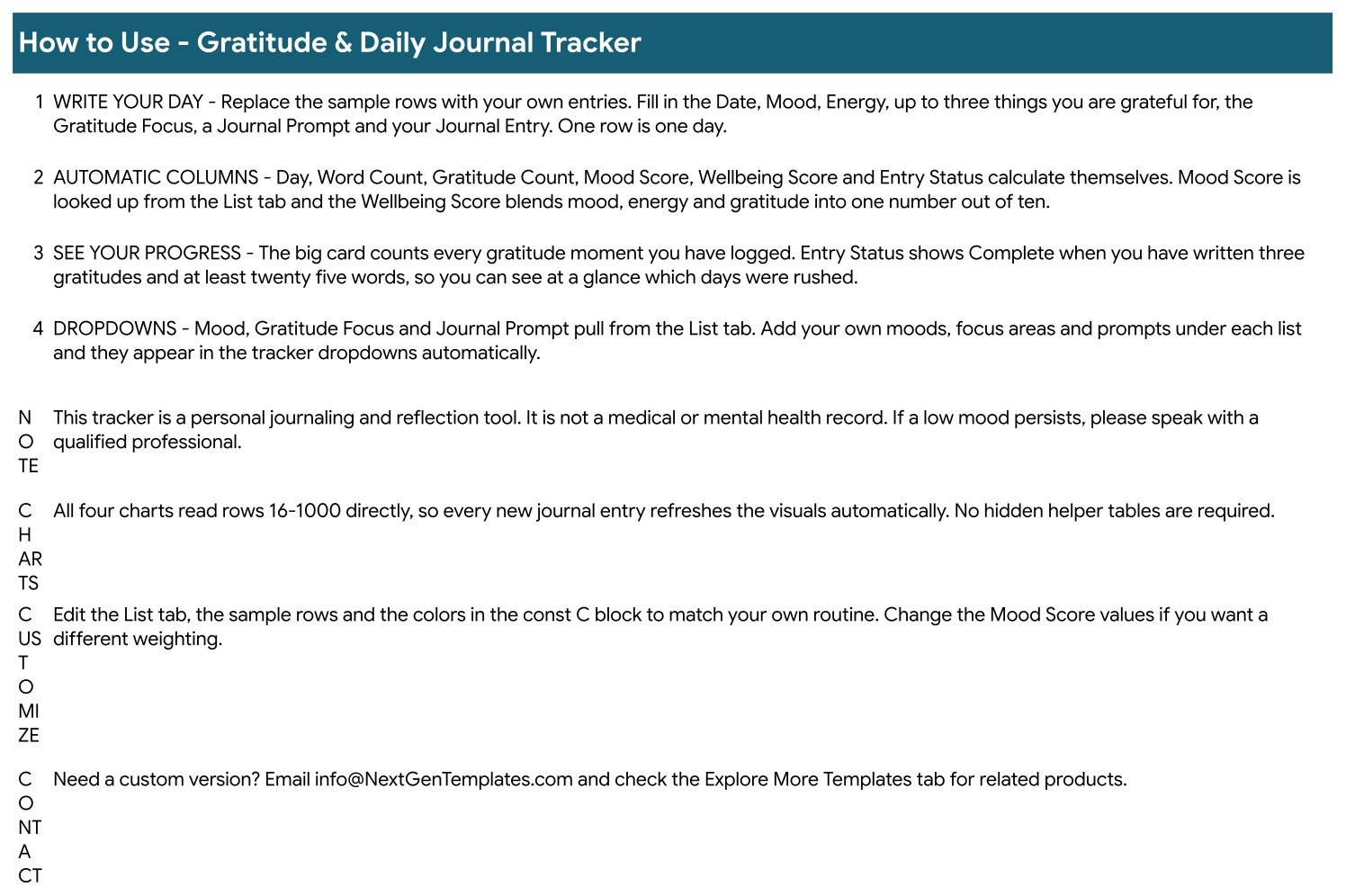
Tab 2: How to Use
A four-step guide covering writing your day, the automatic columns, reading your progress off the counter and Entry Status, and extending the dropdowns from the List tab. It also carries the customisation notes and the reminder that this is a reflection tool rather than a mental-health record.
Tab 3: List
Four short columns feed the whole template: ten Moods with their scores, ten Gratitude Focus areas (Family, Friends, Health, Career, Personal Growth, Finances, Faith & Spirit, Nature, Home & Comfort, Learning) and eight Journal Prompts such as “What made me smile today?”, “What do I want to let go of?” and “What act of kindness did I see?”. Add your own beneath any list and the dropdowns pick them up automatically.
Tab 4: Explore More Templates
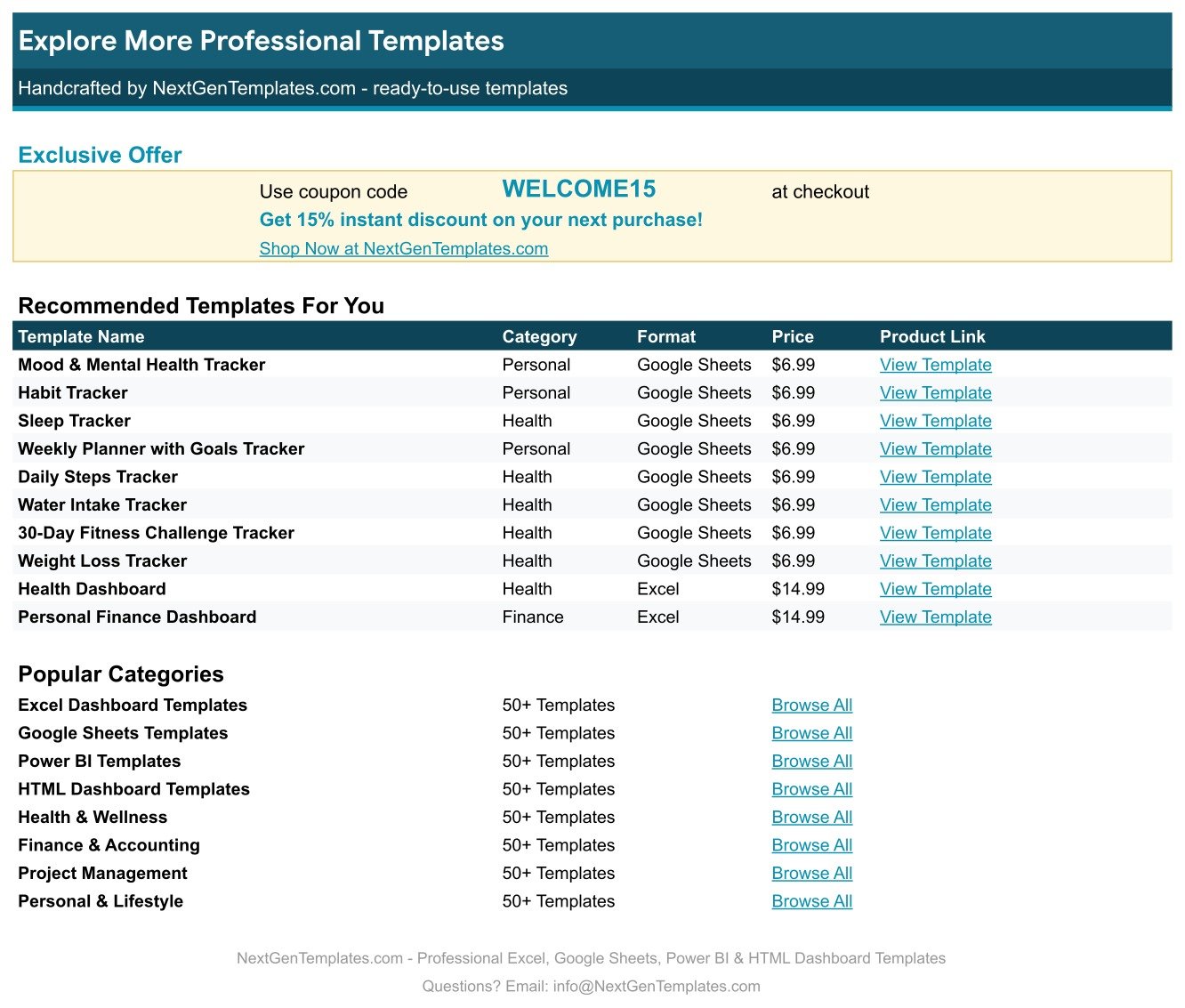
A shortlist of related NextGenTemplates products with categories, formats, prices and direct links, plus a coupon code for your next purchase.
Gratitude & Daily Journal Tracker vs. an Excel Journal vs. a Paid Journaling App
| Feature | Gratitude & Daily Journal Tracker in Google Sheets | Microsoft Excel journal template | Day One / Daylio / Reflectly |
|---|---|---|---|
| Cost | $6.99 one-time ✅ | $5-15 one-time | $3-6 / month, billed yearly |
| Platform | Google Sheets, any browser ✅ | Desktop Excel | Phone app, vendor cloud |
| Setup time | Under 10 minutes ✅ | 15-30 minutes | 5 minutes |
| Where your entries live | Your own Google Drive ✅ | Your PC | The vendor’s servers |
| Scoring formula you can edit | Yes — reweight mood, energy, gratitude ✅ | Yes | No, the algorithm is closed |
| Add your own moods and prompts | Yes, rows 2-500 of the List tab ✅ | Yes, by editing the file | Limited to the paid tier |
| Charts included | 4, live off the log ✅ | Build them yourself | Vendor’s own charts only |
| Export your entries | CSV, XLSX or PDF any time ✅ | Yes | Often gated or lossy |
| Year-1 cost | $6.99 ✅ | $5-15 | $36-72 |
For people who want their journal to stay in a file they control rather than in someone else’s app, the Gratitude & Daily Journal Tracker sits in the sweet spot.
Who Should Use This Template
Perfect for:
- Anyone keeping a daily gratitude practice who wants the entries searchable rather than scattered across notebooks
- Journalers who already work in Google Sheets and want mood, energy and gratitude on the same row as the writing
- Coaches and habit-builders who want a printable, exportable record their clients keep afterwards
- People who would rather not pay a monthly subscription to write in their own diary
Not a fit if:
- You need a clinical instrument — there is no validated scale here and the Wellbeing Score is arithmetic, not an assessment
- You are a clinician keeping patient records; there is no encryption, no audit trail and no HIPAA or GDPR layer
- You want push notifications, streak badges or a phone-first writing experience
- You need shared, permissioned journals with role separation across a team
Real-World Use Cases
Priya, a five-minute morning practice. She logs three gratitudes, her mood and her energy before opening email. After six weeks the Entry Count by Gratitude Focus chart showed almost every good day tracing back to Friends and Nature, and almost none to Career — which is why she now protects Friday afternoons.
Daniel, journaling through a demanding job. He reads the Wellbeing Score by Date chart for the shape of a month rather than the noise of one day, and uses Word Count by Date to spot the weeks where he was only typing a rushed line. He runs it alongside the Habit Tracker in Google Sheets so the reflection and the routine sit side by side.
Meera, a small coaching practice. She sends each new client a copy, asks for thirty days of entries, and reviews the exported PDF at the next session. No app account, no per-seat fee, and the client keeps the file when the engagement ends.
Advantages of the Gratitude & Daily Journal Tracker
The obvious one is cost: $6.99 once against $36-72 a year for a subscription journaling app, which pays for itself in the first two months. But the more useful advantage is transparency. Every number on this page comes from a formula you can click on and read. If you think energy should matter more than mood, change the weighting. If “Grateful” and “Joyful” should not both score 5, change them on the List tab and every historic row re-scores instantly.
The second advantage is that nothing needs maintaining. Because all four charts read the journal rows directly rather than through helper tables, there is no pivot to refresh, no named range to extend and no chance of a chart quietly falling out of sync with the data. Google’s own guidance on creating and editing charts in Sheets covers how to extend the ranges further if you ever outgrow row 1000.
The third is portability. Your entries are rows in a spreadsheet, so they export to CSV, XLSX or PDF whenever you want, and they are still readable in ten years without an app subscription standing between you and your own writing.
Opportunities for Improvement
Being straight about the limits: there is no streak column and no streak chart, so if you want to know how many days in a row you wrote, you will need to add that yourself. There is also no filter view or slicer — the three dropdowns are plain data validation on the entry columns, not interactive controls for the charts, so a month-by-month view means sorting or filtering the sheet by hand.
The Wellbeing Score is deliberately simple and equally deliberately not clinical. It cannot distinguish a genuinely bad day from a day you rated harshly, and it will happily average away a difficult fortnight if the energy numbers stay high. Read it as a prompt to look at the entries, never as a verdict on how you are doing.
Finally, the sample is a fortnight long. Fifteen rows is enough to show you the shape of a good entry, but you will want to delete them before your own data starts, otherwise the charts will read your first month through August 2026’s numbers.
Best Practices
- Edit the List tab before your first entry. Moods, focus areas and prompts in your own language get used; someone else’s vocabulary quietly gets skipped.
- Write to the 25-word bar. Entry Status exists to stop the practice degrading into three words and a mood. If a day genuinely was three words, let it read In Progress and move on.
- Fill all three gratitudes. The third one is the hard one, and it is the one that changes what you notice during the day.
- Review weekly, not daily. Look at Entry Count by Gratitude Focus once a week and ask which area of life your good days actually come from.
- Keep a copy. File → Make a copy every quarter gives you an archive that no accidental sort can damage.
- Do not use it as a health record. If the Wellbeing Score is telling you something worrying, that is a reason to talk to a professional, not a reason to keep tuning the spreadsheet.
Explore Relevant Templates
- Mood & Mental Health Tracker in Google Sheets — the mood-first sibling, with a longer daily log and a risk flag.
- Anxiety & Trigger Journal Tracker in Google Sheets — the same journaling shape, aimed at naming triggers rather than gratitudes.
- Meditation & Mindfulness Tracker in Google Sheets — logs sessions and minutes alongside the reflection.
- Screen Time & Digital Detox Tracker in Google Sheets — the obvious companion if your low-energy days follow your screen time.
- Symptom & Pain Diary Tracker in Google Sheets — a daily diary built for physical symptoms rather than reflection.
If you enjoy building your own trackers, the NextGenTemplates Academy learning paths teach the spreadsheet skills behind them, with practice files.
Frequently Asked Questions
What exactly does the Gratitude & Daily Journal Tracker record?
The Gratitude & Daily Journal Tracker records one row per day holding your date, mood, energy 1-10, up to three gratitudes, a gratitude focus, a reflection prompt and your written entry. Six further columns — day, word count, gratitude count, mood score, wellbeing score and entry status — calculate automatically.
How is the Wellbeing Score calculated?
The Wellbeing Score is (Mood Score ÷ 5) × 6 + (Energy ÷ 10) × 3 + (Gratitude Count ÷ 3) × 1, giving a figure out of ten. Mood carries the most weight, then energy, then how many gratitudes you logged. Change the Mood Score values on the List tab to reweight it.
Is the Gratitude & Daily Journal Tracker a mental-health tool?
No. It is a personal journaling and reflection template, not a medical or mental-health record, not diagnostic, and it contains no validated clinical scale. Treat the Wellbeing Score as arithmetic over your own numbers. If a low mood persists, please speak with a qualified professional.
Can I add my own moods and journal prompts?
Yes. The List tab feeds all three dropdowns and is read from rows 2 to 500, so anything typed under an existing list appears in the Gratitude & Daily Journal Tracker dropdowns straight away. Give every new mood a score from 1 to 5.
How long does setup take?
Under ten minutes. Open the PDF in your download, click the “Make a copy” link, edit the List tab into your own language and delete the 15 sample rows. The Gratitude & Daily Journal Tracker is ready to write in immediately after that.
How does this compare to a paid journaling app like Day One or Daylio?
Those apps run roughly $36-72 a year and keep both your entries and their scoring logic on their servers. The Gratitude & Daily Journal Tracker is a one-time $6.99 purchase, lives in your own Google Drive, exposes every formula and exports to CSV, XLSX or PDF whenever you want.
Do I need Excel or any add-on?
No. The Gratitude & Daily Journal Tracker runs entirely in Google Sheets in any browser, with no add-ons, no macros and no Apps Script. The same copy opens on a phone, though longer entries are easier to write on a laptop.
About the Author
Built by PK — Microsoft Certified Professional with 15+ years of Excel, Google Sheets and Power BI experience. Founder of NextGenTemplates, reaching 300K+ subscribers across YouTube channels. Every template is hand-built and tested before release.
Conclusion
A gratitude practice is easy to start and easy to let slide, and the thing that usually saves it is being able to see it. The Gratitude & Daily Journal Tracker in Google Sheets gives you the writing, the mood, the energy and the pattern in one file, with six columns doing the arithmetic and four charts refreshing themselves as you type. It is a fortnight of worked examples, three lists you can rewrite in your own words, and a scoring formula you are free to disagree with.
Get the Gratitude & Daily Journal Tracker in Google Sheets
Instant download · One-time payment · No subscription · Lifetime access
Last updated: September 2026