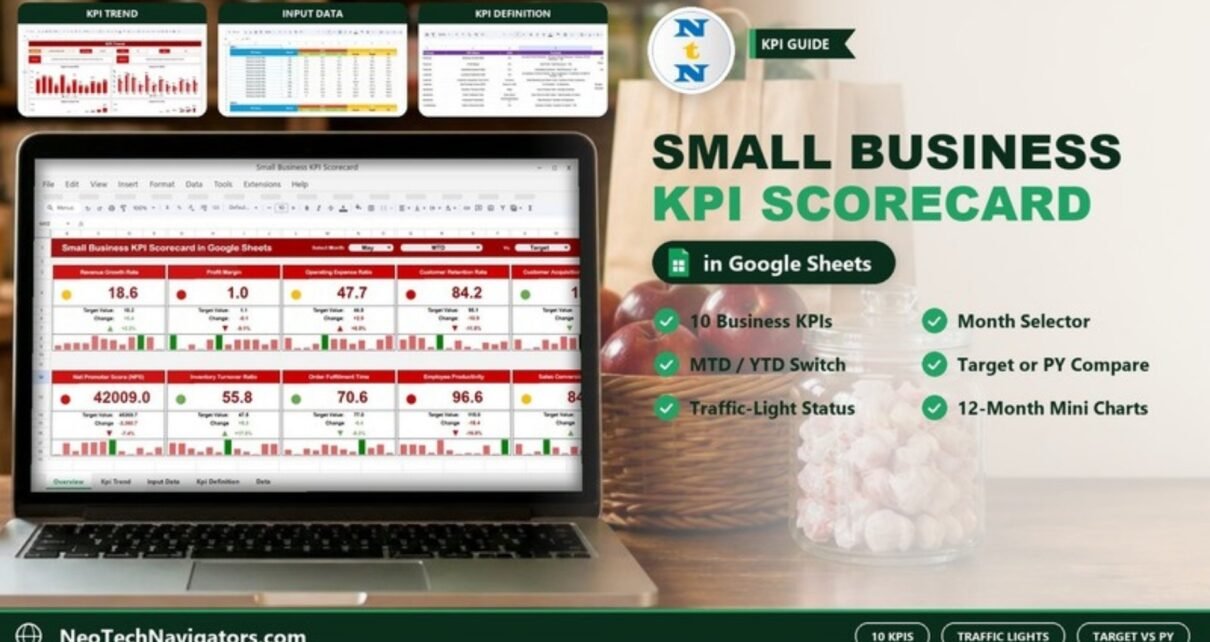
The Small Business KPI Scorecard in Google Sheets puts the ten numbers most small businesses care about on one screen: revenue growth, profit margin, costs, customers, operations and sales conversion. Each KPI appears as a card with its value, a comparison to target or last year, a traffic-light status dot and a twelve-month mini chart.
It is meant for owners, managers and solo founders who want a monthly performance check without a subscription dashboard tool. The file has four sheets (Scorecard, KPI Trend, Input Data and KPI Definition), works in any browser, and can be shared with a partner or accountant as a normal Google Sheets link.
Get the Small Business KPI Scorecard
Why a Small Business Needs a KPI Scorecard
Most owners look at the bank balance and the sales figure, and only find problems once they hit the profit and loss statement. A scorecard adds the early-warning numbers around them. Is the business growing faster than last month? Is each customer getting more expensive to win? Are existing customers staying? Is fulfilment getting slower? Reviewed once a month against a target, those numbers show where to act before the month-end accounts make it obvious.
The 10 KPIs in the Small Business KPI Scorecard
These are the KPIs exactly as listed on the template’s KPI Definition sheet, in four groups.
| # | KPI | Group | Unit | Formula | Better when |
|---|---|---|---|---|---|
| 1 | Revenue Growth Rate | Financial | % | ((Current Period Revenue − Previous Period Revenue) / Previous Period Revenue) × 100 | Higher (UTB) |
| 2 | Profit Margin | Financial | % | (Net Profit / Total Revenue) × 100 | Higher (UTB) |
| 3 | Operating Expense Ratio | Financial | % | (Operating Expenses / Total Revenue) × 100 | Lower (LTB) |
| 4 | Customer Retention Rate | Customer | % | ((Customers at End of Period − New Customers) / Customers at Start of Period) × 100 | Higher (UTB) |
| 5 | Customer Acquisition Cost (CAC) | Customer | Currency | Total Marketing and Sales Costs / Number of New Customers | Lower (LTB) |
| 6 | Net Promoter Score (NPS) | Customer | Score (0–100) | % Promoters − % Detractors | Higher (UTB) |
| 7 | Inventory Turnover Ratio | Operational | Ratio | Cost of Goods Sold / Average Inventory | Higher (UTB) |
| 8 | Order Fulfillment Time | Operational | Time (Days) | Total Time to Fulfill Orders / Total Number of Orders | Lower (LTB) |
| 9 | Employee Productivity | Operational | Revenue/Employee | Total Revenue / Number of Employees | Higher (UTB) |
| 10 | Sales Conversion Rate | Sales & Marketing | % | (Number of Sales / Number of Leads) × 100 | Higher (UTB) |
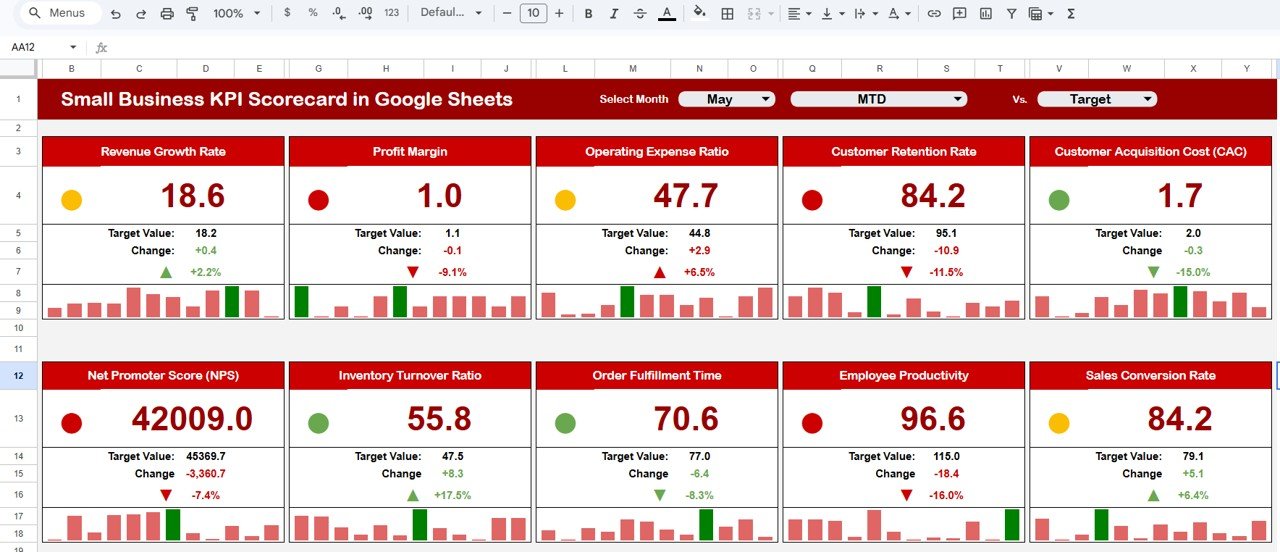
The figures in the sample file are placeholders that show how the sheets work; the NPS card, for example, shows 42009.0, which is not a real NPS value. Replace them with your own data before you draw conclusions.
The Four Sheets Explained
1. Scorecard
Three dropdowns run across the top: Select Month, MTD/YTD and Vs. (Target or PY). The ten KPIs appear as cards in two rows. Each card shows the actual value, the comparison value (Target Value in the screenshot), the Change as a number and a percentage with an arrow, a green, amber or red status dot, and a twelve-month mini bar chart for a quick read of the trend.
Worked example from the screenshot (May, MTD, Vs Target): Revenue Growth Rate is 18.6 against a Target Value of 18.2. The change is +0.4, and 0.4 ÷ 18.2 = +2.2%. Profit Margin is 1.0 against a target of 1.1, a change of −0.1, or −9.1%, shown with a red arrow and a red dot.
2. KPI Trend
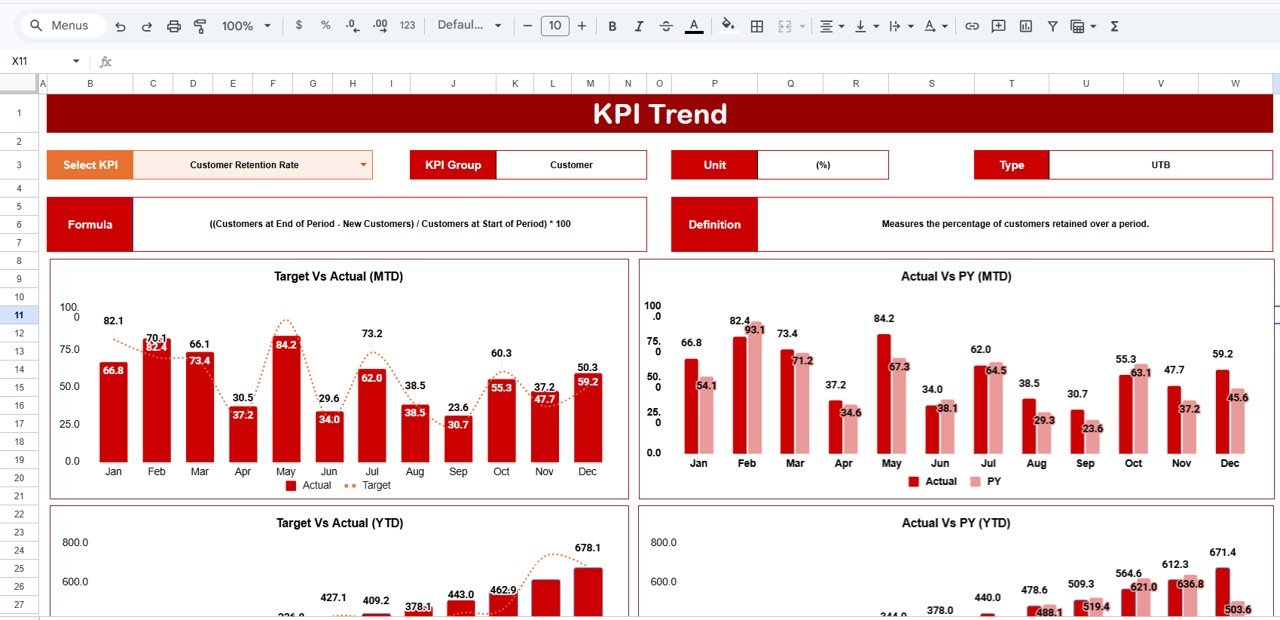
Select a KPI in the dropdown at C3 to see its KPI Group, Unit, Type, Formula and Definition. Four charts cover the year: Target Vs Actual (MTD), Actual Vs PY (MTD), Target Vs Actual (YTD) and Actual Vs PY (YTD). The screenshot shows Customer Retention Rate (Customer group, %, UTB).
3. Input Data
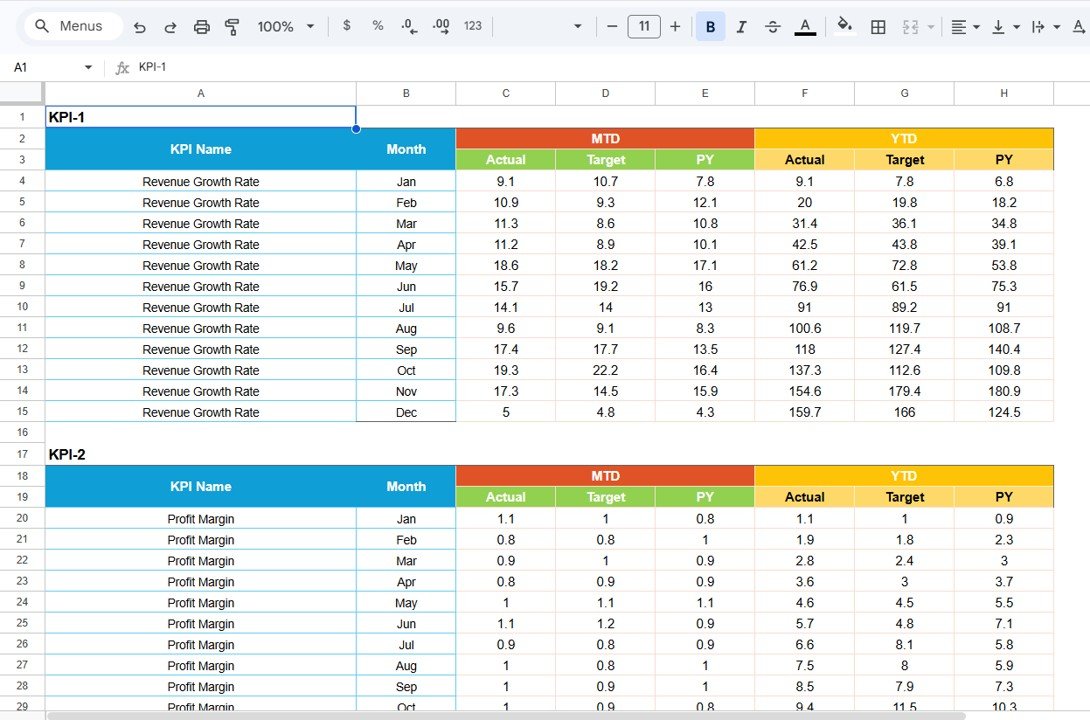
Each KPI has its own block (KPI-1, KPI-2 and so on) with twelve monthly rows. Every row holds MTD Actual, Target and PY, and YTD Actual, Target and PY. For example, Revenue Growth Rate for May has an MTD Actual of 18.6 and a Target of 18.2, which are the numbers on the Scorecard card.
4. KPI Definition
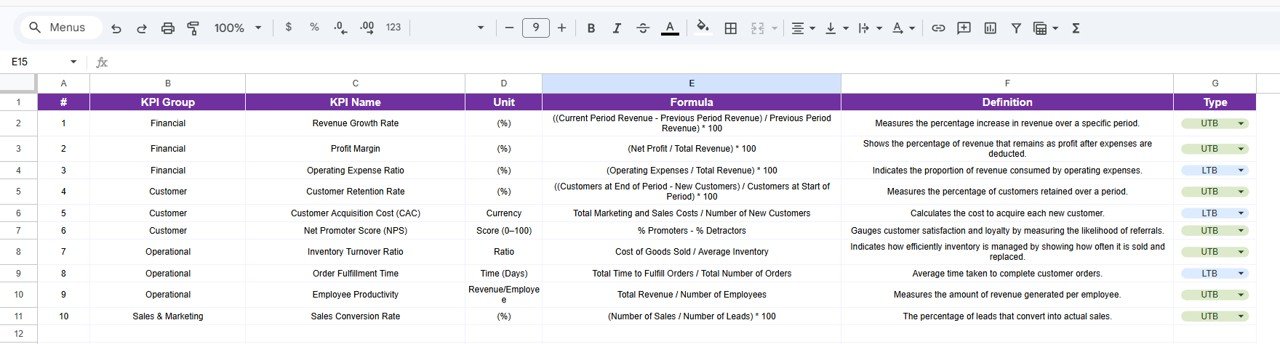
The master list of KPIs: #, KPI Group, KPI Name, Unit, Formula, Definition and Type. Set Type to UTB or LTB from the dropdown so the scorecard knows which direction is good.
How to Use It with Your Own Numbers
- Make your own copy of the scorecard using the link in the PDF guide.
- Review the ten KPIs on KPI Definition. Keep the ones that fit your business, and edit names, formulas or types where they do not. A service business without stock might replace Inventory Turnover Ratio, for example.
- Enter last year’s monthly values in the PY columns on Input Data, then set realistic monthly targets.
- At each month-end, calculate the KPIs from your accounts and sales records. For example, if you spent $1,200 on marketing and sales and won 40 new customers, CAC = 1,200 ÷ 40 = $30. With 120 sales from 600 leads, Sales Conversion Rate = 120 ÷ 600 × 100 = 20%.
- Type the MTD actuals and your YTD figures into the matching rows.
- On the Scorecard, choose the month and switch between MTD/YTD and Target/PY. Open KPI Trend for any red card.
Real-World Use Cases
- Owner’s monthly check-in: a shop or studio owner fills in the month’s numbers with the bookkeeper and reviews the red and amber cards together before planning the next month.
- Agency or consultancy: a small services firm watches Employee Productivity, CAC and Sales Conversion Rate to judge whether new hires and marketing spend are paying off.
- Product business: an online store tracks Inventory Turnover Ratio, Order Fulfillment Time and Customer Retention Rate to keep stock lean and customers coming back.
Best Practices
- Start with fewer KPIs if needed. Ten is manageable, but if you cannot measure one reliably yet, leave it out rather than guessing.
- Keep formulas consistent. Once you choose how to count a “new customer” or a “lead”, do not change it mid-year.
- Update on a fixed date. A monthly calendar reminder is enough; consistency matters more than frequency.
- Give it three months. Trends only become meaningful after a few months of data.
- Share view-only. Partners and advisers can read the scorecard without risk of editing it.
If you want to get more confident with the formulas behind KPIs like these, the Excel AI Mastery: 100 Formulas course on NextGenTemplates Academy covers them with practical examples.
Limitations
- Data entry is manual. It does not connect to your accounting, POS or CRM software.
- There are no email or chat alerts. You open the sheet to see the status.
- The ten KPIs are a general small-business set. Industry-specific metrics need to be added by you.
- It reports monthly performance; it is not a budgeting or forecasting model.
Related Small Business Dashboards
For a chart-heavy alternative, see the Small Business KPI Dashboard in Google Sheets. Solo operators may prefer the Freelance Business KPI Scorecard. For a deeper money view, try the Small Business CFO Dashboard and the Finance KPI Scorecard.
Related template: prefer Excel? The same scorecard is available as a Small Business KPI Scorecard in Excel.
Frequently Asked Questions
Which KPIs does the Small Business KPI Scorecard track?
Ten: Revenue Growth Rate, Profit Margin, Operating Expense Ratio, Customer Retention Rate, Customer Acquisition Cost (CAC), Net Promoter Score (NPS), Inventory Turnover Ratio, Order Fulfillment Time, Employee Productivity and Sales Conversion Rate.
Can I add my own KPIs?
Yes. Add the KPI on the KPI Definition sheet and a matching monthly block on Input Data, following the existing layout so the Scorecard and KPI Trend sheets can read it.
What do the colours on the cards mean?
Each card has a green, amber or red status dot, plus a green or red arrow on the change. The direction is judged using the KPI’s type: for UTB KPIs higher is better, and for LTB KPIs such as CAC lower is better.
How is the Change percentage calculated?
It is (Actual − Comparison) ÷ Comparison. In the sample, Revenue Growth Rate of 18.6 against a target of 18.2 gives +0.4 ÷ 18.2 = +2.2%.
Do I need Excel or any add-on?
No. It runs in Google Sheets in any browser and in the Google Sheets mobile app. An Excel version is available separately if you prefer it.
How long does it take to set up?
Copying the file takes a minute. Most of the time goes into agreeing your targets and gathering last year’s numbers, which is time well spent because it makes the comparisons meaningful.
Wrapping Up
The Small Business KPI Scorecard in Google Sheets gives you a one-page monthly health check: ten clearly defined KPIs, Target and PY comparisons, traffic-light status and a trend view for anything that turns red. Make a copy, review the KPI definitions, and enter last month’s numbers. That is enough to see where your business stands.
Get the Small Business KPI Scorecard
📅 Last updated: October 2026