Contract management plays a critical role in every organization. Whether you work in procurement, operations, sales, vendor management, legal, or finance, monitoring contract performance and renewal timelines is essential. When contracts are not tracked properly, businesses face risks such as delayed renewals, increased costs, compliance issues, and operational disruptions.Contract Performance & Renewal Dashboard in Google Sheets
To solve these challenges, the Contract Performance & Renewal Dashboard in Google Sheets offers a simple, powerful, and ready-to-use solution. It gives a complete view of contract status, values, renewal behavior, approval scores, responsible persons, and monthly trends—all in one place.Contract Performance & Renewal Dashboard in Google Sheets
In this detailed article, you will learn how the dashboard works, explore its sheet-by-sheet structure, understand its charts and insights, review its benefits, and follow best practices for effective contract management. This guide is ideal for contract managers, procurement teams, legal departments, and business leaders who want clear visibility into contract performance.Contract Performance & Renewal Dashboard in Google Sheets
Why Contract Performance Tracking Matters
Click to Buy Contract Performance & Renewal Dashboard in Google Sheets
Organizations rely on hundreds of contracts with vendors, customers, service providers, and internal partners. When these contracts are not monitored effectively, several problems arise:
- Missed renewal deadlines
- Cost overruns
- Non-compliance
- Vendor quality issues
- Misalignment with business goals
- Data scattered across emails and PDFs
- Lack of visibility in reporting
- Inefficient procurement decisions
A well-structured Google Sheets dashboard solves all these issues by centralizing contract data and visualizing it in a clean, user-friendly format.
Key Features of the Contract Performance & Renewal Dashboard
Click to Buy Contract Performance & Renewal Dashboard in Google Sheets
This dashboard contains multiple sheets that work together to provide a complete picture of your contract activity. Let’s explore each sheet in detail.
1. Overview Sheet Tab – Central Performance Summary
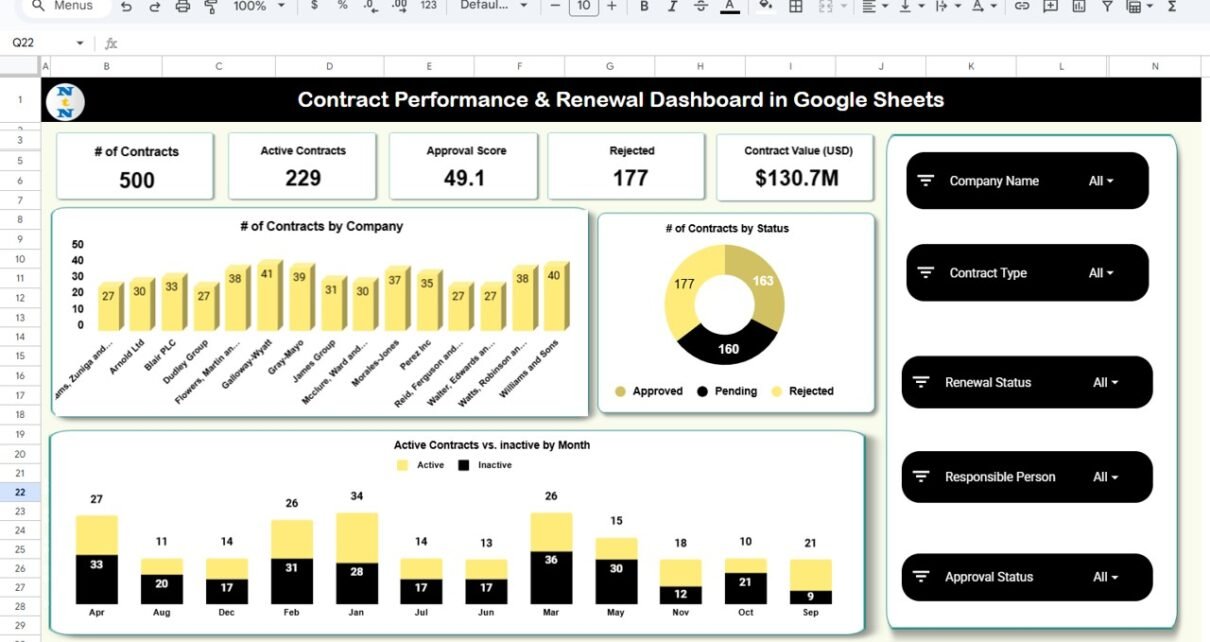
The Overview Sheet works as the main summary page of the dashboard. It contains key contract metrics displayed through cards and charts.
Key Metrics (Cards)
This sheet displays five important contract KPIs:
- Number of Contracts: Shows total contracts available in the system.
- Active Contracts; Displays how many contracts are currently active.
- Approval Score; Represents the average contract approval score.
- Rejected Contracts: Shows the total number of contracts that were not approved.
Contract Value (USD)
Displays the total value of all contracts.
These KPIs help decision-makers understand contract performance at a glance.
Charts in the Overview Sheet
The page also includes four powerful charts:
- # of Contracts by Company: Displays how many contracts each company or vendor has.
- # of Contracts by Status: Shows the distribution of active, inactive, pending, or rejected contracts.
- Active Contracts vs Inactive by Month: Provides a month-wise comparison of contract activity.
These charts highlight contract patterns and health indicators across the organization.

Click to Buy Contract Performance & Renewal Dashboard in Google Sheets
2. Contract Analysis Sheet – Deep Contract Insights
This sheet analyzes contract type and contract value in detail.
Charts included:
- Active Contracts by Contract Type: Helps identify contract types with the highest activity.
- Number of Contracts by Contract Type: Shows which contract categories are most frequently used.
- Contract Value (USD) by Contract Type: Displays how much value each contract type contributes.
- Average Approval Score by Contract Type; Measures quality and approval efficiency based on contract categories.
This sheet is ideal for procurement, legal teams, and financial analysis.

Click to Buy Contract Performance & Renewal Dashboard in Google Sheets
3. Renewal Analysis Sheet – Renewal Performance Tracking
Renewal management is crucial for avoiding disruptions. This sheet focuses on renewal patterns.
Charts included:
- Active Contracts by Renewal Status: Shows how many active contracts are marked as “Renewed,” “Up for Renewal,” or “Expired.”
- Number of Contracts by Renewal Status: Displays renewal distribution clearly.
- Contract Value (USD) by Renewal Status: Shows which renewal categories impact financial planning.
These insights help managers forecast renewals and prioritize follow-up actions.

4. Responsible Person Analysis Sheet – Ownership & Accountability
Contracts must have clearly assigned owners. This sheet helps track performance by responsible person.
Charts included:
- Active Contracts by Responsible Person: Shows distribution of responsibility.
- Number of Contracts by Responsible Person: Measures workload distribution.
- Contract Value (USD) by Responsible Person; Shows financial contribution or risk handled by each owner.
- Average Approval Score by Responsible Person: Helps evaluate the effectiveness of each responsible person.
This sheet is ideal for resource planning and cross-functional performance management.

Click to Buy Contract Performance & Renewal Dashboard in Google Sheets
5. Monthly Trends Sheet – Month-over-Month Pattern Analysis
This sheet displays contract trends across the year.
Charts included:
- Active Contracts by Month: Shows how active contracts change across months.
- Number of Contracts by Month; Displays monthly contract growth.
- Contract Value (USD) by Month: Identifies high-value or low-value months.
- Average Approval Score by Month; Helps track approval quality trends.
This sheet helps teams plan upcoming workloads and renewal cycles.

Click to Buy Contract Performance & Renewal Dashboard in Google Sheets
6. Search Sheet Tab – Smart Contract Lookup Tool
The Search Sheet simplifies contract lookup using:
- Search Keyword
- Field Name
You can search any contract instantly by:
- Company name
- Person responsible
- Renewal status
- Contract type
- Month
- Contract ID
- Value range
This feature is especially useful during audits, contract reviews, or compliance checks.

Click to Buy Contract Performance & Renewal Dashboard in Google Sheets
Data Sheet – Central Contract Database
The Data Sheet contains all contract-related information.
Typical fields include

Advantages of the Contract Performance & Renewal Dashboard
- Real-time performance tracking: Monitor contract performance directly from Google Sheets.
- Better renewal planning: Avoid renewal delays and identify upcoming expirations.
- Improved cost control: Track contract values, financial risks, and value contribution.
- Easy cross-team collaboration: Procurement, legal, and operations can work together in the same file.
- Clear visibility into contract types: Identify high-risk or high-value contract categories.
- Accountability & ownership: Track which person manages which contract.
Best Practices for Using This Dashboard
Click to Buy Contract Performance & Renewal Dashboard in Google Sheets
- Use standard naming conventions: Uniform data prevents reporting errors.
- Categorize contract types clearly: Avoid overlapping categories.
- Use conditional formatting: Highlight renewal deadlines or expiring contracts.
- Train all contract owners: Ensure everyone understands how to add and update data.
- Keep approval score criteria consistent: This ensures fair comparison.
- Review monthly trends: Use MoM trends for forecasting.Contract Performance & Renewal Dashboard in Google Sheets
Conclusion
The Contract Performance & Renewal Dashboard in Google Sheets is a powerful, ready-to-use solution for tracking contracts, renewals, approval scores, responsibilities, and financial value. With its multiple analysis sheets—Overview, Contract Analysis, Renewal Analysis, Responsible Person Analysis, Monthly Trends, Search, and Data—it provides a complete and clear view of contract performance.Contract Performance & Renewal Dashboard in Google Sheets
Visit our YouTube channel to learn step-by-step video tutorials
Youtube.com/@NeotechNavigators
Watch the step-by-step video Demo:
Click to Buy Contract Performance & Renewal Dashboard in Google Sheets