Job Application Tracker in Google Sheets is a comprehensive, ready-to-use template designed for job seekers who want to take control of their entire job search from a single, cloud-based spreadsheet. Whether you are a fresh graduate entering the workforce, a mid-career professional exploring new opportunities, or a career changer pivoting to a new industry, this tracker gives you a structured system to log applications, manage networking contacts, prepare for interviews, and compare job offers — all in one place.
The modern job search involves dozens of applications, multiple interview rounds, countless networking touchpoints, and complex offer negotiations. Without a centralized tracking system, it is easy to miss follow-up deadlines, forget which companies you have applied to, or lose track of where you stand in each hiring process. The Job Application Tracker in Google Sheets solves this by providing 5 dedicated pages that cover every stage of the job search pipeline, complete with KPI cards, interactive charts, and slicer-based filtering for quick data analysis.
👉 Click here to Purchase Job Application Tracker in Google Sheets
Key Features of Job Application Tracker in Google Sheets
👉 Click here to Purchase Job Application Tracker in Google Sheets
This template includes 5 interactive pages with over 20 charts and analyses, 5 KPI dashboard cards, and multiple slicers for filtering data. Each page is designed to handle a specific phase of the job search, ensuring that no detail falls through the cracks. The tracker runs entirely in Google Sheets, which means zero installation, real-time collaboration, and access from any device with an internet connection.
Dashboard Pages Explanation
1. Overview Page
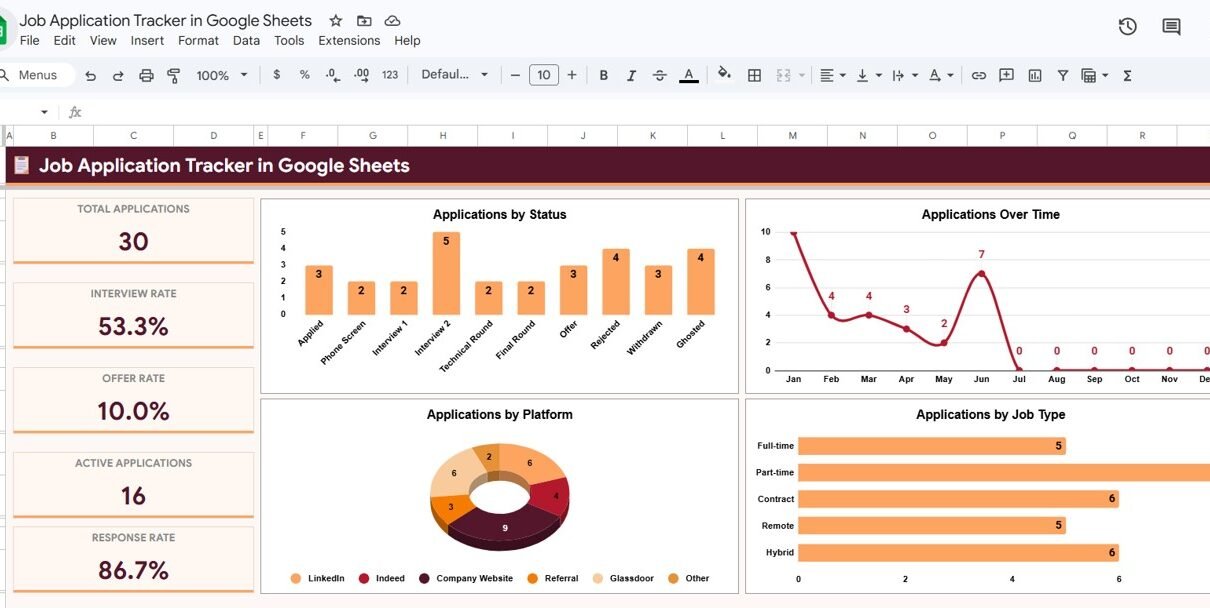
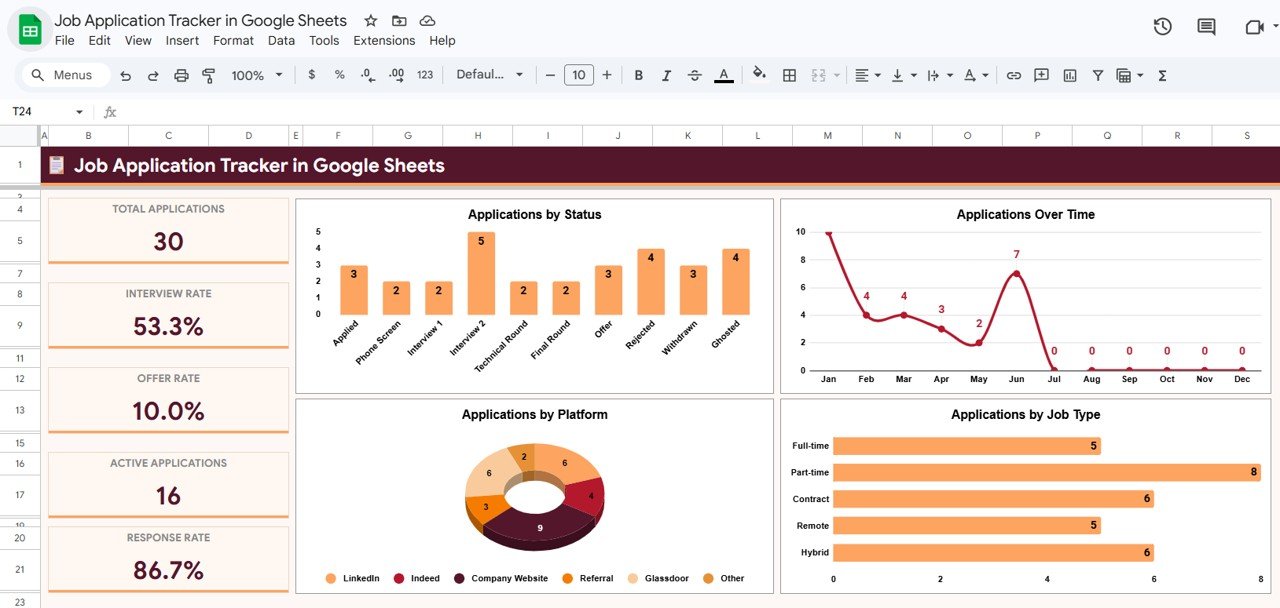
The Overview page serves as the command center for your entire job search. At the top of the sheet, five KPI cards provide high-level metrics at a glance: Total Applications shows the total number of jobs you have applied for, Interview Rate displays the percentage of applications that resulted in interviews, Offer Rate tracks how many interviews converted into job offers, Active Applications shows positions still in progress, and Response Rate measures how many companies have responded to your applications.
Below the cards, four interactive charts deliver visual analysis of your job search performance. Applications by Status breaks down your pipeline into categories like Applied, Interviewing, Offered, and Rejected so you can see where most applications stand. Applications Over Time plots your application activity on a timeline to reveal trends and patterns in your job search momentum. Applications by Platform shows which job boards or channels are generating the most activity, whether it is LinkedIn, Indeed, company websites, or referrals. Applications by Job Type categorizes applications by full-time, part-time, contract, or remote positions. Multiple slicers allow you to filter the entire dashboard by status, platform, job type, or date range to quickly see exactly what you need.
👉 Click here to Purchase Job Application Tracker in Google Sheets
2. Application Log
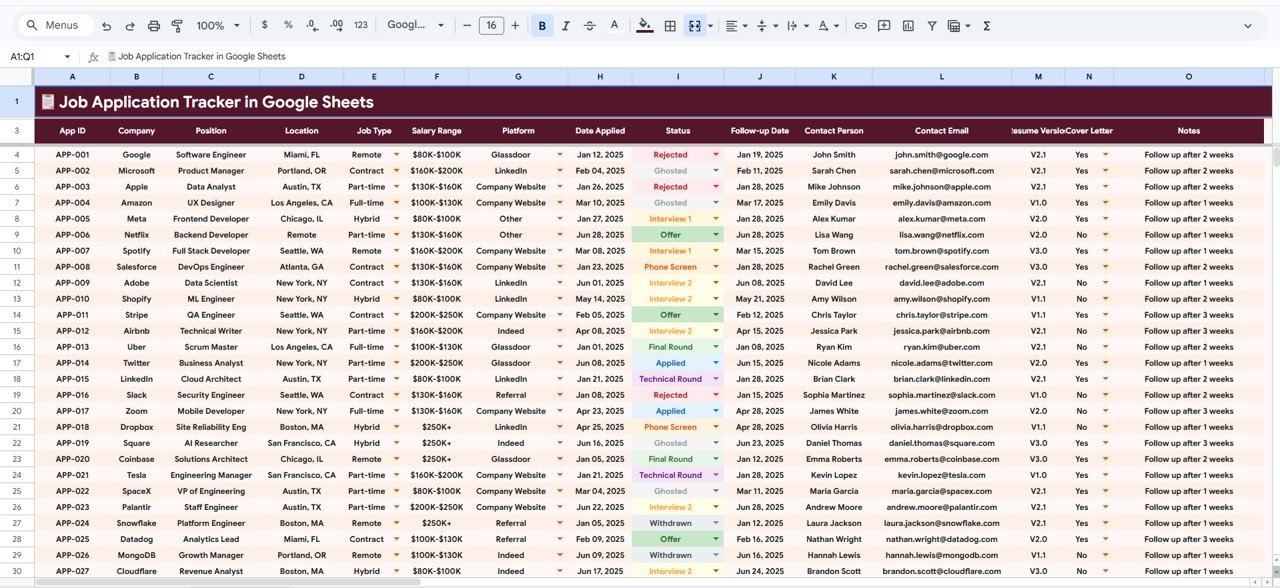
The Application Log is the backbone of the tracker where every job application is recorded with full details. This sheet provides six detailed analyses: Applications by Company groups your submissions by employer name so you can see which organizations you have targeted most frequently. Applications by Position categorizes entries by job title to reveal which roles you are pursuing most aggressively. Applications by Status gives a snapshot of your pipeline health across all stages. Applications by Platform identifies your most productive sourcing channels. Salary Range by Location maps expected compensation against geographic areas to help you understand market rates. Follow-up Date by Application Date tracks the gap between when you applied and when follow-ups are due, ensuring you never miss a critical touchpoint.
👉 Click here to Purchase Job Application Tracker in Google Sheets
3. Networking Tracker
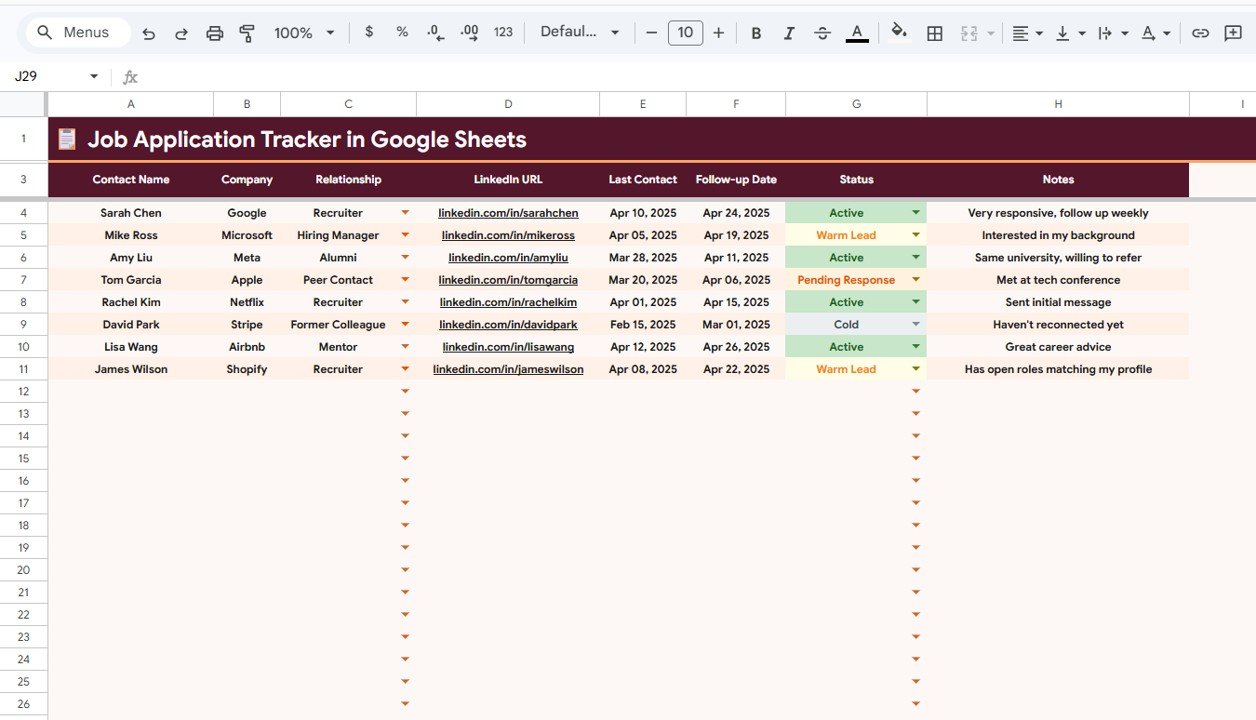
The Networking Tracker page helps you manage professional relationships that can accelerate your job search. It includes six analysis views: Contact Name by Company maps your network across organizations. Relationship by Status tracks whether contacts are warm leads, cold connections, or active referrals. LinkedIn URL by Contact Name stores direct links for quick access. Last Contact by Follow-up Date ensures you maintain regular touchpoints with key contacts. Status by Company shows networking progress at each target employer. Notes by Contact Name captures important details from conversations, meetings, or email exchanges.
👉 Click here to Purchase Job Application Tracker in Google Sheets
4. Interview Tracker
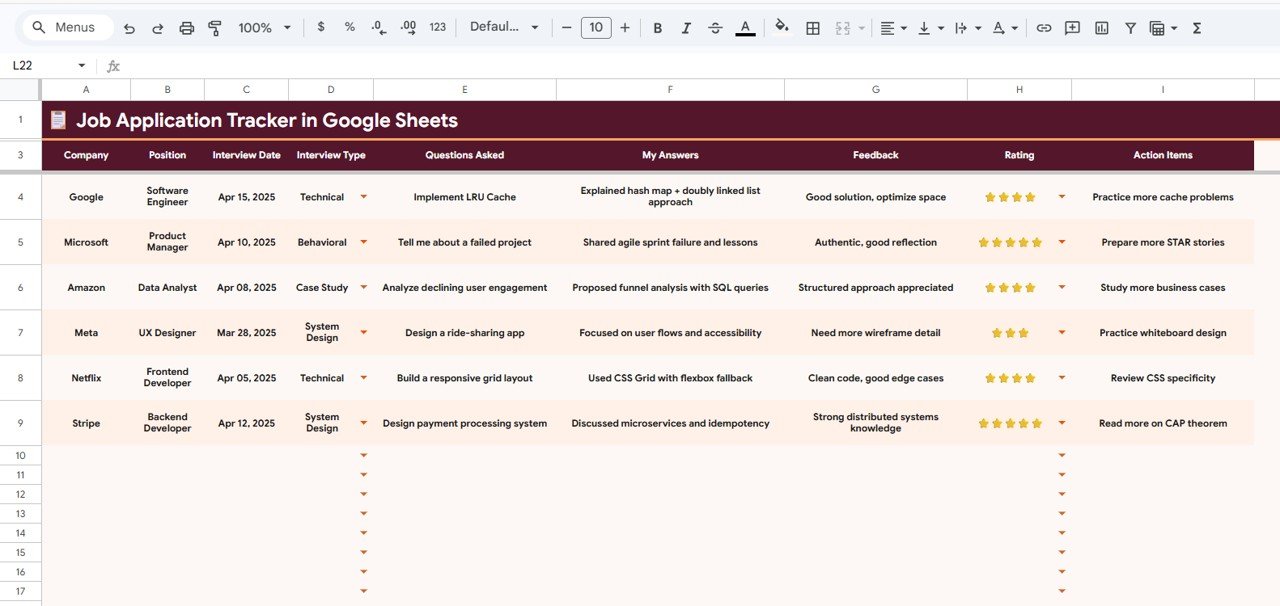
The Interview Tracker page is designed to help you prepare for, record, and learn from every interview experience. It offers seven detailed analyses: Interview Date by Company organizes your interview calendar chronologically. Interview Type by Position differentiates between phone screens, video calls, panel interviews, and on-site meetings. Questions Asked by Company builds a searchable database of interview questions from each employer. My Answers by Questions Asked records your responses for self-review and improvement. Feedback by Company captures recruiter or interviewer feedback. Rating by Company lets you rate your own performance to identify patterns. Action Items by Position tracks follow-up tasks like sending thank-you emails or completing assignments.
5. Offer Comparison
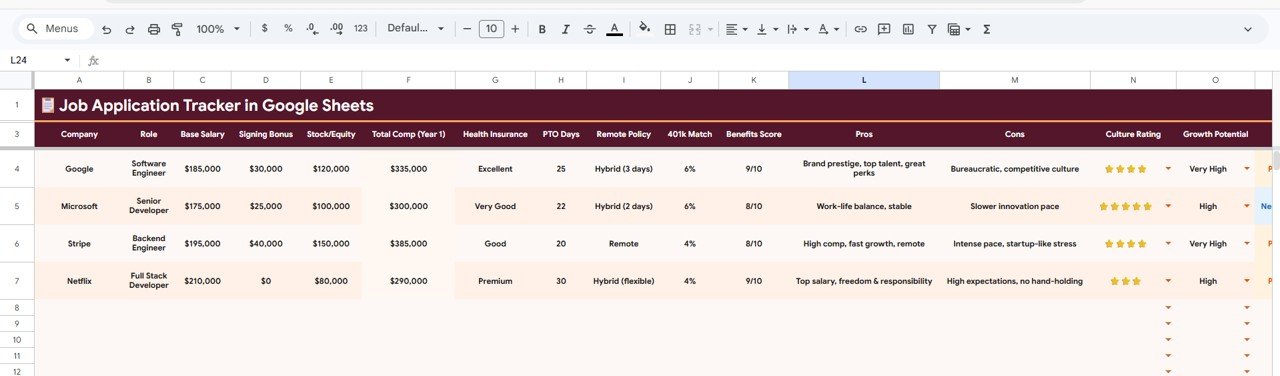
The Offer Comparison sheet is where you make the most important decision of your job search. It enables side-by-side comparison across 11 critical metrics organized by Company: Base Salary, Signing Bonus, Stock Equity, Total Comp (Year 1), Health Insurance, PTO Days, Remote Policy, 401k Match, Benefits Score, Culture Rating, and Growth Potential. This structured comparison removes emotional bias from the decision-making process and helps you evaluate each offer on hard numbers and key lifestyle factors.
👉 Click here to Purchase Job Application Tracker in Google Sheets
Advantages of Job Application Tracker in Google Sheets
- All-in-One Solution — Five dedicated pages cover the entire job search lifecycle from application to offer acceptance, eliminating the need for multiple tools or scattered notes.
- Data-Driven Decisions — KPI cards and interactive charts turn raw application data into actionable insights, helping you adjust your strategy based on real performance metrics.
- Cloud-Based and Collaborative — Built in Google Sheets, the tracker is accessible from any device with an internet connection and can be shared with career coaches, mentors, or accountability partners for real-time feedback.
- Interview Preparation Database — The Interview Tracker creates a searchable record of past questions, answers, and feedback that improves your preparation for every subsequent interview.
- Objective Offer Evaluation — The 11-metric Offer Comparison sheet removes guesswork from the most critical career decision, ensuring you choose the best overall package rather than just the highest salary.
- Zero Technical Barrier — No software installation, no macros, no coding required. Simply copy the template to your Google Drive and start tracking immediately.
Opportunities for Improvement
- Adding automated email reminders for follow-up dates would further reduce the risk of missing critical deadlines.
- A built-in salary negotiation notes section could help users track negotiation strategies and counteroffers alongside the Offer Comparison data.
- Integration with calendar apps like Google Calendar for automatic interview scheduling reminders would enhance the Interview Tracker page.
- A skills-matched-to-jobs analysis could help users identify which skills they need to develop for their most desired positions.
Best Practices
- Update Daily — Log every application, networking interaction, and interview immediately to keep your data accurate and your dashboard reflecting real-time status.
- Review the Overview Dashboard Weekly — Check your KPI cards and charts every week to identify trends, adjust your strategy, and ensure you are maintaining consistent application momentum.
- Use the Networking Tracker Proactively — Do not wait for job openings to appear. Build and maintain relationships consistently, and use the Follow-up Date field to schedule regular check-ins with your network.
- Debrief After Every Interview — Immediately after each interview, record questions, your answers, feedback, and a self-rating in the Interview Tracker. This habit builds a valuable preparation database over time.
- Compare Offers Holistically — Salary is only one factor. Use all 11 metrics in the Offer Comparison sheet to evaluate total compensation, benefits, culture, flexibility, and growth potential before making a decision.
- Share with a Mentor — Give view or edit access to a trusted career mentor or coach so they can review your progress, spot patterns, and provide targeted advice based on your actual data.
Explore Relevant Templates
If you found the Job Application Tracker useful, check out these related templates from NextGenTemplates:
- Skill Development Checklist in Google Sheets — Track training, deadlines, and skill-building progress with interactive dashboard cards and status indicators.
- Career Planning Checklist in Excel — Set career goals, track certifications, organize job applications, and monitor your professional growth milestones.
- Employee Shift Schedule in Google Sheets — Plan employee shifts with weekly schedules, monthly calendars, employee directories, and a built-in analytics dashboard.
Explore the full collection of Google Sheets Tracker Templates for more ready-to-use solutions. Also check out our blog posts on Attendance Tracker in Google Sheets and Employee Shift Schedule in Google Sheets for more Google Sheets template walkthroughs.
Frequently Asked Questions
👉 Click here to Purchase Job Application Tracker in Google Sheets
What is the best way to track job applications in Google Sheets?
The Job Application Tracker in Google Sheets provides a structured, 5-page system for tracking every stage of your job search. It includes an Overview Dashboard with KPI cards showing Total Applications, Interview Rate, Offer Rate, Active Applications, and Response Rate, plus detailed pages for logging applications, managing networking contacts, recording interviews, and comparing offers. This is the most comprehensive approach to managing a job search in Google Sheets.
Can I use this tracker to prepare for job interviews?
Yes. The Interview Tracker page lets you record Interview Date, Interview Type, Questions Asked, your Answers, Feedback received, self-Ratings, and Action Items for each company. Over time, this creates a searchable database of interview experiences that helps you identify common questions, improve weak answers, and approach each new interview with better preparation.
How does the Offer Comparison sheet work?
The Offer Comparison sheet organizes job offers side by side across 11 key metrics: Base Salary, Signing Bonus, Stock Equity, Total Comp Year 1, Health Insurance, PTO Days, Remote Policy, 401k Match, Benefits Score, Culture Rating, and Growth Potential. Each metric is displayed by Company, making it easy to see which offer provides the best overall package rather than just the highest salary.
Do I need any technical skills to use this template?
No. The Job Application Tracker runs entirely in Google Sheets and requires no installation, no macros, and no coding knowledge. After purchase, simply follow the PDF guide to copy the template into your Google Drive, replace the sample data with your own information, and all charts, KPI cards, and analyses update automatically.
Can I share this job tracker with my career coach?
Absolutely. Since it is built in Google Sheets, you can share it with anyone using standard Google Drive sharing permissions. Your career coach or mentor can view your application data, interview history, and offer comparisons in real time and provide targeted guidance based on your actual progress.
How many job applications can this tracker handle?
There is no fixed limit on the number of applications you can track. Google Sheets supports thousands of rows, so the template can easily accommodate hundreds of job applications, networking contacts, and interview records. All charts and KPI cards update dynamically as you add new data.
Conclusion
The Job Application Tracker in Google Sheets is a must-have tool for anyone serious about landing the right job. With 5 interactive pages covering the full job search lifecycle — from application submission to final offer comparison — this template brings structure, clarity, and data-driven insights to a process that is often overwhelming and disorganized. Stop relying on memory, scattered notes, or basic spreadsheets. Start tracking your career moves with a professional-grade system designed to help you get hired faster and smarter.
👉 Click here to Purchase Job Application Tracker in Google Sheets
🎥 Visit our YouTube channel to learn step-by-step video tutorials
👉 Youtube.com/@NeoTechNavigators