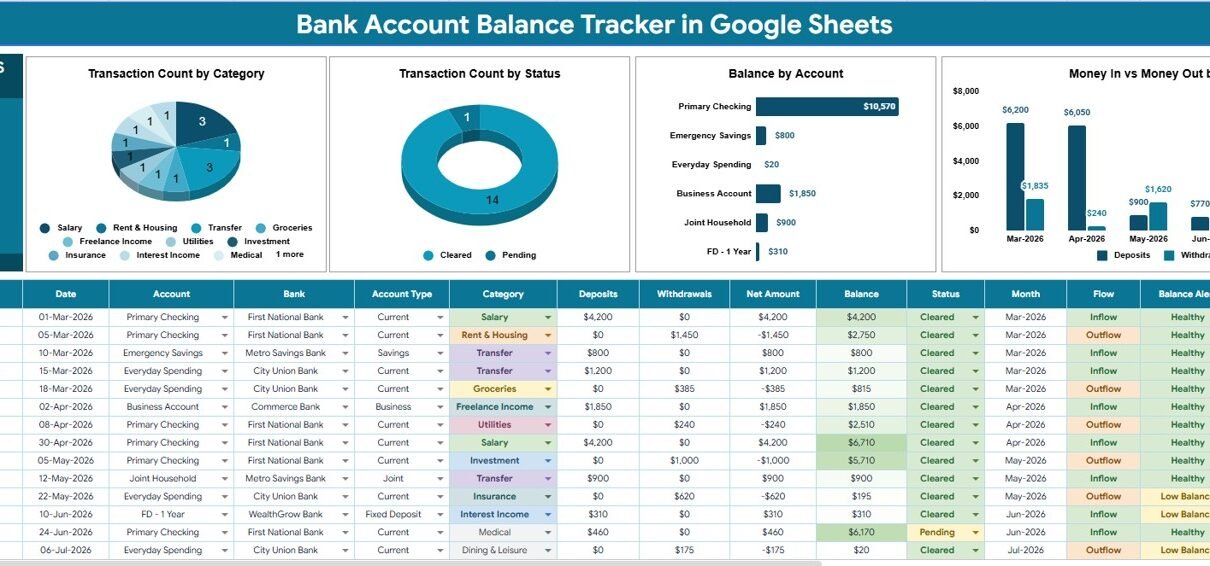
The Bank Account Balance Tracker in Google Sheets runs on 2 linked sheets, drives 1 live Total Balance Across Accounts card, 4 auto-updating charts and 5 dropdown lists you control from a single Setup tab. Setup takes under 10 minutes and the file costs $6.99 once — against $8–15 per month for the subscription money apps most people end up abandoning.
Most households and freelancers do not have a budgeting problem so much as a visibility problem. Money sits in a salary account, a joint account, a savings account and a credit card, and answering “what is my actual position today” means opening four apps. This Google Sheets bank account tracker collapses that into one number and four charts, without ever asking you to hand over a banking login.
Get the Bank Account Balance Tracker in Google Sheets
Key Features of the Bank Account Balance Tracker in Google Sheets
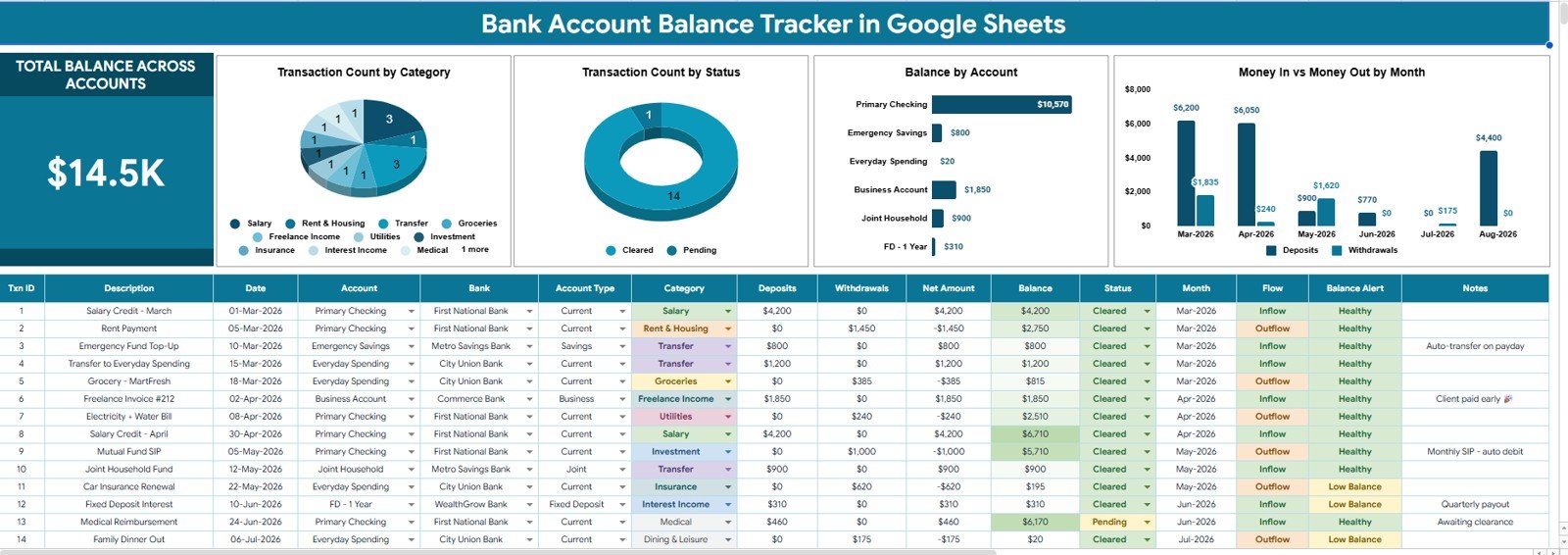
- One consolidated balance. The Total Balance Across Accounts card sums every account on your list and recalculates the moment a transaction row is entered.
- Four pre-built charts. Transaction Count by Category, Transaction Count by Status, Balance by Account, and Money In and Money Out by Month — all reading directly from the transaction log.
- Slicers across the top. One click on a bank, account type, category or status refilters the balance card and all four charts together.
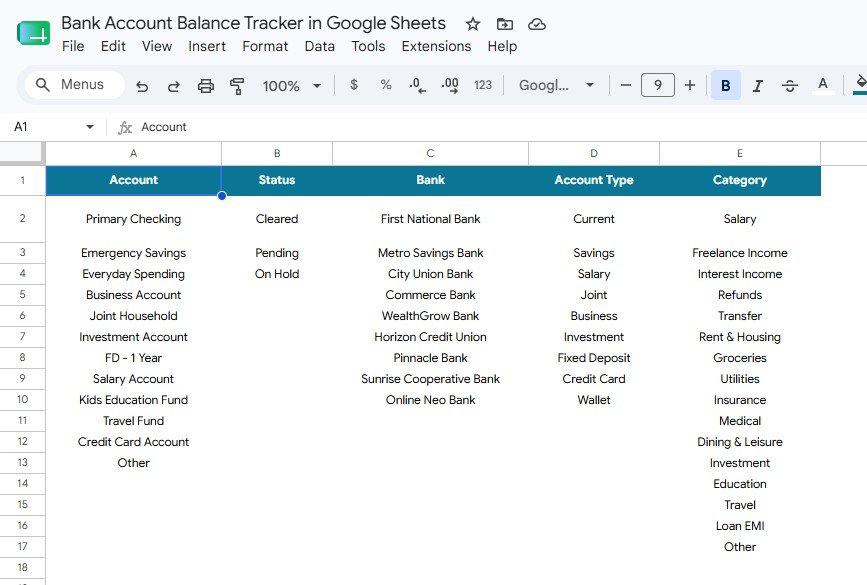
- Five lists you own. Account, Status, Bank, Account Type and Category are all defined on the Setup sheet and feed the dropdowns automatically.
- Auto-expanding ranges. Add rows to the transaction log and the charts pick them up — no range editing.
- No bank credentials. This is a manual-entry template by design, so nothing about your accounts leaves your Google Drive.
- Free to share. Send a Google share link to a partner or accountant; there are no seat licences and no per-user fees.
Template Structure Explained
Page 1: Overview Page
The Overview page leads with the Total Balance Across Accounts card and a row of slicers, then four charts. Transaction Count by Category shows where your activity concentrates; Transaction Count by Status shows how much is still unreconciled; Balance by Account ranks accounts largest to smallest; and Money In and Money Out by Month plots deposits against withdrawals. Below the visuals sits the transaction log — date, account, bank, category, status, money in and money out — the single input area that feeds everything above it.
Page 2: Setup Sheet
The Setup sheet is the control panel behind every dropdown and slicer. It holds Account Setup by Account, Status Setup by Status, Bank Setup by Bank, Account Type Setup by Account Type and Category Setup by Category. Add a bank or a spending category here and it appears in the transaction log dropdown immediately — you never touch a data-validation rule yourself.
The slicer controls at the top of the Overview page are a native Google Sheets feature. If you want to understand how they behave or add your own, Google documents them in the official Google Sheets Help article on slicers.
Bank Account Balance Tracker in Google Sheets vs. Excel vs. Paid Money Apps — Feature Comparison
| Feature | Bank Account Balance Tracker in Google Sheets | Microsoft Excel version | Quicken / YNAB / Monarch Money |
|---|---|---|---|
| Cost | $6.99 one-time | $6–15 one-time + Excel licence | $8–15 / month, billed yearly |
| Platform | Google Sheets (free) | Microsoft 365 required | Vendor web + mobile app |
| Setup time | Under 10 minutes ✅ | 10–15 minutes | 20–40 minutes incl. bank linking |
| Real-time collaboration | Yes, native ✅ | Only via OneDrive co-authoring | Extra seats often cost more |
| Mobile access | Sheets app, free ✅ | Excel mobile, limited editing | Yes |
| Add your own categories & banks | Unlimited, via Setup sheet ✅ | Unlimited | Often fixed to vendor taxonomy |
| Bank credentials required | None — you enter data ✅ | None | Yes, account linking required |
| Share with link | Yes ✅ | Yes, with a Microsoft account | Invite-only, seat-limited |
| Year-1 cost at 5 users | $6.99 total ✅ | $6.99 + 5 Microsoft 365 licences | $480–900 |
For households and small businesses that want a single balance view without handing bank logins to a third party or paying monthly, the Bank Account Balance Tracker in Google Sheets sits in the sweet spot.
Who Should Use This Template
Perfect for:
- Individuals and couples juggling 3–10 accounts across two or more banks
- Freelancers who need business and personal accounts separate but visible together
- Small business owners doing monthly bank reconciliation from downloaded statements
- Anyone who would rather type transactions than connect bank credentials to an app
- Google Workspace users who want the file shared with a spouse or accountant at no extra cost
Not a fit if:
- You want automatic bank feeds — there is no bank API connection here
- You need double-entry bookkeeping with journals and a trial balance
- You process several hundred transactions a day and a spreadsheet would bog down
- You need live FX conversion across currencies — currency handling is manual
Real-World Use Cases
Meera runs a two-income household with five accounts. A joint current account, two salary accounts, a savings account and one credit card. Every Sunday she opens the tracker, reads the single combined figure, and checks Money In and Money Out by Month. The months where spending quietly outran income are obvious in one glance — and she is not paying $99 a year for a budgeting subscription to see it.
Daniel is a freelance designer with a business and a personal account. Client payments land in one, personal spending comes out of the other. He tags each row with a category, filters by account type with the slicer, and at year end hands his accountant a Google share link instead of exporting statements from two banking portals. He pairs it with the Tax Deduction and Receipt Tracker in Google Sheets for deductible expenses.
Anita keeps the books for a 6-person agency. Each month she downloads statements from three banks, logs them, and watches Transaction Count by Status until the unreconciled count reaches zero — that is her month-close signal. Balance by Account then gives the partners a clean cash position on one screen.
Advantages of the Bank Account Balance Tracker in Google Sheets
It costs $6.99 once, not $96–180 a year. Over three years a mid-tier money app runs $288–540 for a household. This tracker is a single payment with lifetime access, which is why the year-1-at-5-users figure in the table above is $6.99 rather than several hundred dollars.
It saves the weekly app-hopping. Checking four banking apps takes 5–10 minutes each time. Logging transactions as they happen and reading one card takes under a minute.
Your data stays yours. Because nothing connects to a bank API, there is no third-party aggregator holding your credentials. The file lives in your own Google Drive under your own account permissions.
It bends to your categories. Subscription apps impose their own spending taxonomy. Here you write the five lists on the Setup sheet, so “school fees”, “farm inputs” or “studio rent” are first-class categories rather than an “Other” bucket.
Opportunities for Improvement
Being straight about the trade-offs: this is a manual-entry tracker. If you make 40 transactions a week and will not sit down to log them, an app with automatic bank feeds genuinely suits you better — an unfilled spreadsheet helps nobody.
Multi-currency is handled by treating each currency as its own account rather than converting at live rates, so a globally distributed set of accounts needs a manual FX column. There is also no forecasting or scheduled-transaction engine; this template tells you where you are, not where you will be in 90 days. For forward-looking planning, pair it with the Personal Cash Flow Tracker in Google Sheets.
Best Practices
- Enter opening balances first. Log one row per account with its current balance before anything else, or your totals will start from zero.
- Keep the Status column honest. Mark rows as reconciled only once they appear on the actual statement — Transaction Count by Status is only useful if it is truthful.
- Log weekly, not monthly. Fifteen minutes each Sunday beats a three-hour catch-up where receipts have gone missing.
- Keep categories under 15. Too many categories make the Transaction Count by Category chart unreadable and slow down data entry.
- Duplicate the file each year. Start a fresh copy every January and archive the old one so the sheet stays fast.
Explore Relevant Templates
- Personal Cash Flow Tracker in Google Sheets — income against expenses, month by month
- Cash Envelope Budget Tracker in Google Sheets — allocate money into envelopes before it leaves the account
- Emergency Fund Savings Tracker in Google Sheets — set a target and log contributions
- Insurance Policy and Premium Tracker in Google Sheets — never miss a renewal or premium date
- Charitable Giving and Tithe Tracker in Google Sheets — record giving, pledges and receipts
- Fintech Dashboard in Google Sheets — a larger multi-page analytics build if you outgrow a tracker
If you want to get faster at building trackers like this, the NextGenTemplates Academy learning paths take you through the core spreadsheet skills with practice files.
Frequently Asked Questions
What does the Bank Account Balance Tracker in Google Sheets actually track?
The Bank Account Balance Tracker in Google Sheets tracks money in, money out and the running balance for every account you list. It shows a Total Balance Across Accounts card plus four charts covering transaction count by category, transaction count by status, balance by account, and monthly inflow versus outflow.
Does this tracker connect to my bank automatically?
No. The Bank Account Balance Tracker in Google Sheets is a manual-entry template with no bank API link, so you never share banking credentials with a third party. You type transactions in or paste them from a downloaded statement, and the charts and balances update on their own.
How long does setup take?
Under 10 minutes. Replace the five sample lists on the Setup sheet with your own banks, accounts, account types, categories and statuses, enter an opening balance per account, and the Bank Account Balance Tracker in Google Sheets is ready to use.
How many bank accounts can I add?
There is no built-in limit. Add as many accounts and banks as you need on the Setup sheet and they flow through to the dropdowns, the Balance by Account chart and the slicers. Most users comfortably track between 3 and 12 accounts.
How does this compare to Quicken, YNAB or Monarch Money?
Those apps run roughly $8–15 per month and require linking your bank logins. The Bank Account Balance Tracker in Google Sheets is a one-time $6.99 purchase with no subscription, no credential sharing and unlimited sharing by Google link — the trade-off being that you enter transactions manually.
Can I use it for business and personal accounts together?
Yes. Define separate account types on the Setup sheet, tag each transaction accordingly, and use the account type slicer to view business only, personal only, or both. Many freelancers run the Bank Account Balance Tracker in Google Sheets exactly this way.
Will it work on my phone?
Yes. The Bank Account Balance Tracker in Google Sheets opens in the free Google Sheets app on Android and iOS, so you can log a transaction the moment it happens. Charts and slicers read best on a desktop or tablet screen.
About the Author
Built by PK — Microsoft Certified Professional with 15+ years of Excel, Google Sheets and Power BI experience. Founder of NextGenTemplates, reaching 300K+ subscribers across YouTube channels. Every template is hand-built and tested before release.
Conclusion
If your money is spread across several accounts and you have never had one number that tells you where you stand, the Bank Account Balance Tracker in Google Sheets fixes that in an afternoon. Two sheets, one balance card, four charts, five lists you control — and no monthly bill.
Get the Bank Account Balance Tracker in Google Sheets
Instant download · One-time payment · No subscription
Last updated: August 2026