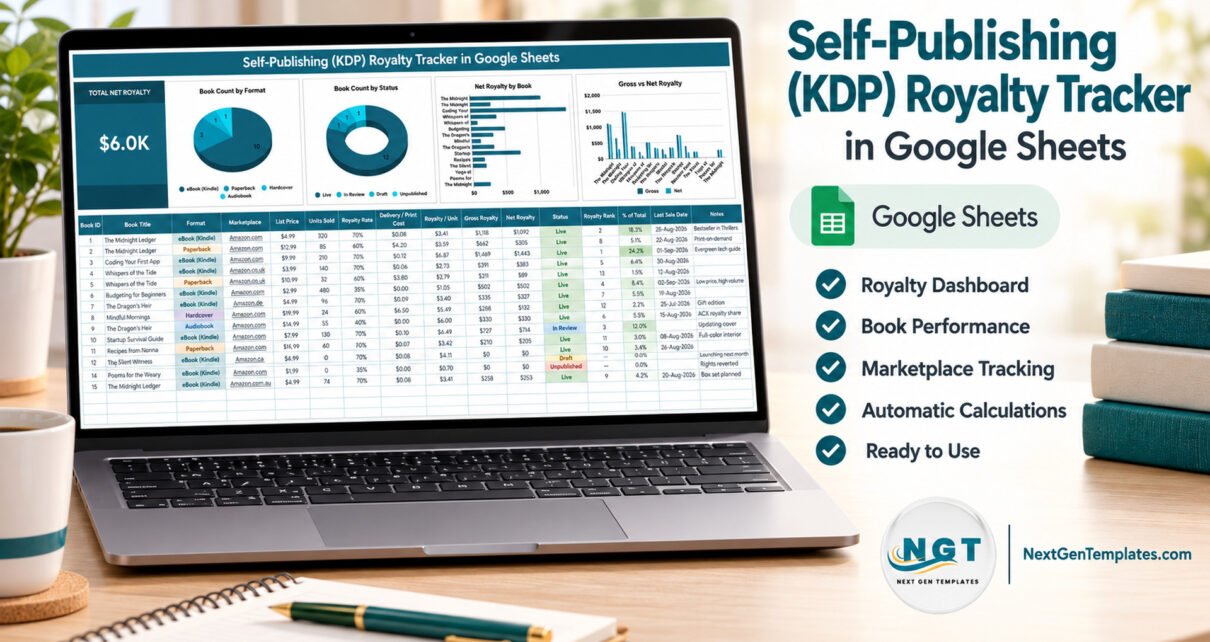
The KDP Royalty Tracker in Google Sheets puts every book edition you publish into one table of 16 columns, six of which calculate themselves, and drives a single Total Net Royalty card plus four live charts straight from that table. The sample file ships with 15 rows already filled in, the formulas and charts stretch to row 1000, and a full setup takes under 10 minutes.
If you self-publish, the numbers you need are never in one place. Kindle royalties sit in one report, paperback royalties in another, audiobook income somewhere else again, and the five Amazon marketplaces each keep their own ledger. Add a few direct sales from an event and no single screen tells you what you actually earned. This kdp royalty tracker in google sheets is the one sheet that holds all of it, because you decide what goes in.

One thing to be clear about first
This is an independent Google Sheets template. It is not affiliated with, endorsed by or connected to Amazon or Kindle Direct Publishing, it has no API or sync, and it does not import KDP sales reports. You enter or paste the figures yourself from your own KDP dashboard. That is a real limitation compared with account-connected tools — and it is also the reason the sheet can track sales that never touched Amazon at all.
Key Features of the KDP Royalty Tracker in Google Sheets
- A row per edition, not per book. One title sold as an eBook (Kindle), a Paperback, a Hardcover and an Audiobook becomes four rows, each carrying its own list price, royalty rate and delivery or print cost.
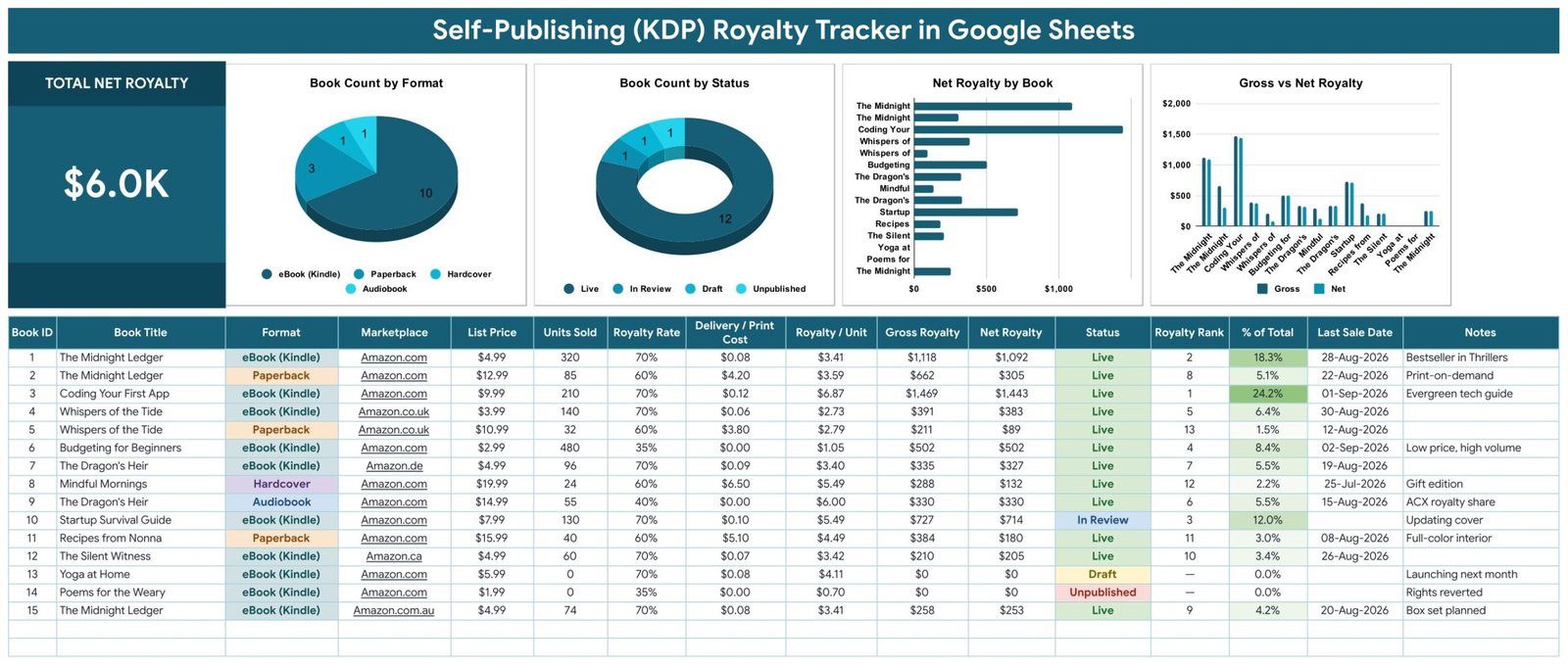
- Six automatic columns. Book ID, Royalty / Unit, Gross Royalty, Net Royalty, Royalty Rank and % of Total are formulas you never type into.
- Safe maths. Royalty / Unit is List Price × Royalty Rate − Delivery / Print Cost, floored at zero, so a mistyped print cost cannot drag a book into negative earnings.
- Ranking built in. Royalty Rank sorts every edition by net royalty; % of Total shows the share of your income each one carries. In the sample data the spread runs from 24.2% down to 1.5%.
- Four charts with no helper tables. They read the data columns directly with the built-in Aggregate option across rows 16–1000, so new titles appear the moment you type them.
- Self-extending dropdowns. Format, Marketplace and Status read a separate List tab (rows 2–500); add a value there and the dropdown picks it up.
- Browser-only. No macros, no add-ons, no scripts to authorise — just a Google account.
Template Structure — Page by Page
The file has three visible pages plus the List tab that feeds the dropdowns.
Page 1: The Royalty Tracker
The working page. A large Total Net Royalty card sits at the left of a band of four charts — Book Count by Format, Book Count by Status, Net Royalty by Book and Gross vs Net Royalty — and the 16-column entry table runs underneath: Book ID, Book Title, Format, Marketplace, List Price, Units Sold, Royalty Rate, Delivery / Print Cost, Royalty / Unit, Gross Royalty, Net Royalty, Status, Royalty Rank, % of Total, Last Sale Date and Notes.
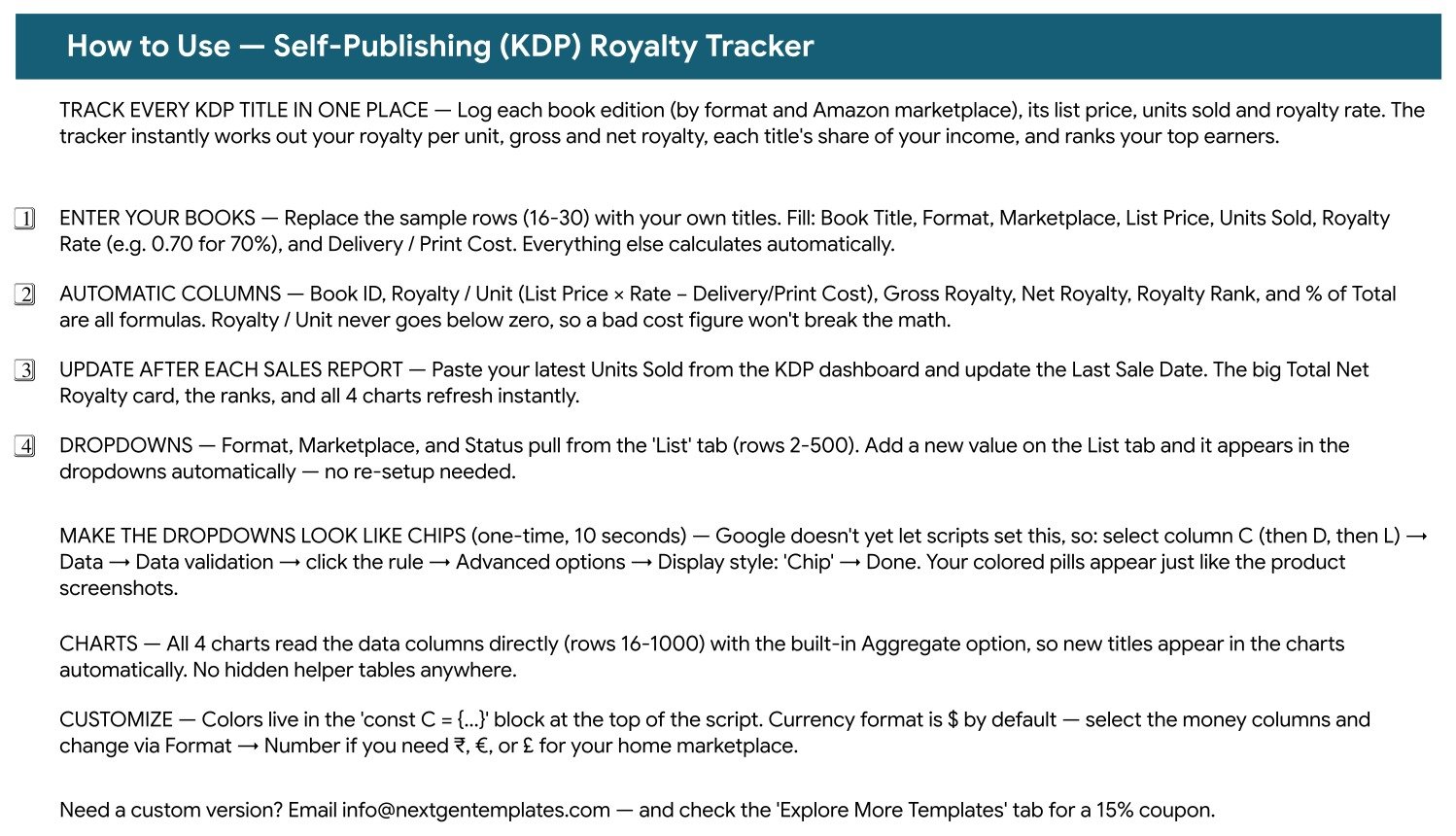
Page 2: How to Use
The instructions live inside the file, not in a separate manual. This page covers replacing the sample rows, which columns are formulas, how to refresh after a KDP sales report, how the List-tab dropdowns work, and the one-time Data → Data validation step that turns Format, Marketplace and Status into the coloured chips shown in the screenshots.
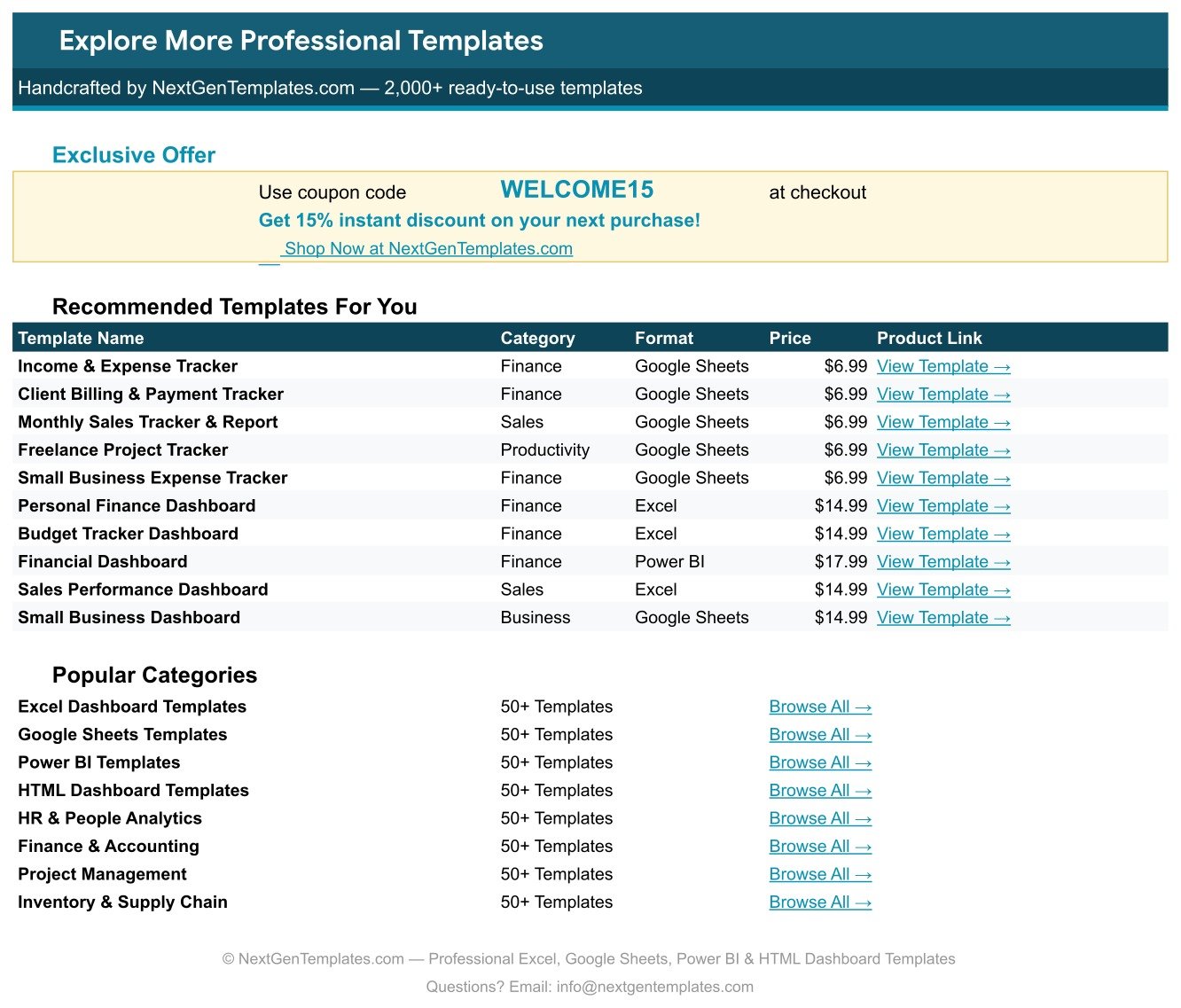
Page 3: Explore More Templates
A recommendations page listing other NextGenTemplates products by category, format and price, with category browse links and a WELCOME15 coupon worth 15% off a future purchase.
KDP Royalty Tracker in Google Sheets vs. an Excel Royalty Spreadsheet vs. Book Report / ReaderLinks
| Feature | KDP Royalty Tracker in Google Sheets | DIY Excel royalty spreadsheet | Book Report / ReaderLinks |
|---|---|---|---|
| Cost | $12.99 one-time | Free, plus hours of build time | $10–$20 / month, forever |
| Platform | Browser, any device with a Google account | Desktop Excel | Browser, vendor-hosted |
| Setup time | Under 10 minutes | A weekend of formula writing | Minutes, after connecting your account |
| Reads your KDP account automatically | No — you enter or paste the figures | No | ✅ Yes |
| Tracks non-Amazon, direct and event sales | ✅ Yes, any marketplace you type in | ✅ Yes | Usually Amazon only |
| Real-time collaboration | ✅ Yes, native Google Sheets sharing | Only via OneDrive co-authoring | Single-seat on cheaper plans |
| Share with a link | ✅ Yes | File attachment | Vendor login required |
| Edit the columns and formulas | ✅ Yes, it is your own sheet | ✅ Yes | No, fixed reports |
| Year-1 cost at 3 users | $12.99 total | $0 plus build time | $120–$240+ |
For authors who want their royalty numbers in one editable sheet they own — including the sales a KDP-only tool never sees — without a monthly fee, the Self-Publishing Royalty Tracker sits in the sweet spot.
Who Should Use This Template
Perfect for:
- Indie authors with roughly 3–100 editions across Kindle, paperback, hardcover and audiobook
- Self-publishers selling in several Amazon stores who want per-marketplace visibility
- Writers who also sell direct, at events or through other retailers
- Small presses and author-services VAs reporting royalties back to a handful of clients
- Anyone looking for a kindle royalty tracker template they can edit and keep for good
Not a fit if:
- You want royalties pulled in automatically — this sheet has no KDP connection
- You split royalties across co-authors, agents or estates on contractual tiers
- You need tax-ready accounting, VAT handling or an audit trail
- You have no Google account, since the download is a “Make a copy” link into Drive
Real-World Use Cases
Priya publishes thrillers and has 22 editions live. Her old routine was four marketplace reports and a calculator on the first of every month. Now she pastes units sold into one book royalty tracker in google sheets, sees at a glance that a single Kindle title carries close to a quarter of her income, and stops funding ads for a paperback that earns $89 a year.
Marcus writes non-fiction and sells at conferences. His Amazon-connected dashboard never counted the 200 copies he sold from a table at the back of a room. He adds a “Direct / Events” value to the List tab, records those sales as their own marketplace rows, and finally has a royalty total that matches what landed in his bank account.
Anita runs author services for six self-publishing clients. One copy of the tracker per author lives in a shared Drive folder. Each writer gets a view-only link, and “how much did I make last month?” is answered with a screenshot instead of a rebuilt spreadsheet.
Advantages of the Self-Publishing Royalty Tracker
The biggest saving is not the subscription you avoid, it is the hour a month you stop spending on arithmetic. Royalty rates differ by format, by price band and by marketplace; delivery costs eat into 70% Kindle royalties in a way that is easy to forget. Letting the sheet apply List Price × Royalty Rate − Delivery / Print Cost to every row removes the most common mistake in author bookkeeping, which is quietly overstating net income.
The second advantage is honesty about your catalogue. Royalty Rank and % of Total are uncomfortable columns in the best way — they show that a handful of editions usually carry most of the income, and that some titles earn less in a year than a single ad campaign costs. Because the charts read the table directly, that picture updates the moment you paste new figures in.
Third, it is portable. A Google Sheet opens on a phone, shares with a co-writer or an accountant by link, and can be duplicated per pen name or per year without any re-setup.
Opportunities for Improvement
Being straight about the gaps: there is no automatic import, so the tracker is only as current as your last paste. It holds one currency at a time, so multi-marketplace authors need to convert before entering — knowing how to track kdp royalties in google sheets across stores really means picking one home currency and sticking to it. There is no month-by-month history page either, so the Total Net Royalty card reflects whatever is in the table right now rather than a time series; authors who want trend lines usually keep one copy per year. And the coloured chips on the dropdown columns need a 10-second manual setting, because Google does not currently let a script apply that display style.
Best Practices
- Set up the List tab first. Formats, marketplaces and statuses defined up front stop half your rows saying “Amazon US” and the other half “Amazon.com”.
- Enter royalty rates as decimals — 0.70 for 70%, 0.35 for 35% — exactly as the How to Use page says.
- Update on a fixed day each month, right after your KDP report lands, and set Last Sale Date as you go.
- Keep one copy per calendar year. Duplicating the sheet each January gives you a clean annual figure and a simple archive.
- Use the Notes column. “Rights reverted”, “box set planned” or “cover being updated” explains a zero far better than a blank row does.
- Add non-Amazon sales as their own marketplace rows. A tracker that matches your bank statement is worth far more than one that matches a single retailer.
Explore Relevant Templates
Authors rarely earn from books alone, and the same one-page layout covers the rest. The Print-on-Demand Sales Tracker in Google Sheets handles merch and POD titles, while the Digital Product Sales Tracker in Google Sheets is built for courses, workbooks and downloads sold from your own site. If your book funnel earns referral income, the Affiliate Marketing Income Tracker in Google Sheets is the companion sheet, and authors who teach will want the Online Course Sales & Student Tracker in Google Sheets. For promotion work there is also the YouTube Channel Performance Tracker in Google Sheets.
Two more writer-focused trackers — a Freelance Writing Pitch & Submission Tracker and a Book Writing & Word Count Tracker, both in Google Sheets — are being prepared and will be published shortly.
Worth reading alongside the template: Amazon KDP’s royalty help pages explain the 35% and 70% options and the delivery costs that feed the Delivery / Print Cost column, and Google’s data validation guide documents the dropdown and chip settings used on Format, Marketplace and Status.
Frequently Asked Questions
Does the KDP Royalty Tracker in Google Sheets connect to Amazon?
No. The KDP Royalty Tracker in Google Sheets has no API, no sync and no affiliation with Amazon or Kindle Direct Publishing. You type or paste units sold and royalty rates from your own KDP dashboard, which is also what allows the sheet to track direct and non-Amazon sales.
How long does setup take?
Under 10 minutes. Open the PDF, click its “Make a copy” link, set your Formats and Marketplaces on the List tab, and overwrite the 15 sample rows. The six formula columns, the Total Net Royalty card and all four charts update as you type.
How does this compare to Book Report or ReaderLinks?
Those services read your Amazon account automatically for roughly $10–$20 a month. This Self-Publishing Royalty Tracker is a one-time $12.99 purchase you own outright and can edit, and it records any marketplace you enter — including event, direct and non-Amazon sales those tools do not see.
Can it track audiobooks and hardcovers?
Yes. The Format dropdown ships with eBook (Kindle), Paperback, Hardcover and Audiobook, and every format gets its own row with its own royalty rate and print cost. Any other format you need can be added on the List tab.
How many books can it hold?
The formulas and charts cover rows 16 to 1000, so around 985 editions are supported without any changes. New rows are ranked, weighted by % of Total and charted automatically as soon as they are entered.
Do I need Excel or macros?
Neither. This is a pure Google Sheets file with no macros and no add-ons. A free Google account and a browser are enough, and the sheet opens in the Google Sheets mobile app as well.
Can I change the currency?
Yes. Money columns use $ by default. Select them and use Format → Number to switch to ₹, € or £. Convert each marketplace’s royalty to that one currency before entering it so the totals stay comparable.
About the Author
Built by PK — Microsoft Certified Professional with 15+ years of Excel, Google Sheets and Power BI experience. Founder of NextGenTemplates, reaching 300K+ subscribers across YouTube. Every template is hand-built and tested before release.
Conclusion
Self-publishing income is scattered by design: different formats, different rates, different stores, different reports. The self-publishing royalty tracker does not try to automate that away — it gives you one clean table where the arithmetic is already done, the best and worst earners are ranked, and four charts tell you the shape of your catalogue at a glance.
👉 Click here to purchase the Self-Publishing (KDP) Royalty Tracker in Google Sheets
Instant download · One-time payment · No subscription · Lifetime access
🎥 More step-by-step tutorials: Youtube.com/@NeoTechNavigators
Last updated: September 2026