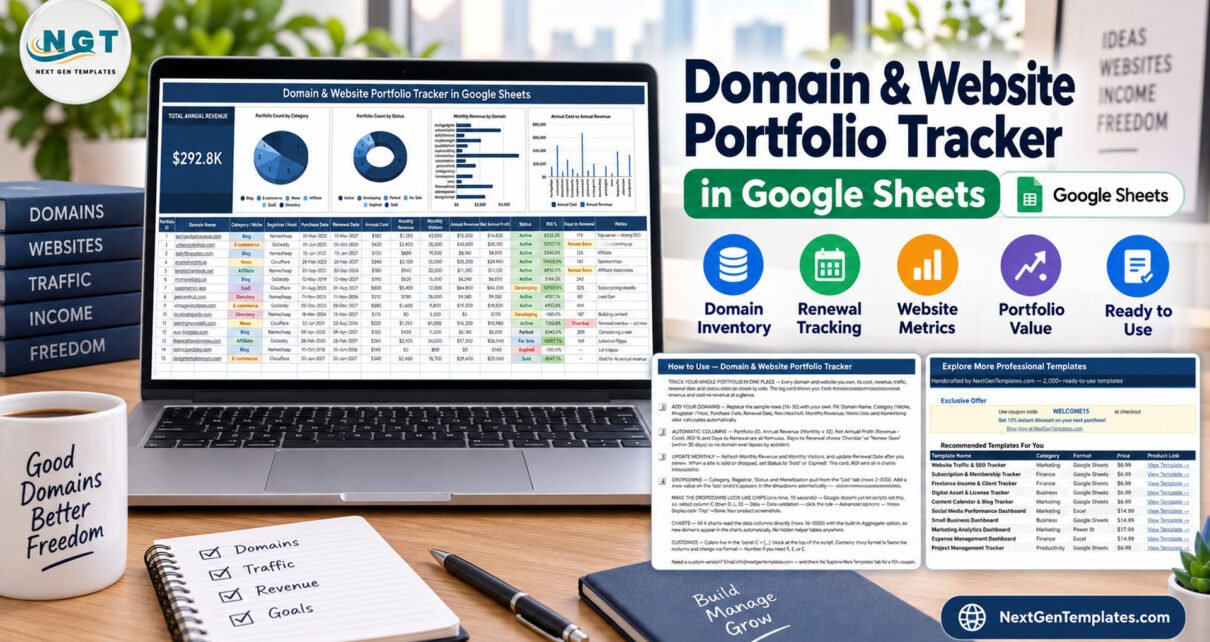
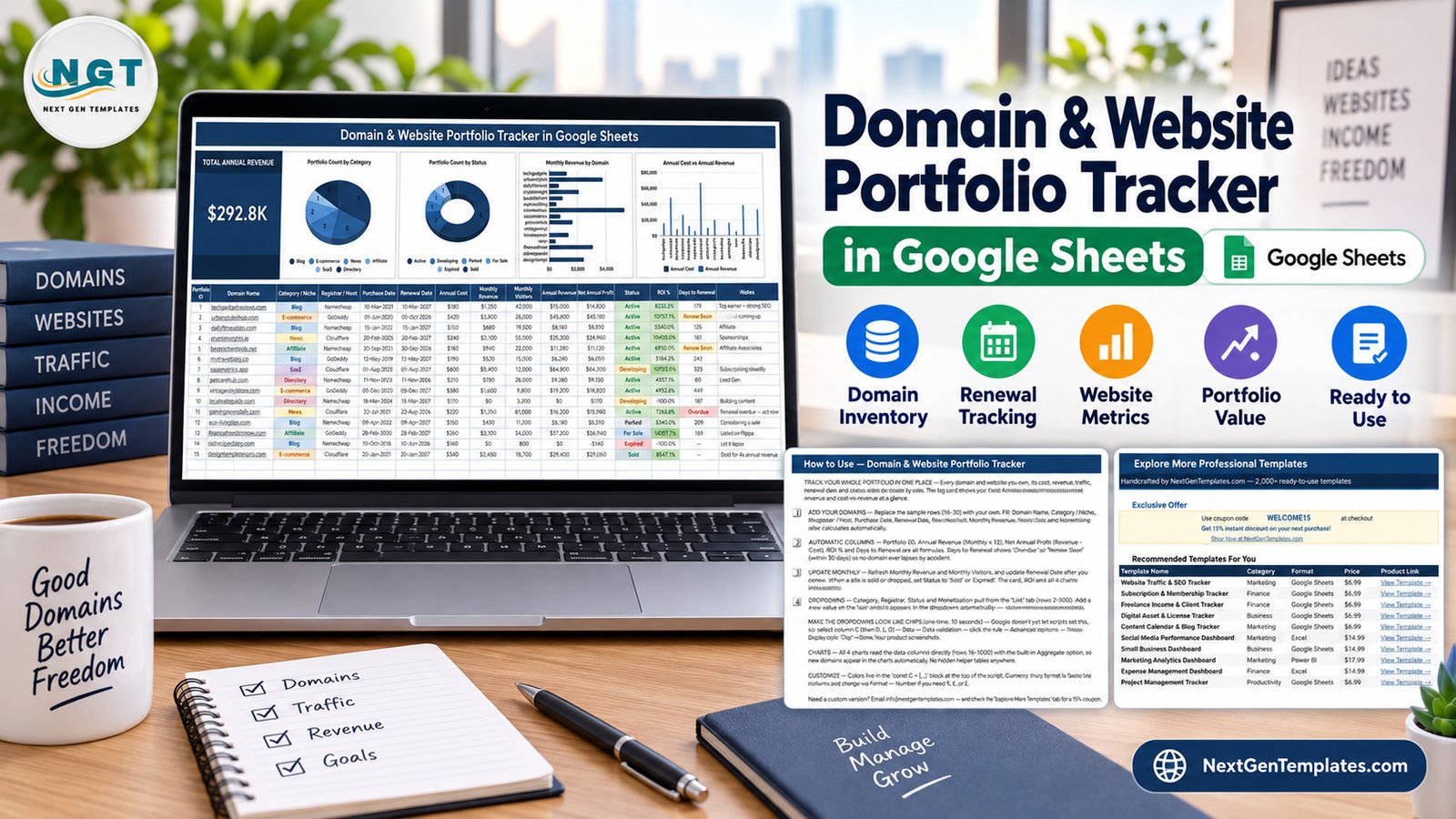
The Domain and Website Portfolio Tracker in Google Sheets holds 16 columns per domain, five of which calculate themselves, above a single KPI card and four charts that read rows 16 to 1000 straight from the data table. It ships with 15 sample domains already filled in, four self-expanding dropdown lists driven by a separate List tab, and a Days to Renewal column that flags “Renew Soon” inside 30 days and “Overdue” once the date has gone.
Anyone who owns more than a handful of sites knows the problem: the renewal date is in a registrar email, the revenue is in AdSense, the traffic is in Analytics, and the cost of holding a domain you never built out is nowhere at all. This domain and website portfolio tracker pulls all of it into one shareable Google Sheet so the whole portfolio has a single profit-and-loss view.
Key Features of the Domain and Website Portfolio Tracker
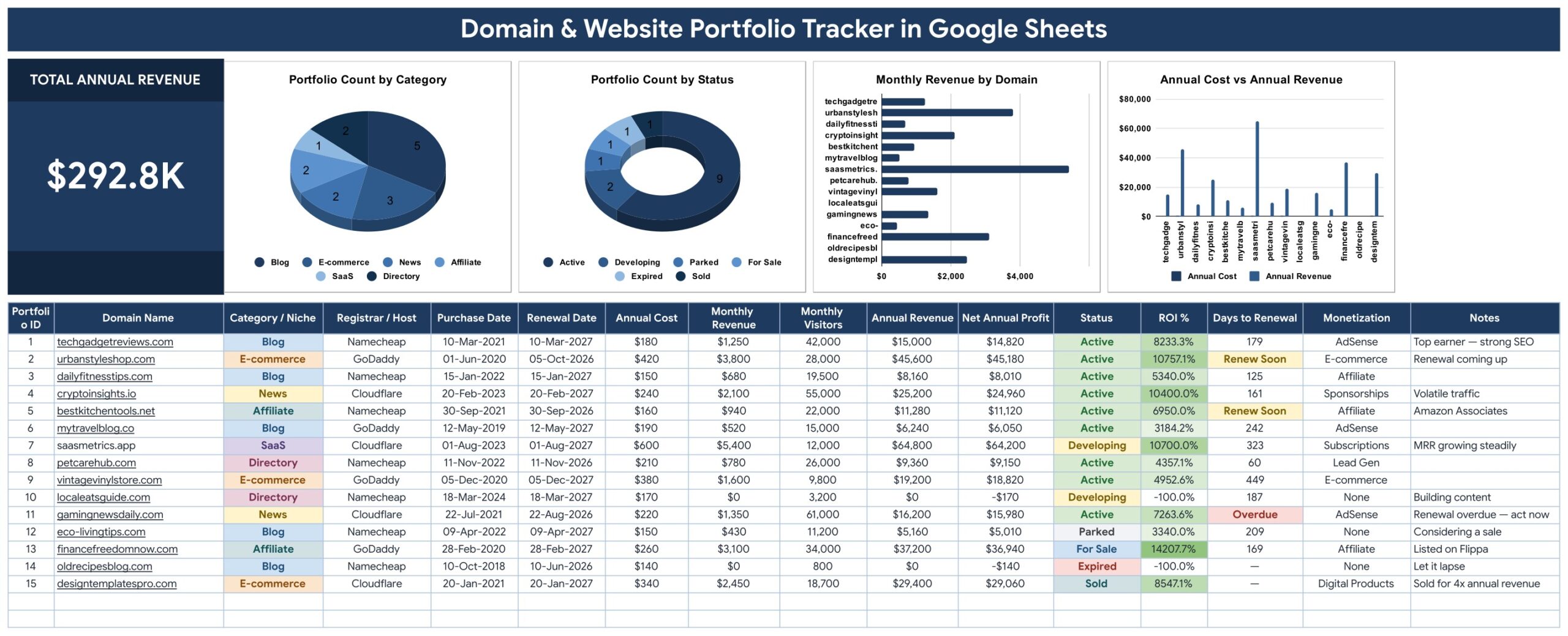
- 16 columns per domain. Portfolio ID, Domain Name, Category / Niche, Registrar / Host, Purchase Date, Renewal Date, Annual Cost, Monthly Revenue, Monthly Visitors, Annual Revenue, Net Annual Profit, Status, ROI %, Days to Renewal, Monetization and Notes.
- Five automatic columns. Annual Revenue is Monthly Revenue multiplied by 12, Net Annual Profit subtracts Annual Cost from it, ROI % measures return against holding cost, Days to Renewal counts down from your renewal date, and Portfolio ID numbers every row.
- Renewal flags. Days to Renewal shows an amber “Renew Soon” inside 30 days and a red “Overdue” past the date, so a forgotten domain becomes visible before the registrar charges you.
- One KPI card and four charts. Total Annual Revenue sits top-left, followed by Portfolio Count by Category, Portfolio Count by Status, Monthly Revenue by Domain and Annual Cost vs Annual Revenue.
- Four self-expanding dropdowns. Category / Niche, Registrar / Host, Status and Monetization read from a List tab (rows 2 to 500). Add a value there and the dropdown picks it up without touching data validation.
- No helper tables. All four charts use the built-in Aggregate option against the live data columns, so nothing breaks when you insert a row.
- No macros and no add-ons. It runs in a browser on any operating system, and the colour palette lives in a single
const C = {...}block in the build script.
Sheets Explanation
Portfolio Tracker
The single working page. The Total Annual Revenue card sits on the left of a four-chart strip — Portfolio Count by Category, Portfolio Count by Status, Monthly Revenue by Domain and Annual Cost vs Annual Revenue — above the data-entry table, where Category, Status and Monetization display as coloured chips.
How to Use
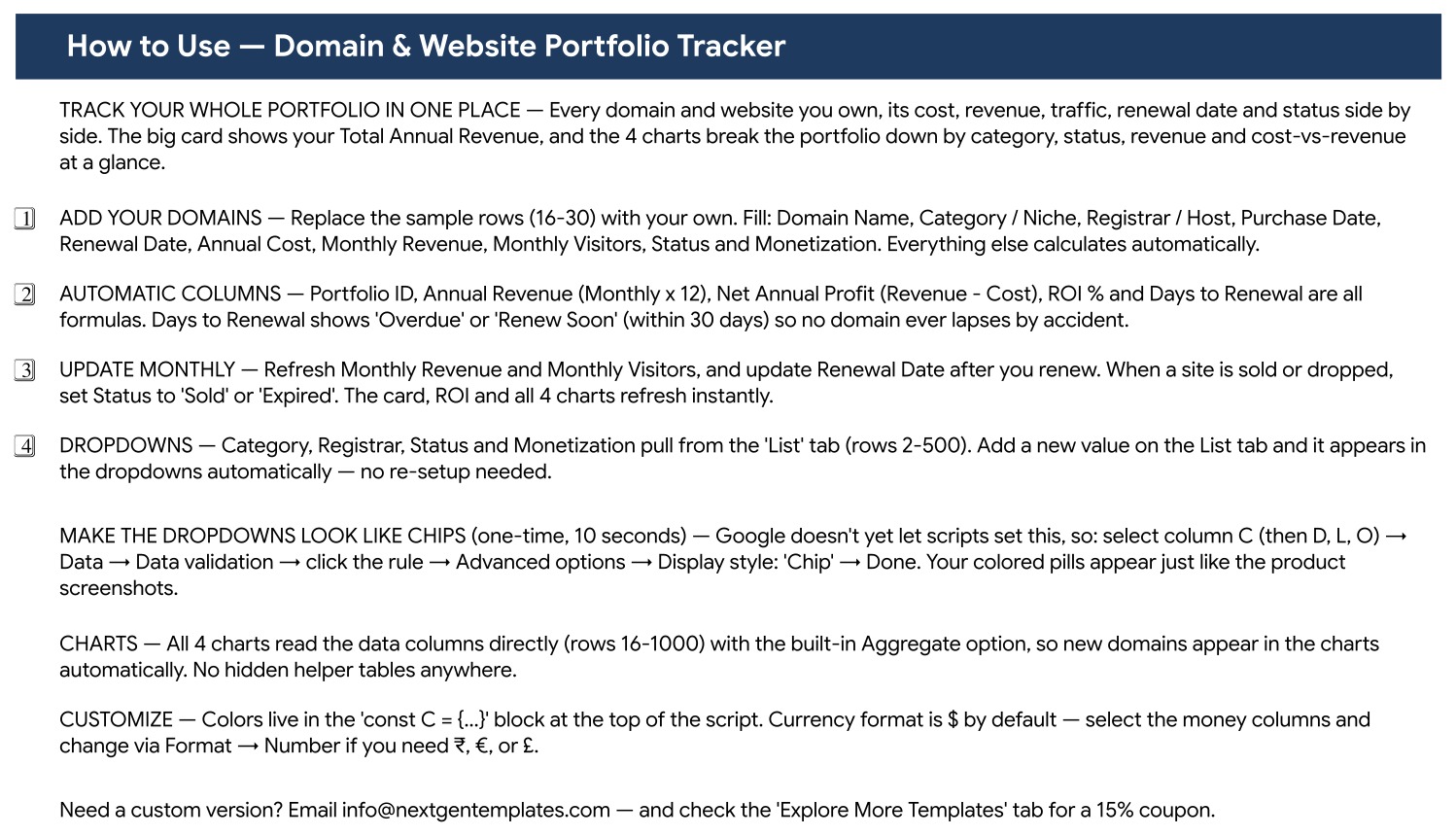
A four-step onboarding page: where to add your domains, which columns are formulas, what to refresh monthly and how the List-tab dropdowns work. It also documents the one-time data-validation step that turns the dropdowns into coloured chips and how to change the currency format.
Explore More Templates
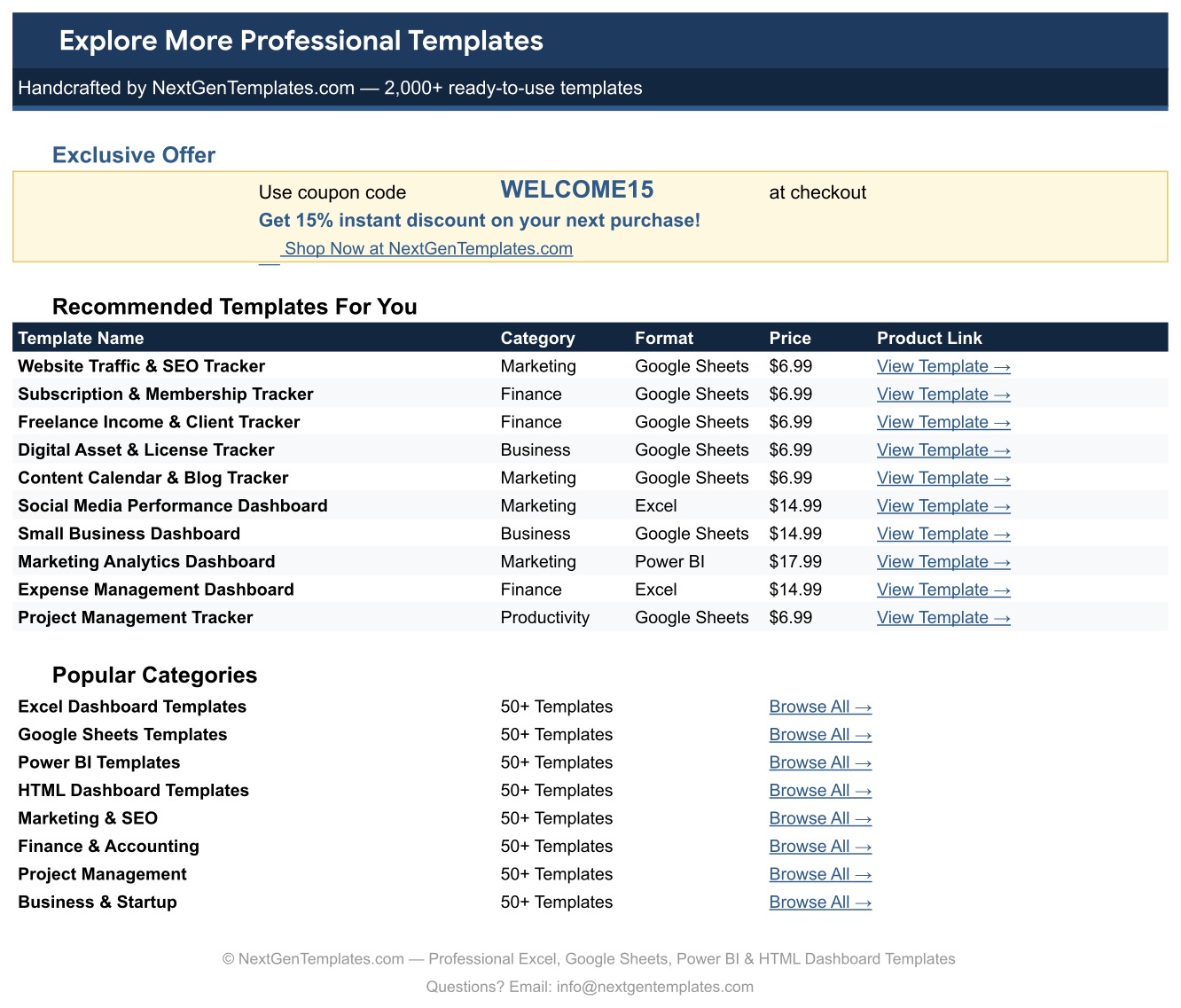
A directory page listing related NextGenTemplates products by category and format, with a WELCOME15 coupon code for 15% off a future purchase.
Domain and Website Portfolio Tracker vs. an Excel Portfolio Sheet vs. Paid Domain Monitoring SaaS
| Feature | Domain & Website Portfolio Tracker in Google Sheets | Excel portfolio spreadsheet | DomainTools / Dofo / SaaS monitors |
|---|---|---|---|
| Cost | One-time purchase ✅ | One-time, if you build it yourself | $25–$99 / user / month |
| Platform | Browser — any OS, any device ✅ | Desktop Excel | Vendor web app |
| Setup time | Under 10 minutes ✅ | Hours of formula building | Account setup + domain import |
| Real-time collaboration | Native Google Sheets sharing ✅ | File passing or OneDrive | Seat-based, paid per user |
| Automatic WHOIS / expiry lookup | ❌ No — you enter the renewal date | ❌ No | ✅ Yes |
| Uptime, DNS and SSL monitoring | ❌ No | ❌ No | ✅ Yes |
| Revenue, cost and ROI per domain | Built in — ROI % and Net Annual Profit columns ✅ | Only if you write the formulas | Rarely — most track registration data, not income |
| Customisable fields and colours | Every column and colour is yours ✅ | ✅ Yes | ❌ Fixed schema |
| Year-1 cost at 5 users | One licence, shared ✅ | Excel licences | $1,500–$5,900 |
For owners who want to track domain renewals and website revenue in one place without paying a monitoring subscription, the Domain and Website Portfolio Tracker sits in the sweet spot — it is a portfolio P&L, not a WHOIS service.
Who Should Use This Template
Perfect for:
- Bloggers and affiliate marketers running 5–50 sites who want cost, revenue and traffic in one view
- Domain investors recording purchase date, holding cost, status and sale outcome per name
- Small agencies holding client domains who need a renewal list they can share by link
- Side-project builders checking which of their sites actually pays for itself
Not a fit if:
- You need automatic WHOIS lookups, registrar API sync or emailed renewal alerts — this domain portfolio tracker connects to no registrar
- You need uptime, DNS or SSL certificate monitoring
- Your portfolio runs into the thousands of names, where a spreadsheet stops being the right container
- You cannot use a Google account, since this is a Google Sheets file rather than an Excel workbook
Real-World Use Cases
Maya runs nine niche blogs alongside a full-time job. The ROI % column shows her that two sites run at a loss while one funds the other eight, and Days to Renewal tells her which renewal is due before her card is charged. She reviews the sheet once a month on a Sunday evening.
Dev buys and flips domains. Purchase Date and Annual Cost give him a holding-cost history, Status moves a name through Parked, For Sale and Sold, and Notes records where each one is listed. Portfolio Count by Status shows him how much of the portfolio is still idle.
Priya manages 24 client domains at a three-person agency. She shares one Google Sheets link with her account manager instead of emailing a file, and sorts by Registrar / Host whenever a renewal invoice arrives so nothing is paid twice.
Advantages of This Google Sheets Tracker
The obvious saving is the subscription you do not pay: portfolio monitoring tools start around $25 per user per month, which is $1,500 a year once five people need access. The less obvious saving is the lapsed domain you do not lose, because the countdown column makes a renewal date visible weeks before it matters.
There is also a decision-making benefit. Once cost and revenue sit on the same row, the ROI % column makes it obvious which sites deserve more content and which should be parked, sold or allowed to expire. Because the charts read the live columns rather than a frozen helper table, that picture updates the moment you type.
Opportunities for Improvement
This website portfolio tracker in Google Sheets is deliberately manual, and that is its main limitation. It does not query WHOIS, does not talk to GoDaddy, Namecheap or Cloudflare, does not verify an expiry date, and sends no reminder emails — every value in every column is one you type or paste in. If your renewal dates are wrong, the flags will be wrong with them.
It also tracks money and status, not health. Uptime, DNS records, SSL expiry and Core Web Vitals are outside its scope, so pair it with a monitoring service if availability matters. Finally, the charts are wired to rows 16 to 1000; a portfolio larger than that needs the chart ranges extended, and past a few thousand domains a database is the better tool.
Best Practices
- Set a monthly calendar reminder to refresh Monthly Revenue and Monthly Visitors — the whole sheet is only as current as those two columns.
- Update Renewal Date the same day you renew, so Days to Renewal never shows a stale “Overdue”.
- Edit the List tab first. Getting your own Category, Registrar, Status and Monetization vocabularies right before bulk entry saves re-typing later.
- Use the Notes column for the decision, not the description: “listed on Flippa”, “let it lapse”, “renewal overdue — act now”.
- Keep a Status of “Expired” rather than deleting a row. The history of what a domain cost you is worth more than a tidy sheet.
Explore Relevant Templates
If you also write for the sites you own, the Blog Content & SEO Tracker in Google Sheets covers the article level that this portfolio view deliberately skips. For income that arrives through partner links, the Affiliate Marketing Income Tracker in Google Sheets breaks the revenue down by programme, and the Digital Product Sales Tracker in Google Sheets does the same for products you sell yourself.
Developers running the sites rather than monetising them will find the Web Development KPI Dashboard in Google Sheets a better fit, and the Print-on-Demand Sales Tracker in Google Sheets covers merchandise storefronts. All of them are available on the NextGenTemplates Google Sheets Trackers range.
Two external references are worth bookmarking alongside the sheet: Google’s data validation documentation, which explains the Chip display style used for the coloured Status pills, and ICANN’s EPP status code reference, the authority on what a registrar actually means by pending delete, redemption period or client hold.
Frequently Asked Questions
Does the Domain and Website Portfolio Tracker check expiry dates automatically?
No. The Domain and Website Portfolio Tracker in Google Sheets performs no WHOIS lookup and connects to no registrar. You enter the renewal date yourself and the Days to Renewal formula counts down from it, showing “Renew Soon” within 30 days and “Overdue” afterwards.
Will it monitor uptime, DNS or SSL certificates?
No. This tracker records cost, revenue, traffic, status and renewal dates that you supply. Site availability, DNS records and certificate expiry are outside its scope, so run a dedicated monitoring service alongside it if you need alerts.
How long does setup take?
Under 10 minutes. Open the PDF in your download, click the “Make a copy” link, replace the 15 sample rows with your own domains and edit the four dropdown lists on the List tab. Every formula column and all four charts are already pointed at the data range.
How many domains can the template hold?
The charts read rows 16 to 1000, which is roughly 985 domains without editing a single formula. Larger portfolios need the chart ranges extended, and beyond a few thousand names a database usually serves better than a sheet.
How does this compare to DomainTools or another paid monitoring subscription?
Paid monitors handle WHOIS, expiry lookups and DNS checks from about $25 per user per month. It is a one-time purchase answering a different question: which of your domains earns its keep, using ROI %, Net Annual Profit and Monthly Visitors per site.
Do I need Excel or any macros?
Neither. The Domain and Website Portfolio Tracker in Google Sheets runs entirely in the browser with no macros and no add-ons. All you need is a free Google account and the “Make a copy” link included in the download PDF.
Can I change the currency symbol?
Yes. Annual Cost, Monthly Revenue, Annual Revenue and Net Annual Profit default to $, but they are ordinary cell formats. Select those columns and switch them to ₹, € or £ from Format → Number.
About the Author
Built by PK — Microsoft Certified Professional with 15+ years of Excel, Google Sheets and Power BI experience. Founder of NextGenTemplates, reaching 300K+ subscribers across YouTube channels. Every template is hand-built and tested before release.
Conclusion
If you own domains, you already have this data — it is just scattered across a registrar account, an ad network and your memory. The Domain and Website Portfolio Tracker in Google Sheets gives it one home, with the arithmetic done for you and the renewal countdown in plain sight. It will not phone your registrar for you, and it is honest about that; what it will do is tell you which of your sites is worth keeping.
👉 Click here to Purchase the Domain & Website Portfolio Tracker in Google Sheets
Instant download · One-time payment · No subscription
🎥 For step-by-step video walkthroughs, visit Youtube.com/@NeoTechNavigators.
Last updated: September 2026