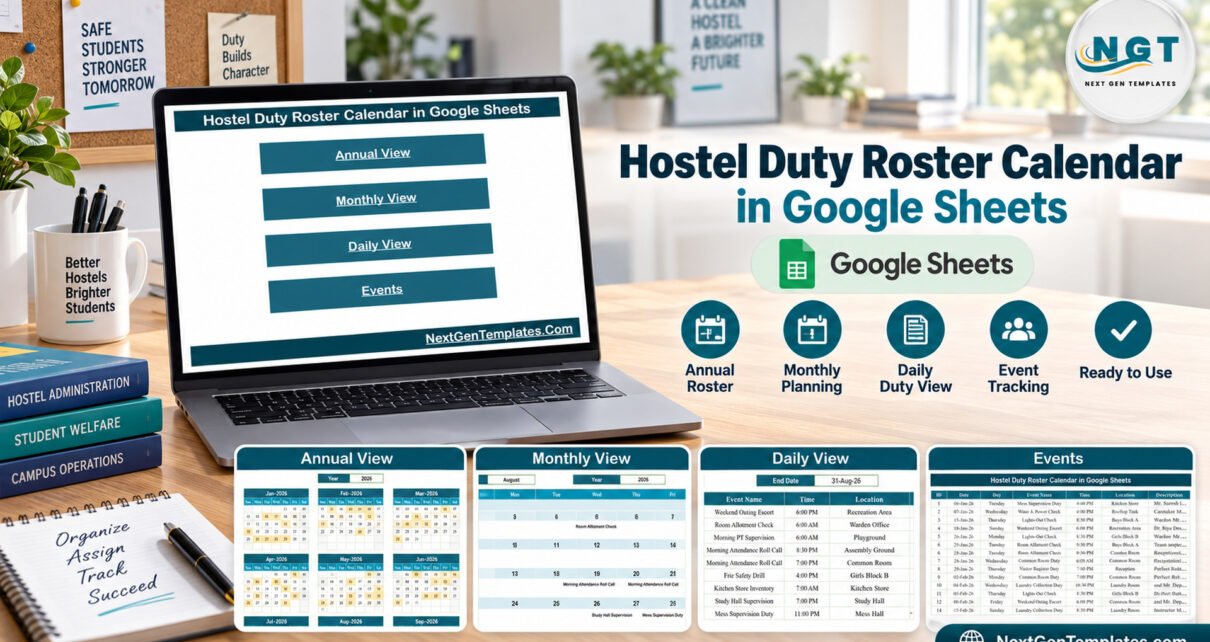
The Hostel Duty Roster Calendar in Google Sheets is a ready-made duty calendar for school, college and coaching-institute hostels. Its live sample holds 100 duty slots (IDs 1-100) from 06-Jan-2026 to 29-Dec-2026, covering 18 duty types at 17 locations and 14 time slots between 5:30 AM and 11:00 PM. Every weekday label in the sample matches its date, and all four views read from a single Events sheet.
Most hostels still run duty rosters on a notice board or a loose spreadsheet that nobody can find on a Sunday night. When a warden is unsure who has lights-out or who escorts the weekend outing, gaps appear. This template puts every duty slot – who, where and when – into one shared Google Sheet with an annual overview, a month planner and a date-range list, so the whole team works from the same roster.
Get the Hostel Duty Roster Calendar in Google Sheets
Key Features of the Hostel Duty Roster Calendar
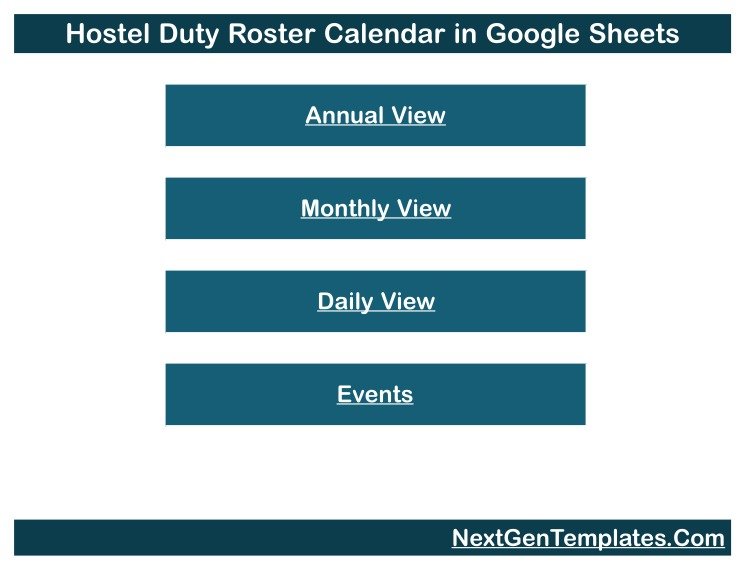
- Four linked views. The file opens on a Home menu with buttons for Annual View, Monthly View, Daily View and Events. Each view has a “← Back” link to return to the menu.
- Year-at-a-glance roster. Annual View draws twelve month grids for the selected year and highlights every date that has at least one duty.
- Month planner with dropdowns. Monthly View takes a Month and a Year and writes the duty name inside each day cell. Days with two duties show the first plus a “1 more…” note.
- Date-range duty list. Daily View takes a Start Date and an End Date and lists every duty in between with ID, Date, Day, Event Name, Time, Location and Description.
- One sheet to maintain. The Events tab is the only place you type. A hidden List tab supplies the month names and years for the dropdowns.
- Hostel-specific sample data. Duty types include Common Room Duty, Weekend Outing Escort, Laundry Collection Duty, Visitor Register Duty, Drinking Water RO Check, Warden Night Duty, Gate & Security Duty and Sick Bay / Infirmary Duty.
Calendar Pages Explanation
The workbook has six tabs: Home, Annual View, Monthly View, Daily View, Events and the hidden List tab. Here is what each visible view shows.
Annual View
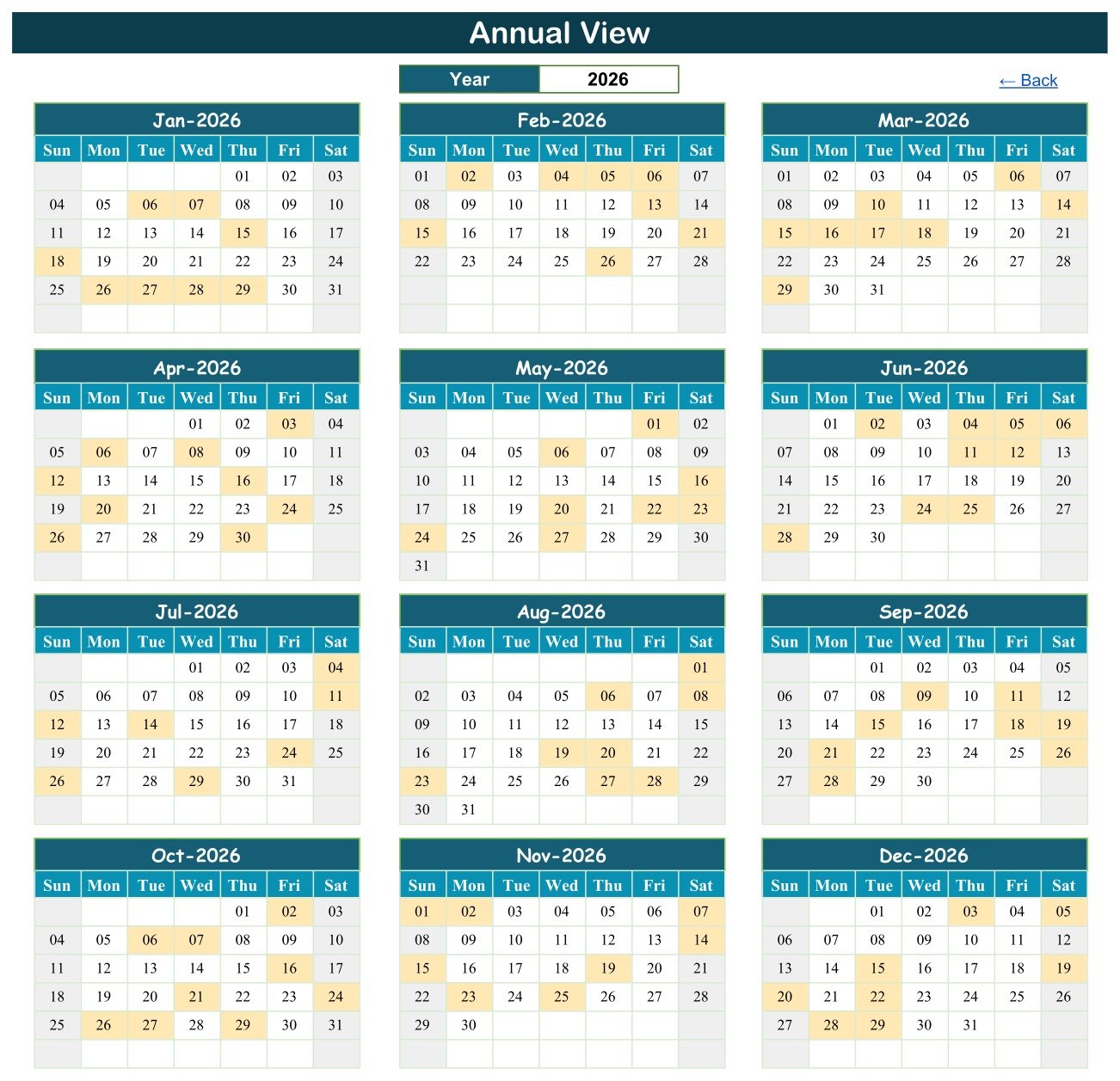
Annual View lays out Jan-2026 to Dec-2026 as twelve Sunday-to-Saturday grids beneath a Year box. Shaded dates are days with a scheduled duty, so you can see at once that the sample spreads 8 or 9 duties across every month of the year.
Monthly View
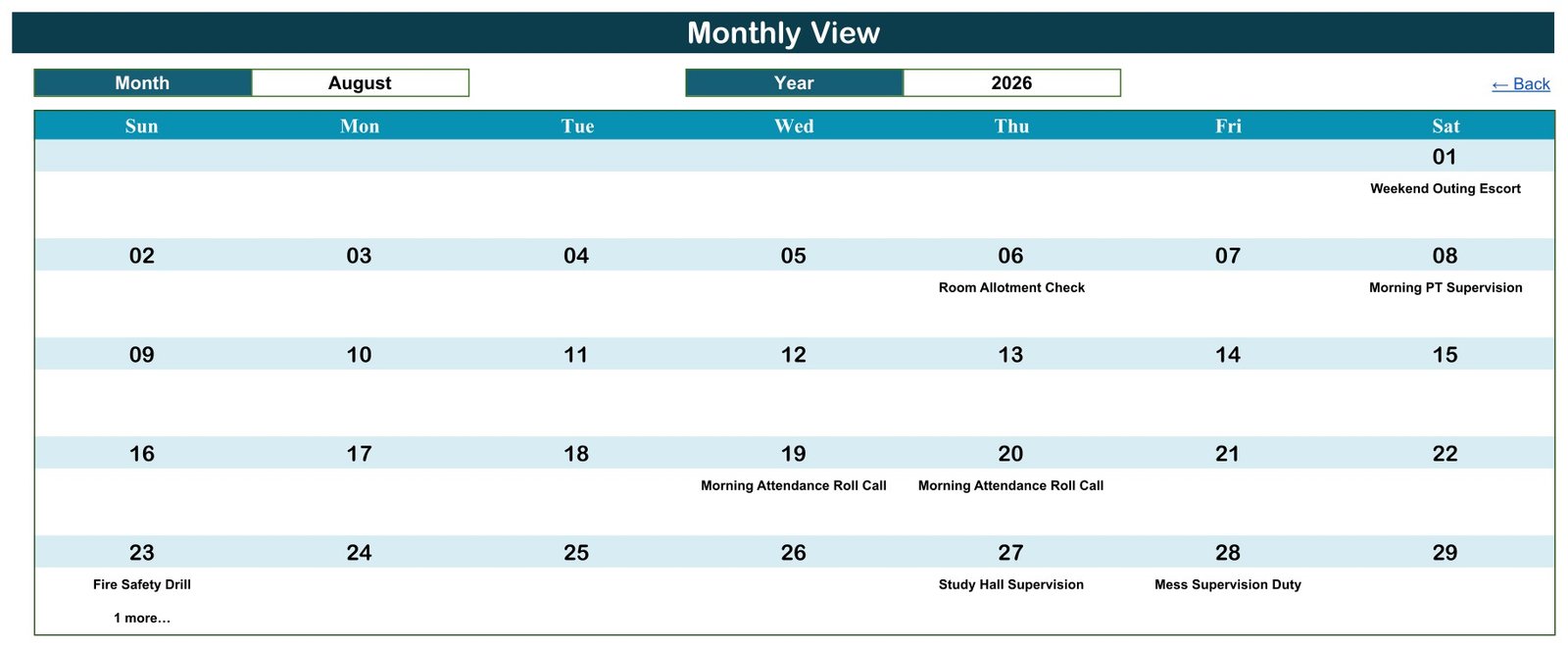
Monthly View turns one month into a full-width calendar. In the August 2026 sample you can read Weekend Outing Escort on the 1st, Room Allotment Check on the 6th, Morning PT Supervision on the 8th, Morning Attendance Roll Call on the 19th and 20th, Fire Safety Drill on the 23rd with “1 more…”, Study Hall Supervision on the 27th and Mess Supervision Duty on the 28th.
Daily View
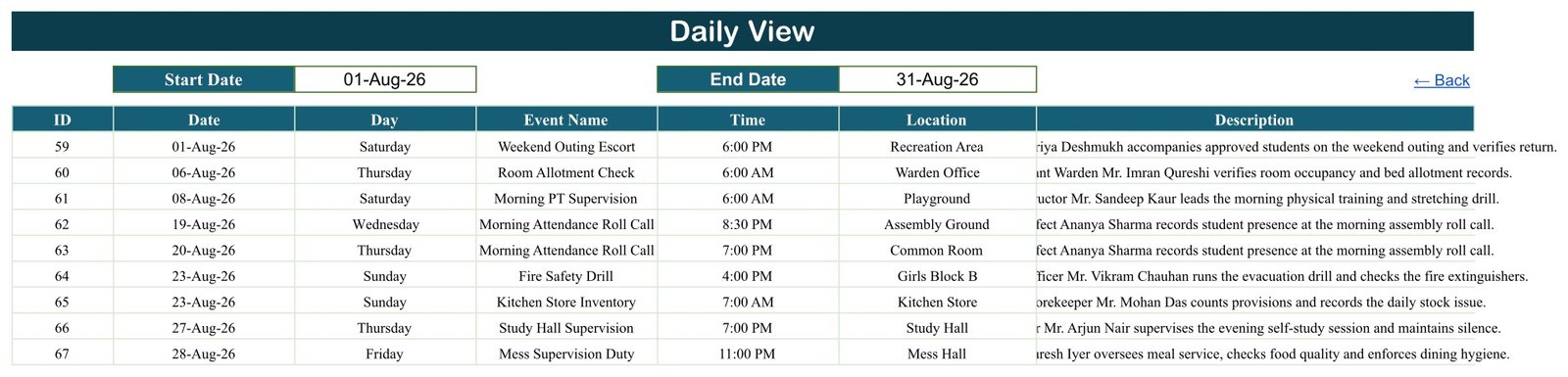
Daily View is the working list. With 01-Aug-26 to 31-Aug-26 entered, it returns nine duties, IDs 59 to 67, including the second 23-Aug duty (Kitchen Store Inventory at 7:00 AM) that Monthly View folds into “1 more…”. Use it to pull a weekly list for the caretaker or security team.
Events
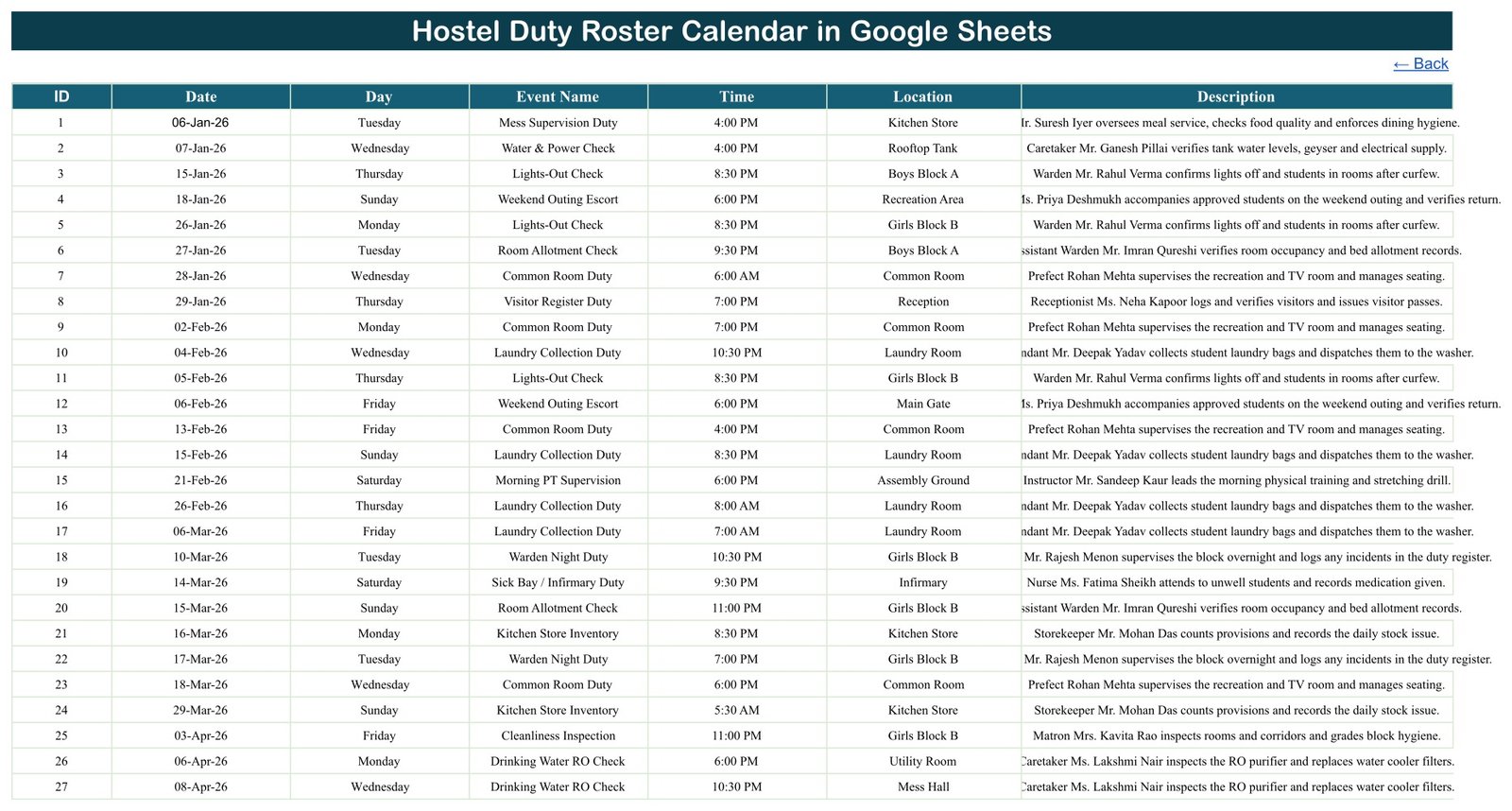
The Events sheet is the master roster: ID, Date, Day, Event Name, Time, Location and Description. The sample descriptions name a role and a person for each slot – for example a warden confirming lights off after curfew, or a storekeeper counting provisions. All of those names are fictional.
Hostel Duty Roster Calendar vs. Excel Calendar vs. Paid Scheduling Software
| Feature | Hostel Duty Roster Calendar (Google Sheets) | Microsoft Excel calendar | Paid staff-scheduling software |
|---|---|---|---|
| Cost | ✅ $4.99 one-time (sale) | One-time template, needs Excel | Monthly per-user subscription |
| Platform | ✅ Any browser with a Google account | Excel desktop | Vendor web and mobile apps |
| Setup time | ✅ Make a copy and start editing | Download and open | Account setup and staff onboarding |
| Real-time team editing | ✅ Yes, through sharing | Limited without OneDrive | ✅ Yes |
| Mobile access | ✅ Google Sheets app | Excel mobile app | ✅ Dedicated app |
| Custom duty names and locations | ✅ Type anything | ✅ Yes | Within vendor fields |
| Annual, monthly and date-range views | ✅ All three included | Depends on the template | ✅ Usually |
| Shift swaps, reminders, attendance | Not included | Not included | ✅ Usually included |
For hostels that want a shared, readable duty calendar without per-user monthly fees, this template sits in the sweet spot; hostels that need swap approvals or automatic reminders should pick dedicated scheduling software.
Who Should Use This Template
Perfect for:
- Hostel wardens and assistant wardens planning night duty, lights-out checks and roll calls
- Hostel administrators coordinating mess, laundry, kitchen store and water checks across blocks
- Boarding schools and coaching institutes that want one shared calendar of gate, visitor and fire drill duties
Not a fit if:
- You need HR, payroll, attendance or hours-worked tracking
- You need automatic shift swaps, SMS or email reminders, or working-time compliance checks
- You want a resident database with room, fee or guardian records – that is a different kind of tool
Real-World Use Cases
A boys’ hostel warden at a residential school enters the term’s Warden Night Duty, Lights-Out Check and Gate & Security Duty slots on the Events sheet, then shares Monthly View with the assistant wardens. Each person checks their own dates on their phone instead of reading a notice board.
A college hostel administrator schedules Mess Supervision Duty, Kitchen Store Inventory and Drinking Water RO Check across the Mess Hall, Kitchen Store and Utility Room. Every Monday she sets Daily View to the coming week and sends that list to the caretaker team.
A coaching-institute hostel manager uses Annual View to spread Fire Safety Drill dates evenly through the year and to make sure Weekend Outing Escort duties do not bunch up around exams.
Advantages of the Hostel Duty Roster Calendar
- Low cost: a one-time purchase instead of a per-user subscription for a task that only needs a clear calendar.
- Nothing to install: it runs in Google Sheets, so wardens can open it on a laptop or phone.
- One source of truth: three views read from one Events sheet, so the annual, monthly and daily pictures never disagree.
- Easy to share: Google Sheets sharing lets you give view access to staff and edit access only to the roster owner.
- Fast to adapt: duty names, locations and times are plain text, so a girls’ hostel, a boys’ hostel or a mixed campus can reuse it.
Opportunities for Improvement
- No clash warning. Nothing stops two duties landing on the same date and time, so check busy days in Daily View.
- Monthly View shows one duty per cell. A second duty on the same day appears only as “1 more…” (the sample has two such days, 26-Jul and 23-Aug).
- No end time or duration. Duties have a start time only, so hours cannot be totalled.
- No staff or resident list. People are named only inside the free-text Description, so you cannot filter by person.
- No automation. There are no reminders, shift swaps or attendance records.
Best Practices
- Make a copy first. Work in your own copy in Google Drive, never in the shared view-only original.
- Clear the sample rows. The 100 sample duties are illustrative – a few “Morning” duties even carry evening times – so replace them all before sharing.
- Keep IDs and dates in order. Sorting the Events sheet by date keeps Daily View lists readable.
- Share view-only. Give most staff view access and keep editing with one or two roster owners. Google’s help page on sharing files from Google Drive explains the options.
- Store only what you need. Put a role or first name in the Description, not phone numbers or student details you would not want in a shared file.
Explore Relevant Templates
This calendar shares its four-view layout with other education calendars on this blog, including the Class Timetable Calendar in Google Sheets, the Teacher Substitution Calendar in Google Sheets and the School Fee Due Calendar in Google Sheets.
For other duty rosters, read about the Maternity Ward Duty Calendar in Google Sheets and the Ambulance Duty Calendar in Google Sheets. Running a hostel business rather than a campus hostel? See the Backpacker Hostel Management System Web App.
On the store, the Nurse Duty Roster Calendar in Google Sheets and the Hostel Room Allotment Data Entry System in Excel pair well with this roster, and every Google Sheets calendar template is listed in one place.
To build confidence with rosters and planners in a spreadsheet, the NextGenTemplates Academy learning paths take you through the essentials step by step.
Get the Hostel Duty Roster Calendar in Google Sheets
Frequently Asked Questions
What is the Hostel Duty Roster Calendar in Google Sheets?
It is a Google Sheets calendar for hostel duty slots with a Home menu, Annual View, Monthly View, Daily View and an Events sheet. The sample holds 100 duties from 06-Jan-2026 to 29-Dec-2026 across 18 duty types and 17 hostel locations.
How long does setup take?
Open the link in the PDF, choose File > Make a copy, delete the sample rows on the Events sheet and type your own duties. A hostel with a term’s roster already written down can usually enter it in one sitting, and the views update from that list.
Do I need a Google account?
Yes. The hostel duty roster template lives in Google Sheets, so you need a free Google account to make your own copy in Google Drive. You do not need Microsoft Excel or any add-on.
Can it track attendance, hours or pay?
No. It is a calendar of duty slots, not a staff-scheduling, HR or payroll system. It has no attendance record, no end time or hours total, no shift-swap workflow and no notifications. It shows which duty happens where and when.
Are the people in the sample data real?
No. The wardens, caretakers, prefects and other names in the Description column are fictional. You decide what resident or staff information goes into your copy, so keep it to what your hostel is comfortable storing in a shared Google Sheet.
How does it compare with paid scheduling apps?
Paid scheduling apps add mobile shift swaps, reminders and attendance for a monthly per-user fee. This template is a one-time purchase that covers planning and sharing the duty calendar, which suits hostels that only need a clear roster everyone can read.
What happens when two duties fall on the same day?
Both appear on the Events sheet and in Daily View. Monthly View shows the first duty with a “1 more…” note. The sheet does not block or flag clashes, so check crowded dates before you share the month.
About the Author
Built by PK – Microsoft Certified Professional with 15+ years of Excel, Google Sheets and Power BI experience, and founder of NextGenTemplates. Every template is hand-built and tested before release.
Conclusion
If your hostel needs a clear, shared duty calendar rather than a full scheduling system, this template gives you an annual overview, a month planner and a date-range list from one Events sheet, all inside Google Sheets.
✅ Instant download · One-time payment · No subscription
Last updated: September 2026