The Interior Fit-Out Project Management System is a Google Apps Script web app with 27 modules, 7 editable roles and 30 ready-made reports. Setup builds a Google Sheet database of 32 tables and seeds it with 10,708 rows of demo data for a fictional contractor running 34 fit-out contracts, so every screen and report is populated the moment you sign in.
Commercial fit-out work is hard to track in spreadsheets because the money and the site move at different speeds. A BOQ is priced in one file, packages are let to subcontractors in another, snags live on a site engineer’s phone and retention sits in the accounts ledger. This interior fit-out project management system puts quotations, work packages, site tasks, snags, procurement, labour and milestone billing in one browser application on your own Google account, so the dashboard and the records always agree. It works as a snag list and BOQ tracker, a subcontractor and purchase order register and a Google Apps Script project management web app at the same time.
Get the Interior Fit-Out Project Management System Web App
🚀 Try the Live Demo Before You Buy
Open the working system in your browser right now: no download, no sign-up, nothing to install. Sign in as any role below and see exactly which modules that person can and cannot reach.
Demo sign-in details: all 10 accounts across 7 roles
| Role | User name | Password | What this role reaches |
|---|---|---|---|
| Administrator | admin | Admin@2024 | Everything: all modules, users, roles, settings and archive |
| Project Manager | pmanager | Project@2024 | Clients, projects, quotations, packages, tasks, snags, inspections, handover, variations, invoices, expenses, documents and reports |
| Project Manager | pmanager2 | Project@2024 | Second project manager account, same permissions |
| Site Engineer | engineer | Site@2024 | Site execution: tasks, progress, stock issues, goods receipt, labour, timesheets, snags, inspections, documents |
| Site Engineer | engineer2 | Site@2024 | Second site engineer account, same permissions |
| Site Engineer | sitedesk | Site@2024 | Third site engineer account, same permissions |
| Quantity Surveyor | surveyor | Survey@2024 | Quotations and BOQ, measurement, packages, variations, invoicing and commercial reports |
| Procurement Officer | purchase | Buy@2024 | Materials, stock, subcontractors, purchase orders, goods receipt and procurement reports |
| Accounts | accounts | Accounts@2024 | Invoices, payments, expenses, retention, receivables, financial reports and the audit log |
| Viewer | director | Viewer@2024 | Read-only across the business, for directors and consultants |
These credentials are public on purpose. The demo is a shared instance seeded with a fictional contractor (Meridian Interior Contracts) and it may be reset at any time. It is not anybody’s live business. Your own deployment gets its own database, its own users and its own passwords.
Key Features of the Interior Fit-Out Project Management System
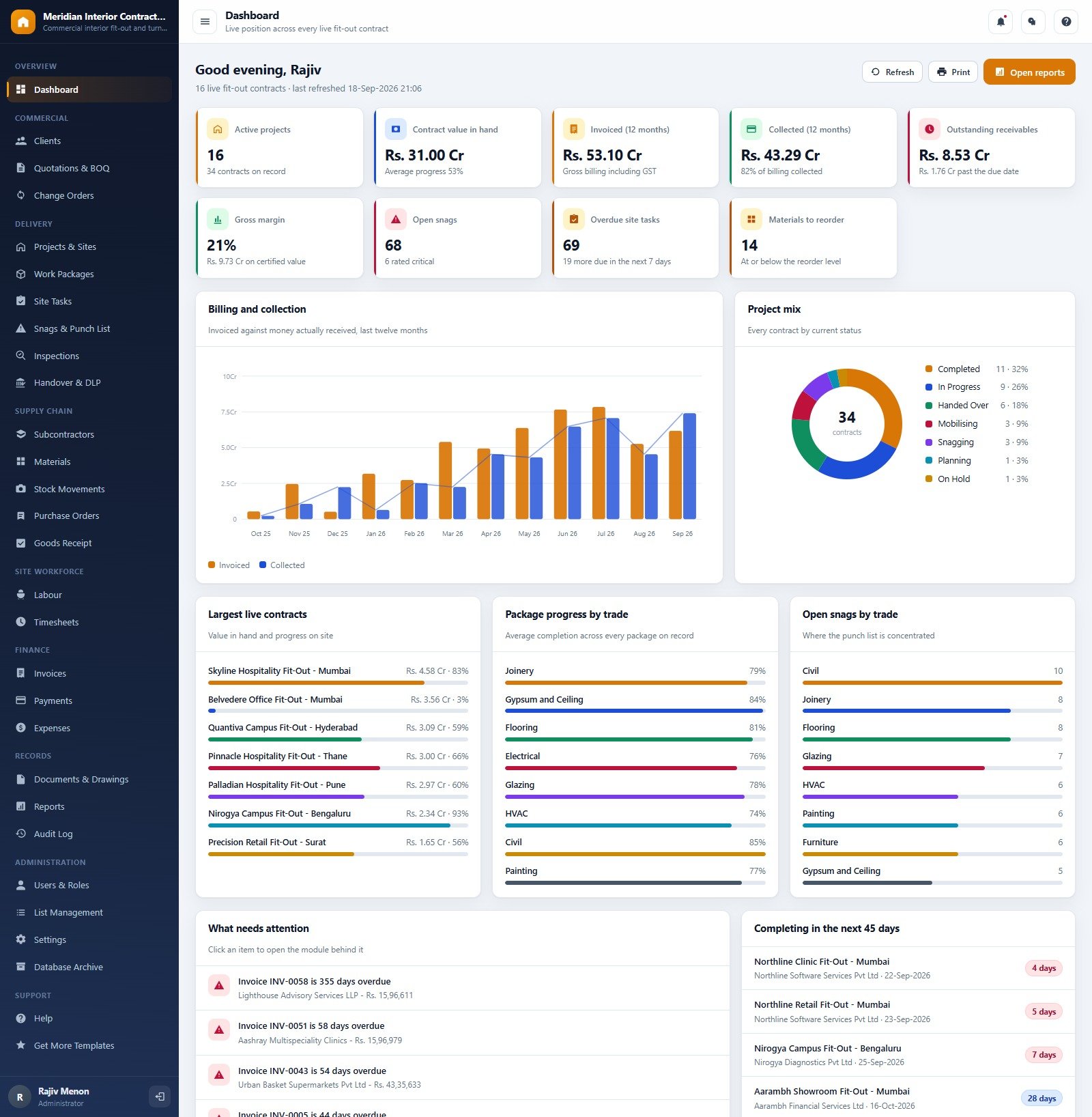
- Nine-card live dashboard. Active projects, contract value in hand, invoiced and collected over 12 months, outstanding receivables, gross margin, open snags, overdue site tasks and materials at or below reorder level, with a “What needs attention” list that opens the module behind each alert.
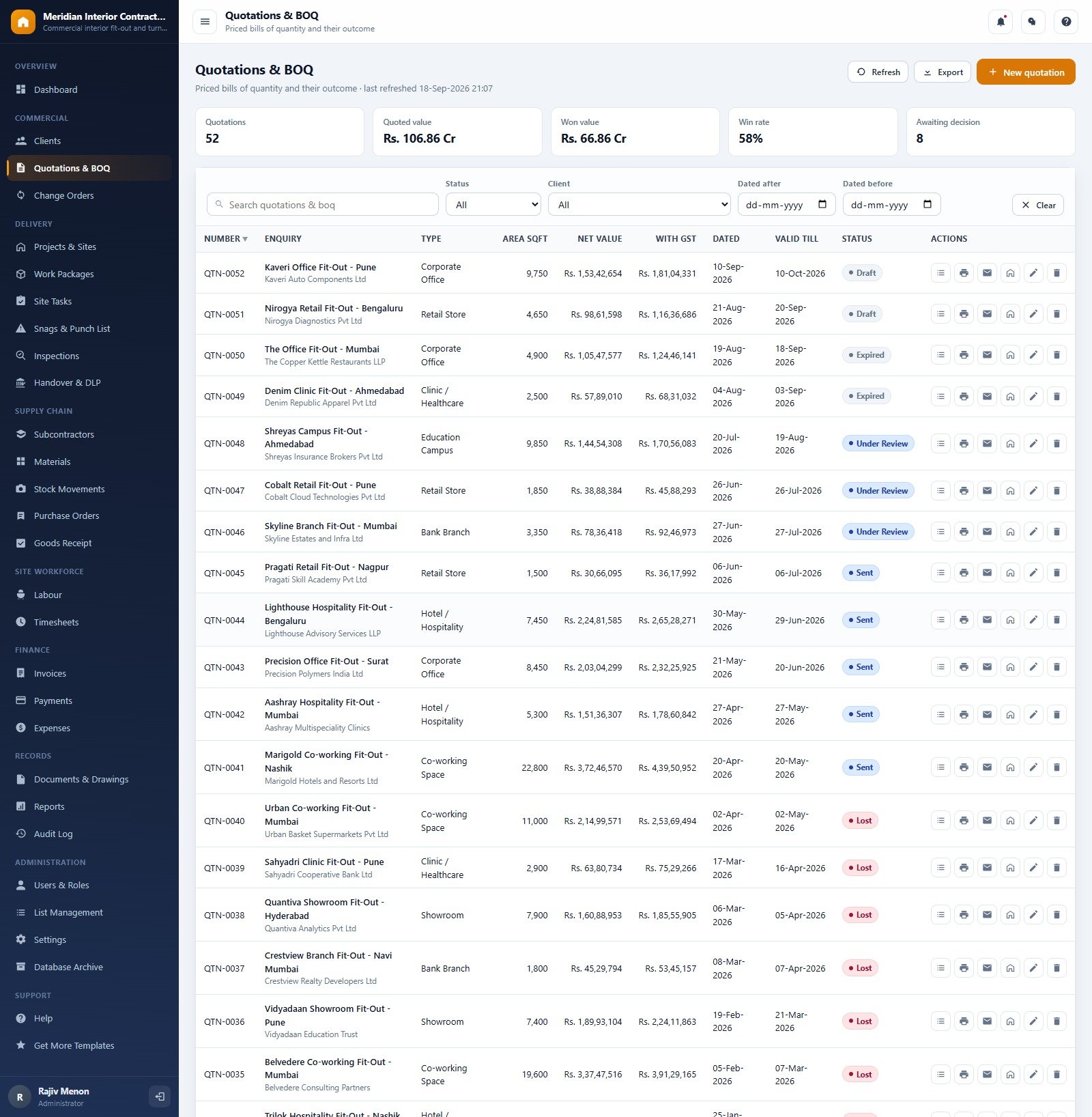
- Quotations and BOQ with win rate. Every enquiry is priced as a bill of quantities with area, net value and value with GST, and the page tracks quoted value, won value, win rate and quotations awaiting a decision.
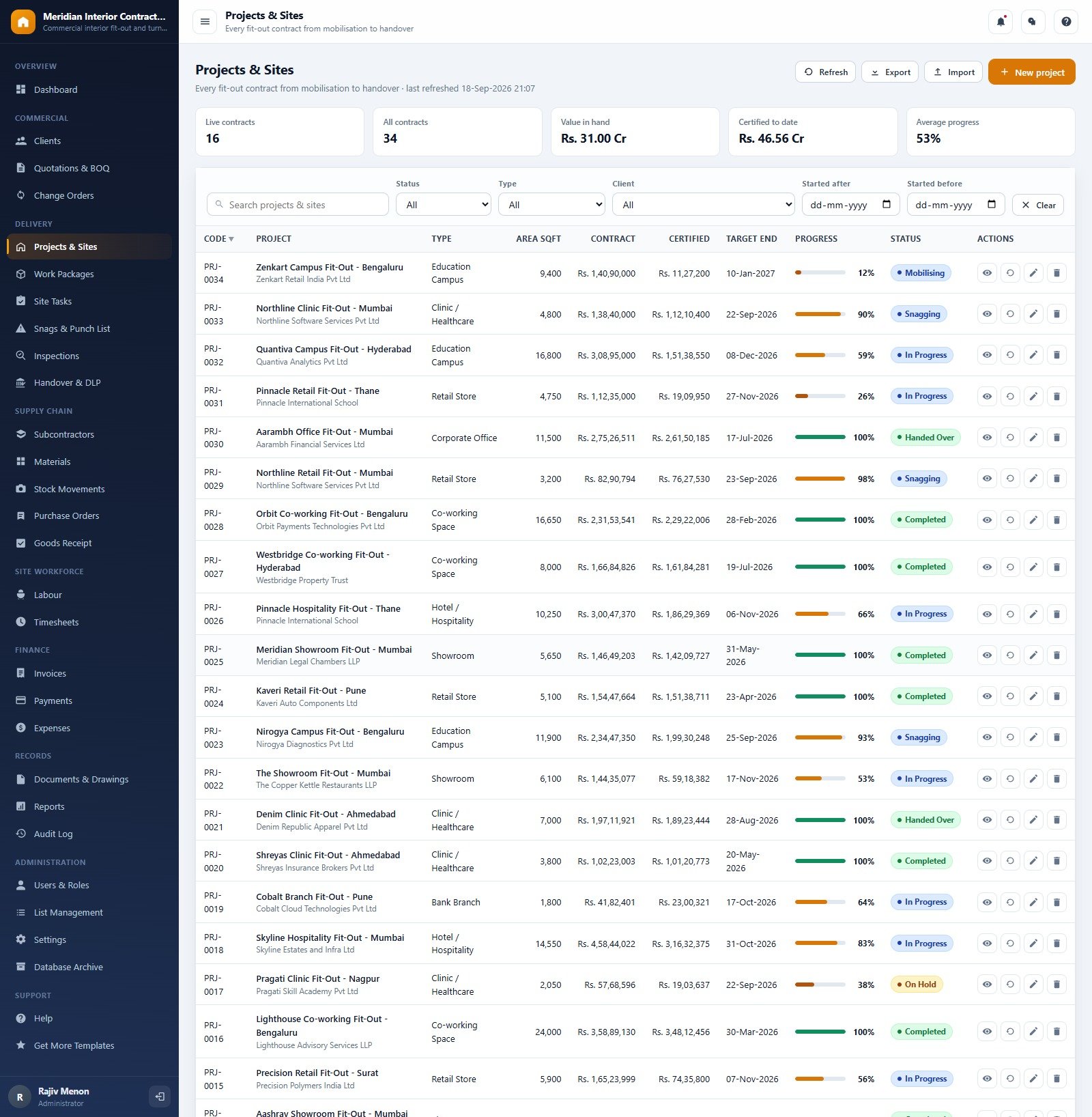
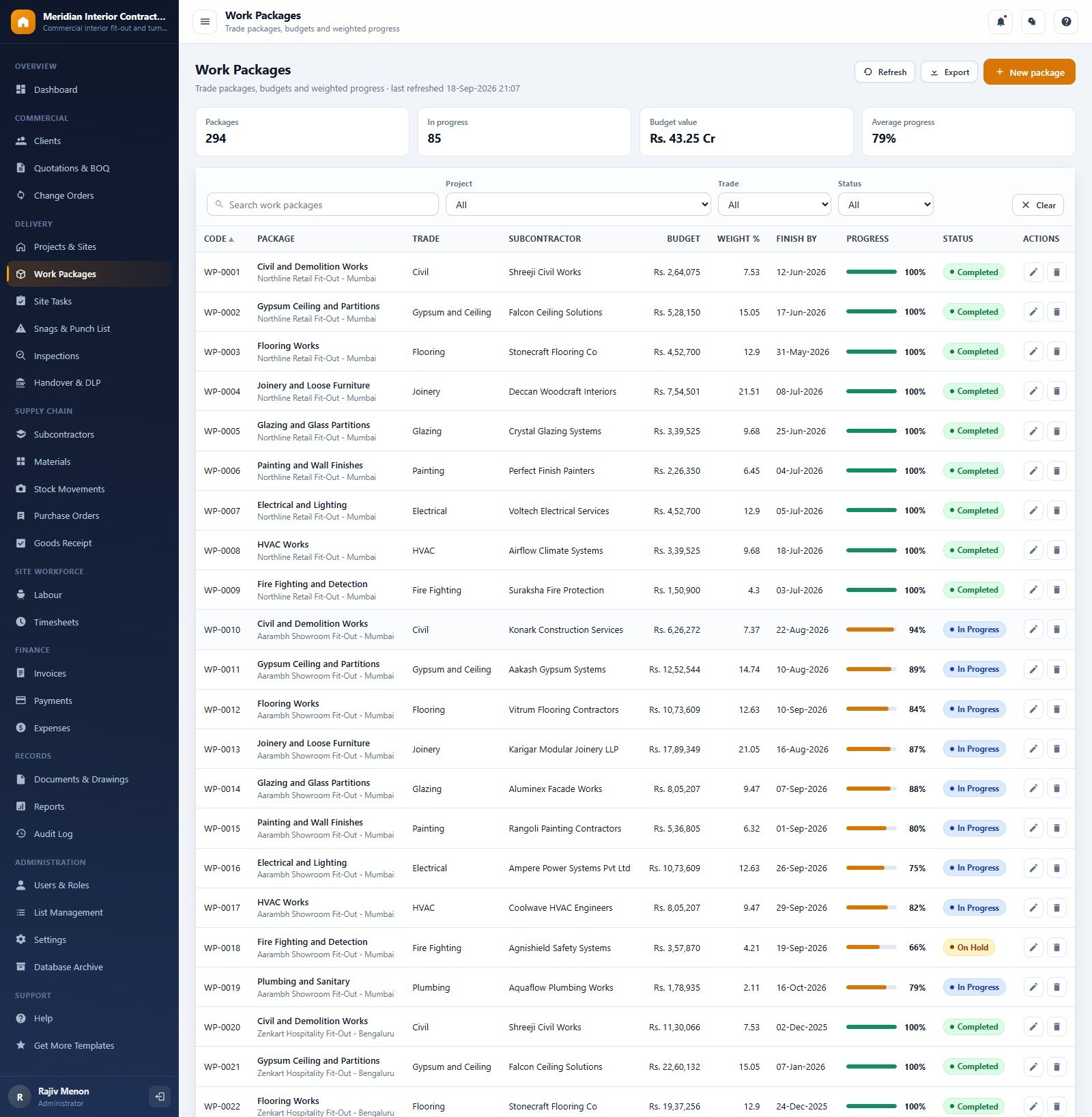
- Progress driven by site weightages. Trade work packages carry a budget and a weight %, so project progress rolls up from real package and task completion instead of a number someone typed in.
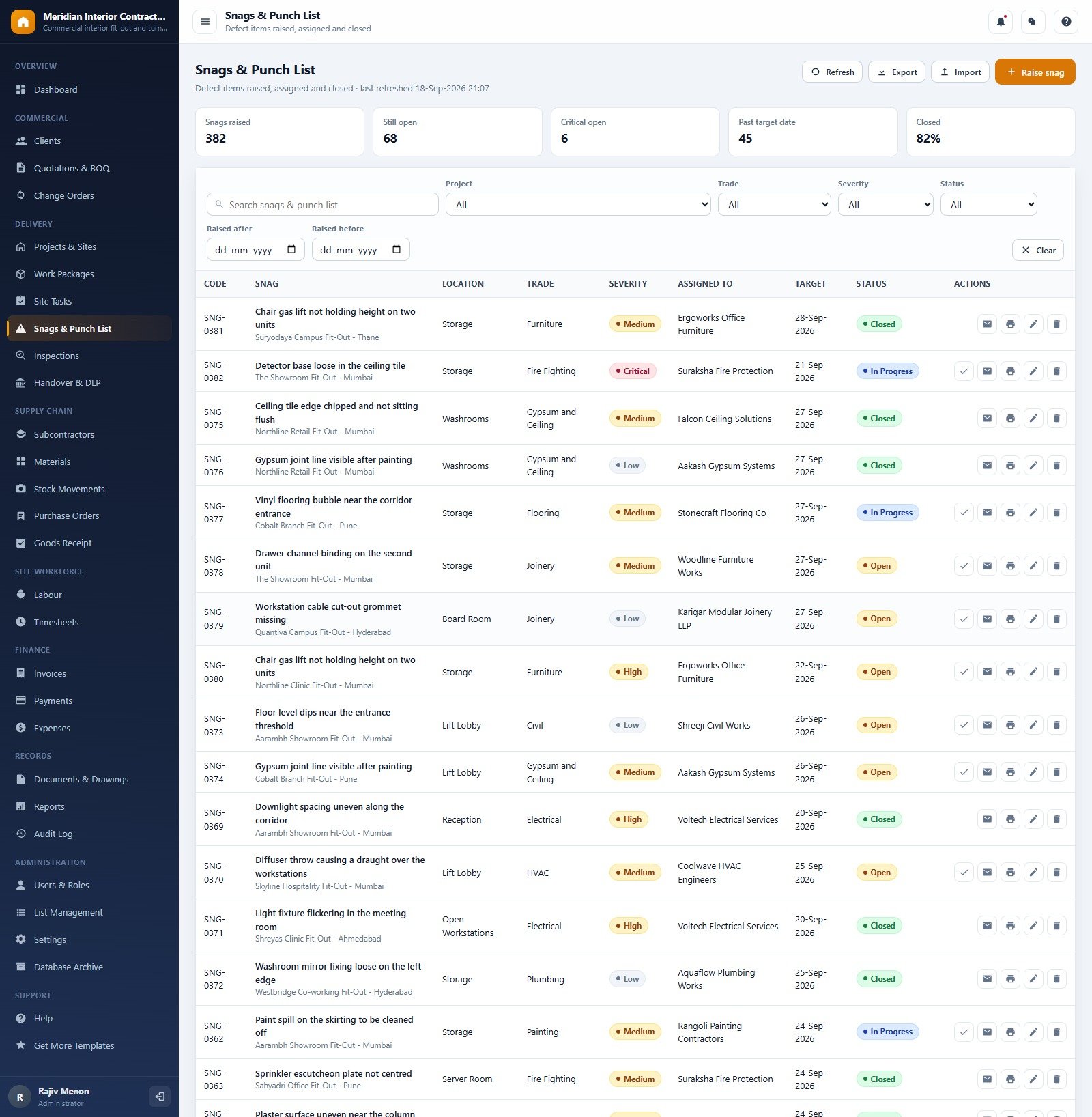
- Snag-to-handover control. Snags carry location, trade, severity, assignee and target date; handovers record the defect liability period and the snags carried over.
- Procurement and cost to date. Materials, stock movements, purchase orders, goods receipt notes, labour and timesheets feed the cost side of the Project Profitability report.
- Milestone billing with retention. Invoices hold invoice value, retention, net payable, received and due date, and Payments and Expenses complete the money trail.
- Seven editable roles and an audit log. Tick exactly which permissions a role holds and the sidebar follows them immediately; every create, edit and upload is written to the Audit Log.
Web App Modules Explanation
The sidebar groups 27 modules into Overview, Commercial, Delivery, Supply Chain, Site Workforce, Finance, Records and Administration. Ten of them are shown below. Every list page has search, filters, CSV export and print, and several support CSV import.
Dashboard
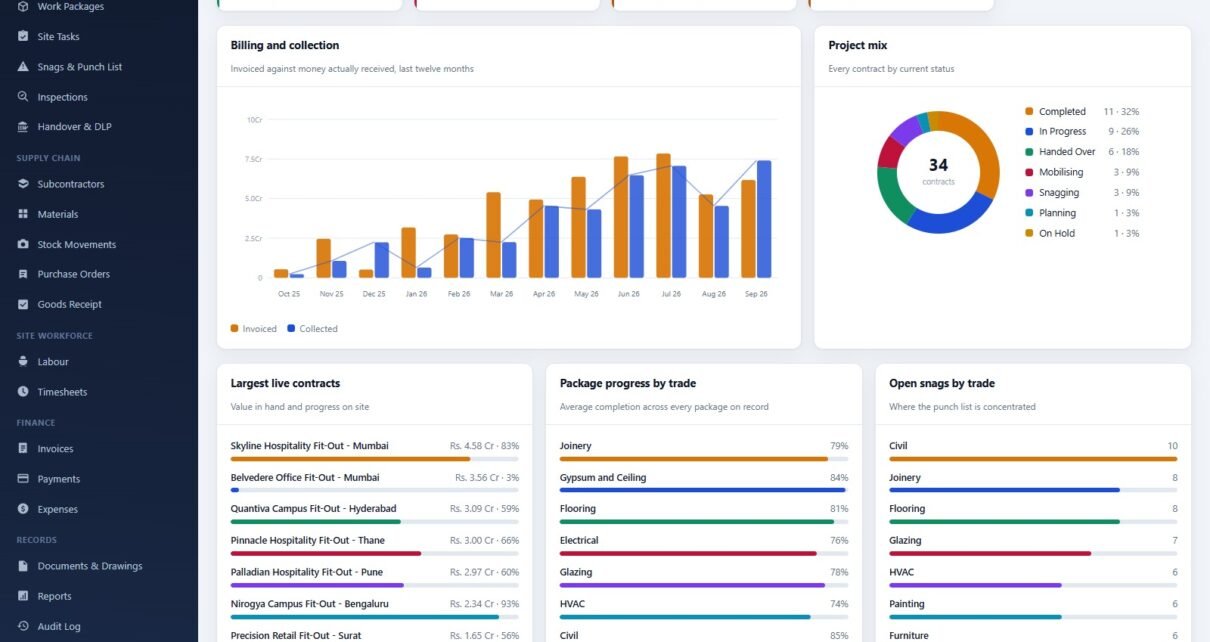
Nine KPI cards above Billing and Collection by Month, Project Mix by Status, Largest Live Contracts, Package Progress by Trade and Open Snags by Trade, plus overdue invoices and contracts completing in the next 45 days.
Quotations & BOQ
Quotation number, enquiry and client, fit-out type (corporate office, retail store, clinic, hotel, co-working, showroom, bank branch, education campus), area, net value, value with GST, dates and status.
Projects & Sites
Live contracts, all contracts, value in hand, certified to date and average progress, with a progress bar and status for every contract from Mobilising to Handed Over.
Work Packages
Packages per project and trade with subcontractor, budget, weight %, finish date, progress and status.
Snags & Punch List
Snags raised, still open, critical open, past target date and closed %, with severity from Low to Critical and one-click close, email and print actions.
Handover & DLP
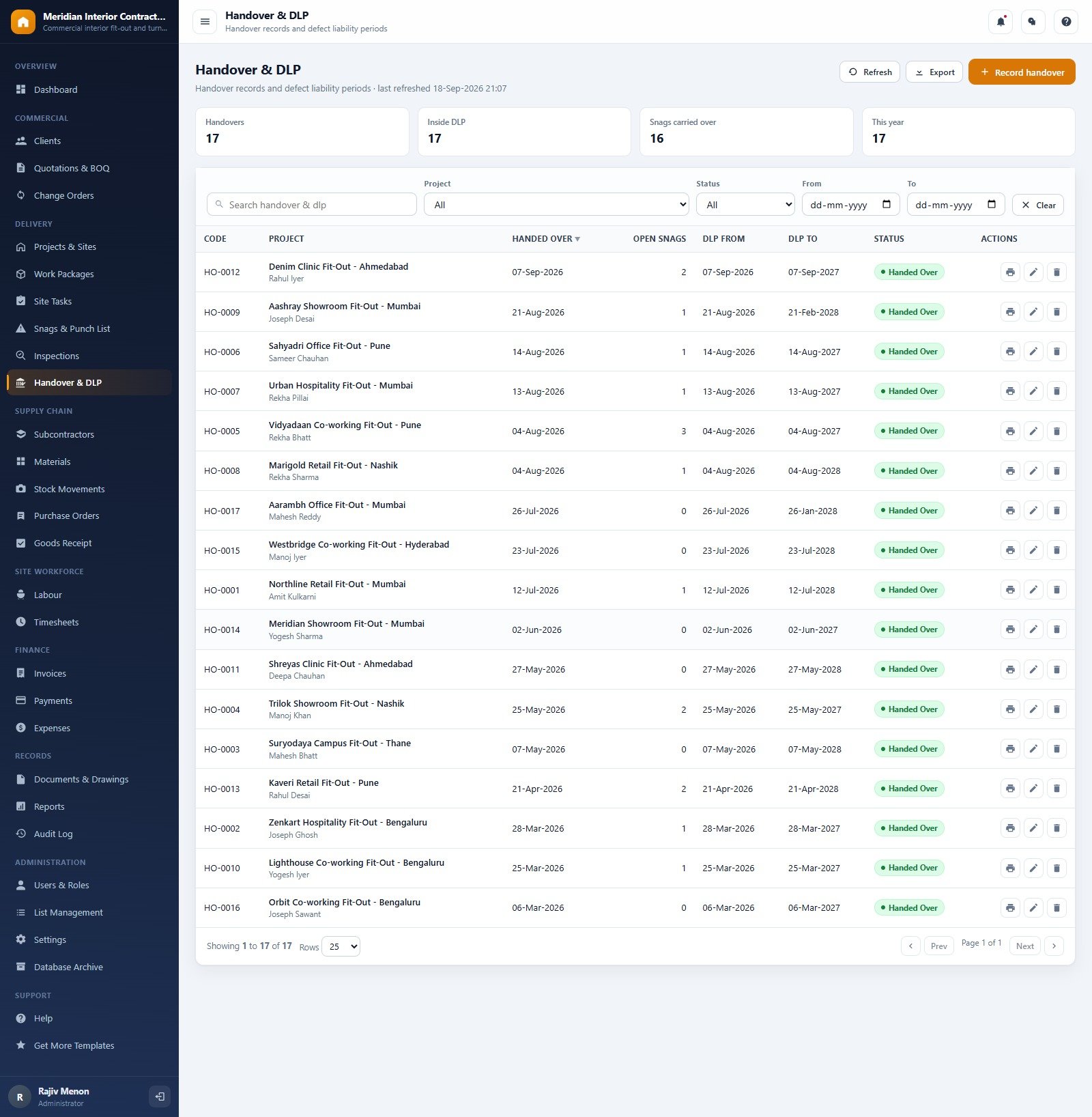
Handovers, projects inside DLP, snags carried over and handovers this year, with the DLP from and to dates on every record.
Purchase Orders
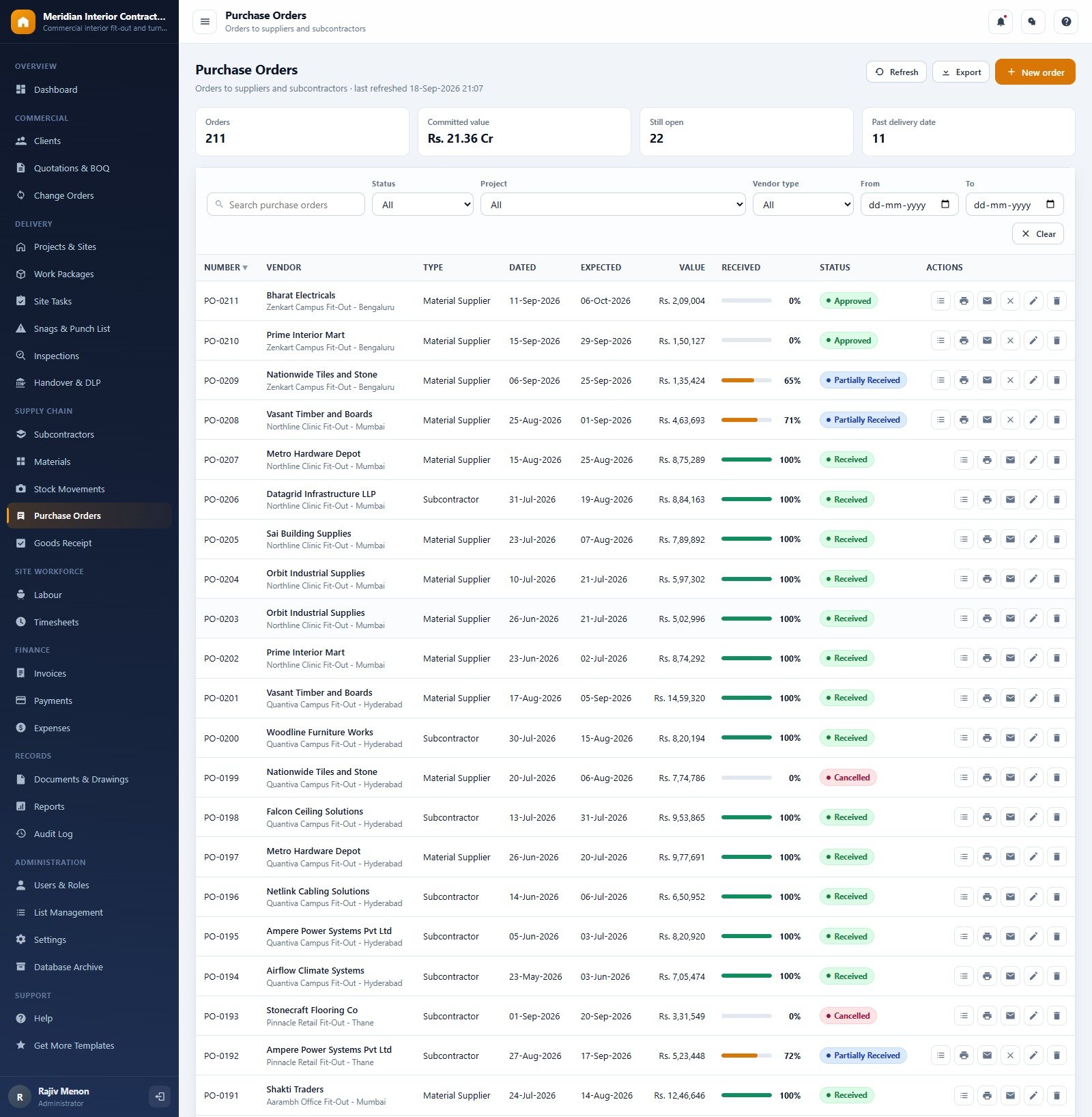
Orders to material suppliers and subcontractors with committed value, open orders, orders past delivery date and a received % per order.
Invoices
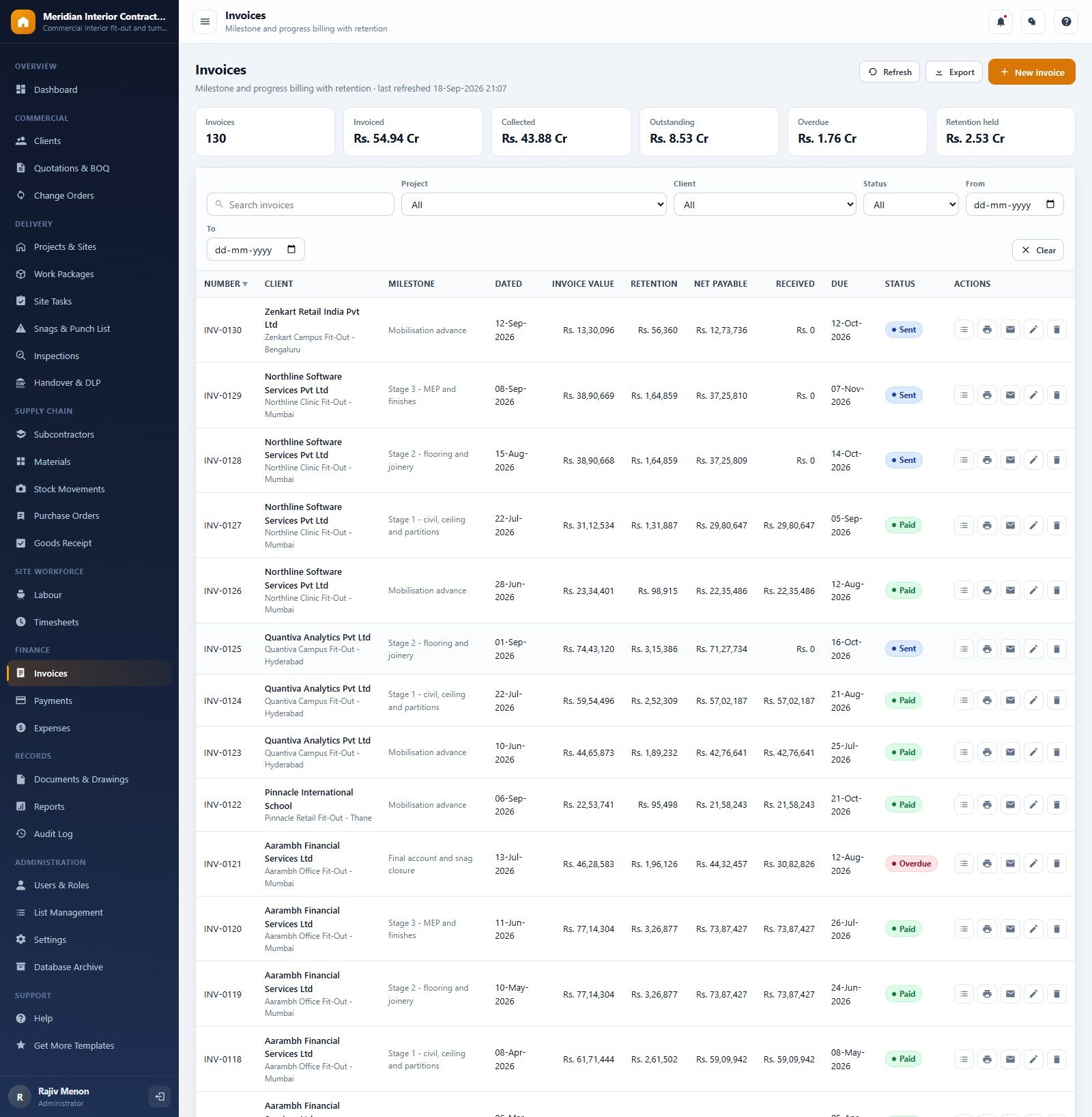
Invoiced, collected, outstanding, overdue and retention held, with each milestone bill showing retention, net payable, received and due date.
Reports
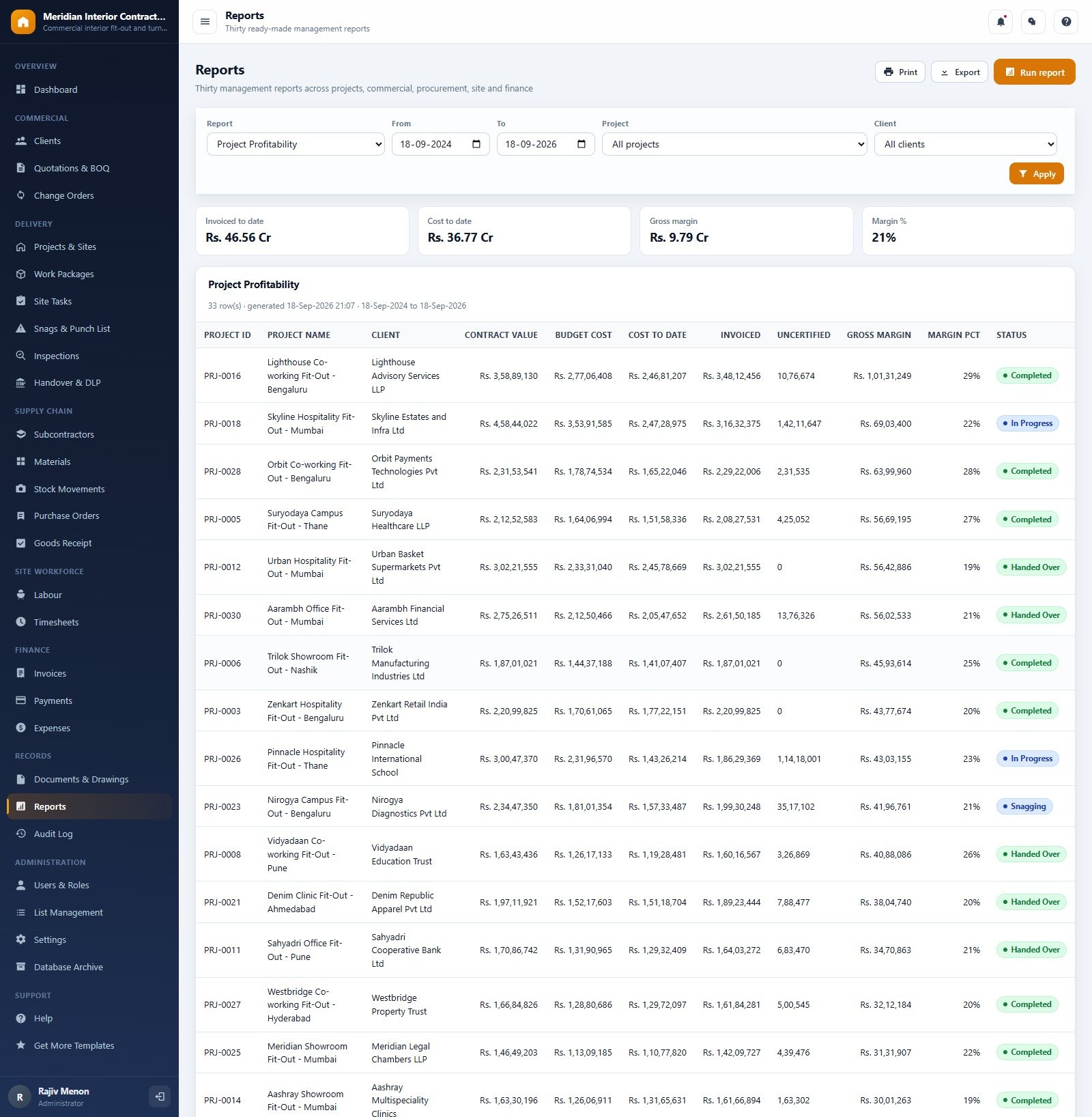
Thirty reports in six groups: Projects, Commercial, Procurement, Site, Finance and Records. Examples include Project Profitability, BOQ vs Actual Cost, Two Week Look Ahead, Subcontractor Performance, Snag Register and Ageing, Retention Held and Cash Flow Summary.
Interior Fit-Out Project Management System vs. Excel Tracker vs. Paid Construction Software
| Feature | Interior Fit-Out Project Management System | Excel project tracker | Paid construction PM software (Procore / Buildertrend) |
|---|---|---|---|
| Cost | ✅ One-time purchase | Free to low cost | Monthly or annual subscription |
| Platform | ✅ Browser, on your own Google account | Desktop spreadsheet file | Vendor cloud |
| Setup time | ✅ About 15 minutes | Days of building sheets | Weeks of onboarding |
| Role-based logins | ✅ 7 editable roles | No | ✅ Yes |
| Real-time team collaboration | ✅ One live database | File versions and email | ✅ Yes |
| BOQ, snags, retention and DLP together | ✅ Built in | You build it | Varies by plan |
| Source code you can edit | ✅ Yes | ✅ Yes | No |
| Data ownership | ✅ A Google Sheet in your Drive | ✅ Your file | Vendor hosted |
| Gantt scheduling and mobile app | No | No | ✅ Yes |
For fit-out contractors who want quotations, site delivery, procurement and billing in one system without per-user fees, this web app sits in the sweet spot.
Who Should Use This Template
Perfect for:
- Commercial interior fit-out contractors running office, retail, hospitality, clinic and campus projects
- Turnkey interior firms that price a BOQ, let trade packages to subcontractors and bill by milestone with retention
- Owners who want fit-out project management software they can edit, with no per-user subscription
Not a fit if:
- You need Gantt charts, critical-path scheduling or BIM links
- You need statutory tax filing, e-invoicing or an accounting-software integration
- Your crews must record work offline; the app needs an internet connection
Real-World Use Cases
An office fit-out contractor with a dozen live sites. The quantity surveyor prices every enquiry as a BOQ, project managers track package progress by trade, and the managing director signs in as a Viewer each Monday to check value in hand, receivables and overdue site tasks without being able to change a record.
A retail interiors firm rolling out stores. The procurement officer raises purchase orders per store, site engineers record goods receipt and timesheets, and the BOQ vs Actual Cost report flags stores drifting over budget before the final account is agreed.
A hospitality fit-out specialist. Snags are assigned to subcontractors with target dates, handovers record the DLP end date, and the Retention Held report shows how much money is still waiting on release.
Advantages of the Interior Fit-Out Project Management System
- One purchase, unlimited users. There are no seat fees, so site engineers, surveyors and accounts staff can all have their own login.
- Your data, your Drive. Records sit in a Google Sheet you own and can back up with the built-in backup command.
- Working from day one. The seeded demo business shows how every module connects before you enter your own projects.
- Fully editable. Trades, BOQ categories, expense categories and site areas are managed in List Management, and the full source code is included.
Opportunities for Improvement
- There is no Gantt chart or dependency scheduling; timing is handled through task due dates and the Two Week Look Ahead report.
- Invoices are internal billing records. The system does not file tax returns or connect to accounting software.
- Google Apps Script has daily quotas and execution time limits, so very large businesses should archive old records regularly with Database Archive.
- Inspections are internal quality records; the system does not certify compliance with any building or safety standard.
- After any code change you must deploy a new version for the live URL to update.
Best Practices
- Try each role in the live demo first, then decide which of the seven roles your team needs and trim the permissions.
- Set company details, currency symbol, GST %, retention % and print size in Settings before you print the first quotation.
- Agree package weights at the start of each project so the progress figures mean the same thing on every site.
- Close snags in the system the same day they are fixed, so the handover snag count stays accurate.
- Use Database Archive at year end to keep the live tables fast.
New to Apps Script? Google’s own web app deployment guide explains the deploy step in detail.
Explore Relevant Templates
If you only need KPIs rather than a full system, read about the Interior Fit-Out KPI Dashboard in Google Sheets and the Interior Fit-Out KPI Scorecard in Google Sheets. For related Apps Script systems, see the Civil Contractor Job Management System Web App, the Architecture Firm Project Management System Web App and the Home Renovation Project Management Web App.
Ready-to-buy versions are in the store: Civil Contractor Job Management System, Architecture Firm Project Management System, Interior Fit-Out KPI Dashboard in Excel and every system in the Web Apps collection.
Building your own trackers and management sheets alongside a system like this? The NextGenTemplates Academy learning paths take you through the spreadsheet skills one stage at a time.
Get the Interior Fit-Out Project Management System Web App
Frequently Asked Questions
Can I try the Interior Fit-Out Project Management System before buying?
Yes. The live demo above runs the full web app with fictional data. Sign in with any of the 10 demo accounts to see the dashboard, the modules each of the 7 roles can reach and all 30 reports before you buy anything.
What do I need to run it?
Only a Google account. The web app runs on Google Apps Script and creates its own Google Sheet database in your Drive during setup. Team members sign in with user names you create, so they do not need their own Google accounts.
How long does setup take?
About 15 minutes. Paste two files into a new Apps Script project, deploy it as a web app and run setup once from the first-run panel or the editor. Setup resumes on its own if Google’s time limit interrupts it.
How does it compare to Procore or Buildertrend?
Those are subscription platforms with scheduling, mobile apps and integrations. This interior contractor management software is a one-time purchase covering quotations, packages, snags, procurement and billing on your own Google account, without Gantt scheduling, offline use or accounting integrations.
Can I change the currency and tax rate?
Yes. The demo shows Indian Rupees and GST, but Settings lets you change the currency symbol, default GST %, retention %, credit days, company details and the print size used on quotations, orders and invoices.
Is there a limit on users or projects?
There is no licence limit on users or projects. The practical limits are Google Apps Script quotas and Google Sheets size, which is why the system includes Database Archive for moving old records out of the live tables.
About the Author
Built by PK, Microsoft Certified Professional with 15+ years of Excel, Google Sheets, Apps Script and Power BI experience. Founder of NextGenTemplates, reaching 300K+ subscribers across YouTube channels. Every template is hand-built and tested before release.
Conclusion
The Interior Fit-Out Project Management System brings the BOQ, the site and the money into one place: 27 modules, 7 roles and 30 reports on a database you own. Open the live demo, sign in as a site engineer and then as accounts, and you will see how the role separation works in under a minute.
✅ Instant download · One-time payment · No subscription
Last updated: September 2026