Service businesses lose time when appointments, staff availability, payments, reminders, and customer records sit in separate tools. The Universal Appointment Booking System Web App gives teams a 15-screen, multi-user booking workspace built with Google Sheets and Google Apps Script. It includes a secure login, role-based access, 10 dashboard KPI cards, 4 dashboard charts, booking tables, weekly calendar views, customer records, service catalogs, staff schedules, slots, payments, reminders, reviews, reports, users, lists, and settings. Instead of paying for a full scheduling SaaS before your workflow is ready, you can start with an editable web app template and adapt it to your service business.
Google Apps Script web apps can publish browser-based applications from Apps Script projects, which makes this template useful for teams that want a spreadsheet-backed booking system with a proper app-style interface.
Get the Universal Appointment Booking System Web App
Login Screen
🚀 Try the Live Demo Before You Buy
We have deployed this web app in our own Google account so you can test every page and every role — Admin, Manager, Reception, Staff, Accounts and Viewer — with real sample data, before purchasing. No signup, no email required.
🔑 Test Login Credentials
Sign in as Admin1 for full control over the entire system, or try any of the other roles below to see exactly what each team member can access. The Staff1 login is linked to provider ST-0001 (Dr. Sarah Mehta), so you’ll see the system from a provider’s own point of view.
💡 What you get after purchase: The full source code (Code.gs + Index.html) plus a step-by-step deployment guide so you can deploy your own private instance in your own Google account in under 15 minutes.
Key Features of Universal Appointment Booking System Web App
- Secure multi-user access: team members sign in with username and password, while admin users control roles and module access.
- Appointment calendar: switch between day, week, month, and list views, then create bookings directly from the calendar.
- Booking lifecycle tracking: manage pending, confirmed, completed, cancelled, no-show, paid, unpaid, and balance-due appointments.
- Customer and service masters: store customer contact details, service duration, pricing, categories, skills, and active status.
- Staff availability: manage providers, work days, breaks, skills, capacity, off-days, and appointment slots.
- Operational reporting: review booking status, revenue trends, top services, staff-wise bookings, customer feedback, reminders, and payments.
- Admin controls: user management, list management, business settings, booking defaults, print settings, public booking options, archive, and audit log tabs.
Dashboard Pages Explanation
The application is organized around the daily booking workflow: login, dashboard, calendar, bookings, master data, availability, payments, follow-ups, reporting, and administration.
1. Login Screen
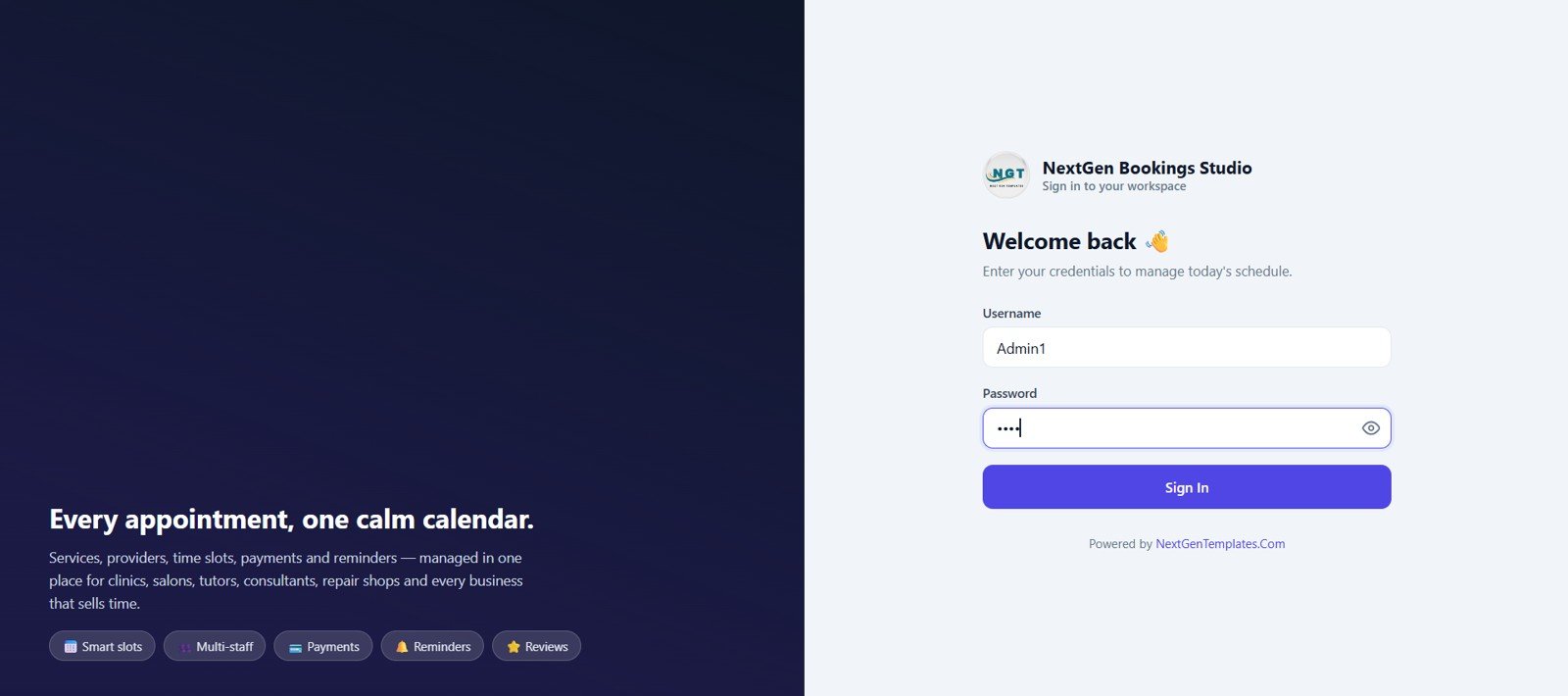
The app opens with a clean login screen for NextGen Bookings Studio. The left panel explains that services, providers, slots, payments, and reminders are managed from one calm booking workspace.
Login Screen
2. Dashboard
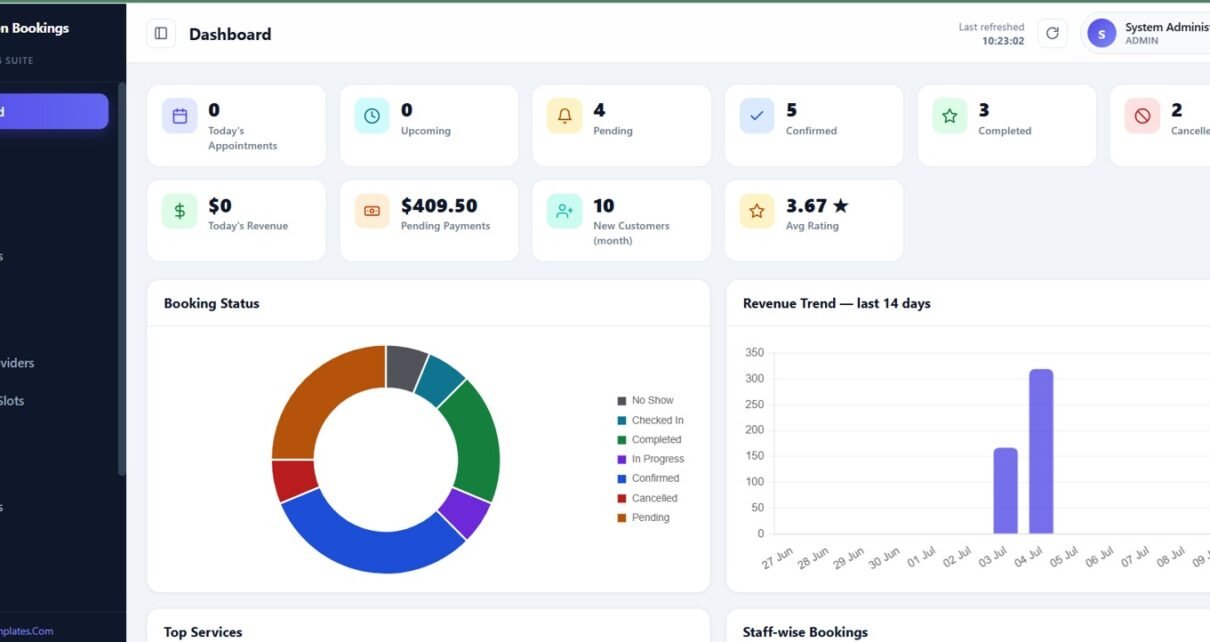
The dashboard summarizes today’s appointments, upcoming bookings, pending, confirmed, completed, cancelled or no-show appointments, revenue, pending payments, new customers, and average rating. Charts cover booking status, revenue trend, top services, and staff-wise bookings.
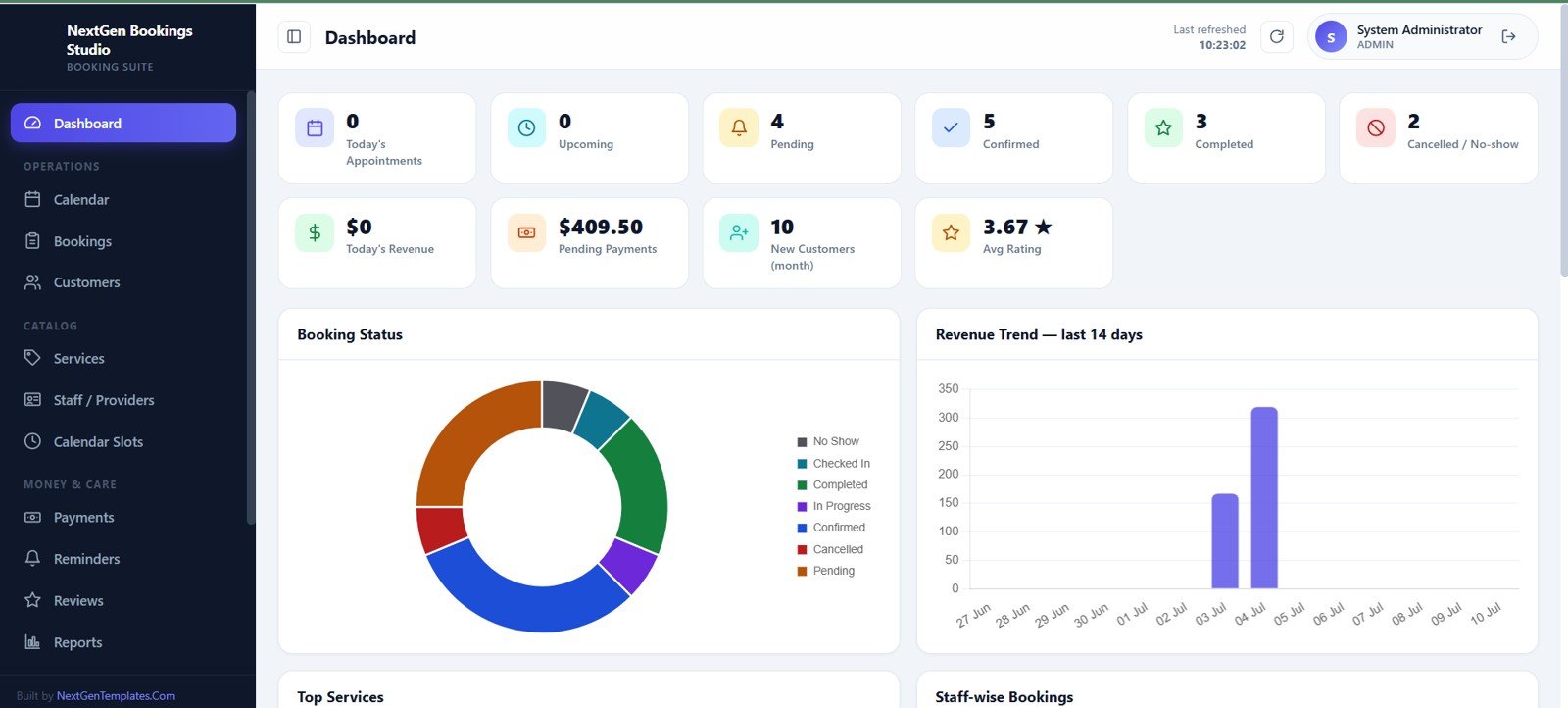
Dashboard
3. Calendar
The calendar screen gives a weekly appointment and availability view. Users can move between dates, filter by staff or service, change the view mode, and create a new booking from the calendar.
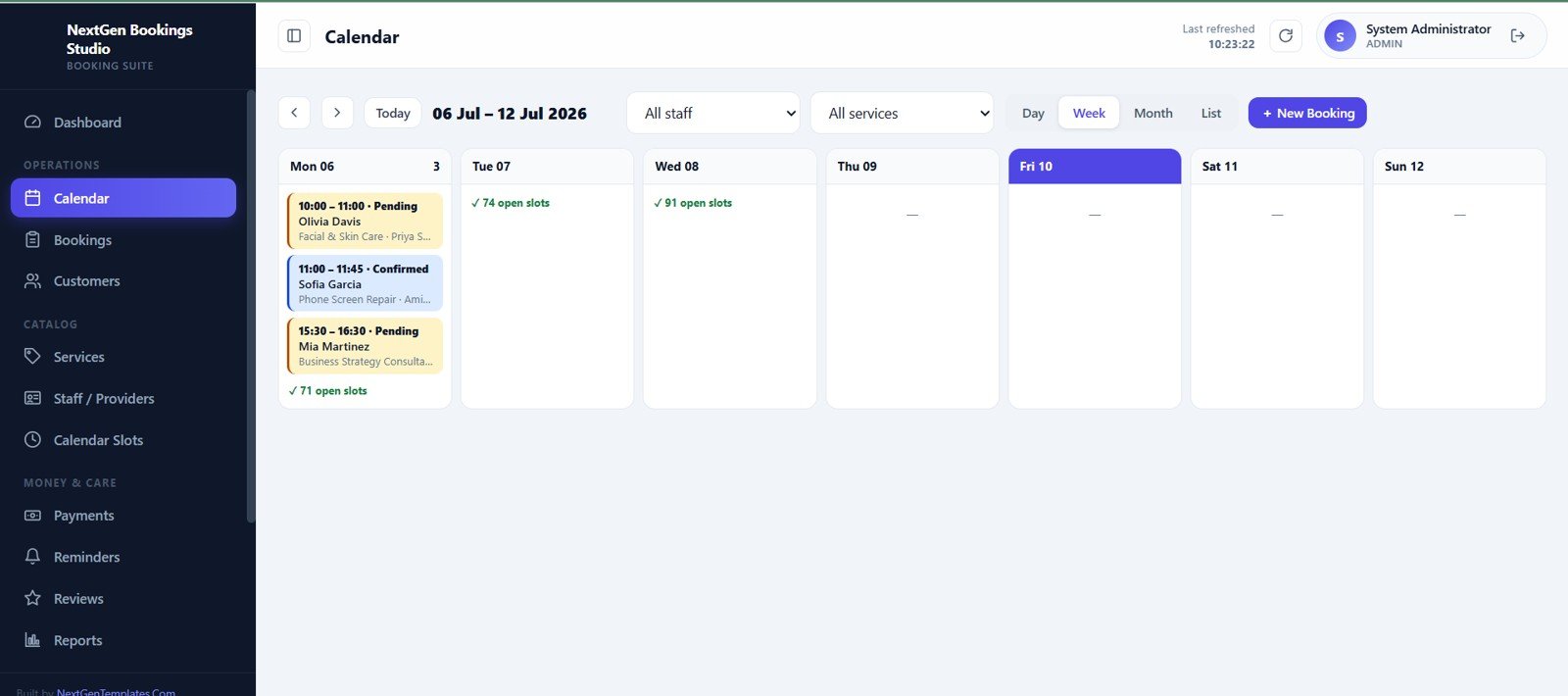
Calendar
4. Bookings
The bookings table tracks appointment time, customer, service, staff, status, total, balance, and payment status. Search, date filters, status filters, import, export, and quick action buttons keep booking operations organized.
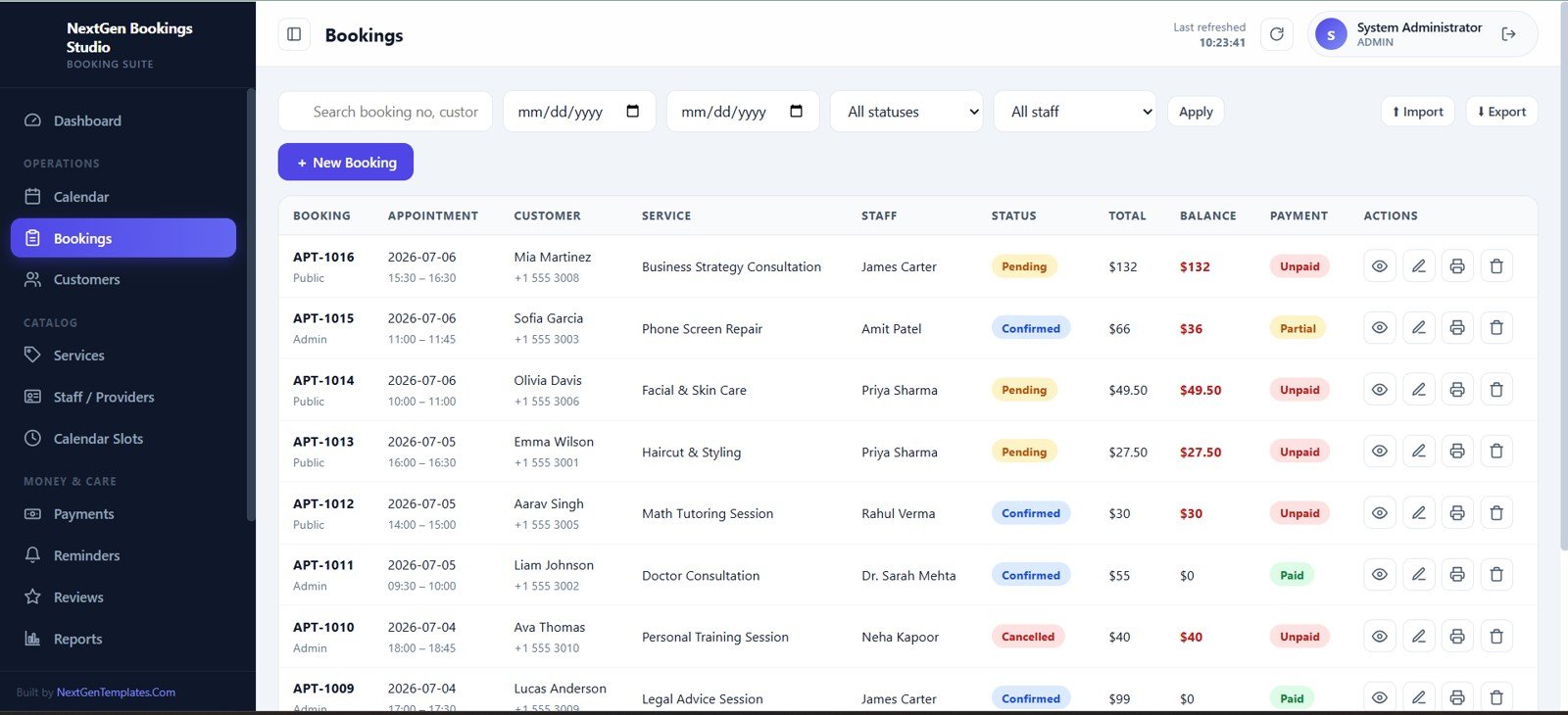
Bookings
5. Customers
The customer screen stores the full customer directory with customer ID, name, mobile, email, type, and status. Users can search, add, import, export, view, message, email, edit, or delete customer records.
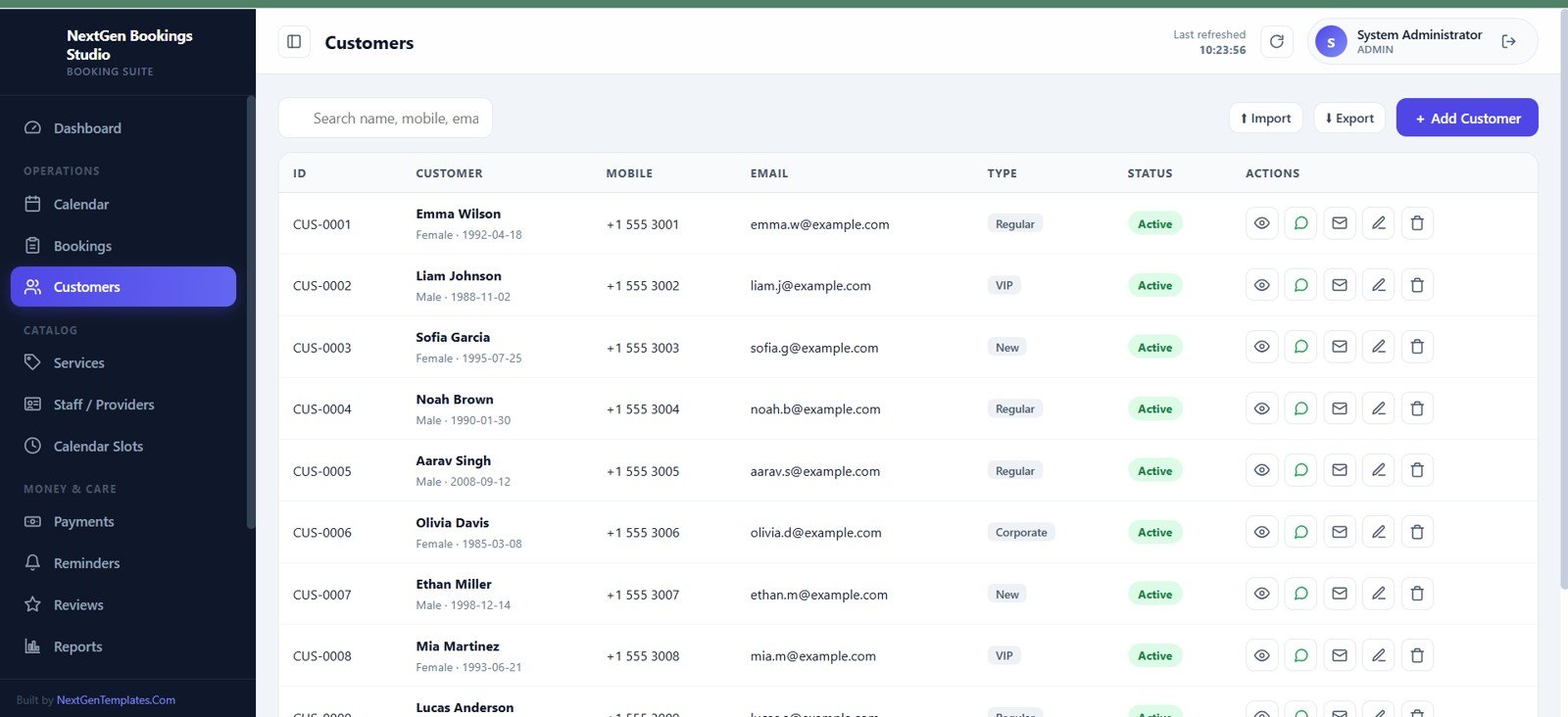
Customers
6. Services
The services screen acts as the service catalog. Each row can show code, service name, category, duration, price, skill, status, and actions for editing or deleting service records.
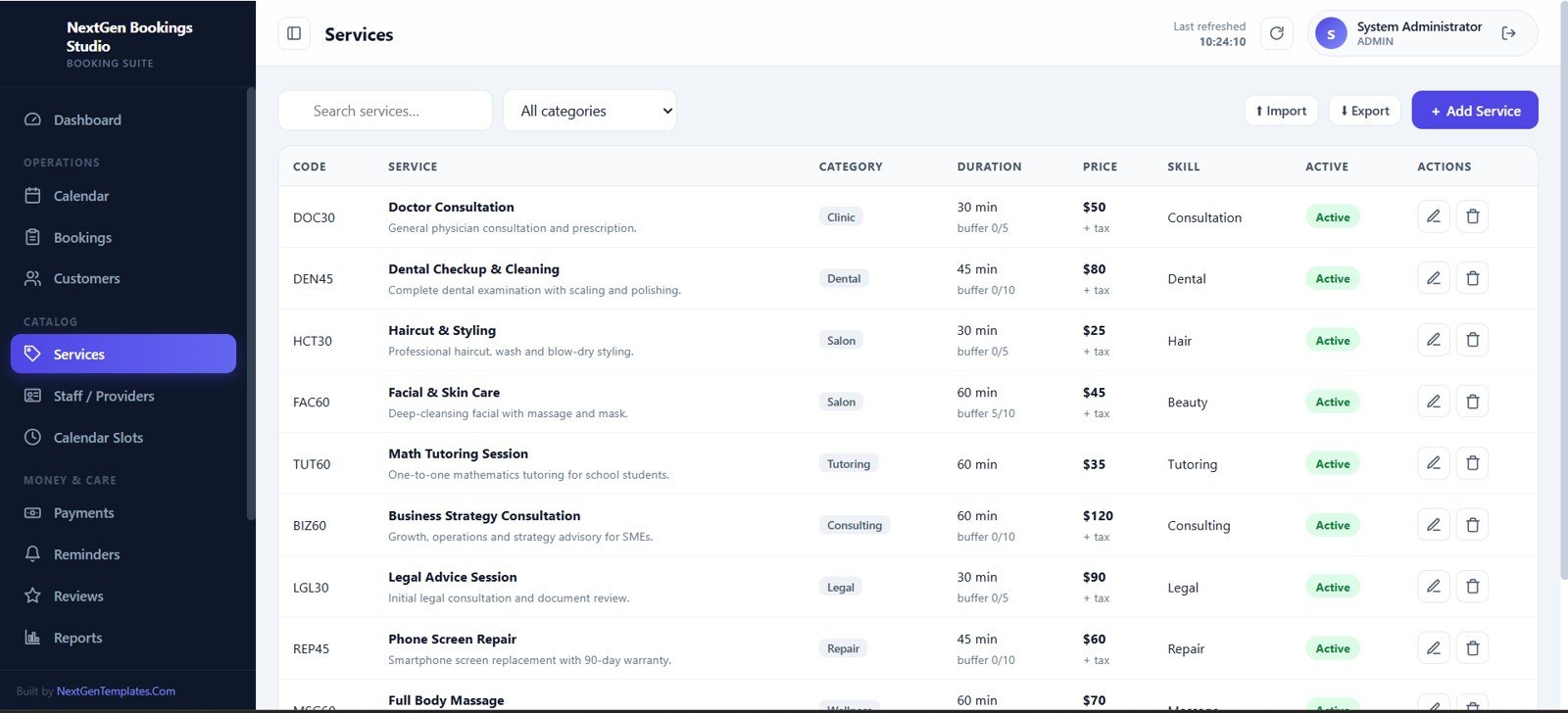
Services
7. Staff / Providers
This page manages the people who deliver services. Provider details, contacts, work days, breaks, skills, capacity, status, schedules, and off-day blocks are handled from one area.
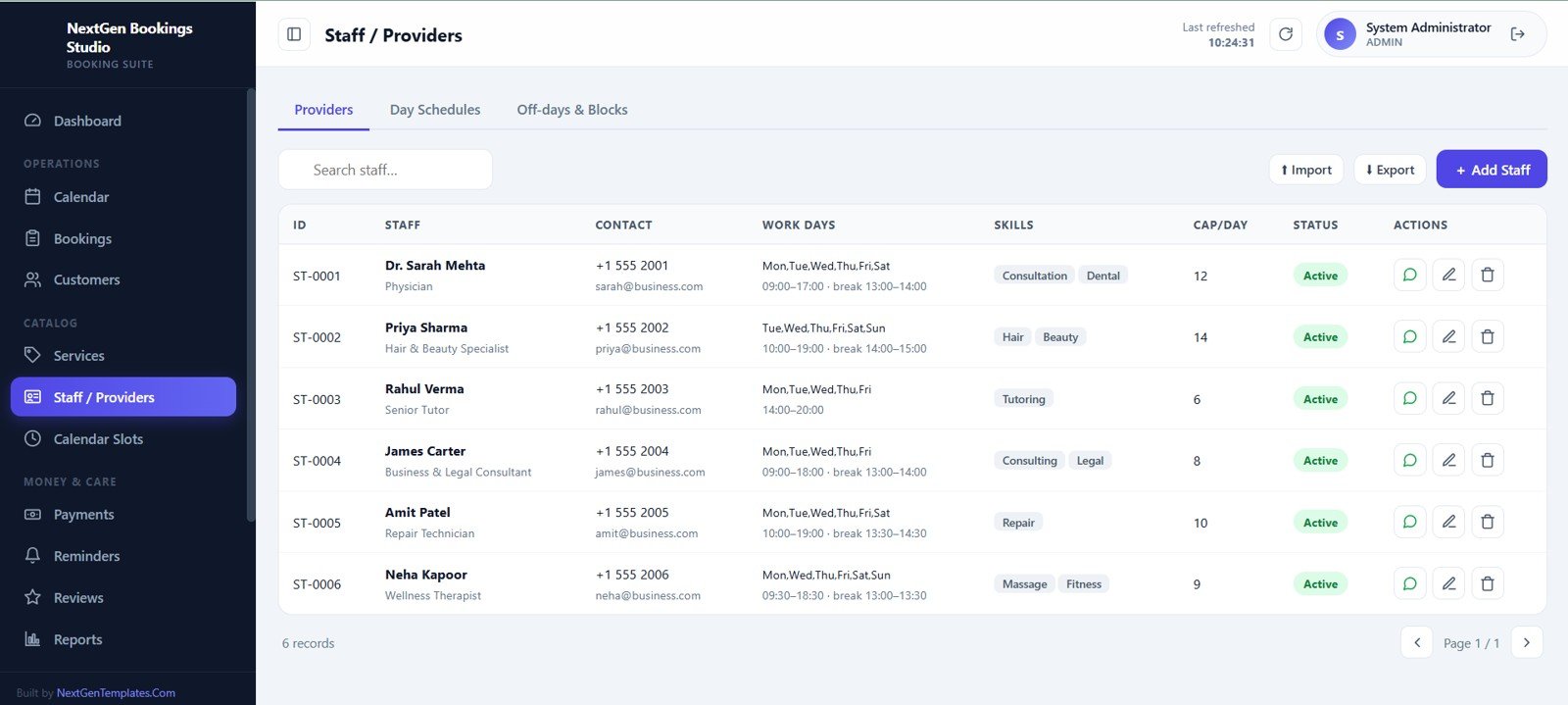
Staff / Providers
8. Calendar Slots and Availability
Availability controls help users create appointment slots by date range and staff member. Slots can be auto-generated from working hours or added manually for custom schedules.
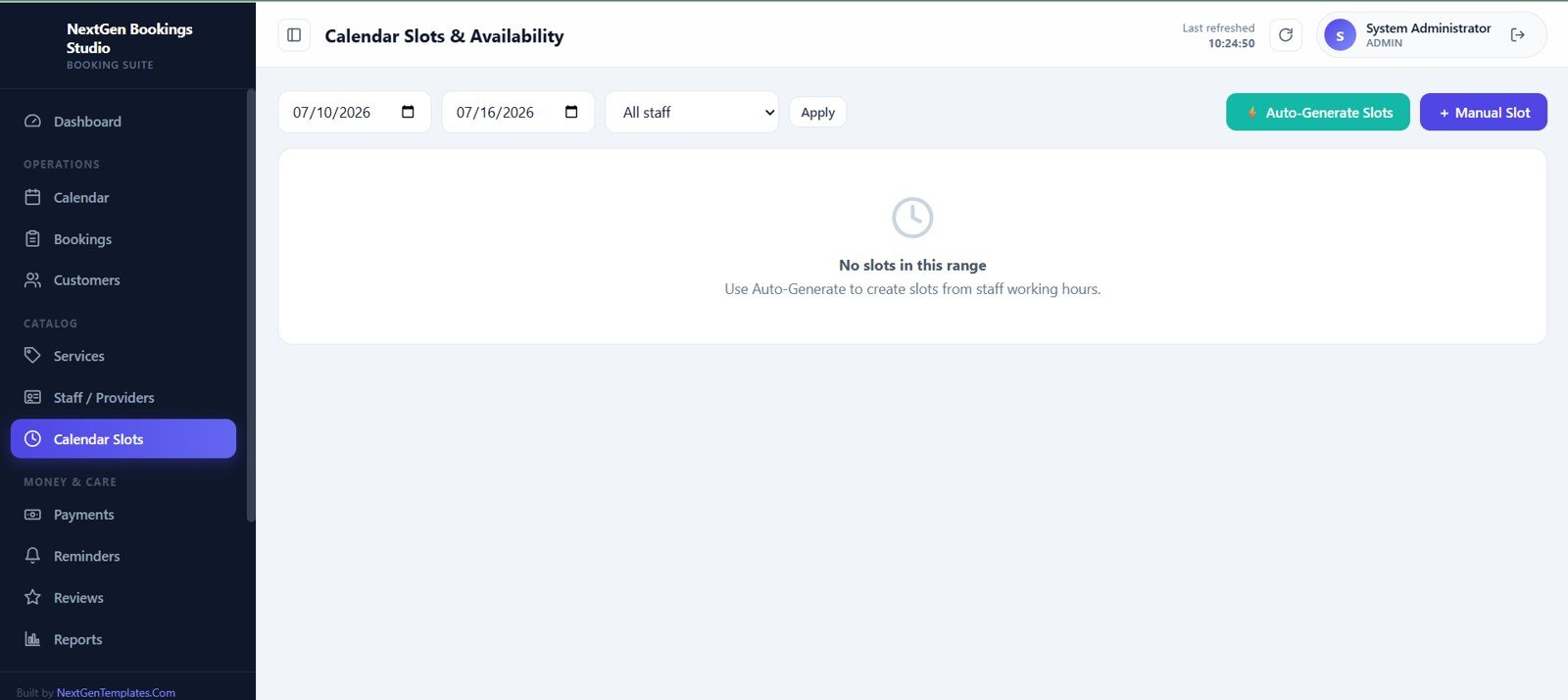
Calendar Slots and Availability
9. Manual Payments
The manual payments page records collections and receipt details. Cards show today’s collection, range collection, total payments, and top payment mode, while the table tracks receipt, date, customer, amount, mode, reference, and actions.
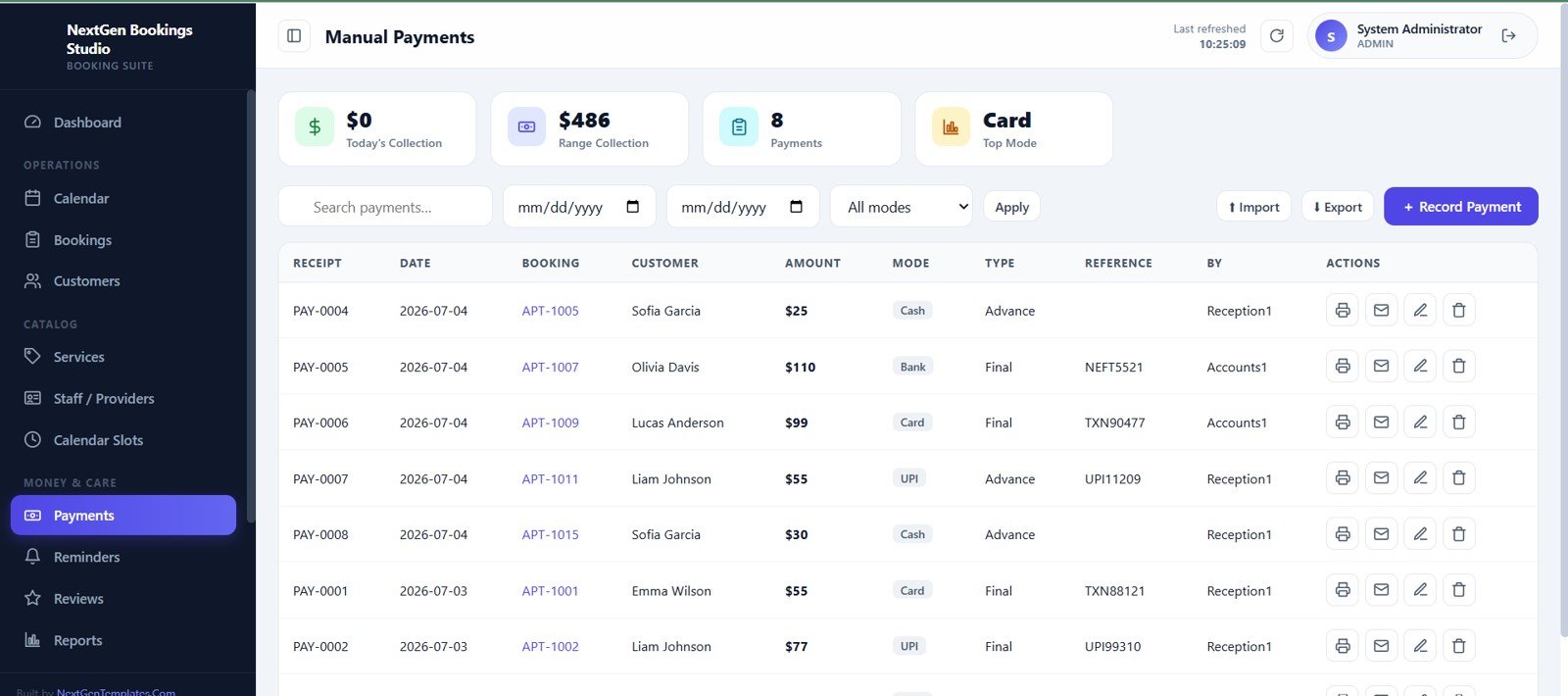
Manual Payments
10. Reminders
The reminders screen helps staff manage booking and customer follow-ups. Each reminder includes due date and time, customer, booking, type, channel, status, notes, and completion actions.
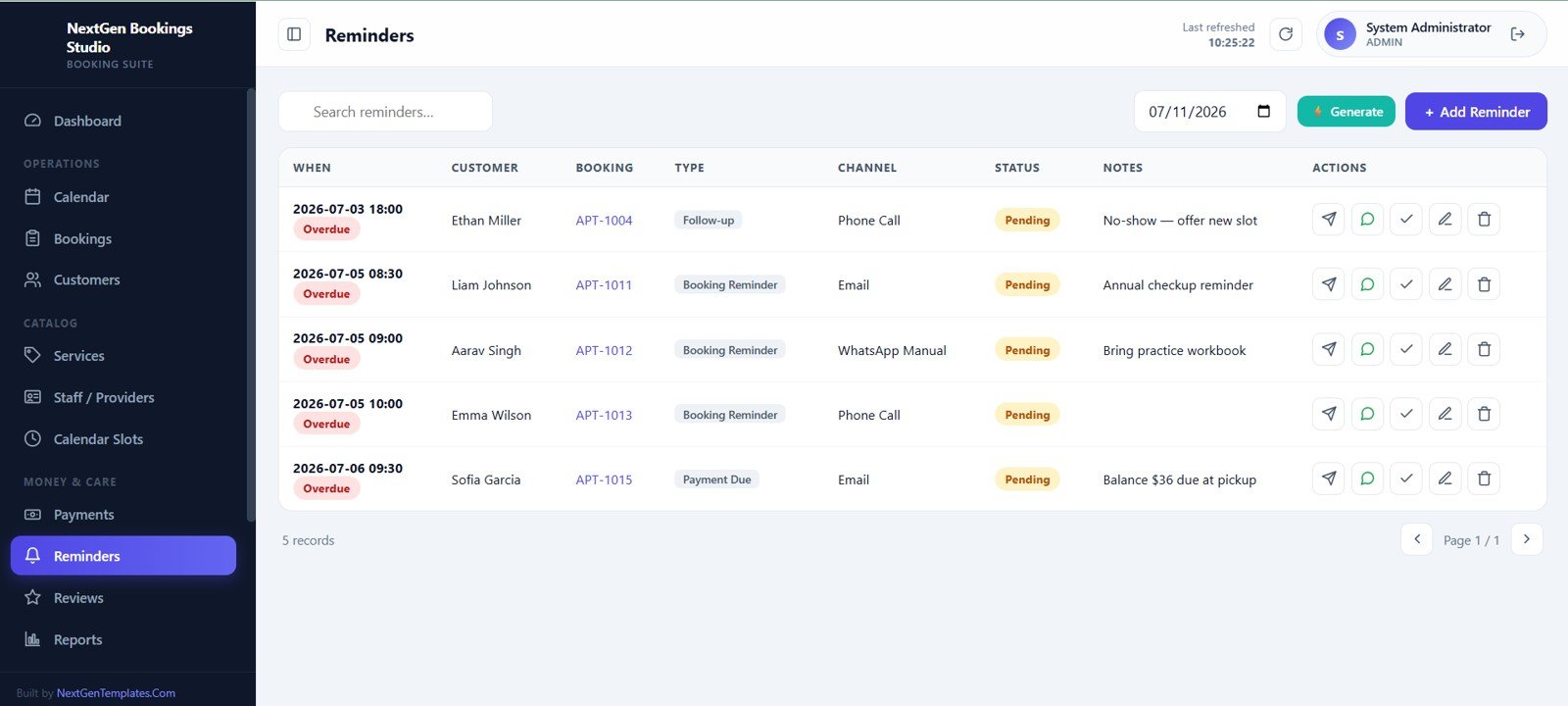
Reminders
11. Reviews and Feedback
This screen tracks customer reviews and service feedback. Cards summarize average rating, total reviews, 5-star reviews, and follow-ups needed, while the table records customer, staff, service, rating, comment, status, and actions.
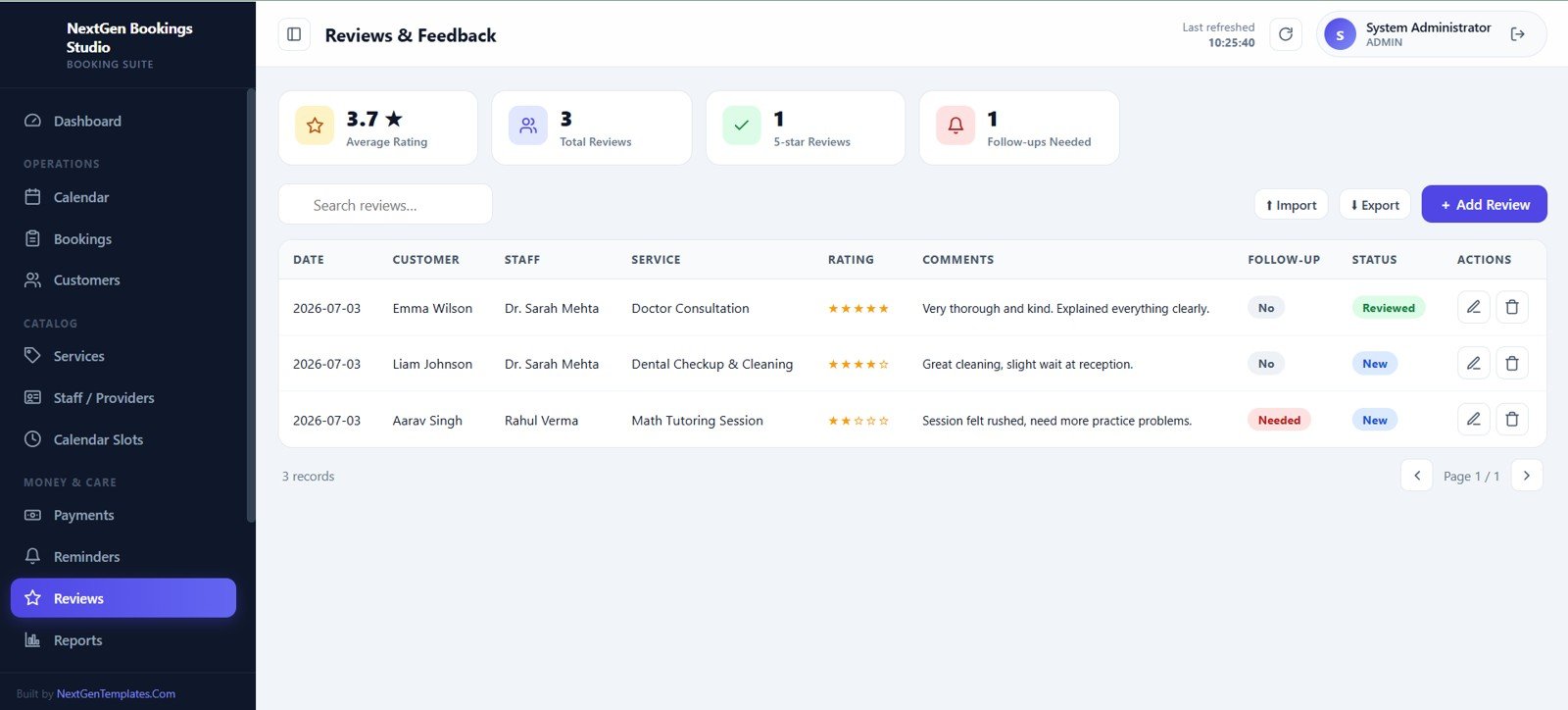
Reviews and Feedback
12. Reports
The reports page turns booking data into ready-made operational reports. Users can choose a report, set a date range, filter by staff or service, run the report, export CSV, or print the result.
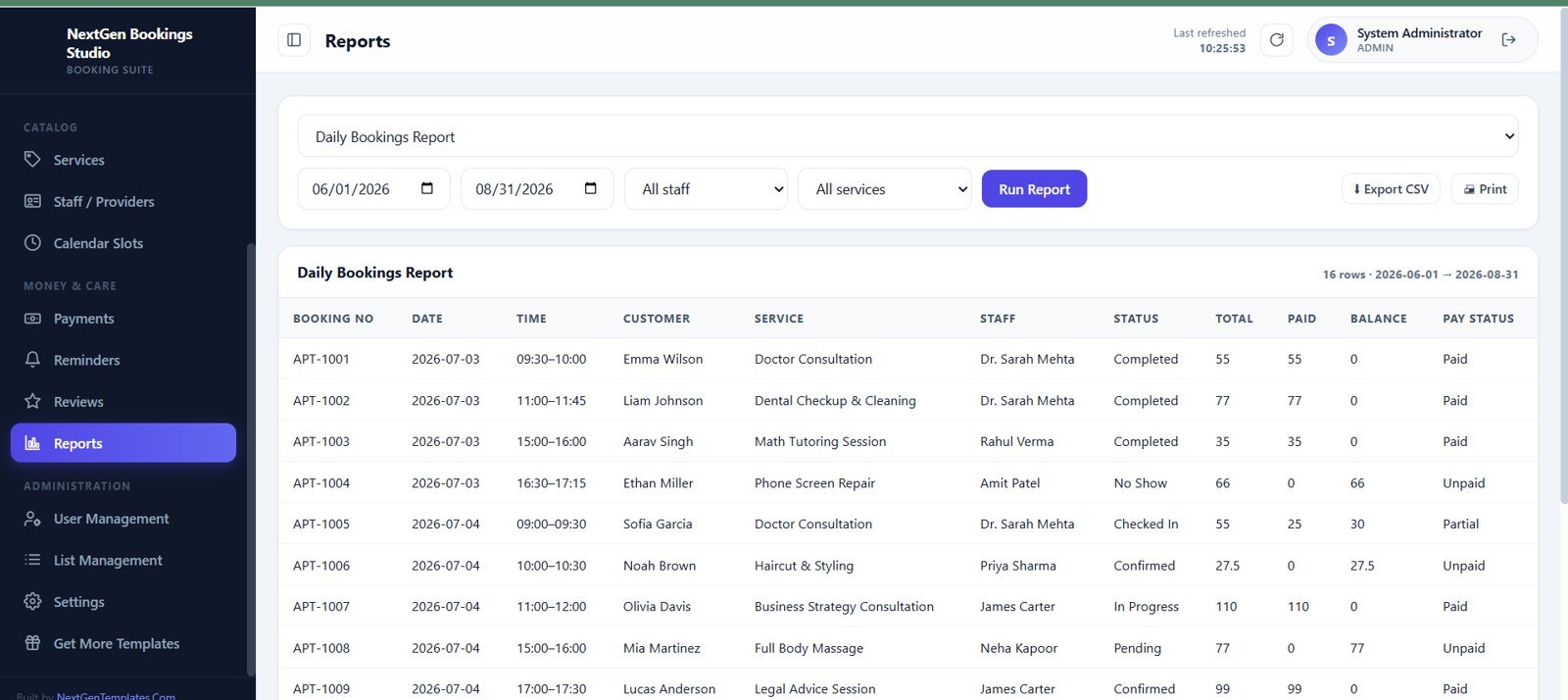
Reports
13. User Management
Admins can manage user accounts and access from this screen. User ID, name, username, role, linked staff, module permissions, status, last login, reset access, edit, and delete actions are visible in one table.
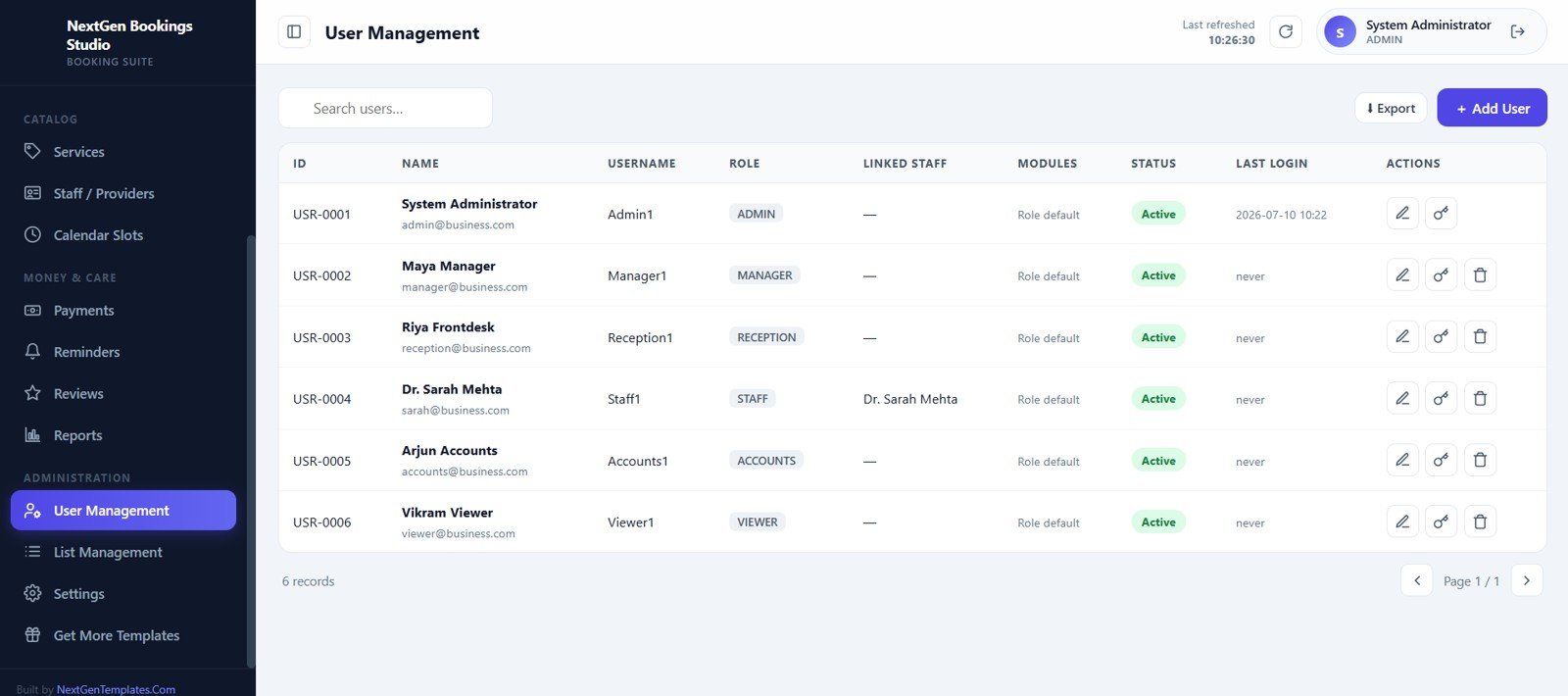
User Management
14. List Management
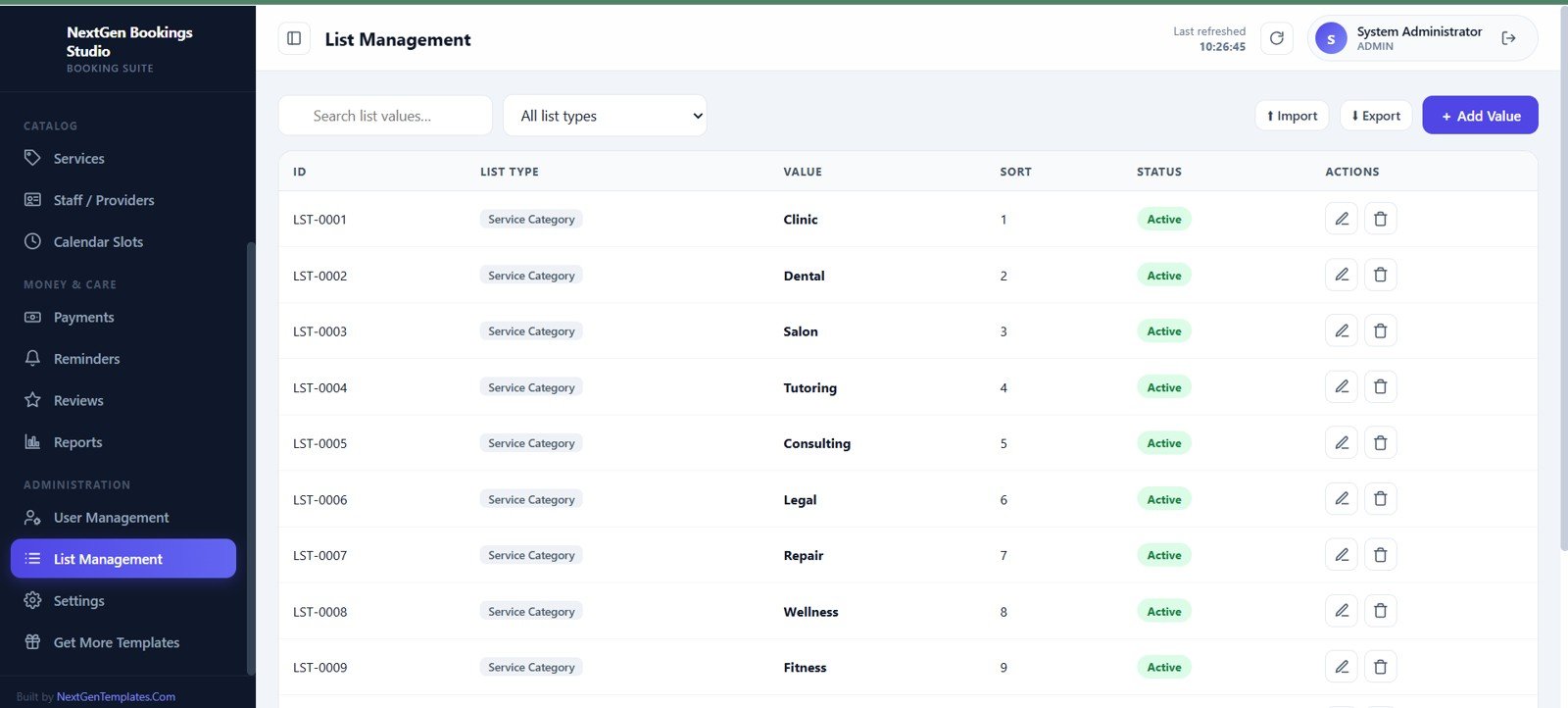
List Management keeps dropdown values and master lists consistent. Service categories such as Clinic, Dental, Salon, Tutoring, Consulting, Legal, Repair, Wellness, and Fitness can be sorted and activated.
List Management
15. Settings
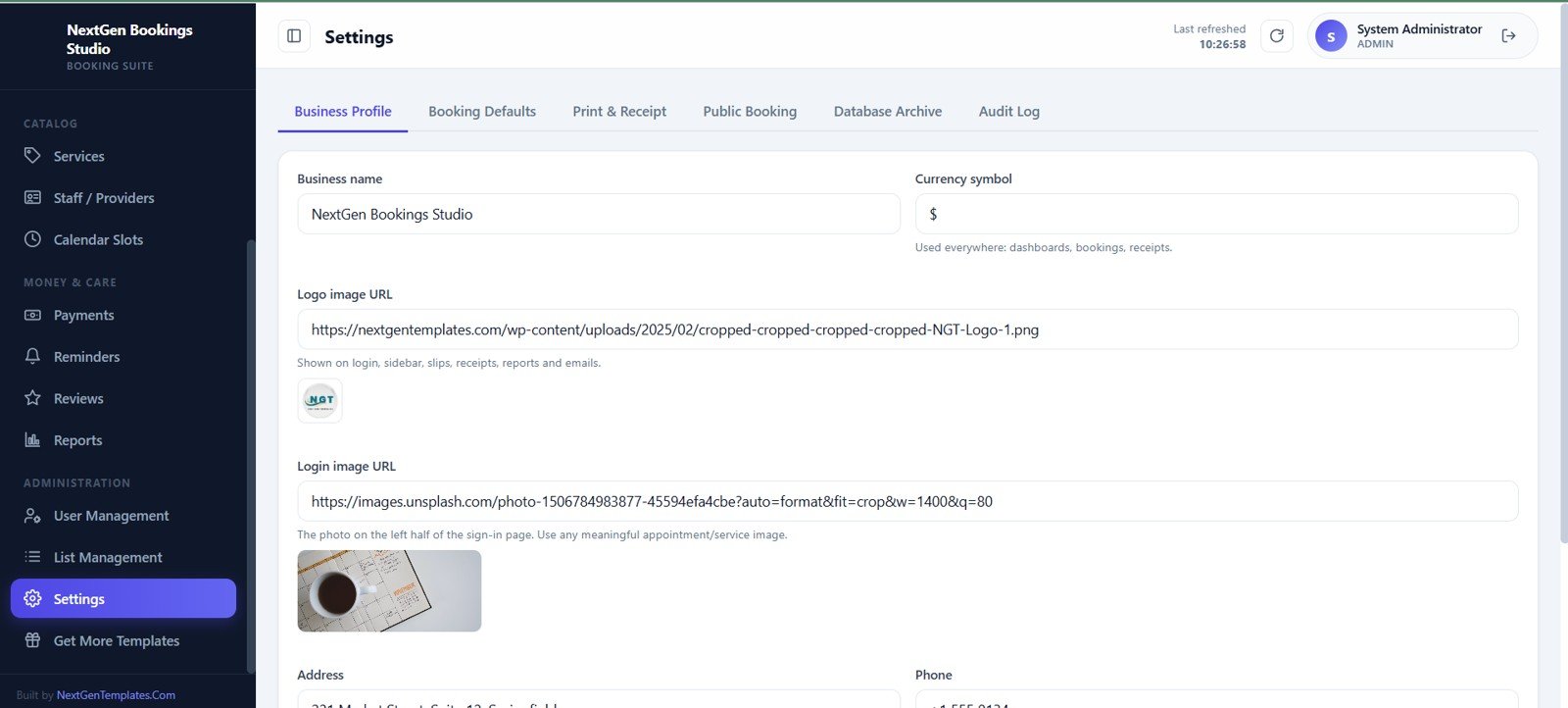
The settings area stores business profile and system preferences. Tabs include Business Profile, Booking Defaults, Print and Receipt, Public Booking, Database Archive, and Audit Log.
Settings
Universal Appointment Booking System Web App vs. Spreadsheet Tracker vs. Paid CRM/SaaS – Feature Comparison
| Feature | This web app template | Spreadsheet or Excel tracker | Paid scheduling SaaS |
|---|---|---|---|
| Cost model | One-time template purchase | Low software cost but high setup effort | Monthly or annual subscription |
| Platform | Google Sheets and Google Apps Script web app | Spreadsheet tabs and manual views | Vendor-hosted cloud platform |
| Setup time | Deploy, configure lists, add users, services, and staff | Build tables, formulas, filters, and reports yourself | Vendor onboarding and workflow setup |
| Real-time team collaboration | Designed for multi-user access and role-based modules | Possible, but role control is usually limited | Usually included by plan |
| Mobile access | Browser-based web app experience | Spreadsheet mobile app or browser | Vendor mobile app or browser |
| Customizable fields | Editable template structure and lists | Highly editable but easier to break | Limited by vendor configuration |
| Share with link | Deploy and share according to your Google account setup | Share spreadsheet file links | Often requires paid user seats |
| Year-1 cost at 5 users | Template price plus your existing Google account costs | Low cash cost, more manual time | Can become hundreds or thousands depending on plan |
| Booking operations | Bookings, calendar, slots, staff, services, payments, reminders, reviews, reports | Usually requires several custom sheets | Included, plan dependent |
Who Should Use This Template
- Clinics, salons, spas, consultants, tutors, repair shops, wellness providers, legal offices, and fitness studios that manage booked appointments.
- Small teams that need login-based access instead of one shared spreadsheet.
- Service businesses that want staff availability, reminders, payments, reports, and customers in one system.
- Template buyers who prefer editable files and a one-time purchase model instead of a locked monthly SaaS subscription.
Real-World Use Cases
Anika runs a salon with six providers. She uses the calendar, staff availability, services, and payment screens to manage daily appointments and follow-ups without keeping separate notebooks.
Dr. Mehta manages a small clinic. The bookings table, reminders, customer records, and reports help the front desk track pending appointments, completed visits, and collections.
Jordan operates a consulting studio. He uses service categories, provider capacity, customer notes, and review tracking to see which sessions are most booked and which clients need follow-up.
Advantages of Universal Appointment Booking System Web App
- Structured workflow: booking, calendar, customer, staff, payment, reminder, review, and report modules are connected.
- Better visibility: dashboard cards and charts show current workload, payment status, revenue, and service trends.
- Role-based administration: user management and settings help the owner separate daily users from admin users.
- Editable foundation: the system can be adapted for different appointment-based businesses and service categories.
- No heavy SaaS commitment: useful when a business wants operational structure before subscribing to a large scheduling platform.
Opportunities for Improvement
This template is a booking management web app, not a full marketplace scheduling platform. It does not claim native integrations with payment gateways, SMS providers, accounting tools, video meetings, or third-party calendars unless you customize those workflows separately. Larger organizations may also need deeper approval flows, automated notifications, customer self-service portals, and advanced compliance controls.
Best Practices
- Set up users and roles before entering live appointment data.
- Clean the customer, service, staff, and list-management values before launch.
- Define staff working days, breaks, off-days, and daily capacity before generating slots.
- Use booking statuses consistently so dashboard cards and reports stay meaningful.
- Review reminders and pending payments daily to reduce missed follow-ups.
- Export reports regularly for backup, reconciliation, and management review.
Explore Relevant Templates
- Web App Based: Hotel Booking Management System
- Salon and Spa Management System Web App
- Parking Management System Web App
- Logistics Management System Web App
- Browse all Mini Web Apps on NextGenTemplates
Curious how systems like this are put together? The NextGenTemplates Academy learning paths cover the spreadsheet skills behind them, with practice files.
Get the Universal Appointment Booking System Web App
Frequently Asked Questions
What is included in the Universal Appointment Booking System Web App?
It includes 15 screens covering login, dashboard, calendar, bookings, customers, services, staff/providers, slots and availability, manual payments, reminders, reviews, reports, user management, list management, and settings.
Is this built with Google Sheets and Google Apps Script?
Yes. The template is described as a Google Sheets and Google Apps Script web app, which gives buyers an editable foundation they can deploy and customize.
Can it manage multiple staff members and providers?
Yes. The staff/providers screen supports work days, break timings, skills, daily capacity, status, day schedules, and off-days or blocks.
Does it include payment tracking?
Yes. The Manual Payments screen tracks receipts, dates, bookings, customers, amounts, payment modes, payment type, reference, recorded-by details, and actions.
Can I use it for salons, clinics, tutors, or consultants?
Yes. The list-management examples include Clinic, Dental, Salon, Tutoring, Consulting, Legal, Repair, Wellness, and Fitness, which makes the structure flexible for many appointment-based services.
Does this replace a large scheduling SaaS platform?
It can replace simple manual scheduling workflows, but it is not meant to match every feature of enterprise scheduling SaaS. It is best for teams that want an editable, one-time-purchase booking web app template.
About the Author
Built by PK – Microsoft Certified Professional with 15+ years of Excel, Google Sheets, and Power BI experience. Founder of NextGenTemplates, reaching 300K+ subscribers across YouTube channels. Every template is hand-built and tested before release.
Conclusion
The Universal Appointment Booking System Web App is a practical option for appointment-based service businesses that need more structure than a spreadsheet but do not want to start with an expensive SaaS subscription. With bookings, calendar, customers, services, providers, slots, payments, reminders, reviews, reports, and admin settings in one workspace, it gives teams a strong starting point for daily scheduling operations.
Last updated: July 10, 2026.