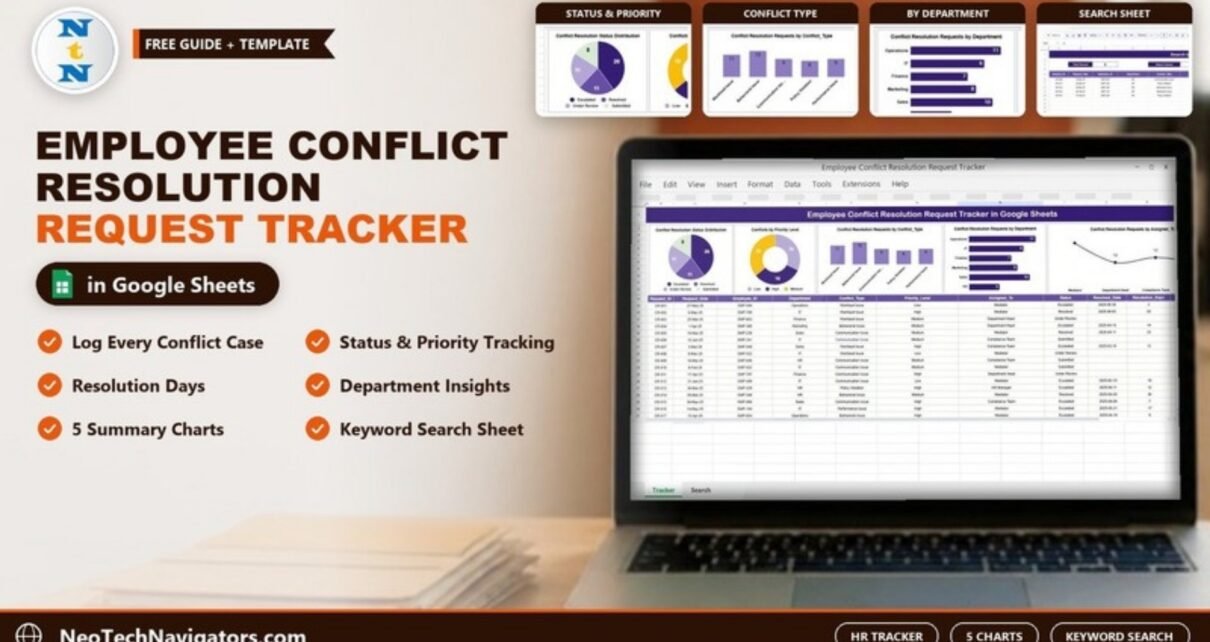
The Employee Conflict Resolution Request Tracker in Google Sheets gives HR teams one place to log workplace conflict cases, follow each one to closure and see patterns across departments. Each request gets an ID, date, department, conflict type, priority, owner and status, and the tracker works out how many days each resolved case took.
It is built for HR managers, people-operations teams, compliance teams and managers of growing companies who handle disputes by email today and lose track of who is doing what. Five charts sit above the data, and a separate search sheet pulls up matching records in seconds.
Below you will see exactly what the tracker contains, a worked example from the sample data, how to set it up, how to handle sensitive information, and where it is not the right tool.
🎥 Watch the Video Tutorial
Get the Employee Conflict Resolution Request Tracker
Why Use an Employee Conflict Resolution Tracker?
Workplace conflicts rarely disappear on their own. When cases are handled informally, a few things go wrong: nobody knows which cases are still open, high-priority issues wait behind minor ones, and the same department keeps appearing without anyone noticing. A conflict resolution tracker fixes this with a simple record for every case and a visual summary of where the problems are.
A structured log also helps fairness. When each case has a date, an owner and a documented outcome, employees can see that concerns are taken seriously and handled consistently.
What Is Inside the Tracker
| Part | What it does |
|---|---|
| Tracker sheet: charts | Five charts summarising status, priority, conflict type, department and owner |
| Tracker sheet: data table | One row per conflict resolution request |
| Search sheet | Pick a column, type a keyword and see all matching records with a record count |
The Data Table: Columns and Values
Each request is one row with these columns:
| Column | What to enter | Sample values |
|---|---|---|
| Request_ID | Unique case number | CR-001, CR-002 |
| Request_Date | Date the request was raised | 27-May-25 |
| Employee_ID | ID of the employee raising it | EMP-594 |
| Department | Department involved | Operations, IT, Finance, Marketing, Sales, HR |
| Conflict_Type | Nature of the conflict | Workload Issue, Behavioral Issue, Communication Issue, Policy Violation, Performance Issue |
| Priority_Level | Urgency | Low, Medium, High |
| Assigned_To | Who handles the case | Mediator, Department Head, Compliance Team, HR Manager |
| Status | Current stage | Submitted, Under Review, Escalated, Resolved |
| Resolved_Date | Date the case was closed | 2025-05-30 |
| Resolution_Days | Days from request to resolution | 3, 28, 14 |
| Remarks | Short outcome notes | Free text |
Using an Employee_ID rather than a name is a good privacy choice. It keeps the tracker useful for reporting without putting names in front of everyone who opens the file.
The Five Charts
The sample contains 50 requests. The charts above the table summarise them:
- Conflict Resolution Status Distribution (pie): Escalated 20, Resolved 11, Under Review 11, Submitted 8.
- Conflicts by Priority Level (doughnut): Medium 18, Low 16, High 16.
- Conflict Resolution Requests by Conflict_Type (column): Behavioral Issue 13, Workload Issue 11, Communication Issue 9, Performance Issue 9, Policy Violation 8.
- Conflict Resolution Requests by Department (bar): Operations 11, Sales 10, IT 9, Marketing 8, Finance 7, HR 5.
- Conflict Resolution Requests by Assigned_To (line): Mediator handles the most cases, with Compliance Team at 12 and Department Head at 10.
Read together, the sample tells a clear story: 40% of cases are escalated, behavioral issues are the most common type, and Operations raises the most requests. That is where an HR team would start.

Worked Example: Resolution Days
The Resolution_Days column is simply the resolved date minus the request date. Two rows from the sample:
CR-001: 30-May-25 - 27-May-25 = 3 days
CR-002: 03-Jun-25 - 06-May-25 = 28 days
Open cases (Submitted or Under Review) have no resolved date, so the column stays blank. If you rebuild or extend the sheet, the same logic in a formula looks like this:
=IF(Resolved_Date="", "", Resolved_Date - Request_Date)Replace the names with the actual cells in your row, for example the Resolved_Date and Request_Date cells of row 15.
Search by Keyword and Field Name
The search sheet, titled Search by Search Keyword and Field Name, has three controls: Select Column (a dropdown of the table headers), Search Keyword and a Total Record counter. In the sample, Select Column is set to Department and the keyword is “hr”. The sheet returns 5 records (CR-009, CR-013, CR-014, CR-023 and CR-041) with all their columns, including Remarks. The lowercase keyword still matched “HR”, so you do not need to worry about capitals.

If you want to learn how to build search panels like this yourself with functions such as FILTER and SEARCH, the 100 formulas course on NextGenTemplates Academy covers lookup and filter formulas with practice files.
How to Use It With Your Own Data
- Make a copy with File > Make a copy and store it in a restricted HR folder.
- Delete the sample rows in the tracker table, keeping the headers and any formula columns.
- Decide your own values for Department, Conflict_Type, Priority_Level, Assigned_To and Status. Adding dropdowns through Data > Data validation keeps the spelling consistent so the charts group cases correctly.
- Log each new request with an ID, date, Employee_ID, department, type, priority and owner. Set Status to Submitted.
- Update Status as the case moves, and enter the Resolved_Date when it closes.
- Check the charts weekly and use the search sheet before review meetings.
Three Real-World Use Cases
- Growing startup: the single HR person logs every concern so nothing is forgotten when the founders ask for an update.
- Manufacturing plant: HR notices most cases come from one shift’s department and arranges team communication training.
- Multi-team service company: the Assigned_To chart shows the mediator is overloaded, so new cases are routed to department heads.
Best Practices for Conflict Case Tracking
- Share the file only with people who handle cases. Use Share settings and avoid “anyone with the link”.
- Keep remarks factual and short. Store detailed notes and evidence in your HR system, not in a shared sheet.
- Agree on what each priority means, for example High for safety or harassment concerns.
- Review escalated cases every week. In the sample they are the largest group.
- Look at conflict types quarterly and plan training around the most common one.
Limitations and Who Should Not Use It
This tracker records and summarises cases. It does not send alerts, enforce deadlines, manage formal investigations or keep a legal audit trail. Serious matters such as harassment complaints usually need a confidential case management process and legal advice, and should follow your company policy and local law. Large organisations with a full HR information system should log cases there. The sample also does not include a Critical priority level; add one to the dropdown if you need it.
Related Templates
For formal complaints, see the employee grievance tracker in Google Sheets. To measure how well your process performs over time, the conflict resolution KPI dashboard is a good companion, and the HR KPI dashboard and employee satisfaction dashboard help you link conflict trends to wider HR results.
Frequently Asked Questions
What does the Employee Conflict Resolution Request Tracker include?
A request table with 11 columns, five summary charts (status, priority, conflict type, department and assigned to) and a search sheet that filters records by column and keyword.
How are Resolution Days calculated?
Resolved_Date minus Request_Date. For example, a request raised on 27 May and resolved on 30 May shows 3 days.
Can I change the conflict types and departments?
Yes. Replace the sample values with your own and use the same spelling in every row so the charts group them correctly.
Is it safe to store conflict cases in Google Sheets?
It can be, if you restrict sharing, use employee IDs instead of names and keep sensitive details in a secure HR system. Follow your company’s data policy.
Does the search work with lowercase keywords?
Yes. In the sample, the keyword “hr” returns the five HR department records.
Is it suitable for small companies?
Yes. It works well for teams handling a few cases a month up to a few hundred a year.
Wrapping Up
The Employee Conflict Resolution Request Tracker in Google Sheets gives HR a simple, consistent way to log conflict cases, see which ones are stuck, and spot the departments and issue types that need attention. Set your dropdown values, restrict access, and review the escalated cases first.
Get the Employee Conflict Resolution Request Tracker
📅 Last updated: October 2026