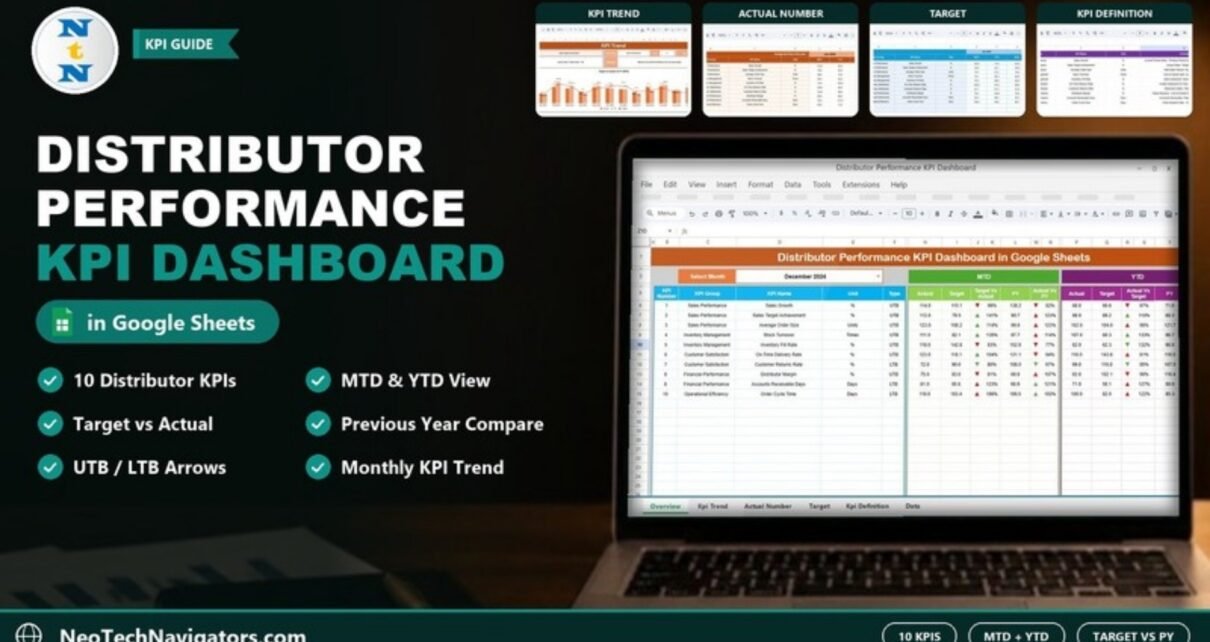
The Distributor Performance KPI Dashboard in Google Sheets is a ready-made scorecard for sales and channel managers who need to see, month by month, whether their distributors are hitting targets and improving on last year. You pick a month, and ten distributor KPIs show their actual, target and previous-year values for both month-to-date (MTD) and year-to-date (YTD), with green and red arrows marking what improved and what slipped.
This guide explains the ten KPIs and their formulas, each of the six worksheets, how the arrows are calculated, and how to load your own monthly numbers. It is written for sales operations teams, distribution managers and business owners who manage a distributor network and already work in Google Sheets.
🎥 Watch the Video Tutorial
Get the Distributor Performance KPI Dashboard
What Problem Does a Distributor KPI Dashboard Solve?
Distributors carry a large share of revenue for many manufacturers and brands, yet their performance is often reviewed from scattered monthly files: one for sales, one for stock, one for collections. By the time someone combines them, the month is over and the conversation with the distributor is about old numbers.
This dashboard puts sales, inventory, customer service, finance and operations KPIs on one page, compares each against its target and against the same period last year, and keeps the definitions in one place so every manager reads the numbers the same way.
The 10 KPIs in the Dashboard
These are the KPIs exactly as listed on the template’s KPI Definition sheet. UTB means “upper the better” (higher is better) and LTB means “lower the better”.
| KPI | Group | What it measures | Formula | Better when |
|---|---|---|---|---|
| Sales Growth (%) | Sales Performance | Growth or decline in sales over a period | (Current Period Sales - Previous Period Sales) / Previous Period Sales * 100 |
Higher (UTB) |
| Sales Target Achievement (%) | Sales Performance | How well the distributor has met sales targets | (Actual Sales / Target Sales) * 100 |
Higher (UTB) |
| Average Order Size (Units) | Sales Performance | Average size of orders placed by distributors | Total Sales Volume / Number of Orders |
Higher (UTB) |
| Stock Turnover (Times) | Inventory Management | How often inventory is sold and replaced in a period | Cost of Goods Sold / Average Inventory |
Higher (UTB) |
| Inventory Fill Rate (%) | Inventory Management | Share of customer orders that are filled | (Items Delivered / Items Ordered) * 100 |
Higher (UTB) |
| On-Time Delivery Rate (%) | Customer Satisfaction | Share of orders delivered on time | (Orders Delivered On-Time / Total Orders) * 100 |
Higher (UTB) |
| Customer Returns Rate (%) | Customer Satisfaction | Share of orders returned by customers | (Returned Orders / Total Orders) * 100 |
Lower (LTB) |
| Distributor Margin (%) | Financial Performance | Profit margin earned by the distributor | (Sales Revenue - Cost of Goods Sold) / Sales Revenue * 100 |
Higher (UTB) |
| Accounts Receivable Days (Days) | Financial Performance | How long it takes to collect payments from customers | (Accounts Receivable / Total Credit Sales) * 365 |
Lower (LTB) |
| Order Cycle Time (Days) | Operational Efficiency | Time taken to fulfil and dispatch an order | Order Dispatch Date - Order Receipt Date |
Lower (LTB) |
You calculate these KPI values in your own systems and enter the results; the dashboard then compares them. You can rename KPIs or change formulas on the KPI Definition sheet to match how your company measures them.
The Six Worksheets
1. Dashboard
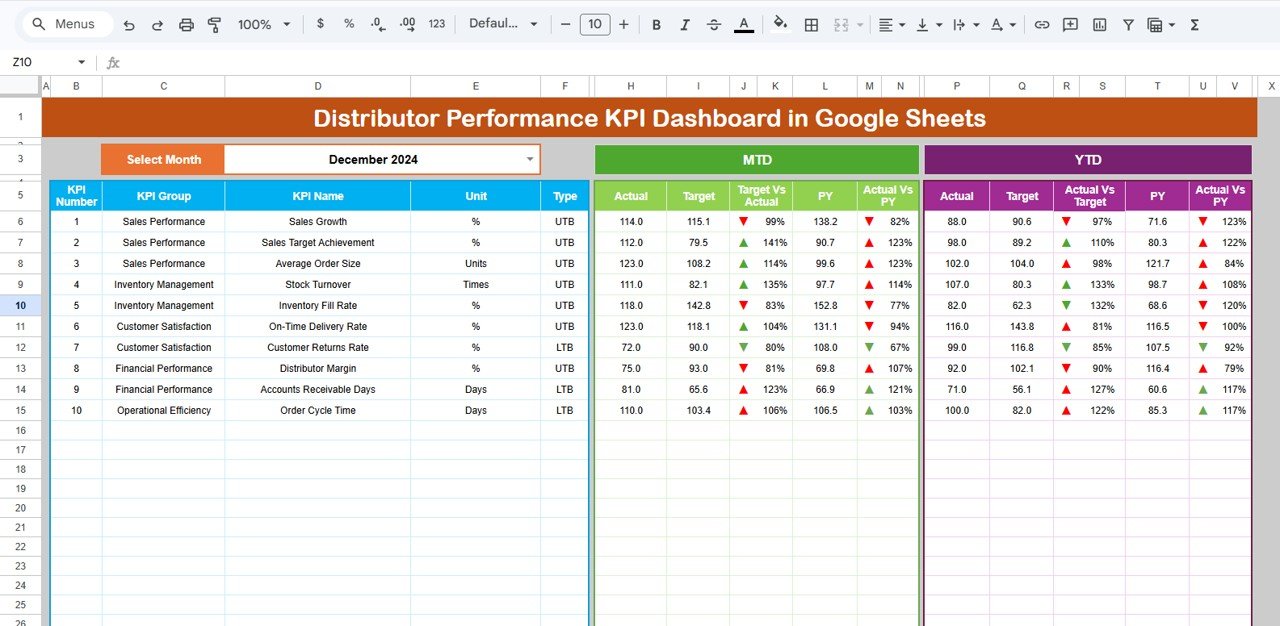
The main page. Choose a month from the Select Month drop-down in cell D3 (December 2024 in the sample) and the table refreshes for all ten KPIs. The left block shows KPI Number, KPI Group, KPI Name, Unit and Type. The green MTD block shows Actual, Target, Target Vs Actual, PY and Actual Vs PY, and the purple YTD block shows the same comparisons for the year to date.
How the comparison percentages and arrows work
Each comparison is Actual divided by the benchmark. In the sample, Sales Growth has an MTD Actual of 114.0 against a Target of 115.1:
Target Vs Actual = 114.0 / 115.1 = 99%
Actual Vs PY     = 114.0 / 138.2 = 82%
Because Sales Growth is UTB, both results are below 100% and are shown with a downward red arrow. For LTB KPIs the colours flip: Customer Returns Rate (Actual 72.0 vs Target 90.0, 80%) gets a green arrow because a lower return rate is good, while Accounts Receivable Days (Actual 81.0 vs Target 65.6, 123%) gets a red arrow because collections are taking longer than planned.
2. KPI Trend
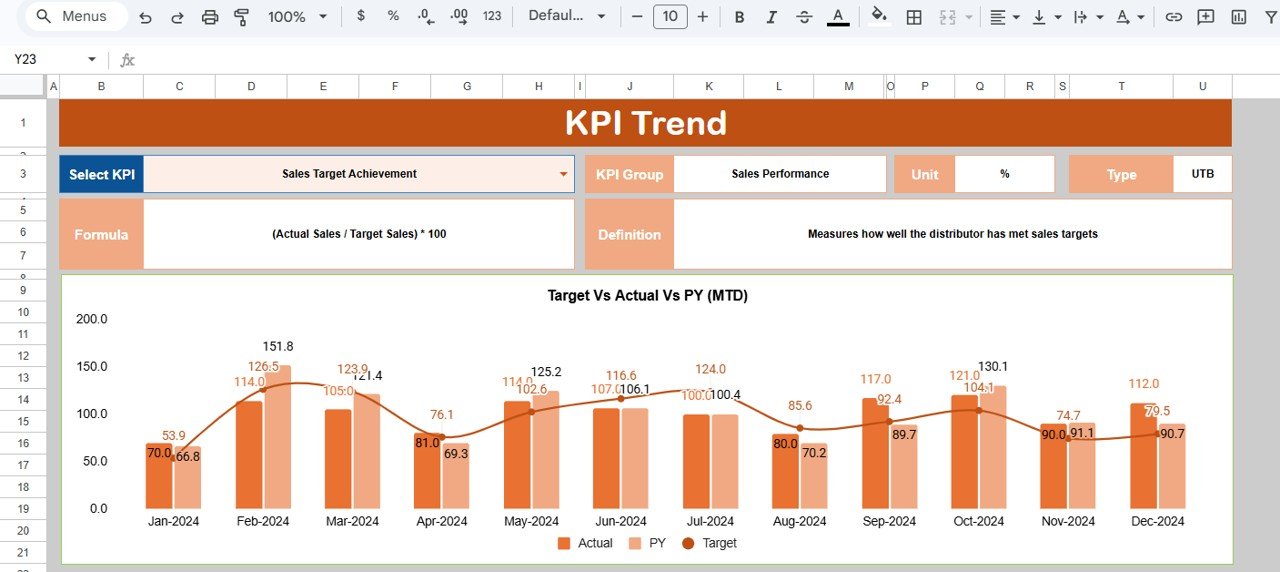
Pick a KPI from the Select KPI drop-down in cell C3. The sheet shows its KPI Group, Unit, Type, Formula and Definition, and a Target Vs Actual Vs PY (MTD) chart with monthly columns for Actual and PY and a line for Target. In the sample, Sales Target Achievement is selected and the chart runs from Jan-2024 to Dec-2024.
3. Actual Number
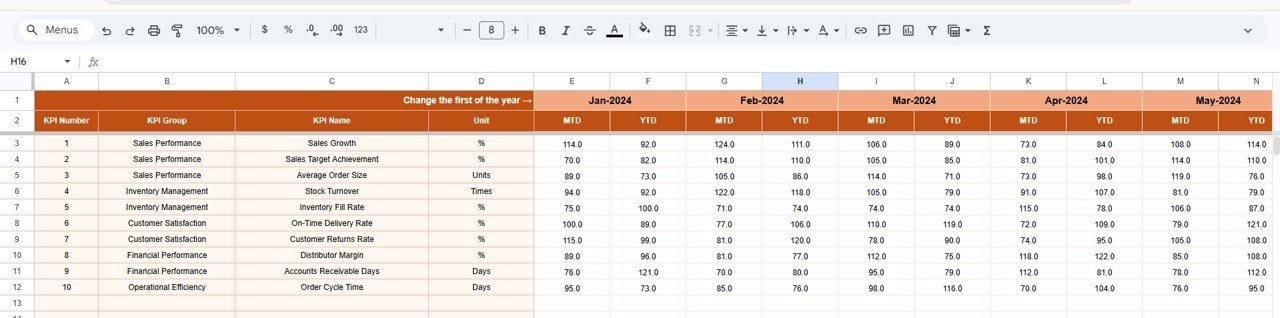
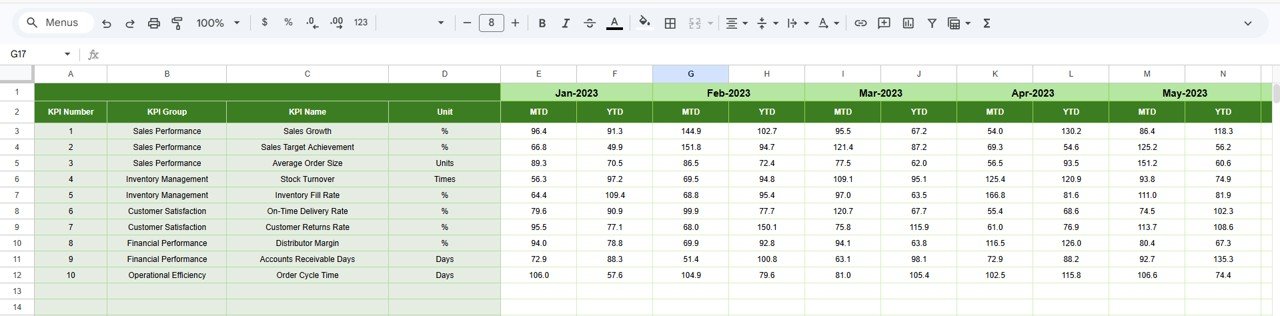
This is where you type the current year’s results. Each month has an MTD and a YTD column for every KPI. Set the first month of your financial year in cell E1 (marked “Change the first of the year”) and the month headers follow from it.
4. Target
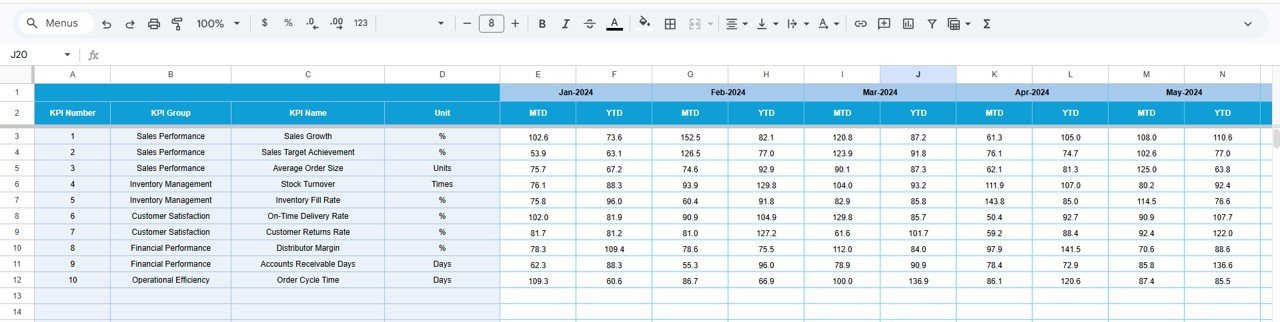
The same layout as Actual Number, holding the MTD and YTD targets for each KPI and month. Keeping targets on their own sheet means you can revise a plan without touching actual results.
5. Previous Year Number
Enter last year’s MTD and YTD values here (Jan-2023 onwards in the sample). These feed the PY columns and the Actual Vs PY comparison on the Dashboard.
6. KPI Definition
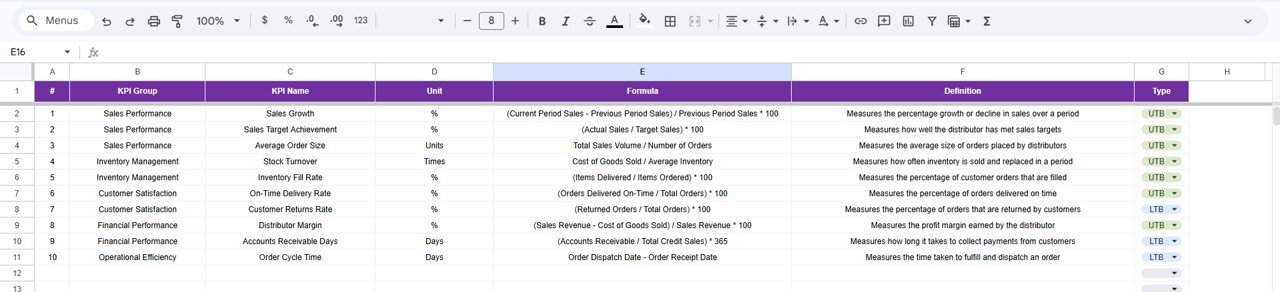
The master list: KPI Group, KPI Name, Unit, Formula, Definition and Type (UTB or LTB, chosen from a drop-down). The Dashboard and KPI Trend sheets read from it, so this is where you add, rename or redefine a KPI.
How to Use It with Your Own Data
- Copy the template to your Google Drive and open the KPI Definition sheet. Keep, rename or replace KPIs so the list matches what you review with distributors, and set each one’s Type to UTB or LTB.
- On Actual Number, set the first month of your financial year in cell E1.
- Enter your monthly targets on the Target sheet (MTD and YTD for each month).
- Enter last year’s results on Previous Year Number so the PY comparisons are meaningful.
- Each month, add the new MTD and YTD actuals on Actual Number.
- Open the Dashboard, choose the month in D3 and review the red arrows first. Use KPI Trend to check whether a problem KPI is a one-off or a pattern.
Real-World Use Cases
- Monthly distributor review: a regional sales manager opens the Dashboard for the closed month, discusses every red arrow with the distributor and agrees actions before the next review.
- Collections follow-up: finance watches Accounts Receivable Days against target and last year, and escalates when the YTD figure keeps rising.
- Service quality check: operations tracks On-Time Delivery Rate, Inventory Fill Rate and Order Cycle Time together on the KPI Trend sheet to see whether faster dispatch is coming at the cost of fill rate.
Best Practices
- Agree the KPI formulas with your distributors before the first review, so nobody argues about definitions later.
- Enter data on a fixed date each month and keep MTD and YTD values consistent with each other.
- Set realistic targets per month instead of dividing an annual figure by twelve; seasonal businesses will otherwise show false red arrows.
- Look at YTD before reacting to a single bad MTD month.
- Share the file as view-only with distributors and keep edit access for the people who enter data.
Limitations and Who Should Not Use It
- The template compares KPI values you enter; it does not calculate them from raw transactions or connect to an ERP.
- It tracks one set of ten KPIs. If you need a separate scorecard for each distributor, you will need one copy (or one tab set) per distributor.
- Teams that want automated data feeds and drill-down to invoice level are better served by a BI tool or a distributor management system.
Related Dashboards and Guides
For broader distribution reporting, see the Distribution KPI Dashboard in Google Sheets and the Distribution KPI Scorecard. If you work with dealers or wholesalers, the Dealer Network KPI Dashboard and Wholesale KPI Dashboard follow the same approach, and the Supply Chain – Logistics KPI Dashboard covers the logistics side.
Related templates: this dashboard is also available as a Distributor Performance KPI Dashboard in Excel and in Power BI.
If you want to learn how dashboards like this are built, the Pivot Tables and Dashboards course on NextGenTemplates Academy covers the underlying techniques step by step.
Frequently Asked Questions
What KPIs should I track for distributor performance?
This template uses ten: Sales Growth, Sales Target Achievement, Average Order Size, Stock Turnover, Inventory Fill Rate, On-Time Delivery Rate, Customer Returns Rate, Distributor Margin, Accounts Receivable Days and Order Cycle Time. Together they cover sales, inventory, service, finance and operations.
What do UTB and LTB mean?
UTB (upper the better) means a higher value is good, such as Inventory Fill Rate. LTB (lower the better) means a lower value is good, such as Customer Returns Rate or Order Cycle Time. The dashboard uses this setting to colour the arrows correctly.
What is the difference between MTD and YTD here?
MTD is the value for the selected month only. YTD is the cumulative value from the first month of your financial year up to the selected month. You enter both on the Actual Number, Target and Previous Year Number sheets.
Can I change the financial year start month?
Yes. Set the first month of the year in cell E1 on the Actual Number sheet.
Can I add more KPIs?
Yes. Add the KPI on the KPI Definition sheet and fill its rows on the Actual Number, Target and Previous Year Number sheets in the same order.
Do I need formula skills to use it?
No. You only type numbers and choose from drop-downs. Formula knowledge helps only if you want to change the layout.
Wrapping Up
The Distributor Performance KPI Dashboard in Google Sheets turns ten distributor KPIs into one monthly view, with targets, previous-year figures and clear arrows for what needs attention. Start by checking the KPI list against how you already measure distributors, enter last year’s numbers and this year’s targets, and run your next monthly review straight from the Dashboard sheet.
Get the Distributor Performance KPI Dashboard in Google Sheets
📅 Last updated: October 2026