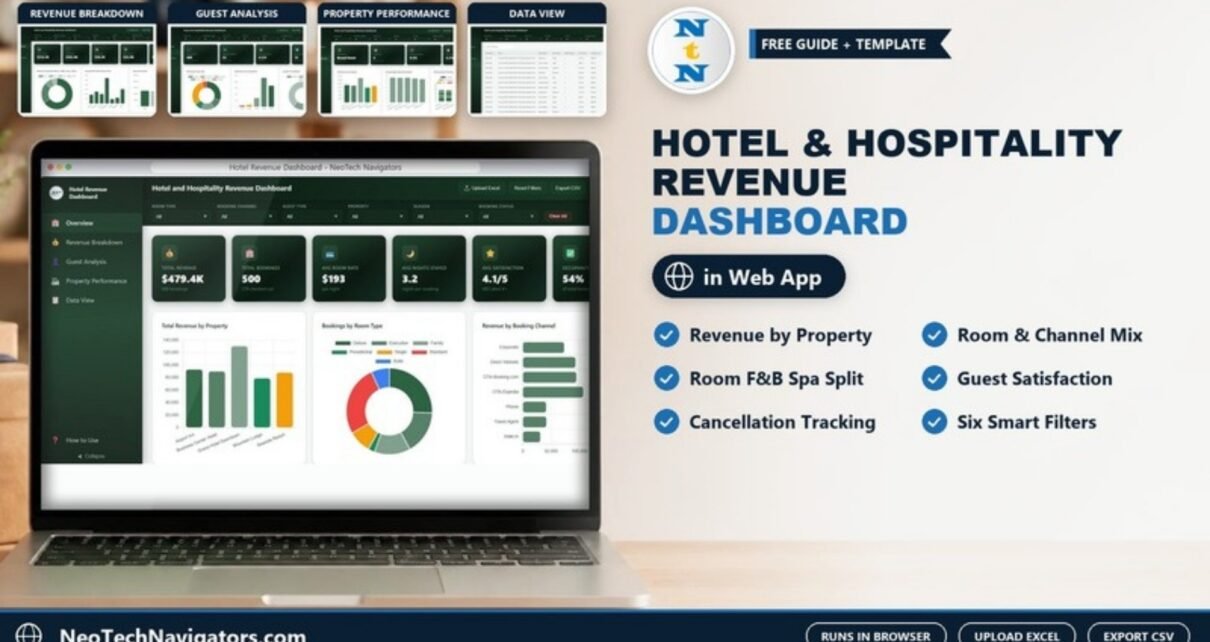
Hotel revenue rarely lives in one place. Room income sits in the property management system, food and beverage in the restaurant till, spa sales somewhere else, and booking channels in a separate report. The Hotel and Hospitality Revenue Dashboard in HTML brings those streams together in one browser page, with KPI cards, filters and charts for revenue, bookings, guests and property performance.
This guide explains each of the five pages as the template ships with its 500 sample bookings across five properties, shows how the main numbers are worked out, and walks through loading your own booking data. It is meant for hotel owners, revenue managers, front-office managers and hospitality analysts who want a clear revenue picture without installing BI software. It opens in Chrome, Edge, Firefox or Safari.
🎥 Watch the Video Tutorial
Get the Hotel Revenue Dashboard in HTML
What the Hotel Revenue Dashboard Solves
A daily revenue report tells you how much came in. It does not tell you which property, room type or booking channel earned it, how much came from the spa compared with the rooms, or whether cancellations are hurting one hotel more than another. Those questions normally mean exporting data and building pivot tables every month.
This dashboard answers them from one booking table. A left sidebar switches between Overview, Revenue Breakdown, Guest Analysis, Property Performance and Data View, plus a How to Use page. Across the top, six dropdown filters (Room Type, Booking Channel, Guest Type, Property, Season and Booking Status) narrow every page at once, and Clear All resets them. The header also has Upload Excel, Reset Filters and Export CSV buttons, a light/dark switch and a full-screen button.
Hotel and Hospitality Revenue Dashboard in HTML: Key Numbers Explained
The table below lists the main KPI cards with the sample values from the screenshots and how each one relates to the booking data.
| KPI card | Sample value | How it is worked out | Better when |
|---|---|---|---|
| Total Revenue | $479.4K | Room + F&B + Spa + Other revenue ($312.5K + $102.6K + $38.5K + $25.8K) | Higher |
| Total Bookings | 500 | Count of booking records (270 checked out) | Higher |
| Avg Room Rate | $193 per night | Average nightly Room Rate across bookings | Higher, if occupancy holds |
| Avg Nights Stayed | 3.2 | Average of Nights Stayed per booking | Higher |
| Avg Satisfaction | 4.1 / 5 | Average guest rating (403 bookings rated 4 or above) | Higher |
| Occupancy Rate | 54% | Checked-out bookings ÷ total bookings (270 ÷ 500) | Higher |
| Rev per Booking | $959 | Total Revenue ÷ Total Bookings ($479.4K ÷ 500) | Higher |
| Cancellation Rate | 9.4% | Cancelled bookings ÷ total bookings (47 ÷ 500) | Lower |
| No-Show Rate | 4.2% | No-show bookings ÷ total bookings (21 ÷ 500) | Lower |
Note that the template’s Occupancy Rate is booking-based: it is the share of bookings that reached checked-out status. It is not the hotel-industry room-night occupancy (rooms sold ÷ rooms available), so read it as a completion rate for bookings.
Page-by-Page Walkthrough
1. Overview
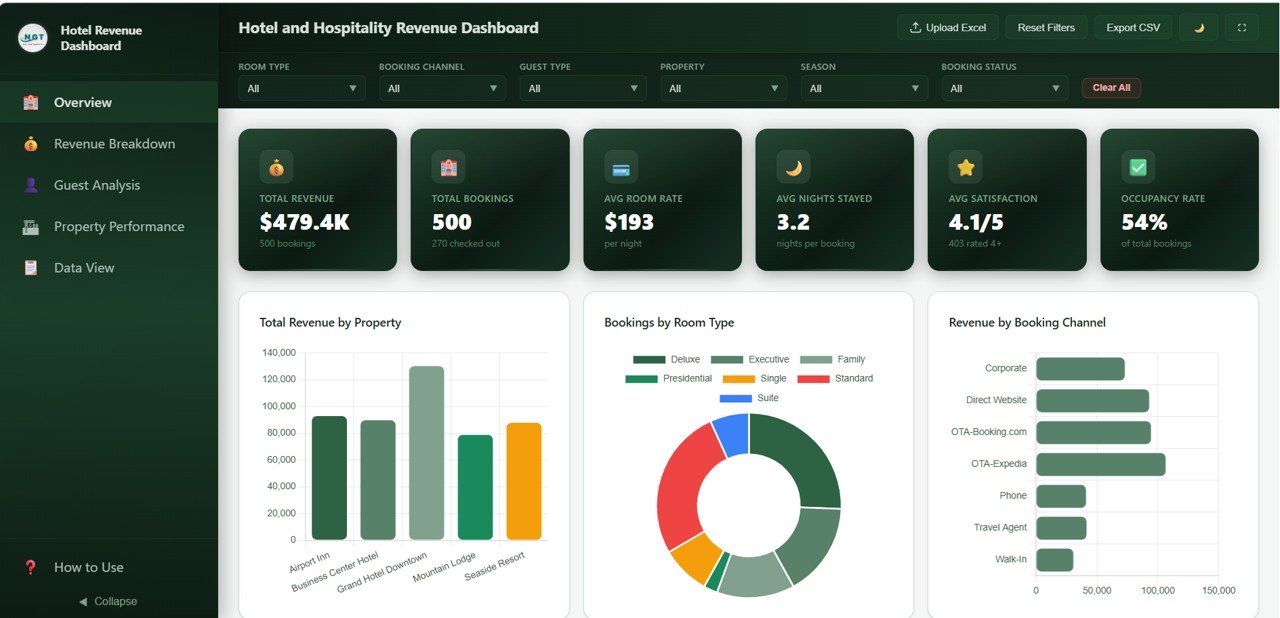
Six KPI cards sit at the top: Total Revenue, Total Bookings, Avg Room Rate, Avg Nights Stayed, Avg Satisfaction and Occupancy Rate. Below them:
- Total Revenue by Property – Airport Inn, Business Center Hotel, Grand Hotel Downtown, Mountain Lodge and Seaside Resort. Grand Hotel Downtown leads the sample.
- Bookings by Room Type – a doughnut for Deluxe, Executive, Family, Presidential, Single, Standard and Suite.
- Revenue by Booking Channel – Corporate, Direct Website, OTA-Booking.com, OTA-Expedia, Phone, Travel Agent and Walk-In. OTA-Expedia brings in the most revenue in the sample.
- Booking Status Distribution and Monthly Revenue Trend further down the page.
2. Revenue Breakdown
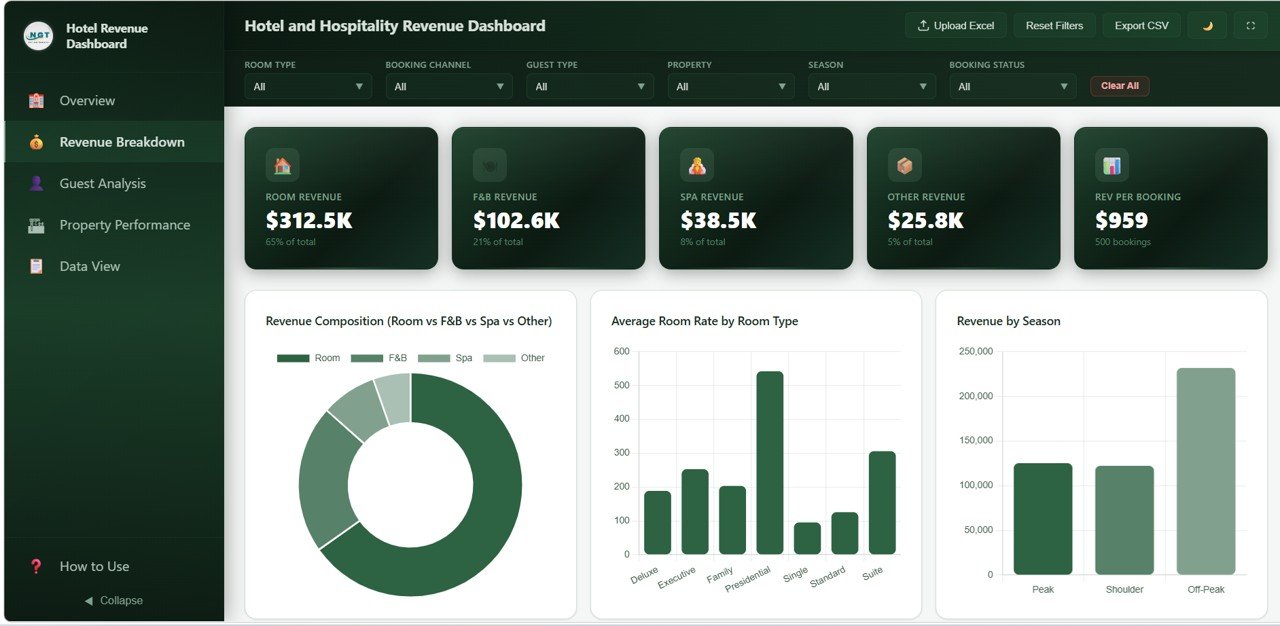
This page splits income into its sources. The cards show Room Revenue $312.5K (65% of total), F&B Revenue $102.6K (21%), Spa Revenue $38.5K (8%), Other Revenue $25.8K (5%) and Rev per Booking $959.
- Revenue Composition (Room vs F&B vs Spa vs Other) – a doughnut of the four streams.
- Average Room Rate by Room Type – Presidential is far above the rest at over $500 a night; Single is the lowest at under $100.
- Revenue by Season – Peak, Shoulder and Off-Peak. In the sample, Off-Peak revenue is the largest, which is a useful reminder to check how many months each season covers before drawing conclusions.
- Revenue by Guest Type and Revenue by Property and Room Type below.
3. Guest Analysis
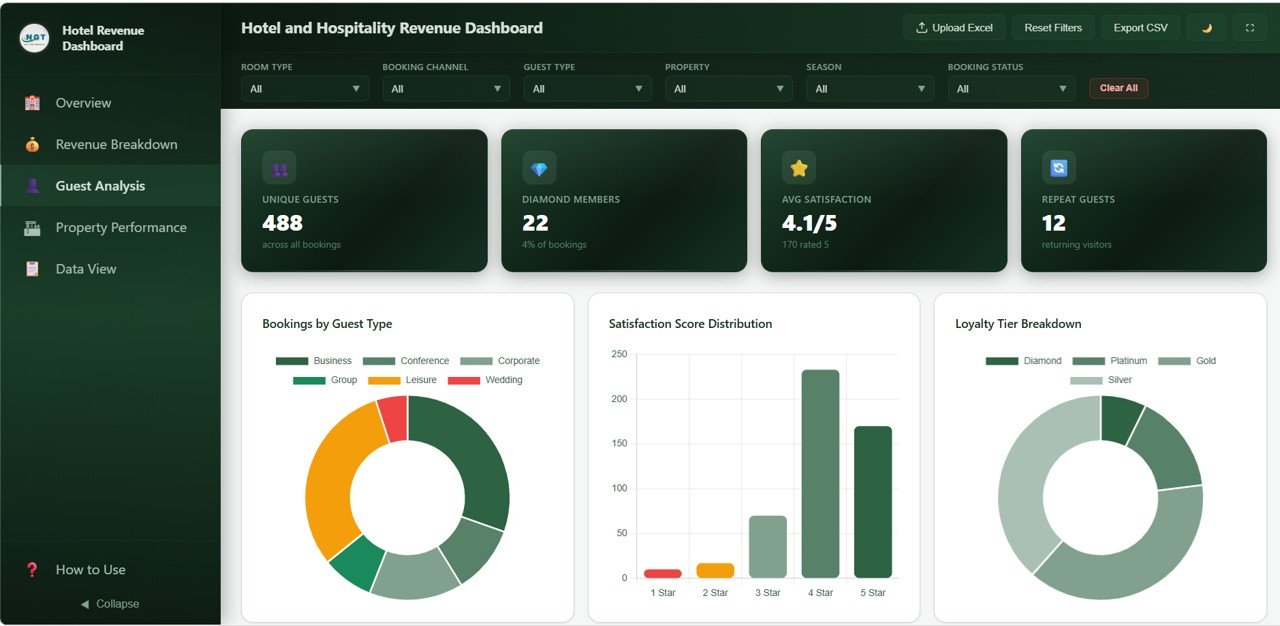
The cards read Unique Guests 488, Diamond Members 22 (4% of bookings), Avg Satisfaction 4.1/5 (170 rated 5) and Repeat Guests 12.
- Bookings by Guest Type – Business, Conference, Corporate, Group, Leisure and Wedding. Leisure and Business are the largest groups in the sample.
- Satisfaction Score Distribution – bookings by 1 Star to 5 Star rating; 4 Star is the most common.
- Loyalty Tier Breakdown – Diamond, Platinum, Gold and Silver.
- Average Satisfaction by Property and Average Nights Stayed by Guest Type below.
4. Property Performance
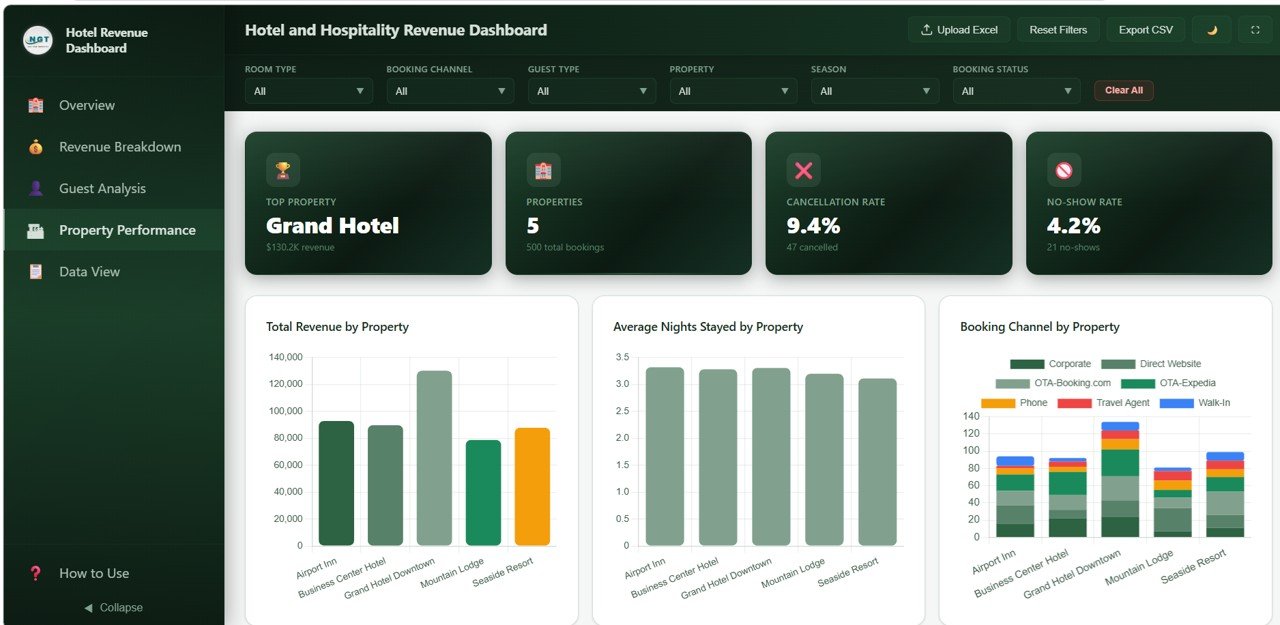
The cards show Top Property: Grand Hotel ($130.2K revenue), Properties 5, Cancellation Rate 9.4% (47 cancelled) and No-Show Rate 4.2% (21 no-shows).
- Total Revenue by Property – the same ranking as the Overview, here for side-by-side comparison.
- Average Nights Stayed by Property – all five properties sit close together at a little over three nights.
- Booking Channel by Property – stacked columns showing how each hotel’s bookings split across the seven channels.
- Cancellation Rate by Property and Monthly Bookings by Property below.
5. Data View
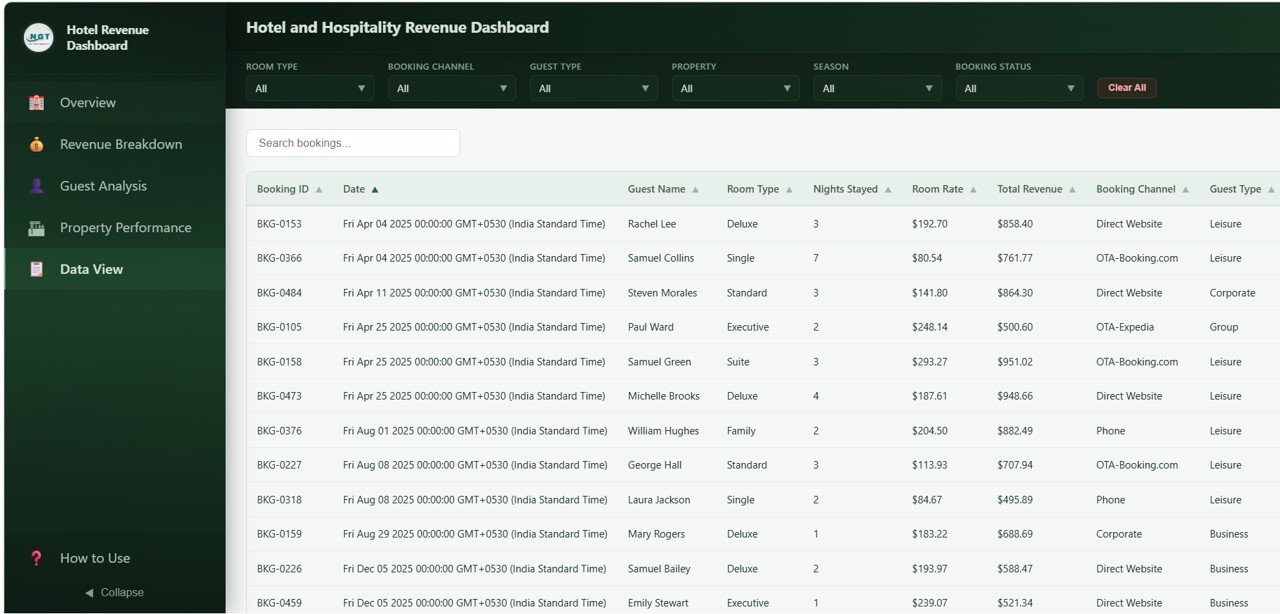
The Data View lists every booking with a Search bookings box and sortable columns, including Booking ID, Date, Guest Name, Room Type, Nights Stayed, Room Rate, Total Revenue, Booking Channel and Guest Type. Use Export CSV to take the filtered rows into Excel or Google Sheets.
How to Use It With Your Own Data
- Download the ZIP from NextGenTemplates, extract it, and open index.html in a modern browser.
- Read the How to Use page in the sidebar before you prepare your file.
- Prepare an Excel file of your bookings with the same columns as the sample (booking ID, date, guest, property, room type, nights, room rate, revenue streams, channel, guest type, status, rating and so on).
- Keep property, room type, channel and status names spelled the same way every time, so each one appears once in the filters.
- Click Upload Excel and select your file. The KPI cards and charts rebuild from your data.
- Check Total Bookings against the number of rows in your file, then try one filter (for example a single property) to confirm the numbers look right.
- Use Export CSV on the Data View when someone needs the underlying rows.
If you would like to build this kind of revenue analysis yourself, the Excel Pivot Tables & Dashboards course on NextGenTemplates Academy teaches the same summarise-and-chart approach in Excel.
Real-World Use Cases
- A small hotel group with three to five properties uses Property Performance in the monthly owners’ meeting to compare revenue, cancellations and channel mix side by side.
- A revenue manager reviewing OTA dependence filters by Booking Channel to see how much revenue comes from OTA-Expedia and OTA-Booking.com compared with Direct Website, and plans direct-booking offers accordingly.
- A resort with a spa and restaurant watches the Revenue Breakdown page to see whether F&B and Spa grow alongside room revenue or lag behind.
Best Practices
- Upload a fresh export at the same point each month so month-on-month charts compare like with like.
- Read Avg Room Rate together with bookings; a higher rate with fewer bookings is not always a win.
- Review Cancellation Rate and No-Show Rate by property before changing deposit or overbooking policies.
- Use the Guest Type and Loyalty Tier charts to decide which segments get packages or upgrades.
- Clear all filters before exporting a headline report, so nobody reads a filtered view as the full picture.
Limitations: Who Should Not Use This Template
The dashboard reads data you upload; it does not connect live to a property management system or channel manager, so numbers are only as fresh as your last upload. It does not forecast demand, set prices or calculate room-night occupancy, RevPAR or ADR from room inventory. Large chains that need automated daily feeds, user logins and audit trails should look at a BI tool or the reporting module of their PMS.
Related Templates and Guides
Prefer a spreadsheet? Read the guide to the Hotel Hospitality Revenue Dashboard in Google Sheets. For broader hotel analytics in the browser, see the Hospitality Dashboard in HTML. Teams tracking monthly targets can use the Hospitality KPI Dashboard in Google Sheets or the Hospitality & Guest Booking Performance Dashboard, and if you run a hotel restaurant, the Restaurant Profit and Loss Dashboard in HTML covers the F&B side.
Related template: Hotel and Hospitality Revenue Dashboard in Power BI for teams that already use Power BI.
Frequently Asked Questions
Do I need any software to run this hotel revenue dashboard?
No. Extract the ZIP and open index.html in Chrome, Edge, Firefox or Safari. No installation or licence is needed.
How do I load my own hotel data?
Prepare an Excel file in the same layout as the sample and click Upload Excel in the header. All pages rebuild from the uploaded bookings.
Can it handle more than one property?
Yes. The sample has five properties, and the Property filter plus the Property Performance page are built for multi-property comparison.
How is Occupancy Rate calculated in this template?
It is the share of bookings with a checked-out status: 270 of 500 bookings gives 54% in the sample. It is not the room-night occupancy figure used in hotel accounting.
Which revenue streams does it track?
Room, F&B, Spa and Other revenue. Total Revenue is the sum of the four.
Is it available in other formats?
Yes. NextGenTemplates also offers this dashboard in Excel, Power BI and Google Sheets.
Wrapping Up
The Hotel and Hospitality Revenue Dashboard in HTML gives you one place to see revenue by property, room type, channel and stream, together with guest satisfaction, cancellations and no-shows. Start by uploading last month’s bookings, check which channel and which property drive the most revenue, and use the cancellation numbers to decide where policies need attention.
Get the Hotel Revenue Dashboard in HTML
📅 Last updated: October 2026