Fleet teams that still track vehicle movements in WhatsApp groups and shared Excel files spend a lot of time on manual entry, chasing document renewals and settling disputes about who took which vehicle and when. The Vehicle Movement Register Management System Web App closes that gap: a multi-user fleet management web application built on Google Apps Script and Google Sheets, available for a one-time $39.99 with no recurring fees.
Whether you manage 5 vehicles or 100, the app gives every team member a secure login, a live fleet dashboard and a complete digital record of every trip, fuel fill-up, service visit and document renewal. It runs in the browser, so there is nothing to install. Below you will find each of the 12 modules explained with screenshots, a comparison with Excel and fleet SaaS, setup steps, use cases and honest limitations.
🎥 Watch the Video Tutorial
Get the Vehicle Movement Register Web App
Try the Live Demo Before You Buy
The web app is deployed in our own Google account so you can test every page and both roles with sample data before purchasing. No signup or email is required: open the live demo.
Sign in as Admin1 to manage users, vehicles, drivers, trips, lists, settings, exports and reports, or as User1 to add and update trips, view vehicles and drivers, use WhatsApp/call, and export if allowed.
| Role | Username | Password |
|---|---|---|
| Admin | Admin1 | abcd |
| User | User1 | abcd |
What you get after purchase: the full source code (Code.gs + Index.html) plus a step-by-step deployment guide so you can deploy your own private instance in your own Google account in under 15 minutes.
Key Features of the Vehicle Movement Register Management System Web App
- 12 integrated modules covering Login, Dashboard, Trip Management, Vehicle Master, Driver Master, Fuel Log, Maintenance Log, Vehicle Documents, Driver Documents, Attachments, Reports and Settings.
- Multi-user login with role-based access — Admin and User roles, managed by the Admin.
- Live dashboard with 8 KPI cards — Total Vehicles, Available Vehicles, Trips Today, Open Trips, Completed Trips, Drivers, KM This Month and Fuel This Month update as records are saved.
- WhatsApp integration — message a driver directly from a trip or driver record using the default message set in Settings.
- Document expiry alerts — the dashboard lists vehicle and driver documents approaching expiry, with the alert window (Document Expiry Alert Days) configurable in Settings.
- One-time $39.99 — no subscription, no per-vehicle fees, no server hosting costs. The app runs on Google Apps Script, which is free with a Google account.
Application Screens Explained
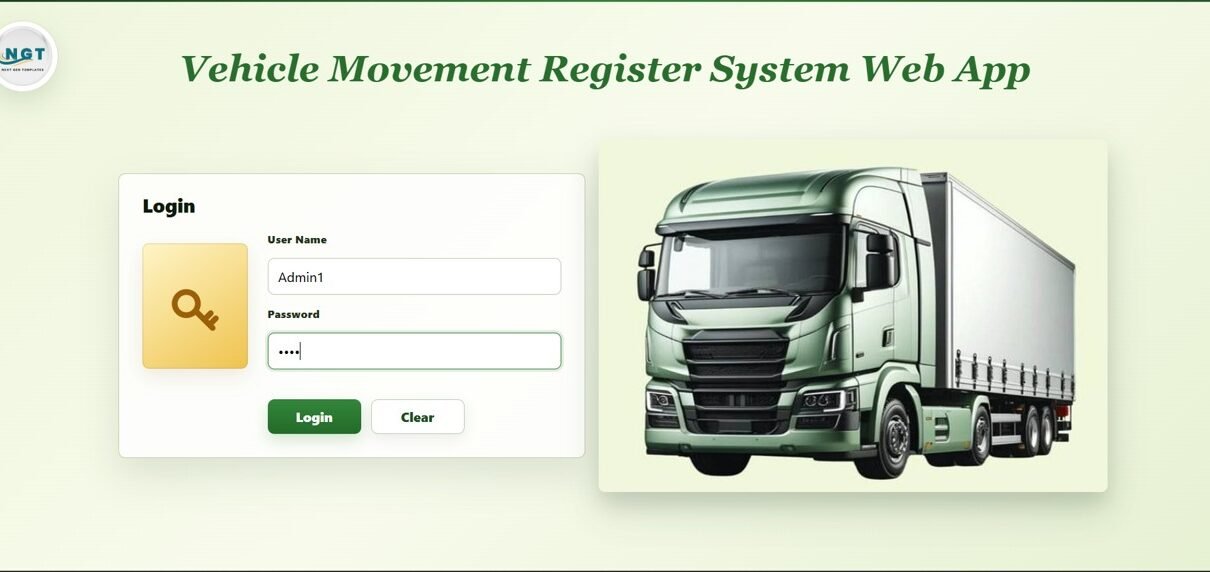
Login Screen
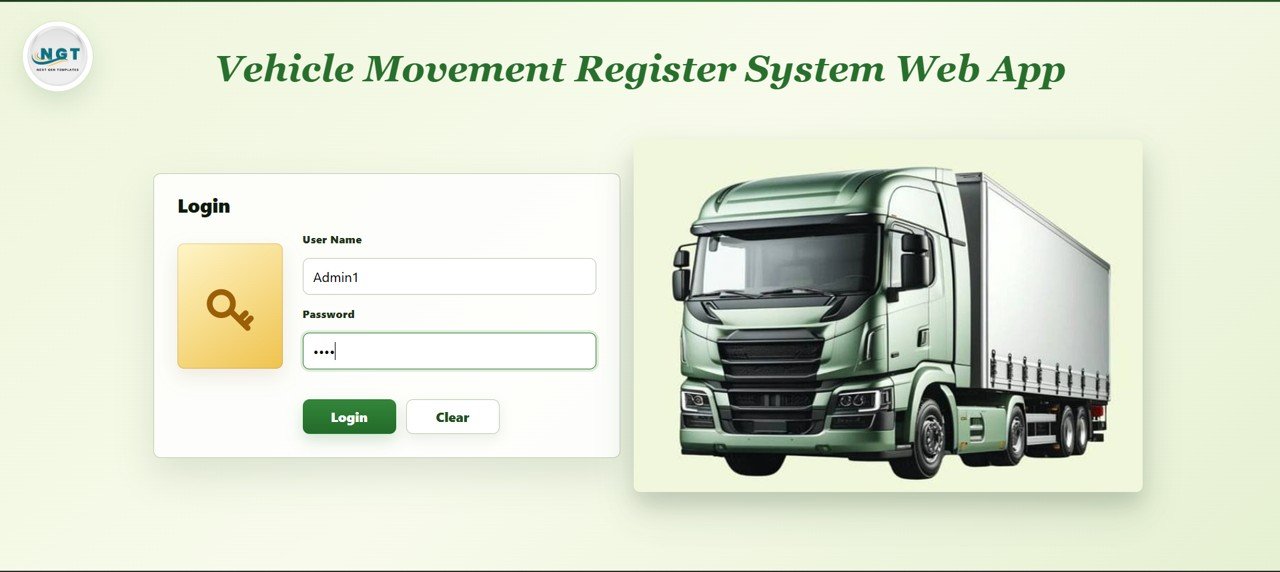
Every user signs in with a user name and password. Access is controlled by role — Admin or User — so managers see everything while drivers or field staff see only what they need.
Dashboard
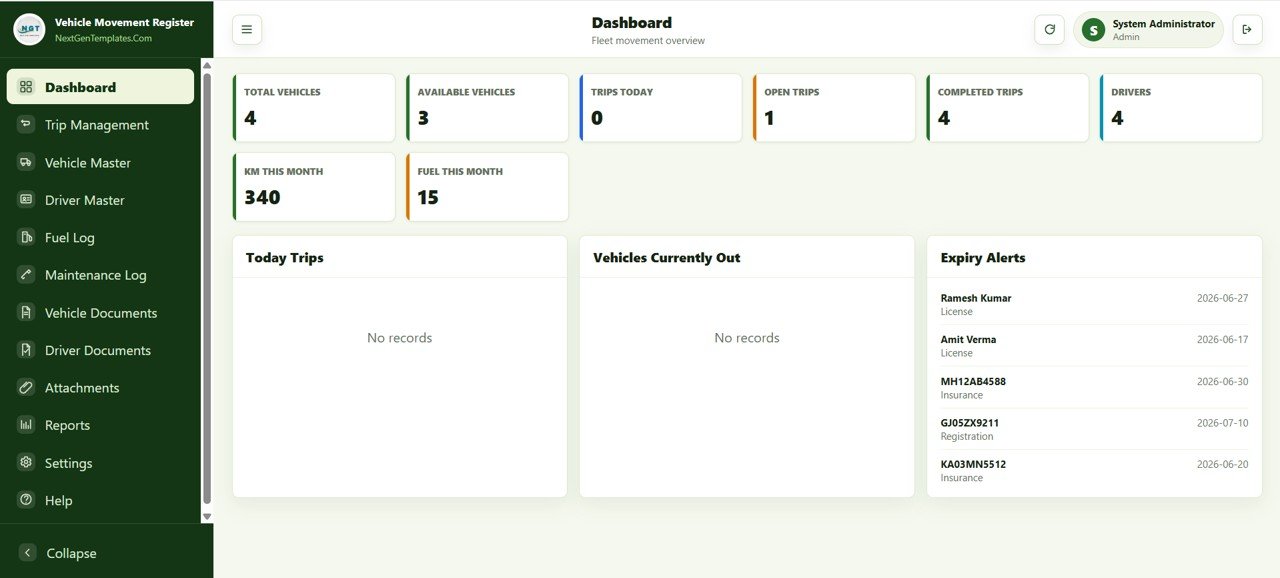
The dashboard gives a fleet overview with 8 KPI cards — Total Vehicles, Available Vehicles, Trips Today, Open Trips, Completed Trips, Drivers, KM This Month and Fuel This Month — plus panels for Today Trips, Vehicles Currently Out and Expiry Alerts. In the sample data, the Expiry Alerts panel lists driver licences and vehicle insurance and registration documents with their expiry dates, so managers can see what needs renewing without opening individual records.
Trip Management
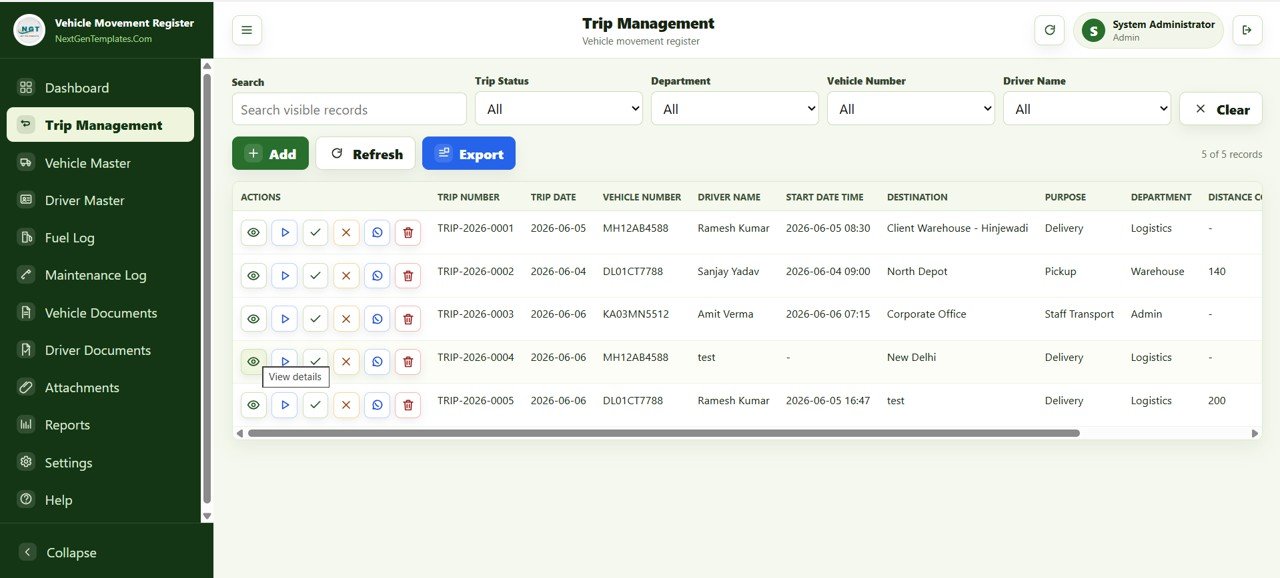
This is the core vehicle movement register. Each trip is recorded with Trip Number, Trip Date, Vehicle Number, Driver Name, Start Date Time, Destination, Purpose, Department and Distance Covered. Row action buttons let you view, start and close a trip, message the driver on WhatsApp or delete the record, and filters cover Trip Status, Department, Vehicle Number and Driver Name. Add, Refresh and Export buttons sit above the table. This is the log that replaces paper trip registers and WhatsApp-based vehicle tracking.
Vehicle Master
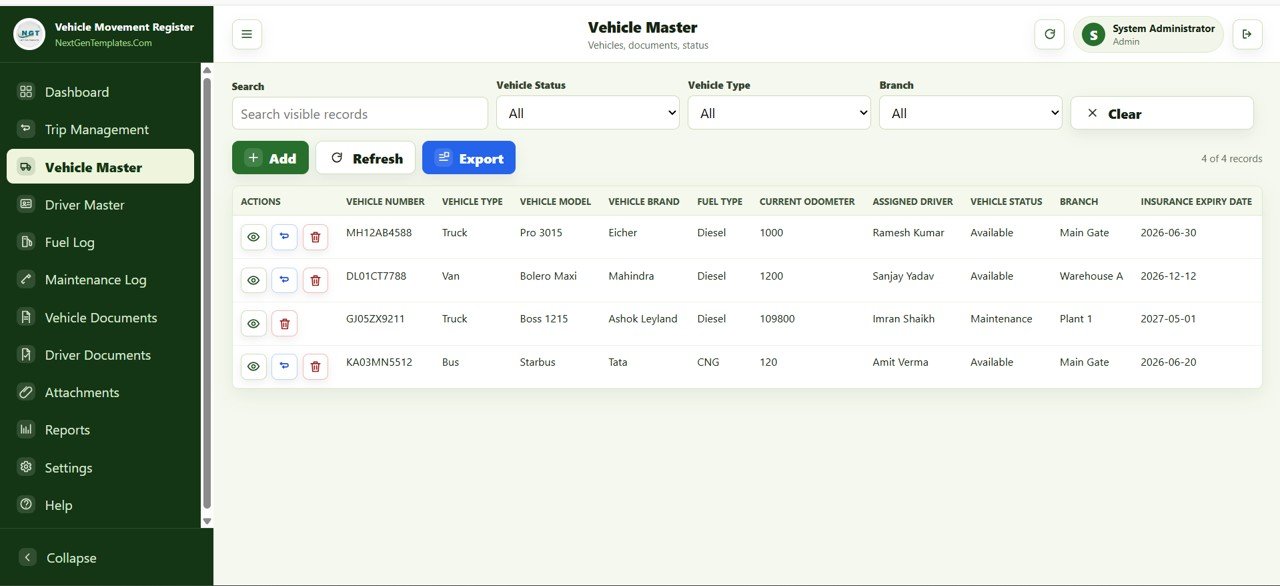
Stores the fleet with Vehicle Number, Vehicle Type, Vehicle Model, Vehicle Brand, Fuel Type, Current Odometer, Assigned Driver, Vehicle Status, Branch and Insurance Expiry Date. Filter by status, type or branch and export the list at any time. If you also want chart-based analysis, the Fleet Management Dashboard in Google Sheets is a complementary reporting layer.
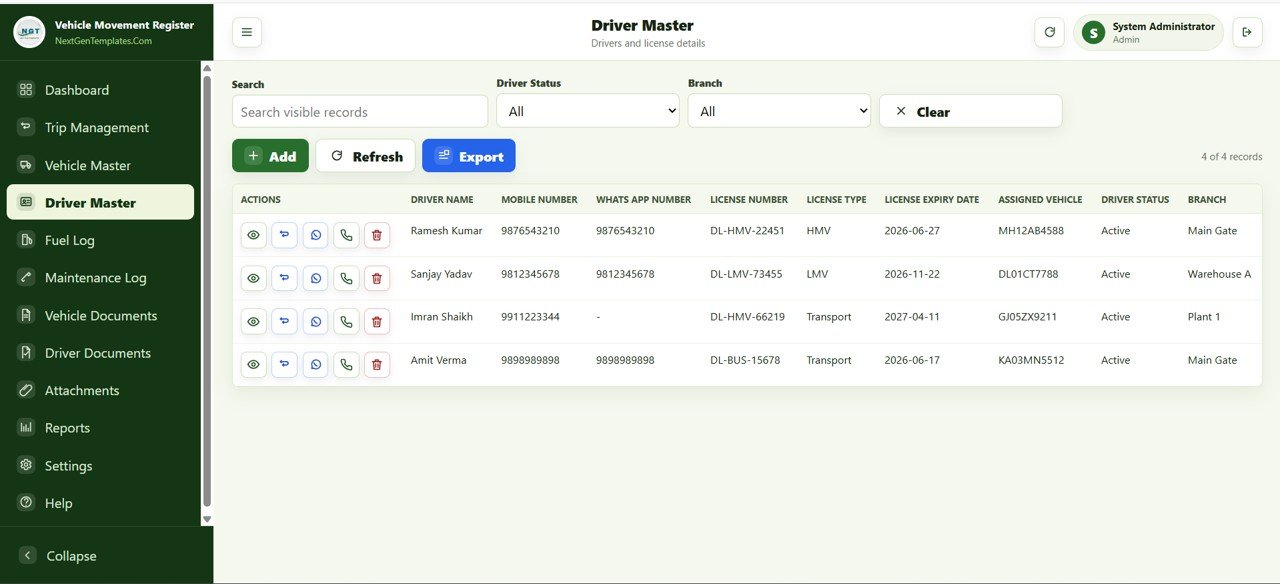
Driver Master
Each driver record includes Driver Name, Mobile Number, WhatsApp Number, License Number, License Type, License Expiry Date, Assigned Vehicle, Driver Status and Branch. Call or message a driver directly from the row without copying numbers, and filter by status and branch to find the right person quickly.
Fuel Log
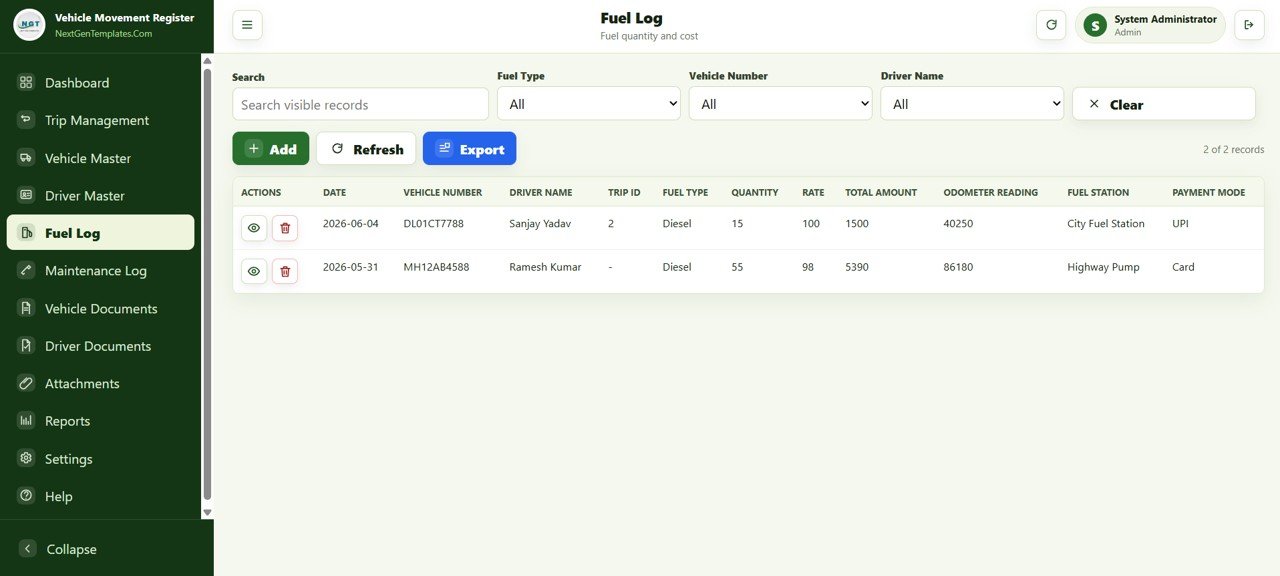
Records every fill-up with Date, Vehicle Number, Driver Name, Trip ID, Fuel Type, Quantity, Rate, Total Amount, Odometer Reading, Fuel Station and Payment Mode. Filter by fuel type, vehicle or driver and export the data for accounts or fleet cost audits. The Fleet Utilization KPI Dashboard in Google Sheets can help you analyse utilization alongside the exported data.
Maintenance Log
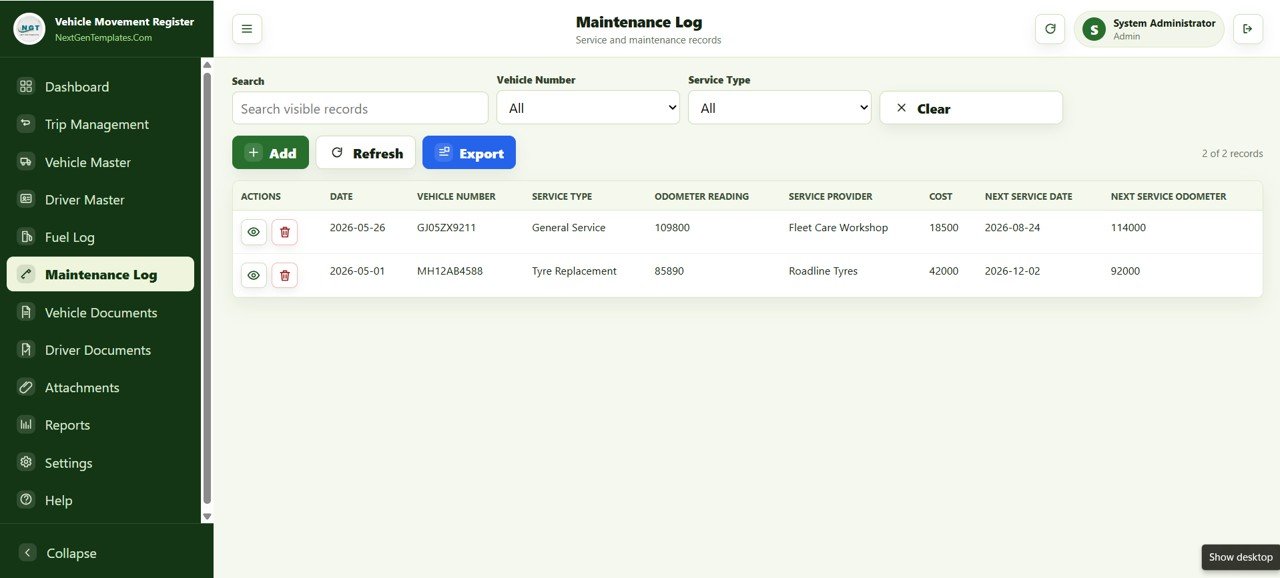
Keeps service records for each vehicle with Date, Vehicle Number, Service Type, Odometer Reading, Service Provider, Cost, Next Service Date and Next Service Odometer. Recording both the next service date and the next service odometer means you can plan the next visit by mileage as well as by calendar.
Vehicle Documents
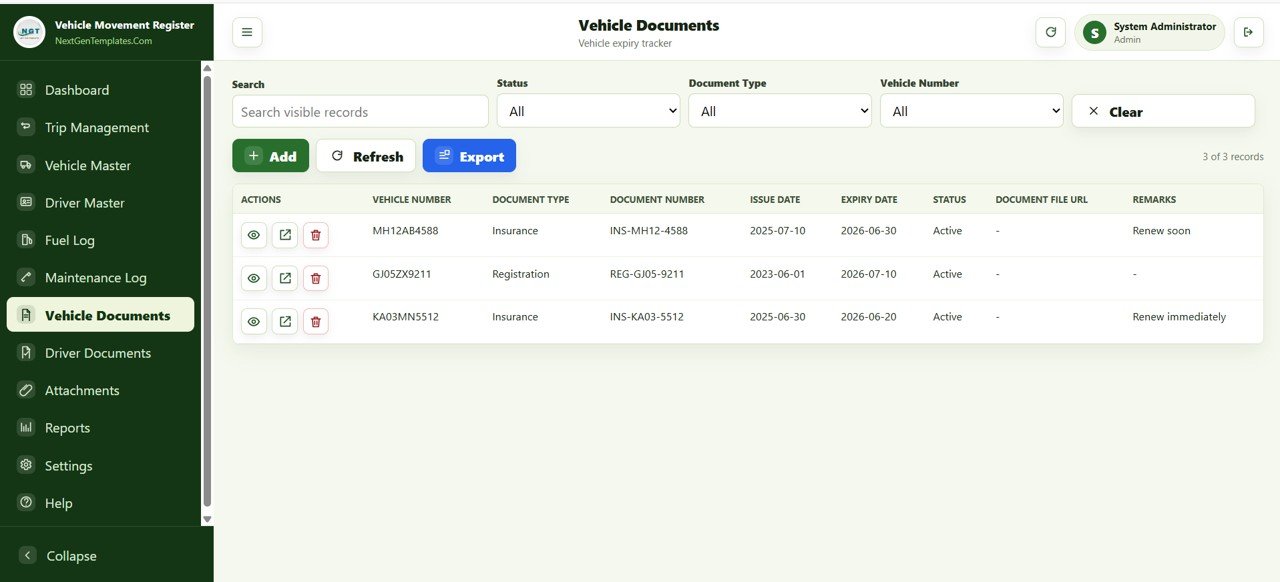
The expiry tracker for the fleet. It stores insurance, registration and other documents with Vehicle Number, Document Type, Document Number, Issue Date, Expiry Date, Status, Document File URL and Remarks. Documents approaching expiry also appear in the dashboard’s Expiry Alerts panel.
Driver Documents
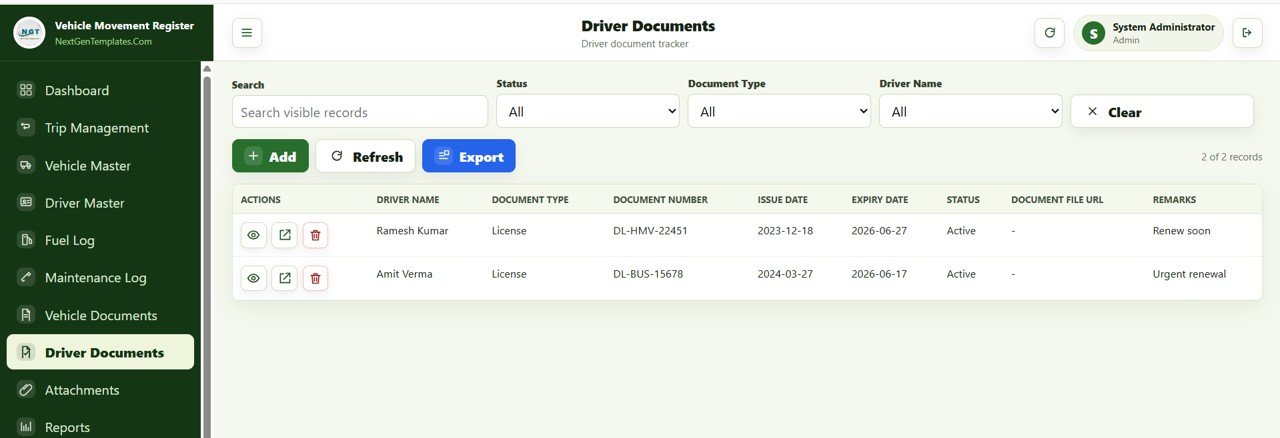
Tracks driver licences and other documents with Driver Name, Document Type, Document Number, Issue Date, Expiry Date, Status, Document File URL and Remarks. It uses the same expiry alert logic as vehicle documents, so licence renewals do not depend on someone remembering a date.
Attachments
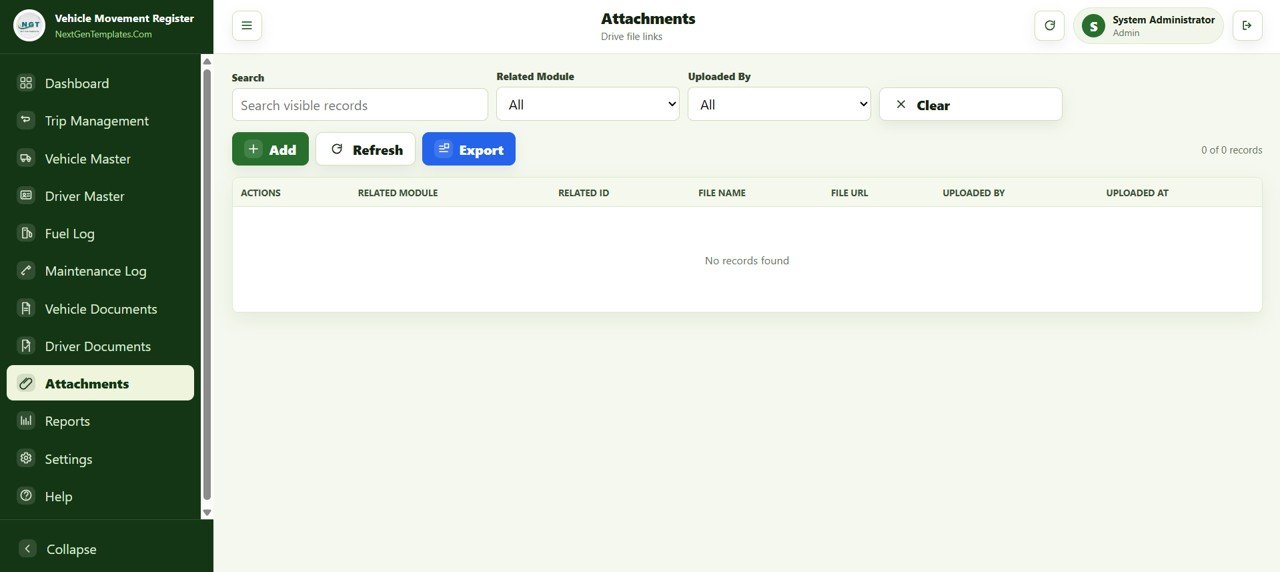
Links supporting files (stored in Google Drive) to any record. Each attachment stores Related Module, Related ID, File Name, File URL, Uploaded By and Uploaded At, keeping paperwork connected to the right trip, vehicle or driver. For teams working on contracts or audits, this gives a simple file trail without a separate document system.
Reports
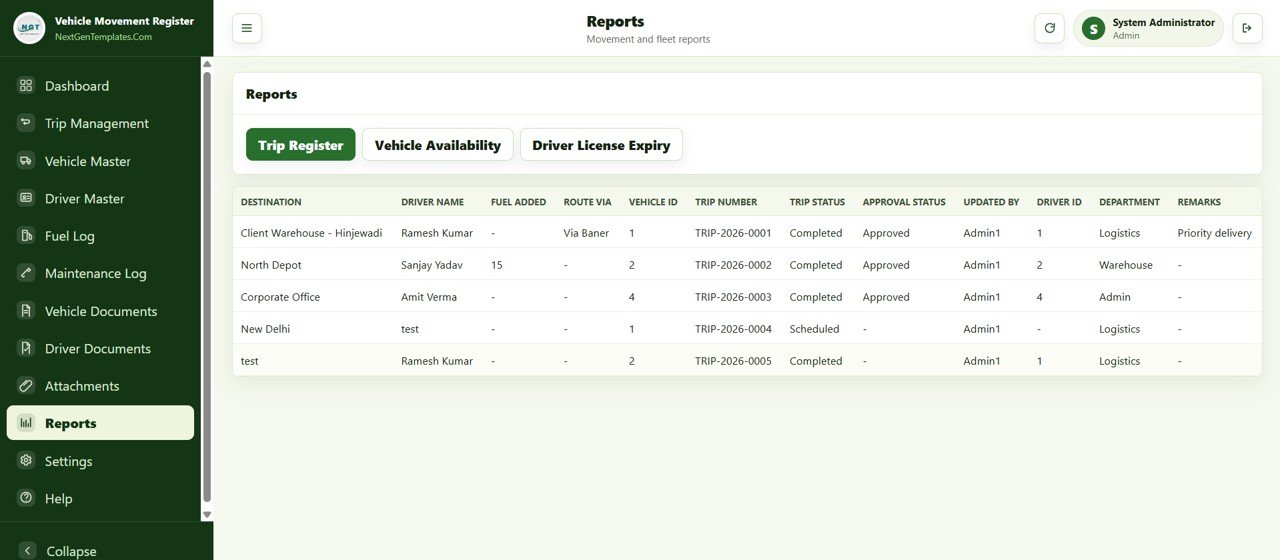
Ready-made reports include Trip Register, Vehicle Availability and Driver License Expiry. The Trip Register report shows Destination, Driver Name, Fuel Added, Route Via, Vehicle ID, Trip Number, Trip Status, Approval Status, Updated By, Driver ID, Department and Remarks in one table — useful for management reviews, donor reporting or audits.
Settings
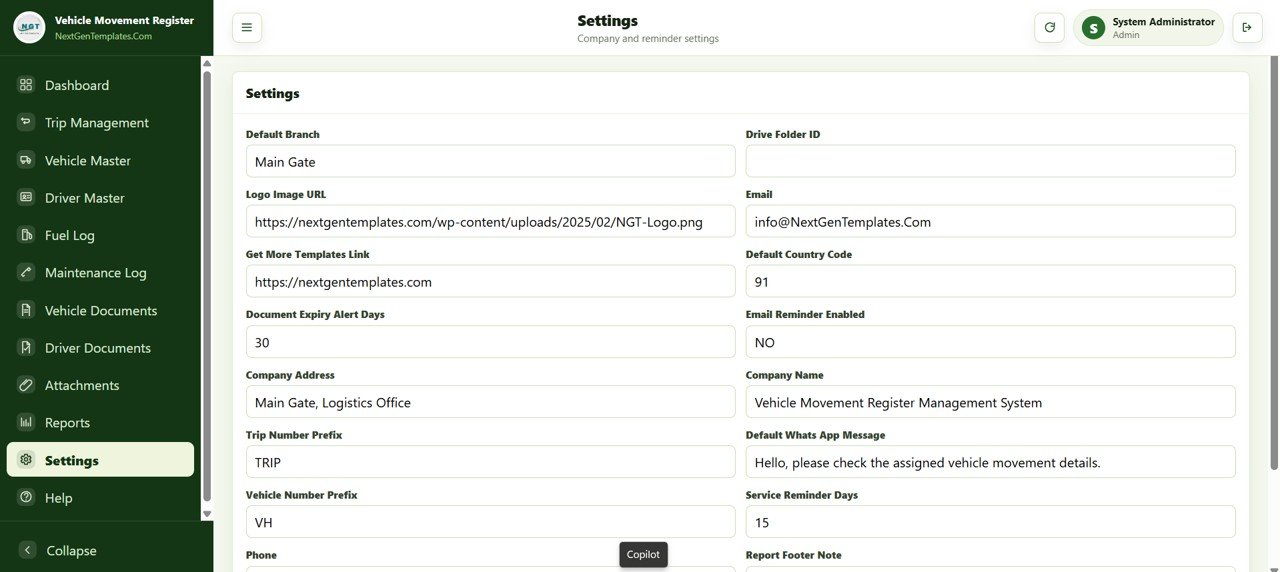
Controls how the system behaves: Default Branch, Drive Folder ID, Logo Image URL, Email, Get More Templates Link, Default Country Code, Document Expiry Alert Days, Email Reminder Enabled, Company Address, Company Name, Trip Number Prefix, Default WhatsApp Message, Vehicle Number Prefix, Service Reminder Days and more — all on one screen.
Vehicle Movement Register Web App vs. Excel Dashboard vs. Fleet SaaS
| Feature | Vehicle Movement Register Web App | Excel dashboard | Fleet SaaS platforms |
|---|---|---|---|
| Cost | $39.99 one-time | One-time template cost | Recurring, usually per vehicle per month |
| Platform | Google Apps Script — any browser | Microsoft Excel | Vendor cloud |
| Multi-user login | ✅ Admin and User roles | ❌ No login system | ✅ Yes |
| Trip register (add/start/close) | ✅ Full lifecycle | ❌ Data entry only | ✅ Yes |
| Document expiry alerts | ✅ Vehicle and driver documents | Manual formulas | ✅ Usually |
| WhatsApp driver messaging | ✅ From the trip and driver records | ❌ No | Varies by vendor |
| Fuel and maintenance log | ✅ Both included | Depends on template | ✅ Yes |
| GPS / telematics | ❌ Not included | ❌ No | ✅ Often available |
| Setup time | Under 15 minutes | Minutes | Onboarding required |
For fleet teams that need multi-user trip registration and document compliance without paying per vehicle every month, the web app sits in a practical middle ground.
How to Set It Up With Your Own Fleet
- Download the ZIP after purchase and open the PDF setup guide.
- Copy the Google Apps Script project and the Google Sheet to your own Drive, then deploy it as a web app.
- Sign in as Admin and fill in Settings: company name, branch, logo, country code, expiry alert days and the default WhatsApp message.
- Add your vehicles in Vehicle Master and your drivers in Driver Master.
- Enter insurance, registration and licence records in Vehicle Documents and Driver Documents.
- Create User accounts for drivers and field staff and start logging trips in Trip Management.
Who Should Use This Web App
A good fit for:
- Fleet managers and transport coordinators at small and mid-size businesses with roughly 5–100 vehicles
- Logistics companies, construction firms and field service businesses that need a digital trip register
- Schools, NGOs and government departments managing shared vehicle pools
- Operations teams that want multi-user access without a dedicated fleet SaaS subscription
Not a fit if:
- You need real-time GPS hardware tracking (this is a software register, not a telematics tool)
- You need certified enterprise hosting or formal vendor compliance agreements
- Your team cannot use Google accounts
Real-World Use Cases
Logistics fleet coordinator. Instead of collecting trip details from WhatsApp groups, each driver logs trips through the web app. The coordinator watches open trips on the dashboard and uses the Expiry Alerts panel (set to 30 days in the sample Settings) to renew insurance before it lapses.
Construction site vehicles. An operations manager uses the Fuel Log to compare fuel quantity and cost per vehicle and per driver each month, and flags unusual consumption for a mechanical check. The Maintenance Log’s next service odometer keeps servicing tied to actual mileage.
NGO shared vehicle pool. Staff at several branches log their own trips under their own logins. The coordinator pulls the Trip Register report each week for internal and donor reporting instead of compiling it by hand.
Advantages and Limitations
The main advantage is that you get a proper login layer and full add/edit/close workflows in a browser app, which a spreadsheet dashboard alone cannot provide. Because the data lives in Google Sheets, it stays accessible and exportable. The WhatsApp actions are especially practical in regions where WhatsApp is the main business channel. For background on the platform, see Google’s Apps Script documentation.
Limitations: there is no GPS or telematics integration, so teams that need live vehicle location will need a separate tracker. The Email Reminder setting is off by default in the sample Settings, and advanced automation such as scheduled reports needs a trigger set up in the Apps Script editor. Large operations with complex approval hierarchies may eventually need a purpose-built platform.
Best Practices
- Set Document Expiry Alert Days to 30 or 45 so warnings appear well before renewal deadlines.
- Keep Admin access for the fleet manager and give drivers and field staff User accounts.
- Run the Trip Register report weekly and the Vehicle Availability report monthly to spot underused vehicles.
- Link fuel receipts and insurance files in Attachments from day one.
- Configure the Default WhatsApp Message in Settings before the first trip so messages stay consistent.
Related Templates and Guides
Related products: Fleet Management Dashboard in Google Sheets, Fleet Utilization KPI Dashboard in Google Sheets, and the Excel VBA Vehicle Movement Register System V1.0.
On this site, see the Fleet Management Dashboard in Google Sheets, the Fleet Fuel and Mileage Tracker in Google Sheets, the Transportation Operations Dashboard in Google Sheets, the Transportation Safety KPI Scorecard in Google Sheets and the Ambulance Fleet Dispatch Management Web App.
Interested in the spreadsheet skills behind registers like this one? The NextGenTemplates Academy learning paths guide you through them with practice files, one step at a time.
Frequently Asked Questions
What modules are included in the Vehicle Movement Register Management System Web App?
It includes 12 modules: Login, Dashboard, Trip Management, Vehicle Master, Driver Master, Fuel Log, Maintenance Log, Vehicle Documents, Driver Documents, Attachments, Reports and Settings, all in one browser-based interface.
Does it require a paid subscription?
No. The app runs on Google Apps Script, which is free with a Google account. You buy the template once for $39.99 and deploy it yourself — no monthly fees or per-vehicle charges.
How long does setup take?
Most users finish in under 15 minutes: copy the script and sheet, deploy it as a web app, fill in Settings, add vehicles and drivers, and start logging trips. No coding is required.
Can multiple people use it at the same time?
Yes. It supports multiple users with Admin and User roles. Field staff can log trips from their phones while the fleet manager monitors the dashboard on a desktop.
Does it track vehicles by GPS?
No. It is a digital movement register, not a telematics tool. Trips, fuel, maintenance and documents are recorded by users; for live location you would need a separate GPS solution.
Is there an Excel version?
Yes. The Vehicle Movement Register System V1.0 is an Excel VBA version of the same idea for teams that prefer desktop Excel.
Second Video Walkthrough
About the Author
Built by PK — Microsoft Certified Professional with 15+ years of Excel, Google Sheets and Power BI experience, and founder of NextGenTemplates. Every template is hand-built and tested before release.
Wrapping Up
If your fleet records are spread across WhatsApp chats and spreadsheets, the Vehicle Movement Register Management System Web App brings trips, vehicles, drivers, fuel, maintenance and document expiry into one multi-user browser app for a single payment. Try the live demo first, then deploy your own copy.
Get the Vehicle Movement Register Web App
📅 Last updated: October 2026