Home Renovation Project Management Web App is a browser-based management system template for homeowners, renovation contractors, interior project managers and property investors who need one place to control budgets, rooms, vendors, quotations, materials, milestones, payments, photos, alerts and reports. The template includes 18 connected screens, 10 dashboard KPI cards, 2 key cost charts, room-level variance tracking, side-by-side quote comparison, 10 report types and a complete audit log.
That matters because renovation work rarely fails in one dramatic moment. It usually slips through small gaps: one contractor quote is accepted without comparison, one material delivery is delayed, one room crosses budget, one milestone is paid before photo evidence is checked. This web app turns those moving pieces into a single owned workflow instead of scattered spreadsheets, messages and folders.
For teams building their own app stack, Google explains how Apps Script projects can be deployed as browser-accessible web apps in the official Google Apps Script web app documentation. This template gives you a practical starting point for that kind of workflow without starting from a blank editor.
Get the Home Renovation Project Management Web App from NextGenTemplates
🚀 Try the Live Demo Before You Buy
We have deployed this web app in our own Google account so you can test every page, every role, and every module — with real sample data — before purchasing. No signup, no email required.
🔑 Test Login Credentials
Sign in as Admin / Owner to access all modules, User Management and List Management, or as User to record renovation project updates and view assigned tasks. Tip: log in with both roles to see how permissions change what each user can access.
💡 What you get after purchase: The full source code (Code.gs + Index.html) plus a step-by-step deployment guide so you can deploy your own private instance in your own Google account in under 15 minutes.
Key Features of Home Renovation Project Management Web App
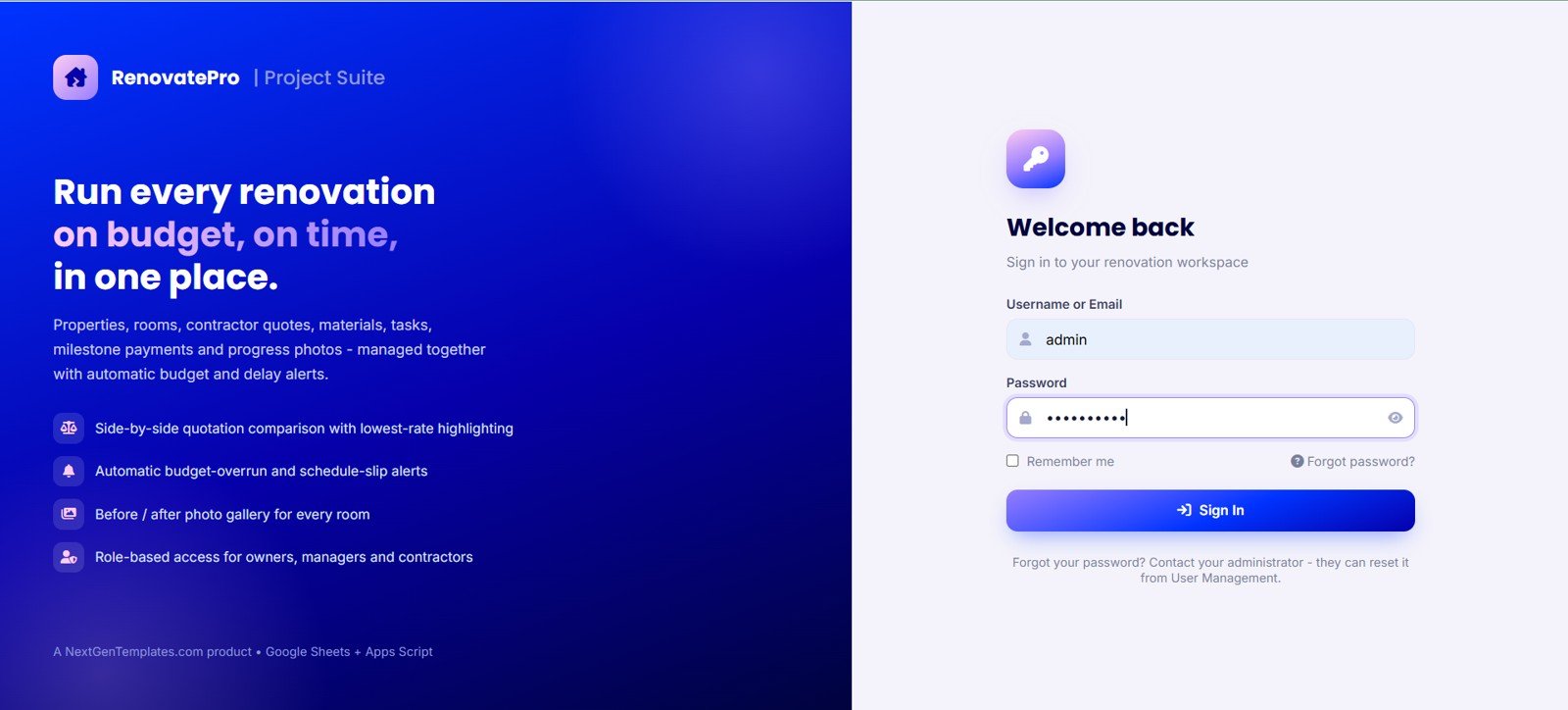
- Secure login: Branded RenovatePro Project Suite entry screen with username, password, remember-me option and role-based access.
- Executive dashboard: Track active projects, estimated budget, committed amount, actual spend, budget variance, progress, tasks, milestones, deliveries and open alerts.
- Room-level budget control: Compare budget, actual cost, variance, progress and status for every room in each property.
- Quotation comparison: Review lowest vendor, fastest vendor, best rated vendor, rate per sqft, timeline, payment terms and warranty before awarding work.
- Vendor and payment ledger: Track awarded value, paid amount, outstanding balance, vouchers, TDS, payment mode and net paid value.
- Materials and milestones: Monitor purchase orders, expected delivery dates, delivery status, payment status, milestone dates and balances.
- Photos, documents and reports: Organize before/progress/after photos, agreements, invoices, project summaries, vendor ledgers, task delays and alerts.
Dashboard Pages Explanation
1. Login Screen
The login screen gives the system a controlled entry point with RenovatePro Project Suite branding, username and password fields, remember-me option, forgot-password link and sign-in button. The side panel highlights the promise of running renovations on budget and on time, with quote comparison, budget alerts, photo galleries and role-based access.
2. Dashboard Overview
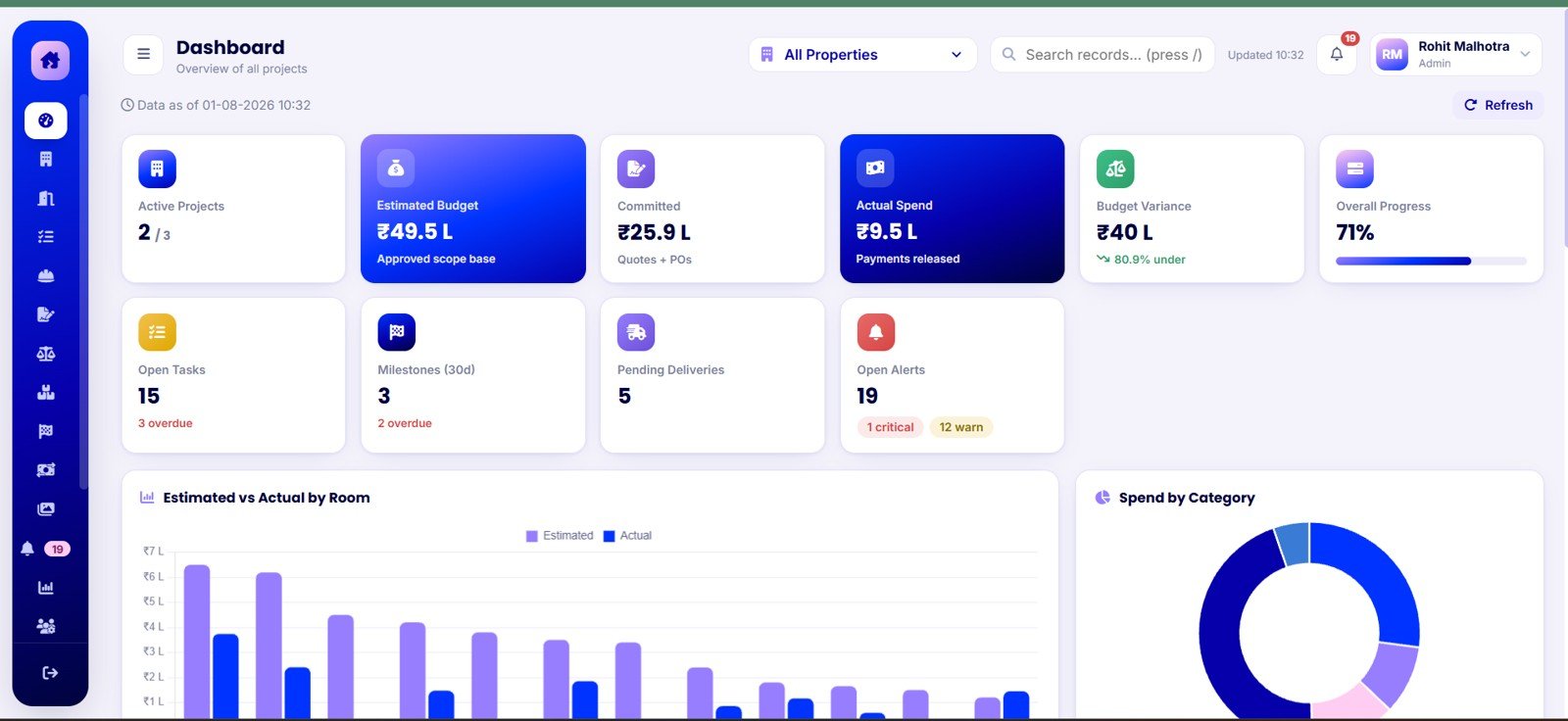
The dashboard is the first working page after login. At the top, KPI cards show Active Projects, Estimated Budget, Committed, Actual Spend, Budget Variance, Overall Progress, Open Tasks, Milestones in the next 30 days, Pending Deliveries and Open Alerts.
The chart Estimated vs Actual by Room helps identify which rooms are crossing budget before the whole project slips. The chart Spend by Category shows where the renovation money is going across labor, materials, furniture, appliances and other cost buckets.
3. Properties
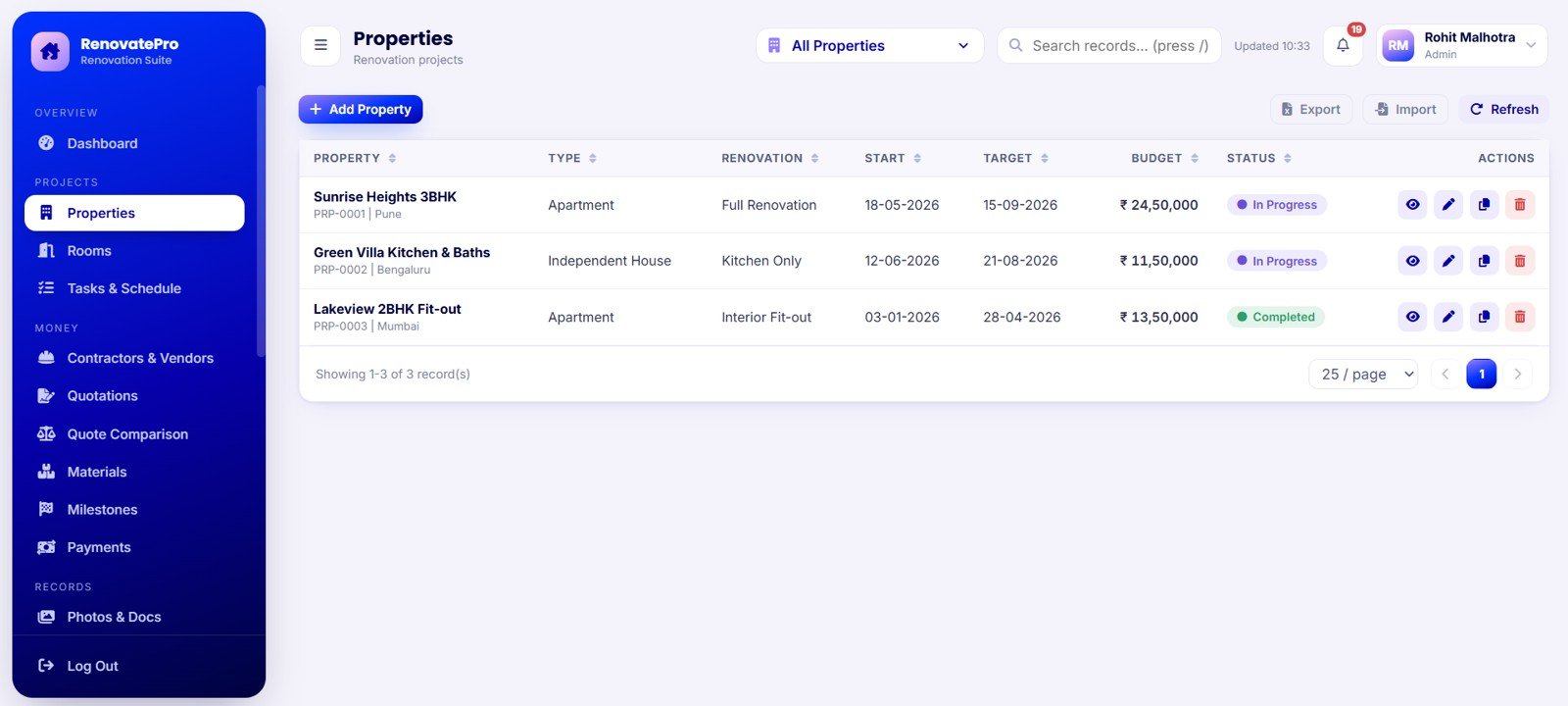
The Properties screen is where each renovation project starts. Users can manage property name, property type, renovation scope, start date, target completion date, budget and project status. This is useful for contractors or investors managing more than one renovation at the same time.
4. Rooms
The Rooms screen breaks each property into manageable work areas. It tracks budget by room, actual cost by room, variance by room, progress by room, status by room and property name by room. This makes it much easier to see whether the kitchen, bathroom, bedroom or living area is creating the overrun.
5. Tasks and Schedule
The Tasks and Schedule page turns the renovation plan into trackable work. Each task can carry a room, work category, vendor, priority, due date, progress percentage and status. Managers can use it for weekly reviews and homeowners can use it to ask focused questions instead of chasing every contractor separately.
6. Contractors and Vendors
The Contractors and Vendors screen works like a vendor ledger. It records vendor name, trade, vendor type, rating, awarded value, paid amount, outstanding balance and current status. This gives the project owner a clearer picture of who has been awarded work and who still needs payment.
7. Quotations
The Quotations screen captures quote number, property, work category, vendor, quote date, valid-till date, total amount, timeline days and quote status. Instead of leaving quotes in email threads or PDFs, the team can keep them in one searchable system.
8. Quote Comparison
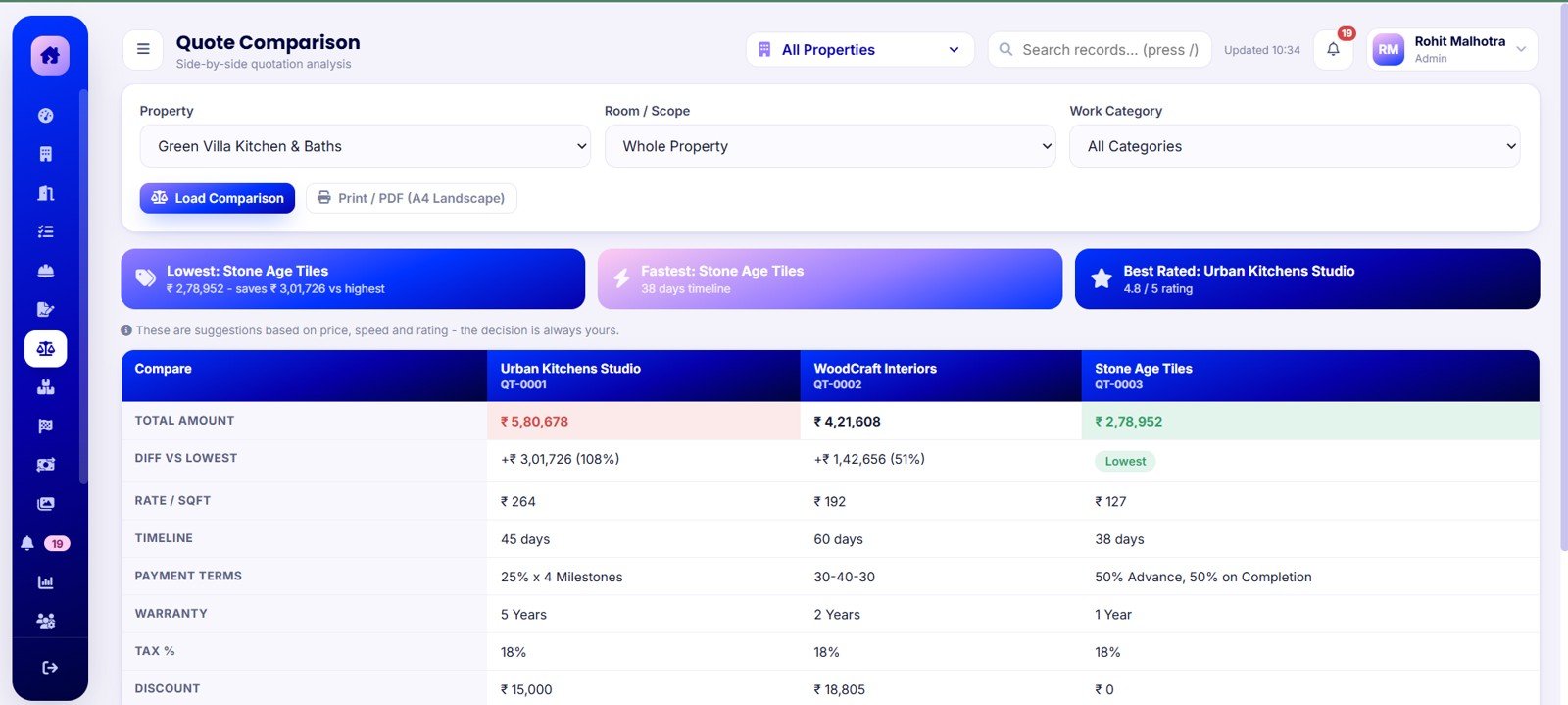
The Quote Comparison screen is one of the strongest buying-decision pages in the app. It compares vendors by lowest total amount, fastest timeline, best rating, difference versus lowest, rate per sqft, timeline, payment terms and warranty. This helps avoid choosing a vendor based only on the first attractive number.
9. Materials
The Materials screen tracks material name, category, vendor, quantity, total amount, expected delivery date, delivery status and payment status. This helps the team see which purchases are still pending and which supplier delays can affect the schedule.
10. Milestones
The Milestones screen manages payment milestones by vendor and property. It tracks milestone name, planned date, amount, paid amount, balance and status so payments can be aligned with actual project progress.
11. Payments
The Payments screen keeps a register of voucher number, payment date, vendor, against record, payment mode, amount, TDS and net paid value. It is useful for reconciling contractor payments and explaining project cash flow later.
12. Photos and Docs
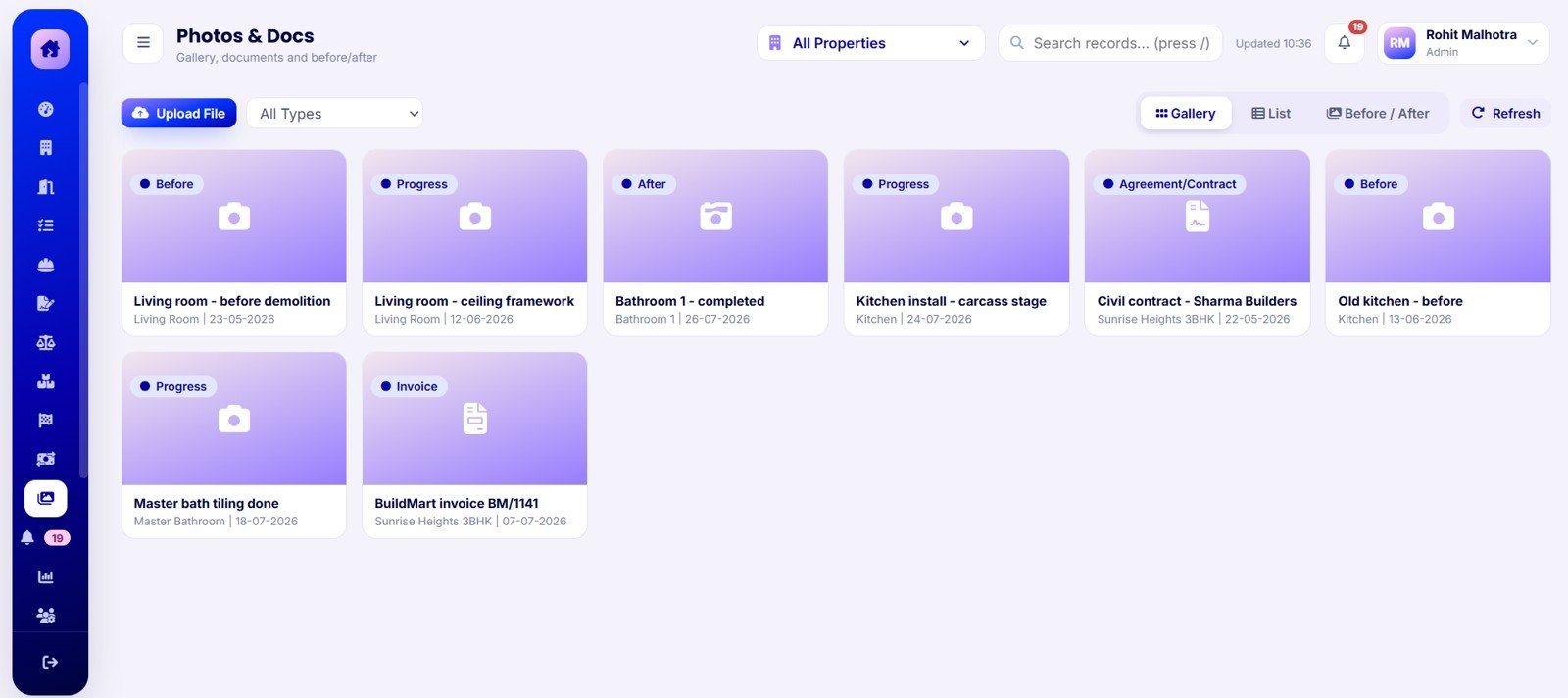
The Photos and Docs screen centralizes before photos, progress photos, after photos, agreements, contracts, invoices and document dates. This is especially helpful when deciding whether a milestone should be paid or when reviewing final handover quality.
Get the Home Renovation Project Management Web App
13. Alerts
The Alerts page gives renovation managers a focused issue list. It records severity, alert type, message, property, generated time, status and action. Typical alerts include budget warnings, schedule slips, delivery delays and overdue tasks.
14. Reports
The Reports screen supports project summary, budget versus actual, room-wise cost, material purchases, vendor ledger, milestone status, payment register, task and delay, progress, photo progress and alerts reports. These views help turn operational records into print-ready management updates.
15. User Management, Lists, Settings and Audit Log
The admin area covers users, roles, assigned properties, contractor links, list values, currency, number format, date format, print size, alert thresholds, Drive root folder ID and audit history. The audit log records when, user, role, module, action, record and details for every tracked action.
Home Renovation Project Management Web App vs. Google Sheets Tracker vs. Paid CRM/SaaS – Feature Comparison
| Feature | Home Renovation Project Management Web App | Google Sheets tracker | Paid CRM/SaaS |
|---|---|---|---|
| Cost | $39.99 one-time sale price | Low cash cost, high setup time | Monthly or annual subscription |
| Platform | Browser-based app with Google Sheets-style database | Spreadsheet tabs | Vendor-hosted platform |
| Setup time | Start from 18 prepared screens | Build forms, formulas and reports manually | Onboarding and configuration |
| Real-time team collaboration | Supported after deployment and access setup | Shared editing | Usually included by plan |
| Mobile access | Browser access after deployment | Sheets app or browser | Usually app or browser |
| Customizable fields | Lists, settings and source structure can be adapted | Editable cells and formulas | Plan and vendor dependent |
| Share with link | Possible through deployment settings | Yes, through Drive permissions | Usually account based |
| Year-1 cost at 5 users | $39.99 template cost | Template cost plus setup time | Can become hundreds or thousands per year |
| Renovation-specific controls | Rooms, quotes, vendors, materials, milestones, photos and alerts | Only if custom built | May require configuration or higher plan |
Who Should Use This Template
- Homeowners managing a major remodel with multiple vendors and room budgets.
- Renovation contractors who need a repeatable project control system for clients.
- Interior designers coordinating rooms, vendors, materials and photo progress.
- Property investors renovating rental or resale properties and tracking final margin.
- Project managers who want more structure than a spreadsheet but do not want to buy a large SaaS platform.
Real-World Use Cases
Anita is renovating her family home. She tracks kitchen, bathroom and living room budgets separately, compares contractor quotations side by side and only releases milestone payments after checking progress photos.
Marcus manages renovation projects for clients. He uses task priorities, vendor ledgers, material delivery status and alerts to run a weekly project meeting from one screen instead of opening six separate files.
Dev buys and renovates rental units. He uses property-level budgets, room variance and payment reports to understand which renovation scopes protect margin and which scopes need tighter controls next time.
Advantages of Home Renovation Project Management Web App
Get the Home Renovation Project Management Web App
- One operating layer: Budgets, rooms, vendors, quotes, milestones, payments, photos and reports live together.
- Decision support: Quote comparison reduces the risk of choosing vendors by memory or guesswork.
- Evidence-based payments: Photos, documents and milestones help connect payments to visible progress.
- Lower recurring cost: The template is a one-time download rather than a per-user subscription.
- Customizable structure: Users can adapt dropdowns, settings, thresholds and workflows to their renovation process.
Opportunities for Improvement
This is a template and starting system, not a full enterprise construction ERP. Teams that need accounting sync, public client portals, live GPS crew tracking, payment gateway integration, automated SMS reminders or insurance-claim workflows will need additional customization or a specialized platform.
The app also depends on disciplined data entry. If vendor names, room labels and material categories are entered inconsistently, the dashboard and reports will be less useful. A short naming standard before the first project will save time later.
Best Practices
Get the Home Renovation Project Management Web App
- Set room names, vendor names and material categories before importing active project data.
- Update task progress and milestone status on a fixed weekly cadence.
- Attach photos before approving milestone payments.
- Use quote comparison for every large work category, not only the first contractor decision.
- Review alerts before every project meeting.
- Keep a backup of the source file and database before making large custom changes.
Explore Relevant Templates
- Home Renovation Project Management Web App
- Construction Project Management System Web App
- Consulting Project and Billing Management System Web App
- Rental Equipment Management System Web App
- Browse Mini Web Apps on NextGenTemplates
Frequently Asked Questions
What is the Home Renovation Project Management Web App?
It is a downloadable web app template for managing renovation properties, rooms, budgets, tasks, vendors, quotations, materials, milestones, payments, photos, documents, alerts, reports, users, settings and audit logs.
Is it only for homeowners?
No. Homeowners can use it, but it also fits renovation contractors, interior designers, property investors and project managers handling multiple renovation jobs.
Can it compare contractor quotations?
Yes. The quote comparison screen reviews vendor amount, timeline, rating, difference versus lowest, rate per sqft, payment terms and warranty.
Does it include room-level cost tracking?
Yes. The Rooms screen tracks budget, actual cost, variance, progress, status and property by room.
Can I track photos and documents?
Yes. The Photos and Docs screen supports before, progress and after photos, agreements, invoices and document dates.
Does it replace a paid construction SaaS platform?
It can replace a basic internal tracker for small renovation teams, but it is not a full enterprise construction platform with accounting sync, payment gateways, GPS tracking or public portals.
About the Author
Built by PK – Microsoft Certified Professional with 15+ years of Excel, Google Sheets, and Power BI experience. Founder of NextGenTemplates, reaching 300K+ subscribers across YouTube channels. Every template is hand-built and tested before release.
Conclusion
The Home Renovation Project Management Web App gives renovation teams a clearer way to manage the everyday details that decide whether a remodel stays on budget and on schedule. Instead of spreading work across quotes, folders, sheets and chat threads, the template gives you one connected workflow for properties, rooms, tasks, contractors, quotations, materials, milestones, payments, photos, alerts and reports.
Get the Home Renovation Project Management Web App and start managing renovation projects from one browser-based system.
For more web app templates and dashboard tutorials, visit Youtube.com/@NeoTechNavigators.
Last updated: August 1, 2026.