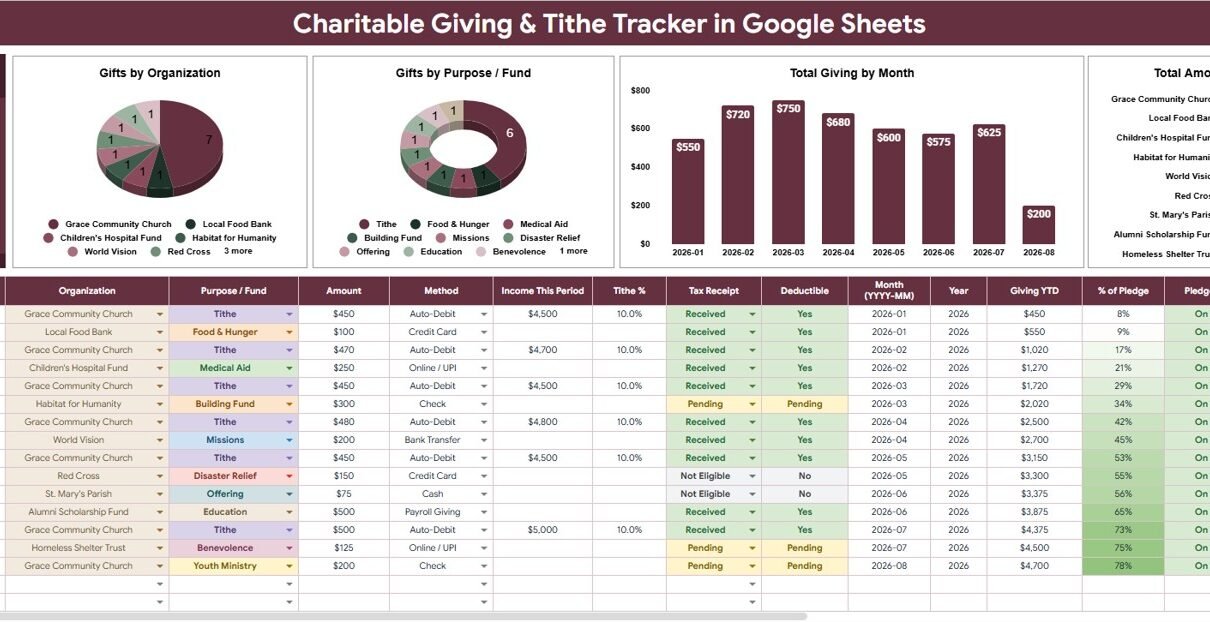
Giving records can get messy fast when tithes, special offerings, nonprofit gifts, payment methods, tax receipts, and pledge goals live across emails, bank exports, and handwritten notes. The Charitable Giving and Tithe Tracker in Google Sheets brings those records into 2 organized sheet tabs, 1 high-level giving card, 4 overview charts, 5 settings analysis sections, and multiple slicers. It is built for people who want a clear spreadsheet-based giving summary without committing to a recurring donation management platform.Charitable Giving and Tithe Tracker in Google Sheets
This Google Sheets tracker is useful for individuals, families, church members, small ministry teams, nonprofit supporters, and anyone who wants a year-end giving view that is easier to filter. Google also provides native collaboration features for Sheets, including sharing and version history, which makes a Google Drive copy practical for households or small teams that review giving together. Learn more from Google Docs Editors Help.
Get the Charitable Giving and Tithe Tracker in Google Sheets
Key Features of Charitable Giving and Tithe Tracker in Google Sheets
- Total Giving This Year card: Review the headline giving total before digging into organization, fund, or monthly detail.Charitable Giving and Tithe Tracker in Google Sheets
- Overview dashboard: See giving charts, slicers, and summary visuals in one main reporting page.
- Organization analysis: Compare giving across churches, charities, ministries, nonprofits, campaigns, and custom organizations.
- Purpose / Fund tracking: Separate tithes, offerings, missions, building funds, relief gifts, scholarships, and other designated giving.
- Monthly giving trend: Review how giving changes across the year and spot special campaign or year-end contribution periods.
- Receipt status control: Track whether a tax receipt has been received, is pending, is not needed, or requires follow-up.
- Pledge goal settings: Maintain goal or pledge values for recurring review.
- Google Sheets workflow: Copy the file to Drive, customize settings, and share with a spouse, treasurer, or trusted reviewer.Charitable Giving and Tithe Tracker in Google Sheets
Dashboard Pages Explanation
1 – Overview Page
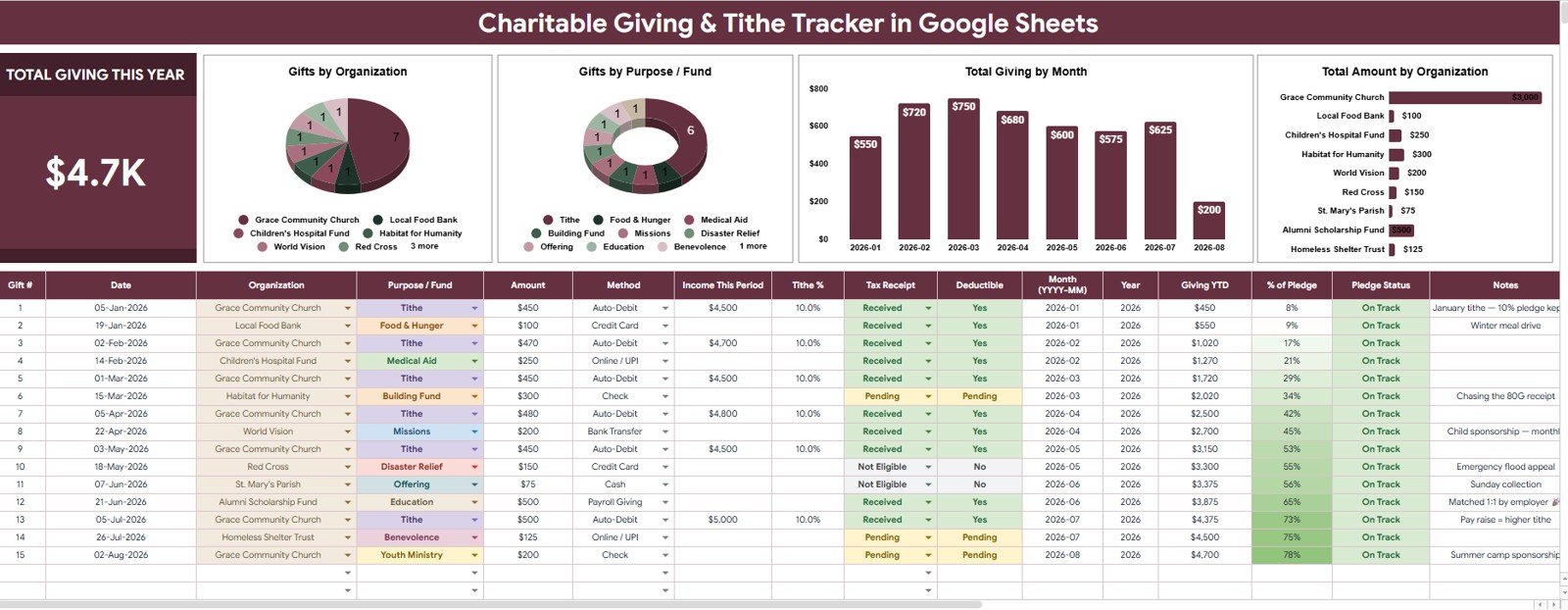
The Overview Page is the main reporting sheet for the tracker. At the top, the Total Giving This Year card shows the high-level annual giving amount based on the entered records and selected filters.Charitable Giving and Tithe Tracker in Google Sheets
The page also includes slicers so users can filter by organization, purpose or fund, payment method, tax receipt status, month, or other available fields. This makes the dashboard useful during monthly reviews, year-end giving summaries, and receipt follow-up sessions.
Gifts by Organization: This chart groups gifts by the organization that received them. It helps users see which churches, charities, ministries, or nonprofits received the most support during the selected period.Charitable Giving and Tithe Tracker in Google Sheets
Gifts by Purpose / Fund: This chart organizes giving by the intended purpose or fund. It helps separate tithe, offering, mission, building fund, relief, scholarship, benevolence, or any custom category.
Total Giving by Month: This chart shows giving activity month by month. It helps users identify giving rhythm, seasonal campaigns, missed periods, and year-end giving spikes.
Total Amount by Organization: This chart compares contribution value by organization. It is especially useful when preparing annual summaries or checking which organizations still need receipt follow-up.
2 – Settings Tab
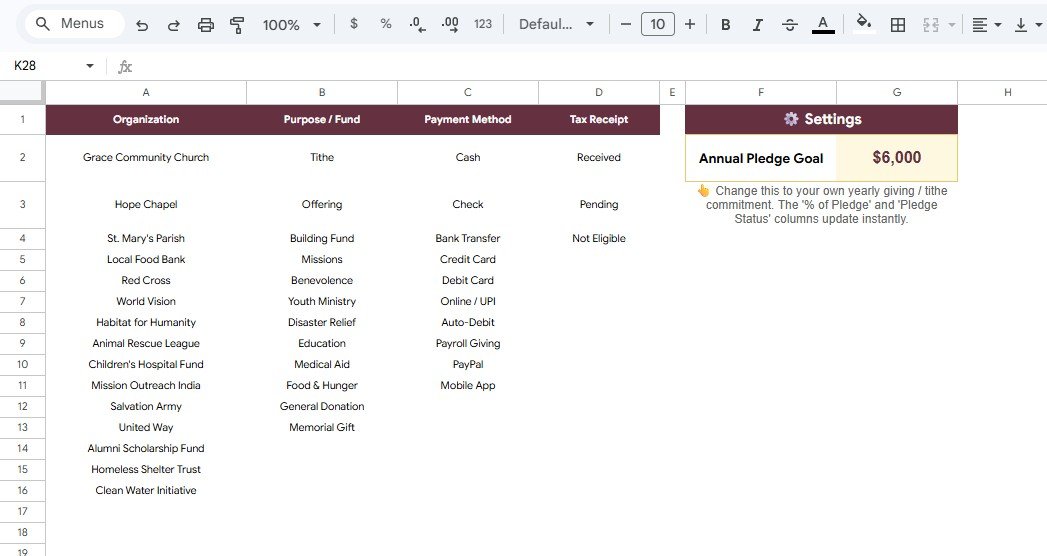
The Settings tab keeps the tracker consistent. Instead of typing organization names, fund labels, payment methods, receipt statuses, and pledge goals in different ways, users can maintain controlled options that support cleaner dashboard analysis.
Giving Options by Organization: This section stores the organizations used in giving entries. Consistent organization names prevent the same church or charity from appearing as multiple chart categories.
Giving Options by Purpose / Fund: This section stores giving categories such as tithe, offering, missions, building fund, relief, scholarship, or custom funds. Clean fund names make purpose-level reporting easier.Charitable Giving and Tithe Tracker in Google Sheets
Payment Options by Payment Method: This section standardizes payment methods such as cash, check, bank transfer, card, online giving, and mobile payment. It helps users review how gifts were made.Charitable Giving and Tithe Tracker in Google Sheets
Receipt Options by Tax Receipt: This section controls receipt status labels. Users can quickly separate received receipts from pending or follow-up-required documentation.
Pledge Goal by Settings: This section helps users define pledge or giving goal values. It supports personal stewardship planning, family giving reviews, or simple ministry goal tracking.
Charitable Giving and Tithe Tracker in Google Sheets vs. Microsoft Excel Tracker vs. Paid Donation Software – Feature Comparison
| Feature | This Google Sheets tracker | Microsoft Excel tracker | Paid donation software |
|---|---|---|---|
| Cost | $6.99 one-time sale price | Template cost plus possible Microsoft license | Often recurring monthly or annual pricing |
| Platform | Google Sheets in Google Drive | Excel desktop, OneDrive, or Excel Online | Vendor-hosted web app |
| Setup time | Copy the file, update settings, enter giving records | Open workbook and customize fields | Create account, configure funds, import contacts |
| Real-time team collaboration | Native Google sharing | Depends on Microsoft 365 setup | Usually account based |
| Mobile access | Sheets app or browser | Excel app or browser | Usually included |
| Customizable fields | Editable organizations, funds, methods, receipts, and goals | Editable if workbook is unlocked | Limited by vendor workflow |
| Share with link | Yes, through Drive permissions | Yes, through Microsoft sharing | Usually login based |
| Year-1 cost at 5 users | $6.99 before any Google Workspace cost | Template plus licensing cost | Can become much higher with subscriptions |
| Tax receipt follow-up | Included as a setting and filter-friendly field | Must be added or customized | Often included in donor tools |
| Pledge goal review | Included in settings | Depends on workbook design | Usually available in fundraising systems |
Who Should Use This Template
- Individuals and families who want a year-end view of tithes, offerings, and charitable gifts.
- Church members who give to multiple funds or ministries and want cleaner personal records.
- Small ministry teams that need a simple giving tracker without a donor CRM.
- Nonprofit supporters who need to follow up on receipts from several organizations.
- Bookkeepers, treasurers, and accountants who receive giving records from clients or households.
Real-World Use Cases
Family giving review: A household records weekly tithes, special offerings, and nonprofit gifts, then reviews Total Giving This Year at the end of each month.
Church fund tracking: A small ministry tracks gifts by purpose, such as missions, building fund, benevolence, scholarship, and outreach.
Receipt follow-up: A donor filters by Tax Receipt status before tax season to see which organizations still need to send documentation.
Pledge goal review: A donor or treasurer compares recorded giving against pledge goals and uses monthly charts to understand timing.
Advantages of Charitable Giving and Tithe Tracker in Google Sheets
- Simple to start: Users can copy the template and begin replacing sample data without installing software.
- Easy to customize: Organizations, funds, payment methods, receipt labels, and pledge goals can be changed in the Settings tab.
- Good for recurring reviews: The Overview Page gives quick annual, monthly, organization, and fund-level visibility.
- Collaboration ready: Google Sheets makes it easier to share the file with trusted reviewers.
- No subscription requirement: The tracker is a one-time spreadsheet template rather than another recurring app.
Opportunities for Improvement
This tracker is intentionally simple and spreadsheet-based. It does not connect automatically to bank accounts, giving platforms, church management systems, donor CRMs, or tax filing software. Users who need official receipting, automated payment collection, donor statements, contribution batching, or regulated accounting workflows should use dedicated systems alongside this file.
Advanced users may extend the tracker with Google Forms, Apps Script automation, additional receipt fields, pledge variance formulas, or separate tabs for household members. Before changing formulas or sheet structure, make a backup copy in Google Drive.
Best Practices
- Update giving records consistently instead of waiting until year-end.
- Keep organization names and fund names standardized in the Settings tab.
- Use receipt status labels to follow up before tax season.
- Do not use the tracker as the only copy of official contribution records.
- Share edit access only with trusted people who should update giving data.
- Review monthly giving trends and pledge goals during recurring budget reviews.
- Make a backup copy before adding new columns, formulas, or automation.
Explore Relevant Templates
- Charitable Giving and Tithe Tracker in Google Sheets – the product page for this template.
- Donation Management Tracker in Google Sheets – useful for broader donation operations and fundraising activity.
- CSR & Sustainability Performance Tracker in Google Sheets – useful for impact and project tracking.
- Budget Request & Approval Tracker in Google Sheets – helpful for financial request and approval workflows.
- Shared Expense Splitter Tracker in Google Sheets – useful for household or group finance tracking.
Want to build skills like this step by step? The NextGenTemplates Academy learning paths walk you through spreadsheet tracking and reporting with practice files.
Frequently Asked Questions
What is included in the Charitable Giving and Tithe Tracker in Google Sheets?
It includes an Overview Page with a Total Giving This Year card, four giving charts, slicers, and a Settings tab for organizations, funds, payment methods, receipt status, and pledge goals.
Can I customize the organization list?
Yes. The Settings tab lets users update organization names so the dashboard reflects their own churches, charities, ministries, nonprofits, or campaigns.
Can I track tithes separately from offerings and donations?
Yes. Use the Purpose / Fund field to separate tithes, offerings, missions, building funds, relief gifts, scholarships, and other custom categories.
Does the tracker issue tax receipts?
No. It tracks receipt status and helps with follow-up, but it does not issue official receipts or provide tax advice.
Can I share the tracker with another person?
Yes. After copying the file into Google Drive, users can share it through Google Sheets permissions.
Does it import giving data automatically?
No. It is a manual tracker. Users enter or paste giving records, which keeps the file simple and editable.
About the Author
Built by PK – Microsoft Certified Professional with 15+ years of Excel, Google Sheets, and Power BI experience. Founder of NextGenTemplates, reaching 300K+ subscribers across YouTube channels. Every template is hand-built and tested before release.
Conclusion
The Charitable Giving and Tithe Tracker in Google Sheets gives users a practical way to track gifts by organization, purpose, fund, payment method, month, tax receipt status, and pledge goal. It is a good fit for donors, families, church members, small ministry teams, and nonprofit supporters who want giving clarity in an editable Google Sheets file.
Get the Charitable Giving and Tithe Tracker in Google Sheets
Last updated: August 7, 2026.