Most people who take more than two medicines regularly have the same quiet problem: nobody actually knows how many days of supply are left in each box. You find out on a Sunday evening when a strip is empty. The Medication & Pill Tracker in Google Sheets exists to make that a number you can read rather than a surprise you discover — one tab, 16 columns, four live charts, and five columns that calculate themselves the moment you type a frequency and a pill count.Medication & Pill Tracker in Google Sheets
Before anything else, the honest framing: this is a personal organising log. It is not medical advice, not a medical device, not a clinical record system and not a dosing tool. It does arithmetic on numbers you type. Every question about a dose, a missed dose, an interaction or a side effect goes to your doctor or pharmacist.
Get the Medication & Pill Tracker in Google Sheets
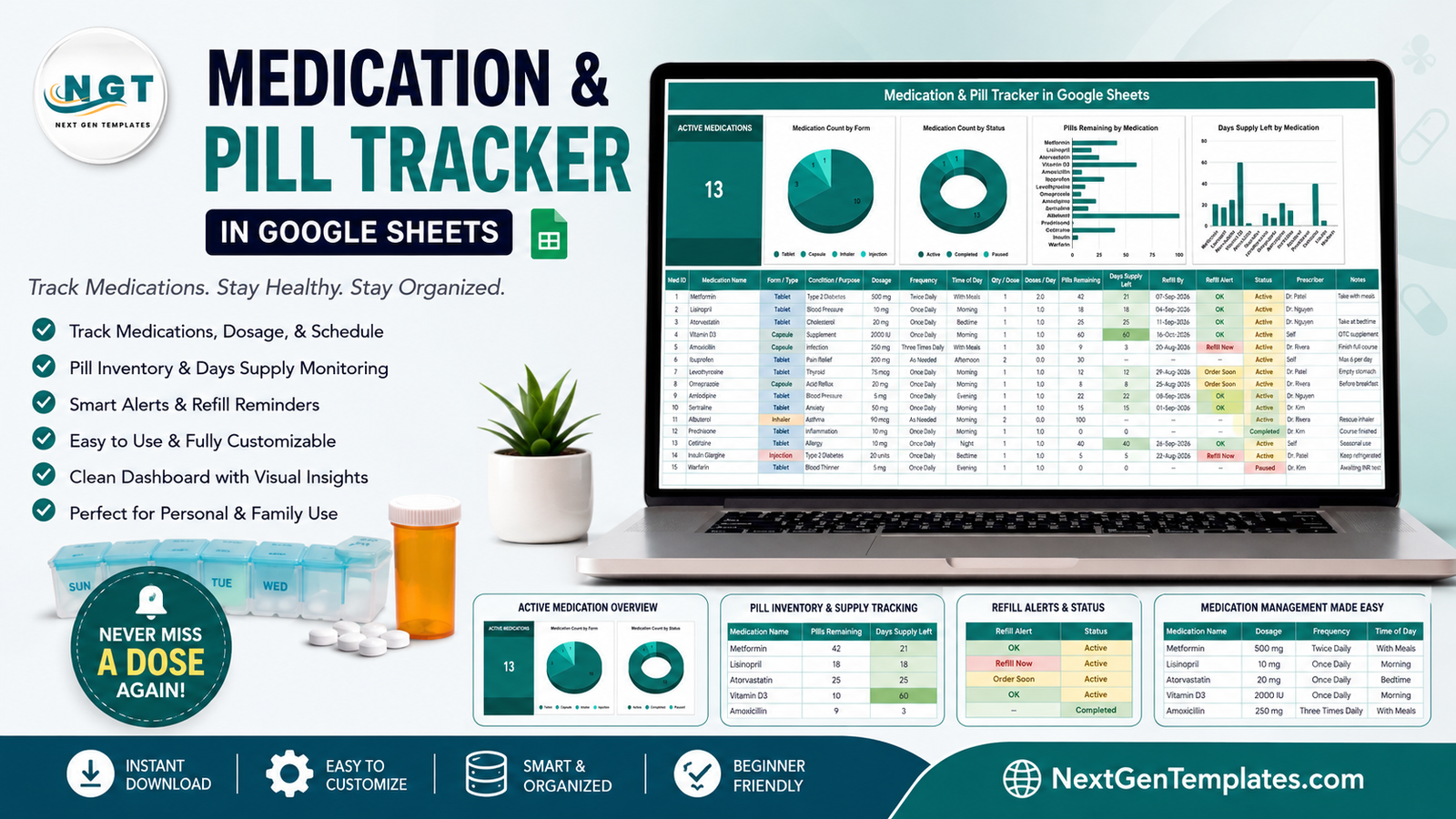
Key Features of the Medication & Pill Tracker in Google Sheets
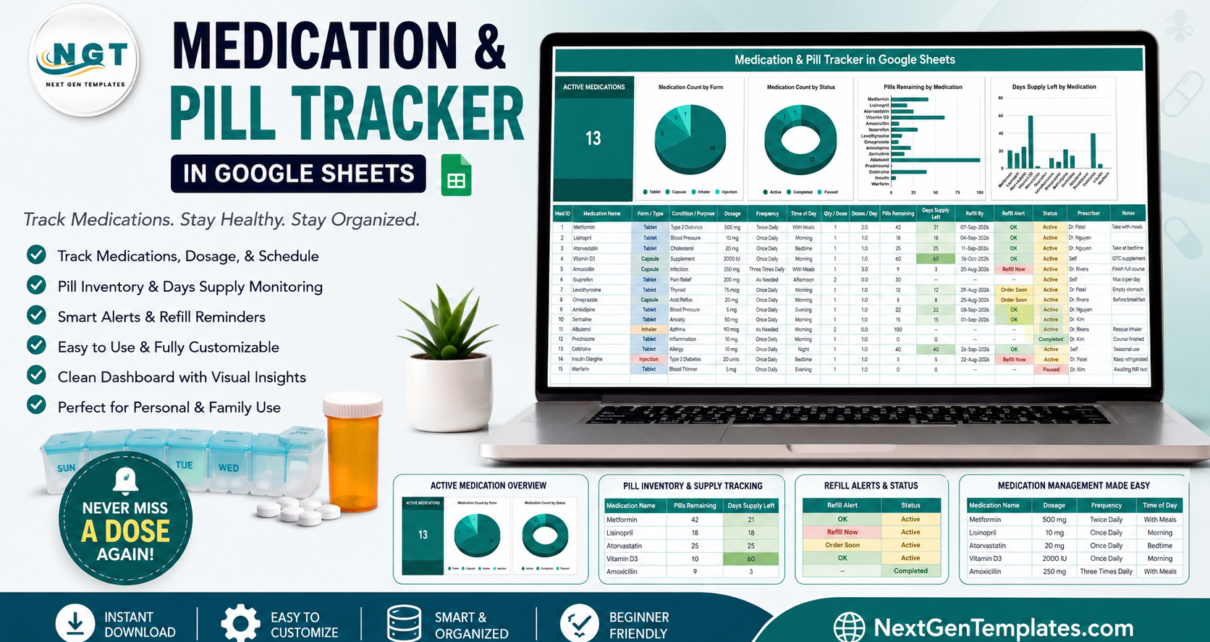
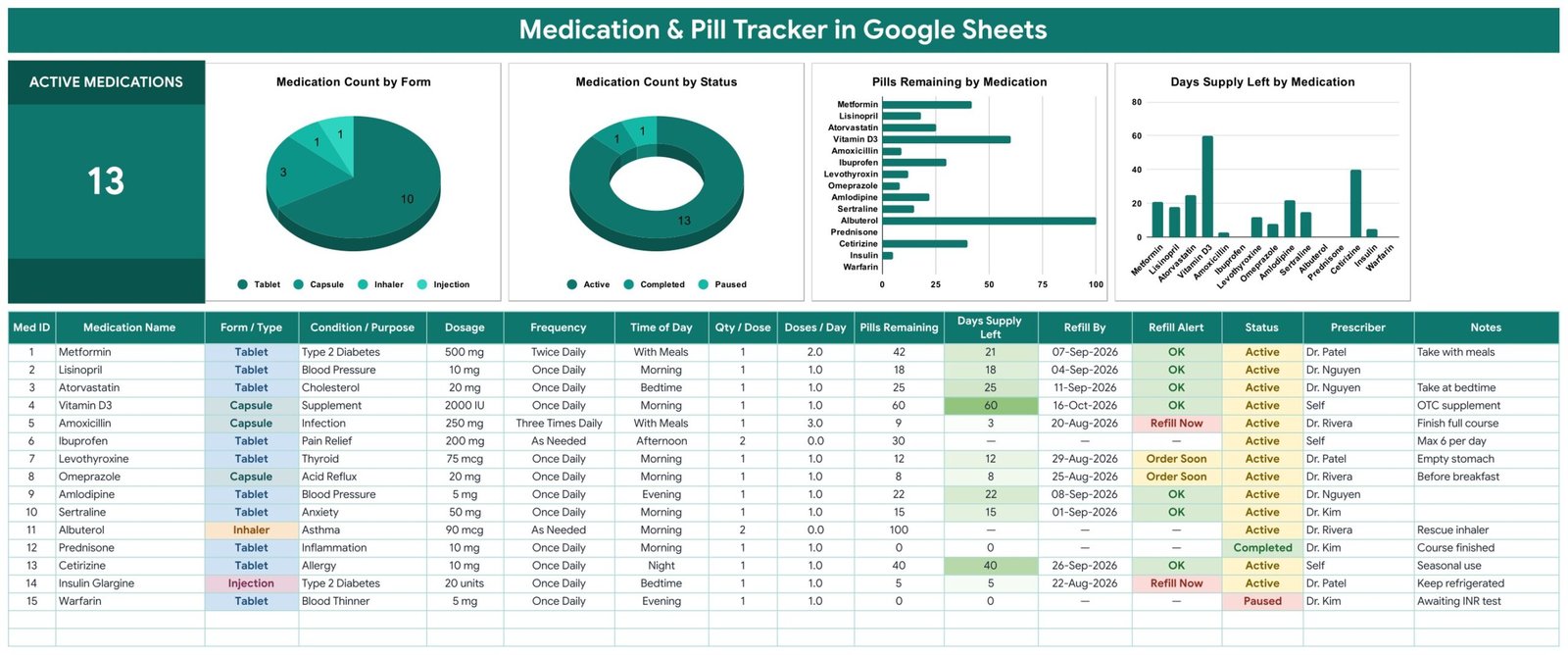
- Everything on one tab. An Active Medications card, four charts and the entry table share a single screen. In the sample file that card reads 13.
- Five formula columns. Med ID, Doses / Day, Days Supply Left, Refill By and Refill Alert are never typed by hand.
- Days Supply Left, worked out for you. Pills Remaining divided by doses per day. Forty-two tablets taken twice daily reads 21 days; nine capsules taken three times daily reads 3.
- Two alert bands. Refill Alert flags Refill Now at seven days or less and Order Soon at fourteen days or less, colour-coded in the cell.
- A projected run-out date. Refill By turns the days-supply figure into an actual calendar date.Medication & Pill Tracker in Google Sheets
- Status that switches alerts off. Mark a course Completed or Paused and it stops asking to be refilled, without deleting the history.Medication & Pill Tracker in Google Sheets
- Four dropdown columns. Form / Type, Frequency, Time of Day and Status all read from a List tab, so your own values appear automatically.Medication & Pill Tracker in Google Sheets
- Charts wired straight to the data. Rows 16 to 1000, using the built-in aggregate option, with no hidden helper tables to break.Medication & Pill Tracker in Google Sheets
Inside the Tracker: Every Tab Explained
1. Medication Tracker
The working tab, and the one in the screenshots. At the top left sits the single big card, Active Medications, which counts rows whose Status is Active. Next to it are four charts:
- Medication Count by Form — a pie of how your medicines break down by form. The demo data splits 10 tablets, 3 capsules, 1 inhaler and 1 injection.Medication & Pill Tracker in Google Sheets
- Medication Count by Status — a donut over Active, Completed and Paused: 13, 1 and 1 in the sample.Medication & Pill Tracker in Google Sheets
- Pills Remaining by Medication — a horizontal bar, so the shortest bars are the ones to look at.Medication & Pill Tracker in Google Sheets
- Days Supply Left by Medication — a column chart of the same data expressed in days, which is usually the more useful of the two.
Below them, the table runs from column A to column P: Med ID, Medication Name, Form / Type, Condition / Purpose, Dosage, Frequency, Time of Day, Qty / Dose, Doses / Day, Pills Remaining, Days Supply Left, Refill By, Refill Alert, Status, Prescriber and Notes. Data starts at row 16. Rows 16 to 30 hold fifteen sample medicines so you can see the whole machine running before you clear them.
2. List
Four columns of dropdown values, read down to row 500: Form / Type (Tablet, Capsule, Liquid, Injection, Inhaler, Drops, Topical Cream, Patch, Suppository, Powder, Spray), Frequency (Once Daily through Four Times Daily, plus Every Other Day, Weekly and As Needed), Time of Day (Morning, Afternoon, Evening, Night, Bedtime, With Meals) and Status (Active, Completed, Paused). Add a row here and the dropdown on the tracker picks it up with no re-setup — the same auto-expanding pattern Google documents for drop-down lists in Sheets.
3. Instructions
A short walkthrough of which columns are typed and which are formulas, what the two alert thresholds mean, and the one manual step in the whole build (see Opportunities for Improvement below). It closes with the same caution this article opens with: an organising tool, not medical advice.
4. Explore More Templates
Links to the wider catalogue and a 15% coupon.
Medication & Pill Tracker in Google Sheets vs. Excel vs. a Paid Medication App — Feature Comparison
| This Google Sheets tracker | A DIY Excel sheet | Paid medication app | |
|---|---|---|---|
| Cost | One payment, kept forever | Free, but you build it | Typically $3–$10 per month |
| Platform | Google Sheets, any browser | Desktop Excel | Phone app on vendor servers |
| Setup time | Copy the file, clear 15 rows | Hours of formula work | Signup, then per-medicine entry |
| Days-supply and refill maths | Built in, five formula columns | You write it | Built in |
| Push reminders on a phone | No — alerts are cells you read | No | Yes |
| Shared with a family member | Yes, a Google share link | Emailed copies | Depends on the plan |
| Add your own columns and values | Fully editable | Fully editable | Fixed by the vendor |
| Where the data sits | Your own Google Drive | Your own machine | The vendor’s account |
| Year-1 cost for a household of five | One purchase, one shared file | $0 plus your time | $180–$600 |
The line is easy to draw. If what you need is a phone alarm at eight in the morning, buy an app — a spreadsheet cannot do that. If what you need is one page showing what is in the cabinet, who prescribed it and what runs out first, the spreadsheet is cheaper, more flexible and yours.
Who Should Use This Template
It suits anyone on several long-term prescriptions who has lost track of pack sizes; carers running a parent’s medicine cabinet from a distance; households that want one shared page rather than four pill boxes and everyone’s memory; and anyone who just wants a clean list to bring to the next appointment.
It does not suit clinics, pharmacies or care homes. It is a spreadsheet, not an EHR or EMR, and it carries no certification of any kind — no HIPAA, no GDPR, nothing. It does not check interactions, allergies, contraindications or duplicate therapy. It sends no notifications. It connects to no pharmacy and no prescription service. It holds exactly what its owner types into their own private Google account, which is also why sharing the link is a decision worth thinking about rather than a default.
Real-World Use Cases
Three long-term prescriptions, three different pack sizes. Metformin, atorvastatin and levothyroxine all arrive in different quantities and empty at different times. Updating Pills Remaining once a month is enough for the Days Supply Left chart to show which one goes first, so the repeat request goes in before the gap rather than after it.
A carer and a sibling sharing one file. Eight medicines and two prescribers across one shared sheet. Both people see the same Refill Alert column, and the Prescriber and Notes fields answer “who started this one?” without a phone call.
A short antibiotic course. Entered at Three Times Daily, watched down to the end of the pack, then switched to Completed — which removes it from the Active Medications count and the refill alerts while leaving the row in place as history.
Advantages of the Medication & Pill Tracker in Google Sheets
- Nothing to install and nothing to authorise. Native formulas, charts and data validation only — no Apps Script, no add-ons, no permission prompts.
- One number does the work. Update Pills Remaining after a refill and the days-supply figure, the run-out date, the alert and both right-hand charts move together.
- It refuses to guess. Set Frequency to As Needed and Doses / Day drops to zero, so Days Supply Left and Refill By show a dash instead of a fabricated date.
- It grows with you. The dropdowns read 500 rows and the charts read to row 1000, so adding an unusual medicine form or a fortieth medicine needs no re-setup.
- Free-text dosage. mg, mcg, mL, IU or units, recorded exactly as the label reads, instead of being forced into a fixed field.
Opportunities for Improvement
Three limitations worth knowing before you buy, stated plainly.
- The coloured “chip” dropdowns are a manual step. Google does not currently let a script set the chip display style, so the first time you open your copy you select column C, then F, G and N, and switch Display style to Chip under Data → Data validation. It takes about ten seconds per column, and the Instructions tab spells it out.
- Pills Remaining is a manual count. Nothing decrements it as you take a dose — you update it when you refill. That is the trade for a tool that needs no app and no permissions, but it does mean the days-supply figure is only as fresh as your last update.
- “Pills” is a generic unit. For an inhaler, a liquid or an injection the column counts whatever unit you decide to put in it. The maths is the same; the label just says pills.
Best Practices
- Update Pills Remaining on a fixed day. The first Sunday of the month is enough for most repeat prescriptions, and it keeps the alerts meaningful.
- Type the dosage exactly as the label reads. The field is free text for that reason; a tidy record is far more useful at an appointment than a tidy-looking one.
- Use Status rather than the delete key. Completed and Paused keep the history and still remove the row from the active count.
- Put the person’s name in Notes if you track a whole household in one sheet — there is no patient field, by design.
- Think before you share. A Google link is convenient and permanent; share with the carer who needs it, not with a group chat.
- Never let the sheet answer a clinical question. If the numbers look wrong, or a dose has been missed, ask a pharmacist — that is what the Notes column is for, not what the formulas are for.
Explore Relevant Templates
If you keep a wider personal health record, the same one-tab pattern shows up across the range: the Sleep Tracker in Google Sheets, the Water Intake Tracker in Google Sheets, the Body Measurements Tracker in Google Sheets and the Calorie & Macro Tracker in Google Sheets. Two closer companions to this one are the Blood Pressure Log Tracker in Google Sheets and the Blood Sugar (Diabetes) Log Tracker in Google Sheets, which log readings rather than supplies. For appointments there is the Medical Appointment Calendar in Google Sheets, and for a broader view the Fitness and Wellness Dashboard in Google Sheets.
Get the Medication & Pill Tracker in Google Sheets
If you would like to get more out of spreadsheet trackers like this one, the NextGenTemplates Academy learning paths cover the skills step by step, with practice files.
Frequently Asked Questions
Is this medical advice or a medical device?
No — to both. It is a personal logging spreadsheet that records what you type and does arithmetic on it. It does not diagnose, treat, advise on doses or check interactions. Anything about your actual medicines goes to your doctor or pharmacist.
Will it remind me to take a pill?
No. There are no notifications, alarms or emails anywhere in the file. The Refill Alert column is a formula in a cell that you read when you open the sheet.
Where is the information stored, and is it compliant?
It lives in a copy of the file in your own Google Drive, visible only to you until you share it. Nobody else sees it. It carries no HIPAA, GDPR or other certification — treat it as a private personal document.
Can I track more than one person?
Yes. Most people add the name in the Notes column or duplicate the tracker tab per person. There is deliberately no patient field, because this is not a patient record system.
What about medicines taken only when needed?
Set Frequency to As Needed. Doses / Day becomes zero and the days-supply and refill-date columns show a dash, rather than inventing a run-out date the sheet cannot know.
Do I need Excel, Apps Script or any add-on?
None of them. Native Google Sheets throughout, so it opens in any browser, including on a phone.
About the Author
Built by PK – Microsoft Certified Professional with 15+ years of Excel, Google Sheets, and Power BI experience. Founder of NextGenTemplates, reaching 300K+ subscribers across YouTube channels. Every template is hand-built and tested before release.
Conclusion
A medicine cabinet is a small inventory problem that nobody treats like one. The Medication & Pill Tracker in Google Sheets treats it like one: type each medicine in once, keep the pill count current, and the sheet tells you how many days you have and which box empties first. It will not remind you, advise you or replace a conversation with your pharmacist — and it is written throughout to be clear about that. What it will do is turn “I think we’re nearly out of something” into a number.
Get the Medication & Pill Tracker in Google Sheets → Instant download; the PDF in your order carries the Make a copy link.
For more Google Sheets walkthroughs, subscribe to NeoTechNavigators on YouTube.