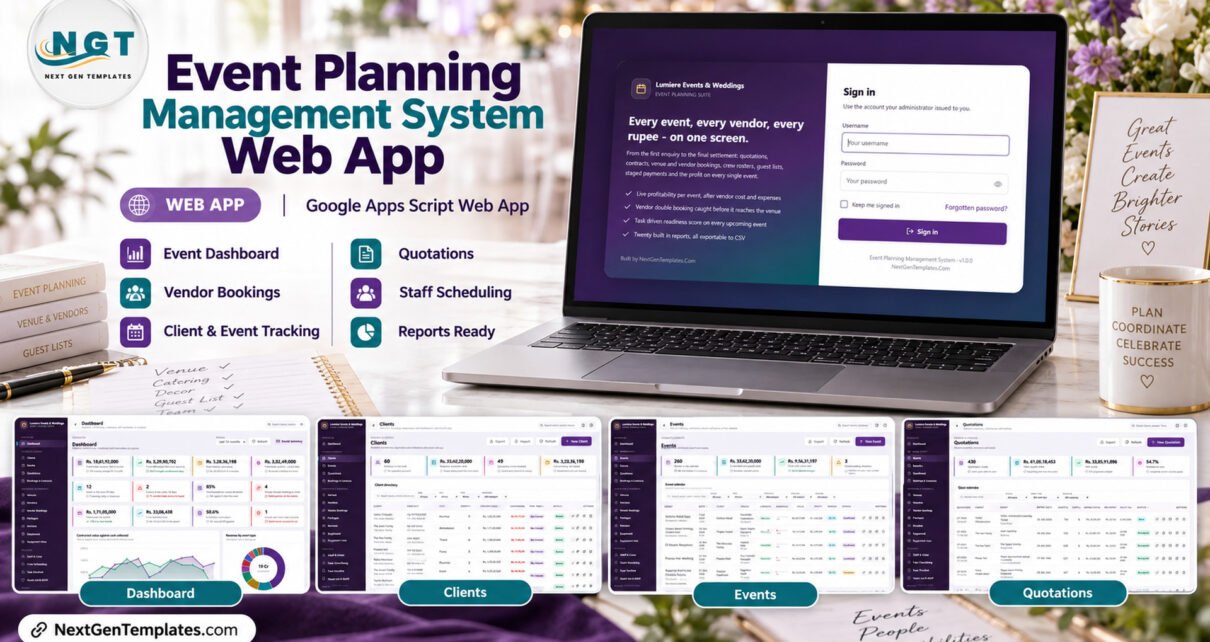
The Event Planning Management System Web App is a self-hosted Google Apps Script system that runs an event business from first enquiry to final settlement. It ships with 28 screens, 20 built-in reports, 6 permission-driven roles and 14,775 rows of fictional sample data across 28 Google Sheets tabs, and it deploys into your own Google account in about 15 minutes.
Most event companies still stitch together a quotation spreadsheet, a vendor WhatsApp group, a separate crew roster and a bank statement to work out whether a wedding made money. This event planning management system replaces that patchwork with one database: quotations become contracts, contracts carry staged payments, vendors and crew are booked against events, and the profit on each event is calculated after vendor cost, expenses, crew and equipment hire. This guide walks through every major screen, what the system calculates, where it fits against spreadsheets and paid software, and where its limits are.
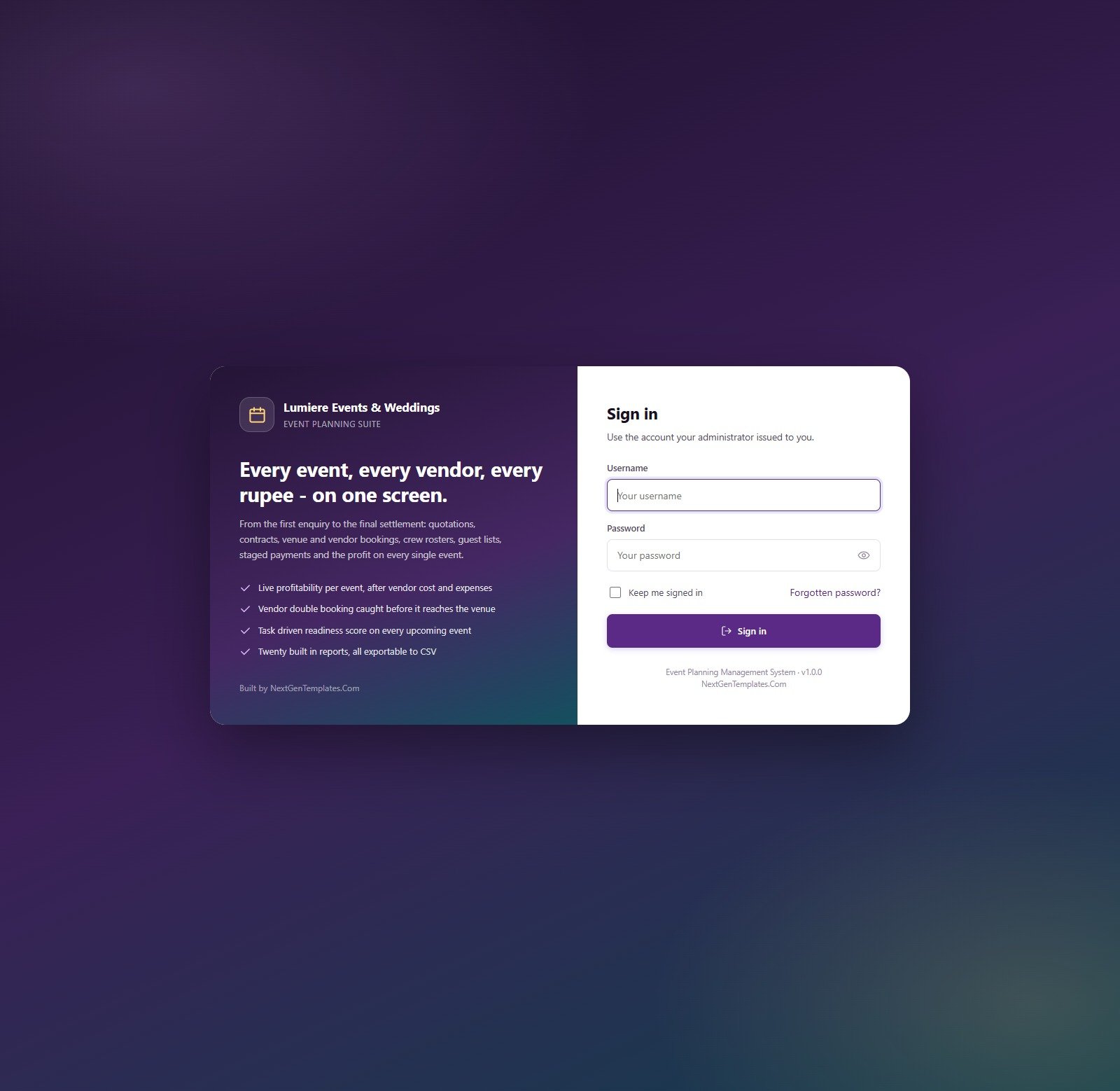
🚀 Try the Live Demo Before You Buy
We have deployed this web app in our own Google account so you can test every page and every one of the 6 roles with realistic sample data before purchasing. No signup, no email required.
🔑 Test Login Credentials
Sign in as admin to see everything, including Users, Lists, Settings, Audit Log and Archive, then sign in as sanjana (Viewer) to see how the sidebar and every server call shrink to read-only access.
💡 These are the seeded logins of a shared demo that we reset from time to time, not a system you are buying access to. What you get after purchase: the full source code (Code.gs + Index.html) plus the user manual, so you deploy your own private copy in your own Google account in under 15 minutes.
Key Features of the Event Planning Management System
The system is organised around the life of an event, and each feature below is something the code actually calculates or enforces rather than a label on a screen.
- Profit on every event. Margin is contract value less vendor cost, expenses, crew cost and equipment hire, reported per event, per event type, per event manager and company wide.
- Vendor clash detection. The same partner booked on two different events on one date is flagged, counted on the dashboard, listed in the Vendor Booking Conflicts report and refused on save.
- Venue capacity check. Expected guests are compared with the venue’s seated and floating capacity and graded Comfortable, Tight or Over Capacity; an over-capacity save needs a manager’s deliberate confirmation.
- Readiness score. Completed tasks set each event’s readiness, pulled down by overdue work and harder by a late critical task. Events inside 14 days below the readiness target (70 by default) are flagged at risk.
- Staged payments and ageing. Booking advance, interim instalment, pre-event balance and final settlement, each with a balance, days overdue and a Current, 1-30, 31-60, 61-90 or 90+ bucket.
- Printing and email. Quotations, contracts, invoices, receipts, vendor work orders and event run sheets print at 3 inch, 4 inch or A4. Quotations, booking confirmations, invoices, work orders and a weekly summary can be emailed through Google MailApp.
- Import, export and Drive filing. Every list and report exports to CSV; clients, venues, vendors, packages, services, equipment, staff and guests import from CSV; uploads are filed into a Drive folder tree.
- Security and audit. Six roles over 49 permissions, checked in the sidebar and again on every server call, salted SHA-256 password hashes, session expiry you control, and an audit log of every change.
Event Planning Management System Screens Explained
The sidebar groups 28 screens into Overview, Clients & Events, Suppliers & Resources, Delivery, Money, Insight, Administration and Support. The sample data describes a fictional Mumbai event company, Lumiere Events & Weddings, with 18 months of history and four months of forward pipeline.
Dashboard
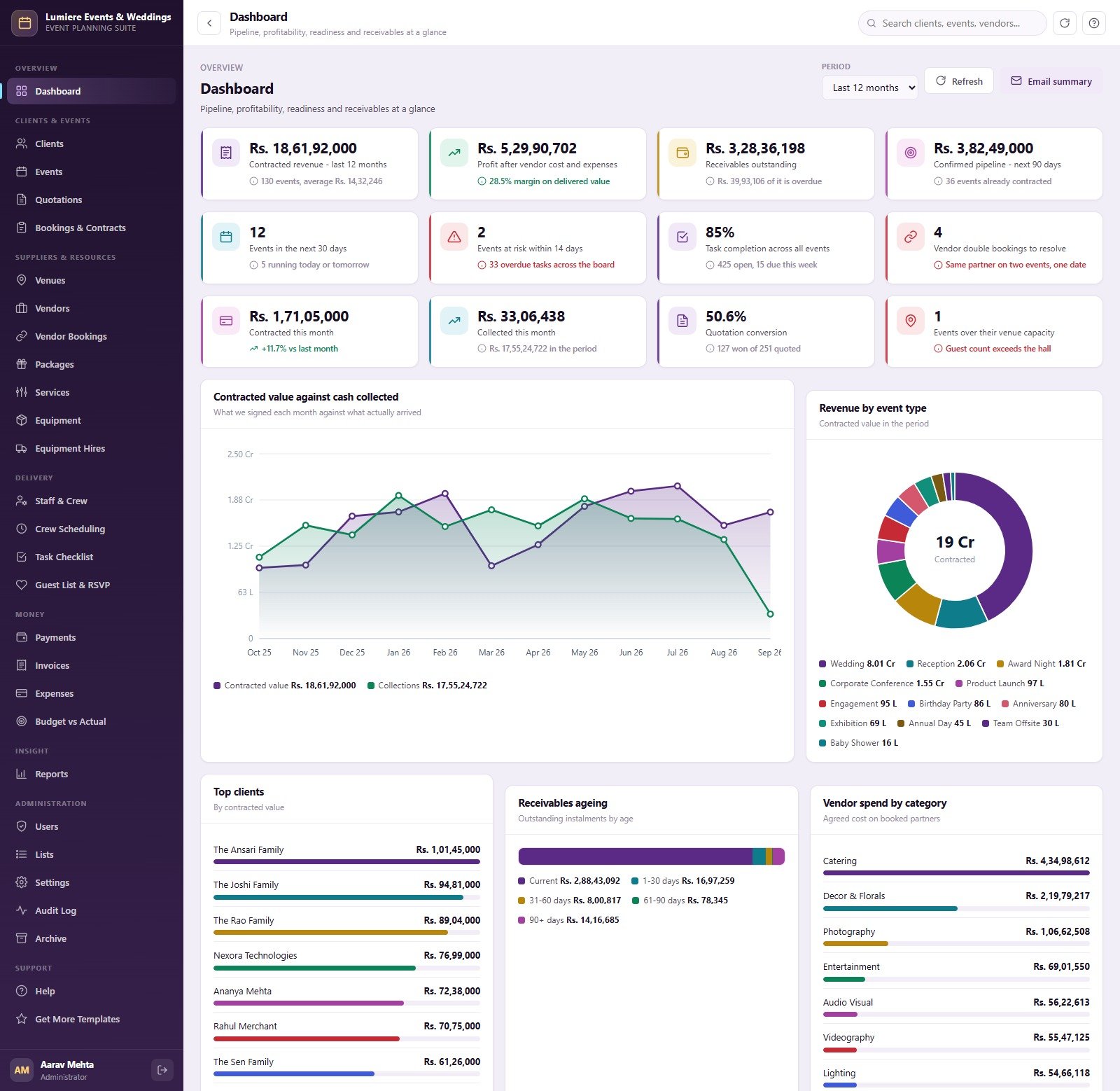
Twelve KPI cards cover contracted revenue for the last 12 months, profit after vendor cost and expenses, receivables outstanding, the confirmed 90-day pipeline, events in the next 30 days, events at risk within 14 days, task completion, vendor double bookings, contracted and collected this month, quotation conversion and events over venue capacity. Below them sit Contracted Value vs Cash Collected by Month, Revenue by Event Type, Top Clients by Contracted Value, Receivables by Ageing Bucket and Vendor Spend by Category. A period picker changes the window, and Email summary sends the snapshot.
Clients, Events and Quotations
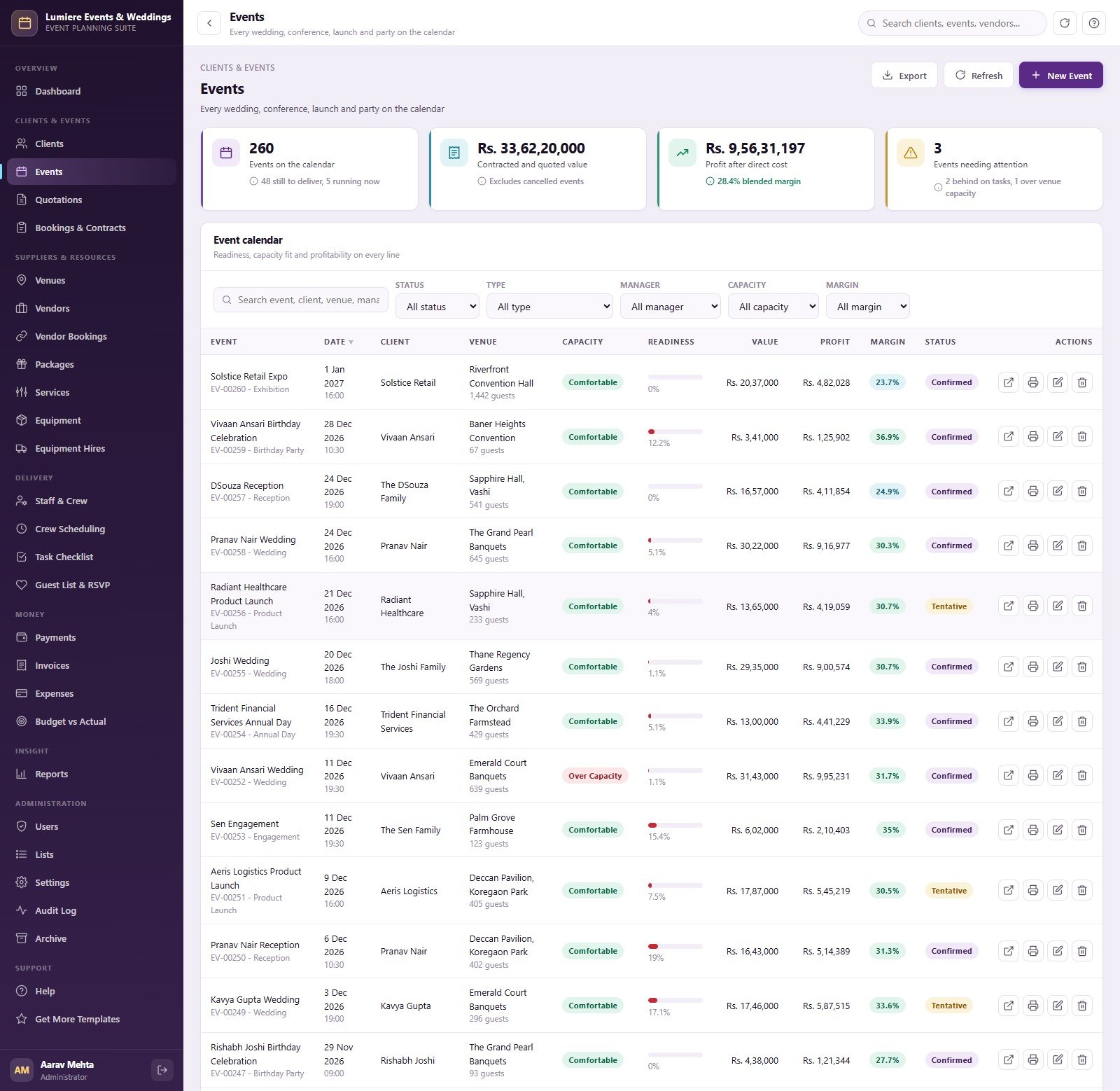
Clients holds 60 families, individuals and corporates with lifetime value, outstanding balance, tier and manager. Events lists 260 events with date, client, venue, guest count, capacity badge, readiness bar, value, profit, margin and status, filtered by status, type, manager, capacity and margin. Quotations holds 430 priced proposals with lines, grand total, per-guest price, validity date and Sent, Accepted, Expired or Lost status.

Bookings, Venues, Vendors and Vendor Bookings
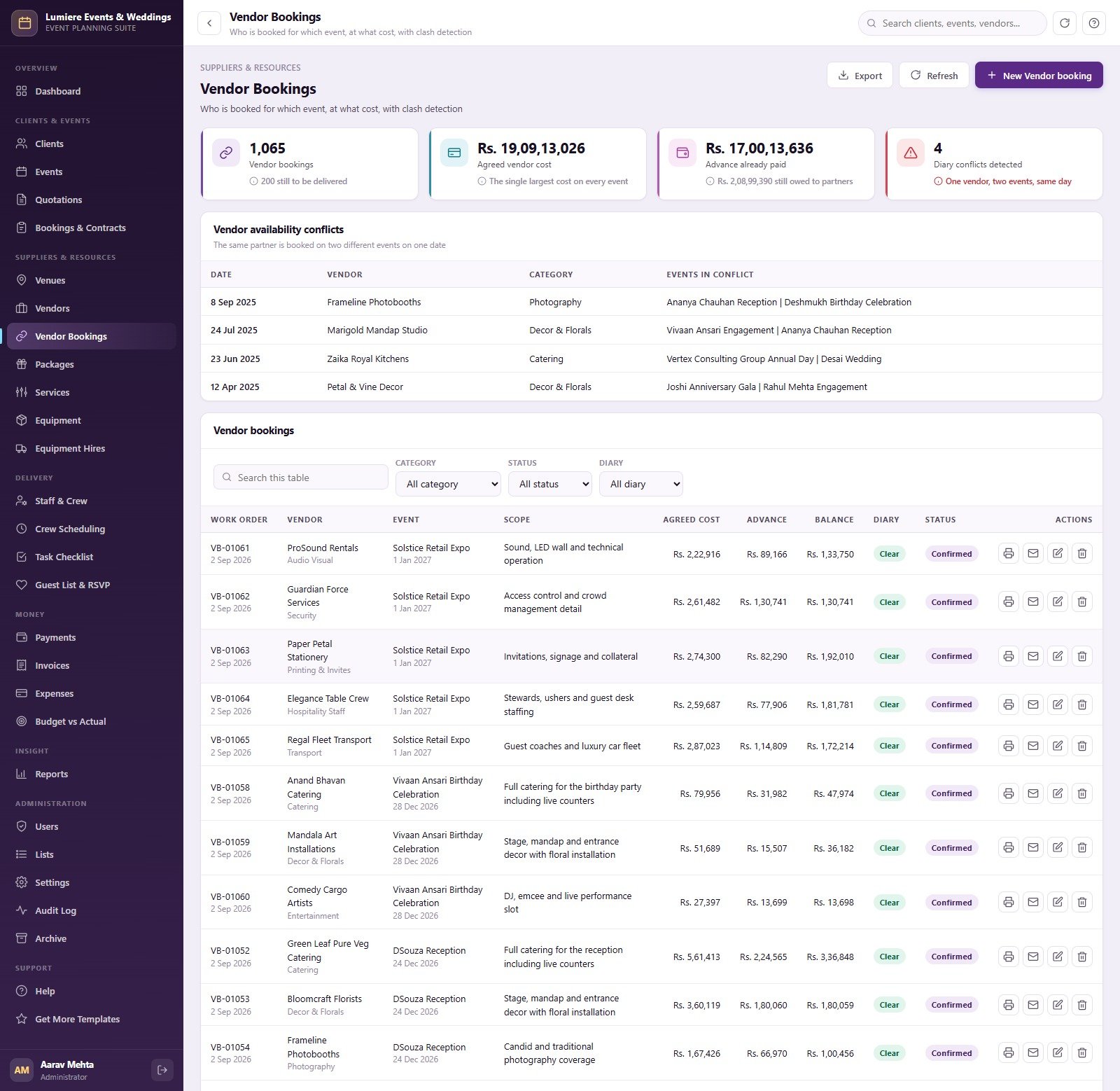
Bookings & Contracts turns accepted quotations into 235 signed contracts with advance percentage, amount received and balance. Venues records 22 halls, lawns, ballrooms and resorts with seated and floating capacity, rental per day and parking. Vendors holds 55 caterers, decorators, photographers, AV, entertainment and transport partners with rating and on-time percentage. Vendor Bookings shows a Vendor Availability Conflicts table above 1,065 work orders with scope, agreed cost, advance, balance and a diary flag.
Packages, Services, Equipment and Hires
Packages sells 14 bundles by event type, tier (Essential, Signature, Premium, Bespoke) and guest band. Services is the 40-line price list behind every quotation, charged per day, guest, counter, set, table or night. Equipment tracks 45 owned and hired lines with availability and day rate, and Equipment Hires records what went out to which event and what came back.
Staff, Crew Scheduling, Task Checklist and Guest List
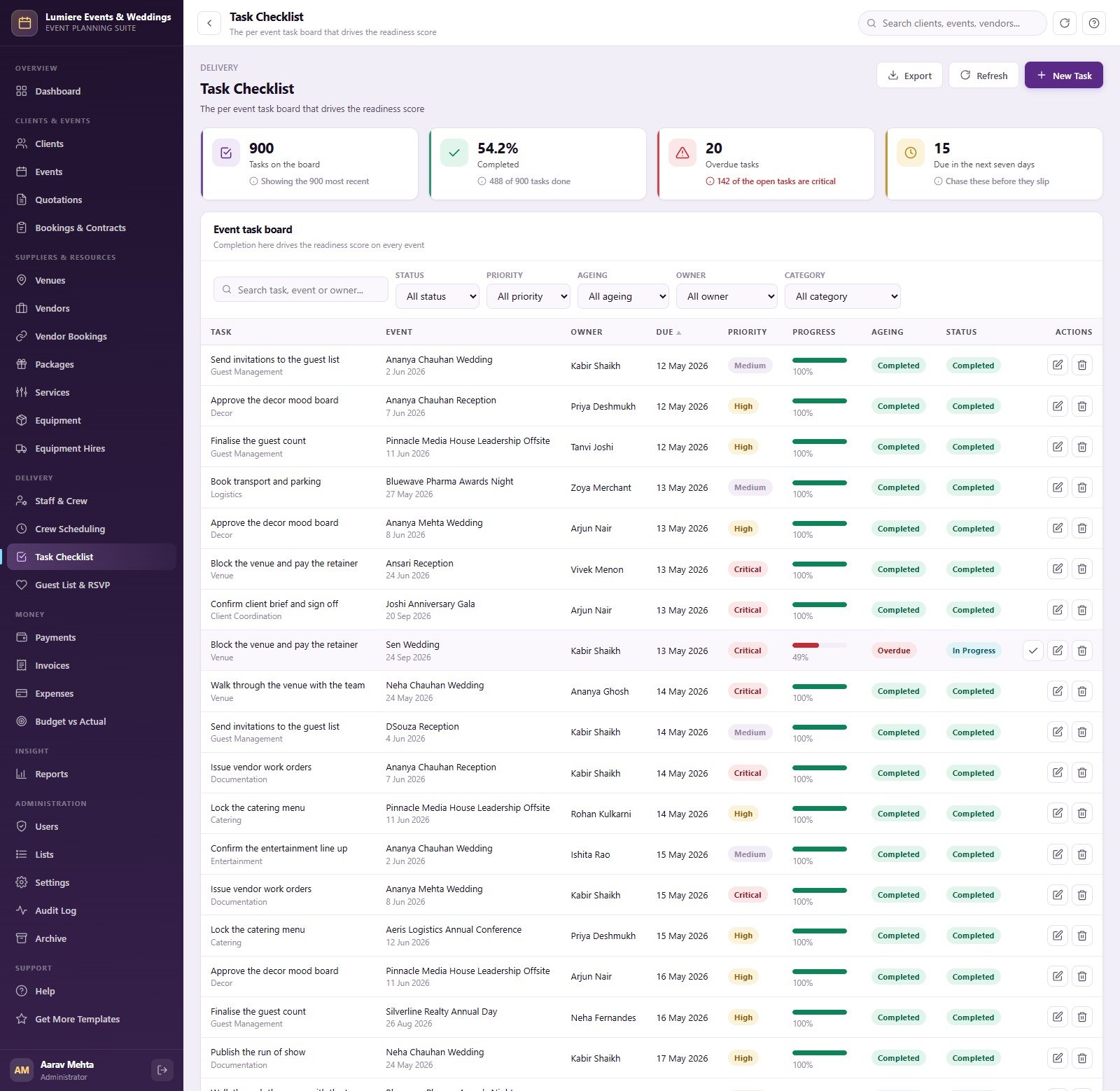
Staff & Crew lists 26 team members with department and day rate. Crew Scheduling rosters them onto events by Morning, Afternoon, Evening or Full Day shift and costs the hours. Task Checklist is the per-event board with owner, due date, priority, progress and ageing that drives readiness. Guest List & RSVP records each invitation’s party size, meal preference, table, side and response.
Payments, Invoices, Expenses and Budget vs Actual
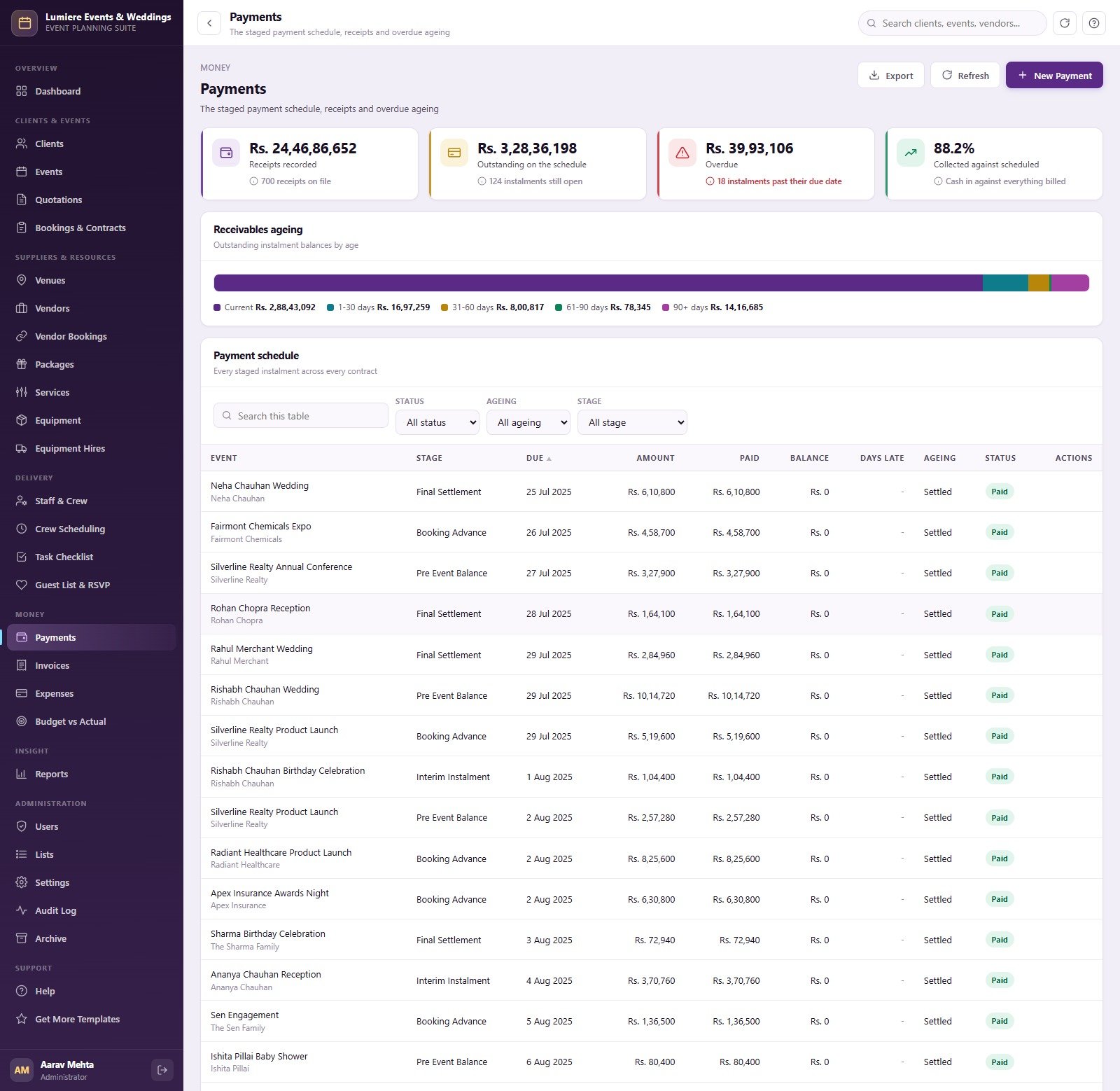
Payments shows receipts, outstanding and overdue balances, a Receivables Ageing bar and the full payment schedule. Invoices lists 200 tax invoices with taxable value, tax, total, paid and balance. Expenses books direct costs by category, and Budget vs Actual compares 1,769 budget lines against real spend with a Budget against Actual by Category chart.
Reports
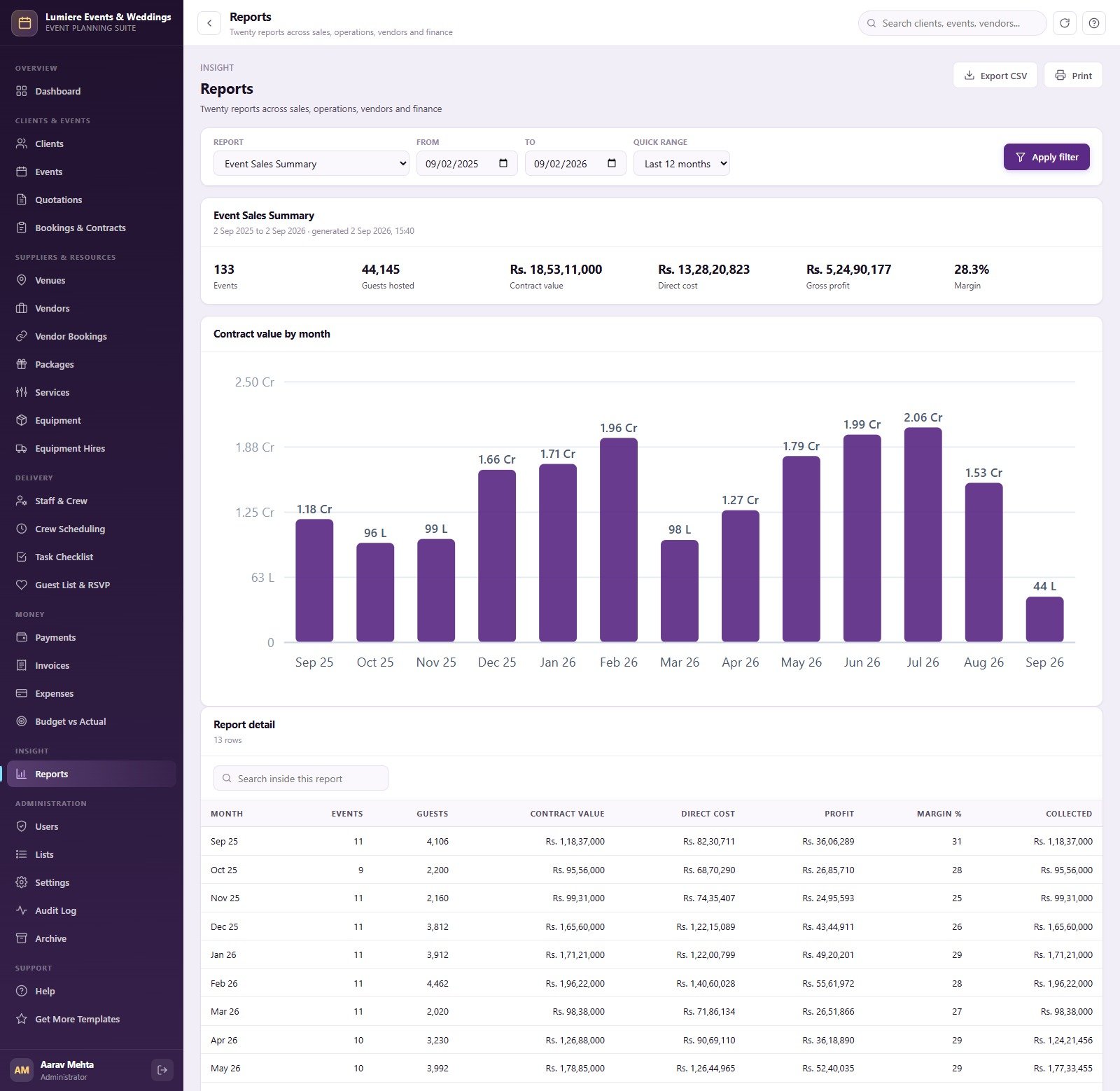
Twenty reports run over any date range and export to CSV or print. Sales & Pipeline: Event Sales Summary, Events by Type, Quotation Conversion, Revenue by Event Manager and Client Revenue Ranking. Operations: Event Schedule, Event Readiness, Task Status by Assignee, Venue Utilisation, Crew Utilisation, Equipment Hire Utilisation and Guest RSVP Summary. Vendors: Vendor Spend Analysis, Vendor Performance and Vendor Booking Conflicts. Finance: Event Profitability, Receivables Ageing, Collections by Mode, Expense Analysis and Budget vs Actual.
Users, Lists, Settings, Audit Log and Archive
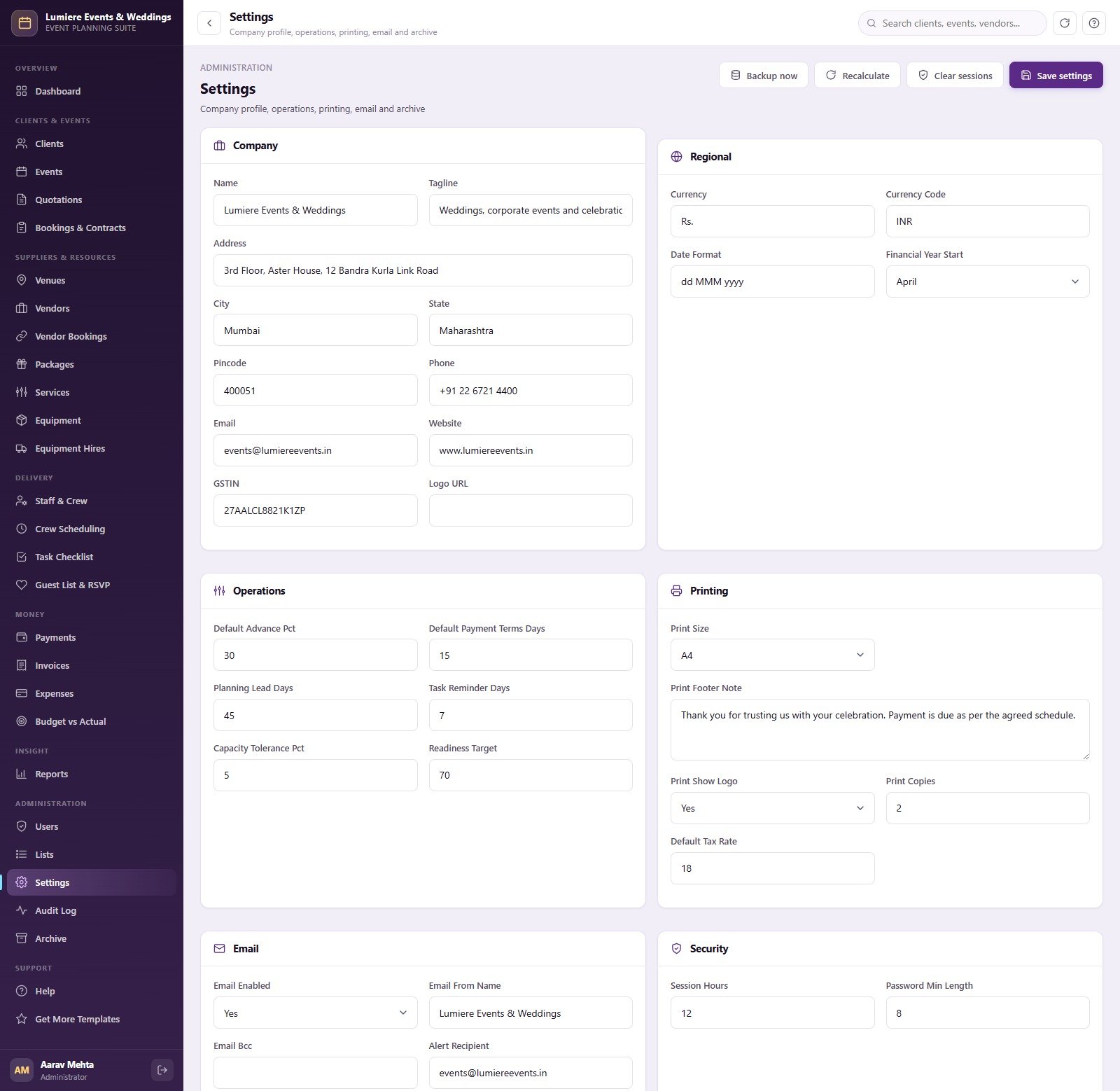
Users shows the eight seeded accounts and a role and permission matrix. Lists holds 142 dropdown values across 20 lists. Settings covers company details with GSTIN, currency and financial year, operations defaults, printing, email and security, plus Backup now and Recalculate. Audit Log records every sign-in, create, update, delete, export and archive. Archive copies the database to Drive and trims only closed, settled transactions.
Event Planning Web App vs. Excel Planner vs. Paid Event SaaS: Feature Comparison
| Feature | Event Planning Management System Web App | Microsoft Excel event planner | Paid event planning SaaS (e.g. HoneyBook, Planning Pod) |
|---|---|---|---|
| Cost | ✅ $39.99 one-time | Low, but you build it yourself | Monthly subscription, often priced per user |
| Platform | ✅ Browser, hosted in your own Google account | Desktop spreadsheet file | Vendor’s cloud |
| Setup time | ✅ About 15 minutes, database built for you | Days to design sheets and formulas | Hours to days of onboarding |
| Team roles and permissions | ✅ 6 roles, 49 permissions, server-side checks | File-level protection only | Usually on higher plans |
| Vendor double-booking check | ✅ Detected and refused on save | Manual | Varies by product |
| Profit per event | ✅ Calculated automatically | Only if you write the formulas | Varies by product |
| Data ownership | ✅ A Google Sheet in your own Drive | ✅ Your own file | Stored on the vendor’s servers |
| Online payments and client portal | Not included | Not included | ✅ Often included |
| Year-1 cost at 5 users | ✅ $39.99 total | Your time | A recurring bill every month |
For event planners who want quotations, vendor bookings, crew, tasks and staged payments in one place without a monthly per-user bill, this web app sits in the sweet spot.
Who Should Use This Template
Perfect for:
- Wedding planners and event companies running a few to several hundred events a year
- Corporate event, conference and product-launch agencies coordinating venues, AV, catering and crew
- Owners who want profit per event, receivables ageing and vendor clashes on one screen
- Teams on Google Workspace or Gmail that need separate staff logins and roles
Not a fit if:
- You need online card payments, because the system records payments but has no payment gateway
- You sell tickets to public events or want a guest-facing RSVP page or client portal
- You need GST or tax return filing; invoices show tax, but this is not accounting software
How to Use the Event Planning Management System
- Try the live demo first. Sign in as each of the six roles above and walk an event from quotation to final settlement.
- Create the Apps Script project. Paste Code.cs.txt into Code.gs and Index.txt into an HTML file named Index.
- Deploy as a web app. Choose Execute as Me and Who has access Anyone, then accept Google’s permission prompt.
- Build the database. Open the URL and press “Build the database now”; setup runs in 24 resumable stages.
- Secure the accounts. Sign in as admin, change every seeded password and deactivate accounts you do not need.
- Configure your business. Set company details, currency, financial year, advance percentage, payment terms and your dropdown lists.
- Start trading. Archive or delete the sample transactions, keeping every header row, and enter your own clients.
Real-World Use Cases
Ritu runs a six-person wedding planning studio. She builds quotations from her package catalogue, converts accepted ones into contracts with a 30% advance, and checks the readiness bar on every wedding each morning. When her decorator is booked on two weddings on the same Saturday, the second booking is refused before anyone confirms it with the venue.
Farhan manages a corporate events agency. His coordinators roster crew shifts and equipment hires for conferences, while the Accounts user chases pre-event balances from the ageing bar. Once a month he runs Event Profitability and Revenue by Event Manager to see which account managers actually deliver margin.
Anita owns a venue-plus-catering business. She relies on the capacity check to stop over-booked halls, tracks meal preferences and table numbers in the guest list, and prints vendor work orders and event run sheets for her team on the day.
Advantages of the Event Planning Management System
- One-time cost. A single $39.99 purchase replaces a recurring subscription, and adding staff accounts costs nothing extra.
- Your data stays yours. The database is a Google Sheet in your own Drive that you can open, back up or analyse directly.
- Money problems surface early. Overdue instalments, over-budget lines and low-margin events appear on the dashboard instead of at month end.
- Fewer day-of surprises. Vendor clashes, over-capacity venues and at-risk events are caught while there is still time to fix them.
- Editable source code. You or a developer can add fields, modules or document layouts without waiting for a vendor roadmap.
Opportunities for Improvement
- No payment gateway. Payments are recorded manually; there is no online checkout or card processing.
- Staff-only access. There is no client portal and no guest-facing RSVP page, so guest responses are entered by your team.
- Email only. There is no SMS or WhatsApp integration, and email volume is bound by your Google account’s MailApp quota.
- Google Sheets limits. Very large histories slow down, which is why the Archive screen exists; plan to archive closed events periodically.
- Some lists show recent rows. The task, guest and crew screens show the most recent 700-900 records on screen, while reports cover full date ranges.
Best Practices
- Set your readiness target, capacity tolerance and default advance percentage in Settings before creating real events.
- Build your package and service catalogue first so every quotation is priced consistently.
- Give each person their own account with the narrowest role that fits; use Viewer for owners who only need visibility.
- Record every vendor booking in the system, even verbal ones, so clash detection has complete information.
- Run Receivables Ageing and Event Readiness weekly, and archive closed events once a year.
- Remember that any code change needs a new deployment version before it reaches users.
Explore Relevant Templates
If you run a single venue, compare this system with the Banquet Hall Management System Web App, and read how our Catering Business Management System Web App handles kitchen-led businesses. Production-heavy planners should look at the DJ and Sound Equipment Booking System Web App, and promoters selling seats will find the Concert Ticketing Management System Web App covers what this system deliberately does not.
For a lighter Google Sheets option, see the Banquet Hall Tracker in Google Sheets or the Wedding Budget Tracker in Google Sheets. On the store you can also get the Event Success Tracking Dashboard in Google Sheets and the Event Management Analysis Dashboard in Power BI, or browse every system in the Web Apps collection.
Frequently Asked Questions
Can I try it before buying?
Yes. The live demo above runs the full Event Planning Management System Web App with sample data. Sign in as Administrator, Event Manager, Coordinator, Accounts, Crew Supervisor or Viewer to test every screen and compare what each role can do. The demo is shared and reset, so never enter real client data.
What do I need to run the event planning management system?
Only a Google account. The system runs on Google Apps Script and creates its own Google Sheets database in your Drive on first run. There is no software to install and no server to rent. Google’s guide to Apps Script web apps explains the deployment settings.
How long does setup take?
About 15 minutes. You paste two files into a new Apps Script project, deploy it as a web app and press “Build the database now”. Setup runs in 24 stages and resumes itself if Google’s six-minute execution limit on consumer accounts pauses it partway.
Does the Event Planning Management System Web App take online payments?
No. It records payments against a staged schedule and tracks balances and ageing, but it has no payment gateway, stores no card details and never charges clients. Collect money through your bank or payment provider and record each receipt in the Payments screen.
How does this compare to HoneyBook or Planning Pod?
Paid event software usually bills monthly, often per user, and keeps your data on its servers, while often adding client portals and online payments. The Event Planning Management System Web App is a one-time $39.99 purchase with source code, running in your Google account, without those portal and payment features.
Can I use my own currency and tax rate?
Yes. The sample company is priced in rupees, but Settings lets you change the currency symbol and code, date format, financial year start, default tax rate, advance percentage and payment terms. The Google Sheets locale settings also affect how the database spreadsheet itself displays numbers.
About the Author
Built by PK, a Microsoft Certified Professional with 15+ years of Excel, Google Sheets, Apps Script and Power BI experience and founder of NextGenTemplates, reaching 300K+ subscribers across YouTube channels. Every template is hand-built and tested before release.
Conclusion
The Event Planning Management System Web App gives wedding planners and event companies one place to quote, contract, book vendors and crew, track tasks and guests, collect staged payments and see real profit per event, all inside their own Google account. It is honest about what it is not: there is no payment gateway, ticketing or client portal. The best way to judge the fit is to open the live demo and walk one event through every role.
👉 Click here to Purchase the Event Planning Management System Web App
✅ Instant download · One-time payment · No subscription
🎥 Watch more tutorials at Youtube.com/@NeoTechNavigators
📅 Last updated: September 2026