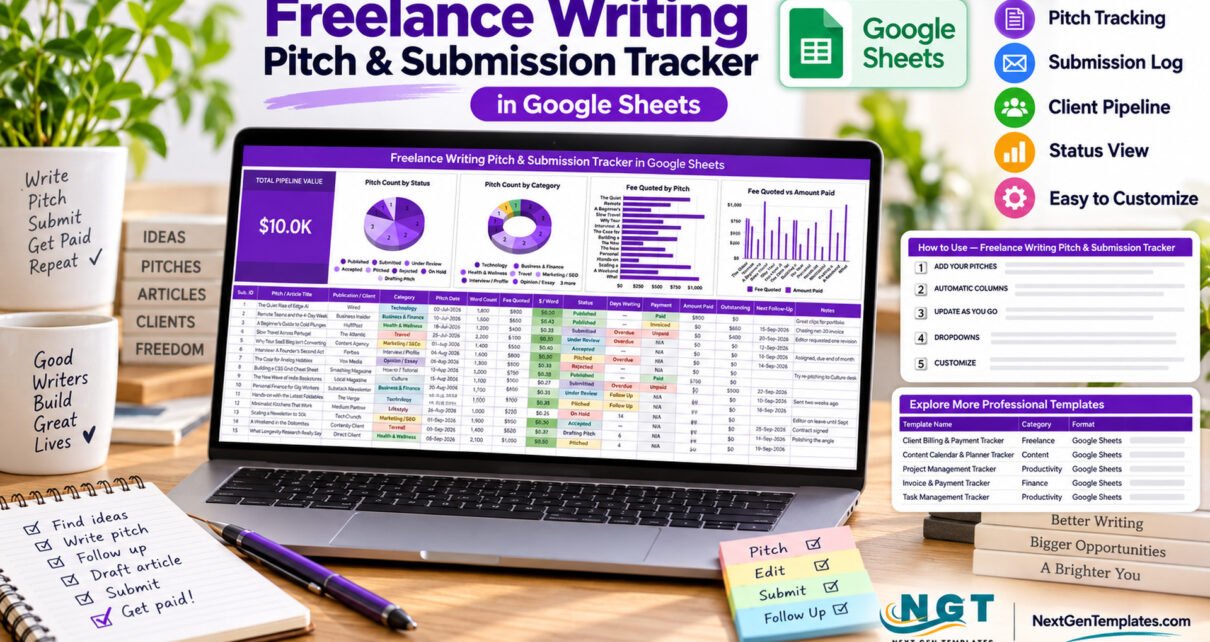
The Freelance Writing Pitch and Submission Tracker in Google Sheets puts 15 data columns, one live pipeline card and four connected charts on a single page. It arrives with 15 sample pitches, 8 status stages from Drafting Pitch through to Published, and dropdown lists wired for 500 entries per column. Four of the columns are formulas you never type, and the whole thing runs in a browser with a free Google account — no macros, no installs.
Most working writers lose money in the gap between “pitch sent” and “invoice paid”. A pitch goes out in July, the editor goes quiet, the piece runs in September, and the payment shows up whenever accounts get around to it. Spread across email, a notes app and a half-finished spreadsheet, that pipeline is impossible to see. This tracker collapses all of it into one page: what you pitched, where it stands, what it is worth, and what is still owed.

Key Features of the Freelance Writing Pitch & Submission Tracker
- A 15-column pitch log. Sub. ID, Pitch / Article Title, Publication / Client, Category, Pitch Date, Word Count, Fee Quoted, $ / Word, Status, Days Waiting, Payment, Amount Paid, Outstanding and Next Follow-Up, plus a free-text Notes column for editor feedback.
- A Total Pipeline Value card. One oversized card adds up the fees quoted across your logged pitches and displays the total in thousands, so the pipeline has a number attached to it.
- Four charts tied to the raw data. Pitch Count by Status, Pitch Count by Category, Fee Quoted by Pitch and Fee Quoted vs Amount Paid all read the data rows directly through the built-in Aggregate option. No helper tables sit behind them.
- Automatic follow-up flags. The Days Waiting column counts days since the pitch date, raises a Follow Up flag at 14 days and an Overdue flag at 21.
- Four self-calculating columns. Sub. ID, $ / Word (fee divided by word count), Days Waiting and Outstanding (fee minus amount paid) are formulas. Log a payment and Outstanding falls to zero by itself.
- Dropdowns that expand. Publication / Client, Category, Status and Payment all read from a List tab wired for 500 entries, so adding a new market never means rebuilding validation rules.
- Colour-coded chips. Category, Status and Payment render as coloured pills and the rate column shades by value, making a weak market or a stalled invoice visible instantly.
- Currency you choose. Amounts show in $ by default and switch to ₹, € or £ through Format → Number.
Sheets Explanation — What You Actually Get
Page 1: Pitch and Submission Tracker
The working page. Top-left holds the Total Pipeline Value card; beside it sit Pitch Count by Status, Pitch Count by Category, Fee Quoted by Pitch and Fee Quoted vs Amount Paid. Below the charts, the entry table carries your pitches with coloured Category, Status and Payment chips, overdue flags in Days Waiting and the Notes column for anything an editor said that you will otherwise forget.
Page 2: How to Use
A short instructions tab written for this specific file. It explains which rows to overwrite, which columns are formulas, how the status flow moves from Pitched to Under Review, Accepted, Submitted and Published, how the List tab feeds every dropdown, and the one-time ten-second setting that turns plain dropdowns into the coloured chips you see in the screenshots.

Page 3: Explore More Templates
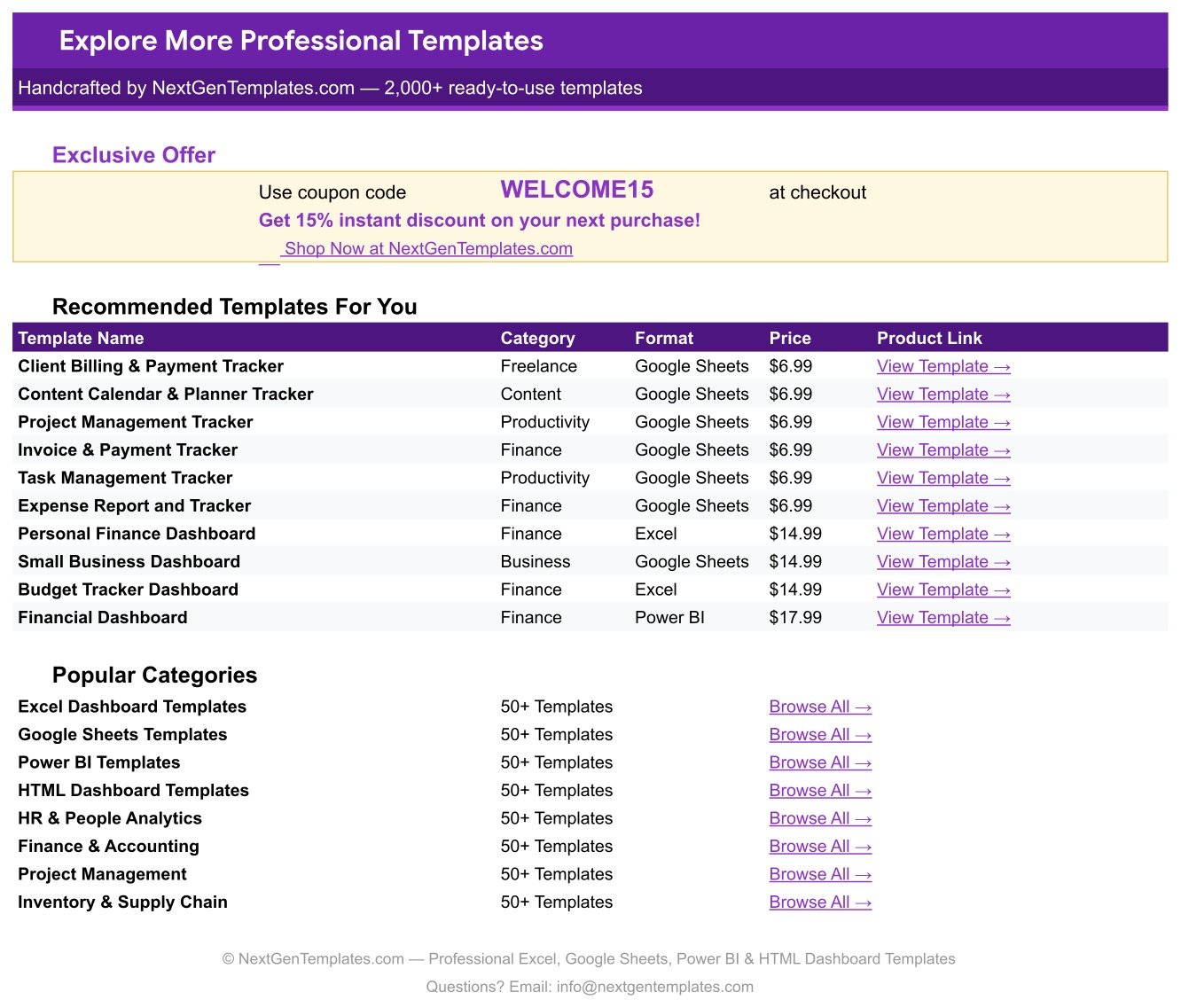
A reference tab listing recommended NextGenTemplates files with their category and format, the popular template categories, and a WELCOME15 coupon code worth 15% off a future purchase. A List tab sits behind these pages holding the dropdown values.
Freelance Writing Pitch Tracker vs. Microsoft Excel vs. Paid Submission SaaS — Feature Comparison
| Feature | Freelance Writing Pitch Tracker (Google Sheets) | Microsoft Excel workbook | Duotrope / Submittable |
|---|---|---|---|
| Cost | $6.99 one-time ✅ | $70+ for Office, or a Microsoft 365 plan | $5–$50 per month, billed forever |
| Platform | Any browser with a Google account ✅ | Desktop Excel on Windows or Mac | The vendor’s own web app |
| Setup time | Under 10 minutes ✅ | Download, open, enable editing | Account, profile and payment setup |
| Real-time collaboration | Built in — share the Sheet ✅ | Only through OneDrive co-authoring | Usually single-user plans |
| Mobile access | Google Sheets mobile app ✅ | Limited on the Excel mobile app | Web or app, depending on vendor |
| Customisable fields | Edit any column or dropdown ✅ | Fully editable | Fixed fields set by the vendor |
| Tracks fees and unpaid invoices | Fee Quoted, Amount Paid and Outstanding ✅ | Only if you build it yourself | Submission status, rarely the money |
| Year-1 cost at 5 users | $6.99 total ✅ | $300+ in licences | $300–$3,000 |
For writers who want a pitch pipeline and an unpaid-invoice list in the same view without paying a monthly subscription, this tracker sits in the sweet spot.
Who Should Use This Template
Perfect for:
- Freelance journalists and feature writers running 10–60 live pitches across several publications
- Content writers and copywriters who bill per word and need a real rate comparison between markets
- Bloggers and newsletter writers pitching guest posts, sponsored articles and recurring columns
- Anyone chasing net-30 invoices who wants the outstanding amount sitting beside the pitch that earned it
Not a fit if:
- You need per-user permissions, approval workflows or an audit trail across an editorial team
- You want invoices generated and collected automatically — this tracks money, it does not move it
- You cannot use a Google account, since the file is delivered as a copy link rather than a desktop file
- You are looking for a market database; it records the publications you already pitch, it does not find new ones
Real-World Use Cases
Maya, technology journalist. She logs every cold pitch on Monday morning, sorts by Days Waiting and follows up on anything flagged Overdue. Her Pitch Count by Status chart tells her whether enough work is sitting in Under Review to cover next month’s rent, which is a very different question from how many pitches she sent.
Daniel, long-form health writer. He bills per word, so the $ / Word column is the one he reads first. After six months he could see which two publications consistently sat at the bottom of that column, and stopped pitching them without any agonising about it.
Priya, one-person content studio. Commissioned articles and speculative pitches live in the same tracker. The Outstanding column doubles as her chase list: anything above zero with a Payment status of Invoiced gets a polite email on the first of the month.
Advantages of the Freelance Writing Pitch and Submission Tracker
The first advantage is time. A writer with thirty live pitches typically spends the first hour of every week reconstructing the state of things from an email archive. Here, the sort order is the state of things — one click on Days Waiting and the chase list is written for you.
The second is pricing discipline. The $ / Word column turns a vague sense that one editor “pays well” into a number you can compare across every commission you have taken this year, including the 2,200-word feature that quietly paid less per word than a 1,200-word explainer.
The third is cash visibility. Because Fee Quoted, Amount Paid and Outstanding sit in the same row, the Fee Quoted vs Amount Paid chart shows the gap between promised money and received money at a glance. That gap is where freelance income actually goes missing, and it is the reason a pitch tracker that ignores payments only does half the job. If you also want the delivery side, pair it with the Freelance Gig & Deadline Tracker in Google Sheets, and route the money that clears into the Freelance Income & Expense Tracker.
Opportunities for Improvement
A few honest limitations are worth stating. The tracker does not send reminder emails — the Follow Up and Overdue flags make the chase list visible, but a human still has to write the message. It does not generate invoices or connect to a payment processor, so Amount Paid is something you type once the money lands. There is no historical archive view either; once a year of pitches builds up, you will want to duplicate the sheet and start a fresh one rather than scroll through 400 rows.
The coloured chips also need one manual step. Google does not yet let a script set the “chip” display style on a dropdown, so the file ships with ordinary dropdowns and a ten-second instruction on the How to Use tab for switching them over. It is a genuine extra step, and the tracker works perfectly well without it.
Best Practices
- Log the pitch the moment you send it, not when the editor replies. A pitch that is not in the sheet does not exist.
- Rebuild the List tab first. Your own publications and beats in the dropdowns make every later row a two-second job.
- Review by Days Waiting once a week rather than opening the file daily; the flags are designed for a weekly rhythm.
- Record the quoted fee even for speculative pitches. Without it, the Total Pipeline Value card understates what is in play.
- Use the Notes column for the reason a piece was rejected. Three months later it is the difference between a blind re-pitch and a smart one.Freelance Writing Pitch & Submission Tracker in Google Sheets
- Keep one sheet per year and share a view-only copy with your accountant at tax time.
If you are new to the mechanics, Google’s own guides on data validation and dropdown lists and on adding and editing charts explain exactly what the List tab and the four charts are doing under the hood.
Explore Relevant Templates
- Proposal & Quote Tracker in Google Sheets — the same pipeline idea applied to client proposals rather than article pitches.
- Billable Hours & Time Tracker in Google Sheets — an hourly view to sit alongside the per-word one.
- Blog Content & SEO Tracker in Google Sheets — for the articles you publish on your own site instead of pitching out.
- Retainer & Recurring Client Tracker in Google Sheets — for the clients who pay monthly rather than per piece.
- Tracker Toolkit – 12 Premium Templates — a dozen Excel and Google Sheets trackers in one bundle.Freelance Writing Pitch & Submission Tracker in Google Sheets
Frequently Asked Questions
What does the Freelance Writing Pitch and Submission Tracker record?
It records the title, publication, category, pitch date, word count, quoted fee, rate per word, status, days waiting, payment state, amount paid, outstanding balance and next follow-up date for every pitch. All of it sits on one page with the pipeline card and four charts above the tableFreelance Writing Pitch & Submission Tracker in Google Sheets
How long does it take to set up?
Under 10 minutes. Open the copy link in the PDF, replace the sample publications and categories on the List tab, then overwrite the 15 sample pitch rows. The formula columns, the pipeline card and all four charts update themselves from that point onwards.Freelance Writing Pitch & Submission Tracker in Google Sheets
Do I need Excel or any other software?
No. It is a Google Sheets template and runs in any browser with a free Google account. There are no macros and nothing to install, and the Google Sheets mobile app gives you the same file on a phone when you are away from a desk.Freelance Writing Pitch & Submission Tracker in Google Sheets
Can I change the statuses, categories and publications?
Yes. All four dropdown columns read from the List tab, which is wired for 500 entries each. Add a market or a beat on that tab and it appears in the dropdown immediately — no data validation rules to rebuild and no re-setup anywhere else.Freelance Writing Pitch & Submission Tracker in Google Sheets
How does it compare to Duotrope or Submittable?
Those are subscription submission databases aimed largely at literary markets. This is a one-time purchase you own outright, and it tracks the money as well as the status, so quoted fee, amount paid and outstanding balance sit in the same row as the pitch itself.Freelance Writing Pitch & Submission Tracker in Google Sheets
Can I share it with an editor or a VA?
Yes. The file lives in your own Google Drive, so you share it like any other Sheet and collaborators see changes live. There are no per-user fees and you choose whether each person can view, comment or edit.Freelance Writing Pitch & Submission Tracker in Google Sheets
About the Author
Built by PK — Microsoft Certified Professional with 15+ years of Excel, Google Sheets and Power BI experience. Founder of NextGenTemplates, reaching 300K+ subscribers across his YouTube channels. Every template is hand-built and tested before release.Freelance Writing Pitch & Submission Tracker in Google Sheets
Conclusion
A freelance writing career is a pipeline problem dressed up as a creative one. The Freelance Writing Pitch and Submission Tracker gives that pipeline a single page: 15 columns of detail, one value card, four live charts, eight status stages and a follow-up flag that fires on its own after 14 days. Ten minutes of setup replaces the weekly hour of reconstructing where everything stands.Freelance Writing Pitch & Submission Tracker in Google Sheets
👉 Click here to Purchase the Freelance Writing Pitch & Submission Tracker in Google Sheets
Instant download · One-time payment · No subscriptionFreelance Writing Pitch & Submission Tracker in Google Sheets
🎥 For step-by-step walkthroughs, visit Youtube.com/@NeoTechNavigators.
Last updated: September 2026Freelance Writing Pitch & Submission Tracker in Google Sheets