The Regulatory & Statutory Compliance Dashboard in Google Sheets gives compliance, HR, finance and legal teams one place to see every statutory obligation, its due date, its responsible person and whether it was handled on time. Instead of chasing status updates through email threads and scattered registers, you log each obligation once and the dashboard turns it into KPI cards, charts and a searchable record list.
This guide walks through what the regulatory compliance dashboard contains, the five KPIs on the Overview page, each analysis section and its slicers, how to load your own compliance calendar, and where the template fits (and where it does not). It is written for compliance officers, company secretaries, internal auditors and operations managers in small and mid-sized organisations.
🎥 Watch the Video Tutorial
Get the Regulatory & Statutory Compliance Dashboard
What Problem Does a Compliance Dashboard Solve?
Every organisation carries a list of recurring obligations: tax returns, labour-law filings, data protection reviews, environmental permits, governance filings and licence renewals. The work itself is usually understood. What goes wrong is visibility. A filing slips because the owner was on leave, nobody noticed that one department is late every quarter, or an auditor asks for a history that has to be rebuilt from inboxes.
A compliance dashboard answers the questions management actually asks:
- How many obligations are we tracking, and how many are still in progress or overdue?
- Which ones were delayed, and in which compliance area?
- Which departments complete on time, and which need support?
- Are high-priority items getting handled first?
- Is our performance improving month by month?
Because the template runs in Google Sheets, several people can update statuses at the same time, access is controlled through normal Google sharing, and there is no separate compliance software licence to manage.
What Is Inside This Regulatory Compliance Dashboard
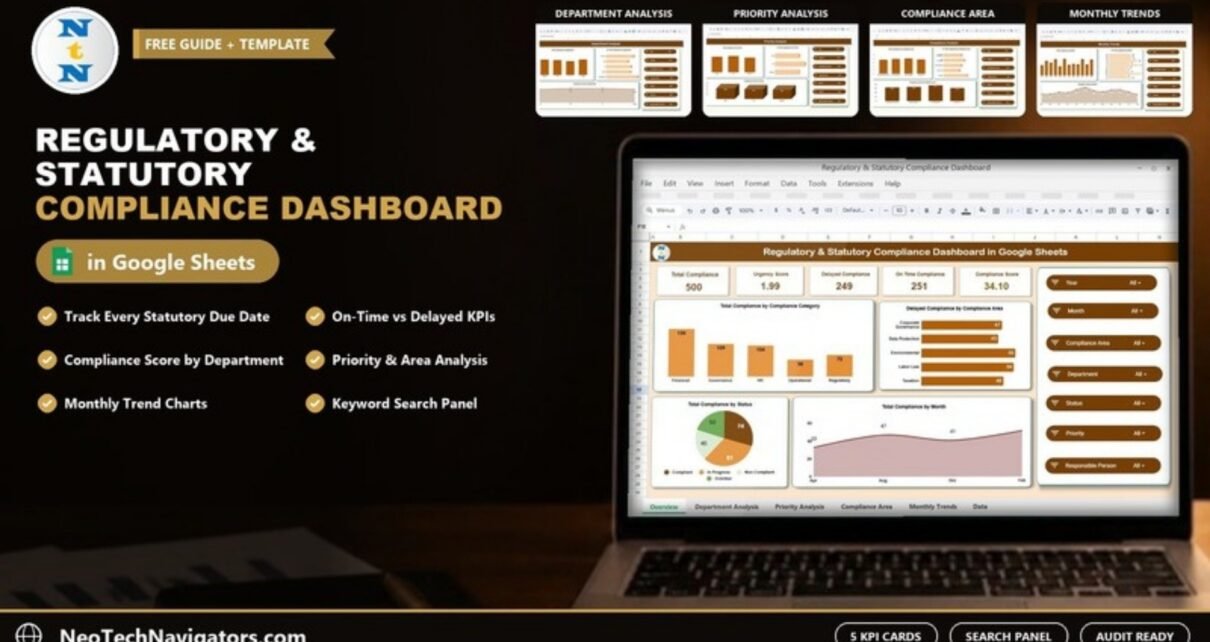
The workbook is built from one structured Data sheet that feeds six views: Overview, Department Analysis, Priority Analysis, Compliance Analysis (by compliance area), Monthly Trends and a Search panel. Every chart reads from the same records, so you only maintain the data once.
Each of the five dashboard pages has the same panel of seven slicers on the right: Year, Month, Compliance Area, Department, Status, Priority and Responsible Person. Set them to narrow every card and chart on the page, or leave them on All for the full picture.
Overview – Compliance Health at a Glance
The Overview page is the control centre. Five KPI cards sit across the top (500 records in the sample), followed by four charts:
- Total Compliance by Compliance Category – Financial, Governance, HR, Operational and Regulatory.
- Delayed Compliance by Compliance Area – Corporate Governance, Data Protection, Environmental, Labor Law and Taxation.
- Total Compliance by Status – Compliant, In Progress, Non-Compliant and Overdue.
- Total Compliance by Month – a monthly volume curve.

The Five KPIs on the Overview Page
Each record in the data carries its own Delayed flag (Yes or No), Urgency Score and Compliance Score, and the KPI cards summarise those columns. Sample values from the screenshot are shown in brackets.
| KPI | What it measures | How it is derived | Better when |
|---|---|---|---|
| Total Compliance (500) | Number of obligations tracked | Count of compliance records | Neutral (workload indicator) |
| Urgency Score (1.99) | How pressing the workload is on average | Average of the per-record Urgency Score; in the sample, High-priority records carry 3.00 | Lower |
| Delayed Compliance (249) | Obligations flagged as delayed | Count of records where Delayed = Yes | Lower |
| On Time Compliance (251) | Obligations not flagged as delayed | Count of records where Delayed = No (249 + 251 = 500) | Higher |
| Compliance Score (34.10) | Overall compliance performance | Average of the per-record Compliance Score: 100 for Compliant, 50 for In Progress and 0 for Non-Compliant or Overdue in the sample rows | Higher |
Department Analysis
Responsibility for compliance is spread across Finance, HR, IT, Legal and Operations in the sample. This page shows Total Compliance by Department, On Time Compliance by Department and Compliance Score by Department, so you can see where the workload sits and which teams need process help rather than reminders.

Priority Analysis
Not every obligation carries the same penalty. The Priority Analysis page splits records into High, Medium and Low and shows Total Compliance by Priority, On Time Compliance by Priority and Compliance Score by Priority. In the sample, High has 168 records, Medium 157 and Low 175. If high-priority items score worse than low-priority ones, the team is working in the wrong order.

Compliance Analysis (by Compliance Area)
This page groups obligations by compliance area (Corporate Governance, Data Protection, Environmental, Labor Law and Taxation) and shows Total Compliance by Compliance Area, On Time Compliance by Compliance Area and Compliance Score by Compliance Area. It is the quickest way to spot a high-risk domain, for example environmental items that are consistently filed late.

Monthly Trends
Monthly Trends shows Total Compliance by Month, On Time Compliance by Month and Compliance Score by Month. Use it to prepare for peak filing months (quarter ends and the financial year end are typical) and to show leadership whether discipline is improving over time.

Search Panel
The Search panel (Search by Search Keyword and Field Name) works in two steps: choose a column in Select Column (for example Priority, Department, Compliance Area, Status or Responsible Person) and type a value in Search Keyword (for example high). Matching records are listed below and Total Record shows the count (168 high-priority records in the example). It is handy during audits, management reviews and quick “where are we on this filing?” questions.

Data Sheet
All views read from one Data sheet. The record columns, as shown in the Search results, are Compliance ID, Compliance Area, Department, Due Date, Status, Priority, Responsible Person, Submission Date, Updated On, Remarks, Delayed, Days to Due, Urgency Score and Compliance Score. Keeping this table clean is what keeps every chart accurate.
How to Use It With Your Own Data
- Make your own copy. After purchase, open the file and use File > Make a copy so you have an editable version in your Drive.
- List your obligations. Build your compliance calendar first: every statutory filing, renewal and inspection with its due date. One row per occurrence (a monthly payroll filing becomes 12 rows).
- Replace the sample rows. Paste your records into the Data sheet using the same column order. Keep compliance area, department, priority and status values consistent (Compliant, In Progress, Non-Compliant, Overdue), because the charts group by exact text.
- Assign a Responsible Person to every row. A record without an owner is the one that gets missed.
- Update Status and Submission Date as work is done. The KPI cards and charts refresh automatically.
- Review the Overview weekly and the department, priority and area pages monthly, using the slicers to focus on one year, month or team, and share a view-only link with management.
If you want to see the logic behind cards like these, simple versions of the delayed count and the average compliance score look like this. The column letters follow the Search view (Delayed in K, Compliance Score in N); adjust them to your own layout:
=COUNTIF(Data!K2:K501,"Yes")
=AVERAGE(Data!N2:N501)
The first counts records flagged as delayed; the second averages the per-record compliance score. The template already handles these calculations, so you do not need to write them yourself.
Real-World Use Cases
- Manufacturing unit: tracks licence renewals, environmental consents, safety audits and labour-law returns, and uses the Department view to see which team’s items run late.
- Accounting or company secretarial firm: keeps one row per client filing so partners can see delayed items by compliance area before deadlines pile up at quarter end.
- HR and payroll team: logs monthly statutory deposits and returns, then uses Monthly Trends in the quarterly review to show on-time performance.
Best Practices
- Use a fixed list of compliance areas, departments, priorities and statuses (data validation dropdowns help) so charts do not split “Taxation” and “taxation” into two bars.
- Enter due dates for the full year in advance; the dashboard can only warn you about what it knows.
- Review delayed items every week and record the reason in Remarks for the next audit.
- Restrict edit access to the people who own compliance updates and give everyone else view-only access.
- Keep supporting documents in Drive and paste the link in Remarks so evidence is one click away.
Limitations and Who Should Not Use It
This is a tracking and reporting template, not legal advice and not a regulatory database. It will not tell you which laws apply to your business; you still need to build that list with your advisers. It also does not send automatic reminders out of the box. If you need workflow approvals, document version control, or audit trails that satisfy a regulator on their own, a dedicated GRC (governance, risk and compliance) system is the better choice. For small and mid-sized teams that mainly need visibility, the spreadsheet approach is usually enough.
Spreadsheet Template vs Other Options
| Option | Best for | Trade-off |
|---|---|---|
| Plain compliance register in a sheet | Very small lists | No charts, no scores, hard to review quickly |
| This Google Sheets dashboard | SMEs and departments needing visibility and reporting | Manual status updates; no built-in alerts |
| Dedicated GRC software | Large, heavily regulated organisations | Higher cost and longer setup |
Related Templates and Guides
If you track compliance from several angles, these posts cover related tools: the Compliance Management Dashboard in Google Sheets, the Corporate Compliance Dashboard, the Compliance Audit Tracker for audit findings, the Legal Compliance Calendar for planning due dates, and the Regulatory Reporting Checklist for filing preparation.
Related templates on NextGenTemplates: Corporate Compliance Dashboard in Google Sheets.
If you want to build dashboards like this yourself, the Excel Pivot Tables & Dashboards course on NextGenTemplates Academy teaches the summarising and charting techniques step by step, and the same ideas carry over to Google Sheets.
Frequently Asked Questions
What is a regulatory and statutory compliance dashboard?
It is a reporting view that lists every legal and regulatory obligation an organisation must meet, with due dates, responsible people and status, and summarises them into KPIs such as on-time count, delayed count, urgency score and an overall compliance score.
Who should use this compliance dashboard?
Compliance officers, company secretaries, HR and payroll teams, finance teams, internal auditors and managers who need a single view of statutory deadlines across departments.
Can I change the compliance areas, departments and priorities?
Yes. The values come from your Data sheet, so you can use your own compliance areas, departments and responsible people. Keep the spelling consistent so the charts and slicers group correctly.
Does the template send due-date reminders?
Not by default. It shows delayed items, days to due and urgency on the dashboard. If you need email reminders, you can add Google Sheets notification rules or a small Apps Script later.
Is it suitable for audits?
It helps with audit preparation because every obligation has a due date, submission date, responsible person and remarks in one place, and the Search panel finds records quickly. Keep evidence documents linked in the Remarks column.
Do I need advanced Google Sheets skills?
No. You enter and update rows in the Data sheet; the formulas, charts and slicers are already built.
Wrapping Up
A Regulatory & Statutory Compliance Dashboard in Google Sheets will not do the filings for you, but it makes sure nobody is surprised by a missed deadline. Load your compliance calendar, assign responsible people, update statuses weekly, and use the department, priority and area views with their slicers to fix the process instead of fighting fires.
Get the Regulatory & Statutory Compliance Dashboard
📅 Last updated: October 2026