Managing attendance for meetings, workshops, training sessions, and corporate events often becomes challenging when organizations rely on manual registers or scattered spreadsheets. Teams spend valuable time calculating participation, verifying attendance, and preparing reports. As a result, productivity decreases and decision-making slows down.Attendance Tracking System for Events and Meetings in Google Sheets
Therefore, organizations need a centralized and automated solution. The Attendance Tracking System for Events and Meetings in Google Sheets provides a powerful, ready-to-use platform that simplifies attendance management using structured data entry, automated calculations, and interactive dashboards.Attendance Tracking System for Events and Meetings in Google Sheets
Get the Attendance Tracking System for Events and Meetings in Google Sheets
In this article, we will explain the Attendance Tracking System for Events and Meetings in Google Sheets, including its features, structure, benefits, best practices, and how businesses can improve attendance monitoring using data-driven insights.Attendance Tracking System for Events and Meetings in Google Sheets
What Is an Attendance Tracking System in Google Sheets?
An Attendance Tracking System is a structured dashboard designed to record, monitor, and analyze attendance performance across events and meetings.Attendance Tracking System for Events and Meetings in Google Sheets
Instead of maintaining multiple files, organizations manage everything inside one Google Sheets system that includes:
- Event master database
- Attendance entry records
- Monthly summaries
- KPI dashboards
- Attendance analytics
Because Google Sheets operates in the cloud, teams update attendance data in real time from anywhere.Attendance Tracking System for Events and Meetings in Google Sheets
Why Do Organizations Need an Attendance Tracking System?
Attendance data plays a major role in measuring engagement, productivity, and event success. However, manual tracking creates errors and delays.
An automated attendance system helps organizations:
- Monitor participation levels
- Compare planned vs actual attendance
- Identify low-engagement events
- Improve event planning
- Generate instant reports
Consequently, managers make faster and more accurate decisions.
Key Features of Attendance Tracking System for Events and Meetings
This ready-to-use solution includes multiple integrated sheets designed for seamless workflow.
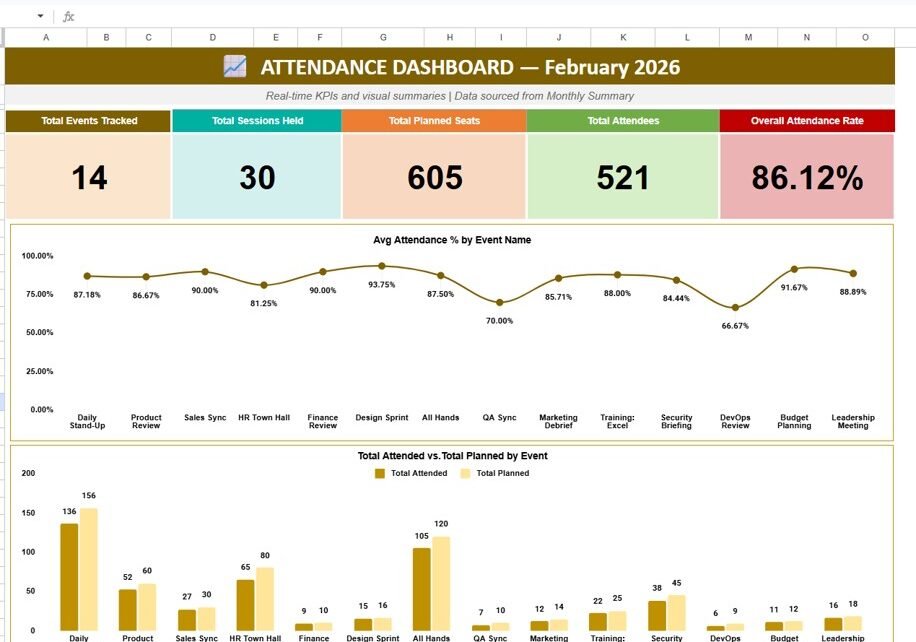
1. Attendance Dashboard – Real-Time KPI Overview
The Attendance Dashboard provides a visual overview of attendance performance.
KPI Cards Displayed
- Total Events Tracked: 14
- Total Sessions Held: 30
- Total Planned Seats: 605
- Total Attendees: 521
- Overall Attendance Rate: 86.12%
These KPIs instantly show event engagement performance.
Charts Included
- Average Attendance % by Event Name
- Total Attended vs Total Planned by Event
Therefore, managers quickly identify which events perform well.

2. Monthly Summary Sheet – Consolidated Event Performance
This sheet summarizes attendance data for a selected month and year.
Information Captured
- Event ID
- Event Name
- Department
- Sessions Held
- Total Planned Participants
- Total Attended
- Average Attendance %
Users select Month and Year from dropdowns, and results update automatically.

3. Attendance Entry Sheet – Daily Data Input
The Attendance Entry sheet records daily attendance.
Columns Included
- Record ID
- Date
- Event ID
- Event Name
- Organizer
- Department
- Planned Participants
- Attended
- Absent
- Attendance %
- Remarks
Once users input data, all dashboards update automatically.

4. Event Master Sheet – Event Configuration
The Event Master Sheet acts as the central database.
Stored Information
- Event ID
- Event Name
- Organizer
- Department
- Category
- Planned Participants
- Frequency
- Status
This sheet standardizes event setup and ensures consistent reporting.

Advantages of Attendance Tracking System in Google Sheets
Centralized Attendance Management
- All attendance records in one system
- No duplicate tracking
- Easy reporting
Real-Time Dashboard Insights
- Automatic KPI updates
- Visual performance tracking
- Instant attendance analysis
Improved Event Planning
- Identify low-performing sessions
- Optimize scheduling
- Improve participation
Automated Calculations
- Attendance percentage auto-calculated
- Monthly summaries generated automatically
Cloud Collaboration
- Multi-user access
- Secure sharing
- Remote updates
How Does the Attendance Dashboard Help Decision-Making?
The dashboard answers important questions:
- Which events have low attendance?
- Which departments show higher engagement?
- Are planned seats utilized efficiently?
- How does attendance trend over time?
Therefore, organizations improve event effectiveness continuously.
Best Practices for Attendance Tracking System
Maintain Accurate Event Master Data
Always update event details correctly.
Enter Attendance Daily
Avoid backlog entries to maintain accuracy.
Monitor Attendance Trends
Review monthly performance regularly.
Use Remarks for Insights
Record reasons for low attendance.
Review KPI Dashboard Weekly
Identify problems early.
How Does This System Improve Organizational Productivity?
When organizations track attendance effectively:
- Meetings become more efficient
- Participation improves
- Planning becomes data-driven
- Resource utilization increases
Consequently, teams focus on meaningful engagement rather than manual administration.
Conclusion
The Attendance Tracking System for Events and Meetings in Google Sheets transforms attendance management into a structured and automated process. With integrated sheets — Dashboard, Monthly Summary, Attendance Entry, and Event Master — organizations gain complete visibility into participation performance.
Instead of spending hours preparing reports, managers analyze attendance instantly using visual KPIs and analytics. Ultimately, this system improves planning, engagement, and operational efficiency through smart data tracking.
If you would like to strengthen your spreadsheet skills beyond ready-made templates, the NextGenTemplates Academy learning paths guide you through them step by step.
Get the Attendance Tracking System for Events and Meetings in Google Sheets
Frequently Asked Questions (FAQs)
What is an Attendance Tracking System?
It is a structured system that records and analyzes participation data for meetings and events.
Why use Google Sheets for attendance tracking?
Google Sheets enables real-time collaboration, automation, and easy accessibility.
Can the dashboard update automatically?
Yes. Once attendance data is entered, dashboards refresh automatically.
Is this system customizable?
Yes. Organizations can modify events, departments, and KPIs.
Who benefits most from this system?
HR teams, trainers, event managers, and organizations managing recurring meetings.