Rental Equipment Management System Web App is a 21-page browser-based template for businesses that rent construction tools, event equipment, machinery, vehicles, furniture, audiovisual kits, or other rentable assets. It brings equipment availability, reservations, contracts, dispatch, returns, inspections, maintenance, billing, expenses, reports, user access and archive settings into one structured workspace.
The need is practical. In 2026, the American Rental Association forecast the U.S. construction and general tool rental industry at $83.5 billion. When rental teams manage bookings with scattered sheets, chats and invoice files, they can lose revenue through double-booking, missed deposits, overdue returns and late maintenance follow-up. This template gives operators a clean starting system without jumping straight into a recurring rental SaaS plan.
For teams deploying the web app through Google Apps Script, Google’s official web app deployment documentation explains how Apps Script projects can publish browser-accessible interfaces. That makes this template useful for rental businesses that want an editable internal app connected to familiar spreadsheet-style data.
Get the Rental Equipment Management System Web App from NextGenTemplates
🚀 Try the Live Demo Before You Buy
We have deployed this web app in our own Google account so you can test every page, every module and all 8 user roles — with real sample data — before purchasing. No signup, no email required.
🔑 Test Login Credentials
Sign in as admin to explore the complete system — dashboard, masters, user management and every report — or use any of the role logins below to see exactly what a rental desk, inventory, maintenance, delivery, accounts or viewer user is allowed to do. 💡 Tip: log in as Admin first to see the full picture, then switch roles to compare the restricted menus.
💡 What you get after purchase: The full source code (Code.gs + Index.html) plus a step-by-step deployment guide so you can deploy your own private instance in your own Google account in under 15 minutes.
Key Features of Rental Equipment Management System Web App
- Secure login and module access: Separate roles for admin, manager, rental desk, inventory, maintenance, delivery, accounts and viewer users.
- Operations dashboard: Summary cards for equipment, availability, reservations, active rentals, overdue returns, dispatches, returns, revenue and payments.
- Equipment master: Store equipment codes, photos, categories, rates, deposits, locations, condition and availability status.
- Pricing and categories: Maintain hourly, daily, weekly and monthly rates, default deposits, tax rates and active categories.
- Customer records: Track company details, mobile number, email, credit limit, opening balance, documents and rental history.
- Availability calendar: Review bookings, rentals and maintenance by date, category and equipment.
- Quote-to-rental workflow: Prepare estimates, approve them, convert them into reservations and manage rental contracts.
- Dispatch and pickup: Capture driver, vehicle, quantity, condition, late hours, damage charges, refundable deposits and workflow status.
- Billing and reports: Manage invoices, payments, deposits, expenses, exports, print views and operational reports.
Dashboard Pages Explanation
1. Login Page
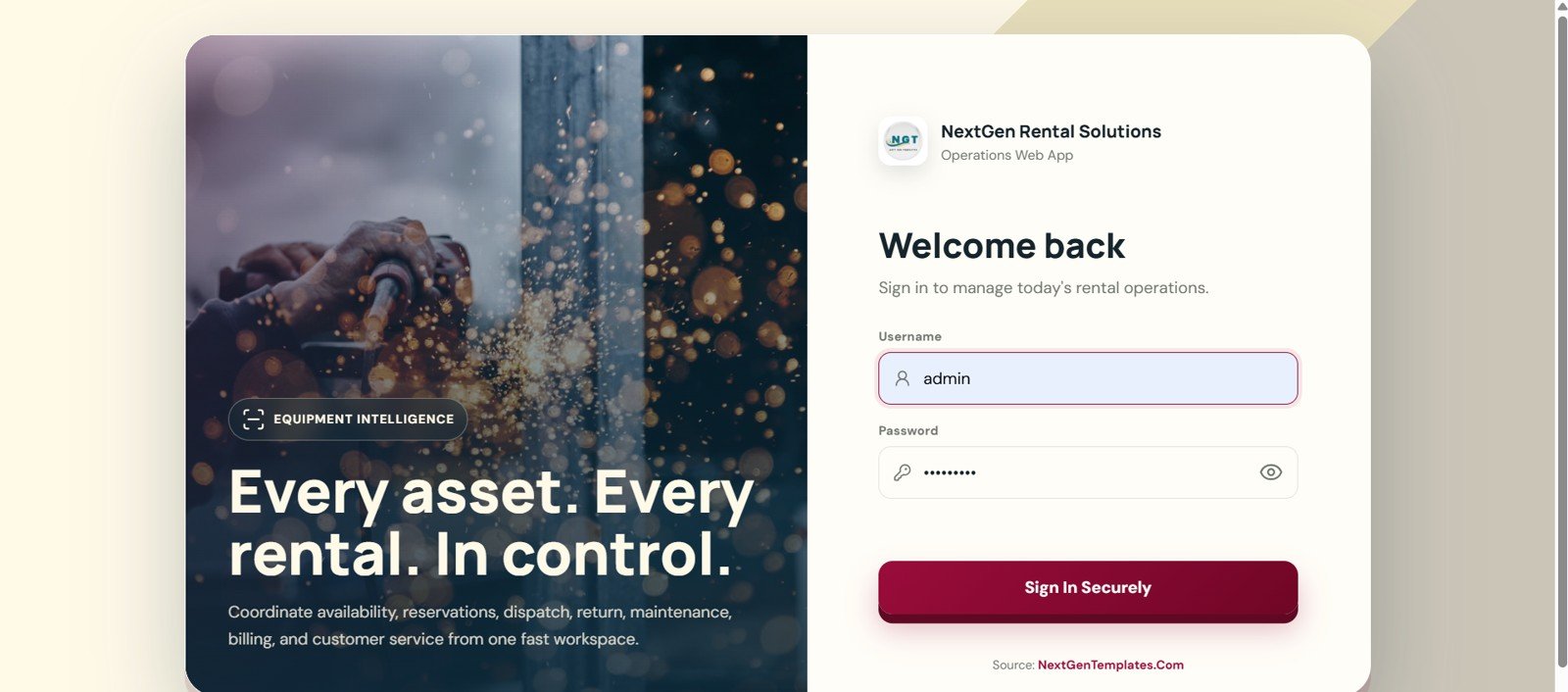
The login page gives the rental workspace a controlled entry point. It includes a branded Rental Equipment Management sign-in screen, username and password fields, show password control, a secure sign-in button and a message around equipment intelligence.
2. Dashboard Page
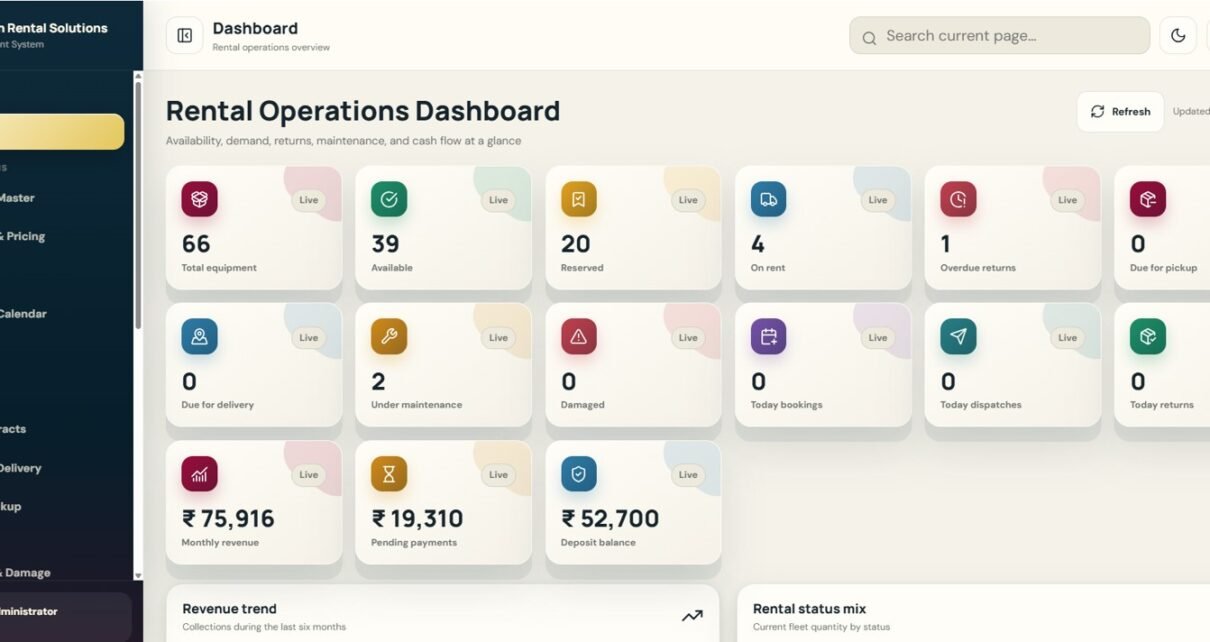
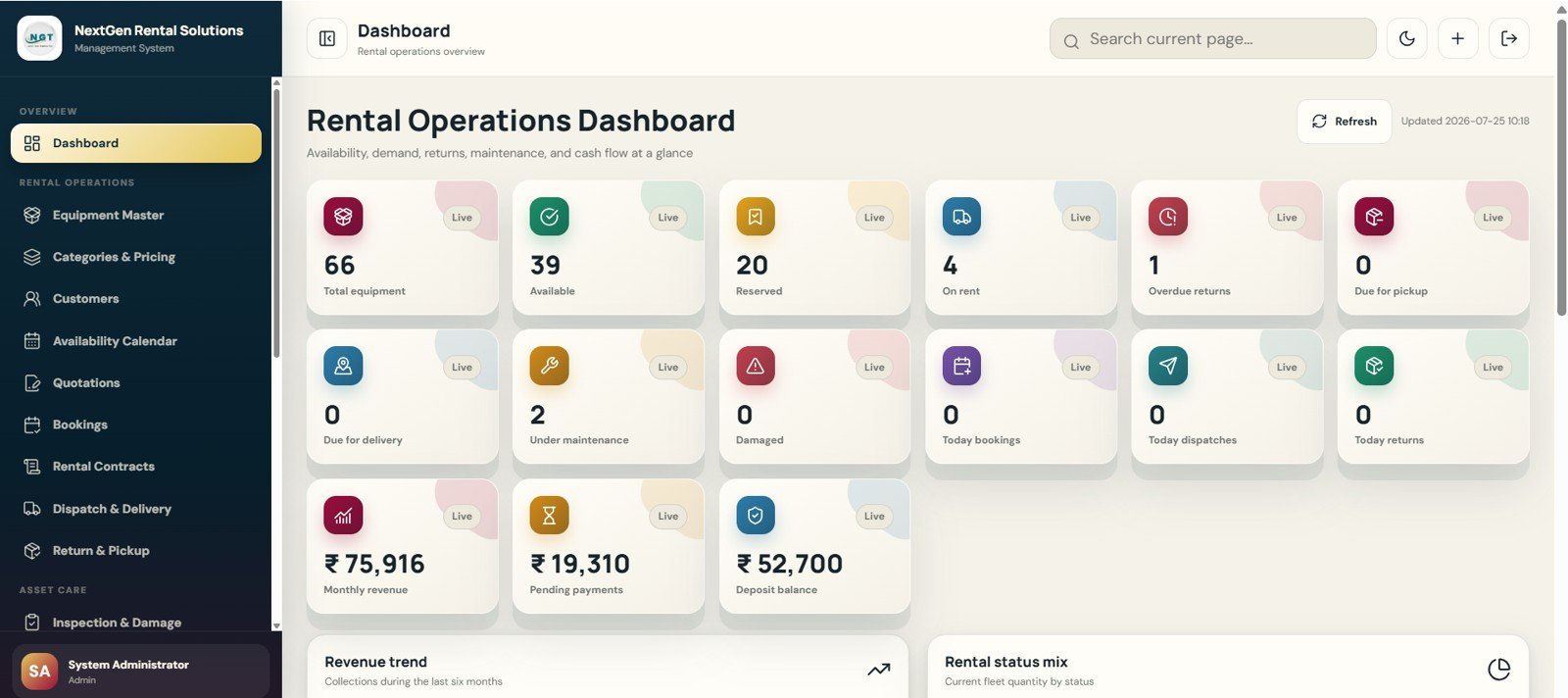
The dashboard is the top-level rental operations view. Cards show Total Equipment, Available, Reserved, On Rent, Overdue Returns, Due for Pickup, Due for Delivery, Under Maintenance, Damaged, Today Bookings, Today Dispatches, Today Returns, Monthly Revenue, Pending Payments and Deposit Balance.
Charts cover revenue trends by month, rental status mix, upcoming bookings, category-wise utilization, low availability alerts and top rented equipment.
3. Equipment Master Page
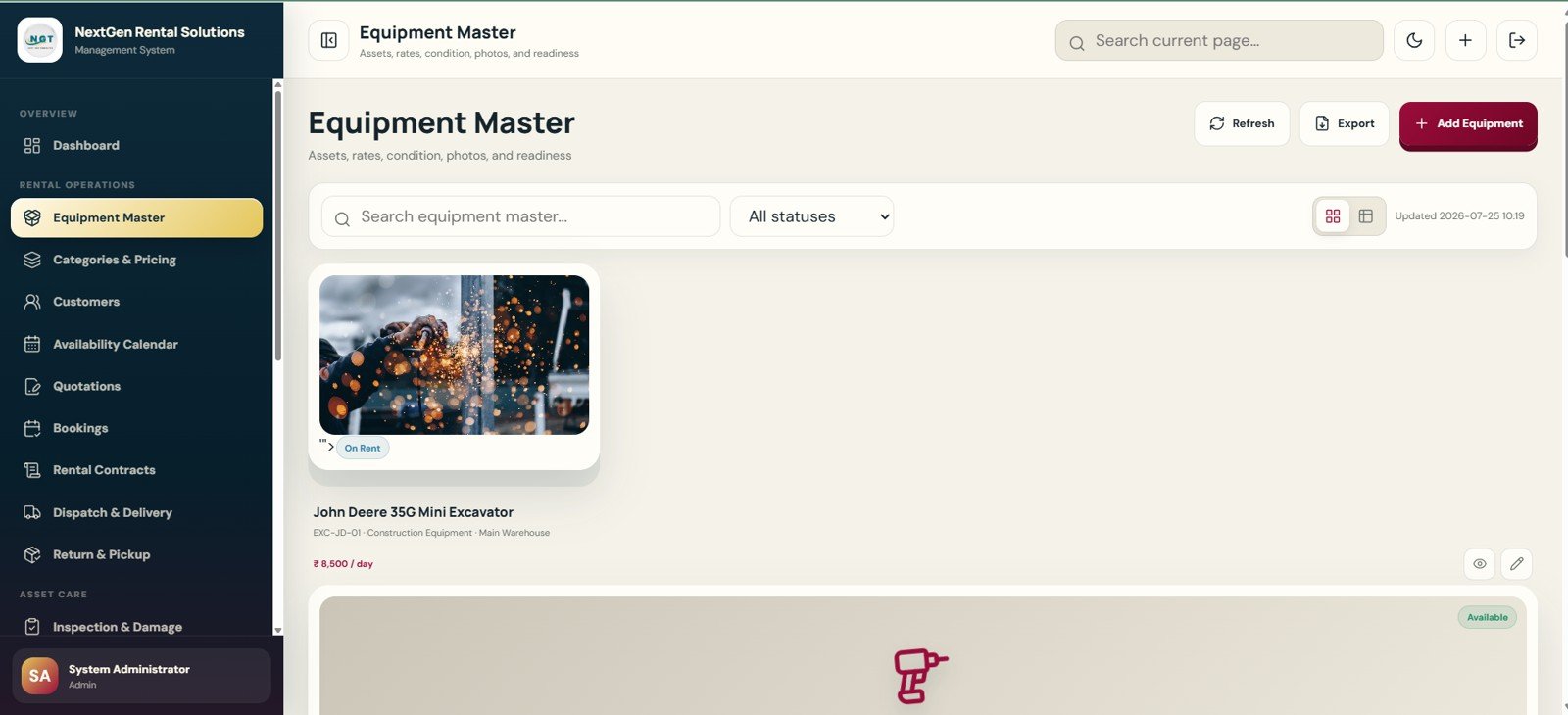
Equipment Master is the product catalog for rentable assets. Users can manage equipment cards and table records with images, availability badges, equipment codes, names, categories, asset types, current locations, conditions, daily rates and deposit amounts.
4. Categories and Pricing Page
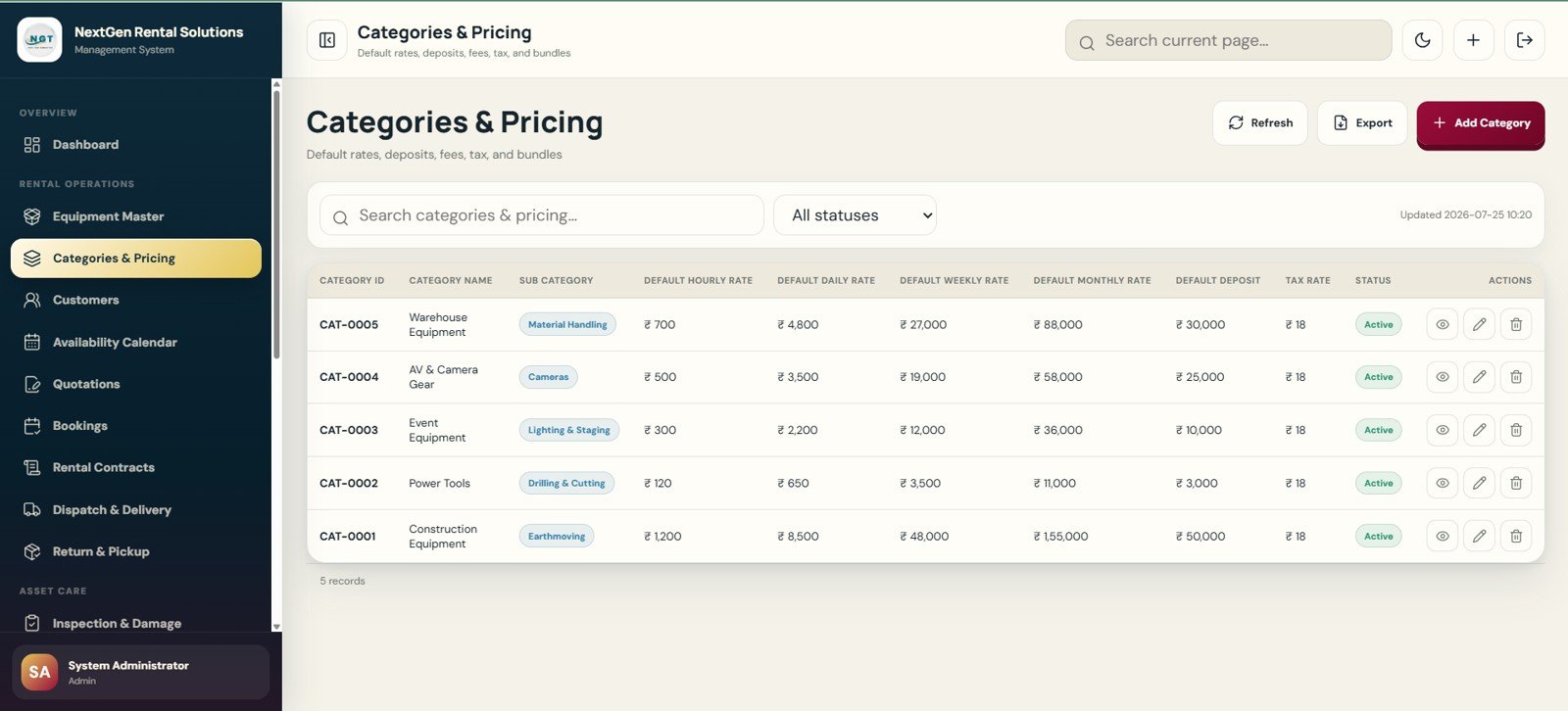
This page manages the default rate logic for the rental business. It stores category ID, category name, sub-category, hourly rate, daily rate, weekly rate, monthly rate, default deposit, tax rate and active status.
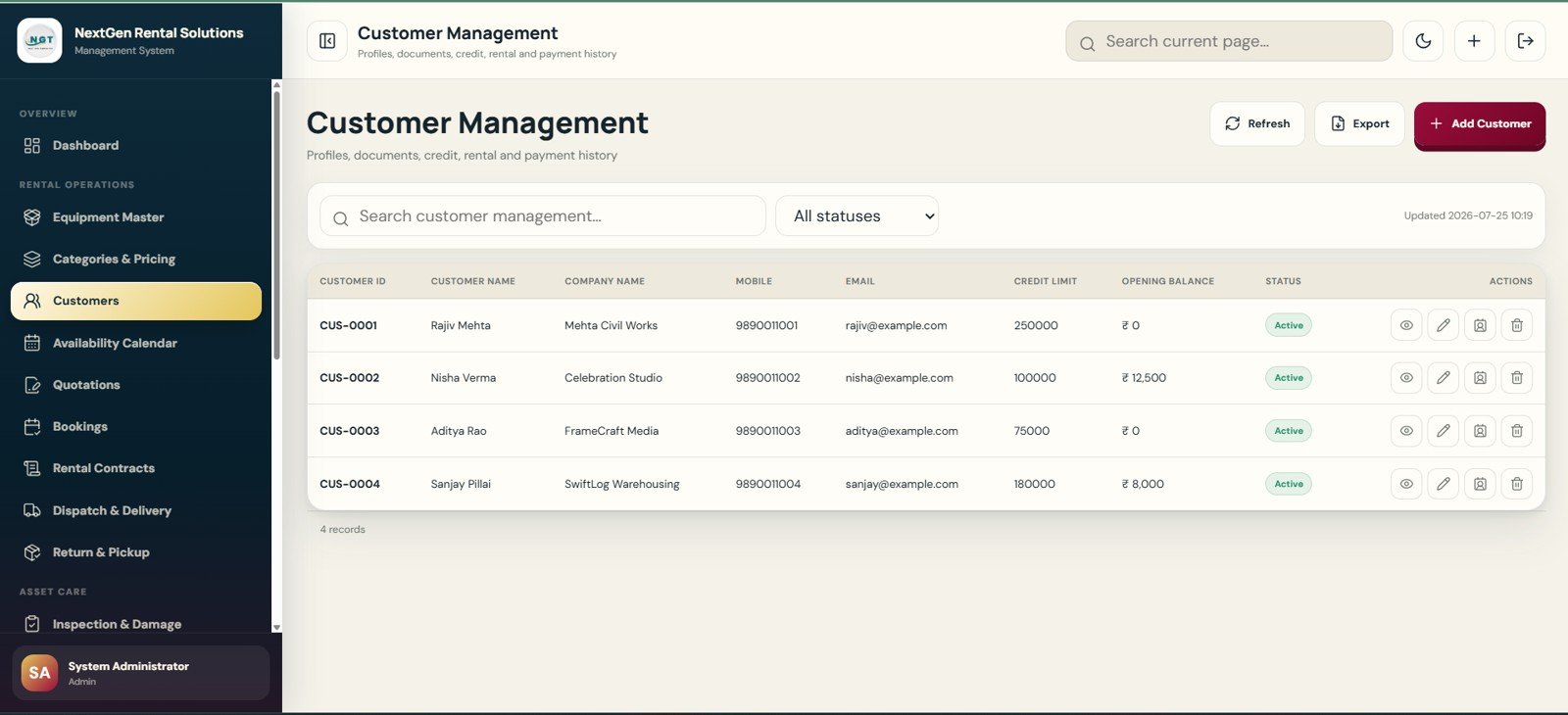
5. Customer Management Page
Customer Management stores profile and account information for renters. It includes customer ID, customer name, company name, mobile number, email, credit limit, opening balance and active status with profile, edit, document and delete controls.
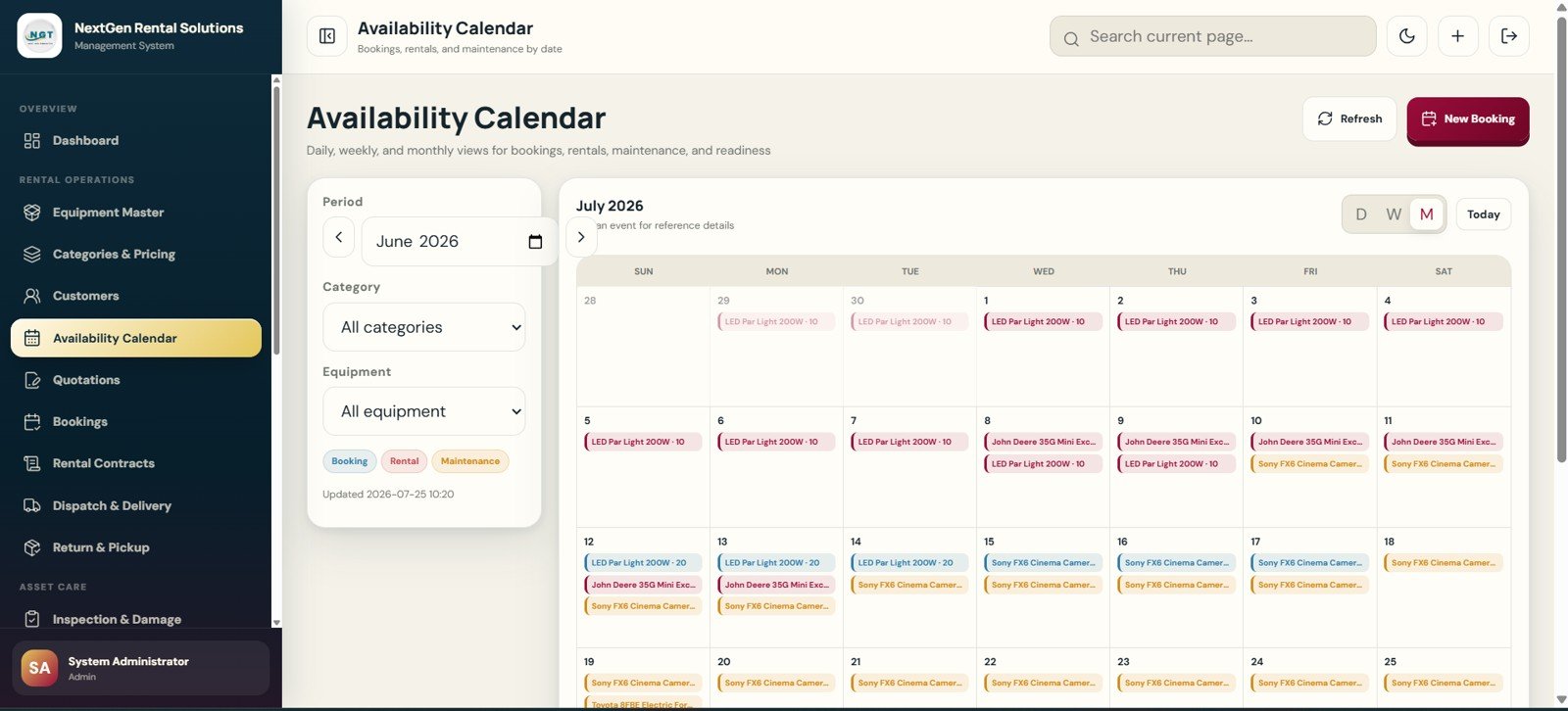
6. Availability Calendar Page
The Availability Calendar helps users see bookings, rentals and maintenance schedules before confirming new orders. Daily, weekly and monthly views support period, category and equipment filters.
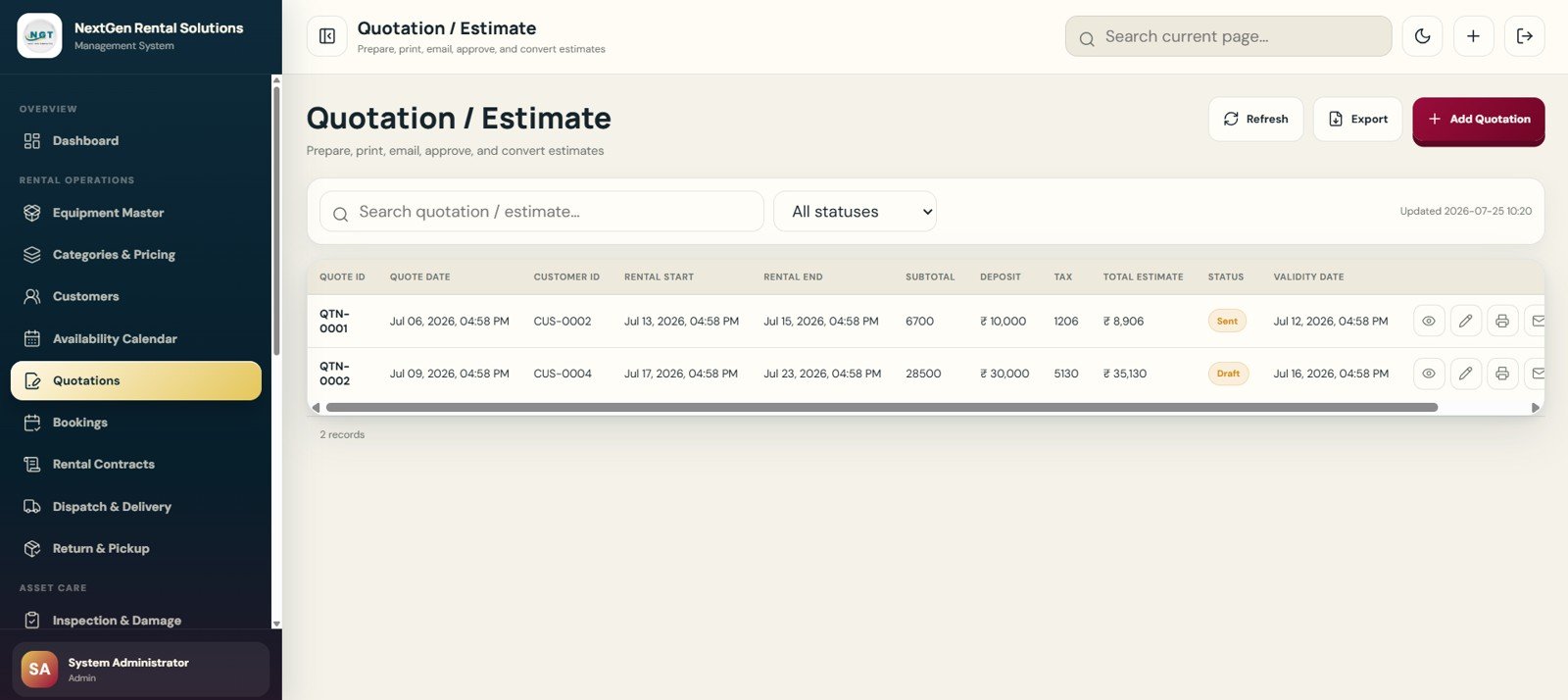
7. Quotation / Estimate Page
The quotation page supports estimate preparation, approval and conversion. It tracks quote ID, date, customer, rental start, rental end, subtotal, deposit, tax, total estimate, status and validity date.
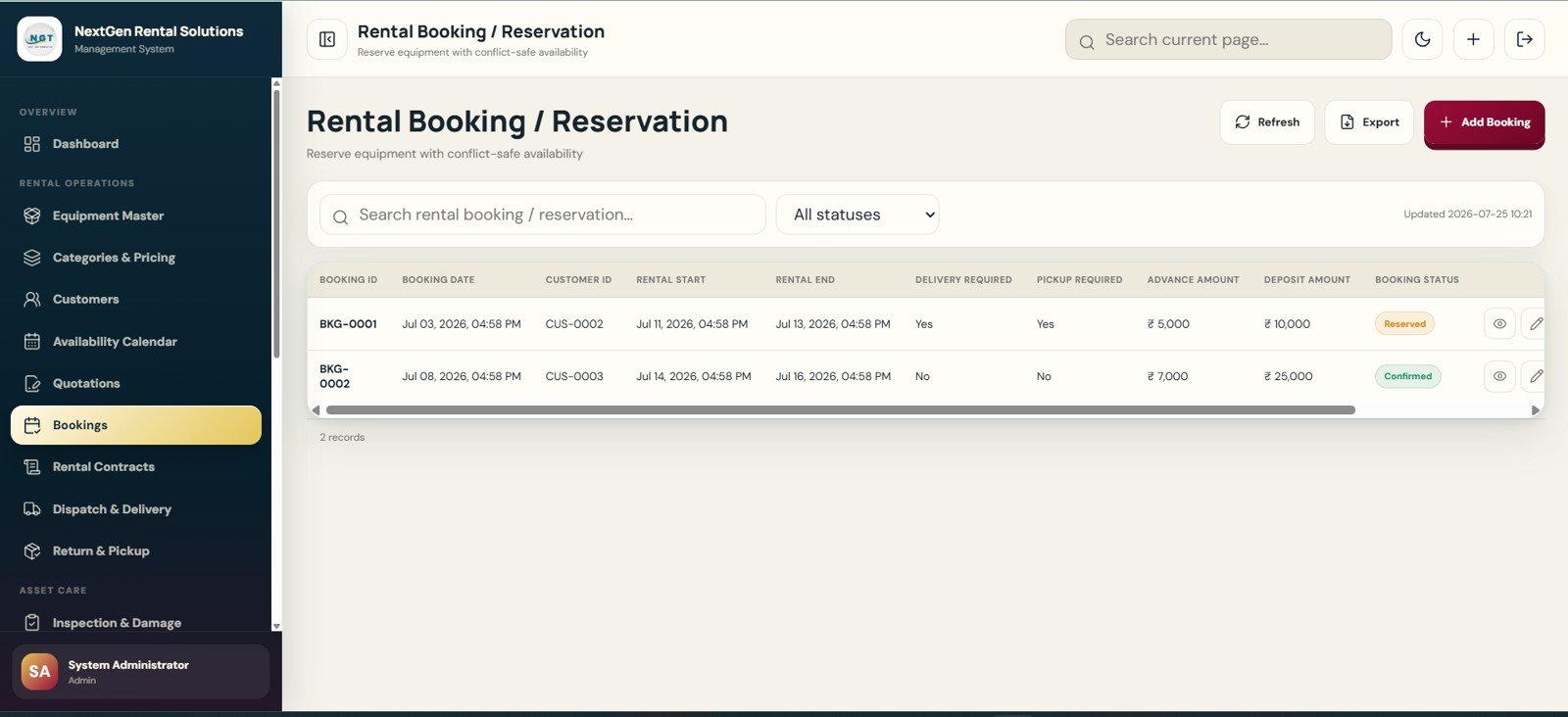
8. Rental Booking / Reservation Page
Booking and Reservation creates the future rental hold. Fields cover booking ID, date, customer, rental start, rental end, delivery required, pickup required, advance amount, deposit amount and booking status.
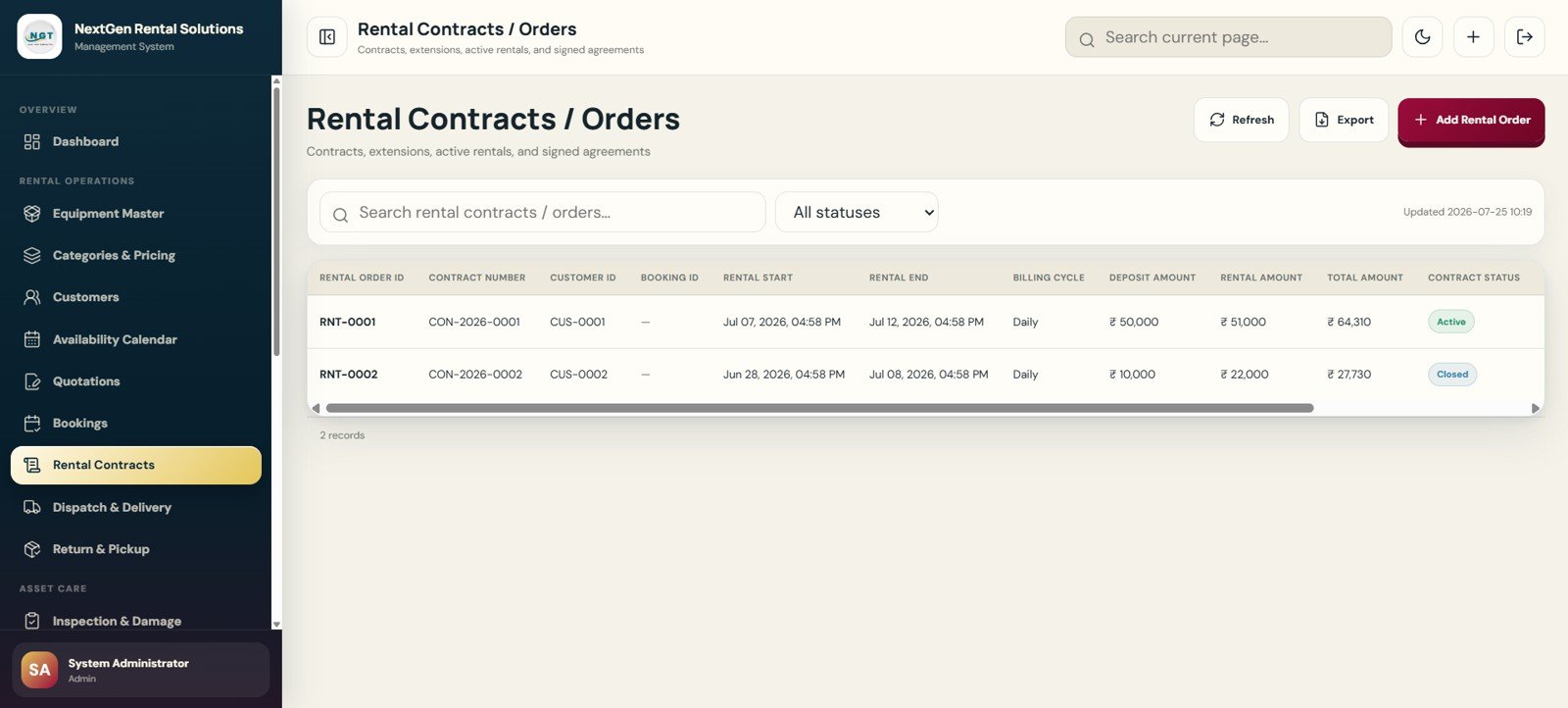
9. Rental Contracts / Orders Page
Rental Contracts and Orders manages the active rental commitment. It stores rental order ID, contract number, customer, booking reference, rental dates, billing cycle, deposit amount, rental amount, total amount and contract status.
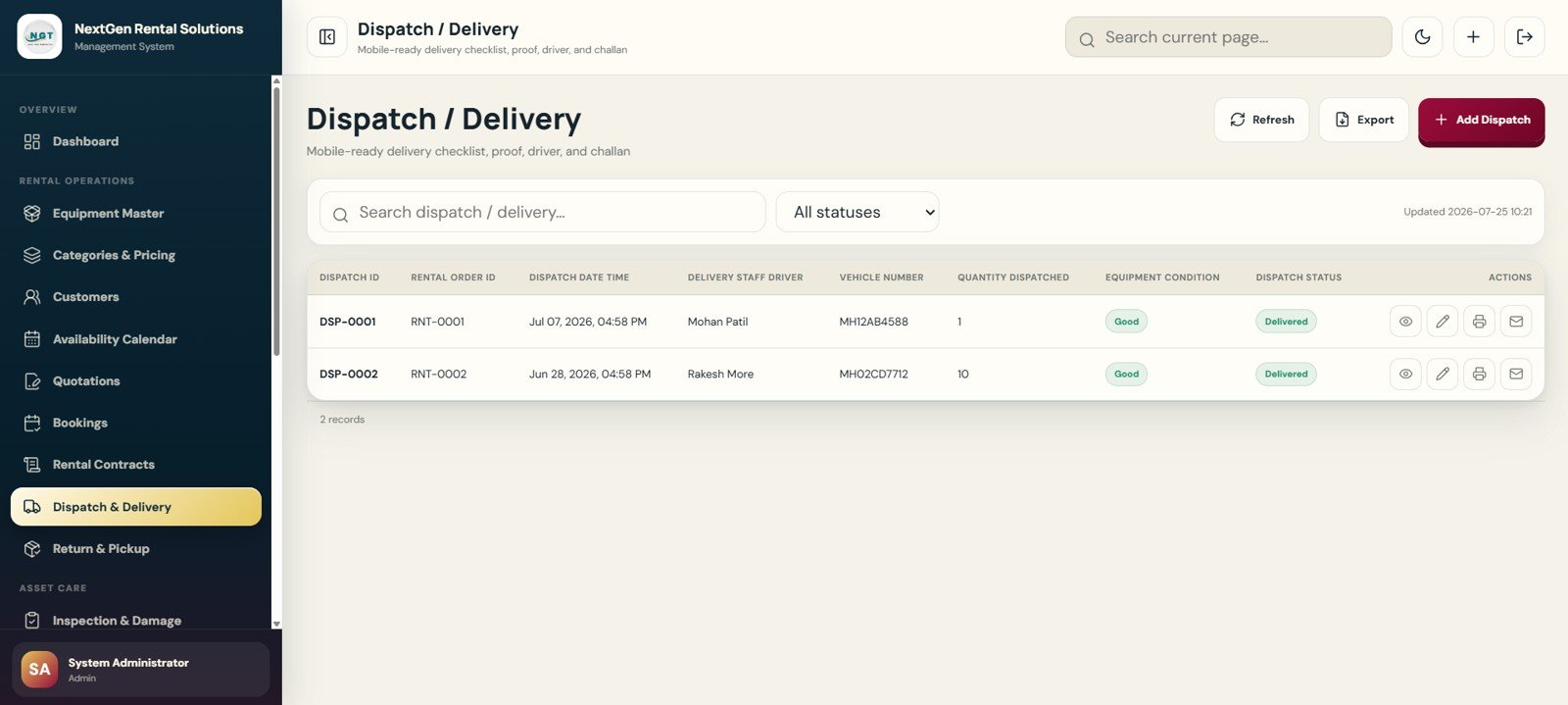
10. Dispatch / Delivery Page
Dispatch and Delivery captures the handoff from warehouse to customer. It includes dispatch ID, rental order ID, dispatch date and time, delivery staff or driver, vehicle number, quantity dispatched, equipment condition and dispatch status.
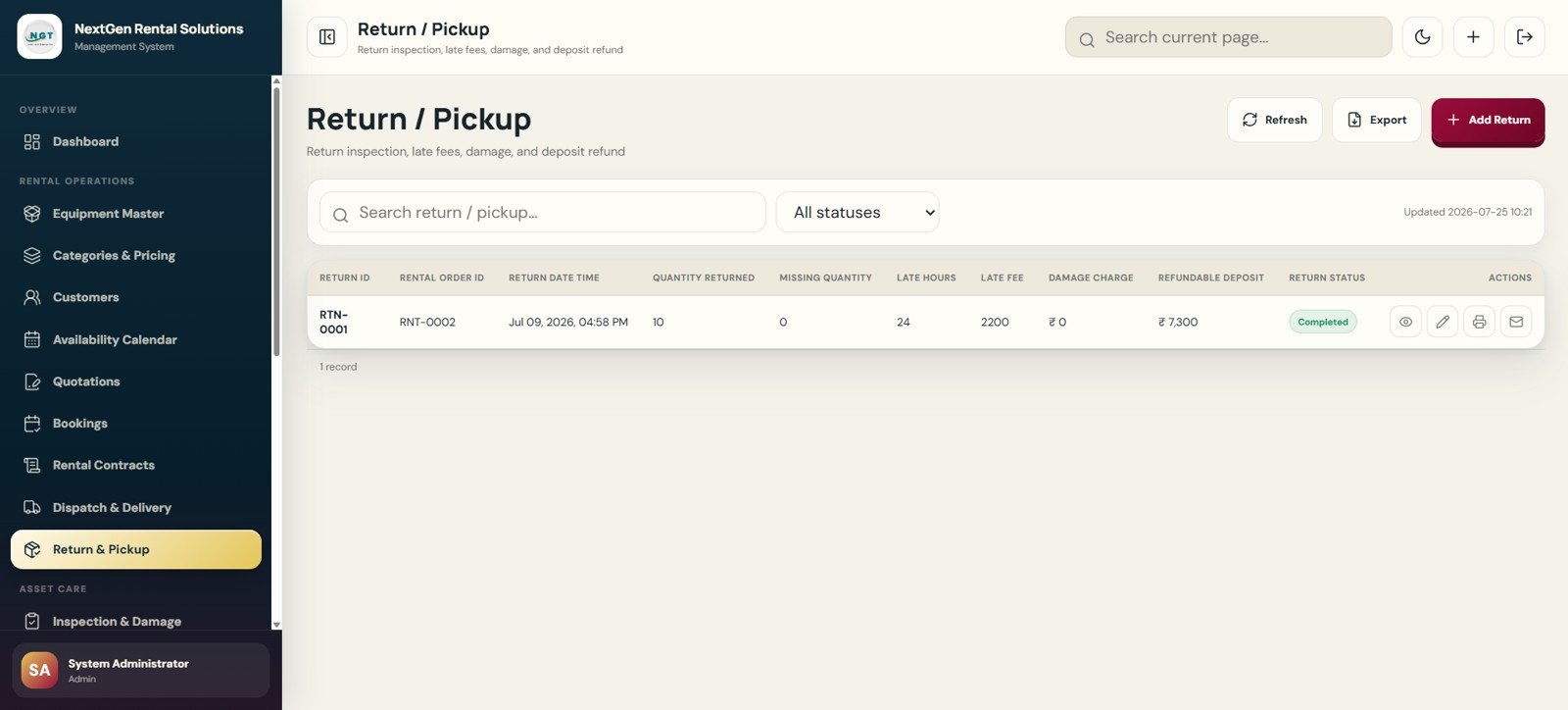
11. Return / Pickup Page
Return and Pickup tracks what comes back, what is missing and what must be charged. It stores return ID, rental order ID, return date, quantity returned, missing quantity, late hours, late fee, damage charge, refundable deposit and return status.
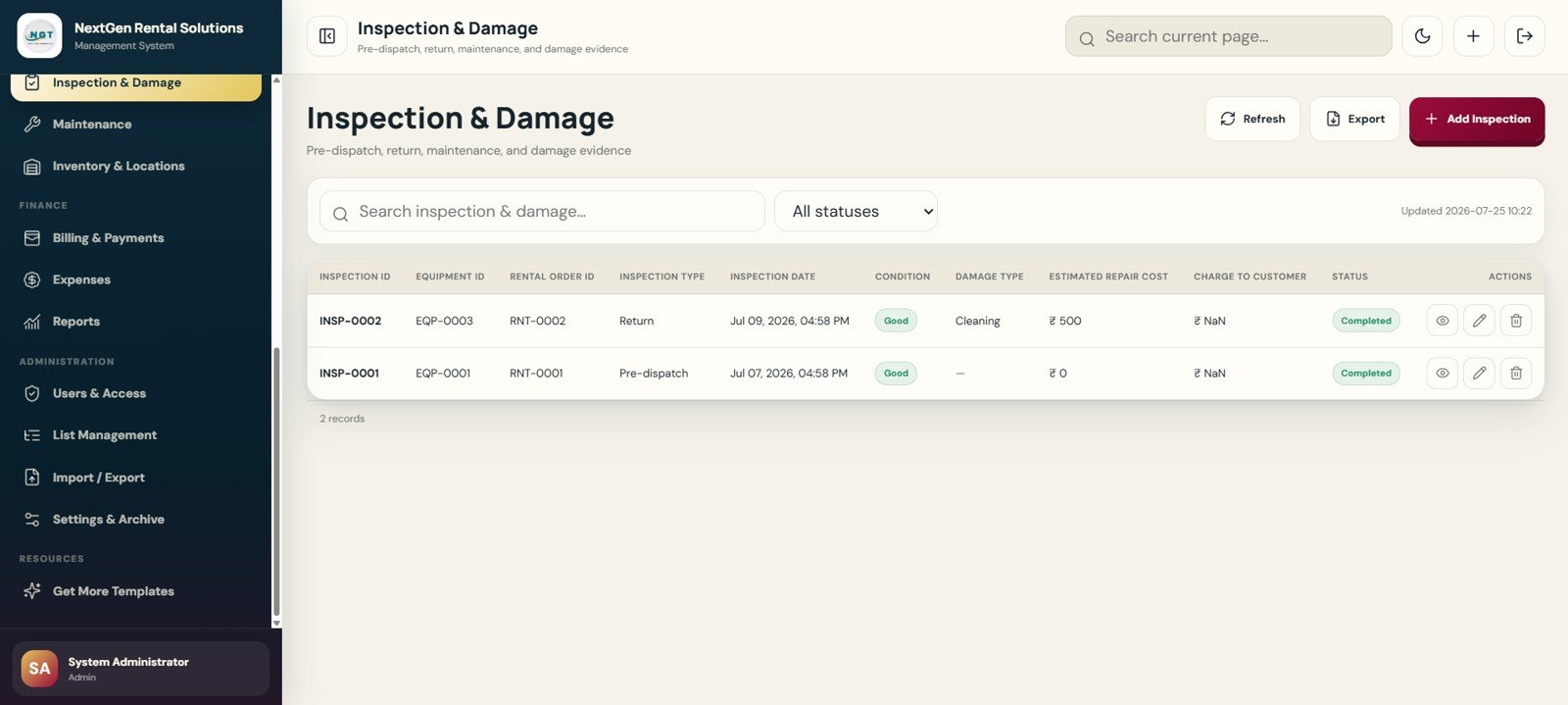
12. Inspection and Damage Page
Inspection and Damage records pre-dispatch checks, return inspections, maintenance inspections and damage evidence. It includes inspection ID, equipment ID, rental order ID, inspection type, date, condition, damage type, repair estimate, charge-to-customer flag and status.
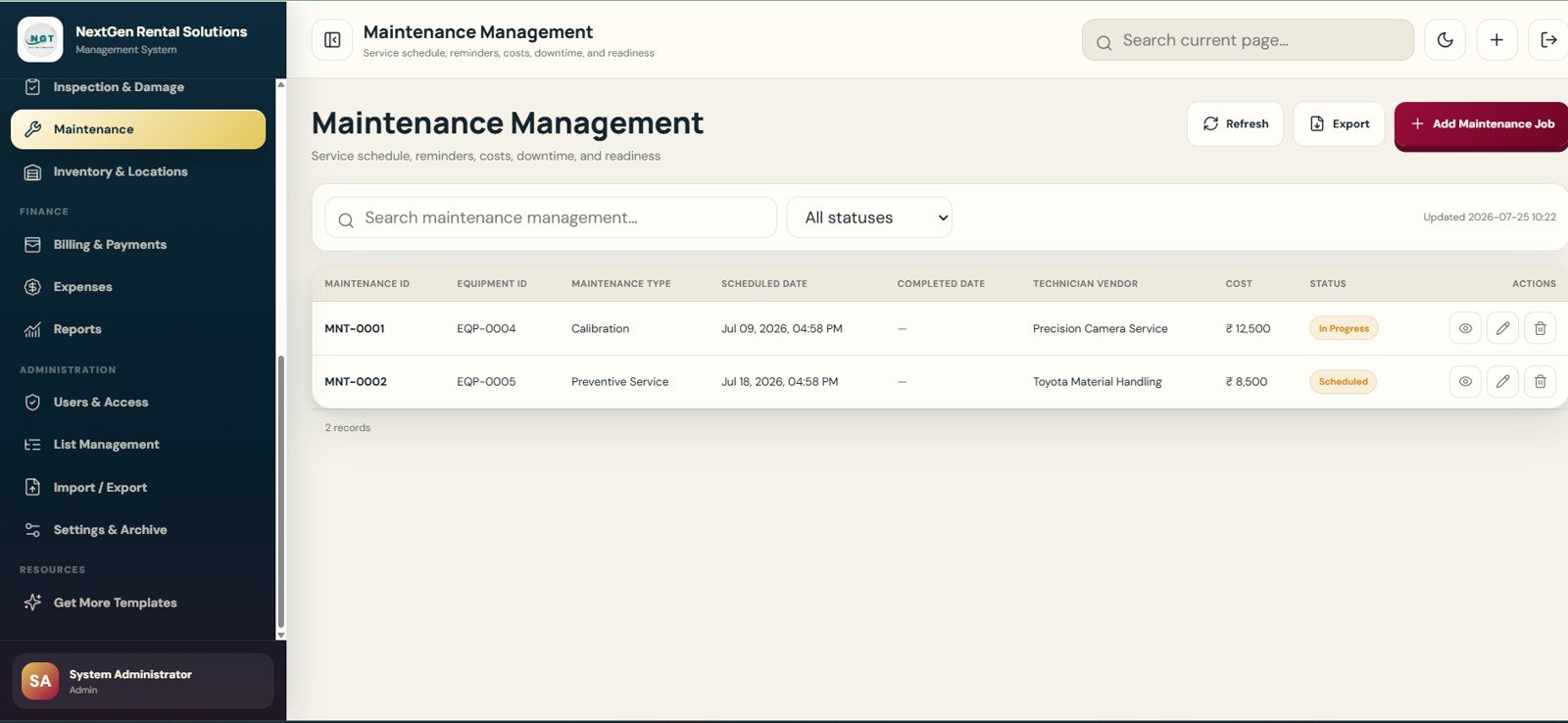
13. Maintenance Management Page
Maintenance Management handles scheduled service and downtime. Users can track maintenance ID, equipment ID, maintenance type, scheduled date, completed date, technician or vendor, service cost and maintenance status.
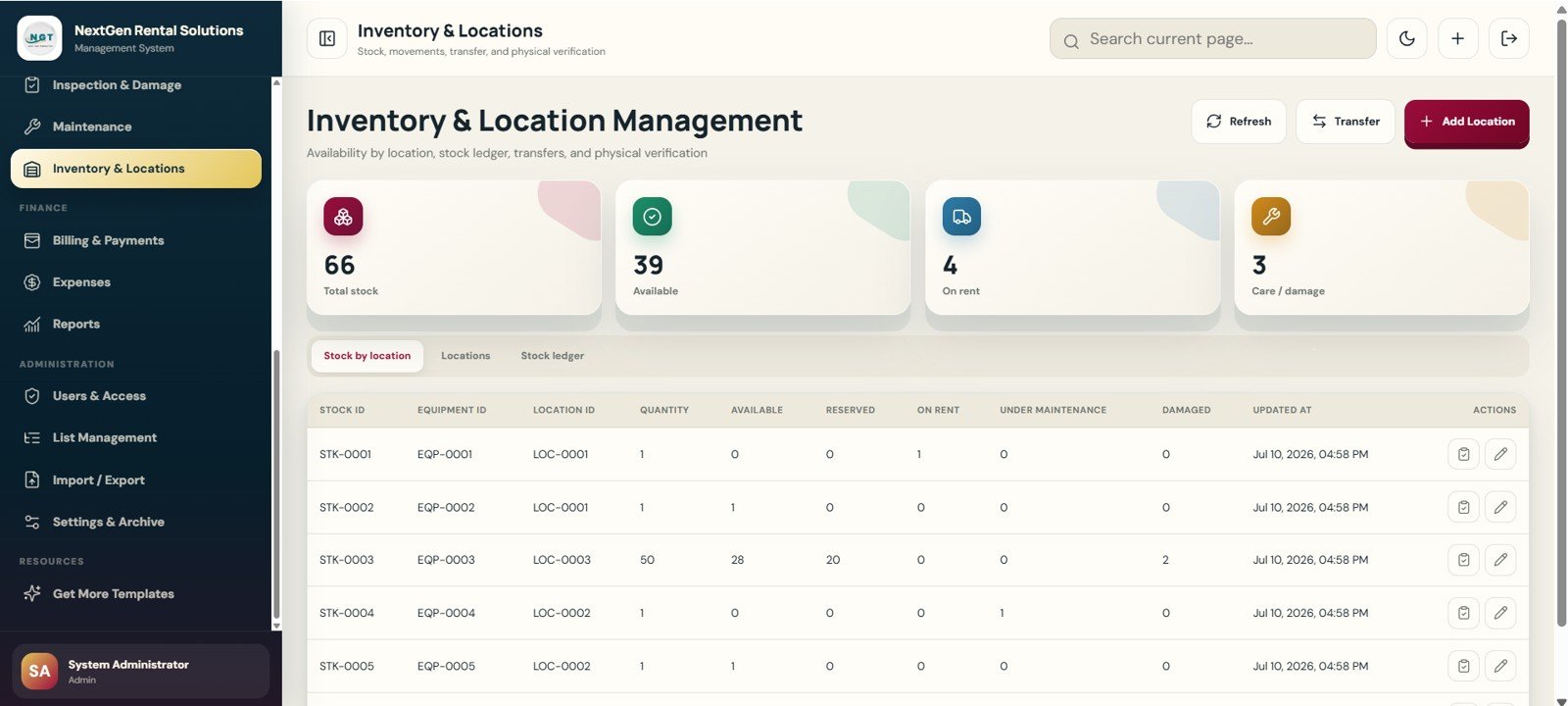
14. Inventory and Location Management Page
This page monitors stock by location, committed quantities, transfers and physical verification. Summary cards show Total Stock, Available, On Rent and Damaged. Tabs include Stock by Location, Locations and Stock Ledger.
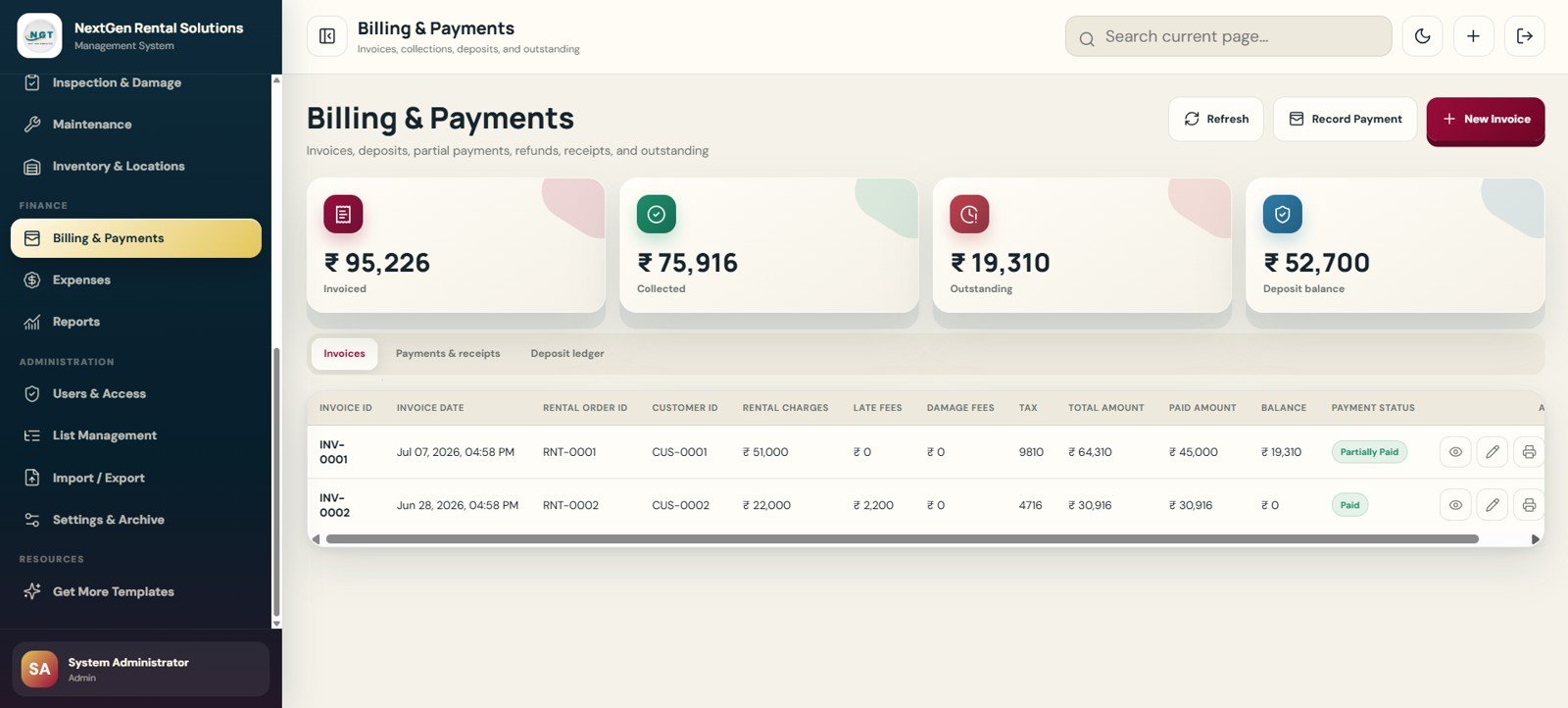
15. Billing and Payments Page
Billing and Payments manages invoices, deposits, partial payments, refunds, receipts and outstanding balances. Cards show Invoiced, Collected, Outstanding and Deposit Balance, while tabs separate invoices, receipts and deposit ledger records.
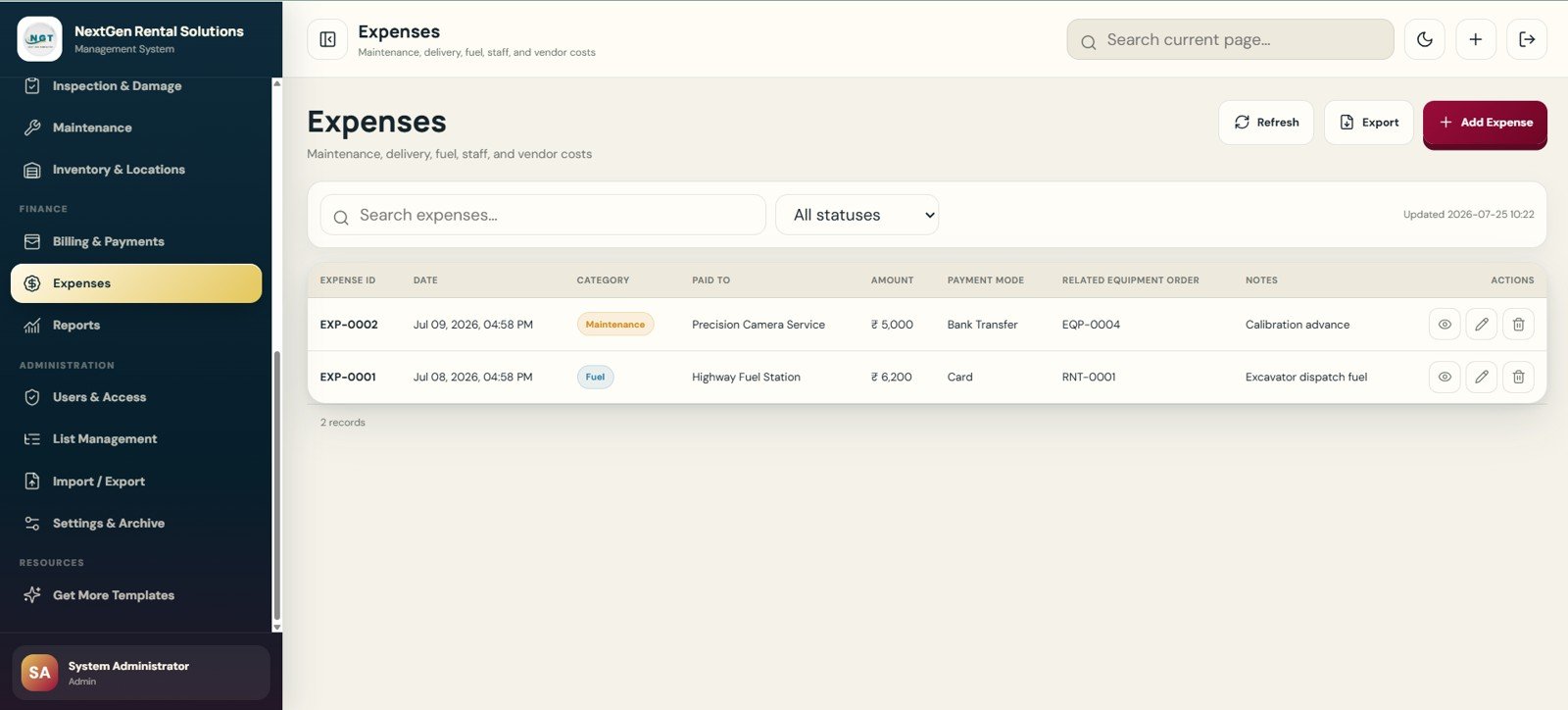
16. Expenses Page
Expenses tracks operational spending such as maintenance, delivery, fuel, staff, vendors, utilities, parts and cleaning. Records include expense ID, date, category, paid-to field, amount, payment mode, related equipment or order, notes and attachment support.
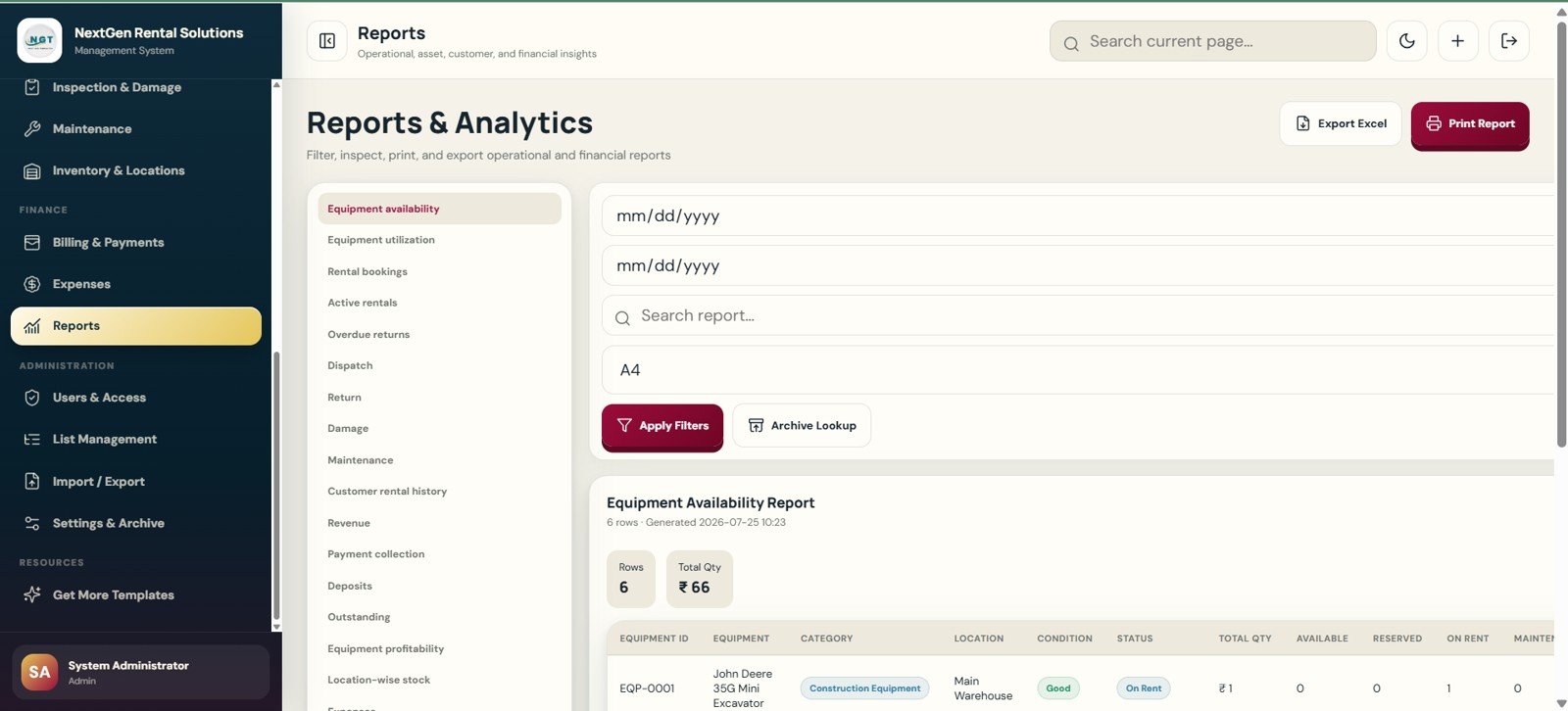
17. Reports and Analytics Page
Reports and Analytics centralizes equipment availability, utilization, bookings, active rentals, overdue returns, dispatch, return, revenue and collection reports. Date filters, search, print size, archive lookup, Excel export and print report actions are included.
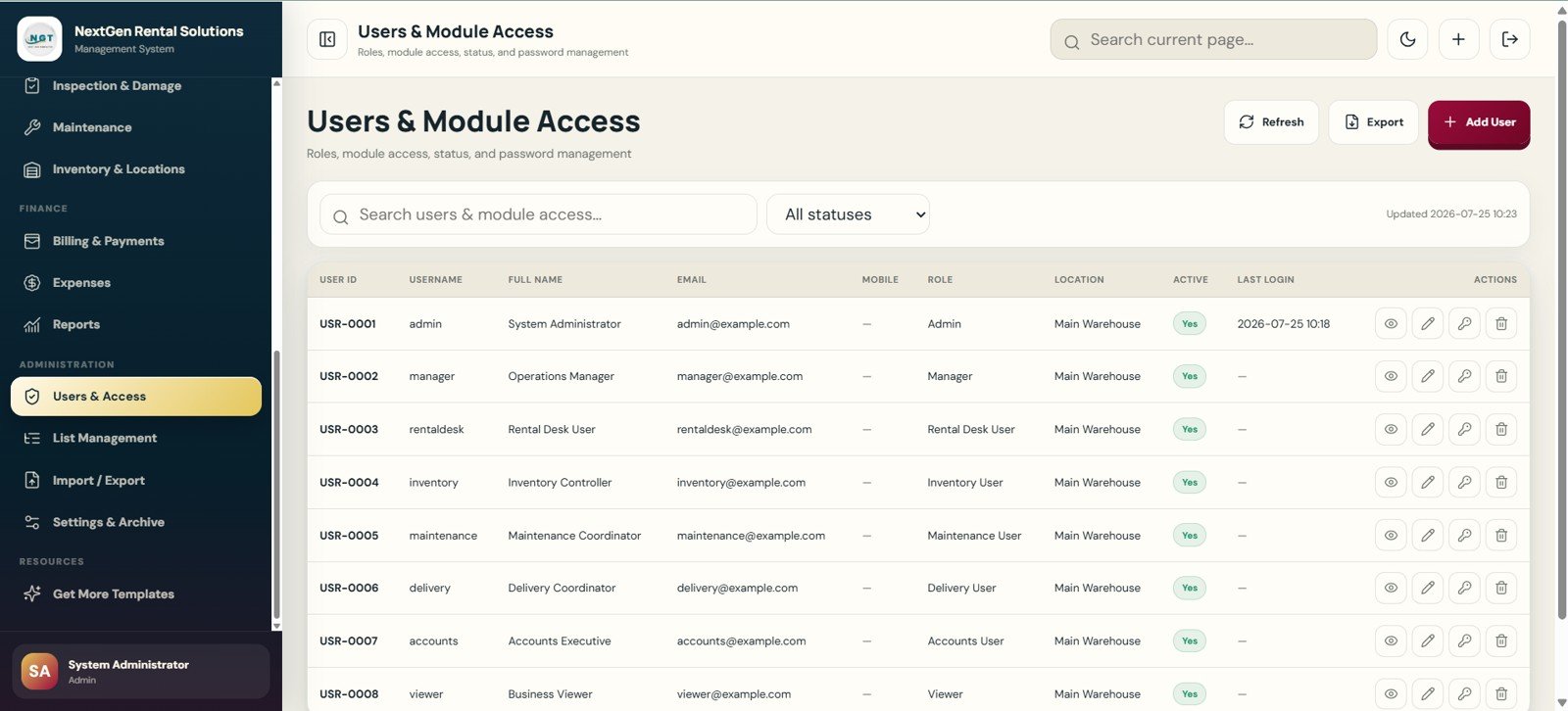
18. Users and Module Access Page
Administrators can manage users, roles, module access, status and password controls. Roles include Admin, Manager, Rental Desk, Inventory, Maintenance, Delivery, Accounts and Viewer.
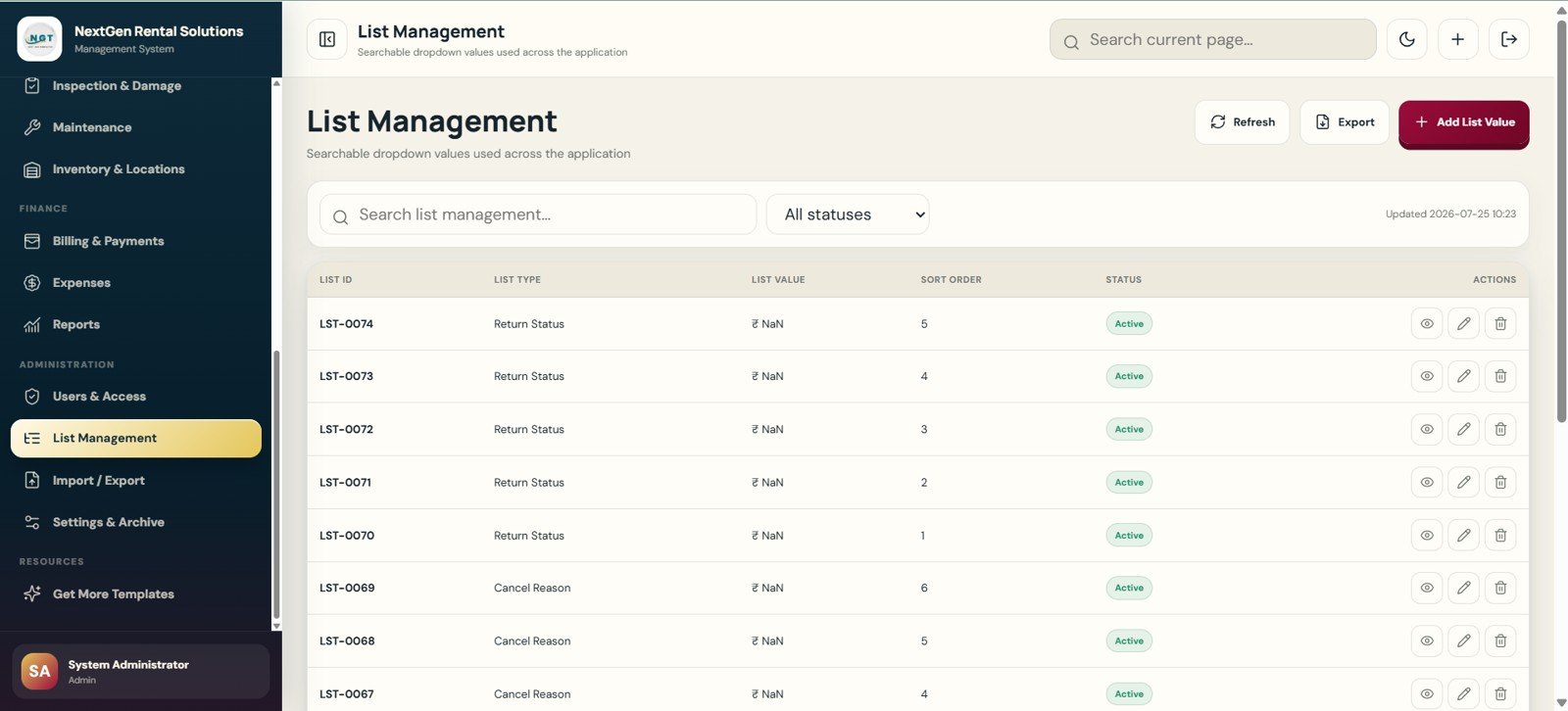
19. List Management Page
List Management keeps searchable dropdown values consistent across the app. Fields include list ID, list type, list value, sort order, status, equipment condition, return status and cancel reason values.
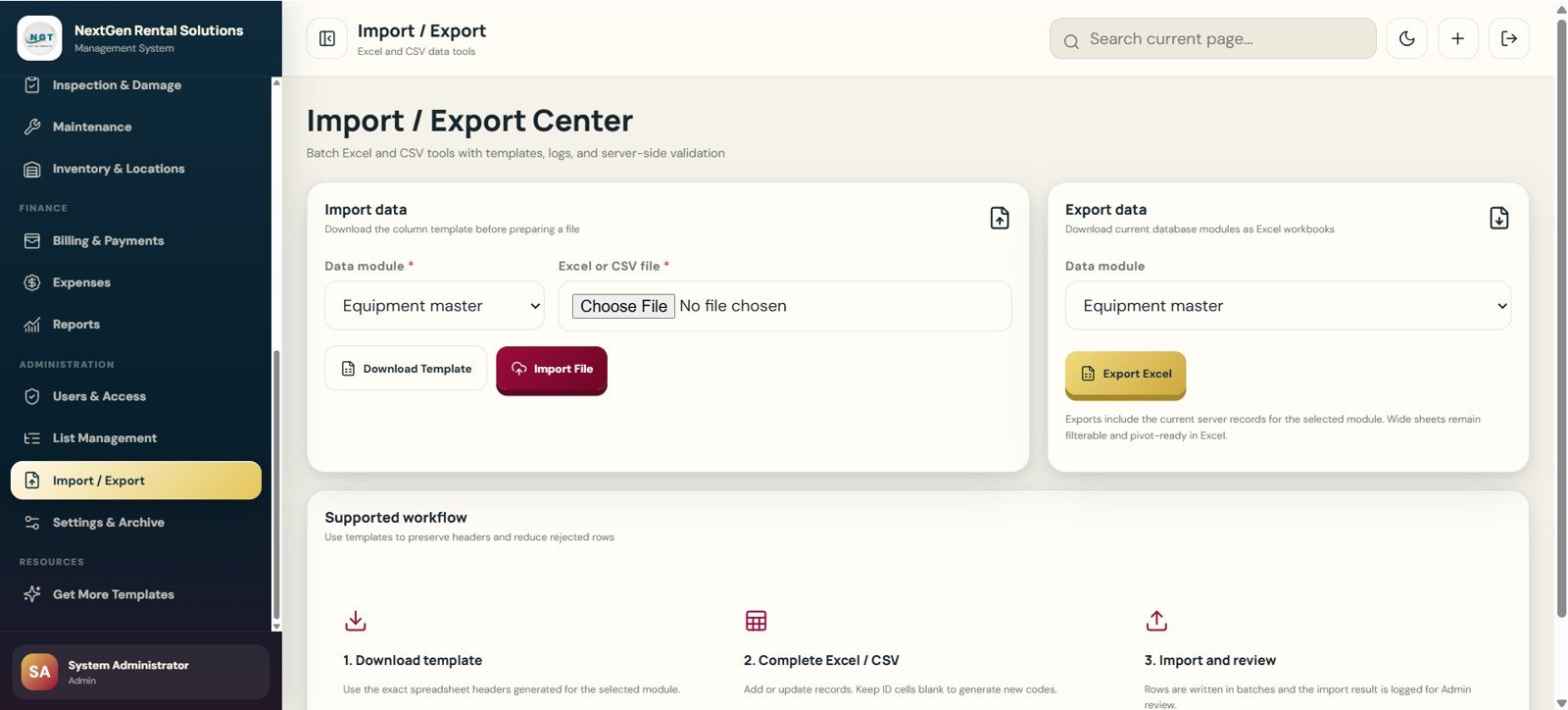
20. Import / Export Center Page
The Import / Export Center supports bulk Excel and CSV workflows. Users can choose the import module, upload files, download templates, import records, choose export modules and export Excel files.
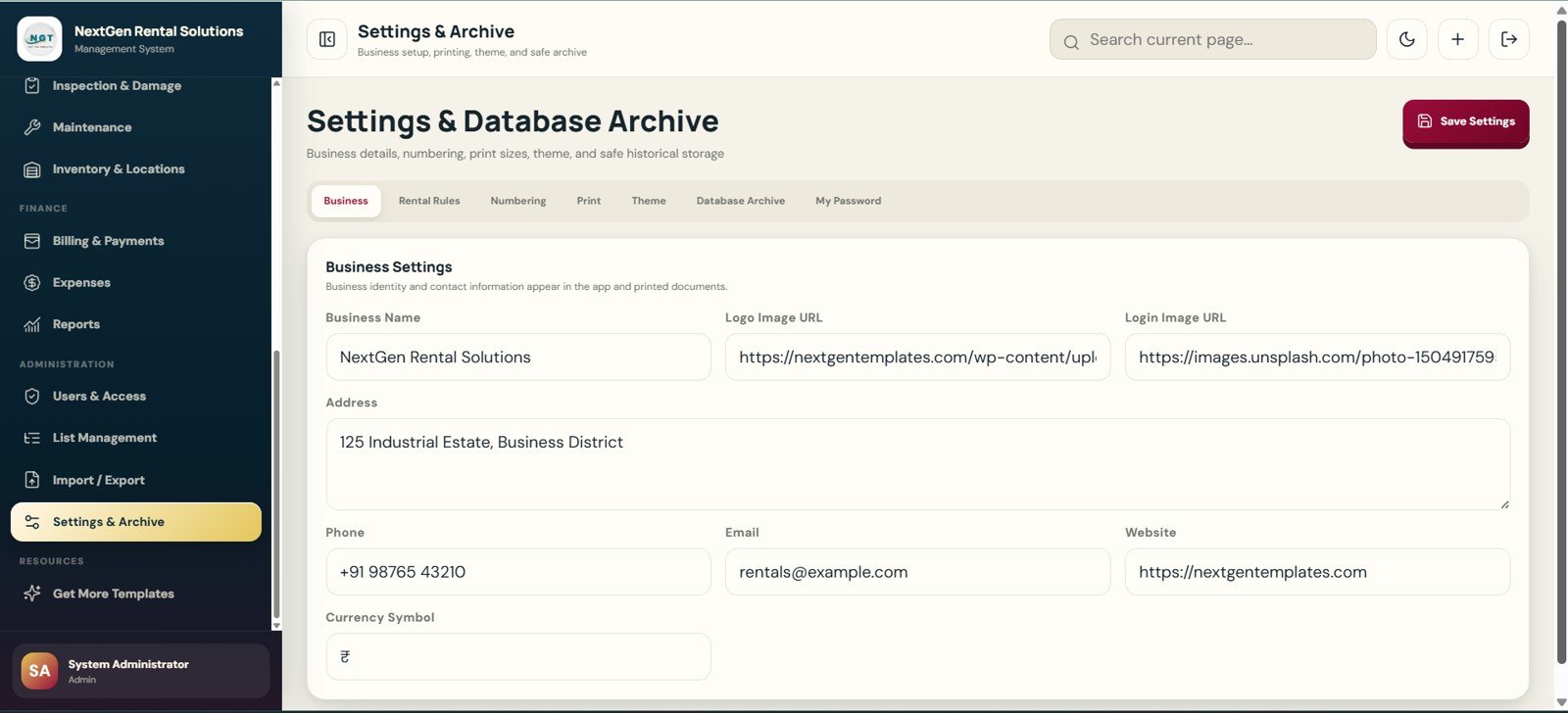
21. Settings and Database Archive Page
Settings controls business setup, rental rules, numbering, print sizes, theme, database archive and password settings. Fields include business name, logo image URL, login image URL, address, phone, email, website and currency symbol.
Rental Equipment Management System Web App vs. Google Sheets Tracker vs. Paid Rental SaaS – Feature Comparison
| Feature | This template | Google Sheets tracker | Paid rental SaaS |
|---|---|---|---|
| Cost | $39.99 one-time sale price | Low cash cost, higher build effort | Recurring monthly or annual cost |
| Platform | Browser web app after deployment | Spreadsheet tabs | Vendor-hosted cloud software |
| Setup time | Start from 21 prepared pages | Build views, forms and reports manually | Onboarding, migration and configuration |
| Real-time team collaboration | Supported through deployment and access setup | Shared sheet editing | Usually included by plan |
| Mobile access | Browser access | Sheets app or mobile browser | Vendor app or browser |
| Customizable fields | Lists, labels, settings and code can be edited | Columns and formulas can be edited | Depends on plan and vendor permissions |
| Share with link | Possible after deployment | Yes | Usually account-based |
| Year-1 cost at 5 users | $39.99 template cost | Template cost plus setup time | Can rise with seats, modules and add-ons |
| Rental workflow depth | Quote, booking, contract, dispatch, return, inspection, billing and reports | Only if custom built | Often broad, but less editable |
Who Should Use This Template
- Equipment rental shops managing tools, machinery, audiovisual kits, event gear or furniture.
- Construction rental counters that need availability, dispatch, return and maintenance visibility.
- Operations teams that want more structure than a spreadsheet but are not ready for a large SaaS migration.
- Consultants building a starter rental management workflow for clients.
- Small teams that want ownership of app files, fields and deployment settings.
It is not the right fit if the business needs certified payment hardware, GPS or telematics, barcode scanner drivers, automated tax filing, deep accounting sync or guaranteed vendor-hosted uptime without customization.
Real-World Use Cases
Construction tool rental counter: A shop can use Equipment Master, Availability Calendar, Bookings, Dispatch and Returns to avoid promising the same generator, ladder or drill to two customers.
Event equipment rental company: A team can quote tents, lights, tables and sound systems, convert estimates into orders, dispatch items, log returns and calculate deposits or damage charges.
Multi-location equipment yard: A manager can use Inventory and Location Management, Maintenance, Reports and User Access to see stock, repairs and branch-level responsibilities in one place.
Advantages of Rental Equipment Management System Web App
- Full rental lifecycle coverage: It connects quoting, reservations, contracts, dispatch, returns, inspection, billing and reporting.
- Operational visibility: Dashboard cards and reports help teams spot overdue returns, low availability, pending payments and maintenance items.
- Editable foundation: The lists, labels, app pages and deployment setup can be adapted to a specific rental workflow.
- Lower first-year cost: A one-time template can be easier to justify than recurring SaaS when a rental team is still formalizing its process.
- Admin-ready structure: Users, roles, list values, settings, import/export and archive controls are included from the start.
Opportunities for Improvement
This is a template-based web app, not a full enterprise rental platform. Larger operators may still want custom integrations for payment processors, accounting systems, barcode scanners, GPS/telematics, customer portals, automated reminders and live inventory APIs.
Teams should test the app with sample rental scenarios before using it for live orders. Pay attention to rental rules, deposits, tax handling, status names, user roles and archive settings, because those decisions shape daily operations.
Best Practices
- Clean category, condition, return status and cancel reason values before adding live records.
- Enter equipment photos, daily rates, deposits and location values consistently.
- Use the availability calendar before approving every future rental.
- Convert approved quotes into bookings instead of retyping customer and rental details.
- Record dispatch condition and return condition so damage fees are easier to justify.
- Review overdue returns, pending payments and maintenance items daily.
- Export reports weekly or monthly before archiving older records.
- Follow Google’s official Apps Script deployment guidance when publishing the app for internal users.
Explore Relevant Templates
- Rental Equipment Management System Web App – the product download for this 21-page rental system.
- Logistics Manager Toolkit – a higher-value pack for transport and dispatch teams.
- Ambulance Fleet and Dispatch Management System Web App – related fleet scheduling and dispatch workflow.
- Auto Garage Job Card Management System Web App – a web app for garage job cards and service workflows.
- Equipment Borrowing Request Tracker in Excel – lighter equipment request tracking.
- Vehicle Reservation Tracker in Excel – reservation workflow for shared vehicles.
- Browse all Mini Web Apps on NextGenTemplates.
Frequently Asked Questions
What is the Rental Equipment Management System Web App?
It is a 21-page browser-based template for managing rental equipment, pricing, customers, availability, quotes, bookings, contracts, dispatch, returns, inspections, maintenance, inventory, billing, expenses, reports, users, lists, imports, exports and settings.
Is this a subscription service?
No. The product is sold by NextGenTemplates as a one-time template download. Your own deployment, hosting, Google account, customization and support choices may still have separate requirements.
Can this prevent double-booking?
The Availability Calendar and booking workflow are designed to help users check reservations, rentals and maintenance schedules before confirming future rentals. Teams should still test their process and status rules before going live.
Does it include billing and payment tracking?
Yes. Billing and Payments includes invoices, payments, receipts, deposit ledger records, rental charges, late fees, damage fees, tax, paid amount, balance and payment status.
Can I manage equipment maintenance?
Yes. Maintenance Management tracks scheduled date, completed date, technician or vendor, service cost and status. Inspection and Damage also records conditions and repair estimates.
Can users have different access levels?
Yes. The Users and Module Access page supports admin, manager, rental desk, inventory, maintenance, delivery, accounts and viewer role concepts.
Does it replace full rental SaaS?
Not in every situation. It is best for teams that want an editable template foundation. Businesses needing payment terminals, telematics, accounting sync or enterprise support should evaluate dedicated rental platforms.
About the Author
Built by PK – Microsoft Certified Professional with 15+ years of Excel, Google Sheets, and Power BI experience. Founder of NextGenTemplates, reaching 300K+ subscribers across YouTube channels. Every template is hand-built and tested before release.
Conclusion
The Rental Equipment Management System Web App gives rental teams a practical way to manage assets, availability, bookings, contracts, dispatch, returns, damage checks, maintenance, payments, reports and admin settings without starting from a blank file. It is best for small and mid-sized rental teams that want an editable web app foundation and a one-time product cost.
Download the Rental Equipment Management System Web App from NextGenTemplates and start organizing your rental workflow in one structured workspace.
For more dashboard, spreadsheet and web app tutorials, visit YouTube.com/@NeoTechNavigators.
Last updated: July 26, 2026.