Ask a therapist how a client is doing and you get a considered, human answer. Ask how many sessions that client has actually had this quarter, how many were video calls, how many were lost to no-shows, and whether the numbers moved at all – and most practices have to go and count. The scheduling app knows one half, the notes know the other half, and nothing joins them up. A spreadsheet joins them up in about four minutes a week.
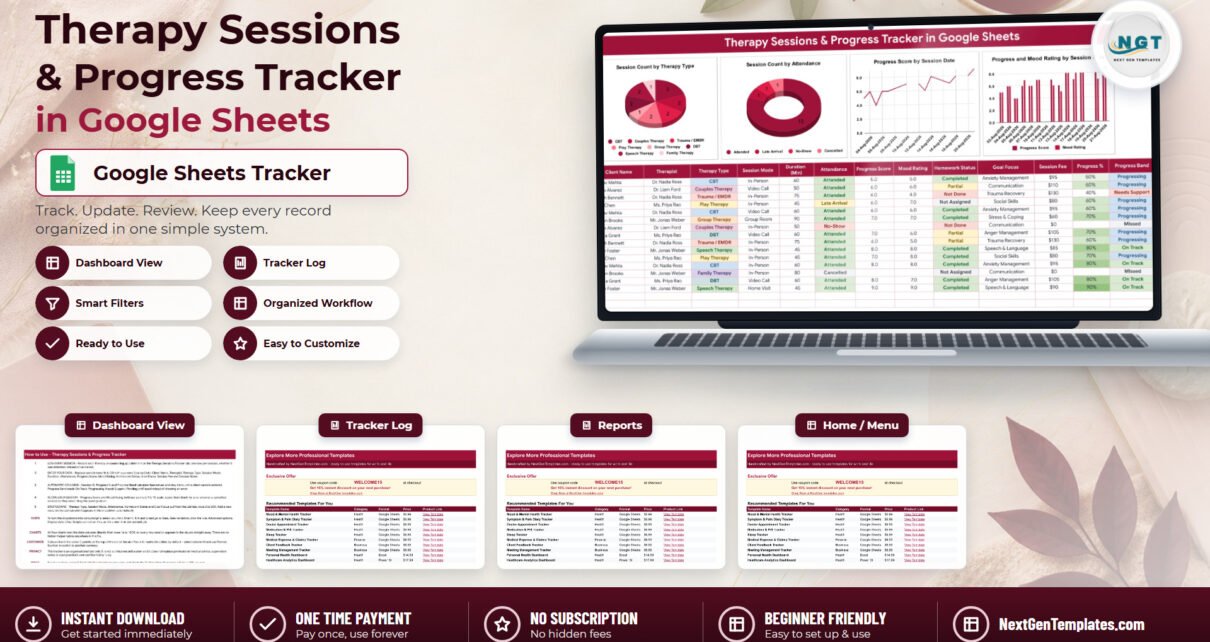
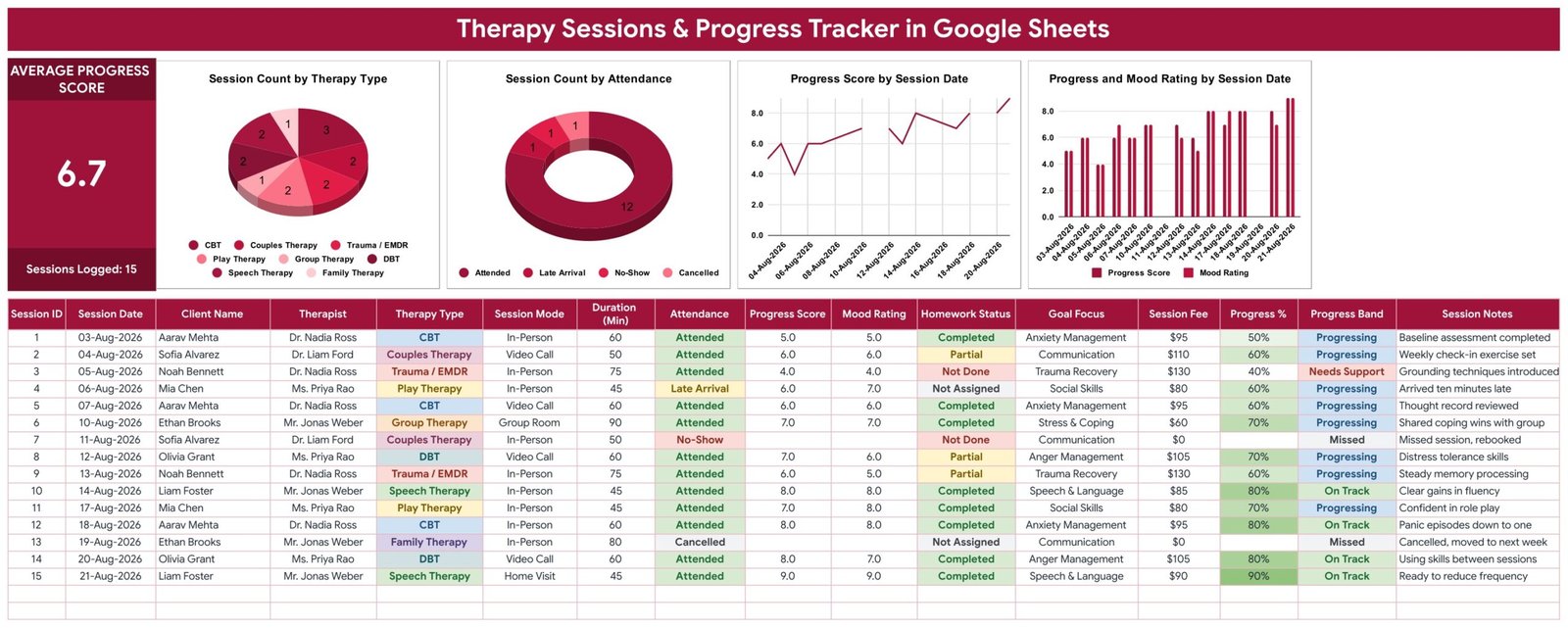
The Therapy Sessions Progress Tracker in Google Sheets is built for exactly that job. One sheet, four tabs, sixteen columns per session, three columns that calculate themselves, five dropdowns fed from a single editable list, one Average Progress Score card and four charts that redraw as you type. Fifteen worked sample sessions dated 03-Aug-2026 to 21-Aug-2026 ship with it, so nothing is blank the first time you open it.
Before anything else, the important part. This is a Google Sheets spreadsheet that you own and control. It is not clinical software, it is not a medical device, it is not an EHR or clinical record system, and it is not a substitute for professional judgement, supervision or your own case notes. It does not assess, diagnose or treat anything. The Progress Band column is an ordinary formula grouping the number you typed – “On Track” means a formula matched your own entry and nothing more, and it is not a validated outcome measure. It contains no encryption, no password protection, no access log and no audit trail, so it is not HIPAA-, GDPR- or PIPEDA-compliant storage and it holds no compliance certification of any kind. If you put client information into it, you are the data controller: where the file lives, who you share it with, and whether you use initials or client codes instead of full names are your decisions and your responsibility. The template says the same thing on its own How to Use tab.
Key Features of the Therapy Sessions & Progress Tracker in Google Sheets
Sixteen columns per session. Session ID, Session Date, Client Name, Therapist, Therapy Type, Session Mode, Duration (Min), Attendance, Progress Score, Mood Rating, Homework Status, Goal Focus, Session Fee, Progress %, Progress Band and Session Notes. That is one row per appointment, whether it happened or not.
Three columns fill themselves. Session ID numbers each row, Progress % converts the score you entered, and Progress Band returns On Track, Progressing, Needs Support, Pending or Missed. All three stay blank until a client name appears, so a half-empty sheet shows blanks rather than a column of errors – a small thing that makes the file far more pleasant to live with.
Five dropdowns, one list. Therapy Type, Session Mode, Attendance, Homework Status and Goal Focus all read the List tab, rows 2 to 500. Add “Schema Therapy” or “Sleep Hygiene” to the list and it appears in the dropdown immediately, with no trip into Google Sheets data validation. If you want the dropdowns to render as coloured pills rather than plain text, select column E (then F, H, K and L), open the validation rule and switch Display style to Chip – a genuine ten-second job that a script cannot do for you.
One headline number. The Average Progress Score card sits top left with a Sessions Logged count underneath. The sample file shows 6.7 across 15 sessions.
Four charts, wired to the data. Session Count by Therapy Type, Session Count by Attendance, Progress Score by Session Date, and Progress and Mood Rating by Session Date. They read the data columns directly from rows 16 to 1000 – there are no hidden helper tables anywhere in the file, which is why a session you type at 9am is in the charts at 9am.
Missed sessions do not poison the average. Leave Progress Score and Mood Rating blank on a no-show or a cancellation. The row still counts as an appointment, the Progress Band reads Missed, and the headline number ignores it.
Tracker Pages Explained
Therapy Sessions Tracker
The single working page, and the only one you type into. The KPI card and the four charts sit across the top; the session table fills everything below. You work left to right: date, client, therapist, modality, then whether the session was In-Person, a Video Call, in a Group Room or a Home Visit, how long it ran, and whether the client Attended, was a Late Arrival, a No-Show or Cancelled. Then the two 1-to-10 numbers, Progress Score and Mood Rating, followed by Homework Status, the Goal Focus for that session, the Session Fee and a one-line note. In the sample data those notes read like real ones – “Grounding techniques introduced”, “Panic episodes down to one”, “Ready to reduce frequency” – which is the length they should be. Anything longer belongs in your case notes, not here.
List
The vocabulary tab, and the first place to go after you take your copy. It ships with eight therapy types (CBT, DBT, Couples Therapy, Family Therapy, Group Therapy, Play Therapy, Speech Therapy and Trauma / EMDR), four session modes, four attendance states, four homework states, and goal focuses including Anxiety Management, Trauma Recovery, Social Skills, Anger Management, Stress & Coping, Communication and Speech & Language. None of it is fixed. Delete what you do not offer and add what you do.
How to Use
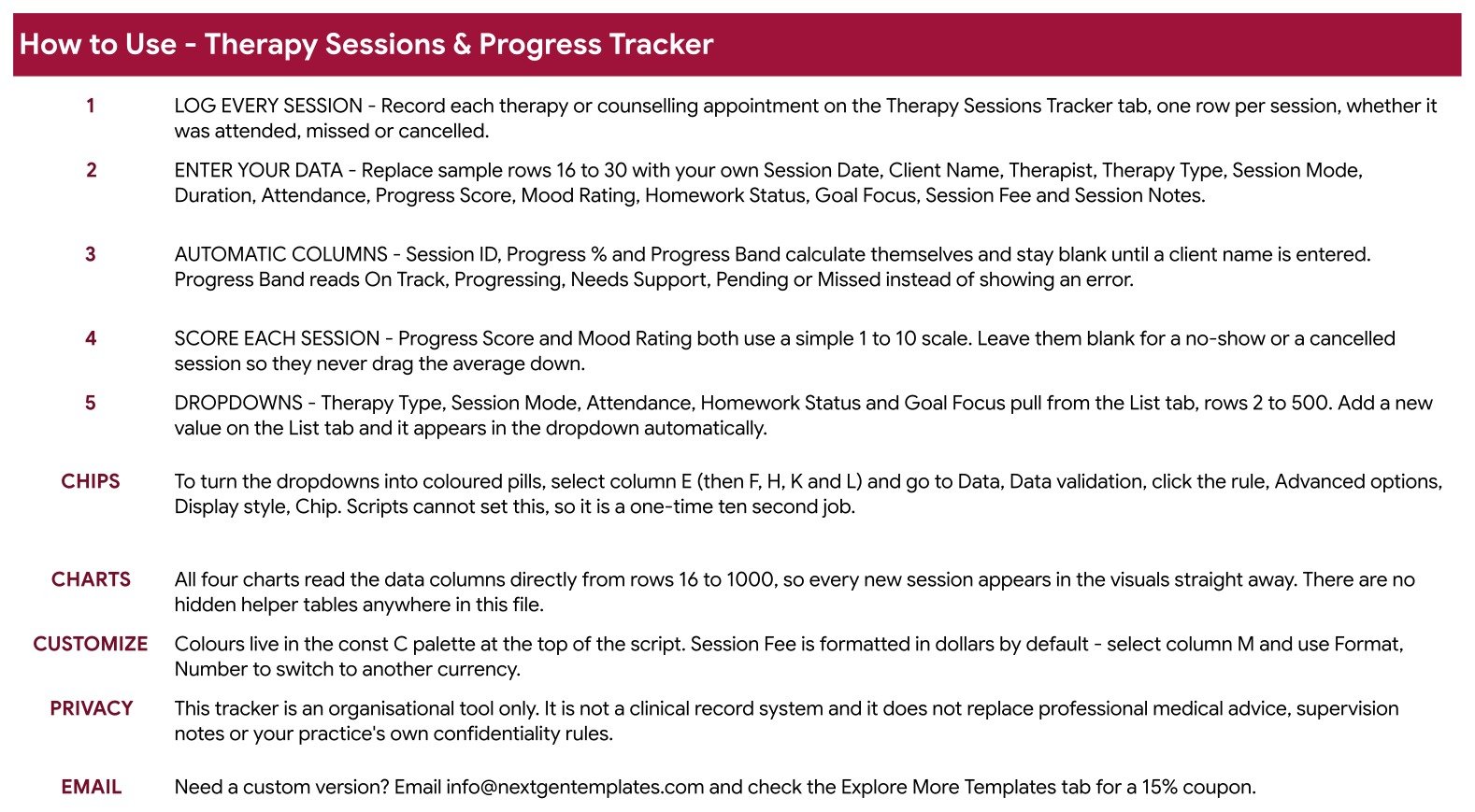
Five numbered steps written on the sheet itself, plus notes on the chip display trick, how the charts are wired, where the colour palette lives in the script, how to switch Session Fee from dollars to another currency, and the privacy statement: this is an organisational tool only, it is not a clinical record system, and it does not replace professional medical advice, supervision notes or your practice’s own confidentiality rules.
Explore More Templates
A closing tab pointing at the wider NextGenTemplates range, with a coupon code and a set of related health and business templates.
Therapy Sessions & Progress Tracker vs. an Excel Session Log vs. Paid Practice Software – Feature Comparison
| This Google Sheets tracker | DIY Excel session log | Paid practice software | |
|---|---|---|---|
| Cost | $6.99 once | Free, but you build it | Roughly $39-$99 per clinician per month |
| Platform | Google Sheets, any browser | Microsoft Excel | The vendor’s web app |
| Setup time | Click the copy link and start typing | Hours of columns, formulas and charts | Days, plus onboarding and migration |
| Real-time collaboration | Yes, Google Sheets sharing | Only by emailing the file | Yes, priced per seat |
| Mobile access | Google Sheets mobile app | Excel mobile, awkwardly | Yes, dedicated app |
| Customisable fields and dropdowns | Every column and every list | Anything you can build | Whatever the vendor allows |
| Share with a link | Yes, view-only or editable | No | Rarely outside the practice |
| Year-1 cost, 5 clinicians | $6.99 total | $0 plus your time | $2,340-$5,940 |
| Scheduling, reminders, billing | None | None | Yes – that is what you pay for |
| Clinical notes, certified hosting, audit trail | No | No | Yes, and certified |
| Export your raw data | Yes, it is a spreadsheet | Yes | Varies by vendor |
The honest summary: practice software books the appointments, stores protected notes on certified infrastructure and raises the invoices. This tracker does none of that and is not trying to. It sits on top of whatever you already use and answers the operational questions – how many sessions, in what mix, with what attendance, moving in what direction.
Who Should Use This Template
A solo therapist, counsellor or coach who wants attendance and progress in one place without paying a per-seat licence. A two- or three-clinician practice that needs to see modality mix and no-show rates without exporting from three systems. A supervisor who wants a caseload at a glance before a supervision hour. A speech, play or occupational therapist logging goal focus session by session. And students or trainees keeping a required practice log, who should use initials or client codes rather than names.
It is not for storing clinical notes or protected health information; not for scheduling, because it sends nothing and reminds you of nothing; not for billing, because Session Fee is a number you type rather than an invoice or a claim; and not for outcome measurement, because it contains no validated instrument such as PHQ-9, GAD-7 or ORS/SRS – only the numbers you choose to enter.
Real-World Use Cases
A private-practice CBT therapist. Twelve clients a week, identified by initials only. After two months the Progress Score by Session Date line answers the question she could not answer from memory: whether the scores are actually moving, or whether it just feels that way after a good week.
A three-clinician counselling room. The Therapist column splits the caseloads, the attendance donut shows how many slots evaporate to no-shows each month, and Session Fee gives a rough revenue picture long before anything reaches the accounts. Clinical records stay where they belong; this is the operational layer above them.
A school speech therapist. Goal Focus is the column that matters – Speech & Language, Social Skills, Communication – and Homework Status shows which pupils practised between sessions. A filtered view-only copy goes to the SENCO before each review meeting.
Advantages of the Therapy Sessions Progress Tracker in Google Sheets
It is fast to adopt, because there is one page to learn and five dropdowns doing most of the typing. It is honest about what it is, which matters more in this category than in any other. It is cheap in a way subscription software cannot be – one payment, no seats, no renewal. The data is yours in a plain grid, so you can sort it, filter it, chart it, export it or delete the whole thing in one click. And because the charts read the columns directly, there is no fragile plumbing to break when you add rows.
Opportunities for Improvement
Being straight about the gaps: there are no reminders or notifications of any kind. There is no client-level page, so per-client history means filtering the log rather than opening a profile. Session Fee does not roll up into an invoice or a monthly total card. There is no recurring-appointment logic, so a weekly slot is a row you copy down. And Google Sheets is not certified storage, which is the reason the identification decision – names, initials or codes – is the single most important choice you make in the first five minutes.
Best Practices
Decide how you will identify clients before you enter a single row; changing it later means editing every line. Keep Session Notes to one line and leave clinical detail out of the sheet entirely. Log no-shows and cancellations rather than skipping them, because the attendance chart is only useful if it is complete. Leave the score columns blank on those rows so the average stays clean. Set the sheet’s sharing to specific people rather than “anyone with the link”. Review the four charts monthly rather than weekly – three or four sessions is noise, not a trend. And keep the sample rows until you have logged a fortnight of your own, so you always have a worked example of the format to look at.
Explore Relevant Templates
The natural companion is the Mood & Mental Health Tracker in Google Sheets – the client-side log to this therapist-side one, and a useful thing to hand someone between sessions. For practice-level reporting rather than a session list, look at the Mental Health Services Dashboard in Google Sheets or the Physiotherapy & Rehabilitation Dashboard in Google Sheets. If you have outgrown a spreadsheet altogether, the Therapy Center Management System Web App is the full multi-user step up. And for clients working on between-session habits, the Yoga & Stretching Practice Tracker in Google Sheets and the Gratitude & Daily Journal Tracker in Google Sheets cover the homework side. Every tracker listed carries exactly the same limits described at the top of this page.

Frequently Asked Questions
Is this clinical software, an EHR, or a diagnostic tool?
No, to all three. It is a Google Sheets spreadsheet you type into. It does not assess, diagnose or treat anything, it gives no clinical advice, and it does not replace professional judgement, supervision or your own case notes. Progress Band is a plain formula grouping the score you entered.
Is it HIPAA or GDPR compliant?
No. There is no encryption, no password protection, no access log and no audit trail, and it carries no compliance certification. It is not appropriate storage for protected health information or clinical records. Your copy sits in your own Google Drive under whatever sharing settings you apply.
Can I use it with real client names?
That is your decision and your responsibility as the data controller. Many users log initials or a client code instead, which keeps the tracker fully useful for counting sessions and reading trends without holding identifiable information. Check whatever you choose against your practice’s confidentiality policy and your local data-protection rules.
Will it send appointment reminders or invoices?
No. It sends no notifications, emails or alerts, and Session Fee is a number you type rather than a bill. Nothing happens unless you open the sheet.
What exactly do I get?
A PDF containing a Google Sheets copy link. Click it and a fully editable copy lands in your own Drive. There is no add-on to install and no account to create beyond a free Google account.
Can I change the therapy types and goal focuses?
Yes, and it is the intended first step. Type your own into the List tab, rows 2 to 500, and the dropdowns pick them up straight away.
How many sessions can it hold?
The charts are wired to rows 16 to 1000 out of the box, which is a long time for most caseloads, and it is an ordinary Google Sheet so you can extend past that. Drag Session ID, Progress % and Progress Band down with any rows you add.
Does it work on a phone?
Yes, through the Google Sheets mobile app. Logging a session between appointments works well; the four charts read better on a larger screen.
About the Author
Built by PK – Microsoft Certified Professional with 15+ years of Excel, Google Sheets, and Power BI experience. Founder of NextGenTemplates, reaching 300K+ subscribers across YouTube channels. Every template is hand-built and tested before release.
Conclusion
A session log only survives if filling it in is faster than avoiding it. This one gets there by doing less: five dropdowns so you are picking rather than typing, three formula columns so nothing is arithmetic, one number and four charts so a quarter has a visible shape, and four tabs so there is nowhere to get lost. It will not tell you how a client is doing – that is your job, and no spreadsheet should pretend otherwise. What it will do is make sure that when someone asks how many sessions, in what mix, with what attendance and moving in which direction, the answer is on one screen instead of in three systems and your memory.
Get the Therapy Sessions & Progress Tracker in Google Sheets for $6.99, and see more Google Sheets walkthroughs on NeoTechNavigators on YouTube.