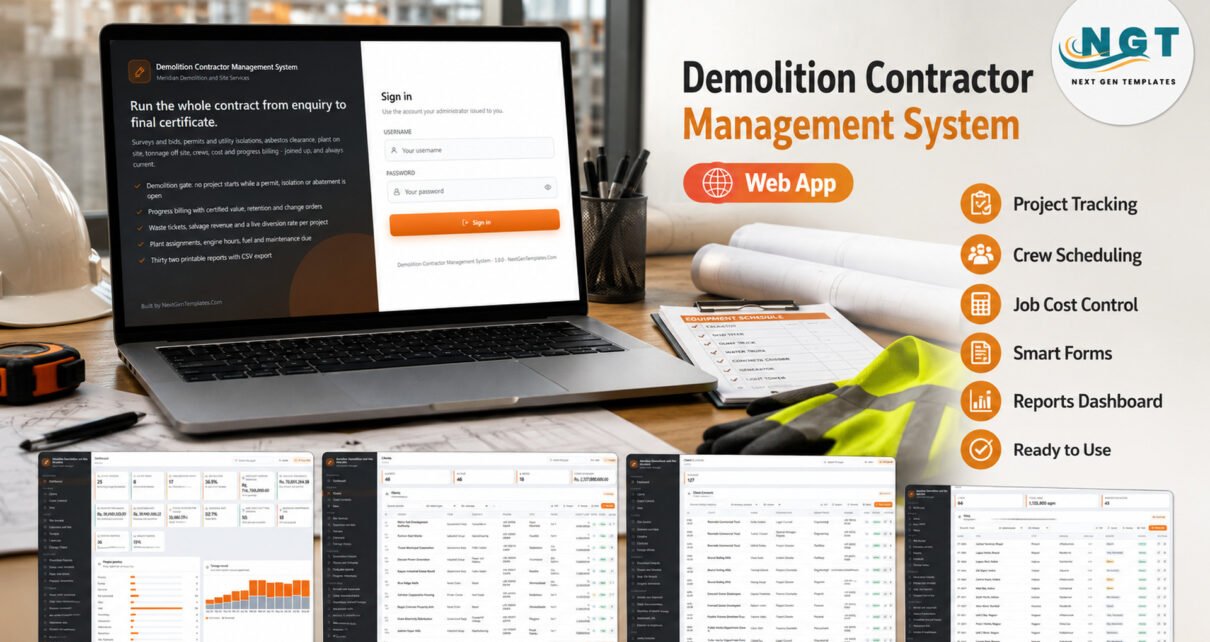
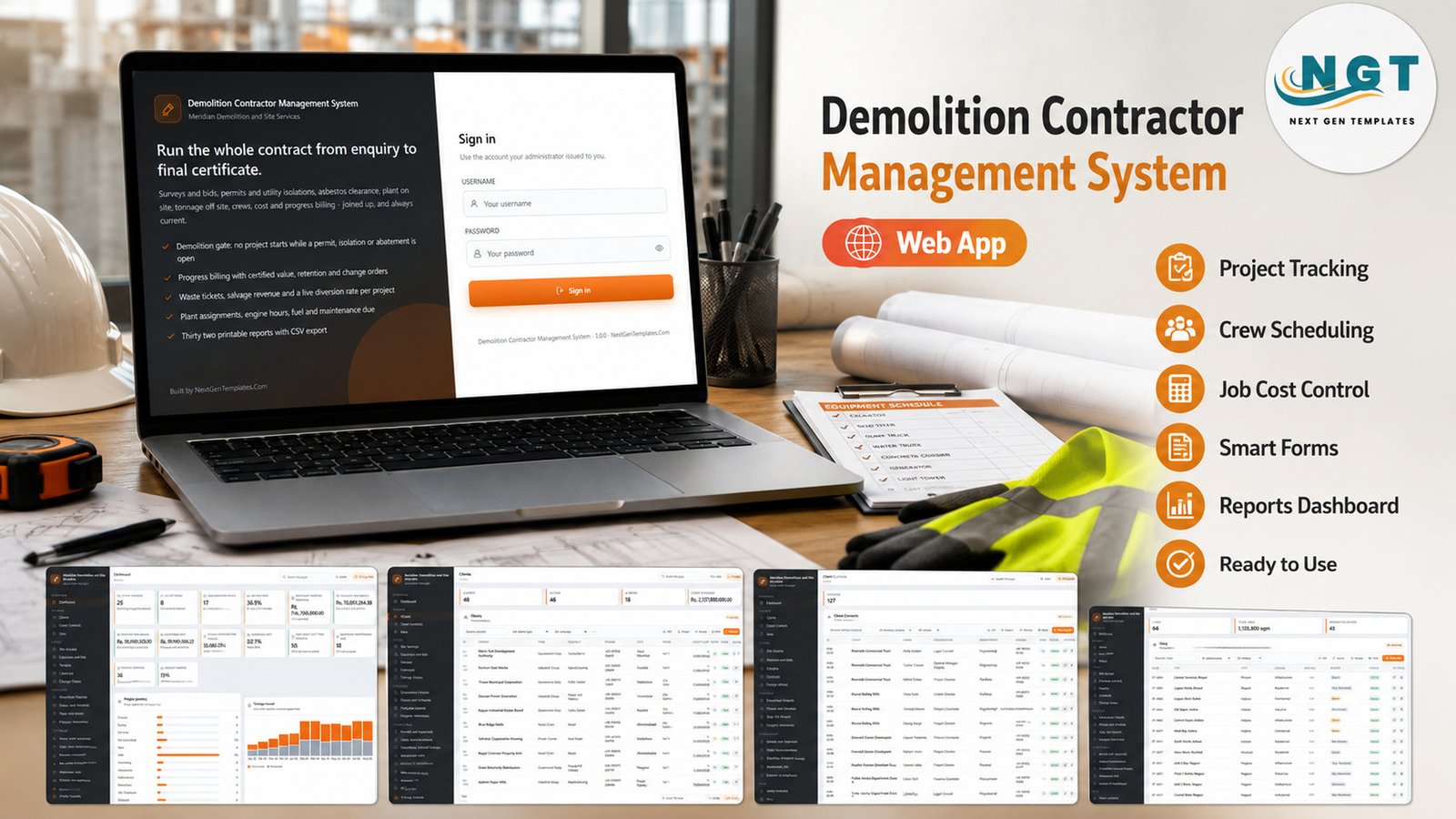
The Demolition Contractor Management System Web App is a Google Apps Script back office built specifically for demolition, strip-out and site-clearance contractors. It ships 47 screens over a 45-tab Google Sheets database, seeded with 11,006 records across 140 demolition projects, 234 permits, 76 hazardous material surveys, 105 method statements, 806 disposal tickets, 2,145 timesheets and 32 printable reports. Deployment takes about 15 minutes: paste two files into a new Apps Script project, deploy as a web app, run setup once.
The problem it solves is not “we need a project tracker”. Demolition contractors usually have one of those. The problem is that the pieces that decide whether a job can legally start – the Demolition Permit, the utility isolation, the asbestos survey and its clearance certificate – live in a different place from the programme, the plant diary and the payment applications. So a crew mobilises against a consent nobody chased. This system puts them on the same spine and refuses the stage change while anything is open.
🚀 Try the Live Demo Before You Buy
We have deployed this system in our own Google account so you can open every page, every module and every one of the ten roles – against the full seeded database – before you spend anything. No signup, no email required.
🔑 Test Login Credentials – every delivered role
Sign in as admin to see everything, then sign out and come back as sverma (Site Supervisor) or viewer – the money columns vanish from every screen and the commercial reports disappear from the report centre. That role separation is the point of the product, and it takes ten seconds to see.
💡 These credentials are public on purpose. They are the seeded logins of a shared demo instance that resets – not a customer deployment, and not a system anyone runs a real business on. When you buy, you deploy your own private copy inside your own Google account and change or delete every one of these accounts on the Users screen before anybody else signs in.
Key Features of the Demolition Contractor Management System Web App
- A demolition gate enforced on the server. A project cannot move to the Demolition stage while a required permit is unapproved or expired, a utility disconnection is unconfirmed, or an asbestos-positive survey has no completed abatement job and clearance certificate number. The refusal names every open item, and because the check runs server-side, no screen and no CSV import can route around it.
- Thirteen lifecycle stages. Enquiry, Survey, Estimate, Bid Submitted, Won, Lost, Permitting, Abatement, Mobilisation, Demolition, Site Clearance, Complete, Closed. Every stage change is written to the audit log with user, role, record and detail.
- Progress billing that is calculated, never typed. Contract value plus approved change orders, certified against milestone weighting, less retention and everything previously invoiced, plus tax. A receipt can never take an application past its gross value.
- Waste, salvage and a live diversion rate. Recovered tonnage plus salvage divided by everything moved gives a diversion rate on the dashboard and per project. Asbestos waste can only be sent to a licensed hazardous waste facility.
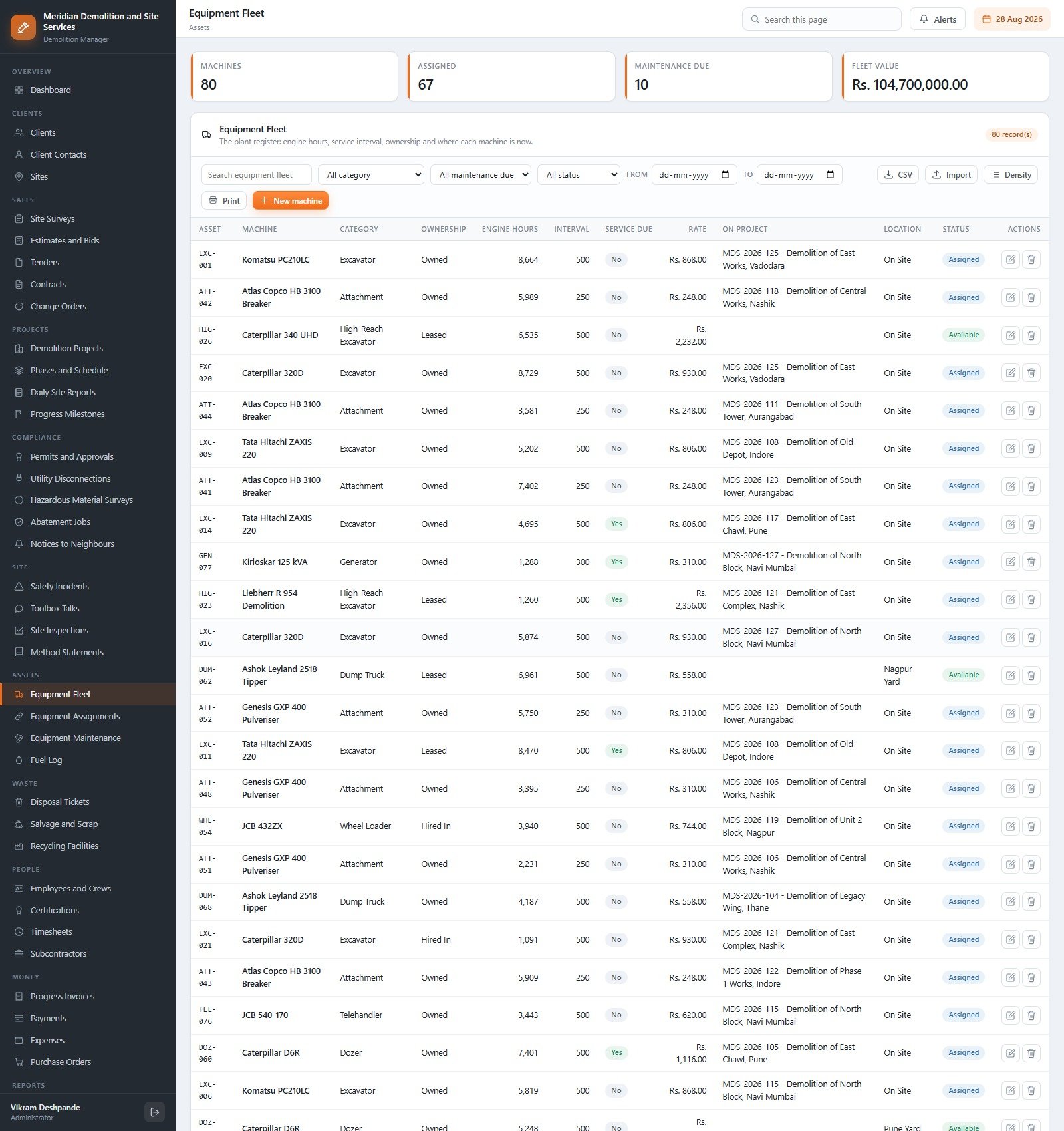
- A plant register that refuses clashes. Eighty machines with engine hours, service interval, ownership, day rate and location. An overlapping assignment is refused and the clash is named.
- Ten roles on one permission map that drives both the sidebar and the server-side guard on every entry point.
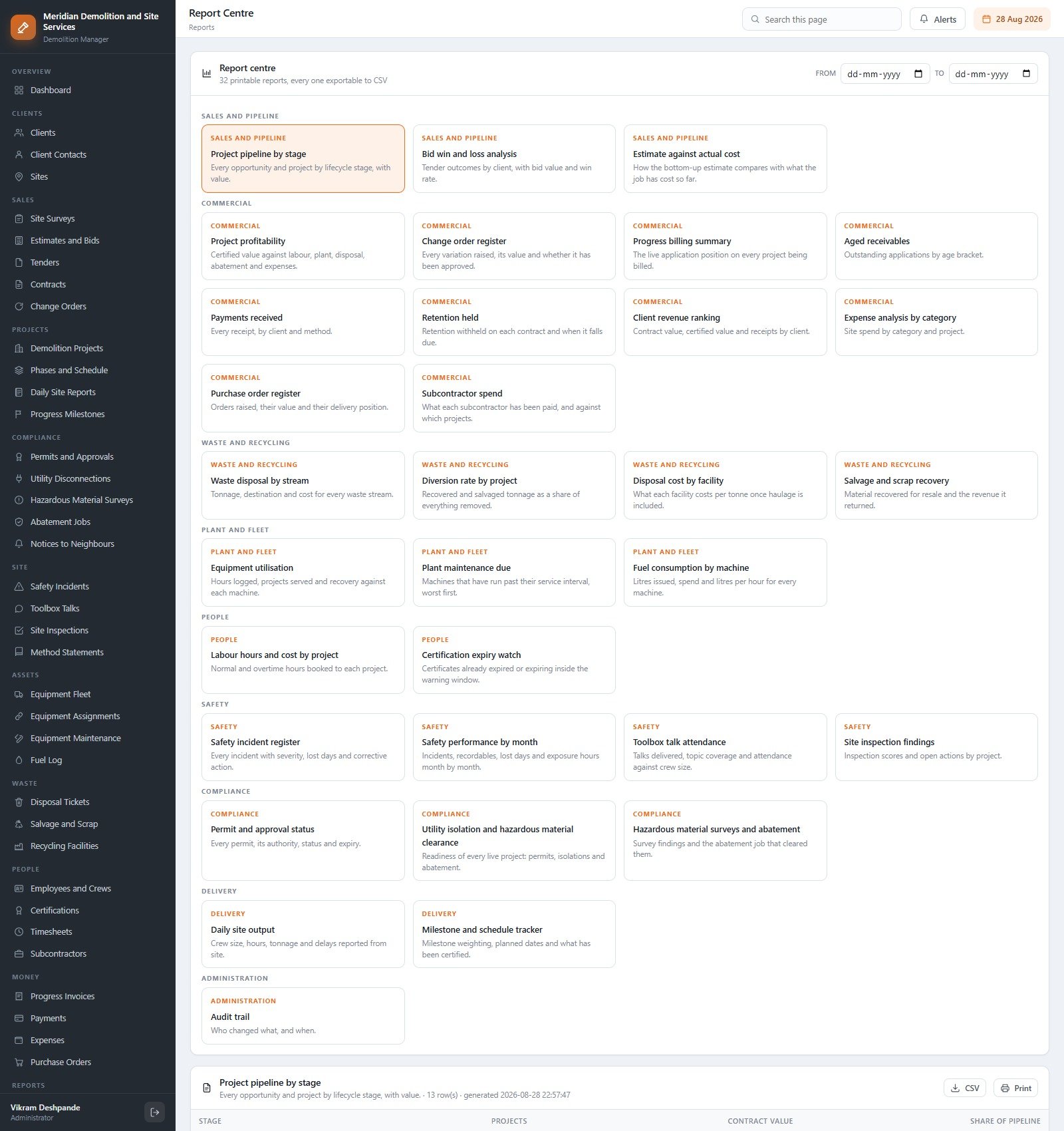
- 32 printable reports, every one exportable to CSV, and 458 editable dropdown values that appear on the forms immediately.
What This System Does Not Do
Demolition is a licensed, safety-critical trade, so this has to be said plainly and early. The Demolition Contractor Management System Web App is an administrative record-keeping tool. It is a place to record what a qualified person has already decided.
- It does not make you compliant with OSHA demolition standards, HSE, CDM, the EPA, local demolition permitting or any asbestos or hazardous-material regulation.
- It is not a structural engineering assessment, a demolition method statement approval, an asbestos survey or a clearance certificate. It stores the reference numbers a competent person issued.
- It does not replace a licensed demolition contractor’s statutory duties, notifications or permits.
- It reads no sensors, no telematics and no weighbridge, and files nothing to any authority or tax portal. It is not accounting software.
The Compliance Officer and Safety Officer roles exist so the paperwork a competent person produced lands against the right project before work starts. The judgement stays with your people.
Screens Explained
Dashboard
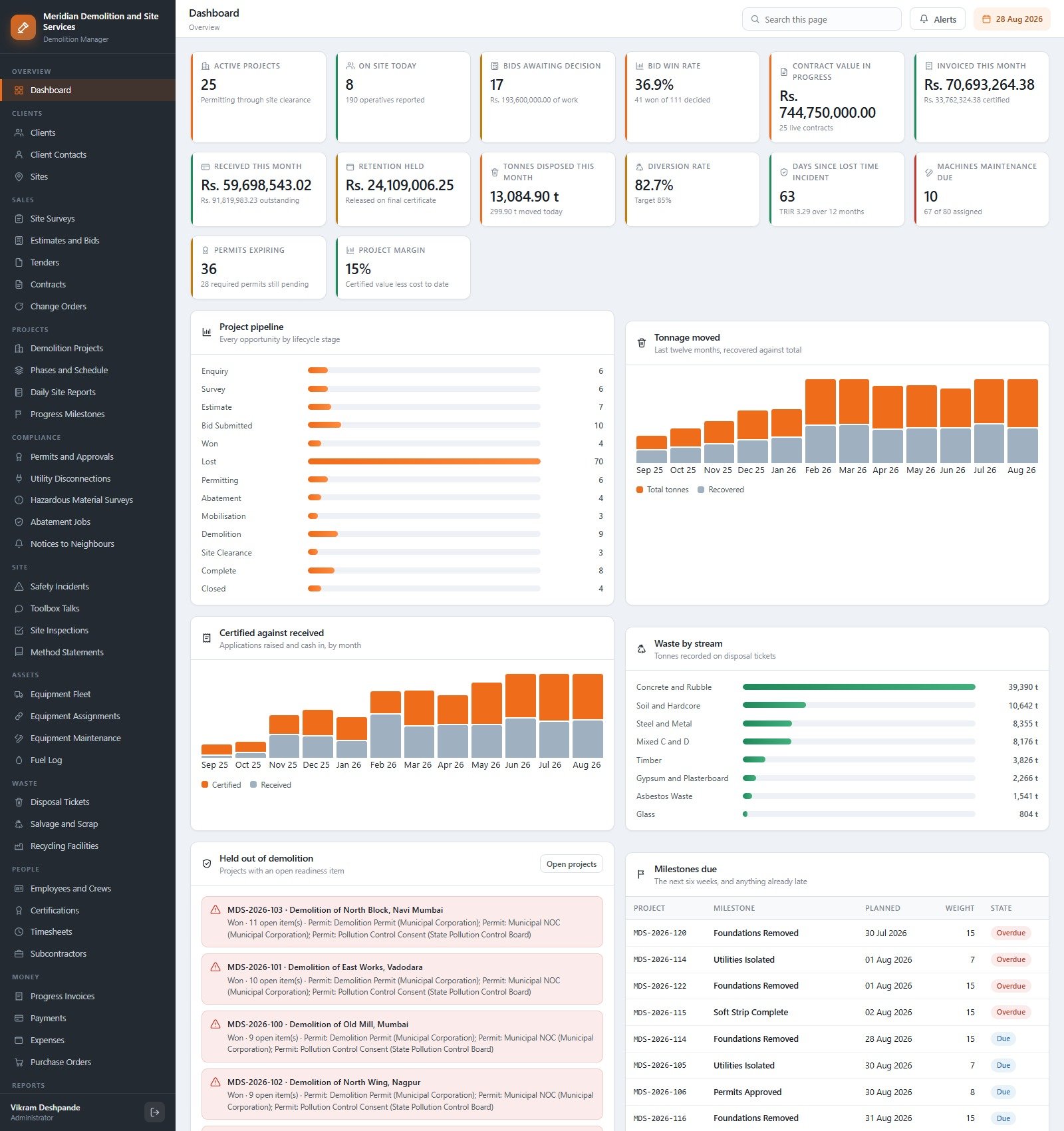
Twelve cards – active projects, on site today, bids awaiting decision, bid win rate, contract value in progress, invoiced this month, received this month, retention held, tonnes disposed this month, diversion rate, days since lost time incident and machines maintenance due – above a project pipeline by stage, tonnage moved over twelve months, certified against received, waste by stream, a “held out of demolition” panel naming every open readiness item, and milestones due.
Demolition Projects
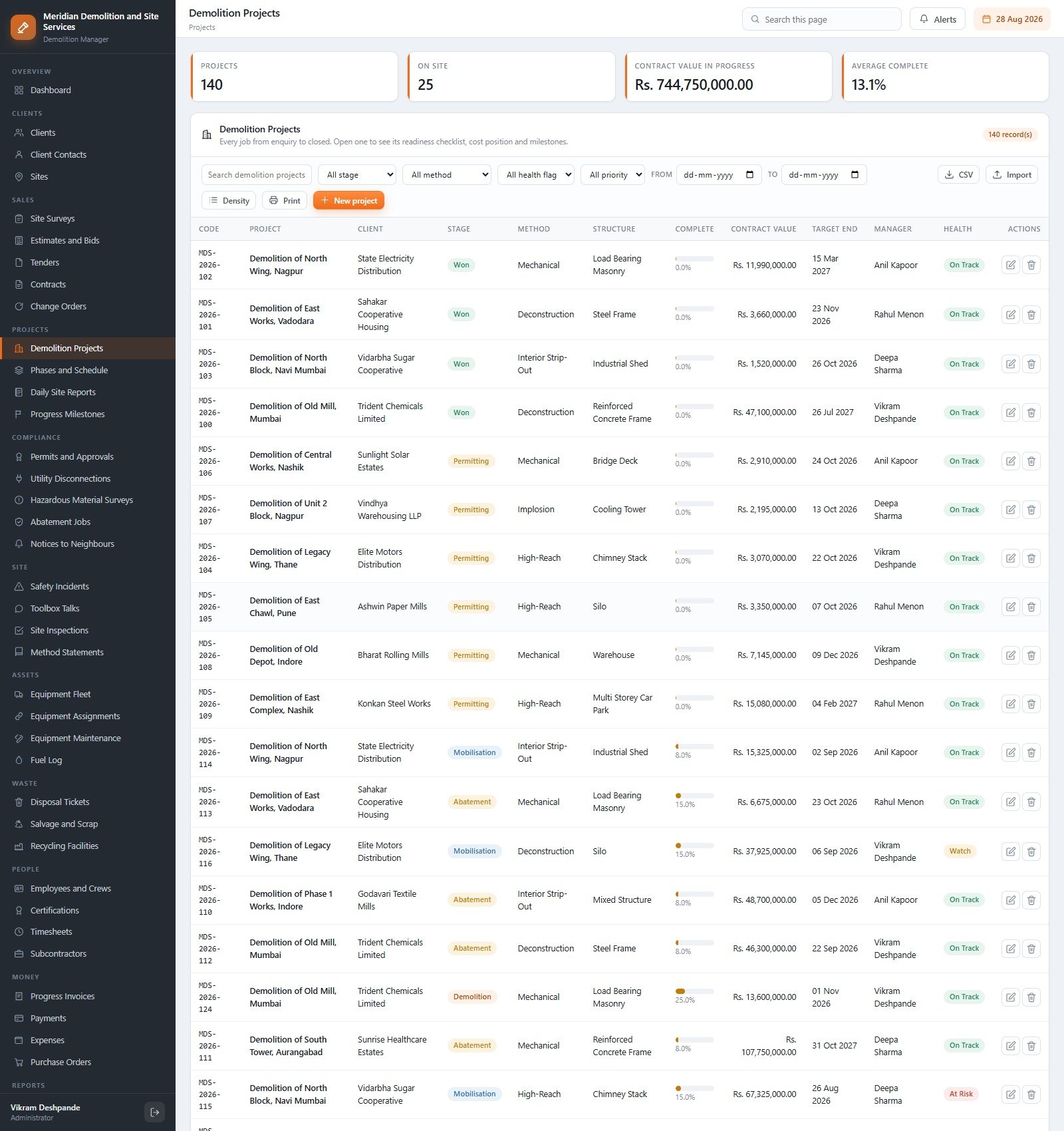
Every job from enquiry to closed, with stage, method (Mechanical, Deconstruction, High-Reach, Interior Strip-Out, Implosion), structure type, percent complete, contract value, target end, manager and a health flag. Open one to see its readiness checklist, cost position and milestone list together.
Permits and Approvals
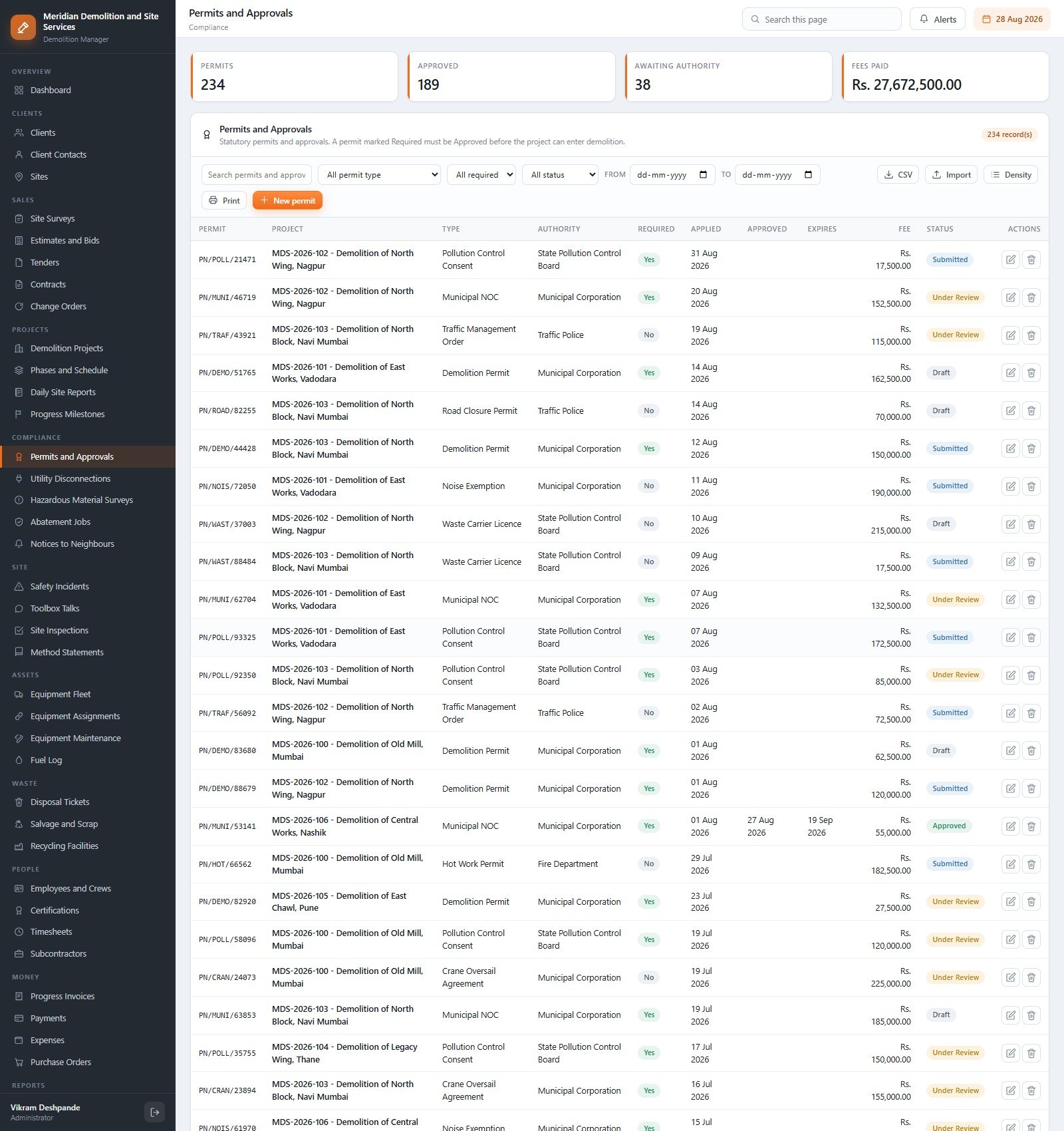
Statutory permits by type and authority – Demolition Permit, Municipal NOC, Pollution Control Consent, Traffic Management Order, Road Closure, Noise Exemption, Waste Carrier Licence, Hot Work, Crane Oversail – each with a Required flag, applied, approved and expiry dates, fee and status. Settings carry a “warn this many days before a permit expires” value.
Hazardous Material Surveys and Abatement Jobs
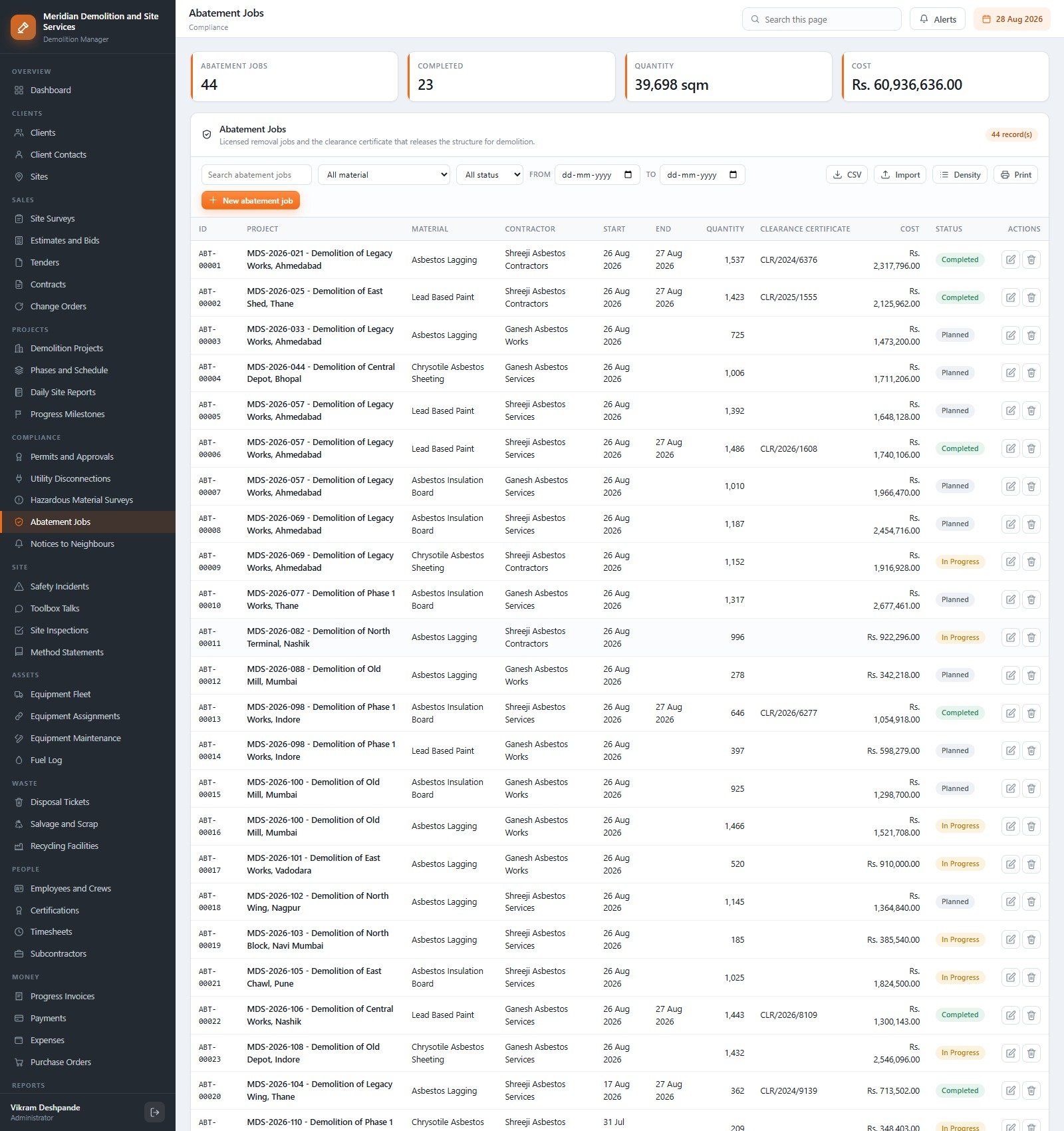
Surveys record asbestos, lead, mould and PCB findings with the laboratory name, risk rating and quantity. Abatement jobs record the licensed remover, the material, the tonnage, the cost and the clearance certificate number – and a job cannot be marked Completed without that number.
Equipment Fleet
Excavators, high-reach excavators, breakers, pulverisers, crushers, dozers, tippers, telehandlers, generators and bowsers, each with engine hours against a 250 or 500-hour service interval, ownership, day rate, current project and location.
Report Centre
Thirty-two reports in nine groups: Sales and Pipeline, Commercial, Waste and Recycling, Plant and Fleet, People, Safety, Compliance, Delivery and Administration. Diversion rate by project, Permit and approval status, Utility isolation and hazardous material clearance, Certification expiry watch, Estimate against actual cost and Subcontractor spend are all one click and one CSV away.
The rest follows the same pattern: Clients, Client Contacts and Sites; Site Surveys, Estimates and Bids, Tenders, Contracts and Change Orders; Phases and Schedule, Daily Site Reports and Progress Milestones; Utility Disconnections and Notices to Neighbours; Safety Incidents, Toolbox Talks, Site Inspections and Method Statements; Equipment Assignments, Maintenance and Fuel Log; Disposal Tickets, Salvage and Scrap and Recycling Facilities; Employees and Crews, Certifications, Timesheets and Subcontractors; Progress Invoices, Payments, Expenses and Purchase Orders; then Users, Roles and Permissions, Dropdown Lists, Settings, Audit Log, Database Archive, Backup and Help.
Feature Comparison: This System vs. Spreadsheets vs. Paid Construction SaaS
| Feature | Demolition Contractor Management System | Spreadsheets and shared folders | Procore / Autodesk Build / Buildertrend |
|---|---|---|---|
| Cost | $39.99 one-time ✅ | Free, plus the hours | $375-$1,000+ per month, usually annual |
| Per-user fees | None – unlimited accounts ✅ | None | Seat or project-volume based |
| Where the data lives | Your own Google account ✅ | Your own Drive | The vendor cloud |
| Setup time | About 15 minutes ✅ | Days of building, then constant tweaking | Weeks, often with paid onboarding |
| Permit / isolation / abatement gate | Built in, server-enforced ✅ | Manual discipline | Generic workflow you configure |
| Asbestos survey and clearance register | Included ✅ | A tab somebody maintains | Add-on module or custom form |
| Hiding commercial values by role | 10 roles, server-side guard ✅ | Not possible in one file | Yes |
| Source code you can edit | Yes – Apps Script, yours ✅ | Not applicable | No |
| Year-one cost at 8 users | $39.99 ✅ | $0 plus rework | $4,500-$12,000+ |
For a demolition contractor who wants permits, abatement clearance, plant and progress billing joined up without signing an annual enterprise contract, this sits in the sweet spot.
Who Should Use This Template
Perfect for:
- Demolition and strip-out contractors running 5-150 live jobs with 20-200 site staff
- Site clearance, deconstruction and asbestos-abatement firms that must file permits, isolations and clearance certificates against the right project
- Plant-heavy contractors who want engine hours, fuel and maintenance-due beside the job
- Owner-managers who want estimates, progress billing and retention in one place without per-seat pricing
Not a fit if:
- You are looking for a compliance guarantee – this records paperwork, it does not produce or approve it
- You need SOC 2, SSO, offline mobile capture, or telematics and weighbridge integrations
- You need statutory accounting, payroll or e-invoicing filed from the same system
- You will not deploy and maintain your own Apps Script project
Real-World Use Cases
Vikram runs a 90-person demolition firm with 25 live jobs. Before, a job would reach mobilisation and somebody would discover the Pollution Control Consent had never been approved. Now the gate refuses the stage change and names the open item, and the dashboard surfaces it a fortnight earlier.
Maria is a compliance officer across eleven sites. She files the laboratory findings, the licensed remover job and the clearance certificate number in one place, and the system will not let an abatement job close without that number. She never sees a contract value, because her role carries no commercial access.
Karthik manages 80 machines. Engine hours against the service interval flag maintenance due, the fuel log gives litres per hour per machine, and an overlapping booking is refused with the clash named – so the excavator that used to be promised to two sites at once no longer is.
Advantages
The cost case is straightforward: one payment against a subscription that scales with headcount. The operational case is better. Because permits, isolations, surveys, abatement, plant, waste, labour and billing sit in one database, a project record can answer “can this start, what has it cost, and what has been certified” in one screen instead of four systems and a phone call. Everything exports to CSV, everything prints, and the audit log records who changed what.
How to Set It Up
- Open the live demo first and sign in as admin, then as Site Supervisor. Two minutes tells you whether the role model fits.
- Create a new project at script.google.com, paste
Code.cs.txtintoCode.gs, add an HTML file named exactlyIndexand pasteIndex.txtinto it. - Deploy as a Google Apps Script web app with Execute as Me and Who has access Anyone.
- Run setup once – from the First run panel on the sign-in card, or from the editor. It builds 45 tabs in resumable stages.
- Sign in as admin and change or delete every seeded account before anyone else gets the URL.
- Set company details, currency symbol, tax, retention, margin, overhead and print size under Settings, then edit the dropdown lists.
Opportunities for Improvement
Honest notes from working through the build. The seeded demo data is in Indian Rupees, so every money figure on the demo reads Rs. until you change the currency symbol under Settings – one field, but do it before you show the system to a client. The dashboard “days since lost time incident” and TRIR figures are computed from the seeded incident history, so they will look odd until you have a few months of your own data. There is no native mobile app; the screens are responsive but site staff will be typing on a browser. And there is no import from Procore, Sage or Xero – CSV import accepts pasted rows against the exact headings, which is enough for a migration but is not an integration.
Best Practices
- Take a backup from Administration before any import, any archive run and any change to roles.
- Set the permit and certificate warning windows in Settings to match your own lead times, not the defaults.
- Give site staff the Site Supervisor role rather than Project Manager – the money columns stay hidden and nothing else is lost.
- Archive old daily reports, timesheets and fuel issues once a year; the archive keeps a full copy of every record, so nothing is destroyed.
- Remember that Apps Script serves the last deployed version – publish a new version after any edit.
Explore Relevant Templates
If you work across the wider build programme, the Fire & Safety Audit Management System Web App is the closest neighbour for site safety paperwork, and the Golf Club Management System Web App shows the same role-and-permission architecture applied to a completely different trade. For the reporting layer without a full system, see the Scaffolding Services KPI Scorecard in Google Sheets, the Home Renovation Contractor KPI Scorecard in Google Sheets and the CCTV Installation KPI Dashboard in Google Sheets. The Content Writing Agency Management System Web App is another example of the same Apps Script foundation.
On the store, the Civil Contractor Job Management System Web App, the Building Material Supplier Management System Web App and the Architecture Firm Project Management System Web App cover adjacent parts of the same supply chain.
Frequently Asked Questions
Does this make our demolition work compliant?
No. The Demolition Contractor Management System Web App is an administrative record-keeping system. It does not confer compliance with OSHA, HSE, CDM, EPA or local permitting rules, it is not an asbestos survey or a clearance certificate, and it does not replace a licensed contractor statutory duties. It stores what qualified people have decided and issued.
Can I try it before buying?
Yes. The live demo above is a fully seeded deployment carrying all twelve accounts across ten roles, with the credentials printed on this page. Sign in as admin and then as viewer to watch every commercial value disappear. No email, no signup, nothing to install.
How long does setup take?
About 15 minutes. Paste two files into a new Apps Script project, deploy as a web app, run setup once. The build is staged and resumable, so a free Google account that hits the six-minute execution limit carries on where it left off rather than failing.
How many people can use it, and can I hide costs from site staff?
Unlimited accounts at no extra cost. Ten roles ship configured, and Site Supervisor, Compliance Officer, Safety Officer and Viewer all see the operational screens with the money columns blanked and the commercial reports removed from the report centre.
How does this compare with Procore or Buildertrend?
Those are full construction platforms with integrations, mobile apps and support contracts, priced per month. This is a $39.99 one-time system you own and can edit, built around demolition specifically: the permit and abatement gate, the diversion rate, the plant register. If you need telematics and SOC 2, buy the platform.
What is in the download?
A ZIP holding Code.cs.txt, Index.txt and a PDF user manual covering deployment, the role guide, the seeded logins and the editor commands. No add-ons, no account, no ongoing fee.
About the Author
Built by PK – Microsoft Certified Professional with 15+ years of Excel, Google Sheets and Power BI experience. Founder of NextGenTemplates, reaching 300K+ subscribers across YouTube. Every template is hand-built and tested before release.
Conclusion
If permits, isolations and asbestos clearance currently live in a folder while the programme lives in a spreadsheet and the applications live in an accounts package, the Demolition Contractor Management System Web App puts all three on one spine and refuses to let a job start with a gap. Open the live demo first, sign in as admin and then as a Site Supervisor, and decide in two minutes whether the role model matches your site.
👉 Click here to purchase the Demolition Contractor Management System Web App
Instant download · One-time payment · No subscription · Unlimited users · Runs in your own Google account
🎥 More walkthroughs on YouTube.com/@NeoTechNavigators
Last updated: September 2026