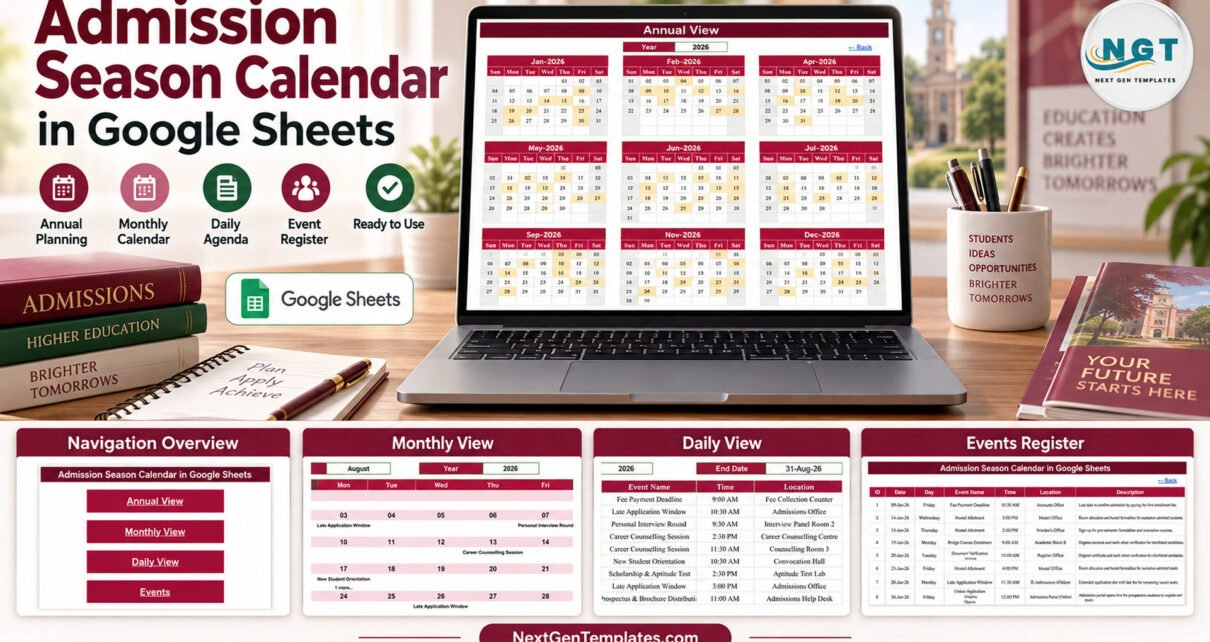
The Admission Season Calendar in Google Sheets puts an entire admission cycle on one shared spreadsheet: 100 sample events dated from 9 January to 28 December 2026, 20 event types across 32 locations, and three calendar views (Annual, Monthly and Daily) that all read from a single Events sheet. Every month holds 8 or 9 events, and all 100 dates carry the correct weekday.
Admission season is a run of fixed dates owned by different people: the application window opens, open houses and webinars run, entrance tests and interviews follow, then document verification, seat allotment, fee deadlines, hostel allotment and orientation. When those dates live in separate emails and notice-board printouts, somebody always misses one. This template gives the admissions office one calendar to maintain and a link to share with everyone else.
Key Features of the Admission Season Calendar in Google Sheets
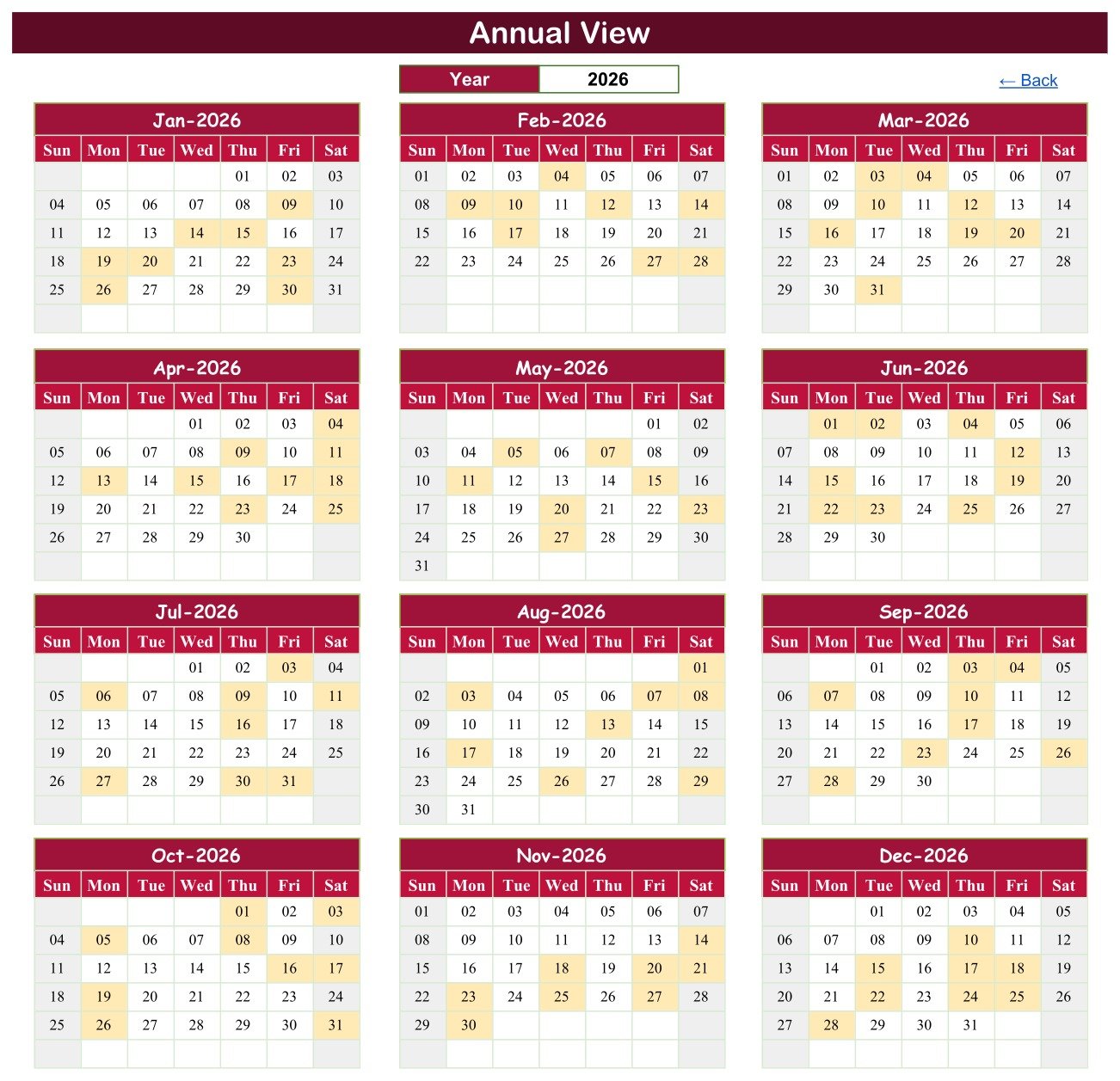
- Annual View with 12 month grids. Enter a year and all twelve months redraw, with every date that holds an event shaded.
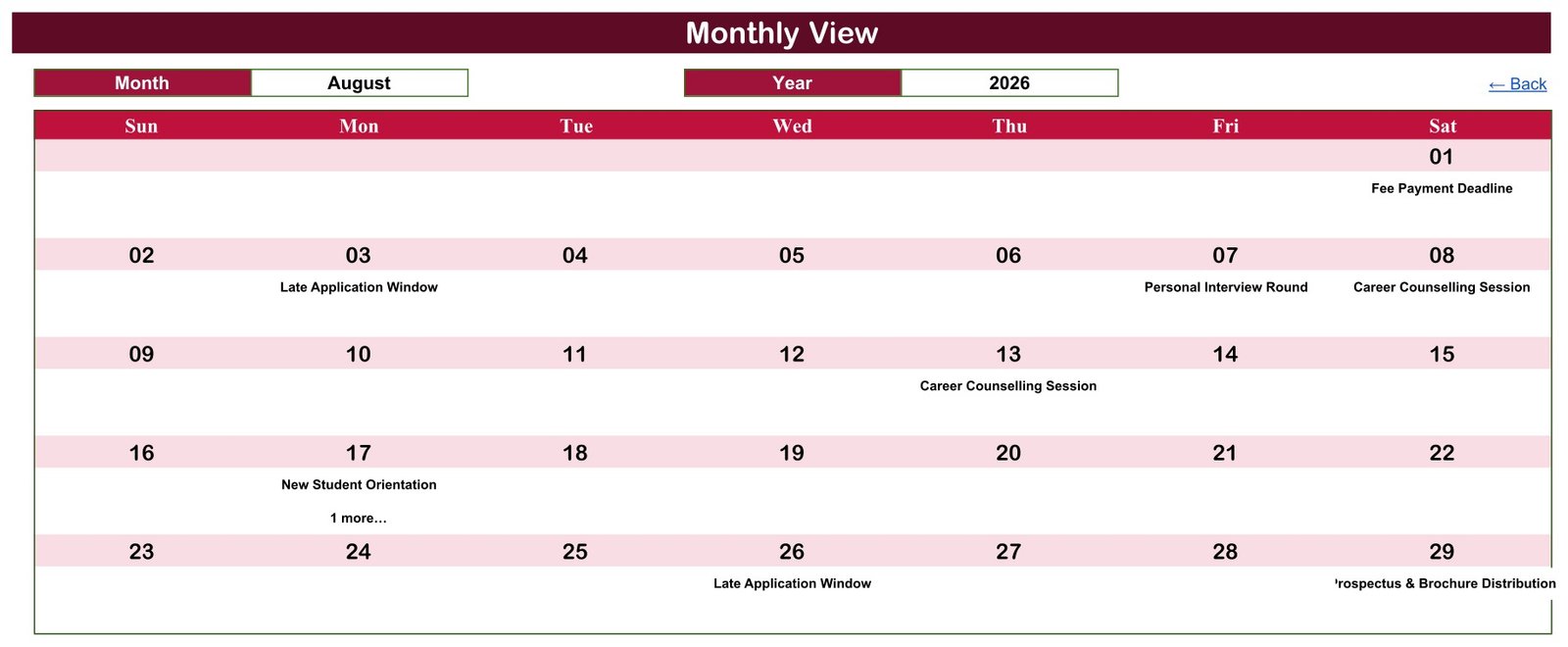
- Monthly View with Month and Year dropdowns. The first event of each day is written under its date, and a “1 more…” line flags a second event on the same day.
- Daily View for any date range. A Start Date and End Date pull every matching event, with ID, date, day, event name, time, location and description.
- One Events sheet feeds every view. Edit a row once and the Annual, Monthly and Daily views follow, because they are formulas over that table.
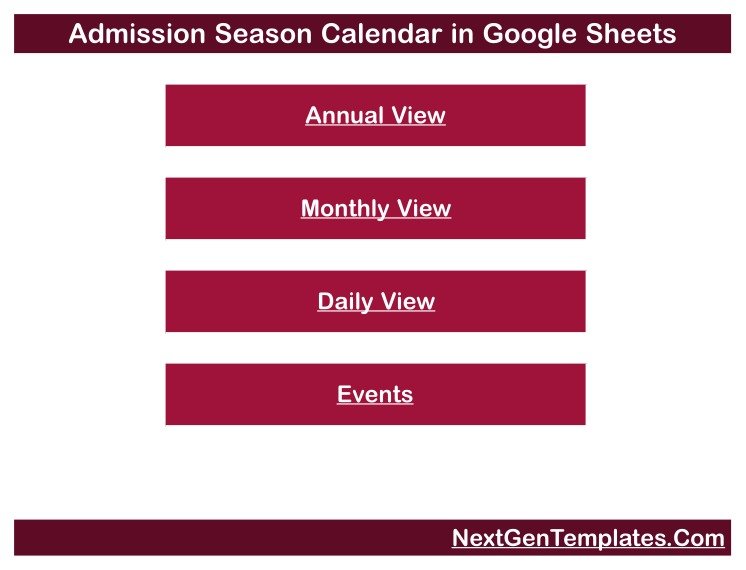
- Home page navigation. Four buttons open the views, and each view has a Back link.
- Realistic sample data. Twenty admission-season event types, from Online Application Window Opens to New Student Orientation, show how a full season reads.
Three facts are worth knowing before you buy. First, the template holds 100 sample events with IDs 1 to 100 in one continuous run. Second, the Monthly View shows one event name per date plus a count of any extras, while the Daily View shows every event in full. Third, it is a scheduling template only: there are no applicant records, no application forms and no fee collection.
Sheets Explanation
Home
The landing page carries four buttons, Annual View, Monthly View, Daily View and Events, plus a NextGenTemplates.Com footer link. It is the quickest way to move around the file on a phone.
Annual View
Twelve month grids for the year in the Year box (2026 in the sample). A shaded cell means at least one event falls on that date. Scanning the grid shows at a glance that the sample season is spread evenly, with no empty month.
Monthly View
Choose a month and a year from the dropdowns to get a Sunday-to-Saturday grid. Under each date sits the name of the first event on that day, looked up with VLOOKUP. The August 2026 sample shows Fee Payment Deadline on the 1st, Late Application Window on the 3rd and 26th, Personal Interview Round on the 7th, Career Counselling Session on the 8th and 13th, New Student Orientation on the 17th with “1 more…”, and Prospectus & Brochure Distribution on the 29th.
Daily View
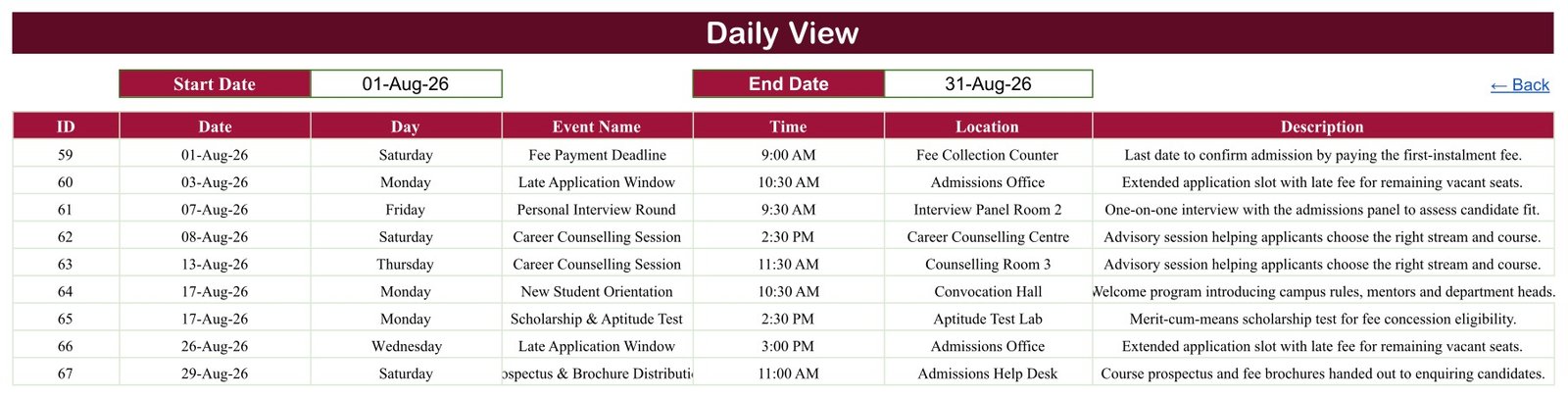
A date-range report built on the FILTER function. Set a Start Date and an End Date and the matching Events rows appear in date order. For 1 to 31 August 2026 it returns 9 events, IDs 59 to 67, including both events on 17 August: New Student Orientation at 10:30 AM in the Convocation Hall and the Scholarship & Aptitude Test at 2:30 PM in the Aptitude Test Lab.
Events
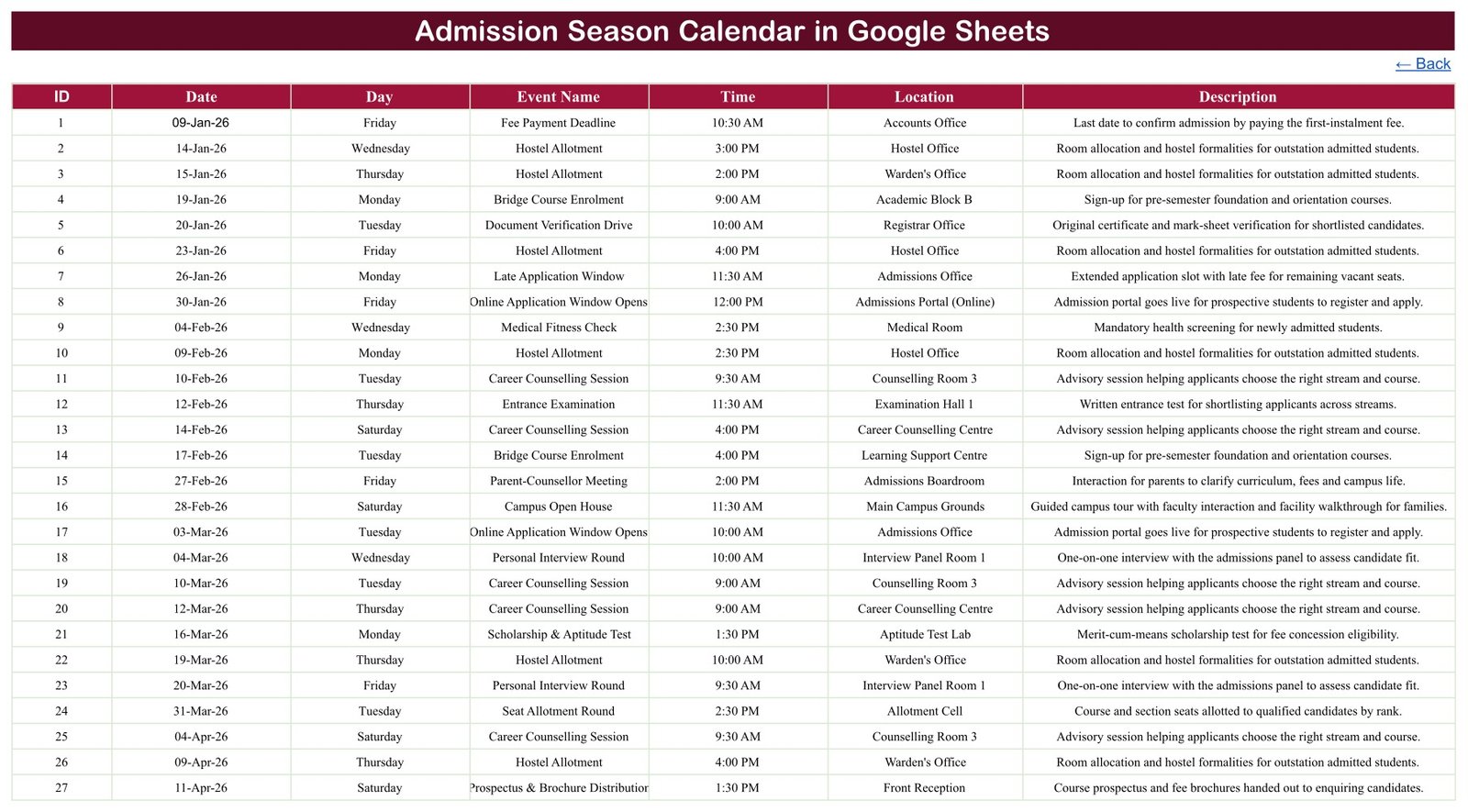
The master table and the only sheet you edit. Seven columns: ID, Date, Day, Event Name, Time, Location and Description. The most frequent sample events are Career Counselling Session (10 rows), Hostel Allotment (9) and Late Application Window (8). The busiest locations are the Admissions Office, the Admissions Portal (Online) and Counselling Room 3. A hidden List tab holds the month names and years behind the dropdowns.
Checking the Sample Data
We exported the live sheet and checked the Events table row by row. All 100 IDs run from 1 to 100 without a gap, and the rows are in date order. Every one of the 100 Day values matches the weekday of its date. Start times fall between 9:00 AM and 4:00 PM. Only two dates carry two events, 15 May and 17 August, which is exactly where the Monthly View shows its “1 more…” note.
Admission Season Calendar vs. an Excel Calendar vs. a Paid Admissions CRM
| Feature | Admission Season Calendar (Google Sheets) | Excel calendar template | Paid admissions CRM |
|---|---|---|---|
| Cost | ✅ $4.99 one-time | Template price plus an Excel licence | Subscription, usually quoted per institution |
| Platform | ✅ Any browser with a Google account | Microsoft Excel desktop | Vendor web app |
| Setup time | ✅ Make a copy, replace the sample rows | Download and open | Implementation project |
| Real-time team collaboration | ✅ Built into Google Sheets | Only when stored in OneDrive or SharePoint | ✅ |
| Mobile access | ✅ Google Sheets app | Excel mobile app | ✅ Usually |
| Share with a link | ✅ View-only or edit link | File sharing | Named user accounts |
| Annual, Monthly and Daily views | ✅ Included | Depends on the template | Varies |
| Applicant records, forms, fee collection | ❌ Not included | ❌ Not included | ✅ The core purpose |
| Year-1 cost at 5 users | ✅ $4.99 in total | Template plus 5 Excel licences | Contract pricing |
For an admissions office that wants one shared season calendar without buying an applicant-management system, this template covers the scheduling side and deliberately nothing more.
Who Should Use This Template
Perfect for:
- Admissions coordinators at schools, colleges and coaching institutes who keep an internal admission timeline
- Registrar and front-office teams sharing interview, verification and counselling slots
- Hostel, medical and orientation teams who need to know when their week arrives
Not a fit if:
- You need to collect applications, store applicant data, rank candidates or take fees
- You need reminders, end times, recurring events or Google Calendar sync
- You are looking for official admission deadlines; every sample date is fictional
Real-World Use Cases
A college admissions coordinator enters the open houses, the entrance examination, group discussion rounds, interview panels and the merit list date, then shares a view-only link so panel members can check the Monthly View before blocking their diaries.
A coaching institute’s front desk keeps virtual admissions webinars, career counselling sessions and bridge course enrolment days in one sheet, and sets the Daily View to the coming week every Monday to brief the help desk.
A residential school’s hostel and orientation team sets the Daily View to the weeks before term and sees hostel allotment, medical fitness checks and new student orientation side by side, with the room or office for each.
Advantages of This Calendar
- One source of truth. Staff stop comparing forwarded notices, because every view reads the same Events table.
- Nothing to install. It opens in a browser or the Google Sheets app, and link sharing is built in.
- Low cost. A one-time $4.99 instead of a subscription for what is a scheduling job.
- Printable ranges. The Daily View turns any week or month into a clean list for a notice board or a briefing.
Opportunities for Improvement
This template is deliberately simple, and a few limits are worth stating plainly:
- The Day column is typed, not calculated. It is plain text, so if you change a date you must update the weekday yourself.
- One event name per date in the Monthly View. A busy day shows the first event plus “1 more…”; open the Daily View to see the rest.
- Start time only. There is no end time or duration column, so overlapping slots are not flagged.
- No reminders or sync. It sends no email or SMS and does not connect to Google Calendar.
- Long names can clip. Prospectus & Brochure Distribution is cut off in the Daily View’s Event Name column and overflows its Monthly View cell; widen the column or shorten the name.
Best Practices
- Delete all 100 sample rows before entering real dates, so no fictional event survives in a shared copy.
- Keep event names consistent (always “Personal Interview Round”, never a variation) so the views stay readable.
- Put the room, hall or online link in Location, and the owner or instructions in Description.
- Share view-only with most staff and give edit access to one or two people, using Google’s sharing settings.
- Avoid storing applicant personal details in Description; this is a calendar, not a records system.
Explore Relevant Templates
On this blog, the School Fee Due Calendar in Google Sheets uses the same four-view layout for fee dates, and the Parent-Teacher Meeting Calendar in Google Sheets covers the meetings that follow once students join. For the academic year itself, read about the Exam Timetable Calendar and the Class Timetable Calendar. For institution-level analytics, see the Colleges & Universities Dashboard and the Student Enrollment KPI Dashboard in Google Sheets.
In the store: School Fee Due Calendar, Exam Timetable Calendar and Colleges & Universities Dashboard.
Frequently Asked Questions
Is this an admissions management or applicant tracking system?
No. The Admission Season Calendar is a scheduling template for admission-season events. It stores an event name, date, time, location and description only, with no applicant records, application forms, merit lists or fee collection. Use it next to whatever system handles your applications.
Are the sample admission dates real deadlines?
No. All 100 sample events are fictional examples dated across 2026 to show how the views behave. They are not linked to any board, university or government schedule. Delete them and enter the dates your own institution publishes.
What do I need to use it?
A Google account and a browser, or the Google Sheets mobile app. Open the PDF from your download, follow its link and choose Make a copy. The copy is saved in your own Drive, and there is no add-on to install.
What happens when two events fall on the same day?
The Daily View lists both events in full. The Monthly View writes the first event under the date and adds a “1 more…” line. In the sample that happens on 15 May and 17 August, the only two dates that carry two events.
Can it send reminders or sync with Google Calendar?
No. The Admission Season Calendar in Google Sheets sends no email, SMS or push reminders and does not connect to Google Calendar. It is a shared spreadsheet that staff open or bookmark to check the schedule.
How long does setup take?
Making the copy takes about a minute. After that, setup is simply the time it takes to type or paste your own events into the Events tab; the Annual, Monthly and Daily views update as soon as the rows are in.
How does it compare with a paid admissions CRM?
A paid admissions CRM manages applicants, forms, communication and payments on a subscription. This calendar only schedules the season’s events, for a one-time $4.99. If you already run an application system, it gives staff a simple shared timeline beside it.
About the Author
Built by PK, Microsoft Certified Professional with 15+ years of Excel, Google Sheets and Power BI experience and founder of NextGenTemplates. Every template is built and tested before release.
Conclusion
If your admission dates are scattered across emails and printouts, this template gathers them into one Events table with Annual, Monthly and Daily views that anyone with the link can read. It is honest about its scope: a planning calendar, not an admissions system.
👉 Click here to Purchase the Admission Season Calendar in Google Sheets
✅ Instant download · One-time payment · No subscription
🎥 More tutorials: Youtube.com/@NeoTechNavigators
Last updated: September 2026