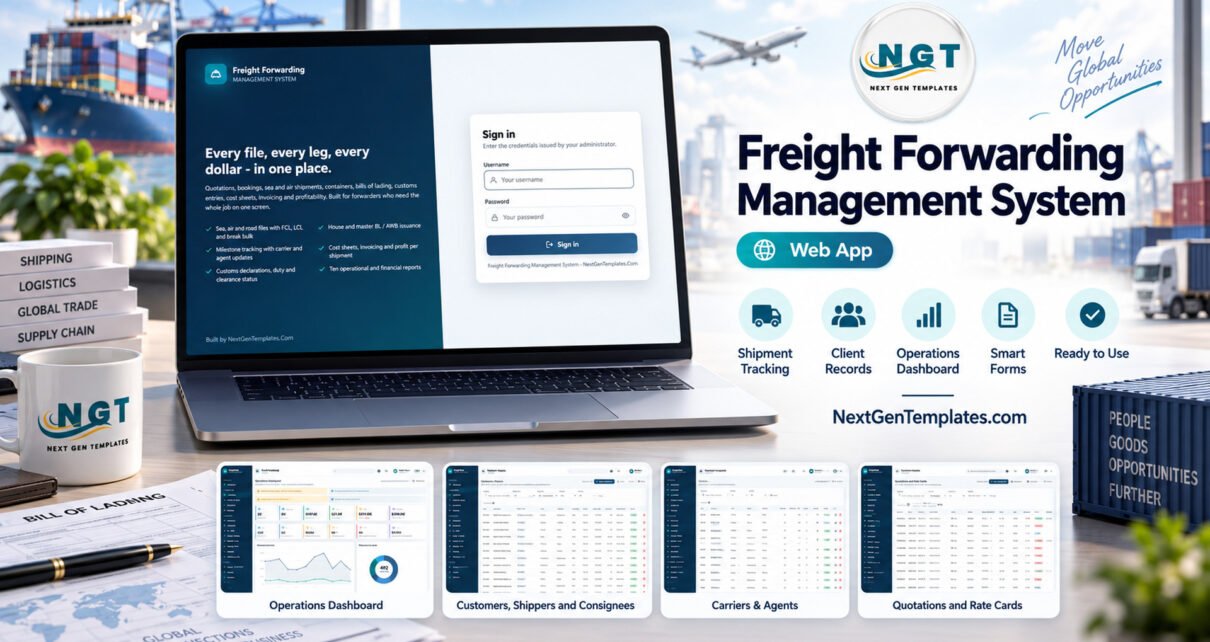
The Freight Forwarding Management System Web App is a self-hosted Google Apps Script system that runs a forwarding office from the first rate quotation to the last customer receipt. It ships with 24 working modules, 10 built-in reports, 8 permission-driven roles and about 14,700 rows of fictional sample data across 27 Google Sheets tabs, and it deploys into your own Google account in about 15 minutes.
Many small forwarders still run the job on a rate spreadsheet, a booking email thread, a separate BL template in Word and an accounts file that only shows the margin weeks later. This freight forwarding management system web app puts that whole chain in one database: quotations convert into bookings, bookings become shipment files, files carry containers, cargo, routing, bills of lading, customs entries and a cost sheet, and the invoice is raised straight from that cost sheet. This guide walks through the main screens, what the system calculates, how it compares with spreadsheets and paid forwarding suites, and where its limits are.
Get the Freight Forwarding Management System Web App

🚀 Try the Live Demo Before You Buy
We have deployed this web app in our own Google account so you can test every page and every one of the 8 roles with realistic sample data before purchasing. No signup, no email required.
🔑 Test Login Credentials
Sign in as admin to see everything, including Users, Lists, Settings, the database archive and the Audit Log, then sign in as customs.broker or viewer to watch the sidebar and every server call shrink to that role’s permissions.
💡 These are the public logins of a shared demo instance that we reset regularly, not a system you would share with other buyers. What you get after purchase: the full source code (Code.gs + Index.html) and a user manual PDF with step-by-step deployment, so you run your own private copy in your own Google account.
Key Features of the Freight Forwarding Management System Web App
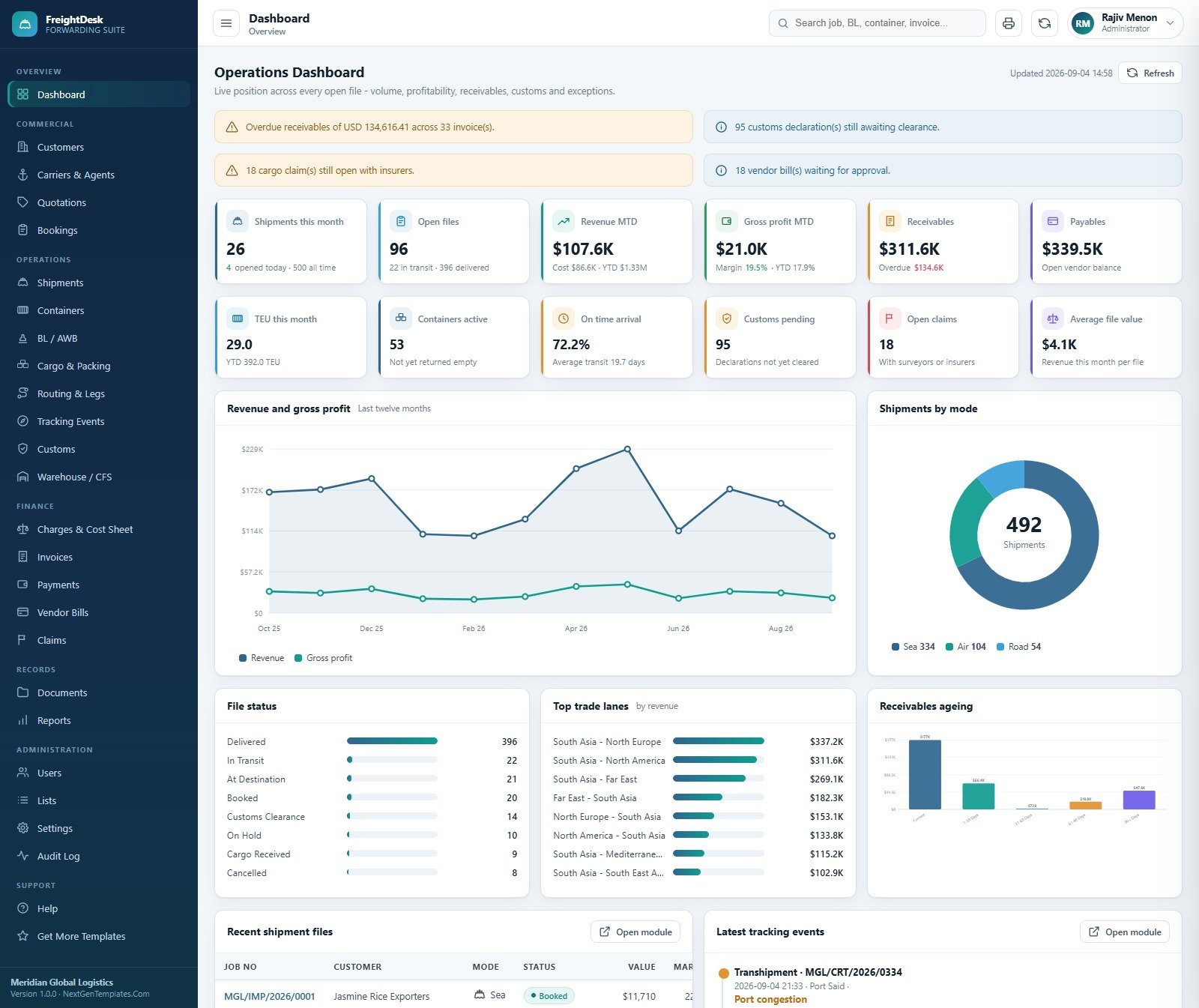
- A 12-card operations dashboard. Shipments this month, open files, revenue and gross profit month to date, receivables, payables, TEU this month, active containers, on-time arrival rate, customs pending, open claims and average file value, plus alert banners for overdue receivables, uncleared declarations, open claims and vendor bills waiting for approval.
- Quotation to booking in one step. Every quotation carries sell and buy on each rate line, a validity date and a status. Converting an accepted quote creates a confirmed carrier booking, marks the quote Accepted and records the booking number against it, so the same rate is never converted twice.
- One shipment file for sea, air and road. Job files cover import, export, cross trade and domestic moves with FCL, LCL, break bulk, air cargo, FTL and LTL loads. Rail and multimodal are available in the dropdown lists.
- Profit on every job. Sell and buy charge lines on the cost sheet recalculate the file’s gross profit and margin, and a single button raises the customer invoice from the sell side with tax applied to taxable lines.
- Documents that print. Invoices, house and master bills of lading and air waybills, packing lists, cost sheets, booking confirmations and delivery orders all print, and the print size can be set to 3 inch, 4 inch or A4.
- Roles checked on the server, not just hidden in the menu. One permission map drives both the sidebar and a guard on every server call, and every sign in, edit, approval, export and archive is written to the Audit Log.
Freight Forwarding Management System Screens Explained
Operations Dashboard
The dashboard opens on the live position across every open file. Below the KPI cards sit charts for Revenue and Gross Profit by Month over the last twelve months, Shipments by Mode (Sea 334, Air 104 and Road 54 in the sample), File Status, Revenue by Trade Lane and Receivables by Ageing Bucket, followed by the latest shipment files and tracking events.
Quotations and Rate Cards
Quotations filter by status, mode, load type and quote date, and the header shows the running totals: 180 quotations worth $796,216, 89 accepted and a 49.4% hit rate in the sample. Each row shows the trade lane, equipment, sell, buy, margin, status and the booking an accepted quote became.

Shipment Files
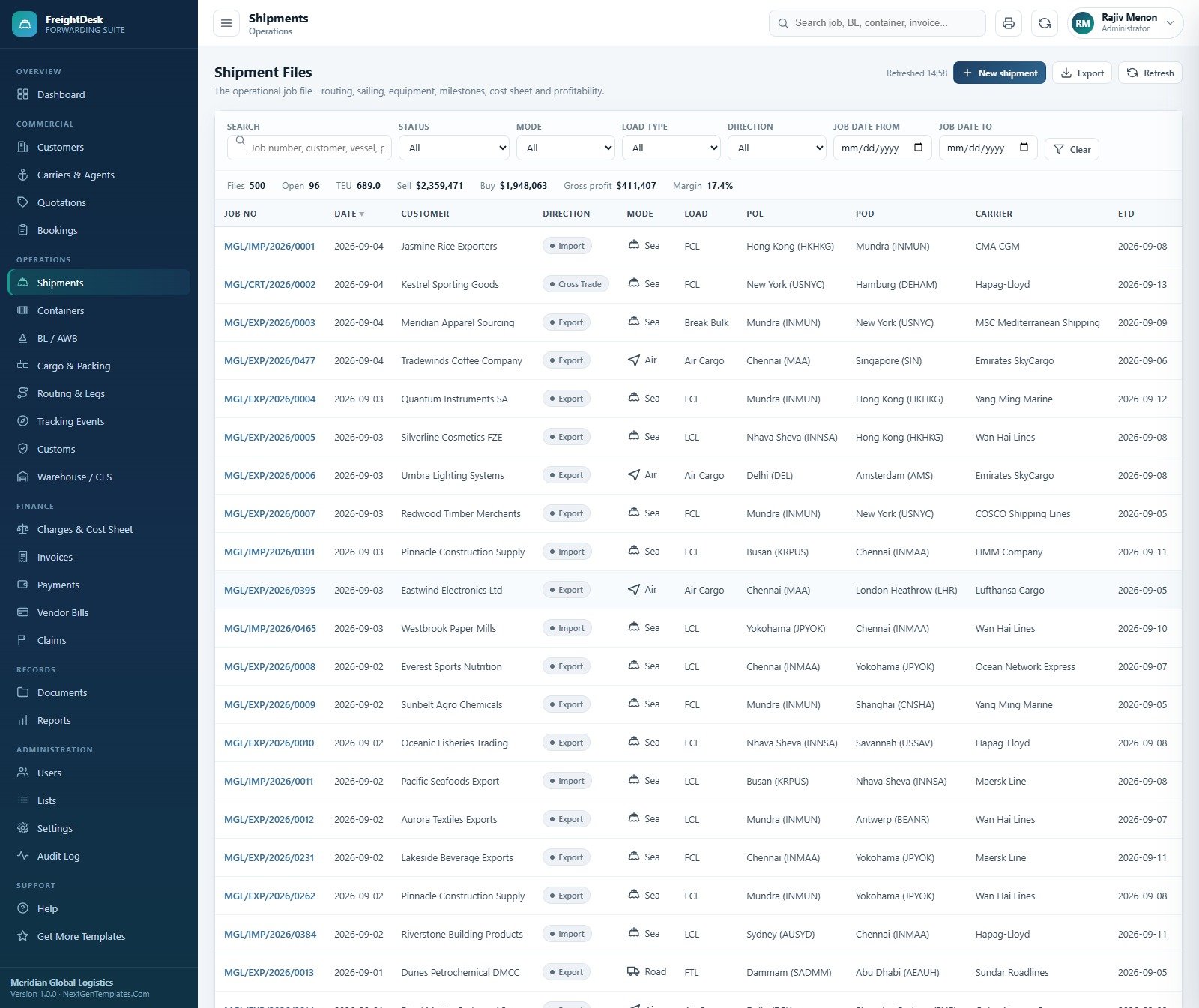
The job register is the heart of the system. It filters by status, mode, load type, direction and job date and totals the filtered view: 500 files, 96 open, 689 TEU, $2,359,471 sell, $1,948,063 buy and $411,407 gross profit at a 17.4% margin in the sample. Opening a file brings its milestones, cargo, containers, documents, routing, customs, cost sheet and billing onto one screen.
Bills of Lading and Air Waybills
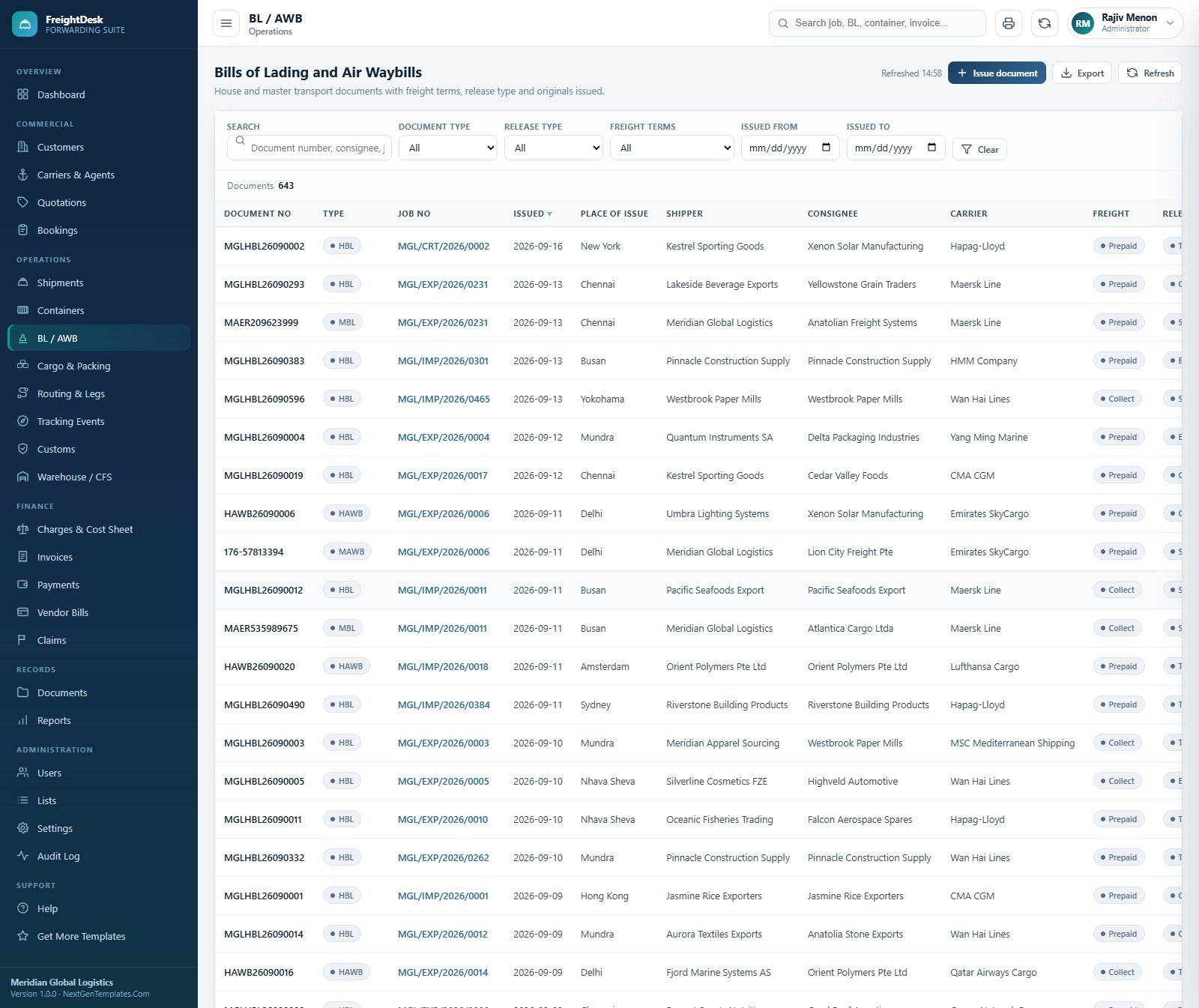
House and master transport documents (HBL, MBL, HAWB and MAWB) record the place of issue, shipper, consignee, carrier, freight terms and release type. Alongside this screen, Containers holds ISO type, seal, tare, cargo weight, VGM and gate dates, and Cargo and Packing holds HS codes, marks, weights, CBM, declared value and a dangerous-goods flag.
Customs Declarations and Clearance
Import, export and transit declarations record the customs house, HS chapter, assessable value, duty, tax, total duty, filed, assessed and out-of-charge dates and the broker. The header totals declarations, duty and entries not yet cleared. These are records for your team to track clearance, not an electronic filing connection to any customs authority.

Customer Invoices
Invoices are raised from the sell side of each cost sheet and show sub total, tax, total, paid, balance, days overdue and an ageing bucket. The sample totals $2,455,408 invoiced, $2,143,769 received, $311,639 outstanding and $134,616 overdue. Payments records receipts against invoices, and Vendor Bills require approval before a payment can be recorded.

Reports
Ten reports are grouped into operations (Shipment Status, Carrier Performance, Volume by Trade Lane, Container Utilisation), finance (Profitability per Shipment, Profitability by Customer, Outstanding Receivables, Monthly Revenue vs Cost, Vendor Bill Summary) and compliance (Customs Status). Every report honours a date range, exports to CSV and prints.

User Management
Each account has a role and a branch; the sample runs twelve users across Mumbai, Chennai, Dubai and Singapore offices. Administrators can add users, reset passwords, deactivate accounts and open the Role permissions view.

Settings and Database
Settings holds the company block printed on every document, finance defaults such as tax percent, payment terms and invoice prefix, printing, email and Drive options, a Backup now button and the database archive. The Database at a glance panel counts rows on all 27 worksheets.

The remaining screens are Customers, Carriers and Agents, Bookings, Containers, Cargo and Packing, Routing and Legs, Tracking Events, Warehouse and CFS, Charges and Cost Sheet, Payments, Vendor Bills, Claims, Documents, Lists, Audit Log and an in-app Help guide.
Freight Forwarding Web App vs. Excel Workbook vs. Paid Forwarding Software: Feature Comparison
| Feature | Freight Forwarding Management System Web App | Excel job register and cost sheet | Paid forwarding suites (e.g. CargoWise, Magaya) |
|---|---|---|---|
| Cost | ✅ $39.99 one-time | Low, but built and maintained by you | Recurring subscription, usually quoted per user |
| Year-1 cost at 5 users | ✅ $39.99 total | Excel licences plus your build time | Vendor quote, recurring every year |
| Platform | Browser web app on Google Apps Script | Excel desktop file | Vendor cloud |
| Setup time | ✅ About 15 minutes | Days to design | Weeks of onboarding |
| Role-based access | ✅ 8 roles, server-enforced | Sheet protection only | ✅ Yes |
| Quote to booking to job file to invoice | ✅ Built in | Manual copy between tabs | ✅ Yes |
| Carrier, EDI and e-filing connections | No, all entries are manual | No | ✅ Usually available |
| Customisable lists and source code | ✅ 36 editable lists, full code | ✅ Full control | Configuration within vendor limits |
| Where your data lives | ✅ A Google Sheet in your own Drive | ✅ Your file | Vendor servers |
For small forwarders who want quotes, job files, documents, customs records and billing in one place without a per-user subscription, this web app sits in the sweet spot.
Who Should Use This Template
Perfect for:
- Small and mid-sized freight forwarders handling a few hundred job files a year across sea, air and road
- Owners who want sell, buy and margin on every file the day it is costed
- Teams on Gmail or Google Workspace who want role-based access with no extra software to install
- Consultants and developers who want a working forwarding codebase to adapt for a client
Not a fit if:
- You need live carrier bookings, EDI messages, vessel or flight tracking feeds, or electronic customs filing
- You are a licensed customs broker needing a certified filing system; the Customs Broker role is a permission set, not a filing interface
- You need multi-currency accounting, single sign-on or audited compliance certifications
How to Use the Freight Forwarding Management System
- Try the live demo first. Sign in as admin, then as customs.broker or viewer, to see how each role’s menu and permissions differ.
- Create a new project at script.google.com, paste Code.cs.txt into Code.gs and Index.txt into an HTML file named Index, and save.
- Deploy it as a web app (Execute as: Me, Who has access: Anyone) and open the URL.
- Press “Build the database now” on the sign-in card. Setup is staged and resumable, so it continues if Apps Script pauses it.
- Sign in as the administrator, change or deactivate the seeded accounts, and fill in your company block, tax, payment terms and print size in Settings.
- Add customers, carriers and agents, or import them by CSV, and adjust the dropdown Lists.
- Run the daily flow: quote, convert to booking, open the shipment file, add containers and cargo, issue the BL or AWB, log customs and milestones, build the cost sheet, raise the invoice and record the receipt.
Real-World Use Cases
Anita runs a 12-person export forwarder in Chennai. Her sales desk quotes LCL and FCL rates and converts accepted quotes into bookings. Documentation issues house bills and packing lists from the same job file, and accounts raise the invoice from the cost sheet the day the file is costed, so she sees the margin on each file instead of discovering it at month end.
Omar manages an air freight desk in Dubai. He records HAWB and MAWB documents, logs milestones as agents report them, and reviews the Outstanding Receivables and Profitability by Customer reports every Monday to decide which shippers keep their credit terms. His warehouse supervisor signs in and sees only CFS jobs, containers, cargo and tracking.
Lena is a logistics software consultant. She deploys the system into a client’s Google account, adds two custom fields and a new delivery order layout in the source code, and hands over a working forwarding app in days instead of building one from nothing.
Advantages of the Freight Forwarding Management System
- One-time cost. $39.99 once replaces a per-user subscription for teams that only need the core forwarding record flow.
- No double entry. Quotes become bookings, charge lines become invoice lines and milestones move the file status automatically.
- Your data stays yours. The database is a Google Sheet in your Drive, documents sit in a Drive folder per job number, and a dated backup is one click away.
- Ready from minute one. A full sample year means every chart, report and screen has data to explore before you enter your own.
- Adaptable. 36 dropdown lists are editable in the app, and the full source code lets a developer add fields, modules or document layouts.
Opportunities for Improvement
- There is no carrier, airline or EDI integration, no live container or flight tracking, and no electronic customs filing; every booking, milestone and declaration is typed in or imported by CSV.
- The system works in one currency (USD in the sample) with no exchange-rate conversion or multi-currency ledger, and receipts are recorded rather than processed through a payment gateway.
- Google Apps Script has daily quotas, including email sends, and a sheet-based database suits a small or mid-sized office rather than tens of thousands of files a year; the database archive helps keep the live sheet lean.
- There is no customer or agent self-service portal; shipment status goes out by email from staff.
Best Practices
- Change every seeded password and deactivate unused accounts before your team starts entering real files.
- Set the company block, tax percent, invoice prefix and print size in Settings before printing your first invoice or bill of lading.
- Build the cost sheet before raising the invoice, because the invoice is generated from the sell-side charge lines.
- Run the Profitability per Shipment and Outstanding Receivables reports every week, not just at month end.
- Take a backup before each archive, and redeploy a new version after any code change, as Google’s Apps Script web apps guide explains.
- Check Google’s Apps Script quotas if you plan to email many shipment updates a day.
Explore Relevant Templates
If your business is broader logistics operations rather than forwarding job files, read our guide to the Logistics Management System Web App. Exporters who mainly manage trade document sets should see the Import-Export Documentation Management System Web App, and courier and parcel businesses the Courier and Parcel Delivery Management System Web App. For analysis instead of operations, try the Shipping Dashboard in Google Sheets.
On NextGenTemplates you will also find the Freight Forwarding Dashboard in Excel, the Freight Forwarding Dashboard in Power BI and every Google Apps Script web app in the store.
For a broader grounding in the spreadsheet skills that systems like this build on, the NextGenTemplates Academy learning paths offer a structured route, with practice files at each step.
Get the Freight Forwarding Management System Web App
Frequently Asked Questions
Can I try it before buying?
Yes. The live demo at the top of this post runs the full Freight Forwarding Management System with sample data and all 8 role logins. Sign in as admin to see every module, then as viewer or customs.broker to see how access narrows. The demo is shared and resets, so never enter real data.
Does it file customs declarations or connect to carriers?
No. Customs entries, bookings and tracking milestones are records your team types in or imports by CSV. There is no electronic customs filing, no carrier or airline API, no EDI link and no live vessel or flight tracking. Values such as “Carrier EDI” are only source labels in a dropdown list.
How long does setup take?
Most buyers deploy the freight forwarding management system web app in about 15 minutes. You paste two files into a new Apps Script project, deploy it as a web app and press “Build the database now”, which creates the 27-tab Google Sheet and loads a full sample year.
How does it compare to CargoWise or Magaya?
Enterprise forwarding suites add carrier connections, electronic filing, multi-currency accounting and vendor support on a recurring subscription. This system covers the core record-keeping flow from quote to invoice for a one-time $39.99, runs in your own Google account and includes source code you can change.
Which roles are included?
Eight: Administrator, Operations Manager, Documentation Officer, Customs Broker, Sales Executive, Accounts, Warehouse Supervisor and Viewer. For example, Sales can see invoices and receipts without changing them, Accounts can approve and pay vendor bills, and Viewer can only read.
Is it a compliance or customs broker system?
No. It is staff-facing record-keeping software. It is not a licensed customs broker tool and makes no IATA, FIATA, FMC or customs compliance claim. The sample company, customers, declarations and figures are fictional, and carrier and insurer names in the sample data are illustrative only.
About the Author
Built by PK, Microsoft Certified Professional with 15+ years of Excel, Google Sheets, Apps Script and Power BI experience. Founder of NextGenTemplates, reaching 300K+ subscribers across YouTube channels. Every template is hand-built and tested before release.
Conclusion
The Freight Forwarding Management System gives a small forwarding office one place for quotations, bookings, job files, containers, cargo, bills of lading, customs records, cost sheets, invoices and vendor bills, with eight roles and ten reports, for a one-time price. Start with the live demo above, sign in as a couple of roles, and when it fits your workflow deploy your own private copy.
✅ Instant download · One-time payment · No subscription
📅 Last updated: September 2026