The Receipt Template in Google Sheets issues print-ready customer receipts and tracks every sale across 5 connected sheet tabs, with 8 KPI cards on the Dashboard, 4 trend and distribution charts, and 7 daily collection metrics covering Cash, Card, UPI, and Check. Setup takes under 10 minutes — fill the Settings tab once and every receipt automatically picks up your business header, tax rate, and the next receipt number.
For boutiques, salons, food trucks, freelance consultants, and weekend market vendors, paid POS software starts at $60 per month per terminal and adds 2.6%–2.9% on every card swipe. This Receipt Template in Google Sheets is a $6.99 one-time alternative that runs in the browser, on a phone, or on a tablet — and tracks Cash, Card, UPI, and Check collections side by side so end-of-day reconciliation takes minutes instead of hours.
Get the Receipt Template in Google Sheets
Receipt Template in Google Sheets
Key Features of the Receipt Template in Google Sheets
🔹 5 connected sheet tabs — Receipt, Receipt Log, Daily Summary, Dashboard, and Settings. Every receipt you issue propagates through all four downstream tabs without copy-paste.
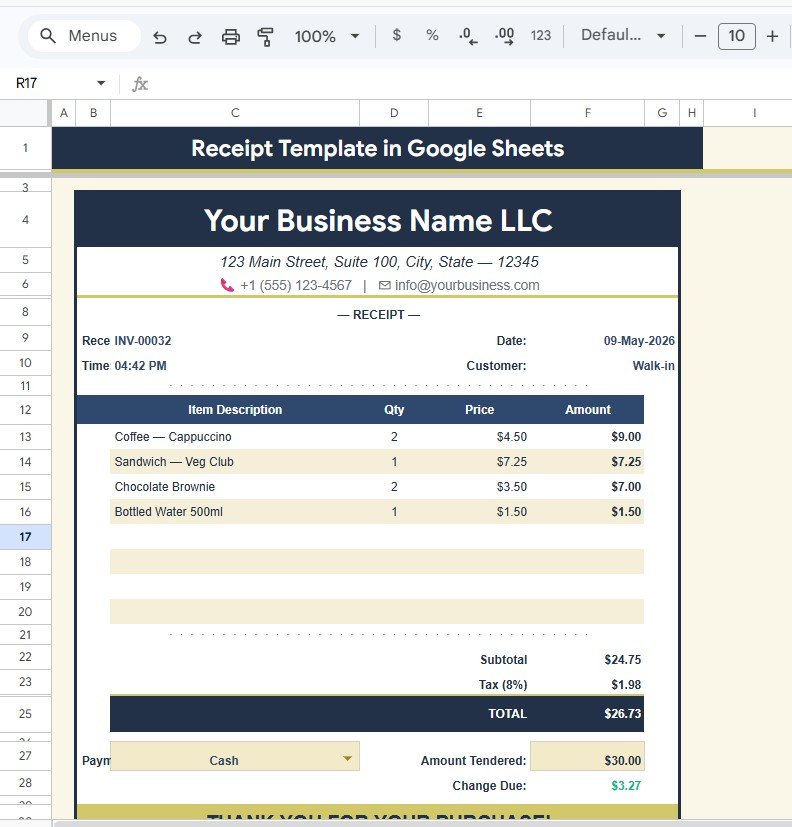
🔹 Print-ready receipt layout — Business header, transaction details, itemized line table, subtotal, tax, total, payment method, amount tendered, and change due — all pre-formatted for letter or A4 printing.
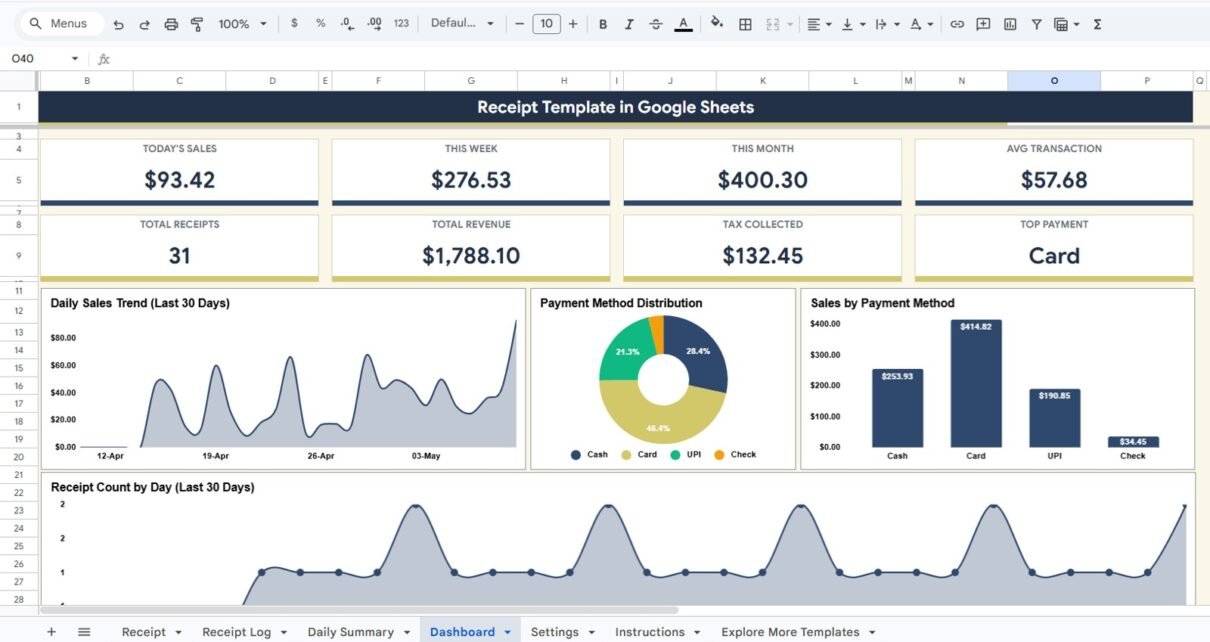
🔹 8 KPI cards on the Sales Dashboard — Today’s Sales, This Week Sales, This Month Sales, Average Transaction, Total Receipts, Total Revenue, Tax Collected, and Top Payment Method.
🔹 4 visual analytics — Daily Sales Trend (Last 30 Days), Payment Method Distribution by Method, Sales by Payment Method, and Receipt Count (Last 30 Days).
🔹 10 configurable Settings — Business Name, Address, Phone, Email, Website, Receipt Prefix, Next Receipt Number Counter, Tax Rate, Currency Symbol, Thank You Message, and Return Policy.
🔹 Multi-payment reconciliation — Daily Summary splits collections into Cash, Card, UPI, and Check on a date-by-date basis, plus Tax Collected by Date for GST/sales-tax filings.
🔹 Works in Google Sheets — browser, mobile app, real-time collaboration, no install. A free Google account is all you need.
Sheets Explanation
1. Receipt
The Receipt sheet is the customer-facing, print-ready page. It is the document a customer takes home or receives by email. Every element is positioned to fit cleanly on letter or A4 paper, and all calculations update the moment line items change.
Below are the elements on the Receipt page:
- Business Name — Pulled from the Settings tab so every receipt carries your brand identity. Edit once and every future receipt picks up the change.
- Business Address and Contact — Address, phone, and email shown directly under the business name. Customers can reach you for follow-up questions or returns without searching.
- Receipt Number — Auto-generated from the Receipt Prefix and the Next Receipt Number Counter on Settings. Each receipt is unique and sortable for accounting.
- Date and Time — Captures exactly when the transaction took place. Useful for shift-level reporting and dispute resolution months later.
- Customer Name — Optional name field for personalized receipts. Helps build a repeat-customer log inside the Receipt Log tab.
- Item Description Table — Itemized list with quantity, unit price, and line total. Add or remove rows depending on the size of the order.
- Subtotal — Sum of all line items before tax. Calculated automatically as you fill in the item table.
- Tax — Applies the Tax Rate from the Settings tab to the subtotal. Update Settings once and every receipt uses the new rate.
- Total — Subtotal plus tax. The single number the customer pays — clearly highlighted on the printed page.
- Payment Method — Tag the sale as Cash, Card, UPI, or Check. This drives the Daily Summary collection splits and the Dashboard’s Top Payment Method KPI.
- Amount Tendered — Captures how much the customer handed over. Critical for cash transactions and ending cash-drawer reconciliation.
- Change Due — Calculated as Amount Tendered minus Total. Removes mental math at the counter and reduces give-back errors.
Receipt
2. Receipt Log
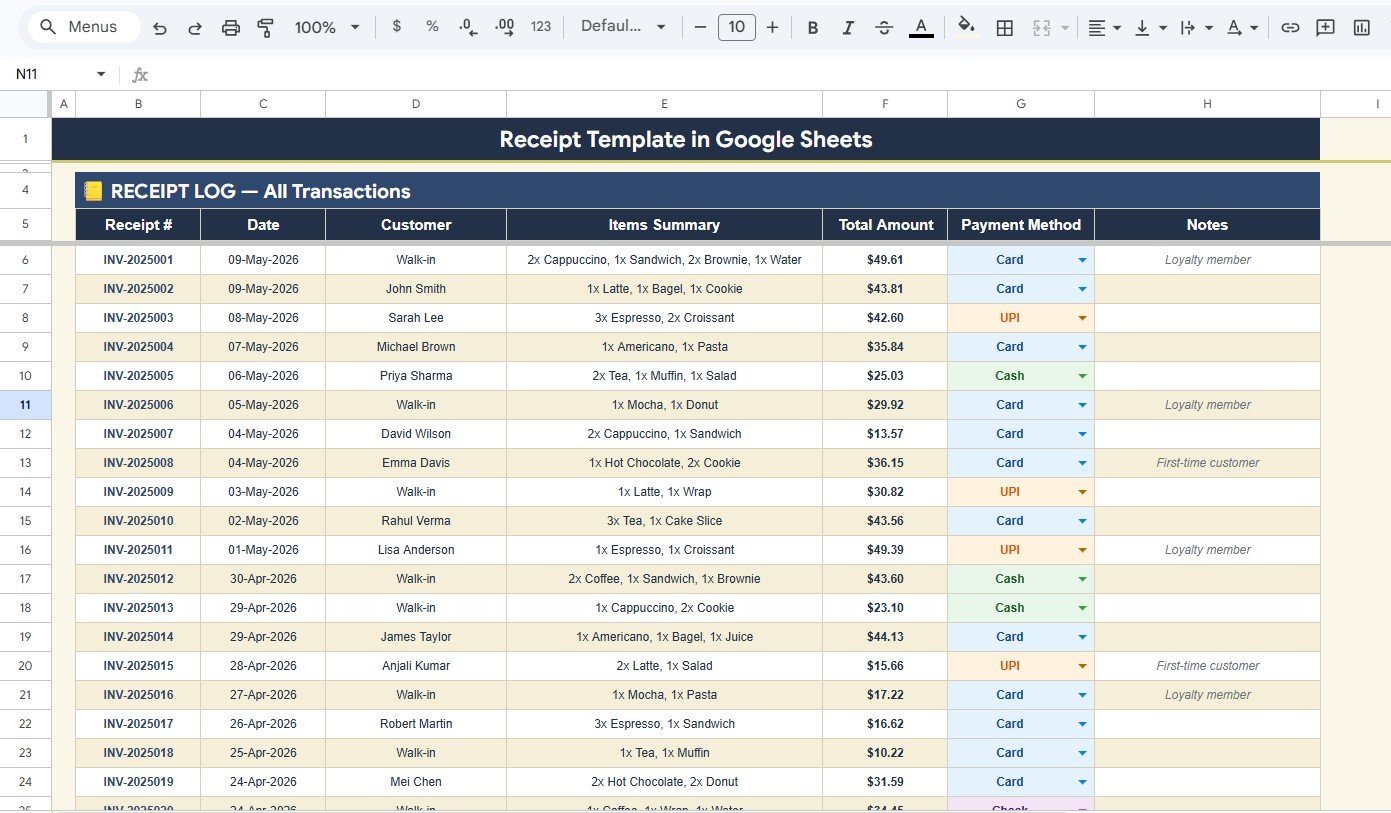
The Receipt Log is the searchable transaction database. Every receipt issued lands here automatically and feeds the Daily Summary and Dashboard. The five built-in analyses on this tab make it easy to look up a specific transaction or pull a quick summary for a customer.
- Total Amount by Receipt Number — Lists each receipt and its grand total in one column. Lets you reconcile a printed receipt against the master log in seconds.
- Items Summary by Customer — Aggregates which items each customer has bought across visits. Useful for follow-up upsells and loyalty rewards.
- Payment Method by Receipt — Shows the payment tag (Cash / Card / UPI / Check) attached to every receipt. Used by the Dashboard to split sales by method.
- Total Amount by Date — Daily revenue rollup taken straight from the receipt log. Drives the Daily Summary’s Total Sales by Date metric.
- Customer Notes by Receipt — Free-text field for special notes — discounts, exchanges, complaints, or fee waivers. Keeps context attached to every transaction.
Receipt Log
3. Daily Summary
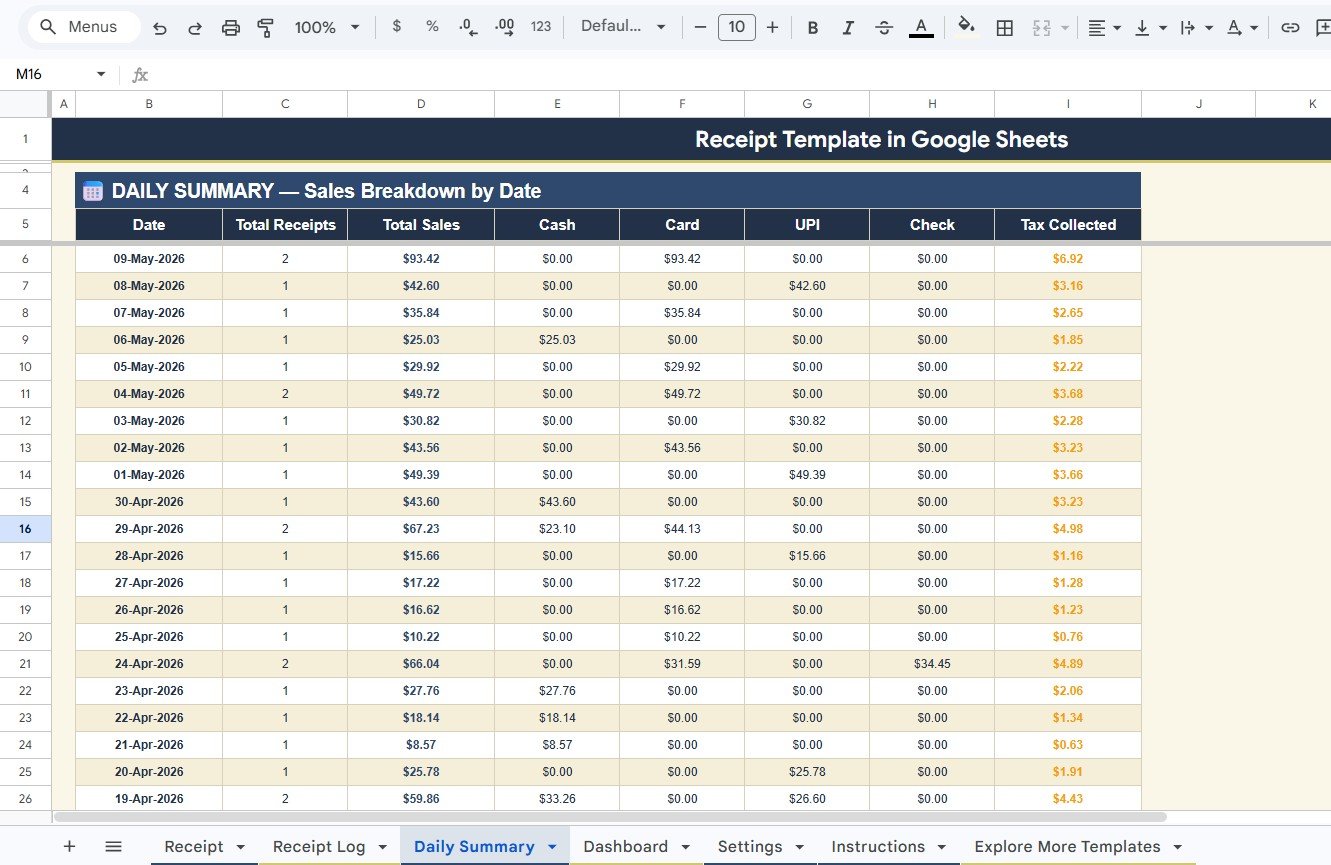
The Daily Summary is the end-of-day reconciliation sheet. At close, you compare what your till and card terminals show against what the template calculates. Mismatches usually mean a missing receipt or a data-entry typo — both quick to fix.
- Total Receipts by Date — Number of receipts issued each day. A drop signals slow days that may need staffing or marketing changes.
- Total Sales by Date — Daily revenue totals from the Receipt Log. The headline number for daily performance.
- Cash Collection by Date — Cash-only sales for the day. Match against the cash drawer at close.
- Card Collection by Date — Card swipes for the day. Match against your terminal’s settlement report.
- UPI Collection by Date — UPI / digital-wallet collections. Match against your UPI app’s settlement.
- Check Collection by Date — Cheque receipts pending bank deposit. Track until each cheque clears.
- Tax Collected by Date — Tax portion of every receipt isolated by day. Makes monthly or quarterly GST / sales-tax filing painless.
Daily Summary
4. Dashboard
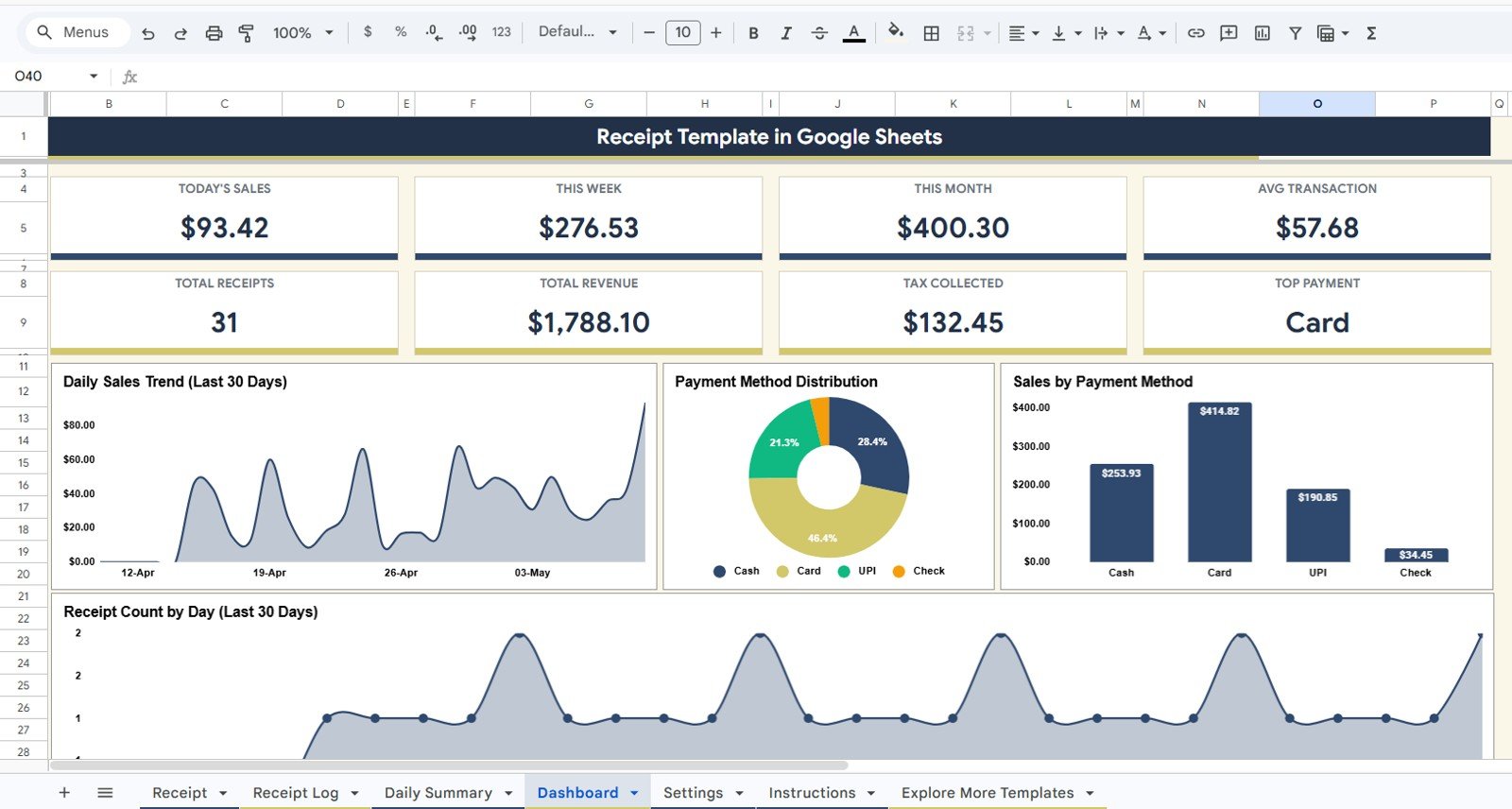
The Dashboard is the single-page performance view. KPI cards sit across the top, charts run below them, and every number refreshes the moment a new receipt is logged. This is the tab to open on Sunday evening to plan the week ahead.
- Today’s Sales — Revenue collected so far today across all payment methods. The most-glanced KPI on the dashboard.
- This Week Sales — Rolling week-to-date revenue. Helps spot whether the week is trending ahead or behind plan.
- This Month Sales — Month-to-date revenue. The number you compare against monthly targets and last month’s run rate.
- Average Transaction — Total revenue divided by total receipts. Tracks whether basket size is rising or falling over time.
- Total Receipts — Lifetime count of receipts issued from this template. A simple growth indicator.
- Total Revenue — Lifetime revenue total. Useful as a year-over-year benchmark and for tax-time totals.
- Tax Collected — Lifetime tax collected. Cross-check this against your tax-filing records.
- Top Payment Method — Which method (Cash / Card / UPI / Check) drives the most volume. Informs decisions like whether to renegotiate card-fee plans.
- Daily Sales Trend by Last 30 Days — A 30-day line chart showing revenue per day. Reveals weekly seasonality and slow patches early.
- Payment Method Distribution by Method — Share-of-volume chart that splits collections by Cash / Card / UPI / Check. Useful for picking the right payment processor.
- Sales by Payment Method — Revenue total per payment method. Pairs with the distribution chart for both volume and value views.
- Receipt Count by Last 30 Days — Daily receipt-count chart. Helps separate “fewer customers” days from “smaller baskets” days.
Dashboard
5. Settings
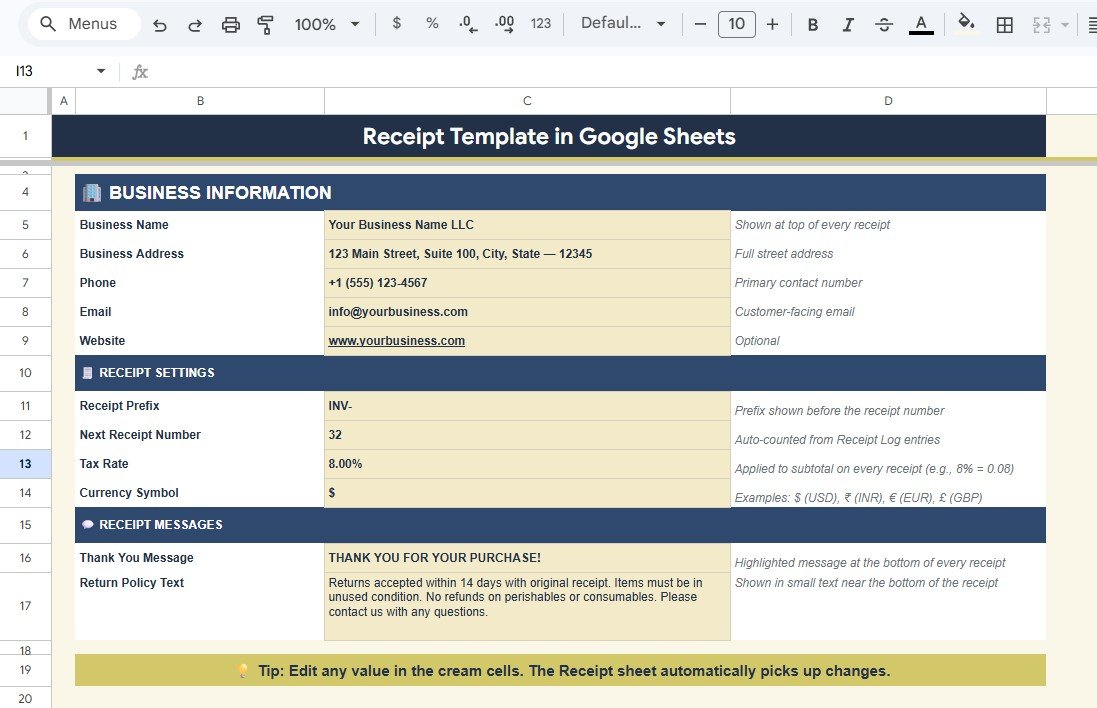
The Settings tab is the configuration sheet. Edit it once during setup and the rest of the template uses these values everywhere. Revisit it whenever your tax rate, business address, or receipt prefix changes.
- Business Name Configuration — Sets the brand name shown at the top of every printed receipt. Update once; every future receipt carries the new name.
- Business Address Setting — Street address, city, state, and ZIP / PIN code displayed under the business name. Keeps customer-facing receipts professional.
- Phone and Email Setting — Customer-contact details for follow-ups, refunds, or warranty claims. Reduces friction for repeat customers.
- Website Setting — Optional website or social-handle line printed on every receipt. Drives repeat traffic to your online store or booking page.
- Receipt Prefix Configuration — Custom alphanumeric prefix (for example, INV, RC, or BK) used in every receipt number. Useful when separating walk-in vs. online numbering.
- Next Receipt Number Counter — The incrementing integer paired with the prefix. Ensures every receipt is unique and chronologically sortable.
- Tax Rate Setting — A single tax-rate field that drives the Tax calculation on every receipt. Change once when GST or sales-tax rates change.
- Currency Symbol Setting — Sets the currency symbol shown on every monetary field (₹, $, £, €, AED, and so on). Supports any locale.
- Thank You Message Setting — Custom thank-you line printed at the bottom of every receipt. A small touch that improves customer experience.
- Return Policy Text Setting — Short return-policy clause printed on the receipt. Reduces disputes by making policy visible at the time of sale.
Settings
Receipt Template in Google Sheets vs. Microsoft Excel Receipt Template vs. Paid POS Software — Feature Comparison
| Feature | Receipt Template in Google Sheets | Microsoft Excel Receipt Template | Paid POS (Square / Shopify POS / Lightspeed) |
|---|---|---|---|
| Cost | $6.99 one-time ✅ | $10–$30 one-time | $60–$165 / month + 2.6%–2.9% per transaction |
| Platform | Google Sheets (browser, mobile, any OS) ✅ | Microsoft Excel (desktop license) | Cloud SaaS — vendor lock-in, hardware required |
| Setup time | Under 10 minutes ✅ | Under 10 minutes | 2–6 weeks |
| Real-time team collaboration | Yes — built into Google Sheets ✅ | Limited (OneDrive co-authoring) | Yes |
| Mobile access | Yes — Sheets mobile app ✅ | Limited on mobile | Yes (paid hardware) |
| Auto receipt numbering | Yes ✅ | Manual | Yes |
| Multi-payment tracking (Cash / Card / UPI / Check) | Yes — Daily Summary splits all four ✅ | Manual setup | Yes (card-fee surcharges apply) |
| 30-day sales trend dashboard | Yes — Dashboard tab ✅ | Not included | Yes |
| Year-1 cost at 5 users | $6.99 ✅ | $10–$30 | $720–$2,000+ per terminal |
For boutiques, salons, food trucks, and small retailers who want professional receipts and daily sales tracking without paying $60+ a month for cloud POS, the Receipt Template in Google Sheets sits in the sweet spot.
Who Should Use This Template
✅ Perfect for:
- Small retailers, boutiques, salons, and food trucks issuing 5–100 receipts per day who need printable receipts plus daily reconciliation
- Solo consultants, freelancers, and tutors billing clients in person who want clean auto-numbered receipts
- Pop-up stores, market-stall vendors, and event sellers needing a phone-friendly receipt system
- Cash-and-card businesses tracking Cash, Card, UPI, and Check side by side
- Bookkeepers managing 5–10 micro-business clients who want shareable, audit-ready logs
❌ Not a fit if:
- You process 500+ daily transactions and need integrated barcode scanning and inventory
- You run a restaurant needing kitchen-display systems and split-check workflows
- You need direct credit-card processing inside the template — payment capture is logged manually
Real-World Use Cases
Aarti runs a 4-chair beauty salon in Pune. She uses the Receipt Template in Google Sheets to print receipts for every walk-in, splits the Daily Summary by Cash, Card, and UPI to match her end-of-day cash drawer, and reviews the 30-day Dashboard trend on Sundays to plan staffing — all from her phone, replacing a $79-per-month cloud POS subscription. Within three weeks, she spotted a Tuesday slowdown that she now offsets with a midweek loyalty offer.
Marcus owns a Brooklyn weekend coffee cart. He logs every receipt on his iPad during the morning rush, lets the Settings-tab counter auto-number each one, and reconciles cash versus card at close. The Dashboard’s Top Payment Method KPI showed him that 71% of customers pay by card — so he renegotiated his card-fee plan and saved roughly $90 a month. The receipt log doubles as his bookkeeping export at quarter end.
Lakshmi is a freelance home-tuition tutor in Bengaluru. She bills 30 students monthly and prints a Google Sheets receipt for each in-person fee collection. The Receipt Log keeps a clean payment history per student, the Customer Notes column flags fee waivers and outstanding dues, and the Tax Collected metric on the Dashboard makes her quarterly GST filing painless. She switched from a notebook in week one and has never looked back.
Advantages of the Receipt Template in Google Sheets
💰 One-time cost replaces recurring SaaS: $6.99 once versus $720–$2,000 per terminal per year for cloud POS. Most users break even in week one.
📱 Mobile and tablet friendly: Issue receipts at a market stall, in a customer’s home, or behind a salon counter. No special hardware required.
🔁 Connected, not manual: A single receipt entry updates the Log, Daily Summary, and Dashboard at the same time. No copy-paste, no version mismatches.
👥 Multi-user collaboration: Share with staff and accountants the same way you share any Google Sheet — change permissions in one click.
🧾 Audit-ready records: Every receipt has a unique number, timestamp, and stored line items. Pulling history for an auditor or a tax officer takes seconds.
Opportunities for Improvement
- Direct payment capture: Pair with Razorpay, Stripe, or Square via Google Apps Script for in-template payment links.
- Inventory deduction: Add an Inventory tab so each line item logged on a receipt automatically reduces stock.
- Email-receipt automation: Use Apps Script to email a PDF copy of every receipt to the customer immediately.
- Multi-currency support: Add an exchange-rate fetch via GOOGLEFINANCE for businesses billing across regions.
- Loyalty integration: Pair the Customer Notes field with a points calculation to reward repeat customers.
Best Practices
✔ Configure the Settings tab fully before issuing your first receipt — Tax Rate and Currency Symbol must be correct on day one.
✔ Increment the Next Receipt Number Counter manually after each receipt to avoid duplicates.
✔ Reconcile the Daily Summary against your till and card terminal at close — mismatches caught the same day are far easier to fix.
✔ Use the Customer Notes column to record discounts, returns, and exchanges so the audit trail stays complete.
✔ Review the Dashboard weekly. The Top Payment Method KPI and 30-day trend chart usually flag opportunities long before monthly revenue does.
✔ Reference the official Google Sheets functions guide if you want to extend the template with custom formulas.
Explore Relevant Templates
🔹 Client Billing & Invoice Management Dashboard in Google Sheets — Track invoices, payments, and overdue accounts in real time.
🔹 Pricing Calculator in Google Sheets — Model selling prices at multiple margins with discount and bundle simulation.
🔹 Expense Management KPI Dashboard in Google Sheets — Pair receipt-side revenue tracking with expense-side analytics.
🔹 Weekly Expense Tracker in Google Sheets — Free companion tracker for weekly business expenses.
🔹 Browse all Google Sheets Financial Tools on NextGenTemplates.
Want to build skills like this step by step? The NextGenTemplates Academy learning paths on NextGenTemplates Academy walk you through it with practice files.
Get the Receipt Template in Google Sheets
Frequently Asked Questions
What sheets are included in the Receipt Template in Google Sheets?
The Receipt Template in Google Sheets includes 5 sheet tabs: Receipt (print-ready), Receipt Log (transaction database), Daily Summary (date-wise collection breakdown), Dashboard (8 KPIs and 4 charts), and Settings (business configuration). All tabs are connected so a single receipt entry updates every report automatically.
Can I print the receipts directly from Google Sheets?
Yes. The Receipt tab is formatted for print — set Google Sheets to print the current sheet only, and the layout fits standard letter or A4 paper. You can also export the receipt as a PDF and email or message it to the customer in seconds.
How does the auto-receipt-numbering work?
The Settings tab contains a Next Receipt Number Counter and a Receipt Prefix field. When you issue a new receipt, the prefix and counter combine to form the Receipt Number (for example, INV-1042). After saving the receipt to the Log, increment the counter once for the next sale.
Which payment methods does this Receipt Template track?
The Receipt Template in Google Sheets tracks Cash, Card, UPI, and Check on every transaction. The Daily Summary splits date-wise collection by all four methods, and the Dashboard shows a Payment Method Distribution chart and a Top Payment Method KPI based on actual receipt data.
How long does setup take for this Receipt Template?
Setup of the Receipt Template in Google Sheets takes under 10 minutes. Click the copy link in the PDF guide, fill in the Settings tab with your business details, tax rate, and starting receipt number, then issue your first sale. There are no formulas to write and no Apps Script authorizations needed.
How does this compare to paid POS software like Square or Shopify POS?
Paid POS software costs $60–$165 per month per terminal plus 2.6%–2.9% in card-transaction fees. The Receipt Template in Google Sheets is $6.99 one-time with no recurring fees and no transaction cuts. It does not process card payments directly — you record them after they clear — but for low-volume retailers it pays for itself in week one.
Is the Receipt Template in Google Sheets a one-time purchase?
Yes. The Receipt Template in Google Sheets is $6.99 one-time, instant download, no subscription, no per-user fees, and lifetime access. You also receive free updates whenever the template is revised.
About the Author
Built by PK — Microsoft Certified Professional with 15+ years of Excel, Google Sheets, and Power BI experience. Founder of NextGenTemplates, reaching 300K+ subscribers across YouTube channels (@PK-AnExcelExpert, @NextGenTemplates, @NeoTechNavigators). Every template is hand-built and tested before release.
Conclusion
The Receipt Template in Google Sheets is a one-time, $6.99 alternative to monthly cloud POS subscriptions. With 5 connected sheet tabs, 8 dashboard KPIs, 4 trend charts, and four-way payment-method tracking, it gives small retailers, freelancers, and pop-up sellers the receipt printing and daily reconciliation they need — without recurring fees or hardware lock-in.
✅ Instant download · One-time payment · No subscription · Lifetime access
📅 Last updated: May 2026