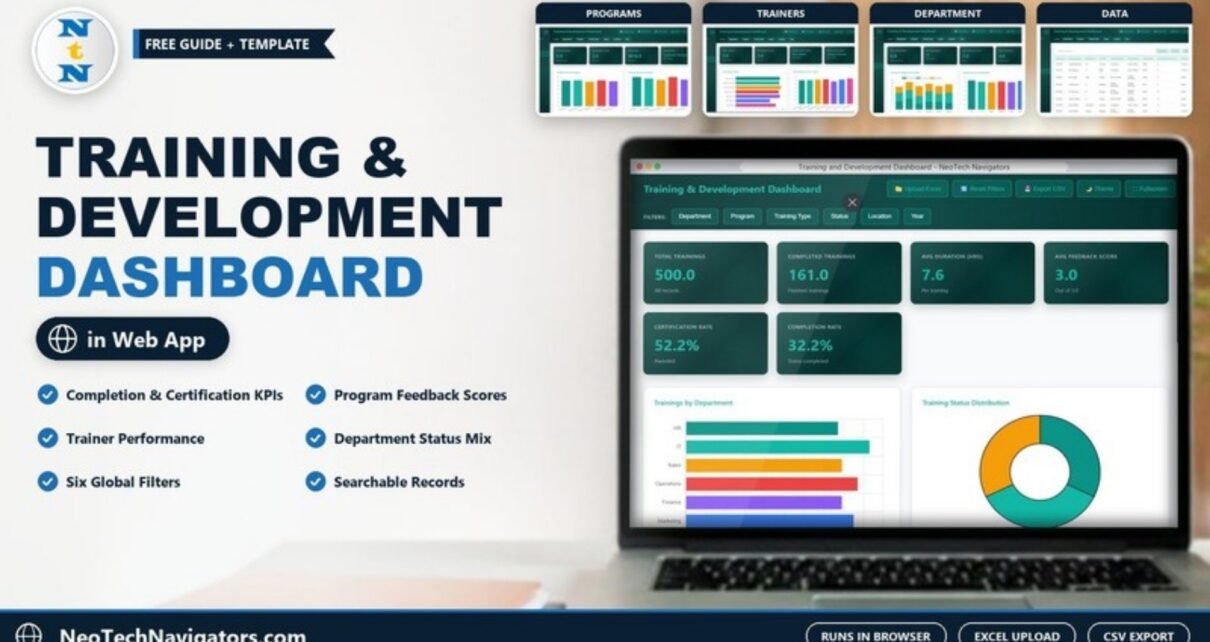
The Training and Development Dashboard in HTML turns a list of training records into a clear picture of what your learning programme is delivering: how many sessions ran, how many were completed, how participants rated them, and which programmes, trainers and departments stand out. It runs in any modern browser, so HR and L&D teams can use it without Excel, Power BI or an LMS licence.
This guide is for HR managers, L&D leads and training coordinators. I walk through each page exactly as it appears in the template, explain how the six headline KPIs relate to each other, and cover loading your own data, practical uses and the limits you should know before choosing it.
🎥 Watch the Video Tutorial
Get the Training and Development Dashboard
What Problem Does It Solve?
Training data is often spread across attendance sheets, feedback forms and certificate logs. Leaders then ask simple questions that take hours to answer: What share of trainings were actually completed? Which trainer gets the best feedback? Is IT getting more training than Sales? This dashboard reads one record table and answers those questions on five pages, with filters that apply everywhere.
Layout and Controls
The left sidebar (titled T&D Dashboard) switches between Overview, Programs, Trainers, Department and Data, plus a How to Use page. The header has Upload Excel, Reset Filters, Export CSV, Theme and Fullscreen buttons, and a filter bar with Department, Program, Training Type, Status, Location and Year.
The Six Overview KPIs
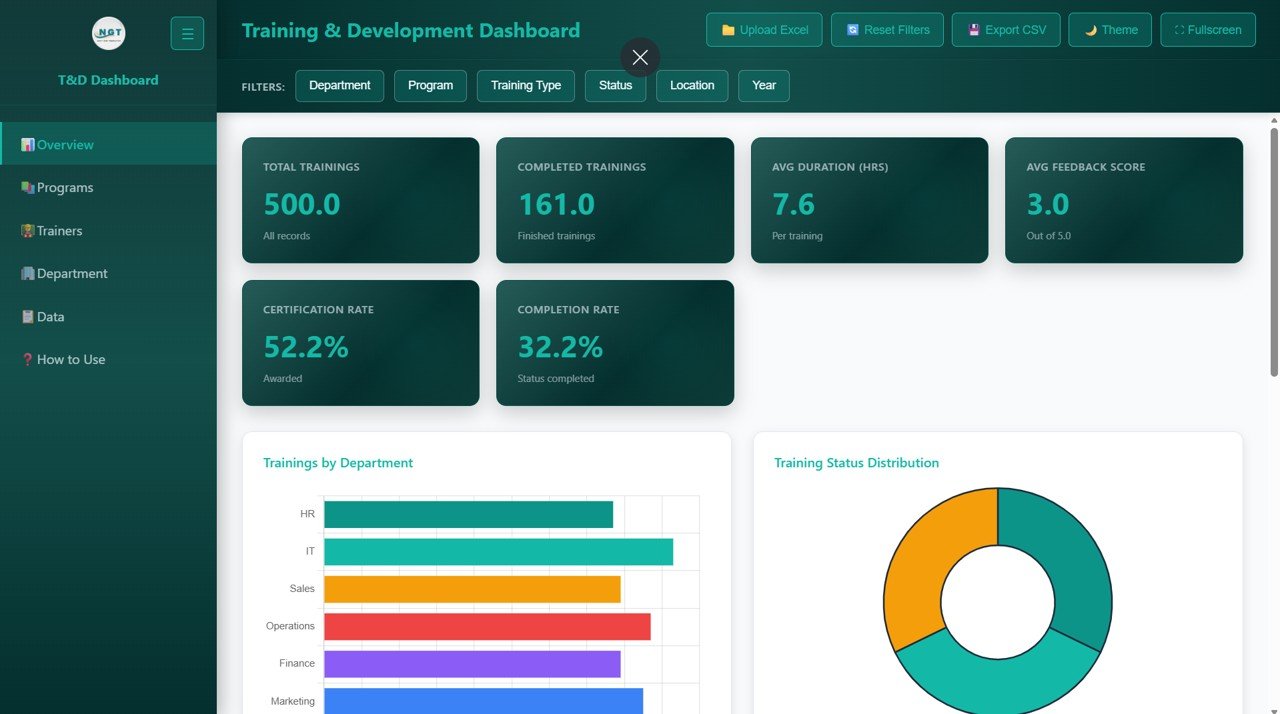
| KPI | Sample value | What it measures | How it is calculated | Better when |
|---|---|---|---|---|
| Total Trainings | 500 | All training records in the current filter | Count of records | Context only |
| Completed Trainings | 161 | Finished trainings | Count of records with Status = Completed | Higher |
| Avg Duration (Hrs) | 7.6 | Average hours per training | Total hours ÷ Total Trainings | Depends on programme design |
| Avg Feedback Score | 3.0 | Participant rating, out of 5.0 | Average of feedback scores | Higher |
| Certification Rate | 52.2% | Share of trainings where a certificate was awarded | Records with a certificate awarded, as a share of all records | Higher |
| Completion Rate | 32.2% | Share of trainings with status completed | Completed Trainings ÷ Total Trainings | Higher |
You can check the cards against each other using the sample numbers:
Completion Rate   = Completed Trainings / Total Trainings
                  = 161 / 500 = 32.2%
Avg Duration      = Total Hours (Programs page) / Total Trainings
                  = 3,816 / 500 = 7.6 hours
Page 1: Overview
The six KPI cards sit at the top. Trainings by Department compares HR, IT, Sales, Operations, Finance and Marketing, and Training Status Distribution shows the split between statuses as a doughnut. Further down the page are Training Program Distribution, Trainings by Location and a Monthly Training Trend.
Page 2: Programs
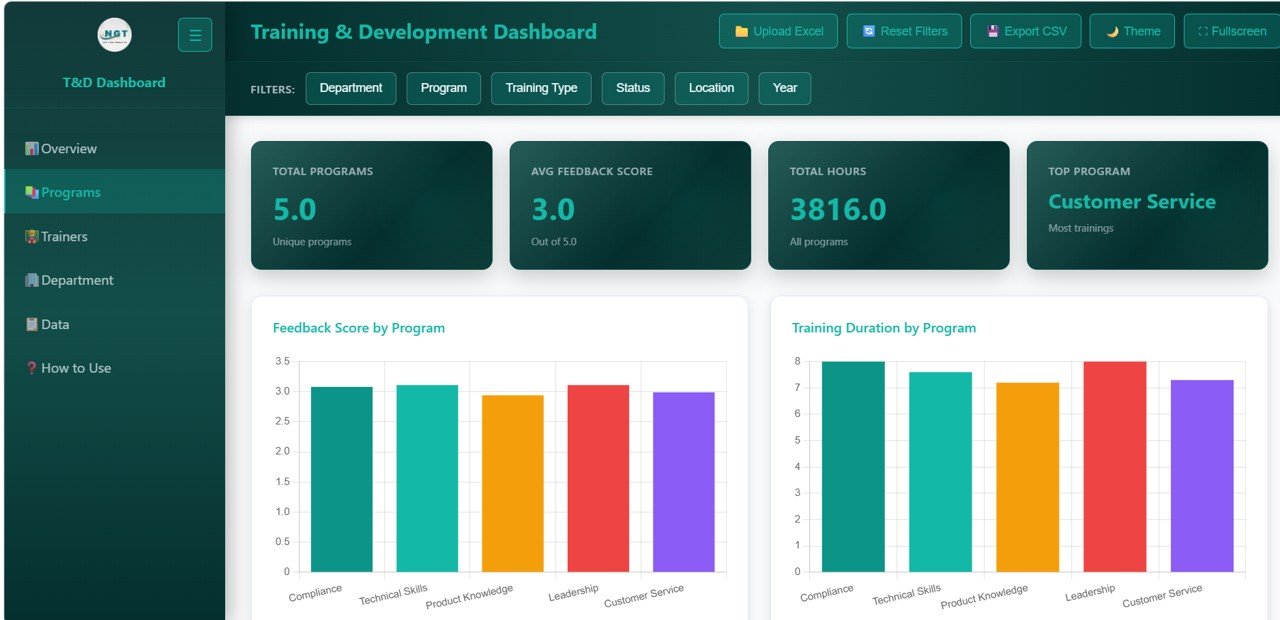
Cards show Total Programs (5), Avg Feedback Score (3.0), Total Hours (3,816) and Top Program (Customer Service, the programme with the most trainings). The five programmes in the sample are Compliance, Technical Skills, Product Knowledge, Leadership and Customer Service. Feedback Score by Program and Training Duration by Program come first, followed by completion rate, training type and certifications by programme.
Page 3: Trainers
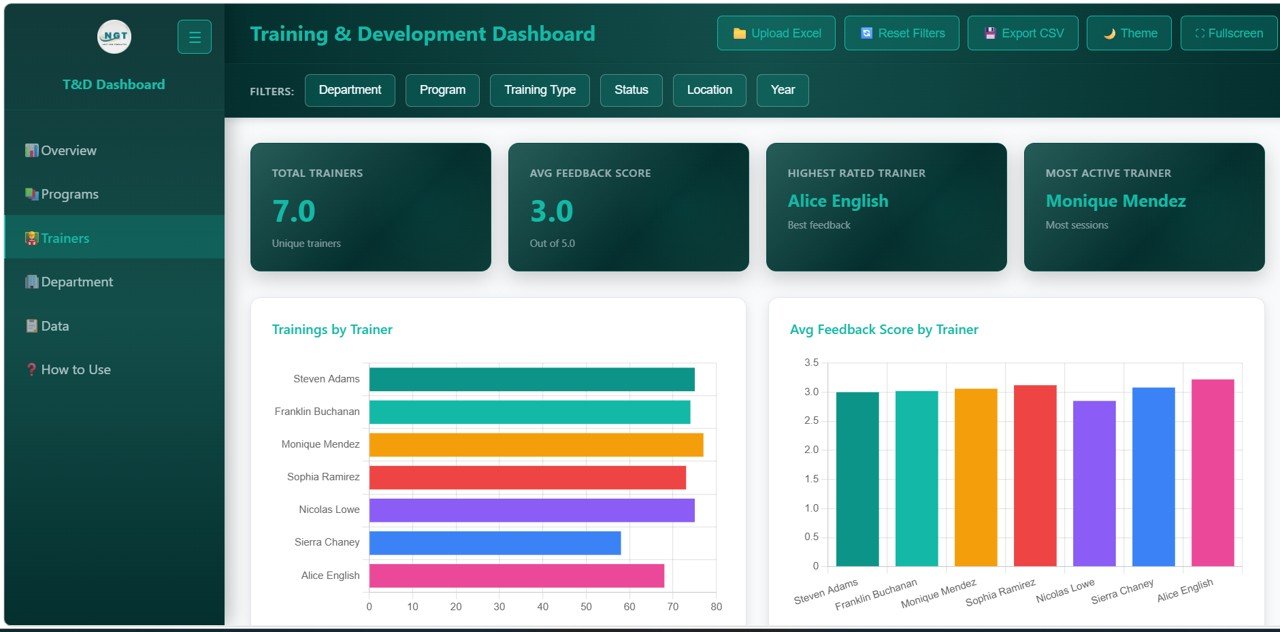
Cards show Total Trainers (7), Avg Feedback Score (3.0), Highest Rated Trainer (Alice English, best feedback) and Most Active Trainer (Monique Mendez, most sessions). Trainings by Trainer shows workload for Steven Adams, Franklin Buchanan, Monique Mendez, Sophia Ramirez, Nicolas Lowe, Sierra Chaney and Alice English, and Avg Feedback Score by Trainer compares their ratings. The page continues with completion rate, training hours and certification rate by trainer.
Page 4: Department
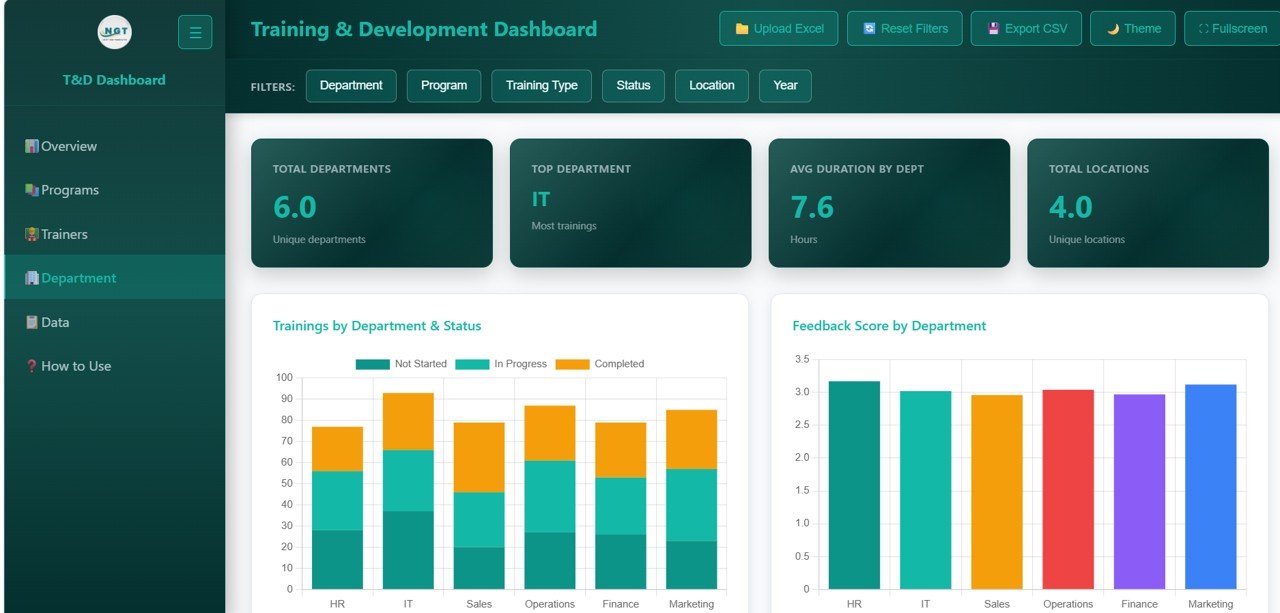
Cards show Total Departments (6), Top Department (IT, most trainings), Avg Duration by Dept (7.6 hours) and Total Locations (4). Trainings by Department & Status stacks Not Started, In Progress and Completed for each department, and Feedback Score by Department compares ratings. Training type by department, trainings by location and status, and average duration by job title follow below.
Page 5: Data
A sortable table of every record with a Search all columns box and quick Department, Program and Status buttons. Visible columns include Training ID, Employee Name, Department, Job Title, Training Program, Trainer Name, Training Date, Training Duration (Hours) and Training Type (for example In-Person or Hybrid). Use Export CSV to save the filtered rows.
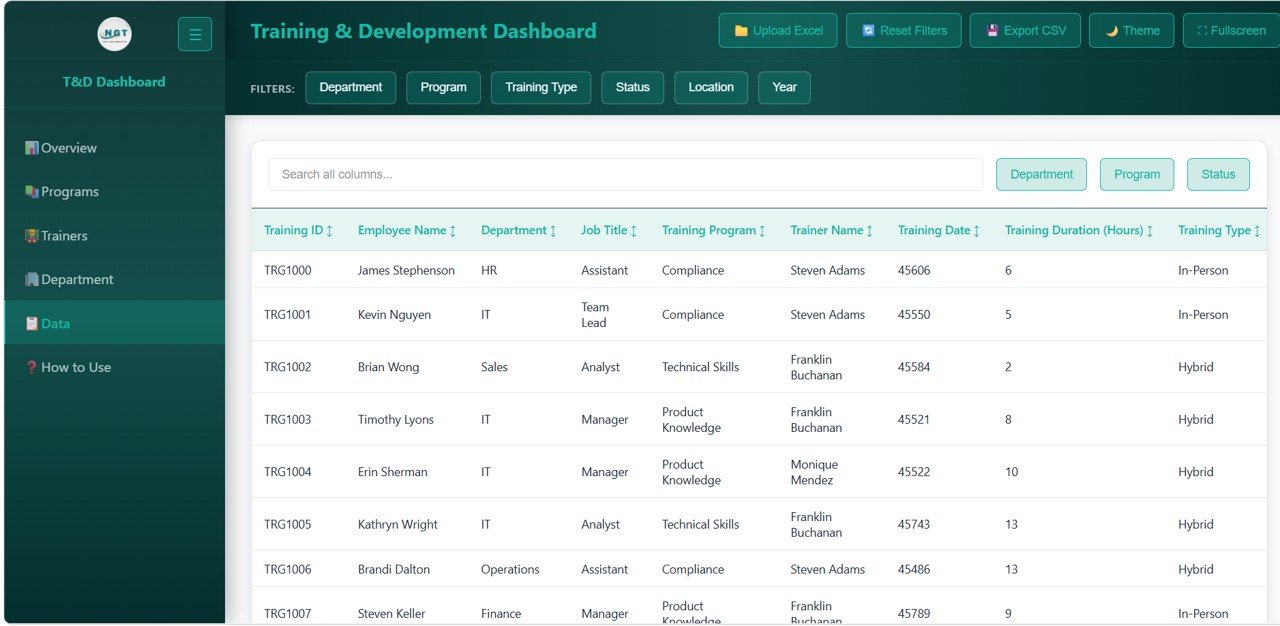
Note: in the sample table, Training Date appears as a spreadsheet serial number (such as 45606), which is how Excel stores dates internally. Keep that in mind when reading or searching the date column.
How to Use It With Your Own Data
- Unzip the download and open index.html in Chrome, Edge, Firefox or Safari.
- Read the How to Use page in the sidebar.
- Prepare an Excel file with the same columns as the Data table: one row per employee per training, with Department, Program, Trainer, Status, Duration, Feedback Score and certification details filled in consistently.
- Click Upload Excel and select your file.
- Check that Total Trainings equals your row count and that Completed Trainings matches your own count of completed rows.
- Apply filters for each stakeholder (for example Department = Sales) and use Export CSV for their records.
Real-World Use Cases
- Quarterly L&D review: show leadership the Completion Rate and Certification Rate, then drill into programmes with low completion.
- Trainer coaching: compare each trainer’s feedback score and session count to balance workload and share good practice.
- Compliance audit: filter Program = Compliance and Status = Completed, then export the list as evidence.
- Department planning: use the Not Started and In Progress bars on the Department page to see which teams still have open training before the year ends.
Best Practices
- Use one status vocabulary (Not Started, In Progress, Completed) and keep it consistent.
- Collect feedback on the same 1 to 5 scale for every programme so scores are comparable.
- Read Completion Rate alongside Total Trainings; a small programme can swing sharply with a few records.
- Update the data after each training cycle rather than once a year.
- Look at feedback and completion together: a trainer with high scores but low completion may be running sessions that are too long or poorly timed.
Limitations and Who Should Not Use It
This is a reporting view, not a learning management system. It does not enrol learners, deliver courses, send reminders or issue certificates, and it shows only what you load. Training cost and ROI are not part of the KPI set. If you need course delivery or automated tracking, use an LMS and feed its export into this dashboard for presentation.
Related Templates and Guides
Prefer Power BI? See the Training and Development Dashboard in Power BI. On this site, compare the Training and Development Dashboard in Google Sheets, the Employee Training Effectiveness Dashboard, the Training Completion Certification Tracker and the Employee Turnover Dashboard in HTML.
If you want to go further with structured lessons on turning data into dashboards, the Pivot Tables and Dashboards course on NextGenTemplates Academy covers it step by step.
Frequently Asked Questions
What KPIs does the Training and Development Dashboard in HTML track?
Total Trainings, Completed Trainings, Avg Duration (Hrs), Avg Feedback Score, Certification Rate and Completion Rate on the Overview, with further cards such as Top Program, Highest Rated Trainer and Top Department on the other pages.
Which filters can I use?
Department, Program, Training Type, Status, Location and Year, plus a Reset Filters button.
What is the difference between Completion Rate and Certification Rate?
Completion Rate is the share of trainings with status Completed (32.2% in the sample). Certification Rate is the share where a certificate was awarded (52.2%).
Do I need special software?
No. Open index.html in a modern browser. Your data is loaded with the Upload Excel button.
Can I export the records?
Yes. Export CSV saves the currently filtered records for use in Excel or for audits.
Can I compare training across office locations?
Yes. The sample has four locations. Use the Location filter, or the trainings by location and status chart on the Department page, to compare sites.
Can I change the colour theme?
Yes. The header has a Theme button that switches the dashboard’s colour theme, which is handy when presenting on a projector or a large screen.
Wrapping Up
The Training and Development Dashboard in HTML gives L&D teams a quick, presentable view of training volume, completion, feedback and certification by programme, trainer and department. Start by uploading one quarter of records, confirm the totals, and use the Trainers and Programs pages to decide where to focus next.
Get the Training and Development Dashboard in HTML
📅 Last updated: October 2026