Planning corporate events requires tracking multiple proposals, approvals, budgets, and timelines. The Corporate Event Proposal Tracker in Google Sheets provides a ready-to-use solution for managing all your event proposals efficiently.
This tracker allows event managers, HR teams, and administrative staff to monitor proposals, analyze approval status, and make informed decisions quickly.
Get the Corporate Event Proposal Tracker in Google Sheets
What Is a Corporate Event Proposal Tracker?
A Corporate Event Proposal Tracker is a digital tool designed to track all aspects of event proposals within an organization. It helps you:
-
Monitor the status of event proposals (Approved, Pending, Rejected)
-
Track proposed budgets and event dates
-
Organize proposals by department, event type, or location
-
Enable easy reporting and decision-making
Using Google Sheets ensures the tracker is collaborative, easy to maintain, and accessible from anywhere.
Key Features of the Corporate Event Proposal Tracker
This tracker contains two main sheets for complete event proposal management:
1. Tracker Sheet
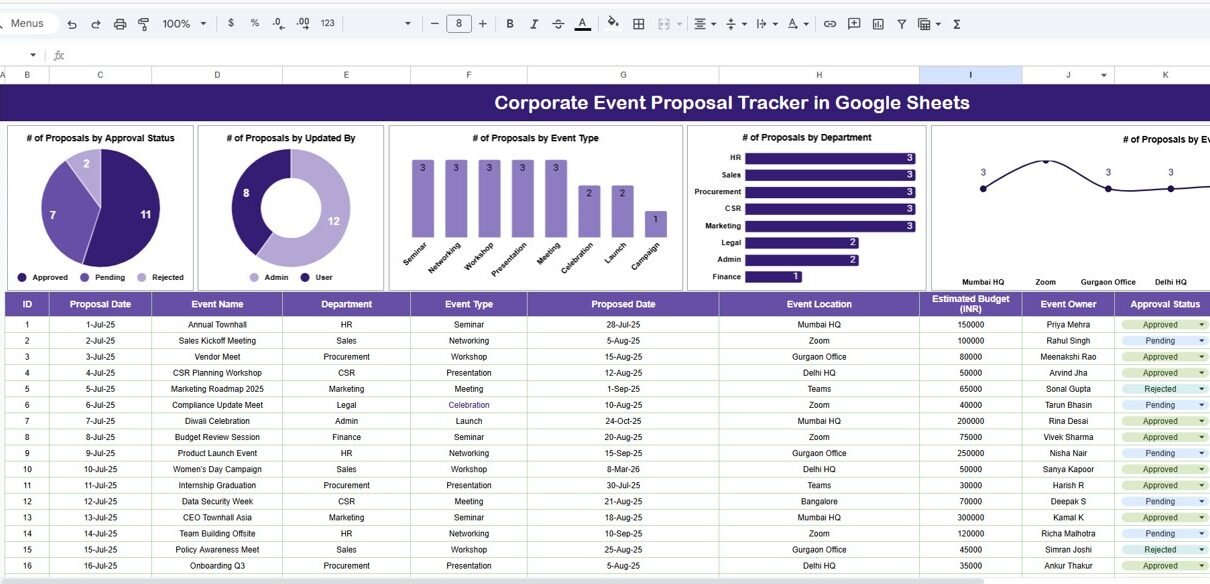
The Tracker Sheet is the main page for monitoring all proposals.
Charts Included:
-
# of Proposals by Approval Status: Visualize approved, pending, and rejected proposals
-
# of Proposals by Event Type: Track distribution across seminars, networking, workshops, etc.
-
# of Proposals by Department: See which departments are submitting proposals
-
# of Proposals by Event Location: Monitor proposals across different office locations
Data Section:
-
View detailed information for each proposal, including Proposal Date, Event Name, Department, Event Type, Proposed Date, Event Location, Estimated Budget (INR), Event Owner, Approval Status, Updated By, and Remarks

This sheet allows managers to track progress and identify bottlenecks in approvals.
2. Search Sheet
The Search Sheet provides quick filtering and retrieval of proposals:
-
Search by Keyword and Field Name: Easily find proposals by department, event type, owner, or approval status
-
Displays total records matching the search criteria for fast reference
This functionality saves time when dealing with multiple proposals and ensures you can locate any event efficiently.

Advantages of Using the Corporate Event Proposal Tracker
-
Centralized Data: All event proposals are tracked in one place
-
Real-Time Monitoring: See approval status, budgets, and timelines at a glance
-
Visual Insights: Charts provide an easy overview of departmental activity and event types
-
Improved Planning: Identify pending proposals and take action to prevent delays
-
Budget Tracking: Keep tabs on estimated budgets for all proposed events
-
Collaboration: Google Sheets allows multiple team members to update proposals simultaneously
Best Practices for Using the Tracker
-
Update Proposal Status Regularly: Keep the tracker current to reflect approvals and changes
-
Categorize Proposals Clearly: Use departments, event types, and locations to organize data effectively
-
Monitor Budget Utilization: Compare proposed budgets to actual event spending
-
Use Search Functionality: Quickly find proposals to prepare reports or make approvals
-
Review Charts Frequently: Use visual insights to identify trends and make informed decisions
How This Tracker Helps Event Managers
-
Efficient Approval Process: Track pending proposals to ensure timely approvals
-
Organize Multiple Events: Keep all event data structured and accessible
-
Analyze Trends: Identify which departments or event types require more resources
-
Ensure Budget Control: Monitor proposed budgets and avoid overspending
-
Increase Accountability: Assign clear ownership for each proposal
Want to build a tracker like this one yourself? The NextGenTemplates Academy learning paths cover the spreadsheet skills behind it, with practice files you can follow.
Get the Corporate Event Proposal Tracker in Google Sheets
Frequently Asked Questions (FAQs)
Q1: Can I customize the tracker for my organization’s needs?
Yes, you can add or remove fields, charts, and sheets to match your event planning requirements.
Q2: How do I track approval status effectively?
Use the charts and data section to filter by Approval Status (Approved, Pending, Rejected) and follow up on pending proposals.
Q3: Is this tracker suitable for large organizations?
Yes, Google Sheets supports collaboration for multiple users, making it ideal for large teams.
Q4: Can I monitor proposals by location or department?
Absolutely. The tracker includes charts by Department and Event Location for clear insights.
Q5: Does it help with budget management?
Yes, each proposal includes the Estimated Budget, making it easy to track financial planning for events.
Conclusion
The Corporate Event Proposal Tracker in Google Sheets is a comprehensive tool for planning, tracking, and managing corporate events. With visual charts, detailed data sections, and a search function, this tracker ensures that event proposals are monitored effectively, approvals are streamlined, and budgets are managed efficiently.