Payroll and Salary Management System Web App is a ready-to-use payroll web app template for teams that need one organized place to manage employees, attendance, payroll runs, payslips, loans, reimbursements, bonuses, settlements, reports, users, settings, and audit history.Payroll and Salary Management System Web App
Payroll data deserves structure. The U.S. Bureau of Labor Statistics reported that private-industry compensation costs averaged $46.60 per hour worked in March 2026, with wages and salaries accounting for 69.9% of employer costs. When payroll records, attendance days, deductions, loans, reimbursements, and settlement records sit in disconnected files, HR and finance teams spend too much time reconciling the same information. This web app template gives that monthly workflow a clearer operating system.
Get the Payroll and Salary Management System Web App
Sources: BLS Employer Costs for Employee Compensation, March 2026 and Google Apps Script deployment documentation.
🚀 Try the Live Demo Before You Buy
We have deployed this web app in our own Google account so you can test every page and every role — with real sample data — before purchasing. No signup, no email required.
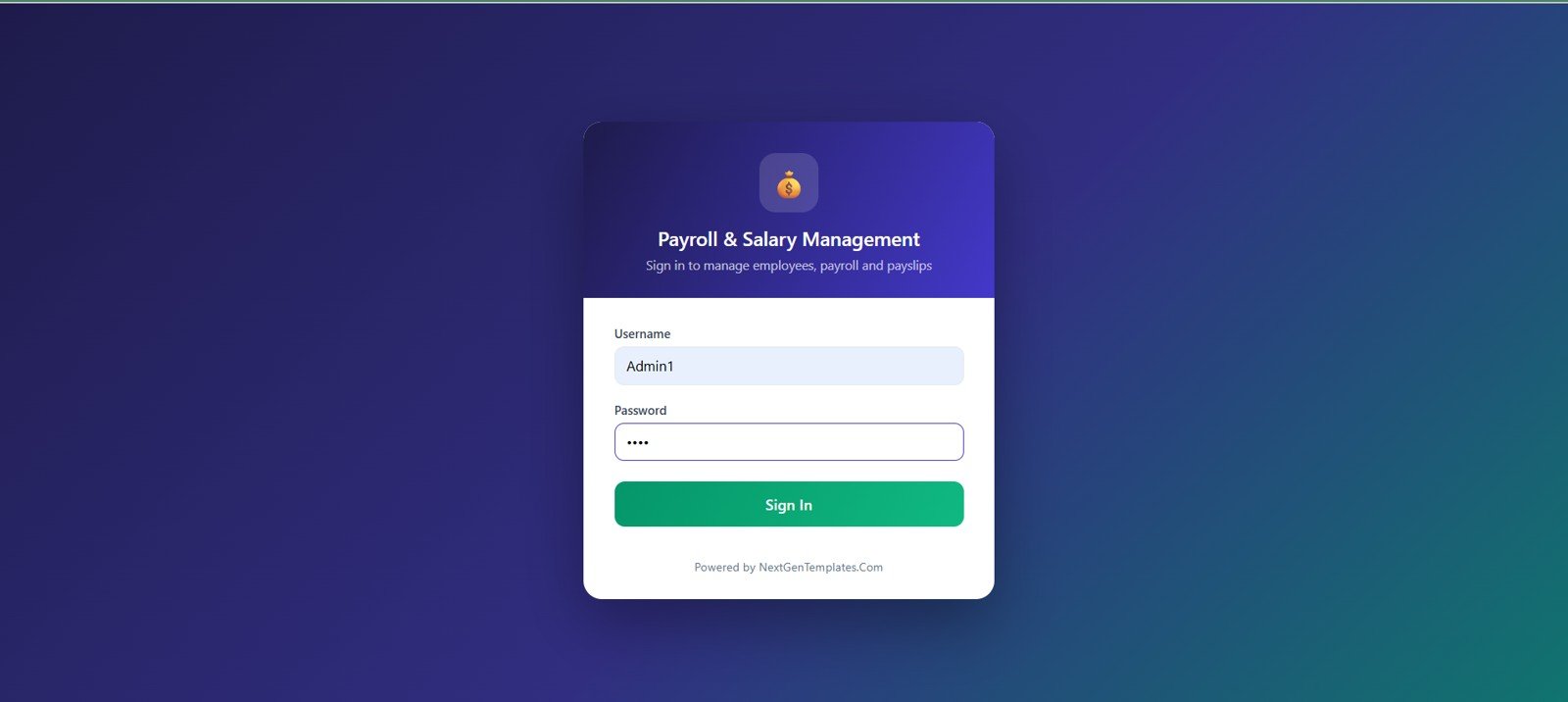
🔑 Test Login Credentials
Sign in as Admin1 for full access to all modules including Settings, User Management, List Management, Audit & Archive; as HR1 to manage employees, attendance, payroll processing, payslips, loans, reimbursements, F&F and reports; as Accountant1 to view payroll runs, payments, bank advice and reports; or as Emp1 to explore the employee self-service portal (own profile, payslips, loans, attendance summary and reimbursement claims — linked to seeded employee EMP-0007, Kavita Joshi).
💡 What you get after purchase: The full source code (Code.gs + Index.html) plus a step-by-step deployment guide so you can deploy your own private instance in your own Google account in under 15 minutes.
Key Features of Payroll and Salary Management System Web App
- 14 connected payroll pages: Login, dashboard, employees, attendance and leave, payroll processing, payslips, loans and advances, reimbursements and bonuses, full and final settlement, reports, user management, list management, settings, and audit log.
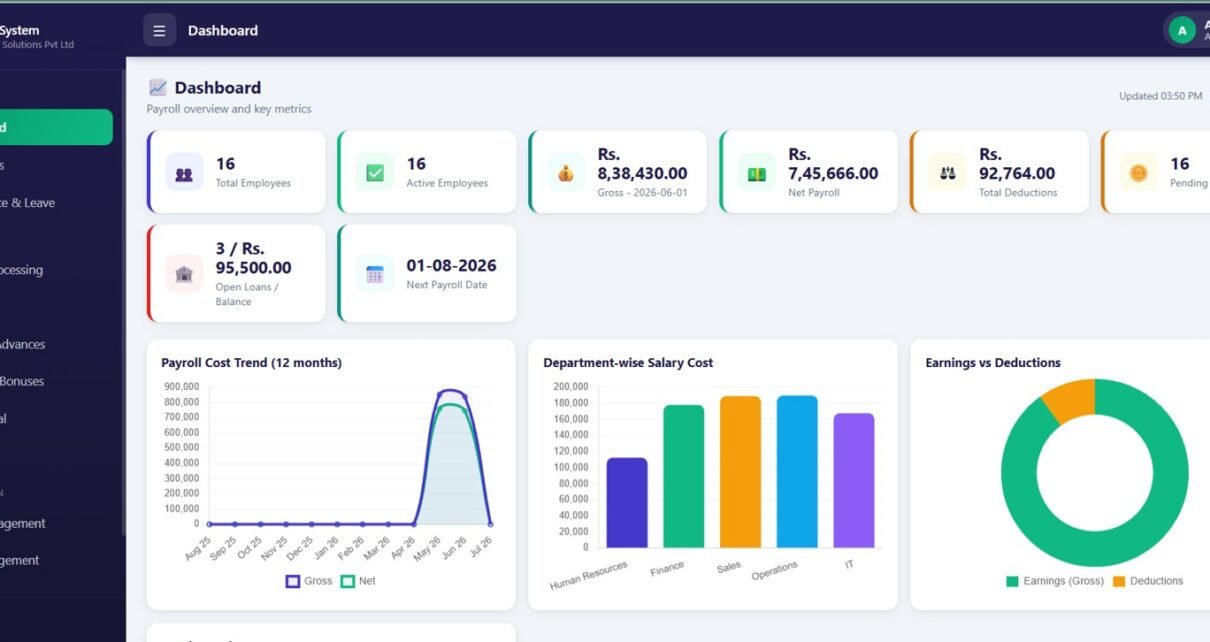
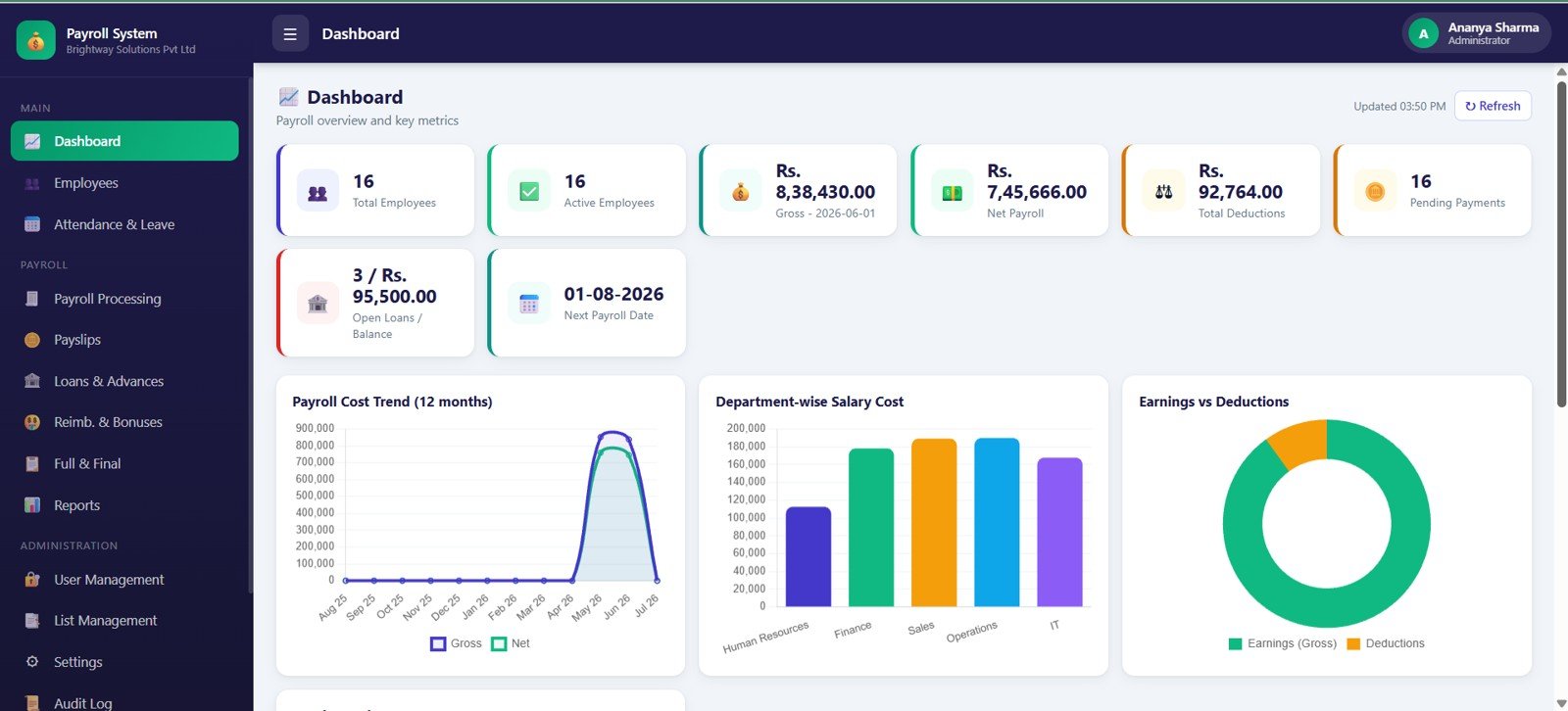
- Executive payroll dashboard: Review total employees, active employees, gross payroll, net payroll, deductions, pending payments, open loans, next payroll date, payroll cost trend, department salary cost, and earnings versus deductions.
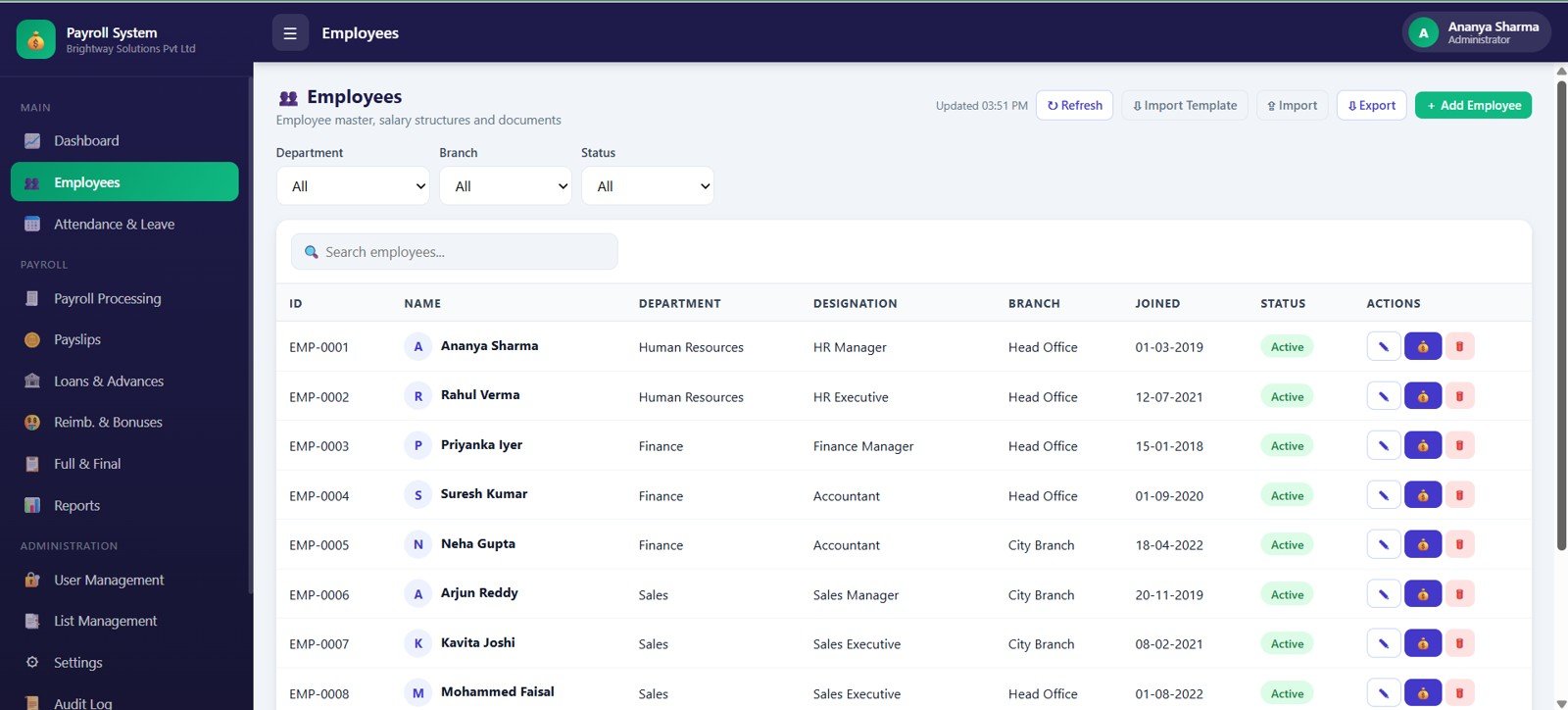
- Employee master records: Maintain employee ID, name, department, designation, branch, joined date, active status, department filter, branch filter, status filter, and record actions.
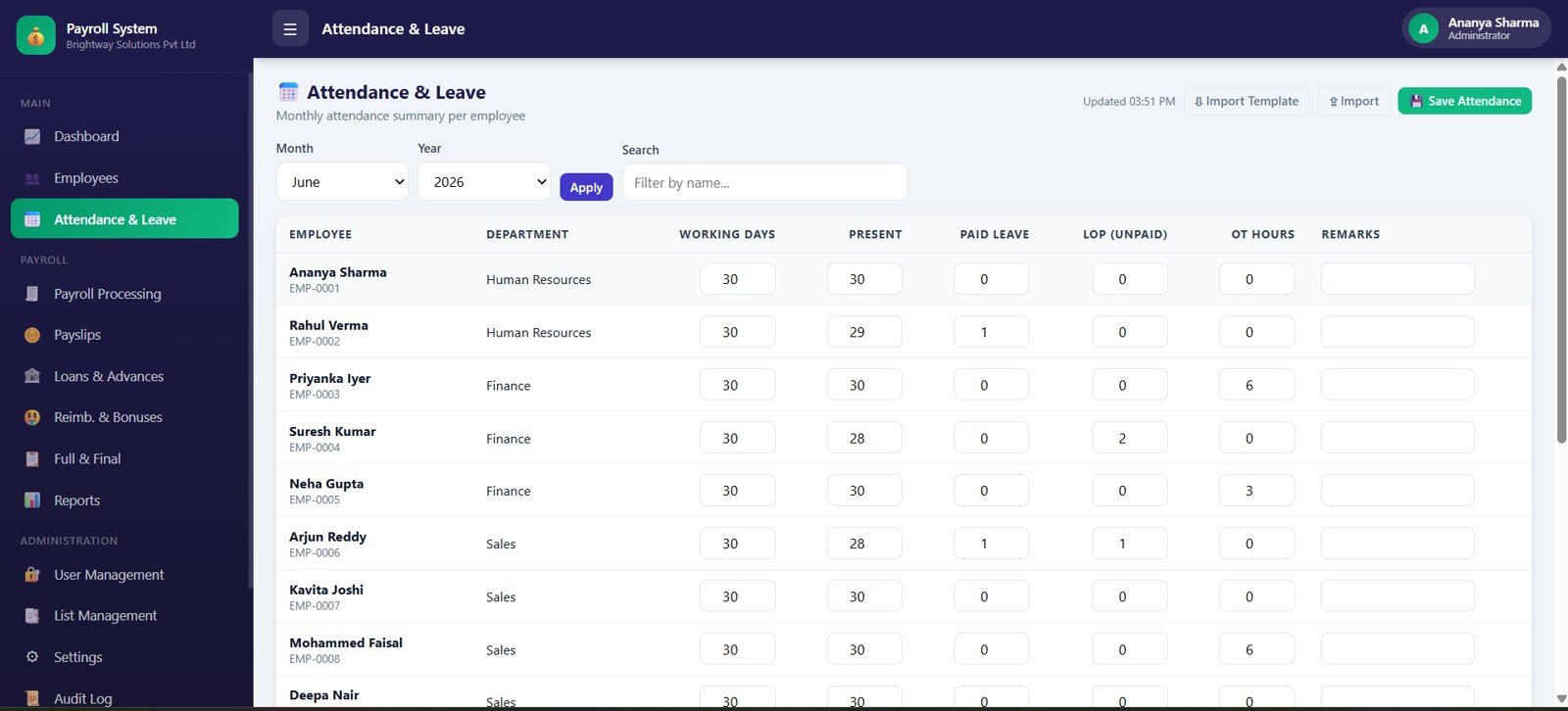
- Attendance-to-payroll flow: Track month, year, working days, present days, paid leave, unpaid LOP, overtime hours, remarks, and monthly attendance save workflow.
- Payslip and payment controls: Manage payroll run, employee payslip, payable days, gross pay, net pay, payment status, view/print, email, and bulk email actions.
- Payroll adjustments: Track loans, advances, reimbursements, claim categories, approval actions, bonuses, leave encashment, gratuity or severance, notice recovery, and final payable.
- Admin setup: Control users, roles, linked employees, access rules, dropdown values, company profile, payroll rules, print size, backup settings, and audit trail exports.Payroll and Salary Management System Web App
Dashboard Pages Explanation
1. Login Page
The login page gives the system a controlled entry point with Payroll & Salary Management branding, username and password fields, secure sign in, system purpose cards, and a NextGenTemplates powered footer.
2. Dashboard Overview
The dashboard is the payroll command center. It shows workforce count, employment status, gross payroll, net payroll, total deductions, pending payments, open loans, next payroll date, payroll cost trend, department salary cost, and earnings versus deductions.
3. Employees
The Employees page works as the employee master table. It organizes employee records by employee ID, name, department, designation, branch, joined date, active flag, record action, and list filters.
4. Attendance and Leave
Attendance and Leave connects monthly attendance with payroll processing. It tracks working days, present days, paid leave, unpaid LOP, overtime hours, employee remarks, month, year, and the monthly save action.
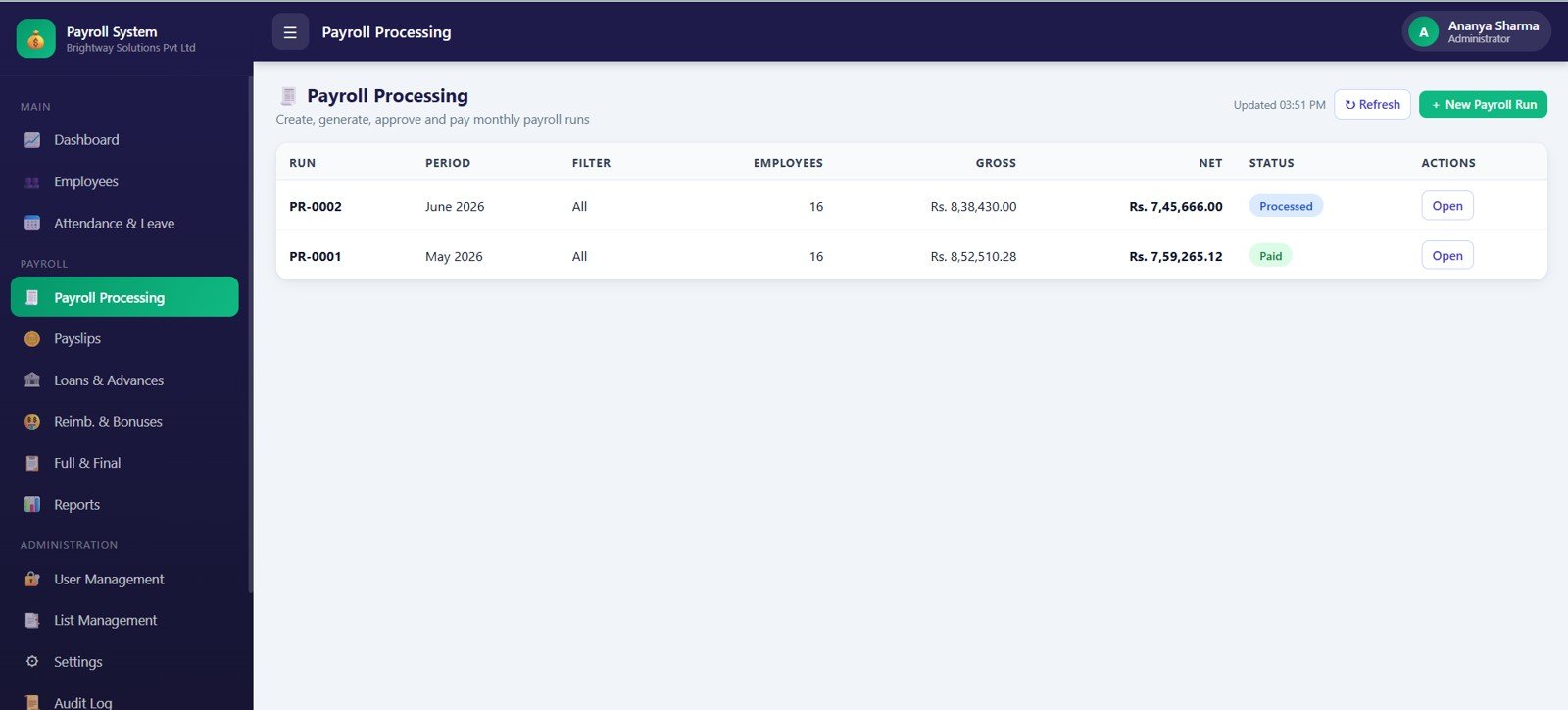
5. Payroll Processing
Payroll Processing helps teams manage payroll runs by period. It reviews employees included in the run, gross pay, net pay, payroll status, run actions, and the new payroll run workflow.
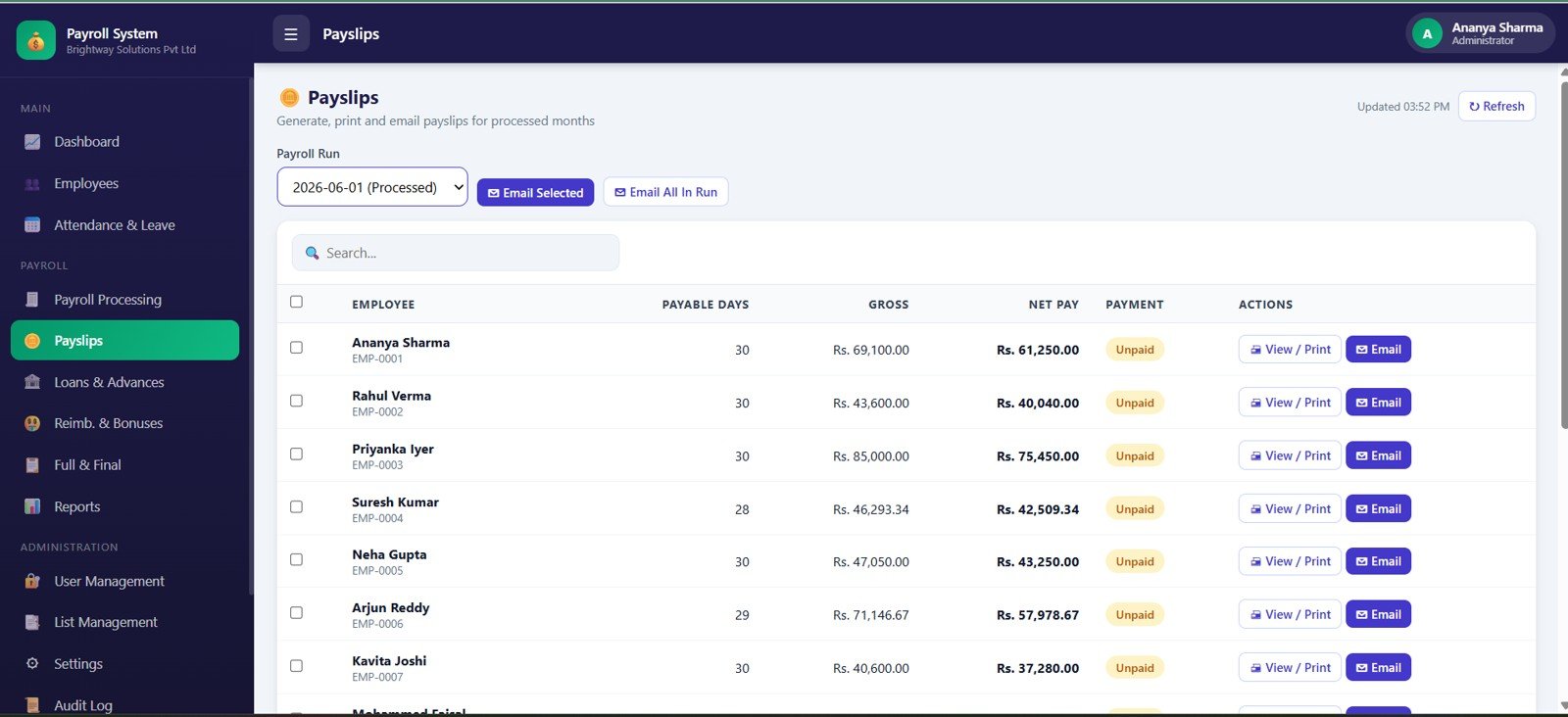
6. Payslips
The Payslips page brings employee-facing payroll records into one view. It includes payslips by payroll run, employee payslips, payable days, gross pay, net pay, payment status, view/print, email, and bulk email actions.
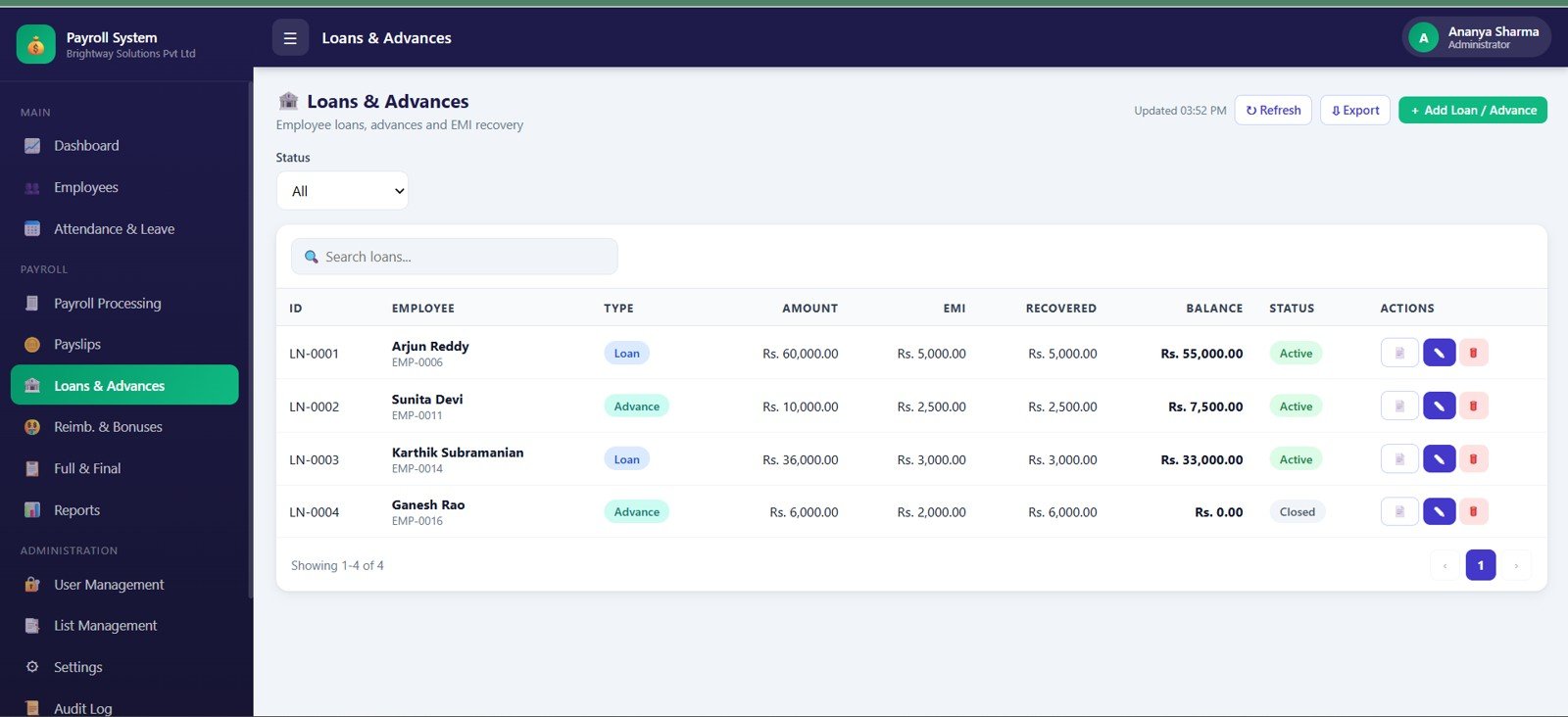
7. Loans and Advances
Loans and Advances tracks loans by employee, loan type, amount, EMI, recovered amount, balance, status, and row actions. This helps payroll teams keep recurring recoveries visible before final net pay is approved.
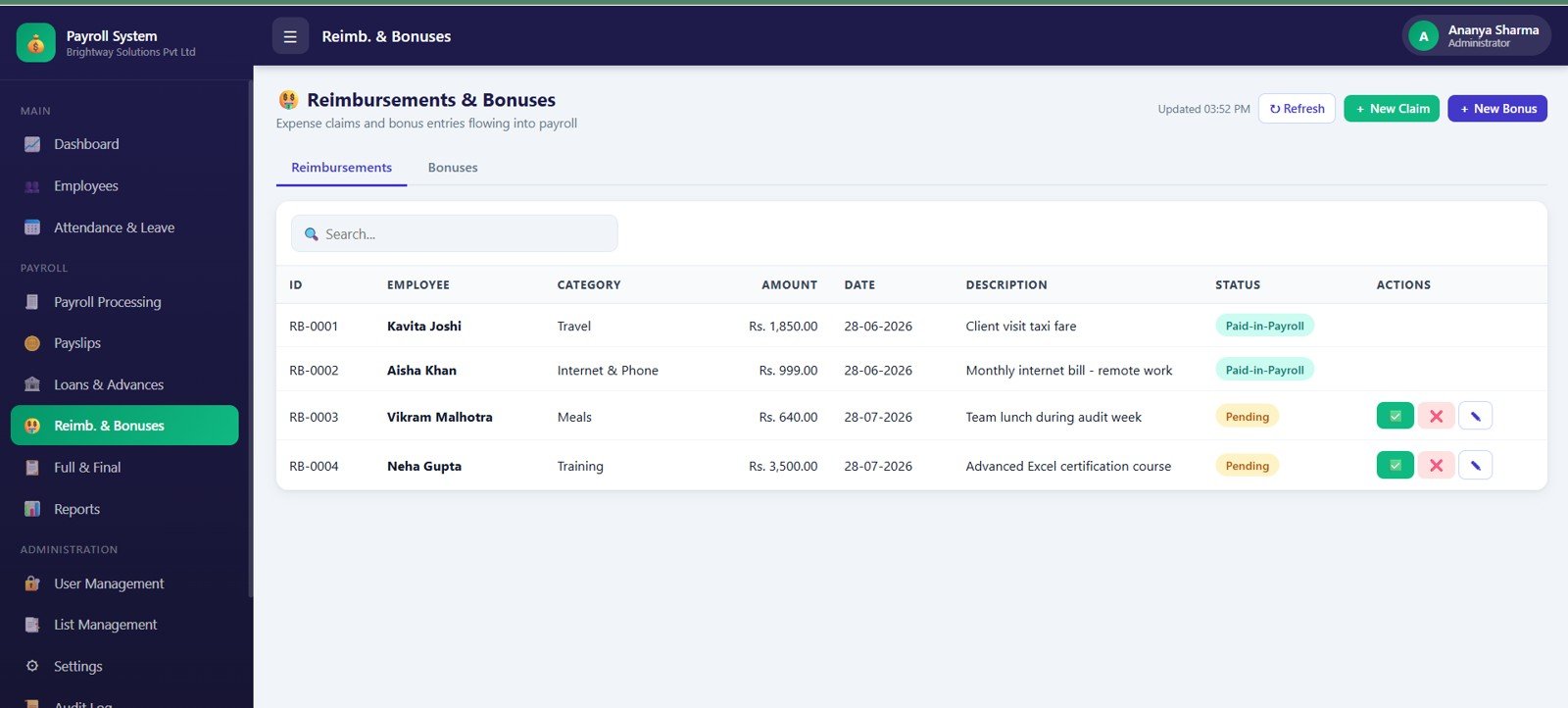
8. Reimbursements and Bonuses
This page tracks reimbursement claims and bonus entries. It covers claim category, amount, claim date, description, status, approval actions, and payroll addition records.
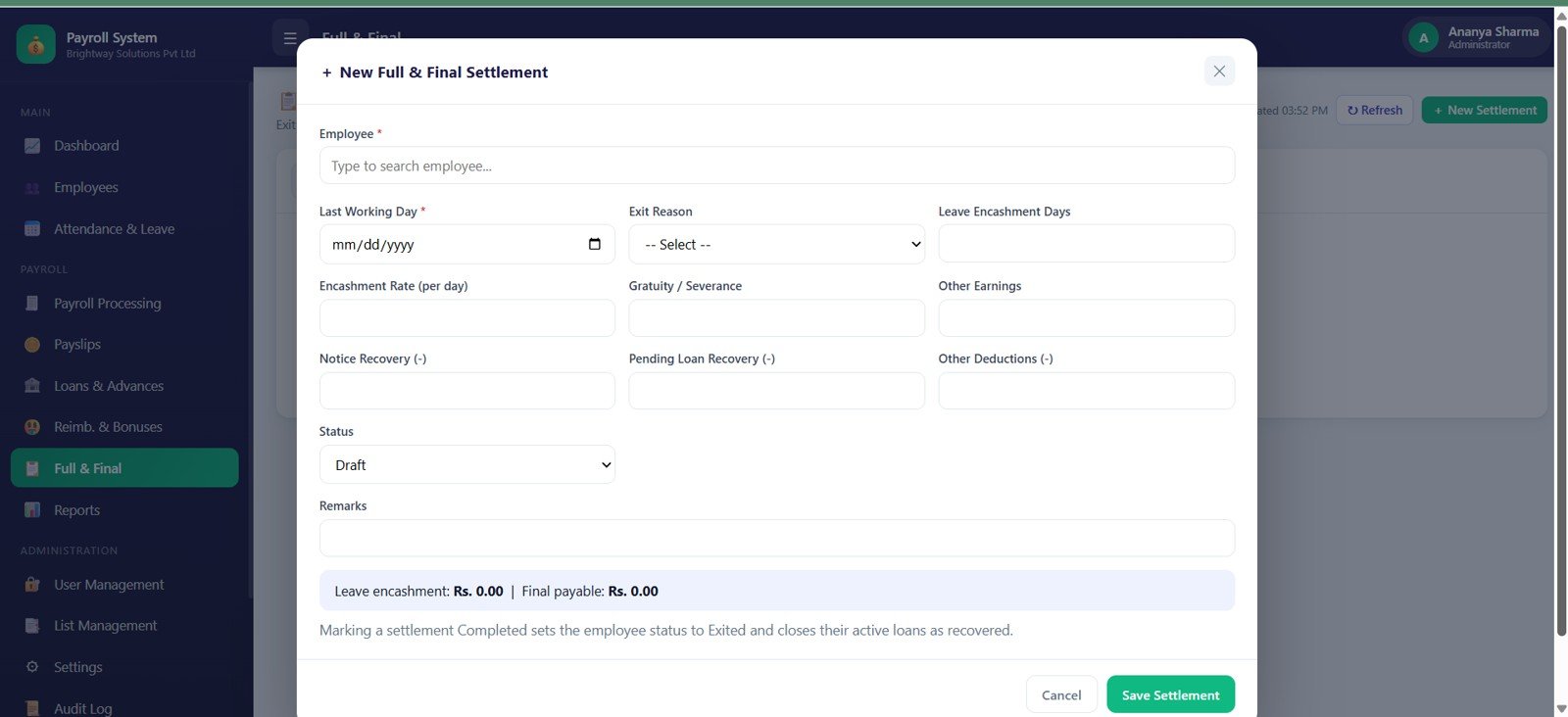
9. Full and Final Settlement
Full and Final Settlement handles exit payroll. It includes last working day, exit reason, leave encashment days, encashment rate, gratuity or severance, other earnings, notice recovery, pending loan recovery, deductions, final payable, and settlement status.
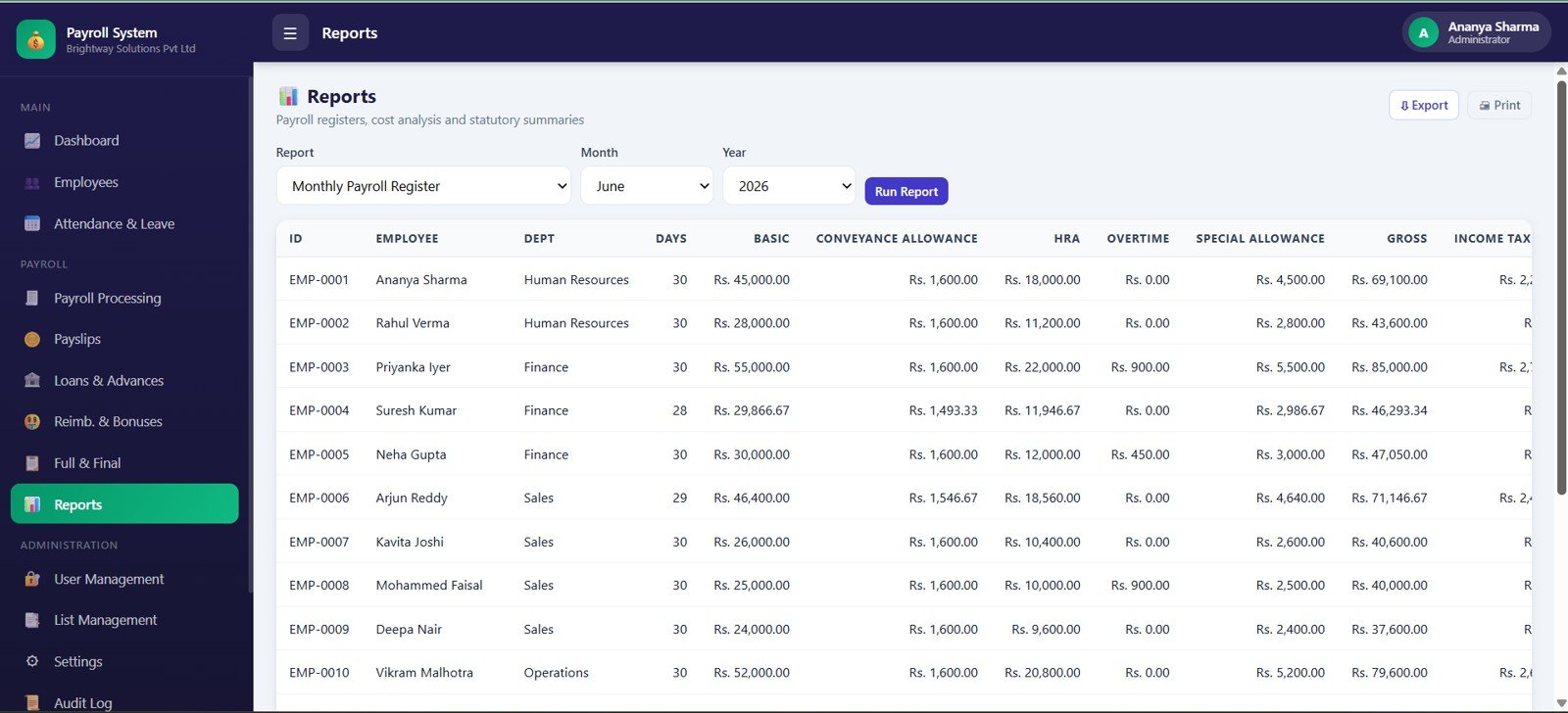
10. Reports
Reports gives payroll teams a monthly register by employee, month, year, days, basic pay, conveyance allowance, HRA, overtime, special allowance, gross pay, income tax, export, and print.
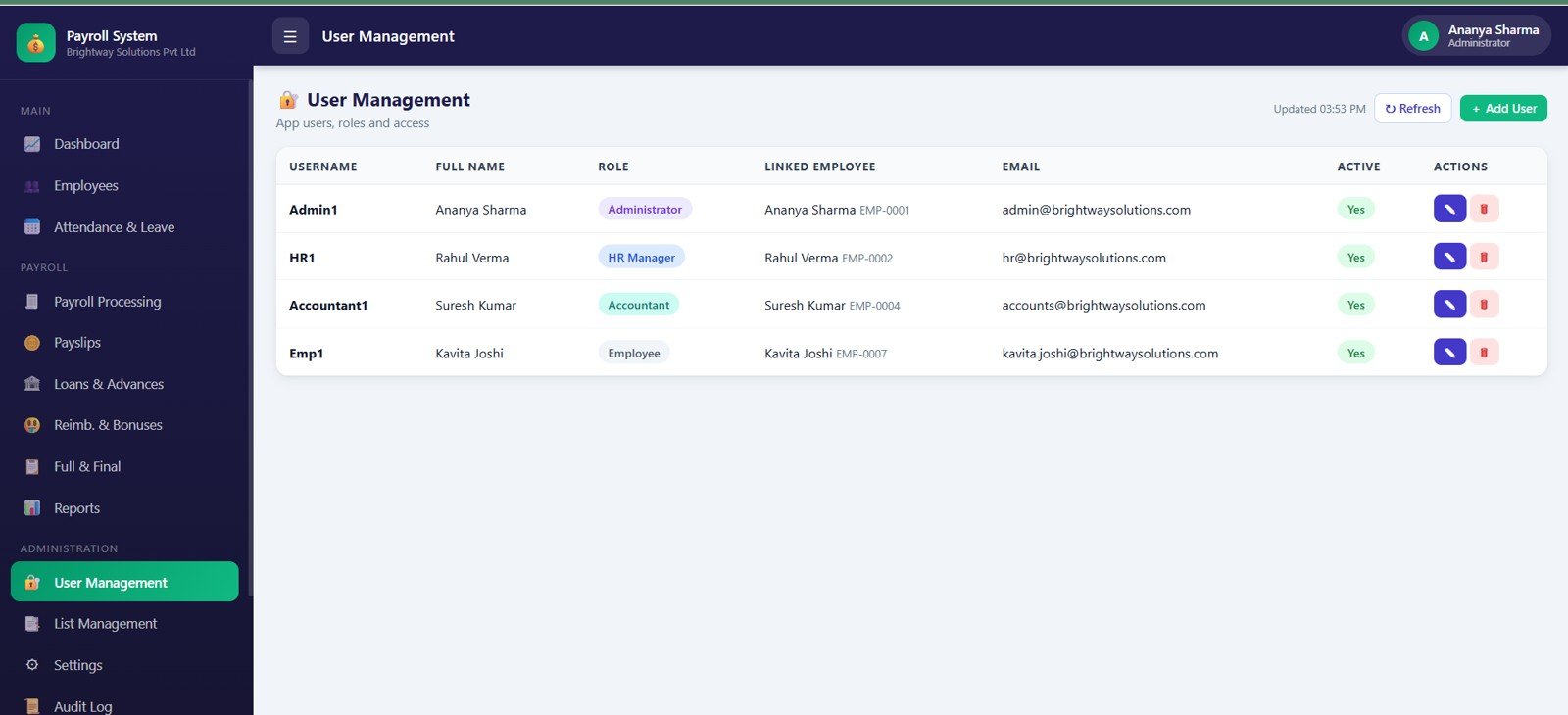
11. User Management
User Management controls username, role, linked employee, email, active status, user actions, and access control by role. It is useful when multiple HR or finance users need different access levels.
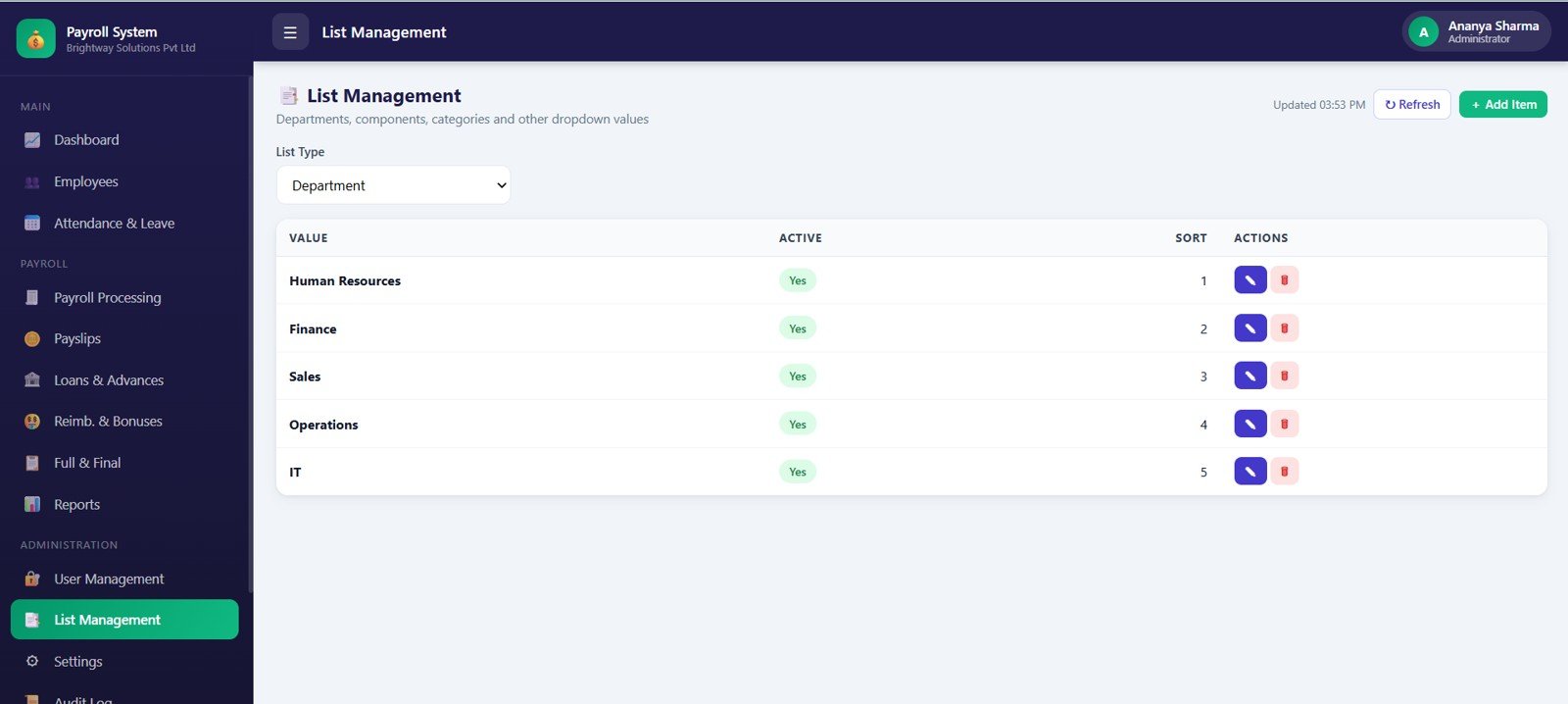
12. List Management
List Management controls dropdown values and master lists. It includes department values by list type, active status, sort order, list actions, and dropdown master values.
13. Settings
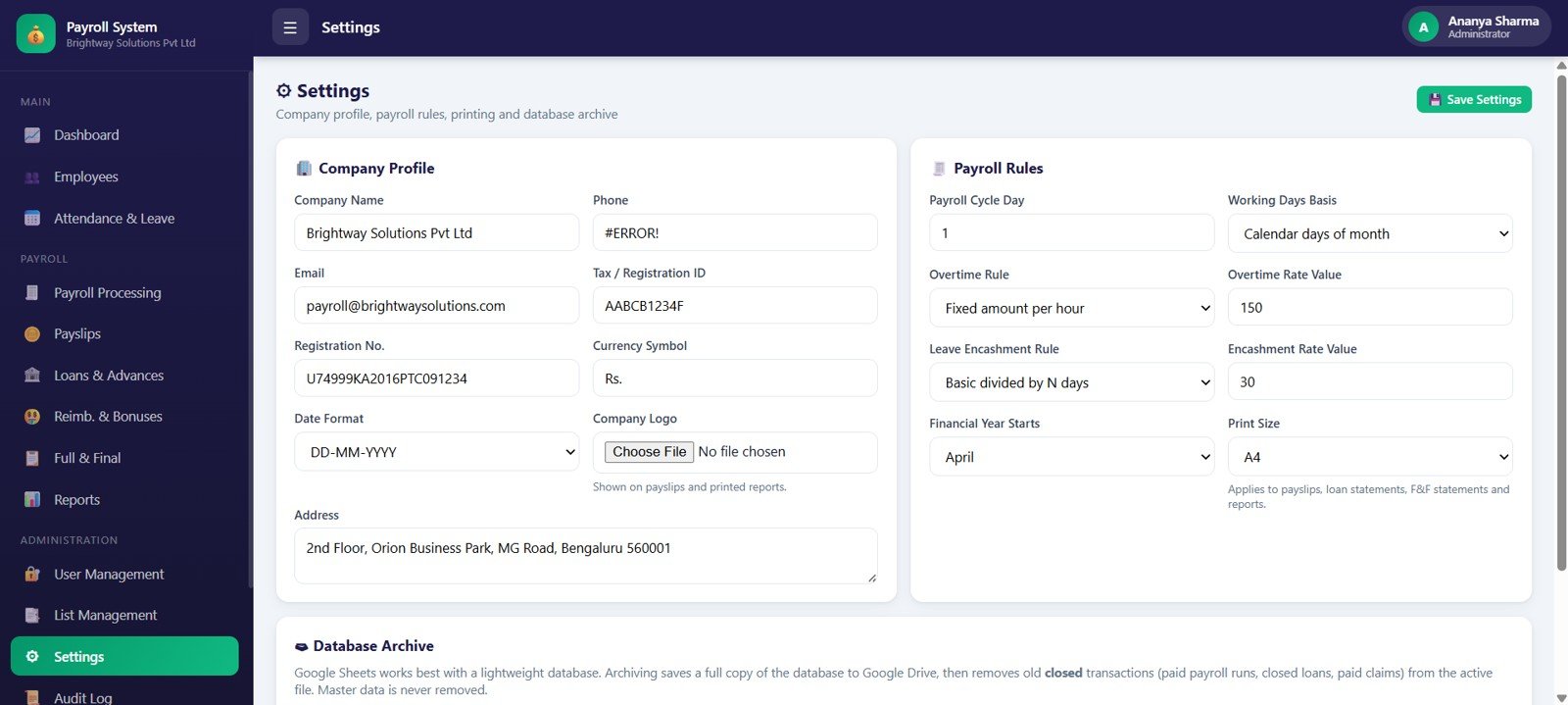
Settings stores company profile, email, phone, tax registration ID, registration number, currency symbol, date format, logo, address, payroll cycle day, working days basis, overtime rules, encashment rules, financial year start, print size, and Google Drive backup.
14. Audit Log
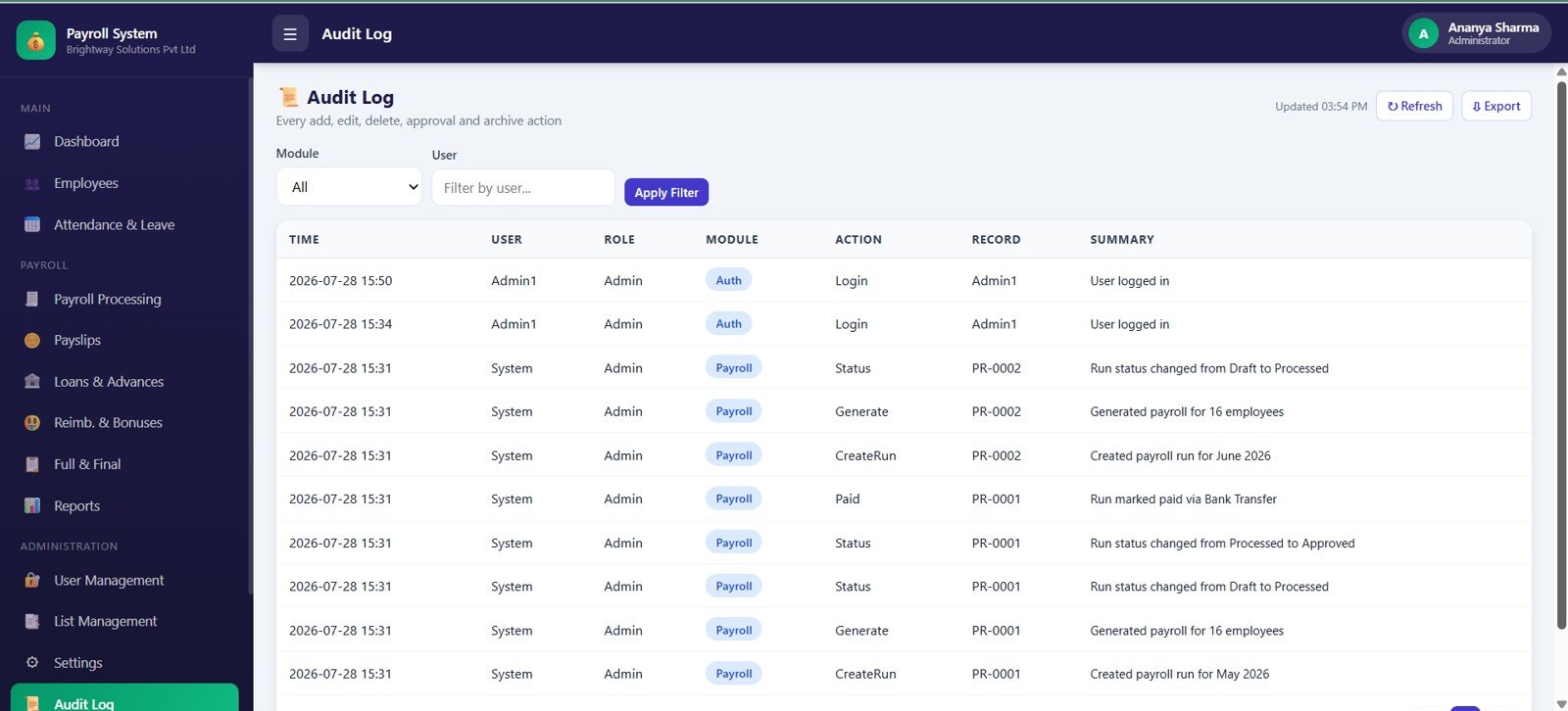
Audit Log records time, activity, user, role, module, action, reference record, system event summary, module/user filters, and audit export. It gives administrators a stronger trail for payroll changes.
Payroll and Salary Management System Web App vs. Google Sheets Tracker vs. Paid HR SaaS – Feature Comparison
| Feature | This web app template | Google Sheets tracker | Paid HR/payroll SaaS |
|---|---|---|---|
| Cost | $39.99 one-time sale price | Low template cost, more manual work | Recurring monthly or per-user cost |
| Platform | Browser-based payroll web app | Spreadsheet tabs and formulas | Vendor-hosted cloud platform |
| Setup time | Start from 14 prepared pages | Fast to copy, slower to connect workflows | Longer onboarding |
| Real-time team collaboration | Possible after deployment and access setup | Possible with sharing permissions | Usually included by plan |
| Mobile access | Modern browser access after deployment | Spreadsheet app or browser | Usually included |
| Customizable fields | Editable lists, roles, records, and settings | Editable columns and formulas | Depends on vendor plan |
| Share with link | Possible after deployment | Yes, with Drive permissions | Usually account based |
| Year-1 cost at 5 users | $39.99 before any workspace or customization costs | Low cash cost, more internal effort | Often hundreds or thousands per year |
| Payroll adjustments | Loans, advances, reimbursements, bonuses, settlements, and deductions | Usually separate tabs | Plan-dependent |
| Audit trail | Dedicated Audit Log page | Usually manual or version-history based | Usually included on higher plans |
Who Should Use This Template
- Small and mid-size teams that need payroll records, payslips, and adjustments in one place.
- HR managers who want employee records, attendance, leave, payroll runs, and settings connected.
- Finance admins who need reports, deductions, loans, reimbursements, and settlement visibility.
- Consultants who build private HR and payroll systems for clients.
- Google Workspace users who prefer a web app experience backed by editable business data.
Real-World Use Cases
Monthly payroll close: Use attendance, leave, payroll processing, loans, reimbursements, and payslips together before confirming net pay.
Payroll adjustment review: Track loan recoveries, reimbursement approvals, bonuses, deductions, and pending payment status in the same workspace.
Exit settlement workflow: Use full and final settlement records to review leave encashment, notice recovery, pending loans, final payable, and settlement status.
Advantages of Payroll and Salary Management System Web App
- One organized payroll workspace: Employees, attendance, processing, payslips, reports, settings, and audit logs stay connected.
- Lower recurring software cost: The template is a one-time download instead of a monthly subscription.
- Payroll-specific depth: Loans, advances, reimbursements, bonuses, settlements, and audit trail are included.
- Editable operating model: Teams can adjust dropdown values, roles, settings, and payroll rules to match their process.
Opportunities for Improvement
This template is not a managed payroll service. Teams that need automatic tax filing, direct salary bank transfer, statutory submissions, biometric attendance devices, or enterprise HRIS integrations should connect this template with specialist payroll or compliance software. If your team needs a simpler attendance-only file, the Attendance Tracker in Google Sheets may be lighter. If you need Excel-based payslip calculation, the Payroll Calculator and Payslip Generator in Excel may be a better fit.
Best Practices
- Standardize departments, branches, designations, roles, and payroll statuses before importing records.
- Update attendance and leave before opening a payroll run.
- Review loans, reimbursements, bonuses, and settlement records before approving net pay.
- Use role-based access so payroll settings and audit logs are controlled by the right users.
- Keep a backup copy before making structural changes to source files or master lists.
Explore Relevant Templates
- HR Employee Management System Web App
- Employee Attendance Payroll Management System – HR Web App Template
- Payroll Calculator and Payslip Generator in Excel
- Payroll Management Dashboard in Excel
- Payroll Data Entry System in Excel
- Browse Web Apps
For the spreadsheet skills that sit behind payroll and HR systems, the NextGenTemplates Academy learning paths offer a structured route with practice files.
Get the Payroll and Salary Management System Web App
Frequently Asked Questions
What is the Payroll and Salary Management System Web App?
It is a downloadable web app template for employee records, attendance and leave, payroll processing, payslips, loans, advances, reimbursements, bonuses, settlements, reports, users, settings, and audit logs.
Does it include payslips?
Yes. The Payslips page includes payroll run, employee payslip records, payable days, gross pay, net pay, payment status, view/print action, email action, and bulk email workflow.
Can it track loans and reimbursements?
Yes. The template includes Loans and Advances plus Reimbursements and Bonuses pages, so payroll adjustments can be reviewed before net pay is approved.
Can I customize company settings?
Yes. Settings includes company profile, tax registration fields, currency, date format, payroll cycle day, working days basis, overtime rules, leave encashment rules, financial year start, print size, and backup options.
Is this a payroll SaaS subscription?
No. It is a one-time digital template purchase from NextGenTemplates. Your own deployment, Google account, hosting, or customization workflow may still require setup depending on how you use the files.
Does it handle statutory filing or direct bank payment?
No. It helps organize internal payroll operations. For statutory filing, direct bank disbursement, or country-specific compliance, use a qualified payroll platform or professional payroll advisor.
About the Author
Built by PK – Microsoft Certified Professional with 15+ years of Excel, Google Sheets, and Power BI experience. Founder of NextGenTemplates, reaching 300K+ subscribers across YouTube channels. Every template is hand-built and tested before release.
Conclusion
The Payroll and Salary Management System Web App is built for teams that want payroll structure without buying a large HR SaaS system. With 14 pages covering employees, attendance, processing, payslips, loans, reimbursements, bonuses, settlements, reports, users, settings, and audit logs, it gives HR and finance teams a clearer way to manage monthly payroll operations.