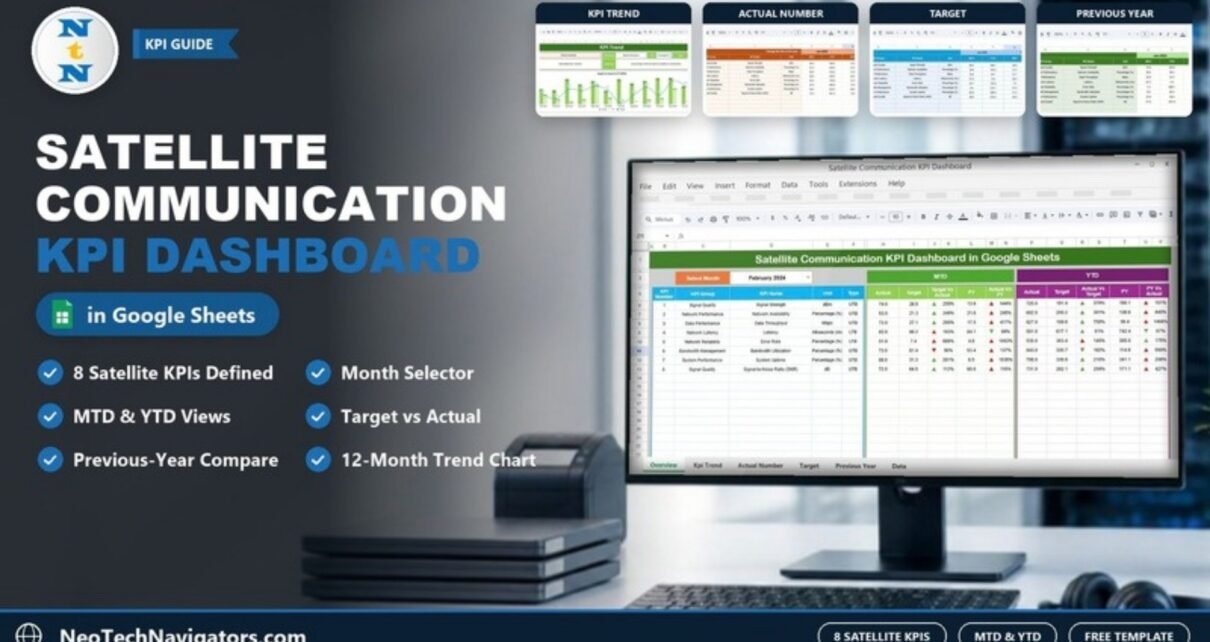
The Satellite Communication KPI Dashboard in Google Sheets gives satellite operators, network engineers and operations managers one place to track link quality, availability, throughput and uptime month by month. You pick a month, and every KPI updates with its MTD and YTD actual, target and previous-year figures, plus up and down arrows that show the direction of change.
The template has six tabs: Dashboard, KPI Trend, Actual Number, Target, Previous Year Number and KPI Definition. It ships with eight satellite KPIs already defined, from Signal Strength and Latency to Signal-to-Noise Ratio (SNR). You can rename them, add your own and enter real numbers without writing a single formula.
This guide walks through each sheet, lists the eight KPIs with their formulas, shows a worked example taken from the template, and explains how to load your own data.
🎥 Watch the Video Tutorial
Get the Satellite Communication KPI Dashboard
What Problem Does This Satellite KPI Dashboard Solve?
Satellite teams usually collect performance numbers from several places: ground station logs, network monitoring tools and monthly reports. When those numbers sit in separate files, it is hard to answer simple questions. Are we hitting our availability target this month? Is latency better or worse than last year? Which KPI has slipped since the start of the year?
This dashboard answers those questions on one screen. You type the monthly numbers into three input sheets (actual, target and previous year). The Dashboard and KPI Trend sheets then do the comparisons for you. Nobody has to rebuild a report every month, and every reviewer reads the same figures.
It suits:
- Satellite operations teams that report monthly service performance
- Network engineers who watch link quality and error rates
- Performance analysts who prepare MTD and YTD reviews
- Operations and planning managers who compare results with targets and with last year
The Eight Satellite Communication KPIs in the Template
All eight KPIs come from the template’s KPI Definition sheet. UTB means “Upper the Better” (a higher value is good). LTB means “Lower the Better”.
| KPI | Group | Unit | Formula (as defined in the template) | Better when |
|---|---|---|---|---|
| Signal Strength | Signal Quality | dBm | Average of all Signal Strength measurements | Higher (UTB) |
| Network Availability | Network Performance | Percentage (%) | Total available time / Total time | Higher (UTB) |
| Data Throughput | Data Performance | Mbps | Total data transmitted / Total time | Higher (UTB) |
| Latency | Network Latency | Milliseconds (ms) | Average of all Latency measurements | Lower (LTB) |
| Error Rate | Network Reliability | Percentage (%) | Total errors / Total packets transmitted | Lower (LTB) |
| Bandwidth Utilization | Bandwidth Management | Percentage (%) | Total bandwidth used / Total available bandwidth | Higher (UTB) |
| System Uptime | System Performance | Percentage (%) | Total uptime / Total time | Higher (UTB) |
| Signal-to-Noise Ratio (SNR) | Signal Quality | dB | Average of all SNR measurements | Higher (UTB) |
Each definition is stored next to the formula. For example, Network Availability is “the percentage of time the network is available for communication”, and Error Rate is “the percentage of data packets that are corrupted or lost”.
Sheet-by-Sheet Walkthrough
1. Dashboard Sheet
This is the main report page. Choose a month from the Select Month drop-down in cell D3 (the screenshot shows February 2024), and the whole table recalculates.
The left block lists each KPI’s number, group, name, unit and type. The MTD block then shows Actual, Target, Target Vs Actual, PY and Actual Vs PY. The YTD block shows Actual, Target, Actual Vs Target, PY and PY Vs Actual. Green and red up/down arrows sit beside each comparison so you can spot movement at a glance.

2. KPI Trend Sheet
Pick one KPI from the Select KPI drop-down in cell C3. The sheet fills in the KPI Group, Unit, Type, Formula and Definition, then draws a Target Vs Actual Vs PY (MTD) chart for all twelve months, with Actual and PY as columns and Target as a line. In the screenshot, Network Availability is selected and the chart runs from Jan-2024 to Dec-2024.

3. Actual Number Sheet
This is where you enter real results. Each KPI row has an MTD and a YTD column for every month (Jan-2024, Feb-2024 and so on). Cell E1 holds the first month of the year, so you can switch to a financial year that starts in April or July.

4. Target Sheet
The Target sheet uses the same layout. Enter the MTD and YTD target for every KPI and month. The dashboard compares the actuals against these values.

5. Previous Year Number Sheet
Enter last year’s MTD and YTD figures here (Jan-2023 onwards in the sample). This sheet drives the PY and Actual Vs PY columns, so you can see whether performance improved year over year.

6. KPI Definition Sheet
This reference table holds each KPI’s group, name, unit, formula, definition and type (UTB or LTB). Because the Dashboard and KPI Trend sheets read from here, it is also where you add or rename KPIs.

Worked Example: Reading One KPI Row
Here is the Signal Strength row from the sample data with February 2024 selected:
- MTD Actual: 74.0 dBm (from Feb-2024 MTD on the Actual Number sheet)
- MTD Target: 28.6
- Target Vs Actual: 259%
- MTD PY: 13.6
- Actual Vs PY: 544%
Both percentages are simple ratios of the actual to the comparison value:
Target Vs Actual = MTD Actual / MTD Target = 74.0 / 28.6 ≈ 259%
Actual Vs PY     = MTD Actual / MTD PY     = 74.0 / 13.6 ≈ 544%
The YTD block works the same way. The YTD Actual of 725.0 comes straight from the Feb-2024 YTD column, and the YTD Target is 191.4. That gives an Actual Vs Target of about 379%.
The sample numbers are demo values that show how the sheets work. They are not industry benchmarks, so replace them with your own data before you share the report.
How to Use It With Your Own Data
- Open the KPI Definition sheet and check the eight KPIs. Rename, delete or add rows so the list matches what your team reports, and set each one’s Type to UTB or LTB.
- On the Actual Number sheet, set the first month of your reporting year in cell E1.
- Enter MTD and YTD actuals for each month you have data for.
- Fill the Target sheet with the MTD and YTD targets agreed for the year.
- Paste last year’s results into the Previous Year Number sheet.
- Go to the Dashboard, choose the month in D3 and review the arrows.
- Use the KPI Trend sheet to look at any KPI that moved unexpectedly across the year.
Three Real-World Use Cases
Monthly service review at a satellite operator
The operations lead selects last month in D3 and walks the management team through the MTD block. KPIs with weak arrows, such as Error Rate or Latency, become the action items for the next month.
Ground station performance reporting
A ground station team tracks System Uptime and Network Availability against contract targets, then uses the YTD block to show cumulative performance at quarterly reviews.
Capacity planning for a telecom provider
Planners watch Bandwidth Utilization and Data Throughput on the KPI Trend chart. A steady rise against the previous year is an early signal that more capacity will be needed.
Best Practices
- Keep units consistent. If Latency is in milliseconds, never mix in seconds for one month.
- Set the KPI Type carefully. A wrong UTB/LTB setting makes the arrows read the wrong way.
- Update on a fixed day. Enter actuals on the same working day each month so reviews always use complete data.
- Protect the formula sheets. Use Data > Protect sheets and ranges to lock the Dashboard and KPI Trend sheets and leave only the input sheets editable.
- Write down data sources. Add a note on the KPI Definition sheet that says where each number comes from, such as which monitoring tool or log.
Limitations and Who Should Not Use It
- It is a monthly reporting tool, not a real-time monitoring system. It will not replace live network telemetry or alarms.
- Data is entered by hand (or pasted). If you need automatic feeds from monitoring systems, you will need extra scripting or a BI tool.
- The comparisons are ratios. Teams that need statistical analysis, such as percentiles or jitter distributions, should keep that work in a dedicated tool.
Related Templates and Further Reading
If your team works in Excel, there is also a Satellite Communication KPI Dashboard in Excel. For other connectivity reporting, see the Telecommunications Infrastructure KPI Dashboard, the Telecom Network KPI Dashboard and the Network Performance KPI Dashboard. Space-sector teams may also like the Space Tech KPI Dashboard in Google Sheets.
If you want to build dashboards like this yourself, the Pivot Tables & Dashboards course on NextGenTemplates Academy covers the layout and comparison techniques step by step.
Frequently Asked Questions
How many KPIs does the Satellite Communication KPI Dashboard include?
It comes with eight KPIs: Signal Strength, Network Availability, Data Throughput, Latency, Error Rate, Bandwidth Utilization, System Uptime and Signal-to-Noise Ratio (SNR). You can add more on the KPI Definition sheet.
Can I change the start month of the year?
Yes. Change cell E1 on the Actual Number sheet to the first month of your reporting year, and the month columns line up from there.
What do UTB and LTB mean?
UTB (Upper the Better) means a higher value is good, as with System Uptime. LTB (Lower the Better) means a lower value is good, as with Latency and Error Rate.
How is Target Vs Actual calculated?
It is the actual value divided by the target. In the sample, Signal Strength has an MTD actual of 74.0 and a target of 28.6, which gives about 259%.
Does the dashboard pull data automatically from my monitoring tools?
No. You enter or paste monthly values into the Actual, Target and Previous Year sheets, and the Dashboard and KPI Trend sheets calculate from those inputs.
Can several people work on it at the same time?
Yes. It runs in Google Sheets, so you can share it with your team and protect the calculation sheets so only the input sheets can be edited.
Wrapping Up
The Satellite Communication KPI Dashboard in Google Sheets turns monthly satellite performance data into a clear MTD and YTD view against targets and last year. Load your own KPI list, enter a year of targets and start each month by picking it in D3. The arrows show you where to look first.
Get the Satellite Communication KPI Dashboard
📅 Last updated: October 2026