The Real Estate Property Tracker in Google Sheets monitors 5 portfolio KPIs across 7 interactive pages, with 14+ pre-built charts and slicer filters. According to the Google Sheets Help Center, slicer filters let users filter charts and data ranges without modifying the underlying data — making them ideal for dashboard-style trackers like this one. Setup takes under 10 minutes and every chart, card, and calculation updates automatically when you replace the sample data.Real Estate Property Tracker in Google Sheets
👉 Click here to Purchase the Real Estate Property Tracker in Google Sheets
Managing a rental portfolio in scattered spreadsheets, email threads, and paper files leads to missed rent payments, forgotten maintenance requests, and inaccurate financial reports. This Real Estate Property Tracker in Google Sheets consolidates everything — property details, tenant records, income and expenses, maintenance logs, and investment calculations — into a single, shareable file that any team member can access from any device.Real Estate Property Tracker in Google Sheets
Key Features of Real Estate Property Tracker in Google Sheets
👉 Click here to Purchase the Real Estate Property Tracker in Google Sheets
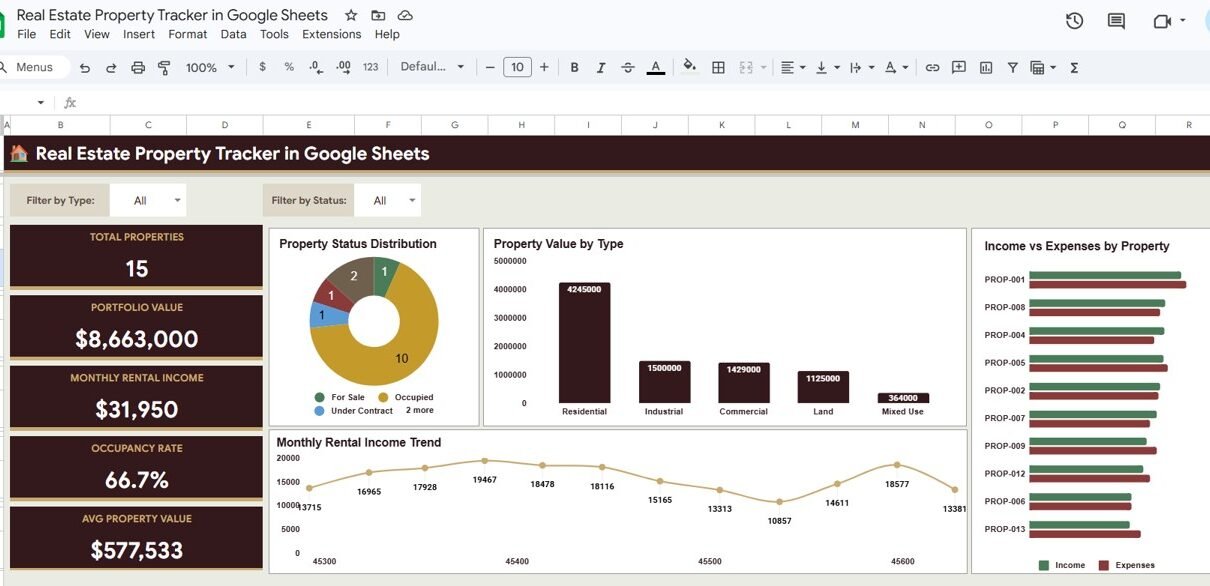
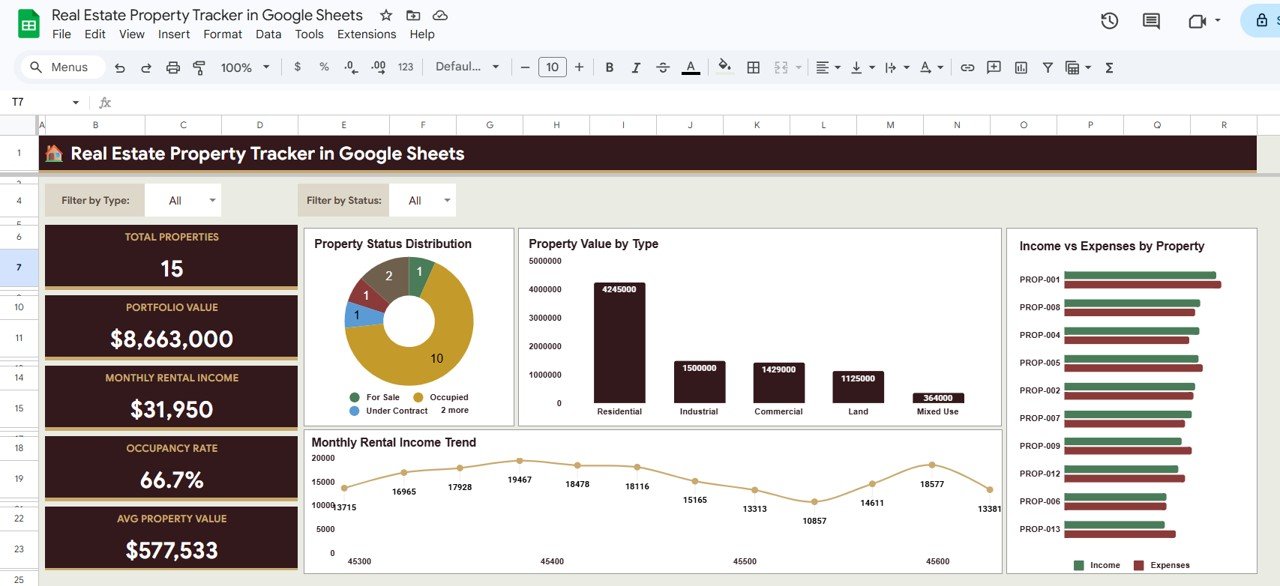
This tracker consolidates property details, tenant records, income and expense tracking, maintenance logs, and an investment calculator into a single Google Sheets file with 7 dedicated pages. It tracks 5 KPIs — Total Properties, Portfolio Value, Monthly Rental Income, Occupancy Rate, and Average Property Value — displayed as cards on the Overview page that update the moment you enter your data.
The tracker includes 14+ pre-built charts covering Property Status Distribution by Status, Property Value by Type, Income vs Expenses by Property, Monthly Rental Income by Month, Current Value by Property, Monthly Rent by Property, and more. A built-in Investment Calculator lets you enter Purchase Price, Closing Costs, Renovation Costs, Down Payment, Mortgage Rate, Loan Term, and all monthly income/expense items to evaluate ROI on any property before buying.
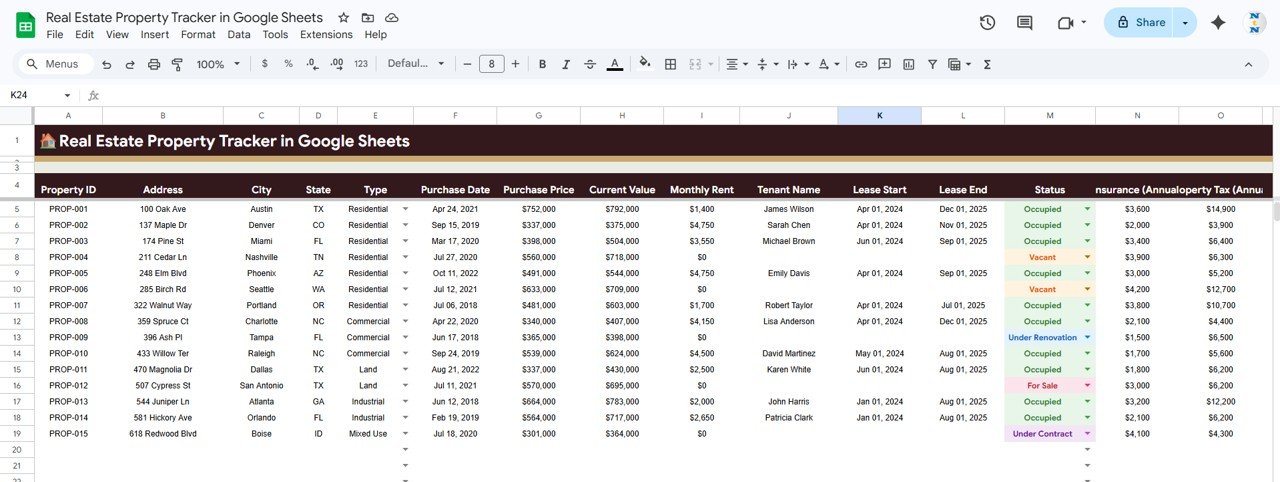
The Property Search page provides a dropdown where you select any Property ID and instantly view Address, City, State, Type, Purchase Date, Purchase Price, Current Value, Monthly Rent, Tenant Name, Lease Start/End, and Status — without scrolling through long data lists. Slicer filters on the Overview page let you slice the entire dashboard by property type, status, or any other dimension.
If you need a more analytics-focused approach, the Property Management Dashboard in Google Sheets offers advanced reporting and KPI visualizations for larger portfolios.
Dashboard Pages Explanation
1. Overview Page
The Overview page displays 5 KPI cards at the top: Total Properties, Portfolio Value, Monthly Rental Income, Occupancy Rate, and Avg Property Value. Below the cards, 4 charts provide portfolio-level analysis: Property Status Distribution by Status shows how many properties are active, vacant, or under maintenance. Property Value by Type breaks down your portfolio value across residential, commercial, and other property types. Income vs Expenses by Property compares rental income against operating costs for each property. Monthly Rental Income by Month tracks income trends over time. Slicer filters at the top let you filter the entire page by any dimension.
Overview Page2. Properties Tracker
The Properties Tracker page provides detailed property-level analysis including Property Details by Property ID, Current Value by Property, Monthly Rent by Property, Status by Property Type, Lease Period by Tenant, and Insurance and Property Tax by Property. This page gives you a complete view of every property in your portfolio with key financial and status metrics side by side.
 Properties Tracker
3. Income and Expenses
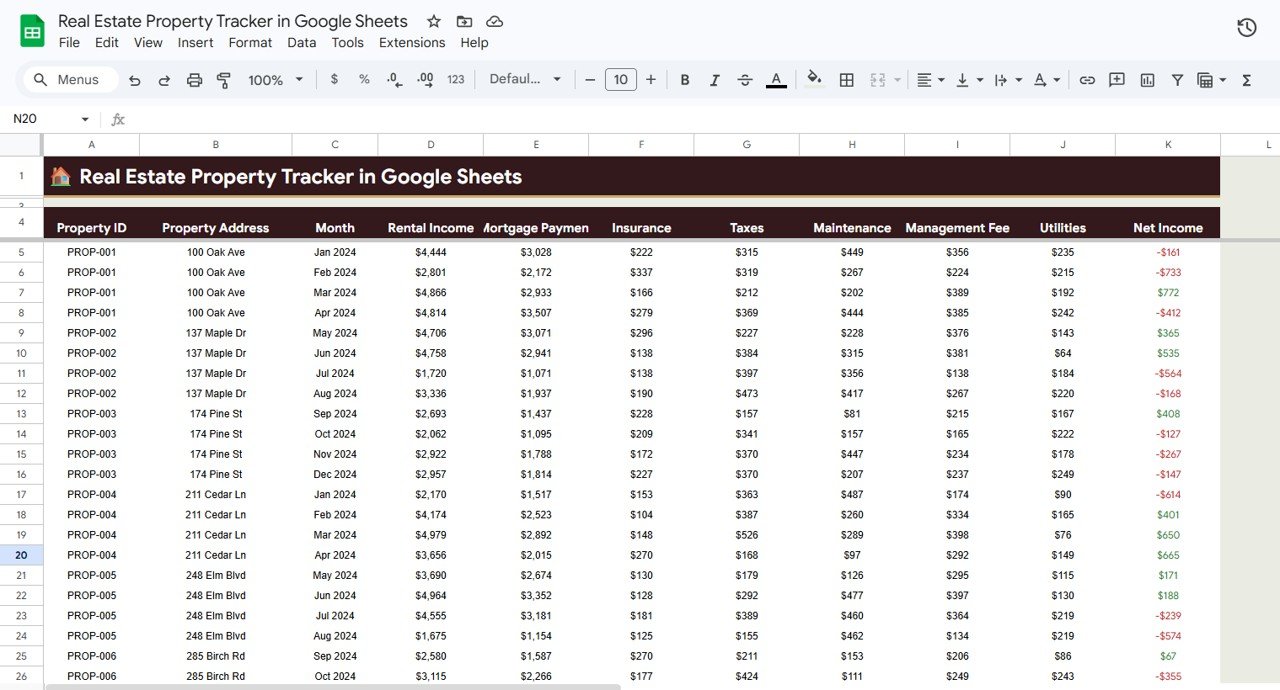
The Income and Expenses page tracks all financial flows across your portfolio: Rental Income by Month, Mortgage Payment by Property, Operating Expenses by Property, Maintenance Cost by Month, and Net Income by Property. This gives landlords and property managers a clear picture of profitability at both the portfolio and individual property level.
 Income and Expenses
4. Maintenance Log
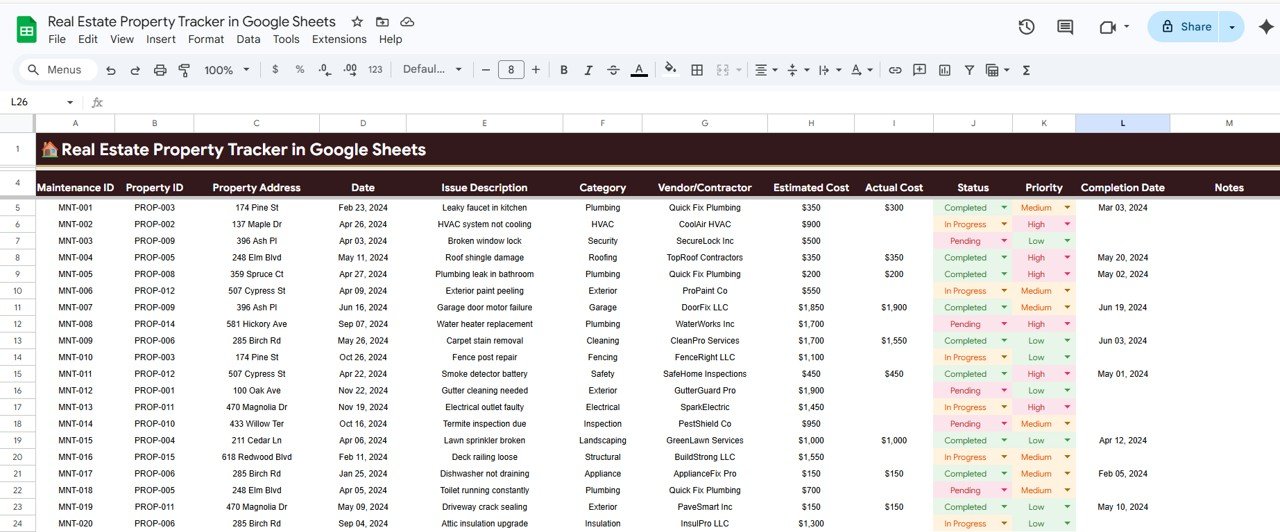
The Maintenance Log page records every maintenance request across your portfolio: Maintenance Records by Property, Issue Description by Category, Estimated and Actual Cost by Vendor, Status by Priority, and Completion Date by Maintenance ID. This ensures no maintenance request falls through the cracks and helps you compare vendor costs over time.
 Maintenance Log
5. Tenant Information
The Tenant Information page stores all tenant-related data: Tenant Details by Tenant ID, Lease Period by Tenant, Monthly Rent by Property, Security Deposit by Tenant, Payment Status by Tenant, and Emergency Contact by Tenant. Having all tenant data in one place speeds up lease renewals, payment follow-ups, and emergency communications.
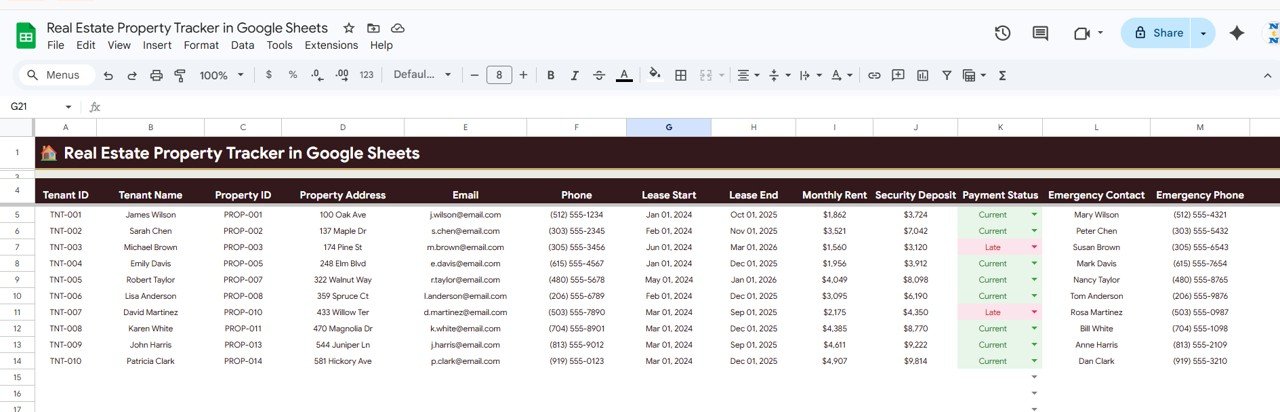 Tenant Information
6. Investment Calculator
The Investment Calculator page lets you enter Investment Details such as Purchase Price, Closing Costs, Renovation Costs, Down Payment, Mortgage Rate and Loan Term, along with Monthly Income and Expenses such as Rental Income, Mortgage Payment, Insurance, Property Tax, Maintenance, Management Fee and Vacancy Reserve. Enter your numbers and the calculator shows whether a potential purchase makes financial sense before you commit.
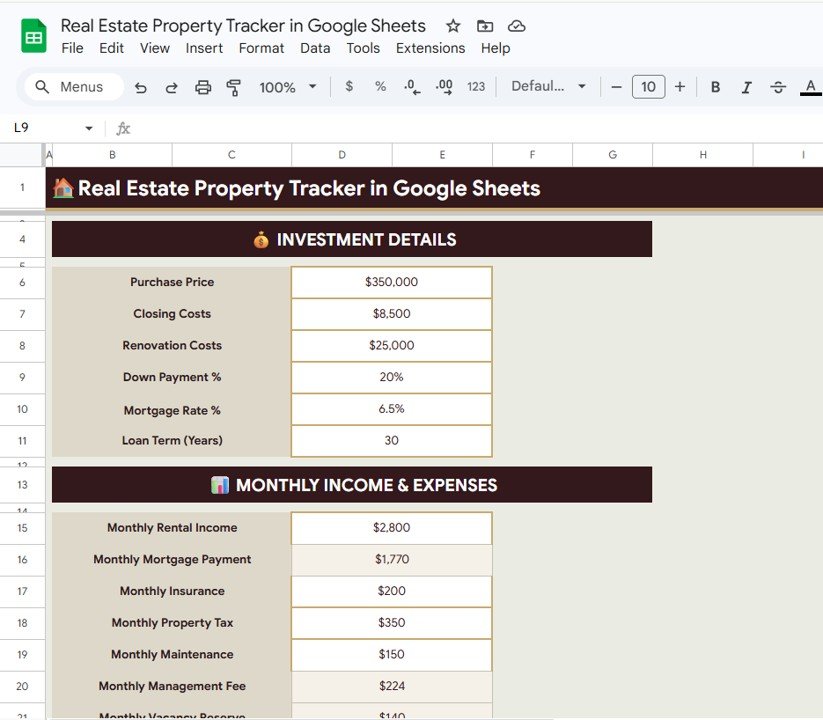 Investment Calculator
7. Property Search
The Property Search page lets you quickly look up any property using the Search by Property ID dropdown. Once you select a Property ID, all the property details are displayed instantly, including Address, City, State, Type, Purchase Date, Purchase Price, Current Value, Monthly Rent, Tenant Name, Lease Start and End dates, and Status. It is the fastest way to find any property without scrolling through long lists.
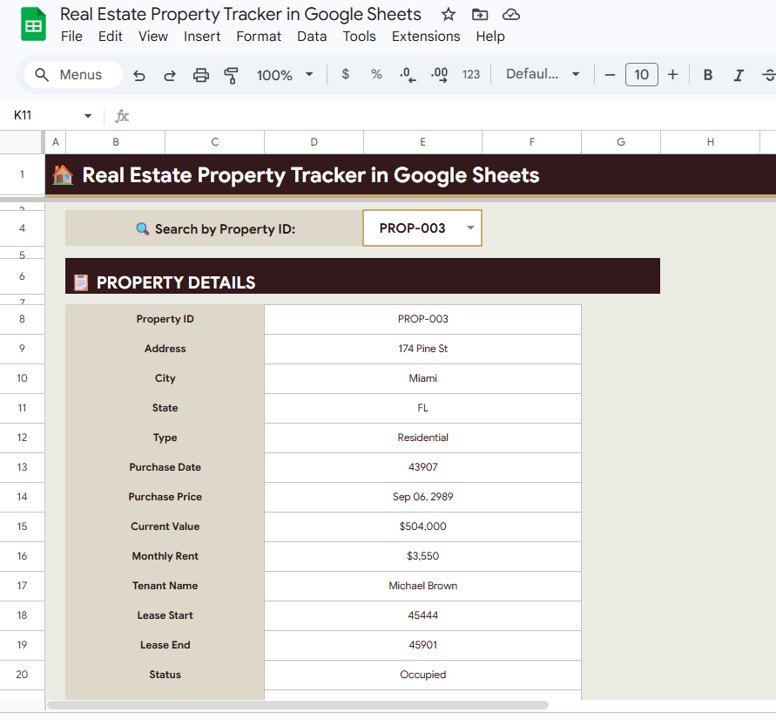 Property Search
Real Estate Property Tracker in Google Sheets vs. Excel Property Tracker vs. Wise Agent CRM — Feature Comparison
| Feature | Real Estate Property Tracker (Google Sheets) | Excel-Based Property Tracker | Wise Agent CRM |
|---|---|---|---|
| Cost | $6.99 one-time | $15-30 one-time | $49/month per user |
| Platform | Google Sheets (browser-based) | Microsoft Excel (desktop) | Cloud SaaS |
| Setup Time | Under 10 minutes | 15-30 minutes | 1-3 hours onboarding |
| Real-Time Team Collaboration | ✅ Built-in | ❌ Requires OneDrive/SharePoint | ✅ Yes |
| Mobile Access | ✅ Google Sheets app | ❌ Limited | ✅ Mobile app |
| Investment Calculator | ✅ Built-in | ⚠️ Build manually | ❌ Not included |
| Customizable Fields | ✅ Fully editable | ✅ Fully editable | ⚠️ Limited to plan |
| Share with Link | ✅ One click | ❌ File sharing needed | ✅ Yes |
| Year-1 Cost (5 Users) | $6.99 total | $15-30 total | $2,940/year |
For property managers who want portfolio-level tracking, tenant management, and investment calculations without paying $49/month per user, the Real Estate Property Tracker in Google Sheets sits in the sweet spot.
Who Should Use This Template
Perfect for:
- Independent landlords managing 1-50 rental properties who need a single view of their portfolio
- Property managers at small to mid-size firms who track tenants, maintenance, and finances in spreadsheets
- Real estate investors who want an investment calculator and income vs expenses breakdown per property
- Teams that already use Google Workspace and want instant collaboration on property data
Not a fit if:
- You manage 500+ units and need API integrations with accounting software like QuickBooks or Yardi
- You need automated rent payment processing or a tenant-facing portal
- You are a real estate agent focused on lead generation and CRM rather than property tracking
Real-World Use Cases
👉 Click here to Purchase the Real Estate Property Tracker in Google Sheets
Raj manages 12 rental apartments in Bangalore. He uses the Real Estate Property Tracker in Google Sheets to monitor monthly rent collection from each tenant, track maintenance requests from plumbers and electricians by vendor cost, and calculate whether a new property purchase fits his budget using the Investment Calculator — all without paying for property management software.
Lisa owns 6 vacation rental properties across Texas. She shares the tracker with her property manager via Google Sheets so both can update tenant lease dates, track occupancy rates in real time, and review income vs expenses per property each quarter before tax filing.
A small real estate firm with 3 agents uses the tracker to maintain a centralized portfolio of 35 client-owned properties. The Property Search page lets any agent pull up a property’s full details — address, tenant, rent, lease dates, and status — in seconds during client calls.
Advantages of Real Estate Property Tracker in Google Sheets
- All-in-one tracking — Properties, tenants, income, expenses, maintenance, and investment calculations live in a single file instead of scattered across multiple spreadsheets
- Real-time collaboration — Multiple team members can view and edit simultaneously through Google Sheets without version conflicts
- Zero recurring costs — One-time $6.99 purchase vs $49+/month for SaaS alternatives like Wise Agent or Placester
- Mobile accessible — View KPIs, search properties, and update data from the Google Sheets app on any device
- Investment decision support — The built-in calculator evaluates purchase price, mortgage terms, and monthly expenses to help you decide before buying
- Instant property lookup — The Search page eliminates scrolling through data rows when you need one property’s details fast
Opportunities for Improvement
👉 Click here to Purchase the Real Estate Property Tracker in Google Sheets
- The tracker does not include automated rent payment reminders or tenant notifications — these need to be handled manually or via a third-party integration
- Google Sheets has a cell limit of 10 million cells per spreadsheet, which could become a constraint for portfolios exceeding 200+ properties with extensive historical data
- The Investment Calculator provides static calculations — it does not pull live mortgage rates or property values from external APIs
- Charts use Google Sheets native charting, which offers fewer visualization options compared to dedicated BI tools like Power BI or Tableau
Best Practices
- Update data weekly — Keep rent payments, maintenance status, and tenant records current for accurate KPI cards on the Overview page
- Use slicer filters regularly — Filter the Overview dashboard by property type or status to spot underperforming assets quickly
- Run the Investment Calculator before every purchase — Enter real numbers for mortgage rates, closing costs, and expected vacancy to avoid overpaying
- Share with view-only access — Give tenants or partners view-only links so they can check lease details without accidentally editing data
- Back up monthly — Download a copy of the Google Sheets file as .xlsx at the end of each month for offline records
Explore Relevant Templates
📌 Property Management Dashboard in Google Sheets — A full dashboard for managing properties with advanced analytics and reporting.
📌 Rental Property Investment Dashboard in Excel — Track rental income, expenses, and ROI for your investment properties in Excel.
📌 Airbnb Host Dashboard in HTML — Monitor your short-term rental performance with an interactive HTML dashboard.
📌 Property Management Dashboard in HTML — A premium SaaS-style property management dashboard for your browser.
📌 Property Management Dashboard in Power BI — Advanced property analytics in Power BI Desktop.
Frequently Asked Questions
👉 Click here to Purchase the Real Estate Property Tracker in Google Sheets
What KPIs does the Real Estate Property Tracker in Google Sheets track?
The Real Estate Property Tracker in Google Sheets tracks 5 key performance indicators: Total Properties, Portfolio Value, Monthly Rental Income, Occupancy Rate, and Average Property Value. All KPIs update automatically when you replace sample data with your own property records.
How long does it take to set up this property tracker?
Setup takes under 10 minutes. Open the Google Sheets copy link, replace the sample data in each sheet tab with your property, tenant, and financial records, and the Overview dashboard with all charts and KPI cards updates instantly.
Can multiple team members edit the tracker at the same time?
Yes. Since this runs in Google Sheets, multiple users can view and edit the tracker simultaneously in real time. You can share access via a link and control edit permissions directly from Google Drive.
How does this compare to Wise Agent or Placester?
The Real Estate Property Tracker costs $6.99 one-time with no subscription fees. Wise Agent charges $49/month per user, and Placester starts at $99/month. This tracker gives you portfolio-level tracking, tenant management, and an investment calculator without recurring costs.
Does it include an investment calculator?
Yes. The Investment Calculator page lets you enter Purchase Price, Closing Costs, Down Payment, Mortgage Rate, Loan Term, and all monthly income and expenses (Rental Income, Insurance, Property Tax, Maintenance, Management Fee, Vacancy Reserve) to calculate property ROI.
Can I track maintenance requests and vendor costs?
Yes. The Maintenance Log page tracks every maintenance record by property, issue category, vendor, estimated vs actual cost, priority level, status, and completion date. You can monitor all open and closed requests across your entire portfolio.
Is this compatible with Google Sheets on mobile?
Yes. The tracker works in the Google Sheets mobile app on both Android and iOS. You can view KPI cards, search properties, and update data on the go from any device with internet access.
About the Author
Built by PK — Microsoft Certified Professional with 15+ years of Excel, Google Sheets, and Power BI experience. Founder of NextGenTemplates, reaching 300K+ subscribers across YouTube channels. Every template is hand-built and tested before release.
Conclusion
The Real Estate Property Tracker in Google Sheets gives landlords, property managers, and real estate investors a single file to track properties, tenants, income, expenses, maintenance, and investment returns — with 7 dedicated pages, 14+ charts, slicer filters, and an investment calculator built in.
✅ Instant download · One-time payment · No subscription · Lifetime access
👉 Click here to Purchase the Real Estate Property Tracker in Google Sheets
🎥 Youtube.com/@NeoTechNavigators