Ask anyone how the last month went and you will get one adjective. Ask them which days were bad, what happened first, and how much sleep they had the night before, and the answer collapses. Memory flattens a month into a mood. A written record does not, and a spreadsheet record does it without a subscription, an account, or an app that keeps your history on someone else’s server.
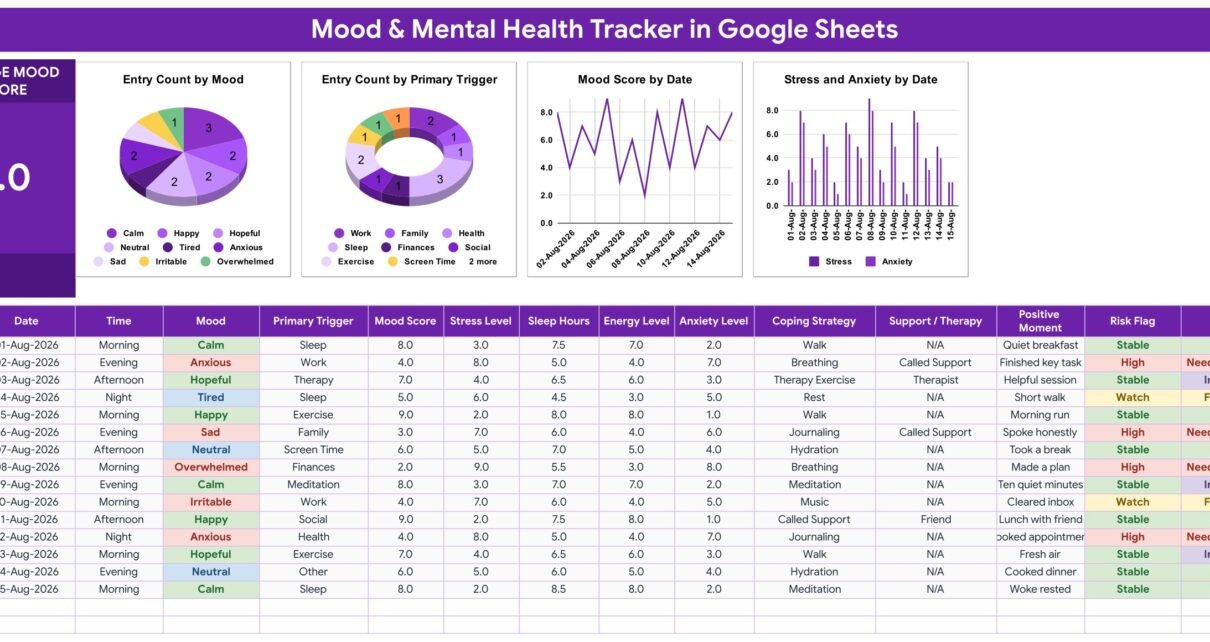
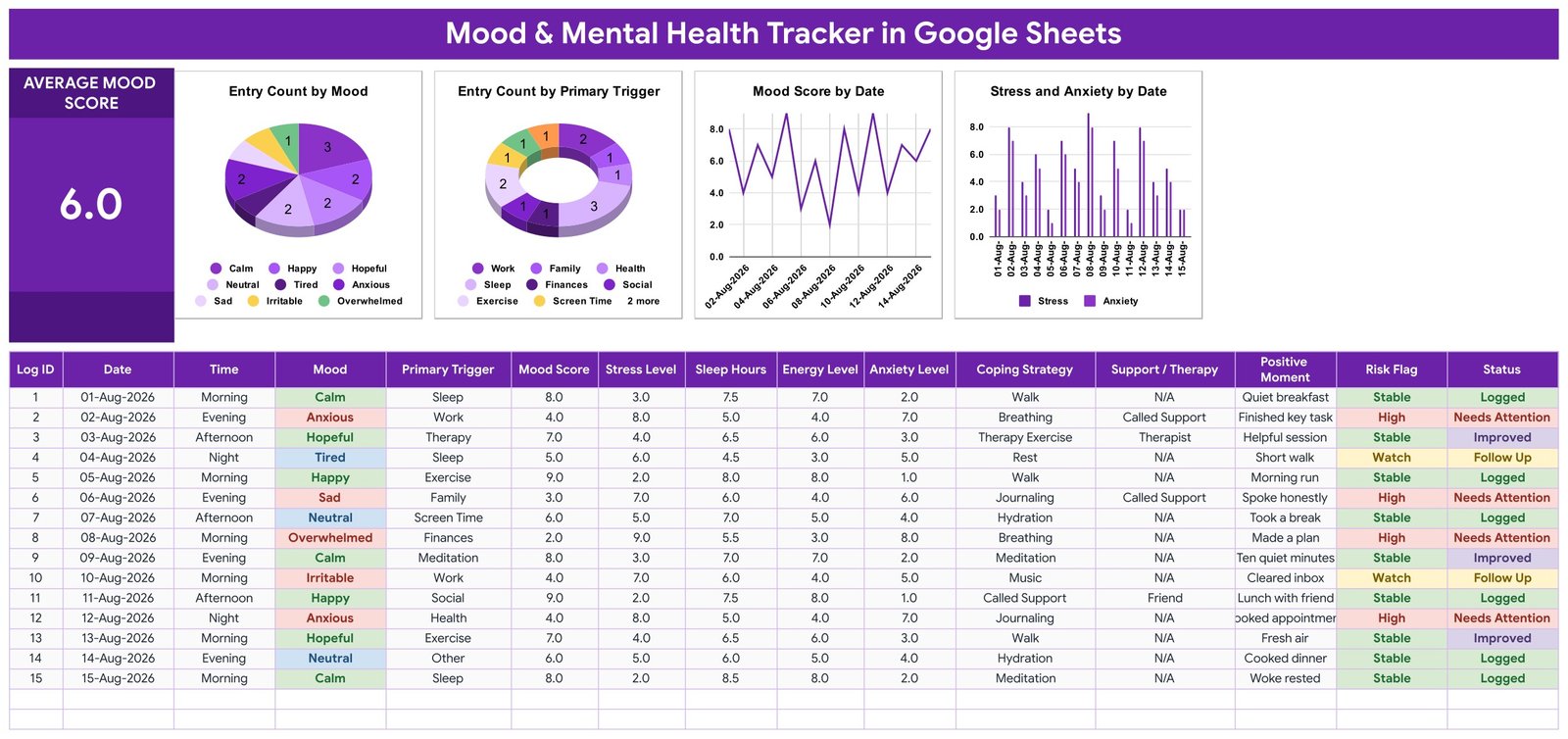
The Mood & Mental Health Tracker in Google Sheets is built for exactly that job. One sheet, four tabs, fifteen columns per check-in, two columns that calculate themselves, dropdowns fed from a single editable list, one Average Mood Score card and four charts that redraw as you type. Fifteen worked sample rows dated 01-Aug-2026 to 15-Aug-2026 ship with it, so nothing is blank the first time you open it.
Get the Mood & Mental Health Tracker in Google Sheets
Before anything else, the important part. This is a spreadsheet, not mental-health software. It is not a medical device, it is not a clinical or diagnostic tool, it is not therapy, and it is not a substitute for professional care. It does not detect, diagnose or treat anything. The Risk Flag column is an ordinary formula grouping the numbers you typed, not a clinical assessment – “High” means a formula matched your own entry and nothing more. It contains no validated screening scale. It stores nothing securely: there is no encryption and no access control beyond your own Google Drive sharing settings, so it is not HIPAA- or GDPR-compliant and it is not appropriate storage for clinical records. If you are struggling or in distress, please contact a qualified mental-health professional; in an emergency, call your local emergency number.
Key Features of the Mood & Mental Health Tracker in Google Sheets
Fifteen columns per check-in. Log ID, Date, Time, Mood, Primary Trigger, Mood Score, Stress Level, Sleep Hours, Energy Level, Anxiety Level, Coping Strategy, Support / Therapy, Positive Moment, Risk Flag and Status. That is enough to describe a day honestly and few enough that logging one takes under a minute.
Two self-filling columns. Log ID numbers each row automatically. Risk Flag returns Stable, Watch or High from the scores already on the row. Both are plain formulas – leave the cells untouched and rows you add below keep calculating.
Dropdowns from one List tab. Mood, Primary Trigger, Coping Strategy and Status all read the List tab. Add “Long commute” or “Cold-water swim” there once and it appears in the dropdown immediately, with no trip through Data validation. If you want to understand what is happening underneath, Google documents the feature in its data validation help page.
One Average Mood Score card. A single headline number recalculated on every entry. In the sample data it reads 6.0.
Four live charts. Entry Count by Mood, Entry Count by Primary Trigger, Mood Score by Date, and Stress and Anxiety by Date. They are wired to the log, so they move the moment you type.
Colour-coded moods and flags. Calm, Happy and Hopeful read differently from Tired and Neutral, which read differently again from Sad, Anxious, Irritable and Overwhelmed. Stable, Watch and High are banded the same way. Six weeks of rows acquire a shape you can see without reading a word.
Tracker Pages Explained
Mood Tracker
The single working page, and the one in the screenshot above. The Average Mood Score card sits on the left, the four charts run across the top, and the entry table fills the rest of the page. You work left to right: the date, the time of day (Morning, Afternoon, Evening or Night), how you felt, what set it off, then the five numbers – Mood Score, Stress Level, Sleep Hours, Energy Level and Anxiety Level – then what you did about it, whether you reached out to anyone, and one good thing from the day in the Positive Moment column. Log ID and Risk Flag fill in behind you.
The Positive Moment column deserves a mention. It is one short line – “Woke rested”, “Lunch with friend”, “Cleared inbox” – and it is the column people keep. A log of only low points is a log nobody opens twice.
List
The vocabulary tab. Every mood, primary trigger, coping strategy and status lives here, and every dropdown reads from it. The sample list ships with moods from Calm through Overwhelmed, triggers such as Work, Family, Health, Sleep, Finances, Social, Exercise and Screen Time, and coping strategies including Walk, Breathing, Journaling, Meditation, Music, Hydration, Rest and Called Support. Replace all of it with your own words – that is the intended first step.
How to Use
Six numbered steps printed on the sheet itself, so the instructions travel with the file rather than living in a download folder. Step six states plainly that a mental-health tracker is for personal organisation only and does not replace professional medical advice or emergency support.

Explore More Templates
A closing tab pointing at the wider template range. Nothing to configure.
Mood & Mental Health Tracker vs. an Excel Mood Log vs. a Paid Mood App – Feature Comparison
| This Google Sheets tracker | DIY Excel mood log | Paid mood app (Daylio Premium, Bearable, Moodfit) | |
|---|---|---|---|
| Cost | $6.99 once | Free, but you build it | Roughly $3-$10 per month, forever |
| Platform | Google Sheets, any browser | Microsoft Excel | The vendor’s phone app |
| Setup time | Click the copy link and start typing | Hours of columns, formulas and charts | Minutes, inside their structure |
| Real-time sharing with a partner or coach | Yes, Google Sheets sharing | Only by emailing the file | Usually not, or a paid tier |
| Mobile access | Google Sheets mobile app | Excel mobile, awkwardly | Yes – that is their whole point |
| Customisable fields | Every column and every dropdown | Anything you can build | Whatever the app allows |
| Share with a link | Yes, view-only or editable | No | Rarely |
| Year-1 cost for a household of five | $6.99 total | $0 plus your time | $180-$600 |
| Reminders and notifications | None | None | Yes |
| You own and can export the raw data | Yes, it is a spreadsheet | Yes | Varies by vendor |
The fair summary: a phone app will nag you into checking in and this will not. What the spreadsheet gives you instead is your own data in a plain grid you can sort, filter, chart, hand to someone or delete outright, with no account attached and no renewal date.
Who Should Use This Template
Anyone keeping a private daily check-in. Someone asked by a therapist or GP to bring a few weeks of notes to the next appointment. A student or shift worker who suspects sleep hours and bad days are connected but has never checked. A parent sitting with a teenager while the teenager logs their own entries. A coach or workplace wellbeing lead who wants a simple shared format rather than a platform.
Who should not: anyone storing another person’s clinical records, because there is no encryption, no access control beyond Drive sharing and no compliance certification of any kind. Anyone who needs crisis alerting, because it sends nothing and nothing happens unless you open it. Any clinic needing a patient database with audit trails. And anyone expecting a screening instrument – there is no PHQ-9, no GAD-7 and no validated scale inside, only the numbers you choose to type.
Real-World Use Cases
Between therapy sessions. Priya, 29, was asked to note what happens before a low evening. Six weeks in, the Entry Count by Primary Trigger chart is unambiguous – Work and Screen Time dwarf everything else. She shares the sheet view-only the day before her session instead of trying to reconstruct the month from memory.
Shift work and sleep. Daniel, 41, suspected his worst days followed his shortest nights. Two months of Sleep Hours logged beside Mood Score gave him a line chart he could put in front of his GP. Not a diagnosis – just a record that made the appointment faster and more specific.
A small workplace wellbeing circle. Five colleagues each keep a private copy of the same template and bring only anonymised themes to the monthly session. One template, five separate sheets, no shared database and nothing for anyone to administer.
Advantages of the Mood & Mental Health Tracker in Google Sheets
The entry is fast, because four of the fifteen fields are dropdowns and two fill themselves. The vocabulary is yours, because the List tab is a plain column rather than a locked taxonomy. The charts arrive already built and already wired, which is the part that stops most DIY mood logs after a fortnight. The whole thing lives in your own Drive, so it survives the vendor, the app store and the price increase. And it costs $6.99 once instead of a monthly fee, which matters for a habit measured in years.
Opportunities for Improvement
It will not remind you. There are no notifications, no emails and no alerts, and a tracker you forget is a tracker that fails – most people pair it with an existing phone alarm. There is no built-in weekly or monthly rollup beyond the Average Mood Score card and the four charts, so a longer-range comparison means adding your own pivot. Typing is comfortable on a phone but the four charts genuinely want a larger screen. And it deliberately holds no validated scale, so it will never give you a score anyone clinical can act on directly.
Best Practices
Rewrite the List tab before your first entry, in your own words – a dropdown you would never pick is friction. Log at a fixed point in the day rather than when you remember, so the record is not biased toward bad evenings. Always fill Positive Moment, even on the worst days, because it is what makes the sheet re-readable. Do not edit Log ID or Risk Flag; drag them down when you add rows. Read the charts as a set rather than one at a time – the Mood Score line means much more beside the Stress and Anxiety columns for the same dates. Share it view-only rather than editable when you show it to anyone. And take what you notice to a qualified professional: the sheet organises the record, it does not interpret it.
Explore Relevant Templates
The closest companion is the Sleep Tracker in Google Sheets, since sleep hours are one of the five numbers on this sheet. Alongside it, the Symptom & Pain Diary Tracker in Google Sheets covers physical symptoms, the Medication & Pill Tracker in Google Sheets covers what you take and when, and the Blood Pressure Log Tracker in Google Sheets and Blood Sugar (Diabetes) Log Tracker in Google Sheets cover the readings. For the movement side there is the Yoga & Stretching Practice Tracker and the Daily Steps Tracker. Every one is a personal log with exactly the same limits described above, and the full range sits in Google Sheets Trackers.
If you would like to get better at building trackers like this, the NextGenTemplates Academy learning paths take you through the spreadsheet skills behind them, with practice files.
Get the Mood & Mental Health Tracker in Google Sheets
Frequently Asked Questions
Is this a medical device, a diagnosis, or therapy?
No, to all three. It is a spreadsheet you type into. It does not detect, diagnose or treat anything, it gives no medical advice, and it is not a substitute for professional care. Risk Flag is a plain formula grouping the scores you entered – “High” means a formula matched your own numbers, nothing more. If you are in distress, contact a qualified mental-health professional; in an emergency, call your local emergency number.
Is my data secure or private?
The template stores nothing securely. There is no encryption, no password protection and no compliance certification, and it is not HIPAA- or GDPR-compliant storage. Your copy sits in your own Google Drive under whatever sharing settings you apply. Never put anyone else’s clinical records in it.
Will it remind me to check in?
No. It sends no notifications, emails or alerts of any kind. Nothing happens unless you open the sheet.
What exactly do I get?
A PDF containing a Google Sheets copy link. Click it and a private, fully editable copy lands in your own Drive. There is no add-on to install and no account to create beyond a free Google account.
Can I change the moods, triggers and coping strategies?
Yes, and it is the intended first step. Type your own into the List tab and the dropdowns pick them up straight away.
How many entries can it hold?
Far more than a personal log needs – it is an ordinary Google Sheet, so the ceiling is Google’s rather than the template’s. Add rows below the last one and drag Log ID and Risk Flag down with them.
Does it work on a phone?
Yes, through the Google Sheets mobile app. Typing a check-in works well; the four charts are easier to read on a larger screen.
Can I share it with my therapist or a family member?
Yes. Share it view-only with a link, or download it as a PDF before an appointment. Remember it is a personal record, not a clinical document.
About the Author
Built by PK – Microsoft Certified Professional with 15+ years of Excel, Google Sheets, and Power BI experience. Founder of NextGenTemplates, reaching 300K+ subscribers across YouTube channels. Every template is hand-built and tested before release.
Conclusion
A mood log only works if keeping it is easier than skipping it. This one gets there by doing less: four dropdowns so you are picking rather than typing, two formula columns so nothing is arithmetic, one number and four charts so a month has a visible shape, and four tabs so there is nowhere to get lost. It will not tell you what is wrong, and it does not try to. It just makes sure that when someone qualified asks how the last few months have gone, you have the actual record in front of you instead of one adjective.
Get the Mood & Mental Health Tracker in Google Sheets for $6.99.