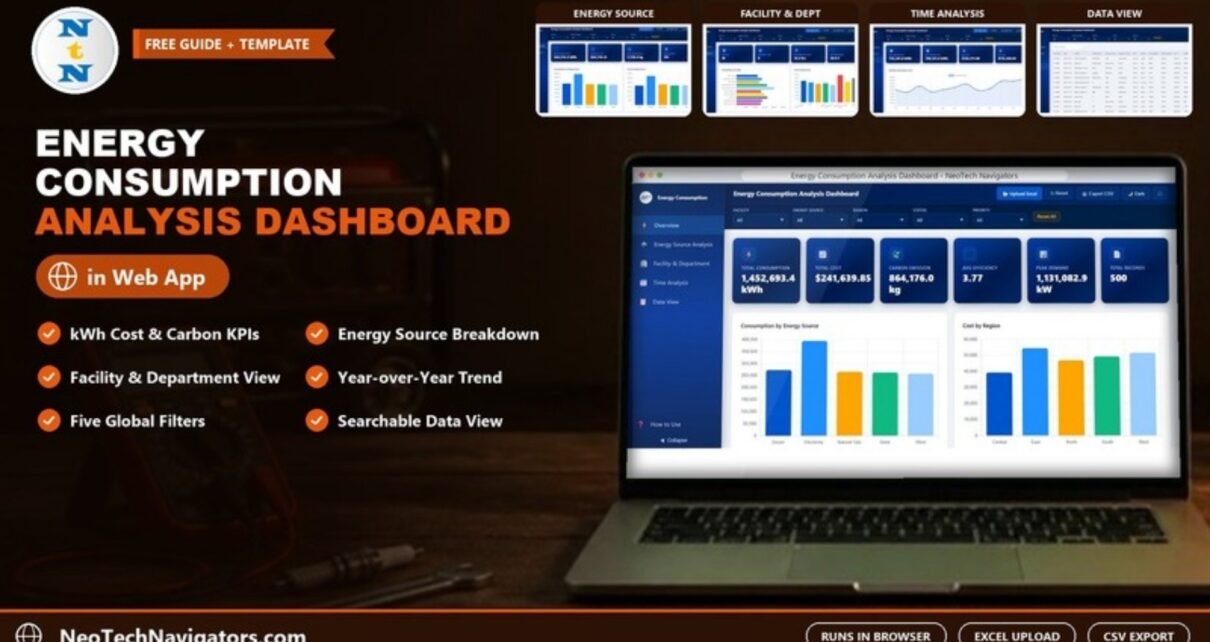
The Energy Consumption Analysis Dashboard in HTML is a browser-based report that shows where your energy goes, what it costs and how much carbon it produces, broken down by energy source, facility, department and month. It opens in Chrome, Edge or Firefox, so there is nothing to install and no licence to manage.
It is built for facility managers, energy and sustainability leads, and operations teams who collect meter or utility data but lack a quick way to present it. Below I go through the five pages exactly as they appear in the template, the six headline KPIs, how to read them, and the situations where a different tool would serve you better.
🎥 Watch the Video Tutorial
Get the Energy Consumption Analysis Dashboard
What Problem Does It Solve?
Energy data usually arrives as long exports: one row per meter reading, bill or equipment log. Totals are easy, but the useful questions are harder: Which facility uses the most? Is electricity or diesel driving cost? Did consumption fall this year? This dashboard answers those questions on five pages from a single record table, and every chart responds to the same set of filters.
Layout and Controls
A left sidebar switches between Overview, Energy Source Analysis, Facility & Department, Time Analysis and Data View, with a How to Use guide and a Collapse option at the bottom. The header holds Upload Excel, Reset, Export CSV, a Dark theme toggle and a full-screen button.
Under the header are five global filters: Facility, Energy Source, Region, Status and Priority, plus a Reset All button. A filter applies to every page, so you can, for example, select Region = North and move through all five pages without resetting.
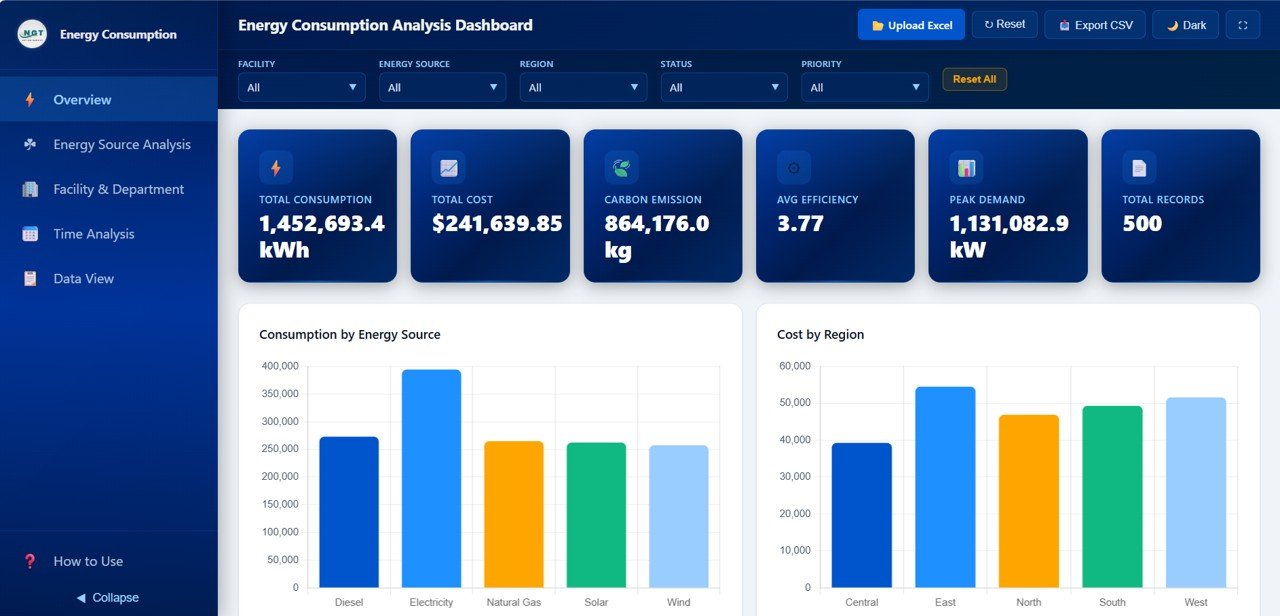
The Six Headline KPIs
| KPI | Sample value | What it measures | How it is derived |
|---|---|---|---|
| Total Consumption | 1,452,693.4 kWh | Energy used across the filtered records | Sum of the Consumption column |
| Total Cost | $241,639.85 | Energy spend | Sum of the Cost column |
| Carbon Emission | 864,176.0 kg | Emissions linked to that energy use | Sum of the Carbon Emission column |
| Avg Efficiency | 3.77 | Typical efficiency rating of the records | Average of the efficiency value in each record |
| Peak Demand | 1,131,082.9 kW | Demand load recorded in the data | Summarised from the Peak Demand column |
| Total Records | 500 | How many rows match the current filters | Count of records |
Two ratios are worth working out yourself from these cards, because they make sites of different sizes comparable:
Average cost per kWh   = Total Cost / Total Consumption
                       = 241,639.85 / 1,452,693.4 = $0.166 per kWh
Carbon per kWh         = Carbon Emission / Total Consumption
                       = 864,176.0 / 1,452,693.4 = 0.59 kg CO2 per kWh
Page 1: Overview
The six KPI cards sit at the top. Below them, Consumption by Energy Source compares Diesel, Electricity, Natural Gas, Solar and Wind (Electricity is the largest in the sample), and Cost by Region compares Central, East, North, South and West. Further down the page are Carbon Emission by Department and Status Distribution.
Page 2: Energy Source Analysis
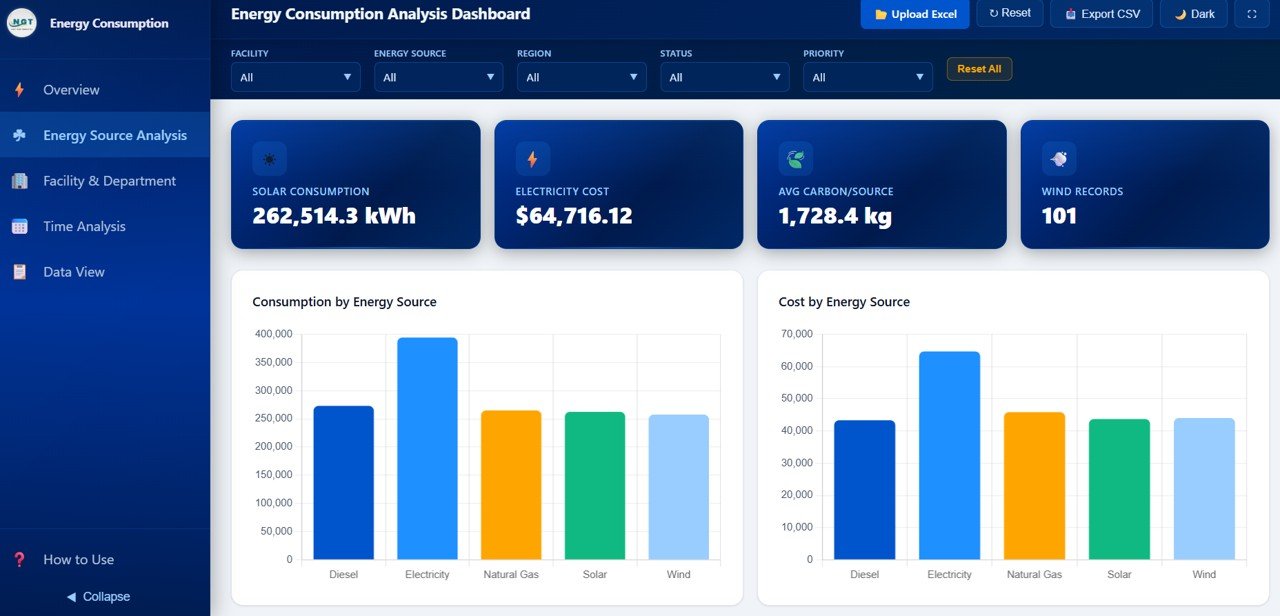
This page focuses on fuel type. Its cards show Solar Consumption (262,514.3 kWh), Electricity Cost ($64,716.12), Avg Carbon/Source (1,728.4 kg) and Wind Records (101). Charts include Consumption by Energy Source and Cost by Energy Source, followed by carbon emission, efficiency rating and peak demand by source and region.
Use it when deciding where a switch to cleaner or cheaper supply would make the biggest difference.
Page 3: Facility & Department
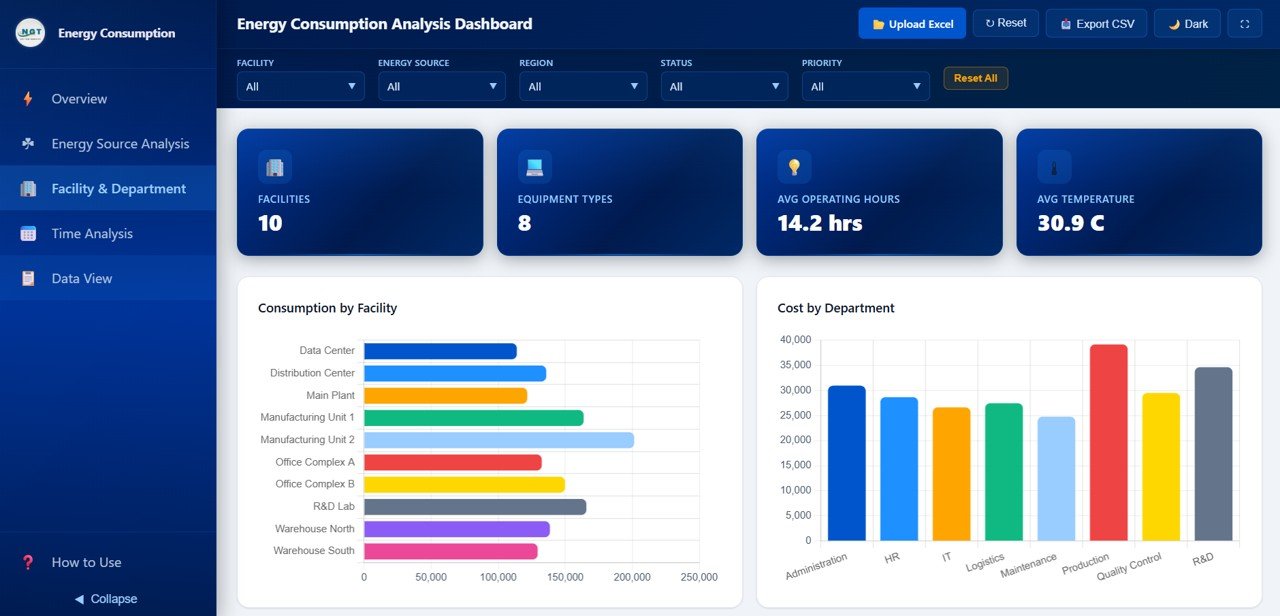
Cards show Facilities (10), Equipment Types (8), Avg Operating Hours (14.2 hrs) and Avg Temperature (30.9 C). Consumption by Facility ranks the ten sites: Data Center, Distribution Center, Main Plant, Manufacturing Unit 1 and 2, Office Complex A and B, R&D Lab, Warehouse North and Warehouse South; Manufacturing Unit 2 uses the most in the sample. Cost by Department covers Administration, HR, IT, Logistics, Maintenance, Production, Quality Control and R&D, with Production the highest. The page continues with carbon emission by facility, equipment type by consumption and maintenance status by department.
Page 4: Time Analysis
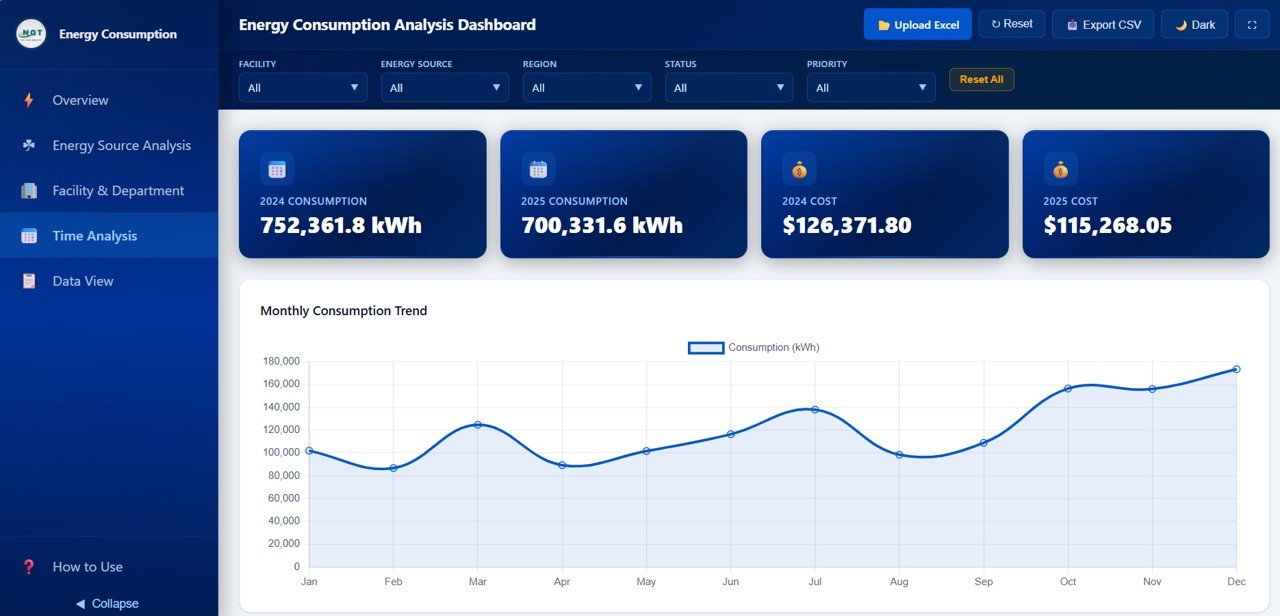
The cards compare years directly: 2024 Consumption 752,361.8 kWh against 2025 Consumption 700,331.6 kWh, and 2024 Cost $126,371.80 against 2025 Cost $115,268.05. The Monthly Consumption Trend line runs January to December, and the page also includes monthly cost, monthly carbon emission and a year-over-year consumption comparison.
Year-over-year change = (2025 - 2024) / 2024
                      = (700,331.6 - 752,361.8) / 752,361.8 = -6.9%
In the sample, consumption fell about 6.9% from 2024 to 2025. Note that the two years add up to the Overview total of 1,452,693.4 kWh, a quick check that nothing is missing.
Page 5: Data View
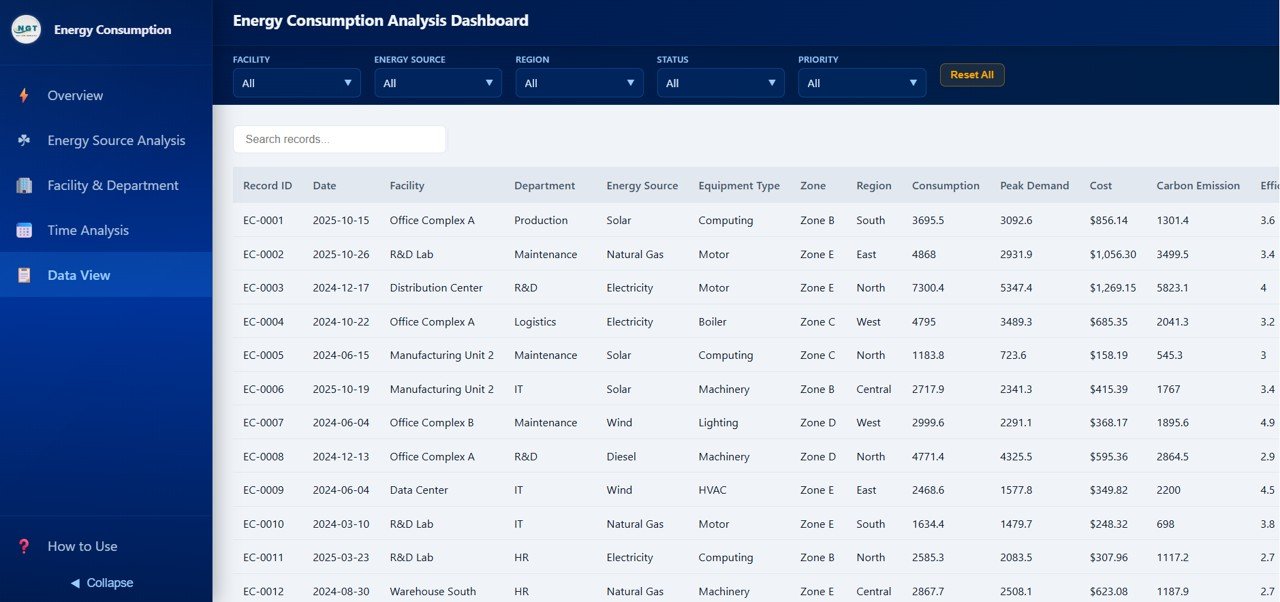
A searchable record table with the columns Record ID, Date, Facility, Department, Energy Source, Equipment Type, Zone, Region, Consumption, Peak Demand, Cost, Carbon Emission and an efficiency column, among others. Use the Search records box to find entries, sort by any column, and export the filtered rows with Export CSV.
How to Use It With Your Own Data
- Download and unzip the files, then open the dashboard HTML file in Chrome, Edge or Firefox.
- Open How to Use in the sidebar and read the built-in instructions.
- Prepare your records with the same columns as the Data View table: one row per reading or bill, with Facility, Department, Energy Source, Region, Consumption (kWh), Cost and Carbon Emission filled in.
- Click Upload Excel and select your file. Check Total Records against the row count in your sheet.
- Use the filters to check one facility or one source against your own totals before sharing.
- Export the filtered table with Export CSV when you need the numbers for a report.
Real-World Use Cases
- Multi-site manufacturer: compare Manufacturing Unit 1 and 2 by consumption and cost to decide where to fund efficiency upgrades first.
- Sustainability report: use the carbon cards and source breakdown to estimate the share of emissions from diesel and grid electricity.
- Facilities budget review: show finance the 2024 vs 2025 cost cards and the monthly trend to support next year’s energy budget.
Best Practices
- Use consistent names for facilities, departments and sources so the charts do not split one site into two.
- Record consumption in a single unit (kWh) and cost in a single currency.
- Calculate carbon emission with the emission factor your organisation reports against, and use it consistently.
- Compare ratios (cost per kWh, carbon per kWh) rather than raw totals when sites differ in size.
Limitations and Who Should Not Use It
This is an analysis view of data you load; it does not read meters, IoT sensors or utility portals live, and it does not send alerts. It also does not calculate carbon for you from fuel volumes. If you need real-time monitoring or certified emissions accounting, use a dedicated energy-management or carbon platform and treat this dashboard as a reporting layer.
Related Templates and Guides
Prefer Power BI? See the Energy Consumption Analysis Dashboard in Power BI. On this site you can also read about the Energy and Utility Dashboard in HTML, the Office Energy Consumption Dashboard in Google Sheets, the Energy Dashboard in Google Sheets and the Energy KPI Dashboard in Google Sheets.
If you want to go further with structured lessons on summarising data and building dashboards, the Pivot Tables and Dashboards course on NextGenTemplates Academy covers it step by step.
Frequently Asked Questions
Which KPIs does the Energy Consumption Analysis Dashboard in HTML show?
Total Consumption, Total Cost, Carbon Emission, Avg Efficiency, Peak Demand and Total Records on the Overview, with extra cards on each analysis page such as Facilities, Avg Operating Hours and yearly consumption and cost.
Which filters are available?
Facility, Energy Source, Region, Status and Priority, with a Reset All button. Filters apply across all pages.
Do I need internet or special software?
You need only a modern browser such as Chrome, Edge or Firefox. The dashboard runs from the HTML file on your computer.
Can I compare this year with last year?
Yes. The Time Analysis page shows consumption and cost for each year side by side, a monthly trend and a year-over-year comparison.
Can I export the data?
Yes. Export CSV saves the filtered records so you can use them in Excel or another reporting tool.
Does it switch to a dark theme?
Yes. The Dark button in the header toggles the theme for presentations or low-light rooms.
Wrapping Up
The Energy Consumption Analysis Dashboard in HTML gives you a clear, filterable view of energy use, cost and carbon across sources, sites, departments and years, without installing anything. Load a year of your own records, check the totals against your bills, and you will have a report ready for your next facilities or sustainability review.
Get the Energy Consumption Analysis Dashboard in HTML
📅 Last updated: October 2026