The HVAC Service Dashboard in HTML tracks 6 high-level KPIs across 5 interactive pages, with 20+ pre-built charts and full search, sort and CSV export on the raw data. Built as a single self-contained HTML file, it runs in under 5 minutes on any laptop — no server, no SaaS login, no per-technician subscription.
For HVAC contractors who need clean dashboard visibility without paying $99–398 per technician per month for ServiceTitan or Housecall Pro, this is the zero-subscription reporting layer that sits between “my data is stuck in spreadsheets” and “we’re locked into enterprise field-service software”. The HVAC Service Dashboard in HTML gives you a portable, offline command centre for revenue, technicians, equipment, regions and SLAs.
Get the HVAC Service Dashboard in HTML
Key Features of the HVAC Service Dashboard in HTML
This template ships as a single self-contained HTML file with embedded CSS and JavaScript. It runs fully offline in Chrome, Edge, Safari or Firefox and tracks 6 KPIs, 20+ interactive charts and 5 dedicated pages covering revenue, service analysis, technician performance, regional insights and a raw data view with CSV export.
- Fully offline HTML dashboard — runs on any laptop, tablet or browser without internet or a web host.
- 5 interactive pages — Overview, Service Analysis, Technician Performance, Regional Insights and Data View.
- 6 KPI cards — Total Revenue, Total Services, Average Customer Rating, Average Response Time, Completed Services and Pending Services.
- 20+ charts covering revenue trends, service status, equipment mix, technician ratings and regional performance.
- Global slicers and filters — filter the entire dashboard by date, region, technician, service type or priority in one click.
- Data View with search, sort, pagination and CSV export — drill any chart to the source record in seconds.
- Priority and response-time tracking to keep emergency calls inside SLA.
- Warranty coverage analytics to protect margin on in-warranty jobs.
- Mobile-responsive layout — works on phone and tablet for field supervisors and dispatchers.
- Print and export-ready for board reviews, franchise audits and investor reporting.
Dashboard Pages Explanation
1. Overview Page
The overview page condenses the entire HVAC service operation onto a single screen. Six KPI cards show Total Revenue, Total Services, Average Customer Rating, Average Response Time, Completed Services and Pending Services, while global slicers let you drill the whole dashboard by region, technician, priority or service type in one click.
Key charts on this page include Revenue Trend by Month (plots the monthly revenue curve so you can spot heating-season peaks and cooling-season dips), Service Status Distribution (splits jobs into Completed, In Progress, Pending and Cancelled so managers see backlog at a glance), Revenue by Service Type (compares installation, repair, maintenance and inspection revenue), Service Volume by Customer Type (separates residential, commercial and industrial work), and Services and Revenue by Priority (overlays emergency, high, medium and low-priority workload against the revenue they produce).
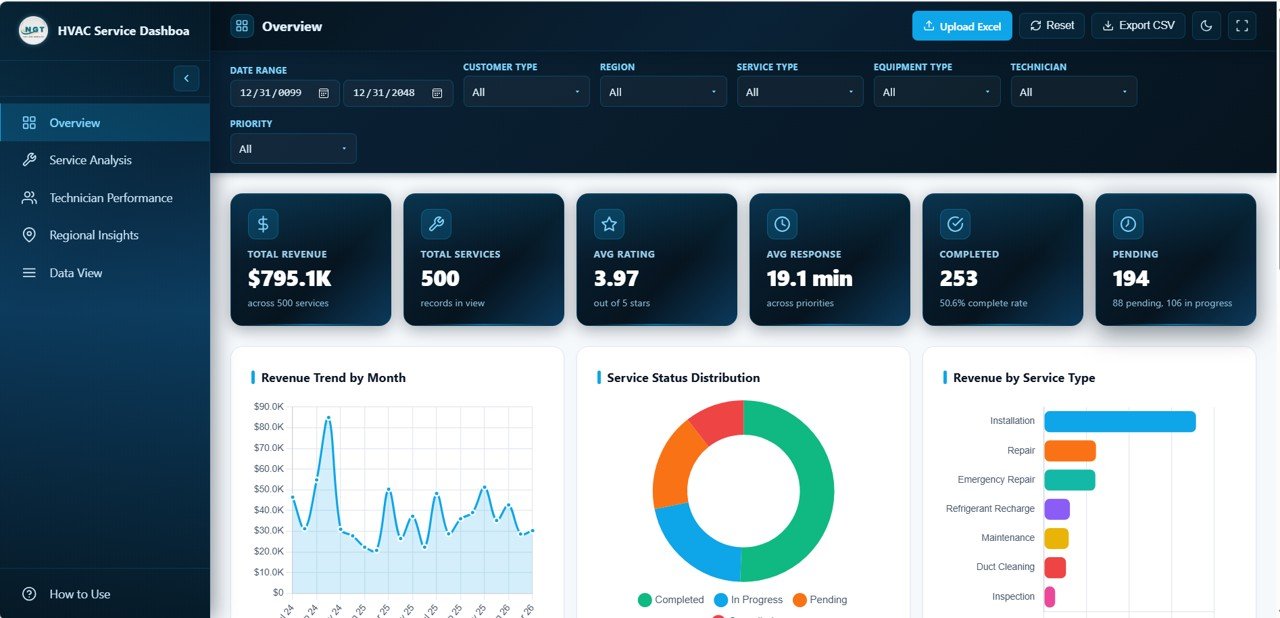
HVAC Service Dashboard Overview
2. Service Analysis
The service analysis page drills into the work itself — what type of jobs, what equipment, what cost structure. Key charts include Service Volume by Service Type, Revenue by Equipment Type, Parts Cost and Labor Cost by Service Type, Services by Warranty Coverage and Average Service Duration by Equipment Type. Use it to spot loss-making job categories and protect in-warranty margin before those jobs eat your profit.
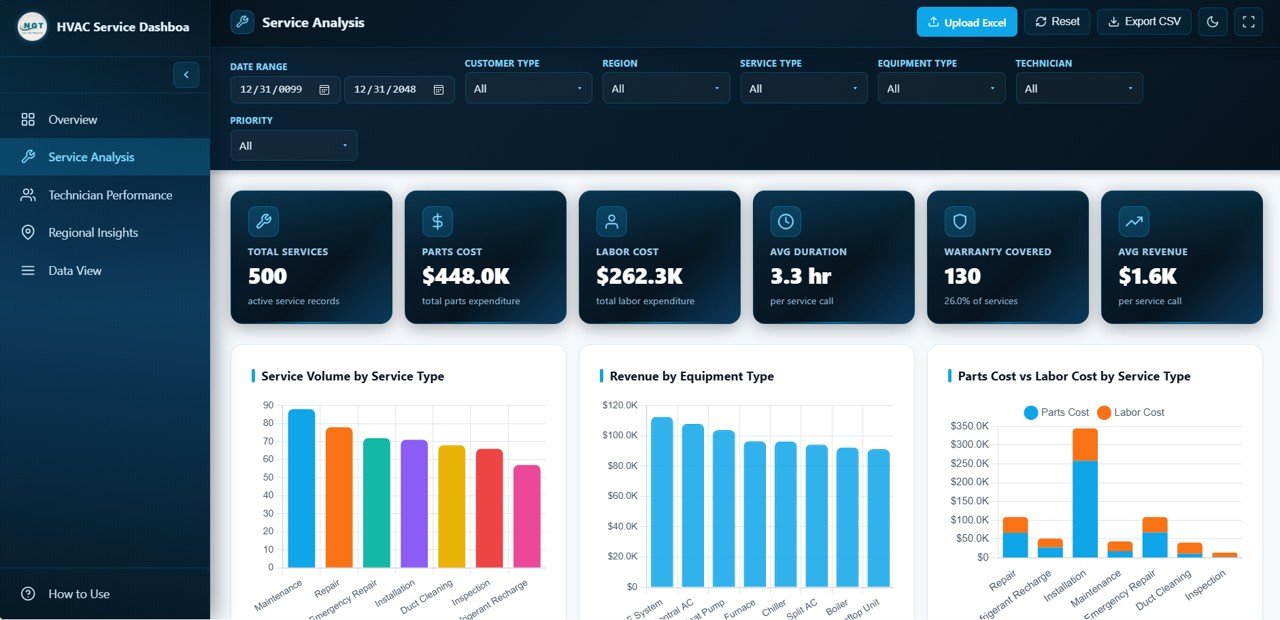
HVAC Service Dashboard — Service Analysis
3. Technician Performance
The technician performance page is built for HVAC service managers who need to reward top performers and coach the rest. Charts cover Revenue by Technician, Service Count by Technician, Average Customer Rating by Technician, Average Response Time by Priority and Customer Rating Distribution. This is the page you will open every monthly one-on-one and every quarterly bonus review.
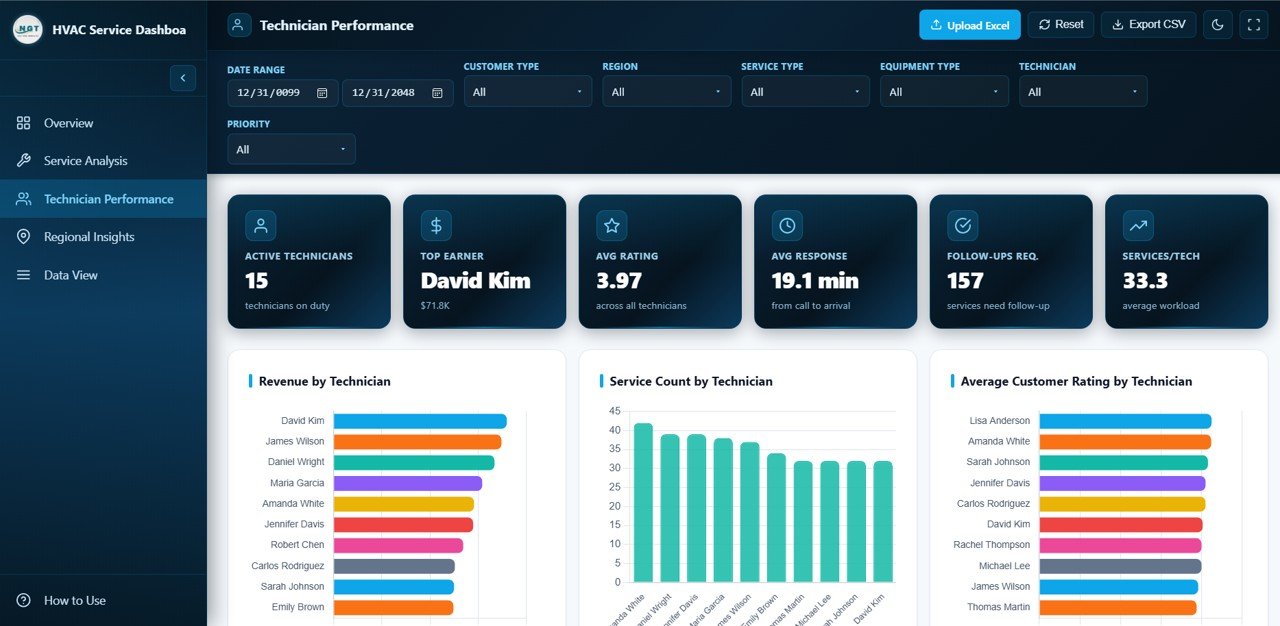
HVAC Service Dashboard — Technician Performance
4. Regional Insights
The regional insights page gives multi-branch HVAC operators a branch-by-branch view of the business. Visuals include Revenue by Region, Service Volume by Region, Customer Type Mix by Region, Average Revenue per Service by Region and Monthly Service Volume by Region. Perfect for franchise owners, area managers and operations directors running Dallas, Houston, Austin and San Antonio (or any four markets) from one HTML file.
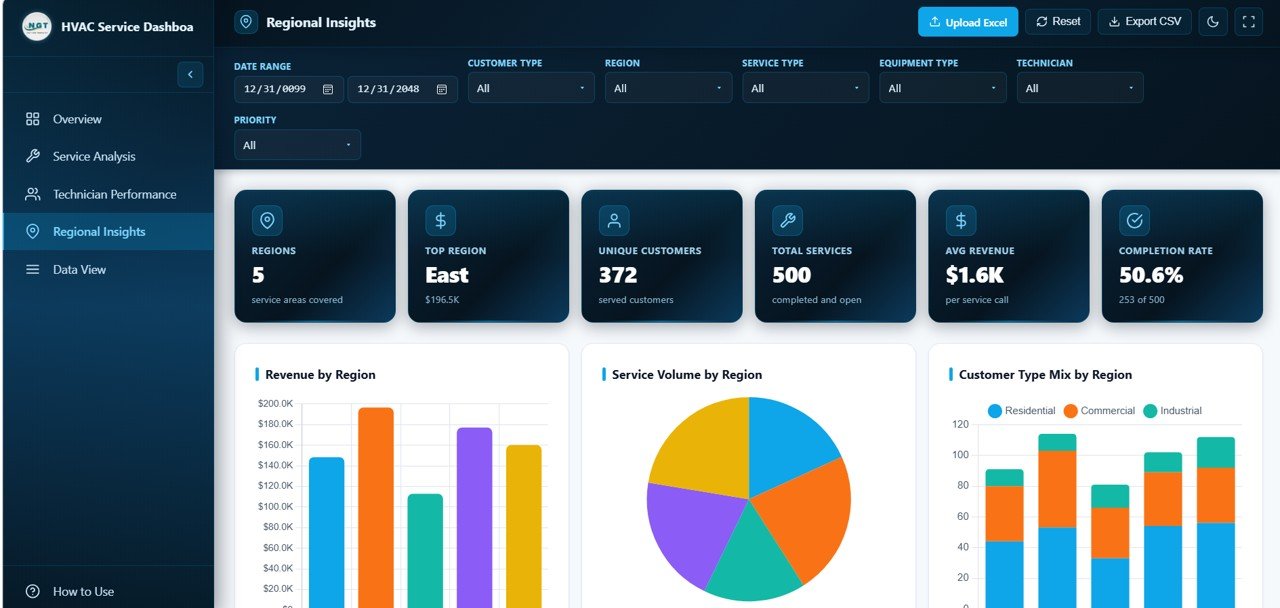
HVAC Service Dashboard — Regional Insights
5. Data View
The data view page is a full interactive table of every service record powering the dashboard. Search by customer or job ID, sort any column, paginate through thousands of rows and export any filtered slice to CSV for your accountant, auditor or CRM import. It is the complete audit trail behind every chart — an essential feature for HVAC contractors who get asked “show me the raw numbers” during franchise reviews, tax audits or due-diligence calls.
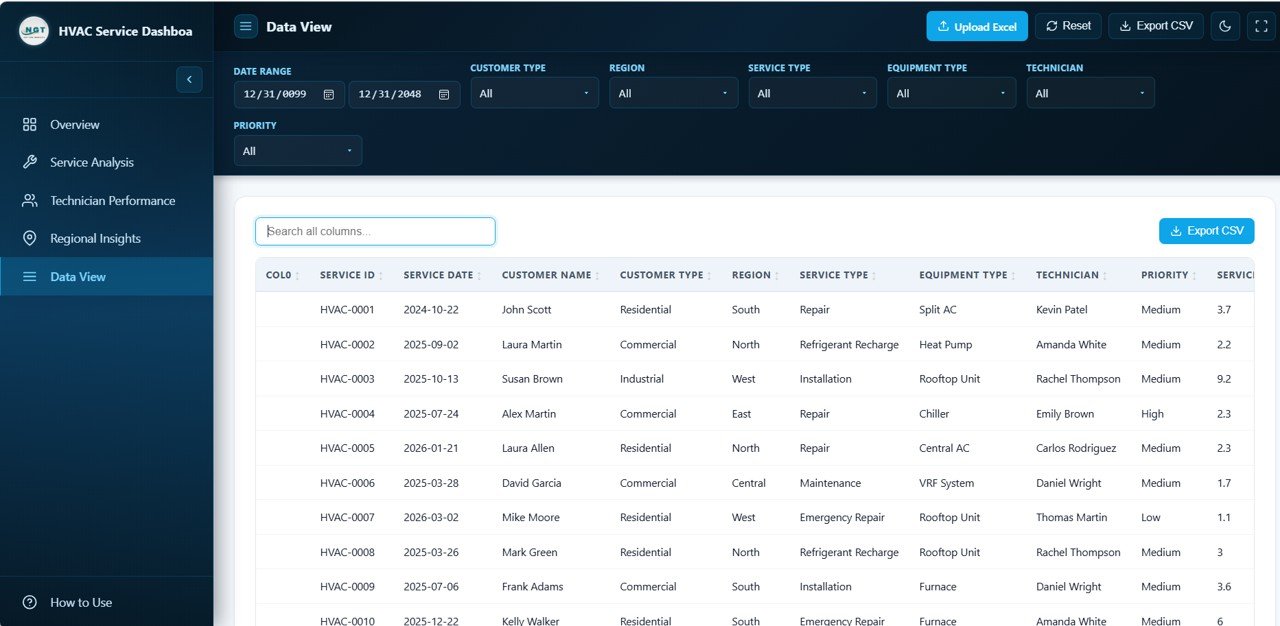
HVAC Service Dashboard — Data View Tab
HVAC Service Dashboard in HTML vs. Standalone SaaS Dashboard vs. ServiceTitan / Housecall Pro — Feature Comparison
| Feature | HVAC Service Dashboard in HTML | Standalone SaaS Dashboard | ServiceTitan / Housecall Pro |
|---|---|---|---|
| Cost | $12.99 one-time | $29–99 / user / month | $99–398 / technician / month |
| Platform | Any browser, offline HTML | Cloud SaaS, login required | Cloud SaaS + mobile app |
| Setup time | Under 5 minutes | 1–3 days | 4–8 weeks onboarding |
| Runs offline | ✅ Yes | ❌ No | ❌ No |
| Customizable charts & fields | ✅ Full HTML/JS control | Limited to vendor options | Limited without Pro plan |
| CSV export of filtered data | ✅ Built in | Often paywalled | Often paywalled |
| Share with link | ✅ Zip & email or host anywhere | User seat required | User seat required |
| Year-1 cost at 5 users | $12.99 total | $1,740–$5,940 | $5,940–$23,880 |
| Works without internet | ✅ Yes — true offline | ❌ No | ❌ No |
For HVAC contractors who want a clean, offline, customizable service dashboard without committing to a per-technician SaaS subscription, the HVAC Service Dashboard in HTML sits in the sweet spot.
Who Should Use This Template
Perfect for:
- HVAC contractors and service companies with 3–50 technicians who want a zero-subscription reporting layer.
- Multi-branch residential and commercial HVAC operators tracking revenue by region and technician.
- Franchise owners and area managers who need a portable dashboard they can run on any laptop or tablet.
- Field service consultants building quick management reports for HVAC, refrigeration or mechanical-services clients.
- HVAC business brokers and M&A advisors building deal rooms with offline dashboards for buyers.
Not a fit if:
- You run a large HVAC enterprise needing live dispatch, GPS routing, payroll integration and SOC 2 compliance — stick with ServiceTitan or Housecall Pro.
- You need the dashboard to write back to a live CRM. This template reads a static dataset and is built for reporting only.
- You want real-time booking, online scheduling, or customer-facing portals — this is a back-office analytics tool, not a customer-facing platform.
Real-World Use Cases
Rajesh runs a 12-technician residential HVAC company in Pune. He uses the HVAC Service Dashboard in HTML to review technician ratings and response times every Monday morning. Because the whole dashboard is a single HTML file, his office manager simply drops the updated file into Dropbox and every supervisor sees the latest numbers — without paying a per-user SaaS fee for seasonal helpers who only work during summer peak season.
Dana manages 4 HVAC branches for a commercial service contractor in Texas. She uses the Regional Insights page to compare average revenue per service across her Dallas, Houston, Austin and San Antonio branches, then uses the Service Analysis page to find out why Houston’s parts cost is 22% higher than the others — without waiting three weeks for her old BI team to build a custom report. The CSV export on the Data View page also lets her drop the source rows straight into her accountant’s template.
Mark is a field-service consultant. He customises the HVAC Service Dashboard in HTML for each new client, drops it into a ZIP file and emails it as a deliverable. Because the template is fully offline HTML, his clients can review it on a plane, in a site office or at home — no VPN, no SaaS login, no “can you send me a read-only invite” back-and-forth.
Advantages of the HVAC Service Dashboard in HTML
The biggest advantage is pure economics. A 5-technician HVAC shop subscribed to ServiceTitan pays roughly $500–$2,000 per month for the analytics layer alone. The HVAC Service Dashboard in HTML replaces that analytics layer for a single one-time $12.99 payment — recovering its cost inside the first hour of the first month.
The second advantage is portability. Because the dashboard is a single HTML file, you can email it, Dropbox it, host it on an internal shared drive or open it on a tablet in a truck in a remote job site with zero connectivity. No field-service SaaS can match that. The third advantage is customisation — because the code is open HTML, CSS and JavaScript, any decent developer can recolor, rebrand or add fields in minutes.
Opportunities for Improvement
The HVAC Service Dashboard in HTML is deliberately a reporting layer, not an operations system. It does not handle dispatch, scheduling, invoicing, payroll or customer booking. If your HVAC business needs a single platform that does end-to-end field service, you are better served by a dedicated platform like ServiceTitan, Housecall Pro or Jobber, and this template becomes the reporting layer on top of whatever operations system you use.
Another honest limitation: because the dashboard is static HTML reading from a data file, you have to refresh the data file on a regular cadence (daily, weekly or monthly). Teams that need true real-time dashboards should either pair this with a scheduled data export from their CRM, or move to a live BI tool.
Best Practices
Export your HVAC service records weekly and overwrite the bundled data file — a 15-minute Monday morning habit keeps the dashboard fresh. Keep one “master” copy of the HTML and share read-only ZIP copies with supervisors. For multi-branch operators, add a “Branch” column in the data file so the Regional Insights page automatically segments by branch. Use the CSV export on the Data View page as an audit trail for quarterly and year-end reviews.
If you would like to learn how reports like this are built in Excel, the Excel Pivot Tables & Dashboards course on NextGenTemplates Academy covers the techniques with practice files.
Explore Relevant Templates
Need the same data in a different tool? Check the HVAC Service Dashboard in Excel if your team lives in Excel and wants pivot-table power, or the Field Service KPI Dashboard in Google Sheets for a cloud-collaboration option. Also check the Trucking and Logistics Dashboard in HTML and the Veterinary Clinic Dashboard in HTML for sibling service-business templates. Or browse the full range of HTML Dashboard Templates covering every industry.
Get the HVAC Service Dashboard in HTML
Frequently Asked Questions
What is the HVAC Service Dashboard in HTML?
The HVAC Service Dashboard in HTML is a single self-contained HTML file that tracks 6 KPIs and 20+ charts across 5 pages — Overview, Service Analysis, Technician Performance, Regional Insights and Data View — for HVAC service companies that want offline reporting without any SaaS subscription.
Which KPIs does the HVAC Service Dashboard track?
The HVAC Service Dashboard in HTML tracks 6 key performance indicators: Total Revenue, Total Services, Average Customer Rating, Average Response Time, Completed Services and Pending Services. All six recalculate automatically the moment you replace the sample data with your own records.
Do I need coding skills to use this HTML dashboard?
No. You only need to open the HTML file in a browser and edit a structured data file. If you can copy and paste into a spreadsheet, you can use the HVAC Service Dashboard in HTML. No JavaScript or HTML knowledge is needed for day-to-day use.
Does the HVAC Service Dashboard in HTML work offline?
Yes. The HVAC Service Dashboard in HTML runs entirely in the browser with no server, no internet and no cloud. You can use it on a laptop on site, on a tablet without Wi-Fi, or host it on any internal shared drive.
How does this compare to ServiceTitan or Housecall Pro?
ServiceTitan and Housecall Pro are full field-service management platforms charging $99–398 per technician per month. The HVAC Service Dashboard in HTML is a one-time $12.99 reporting layer — perfect for contractors who want dashboard visibility without committing to a per-seat SaaS subscription.
How long does setup take?
Under 5 minutes. Unzip the folder, open index.html in any modern browser, paste your service records into the data file and refresh — the dashboard updates instantly with your own HVAC service data.
Can I customise the colors and branding?
Yes. Because the HVAC Service Dashboard in HTML uses plain HTML, CSS and JavaScript, any developer can recolor the KPI cards, swap your logo and rebrand the whole dashboard in minutes. The CSS uses standard variables for primary, secondary and accent colors.
About the Author
Built by PK — Microsoft Certified Professional with 15+ years of Excel, Google Sheets, and Power BI experience. Founder of NextGenTemplates, reaching 300K+ subscribers across YouTube channels. Every template is hand-built and tested before release.
Conclusion
The HVAC Service Dashboard in HTML is the zero-subscription way to run revenue, technician, equipment and regional reporting for any HVAC service business — from a 3-technician residential shop to a 50-technician commercial contractor. Six KPIs, 20+ charts, 5 interactive pages, full CSV export and complete offline operation, all in a single HTML file that opens in any modern browser.
Instant download · One-time payment · No subscription
📅 Last updated: April 2026