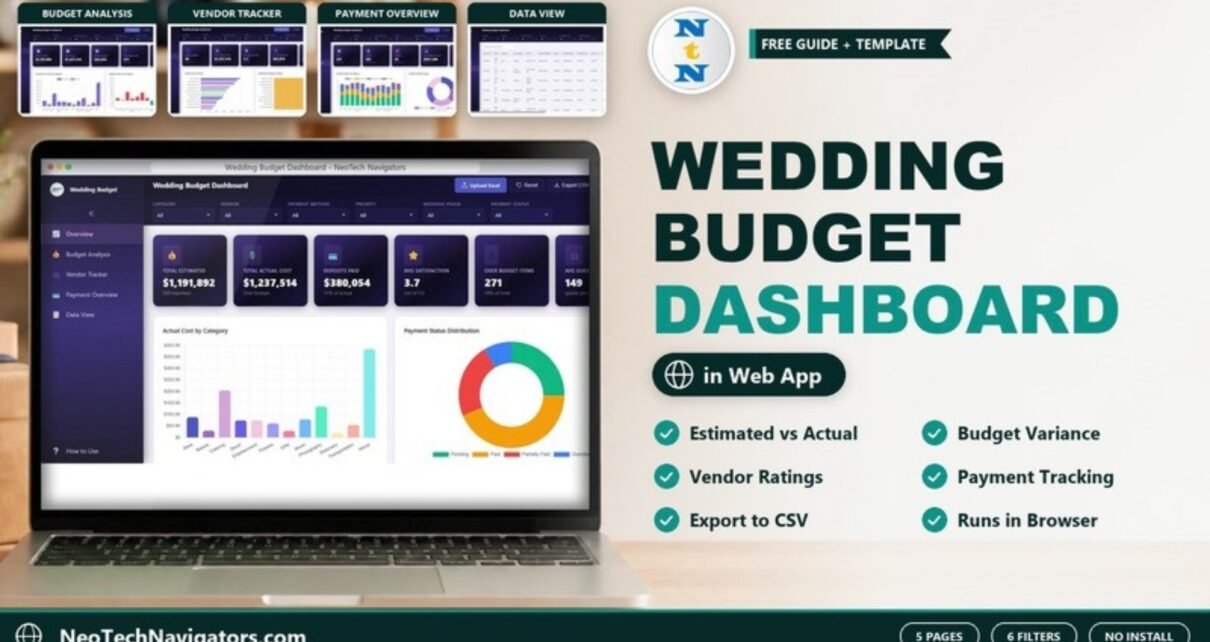
The Wedding Budget Dashboard in HTML is a browser-based dashboard that shows where a wedding budget is going: estimated versus actual cost, deposits paid, outstanding balances, vendor ratings and over-budget items. It is made for couples who want a clear view of their spending, and for wedding planners who manage budgets for clients.
The dashboard opens in any modern browser and has five pages – Overview, Budget Analysis, Vendor Tracker, Payment Overview and Data View – with six filters across the top of each page. There is nothing to install: no Excel, no Power BI and no account to create.
Below you will find what each page shows, using the sample data that ships with the template, how the main figures are calculated, and how to load your own wedding expenses.
🎥 Watch the Video Tutorial
Get the Wedding Budget Dashboard in HTML
Why Use the Wedding Budget Dashboard in HTML
A wedding budget is not one number. It is dozens of line items across venue, catering, photography, attire, flowers and transport, each with a quote, a final price, a deposit and a due date. A simple list tells you what you spent; it does not tell you which categories are drifting over plan, which vendors still need paying, or how much cash you need before the big day.
This dashboard answers those questions on screen. You can filter everything by Category, Vendor, Payment Method, Priority, Wedding Phase and Payment Status, and the header has Upload Excel, Reset and Export CSV buttons, a dark-mode toggle and a full-screen button. A How to Use link sits at the bottom of the sidebar.
The Five Pages Explained
1. Overview
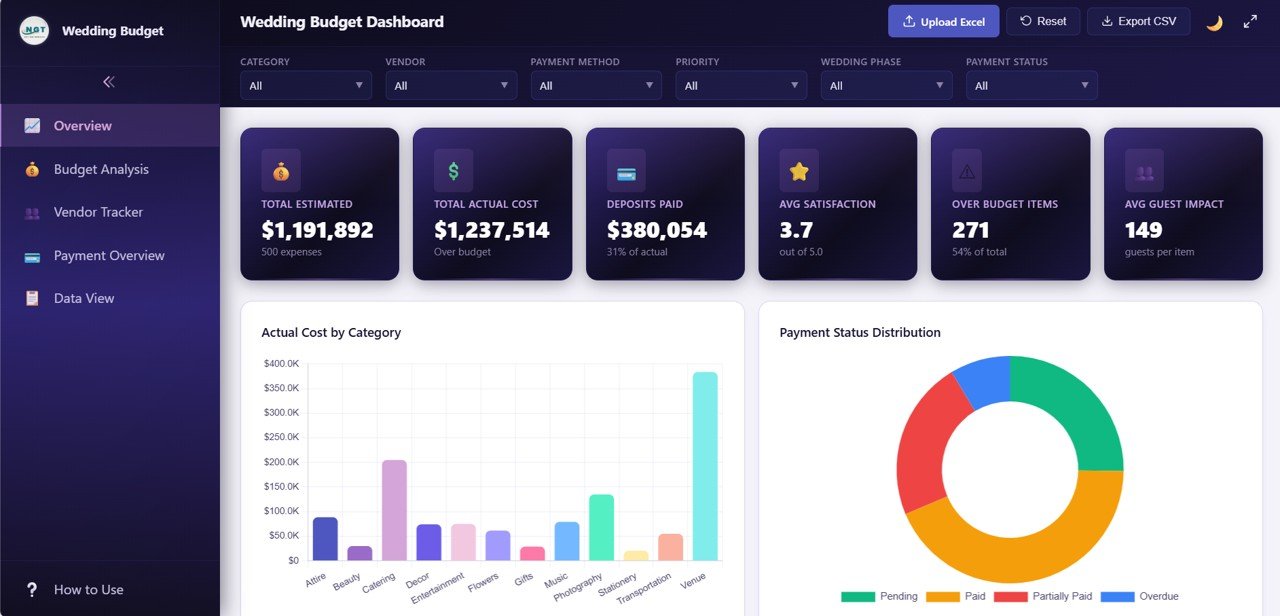
The Overview shows six KPI cards. In the sample of 500 expense lines they read: Total Estimated $1,191,892, Total Actual Cost $1,237,514 (flagged “Over budget”), Deposits Paid $380,054 (31% of actual), Avg Satisfaction 3.7 out of 5.0, Over Budget Items 271 (54% of total) and Avg Guest Impact 149 guests per item.
The first two charts are Actual Cost by Category, where Venue is the largest bar followed by Catering and Photography, and Payment Status Distribution, a donut of Paid, Pending, Partially Paid and Overdue items. According to the product listing, the page also includes Expenses by Wedding Phase, Priority Distribution and a Monthly Spending Trend.
2. Budget Analysis
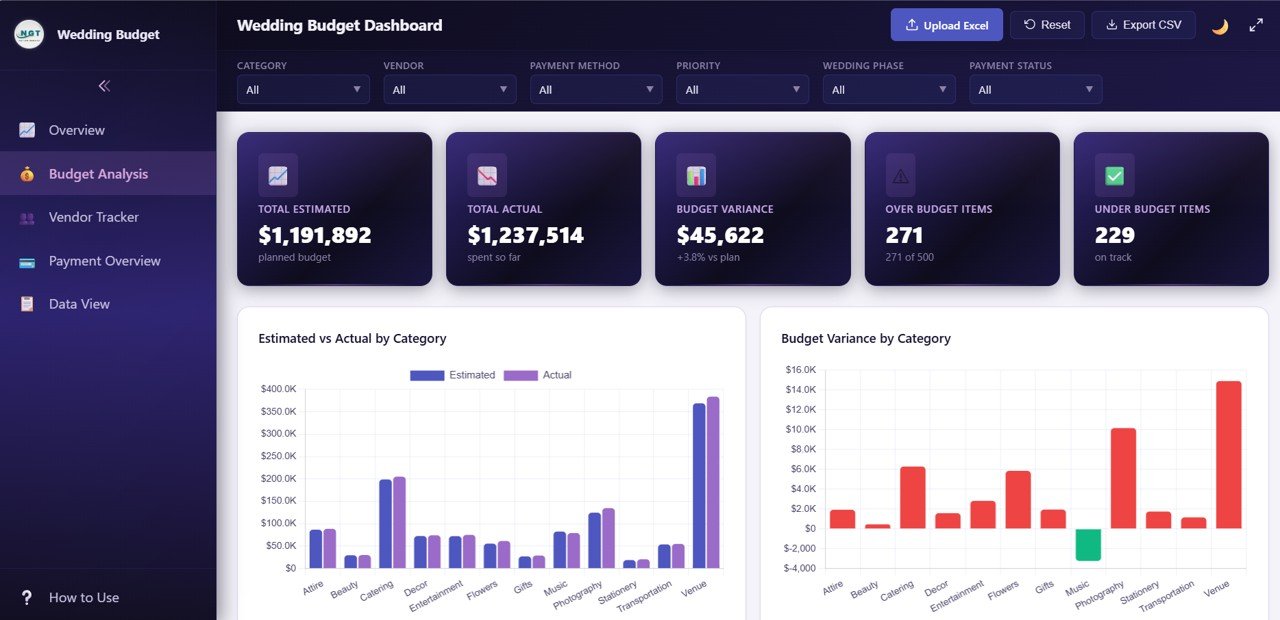
Budget Analysis is where you find out how far reality has moved from the plan. Its cards show Total Estimated ($1,191,892 planned budget), Total Actual ($1,237,514 spent so far), Budget Variance ($45,622, +3.8% vs plan), Over Budget Items (271 of 500) and Under Budget Items (229 on track).
The Estimated vs Actual by Category chart puts the two bars side by side for each of the 12 categories – Attire, Beauty, Catering, Decor, Entertainment, Flowers, Gifts, Music, Photography, Stationery, Transportation and Venue. Budget Variance by Category shows the gap in dollars: Venue and Photography run furthest over plan in the sample, while Music is the only category under budget. The product listing adds Cost Distribution by Sub Category, Estimated Cost by Priority and a Quarterly Budget Comparison.
3. Vendor Tracker
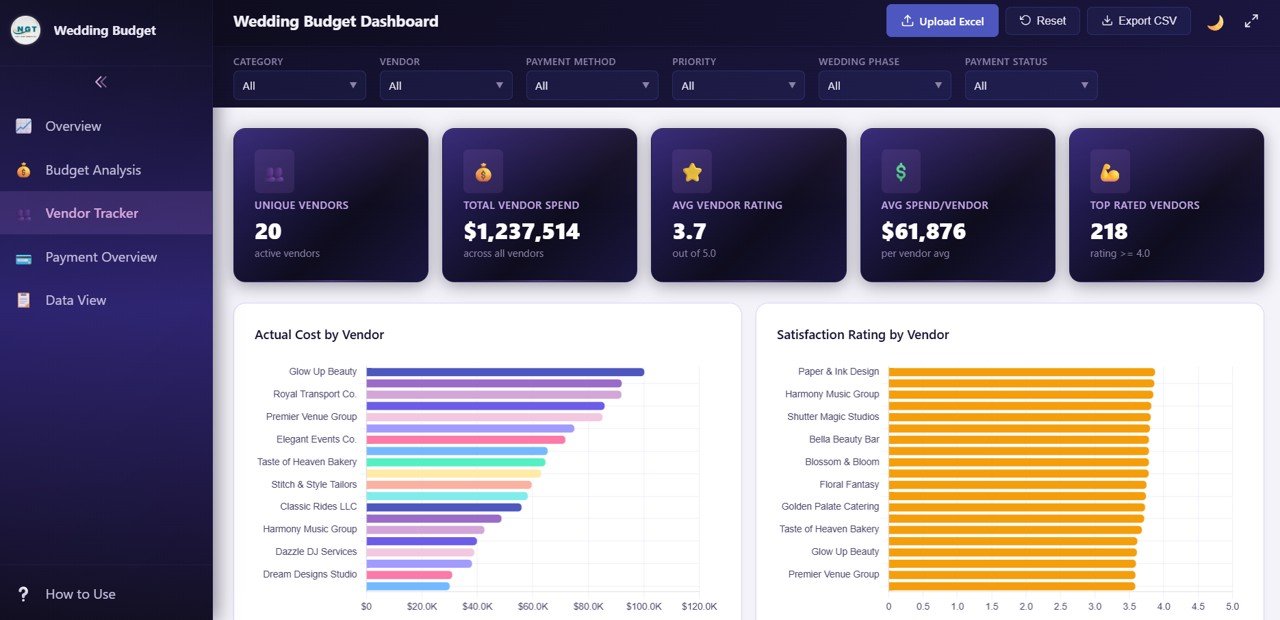
The Vendor Tracker helps you judge each supplier on both cost and quality. Its cards show Unique Vendors (20), Total Vendor Spend ($1,237,514), Avg Vendor Rating (3.7 out of 5.0), Avg Spend/Vendor ($61,876) and Top Rated Vendors (218 items with a rating of 4.0 or higher).
Actual Cost by Vendor ranks suppliers by spend, with Glow Up Beauty at the top of the sample, and Satisfaction Rating by Vendor ranks them by score, led by Paper & Ink Design. The listing also mentions Expense Count by Vendor, Vendor Spend by Payment Method and a Vendor Rating vs Spend comparison.
4. Payment Overview
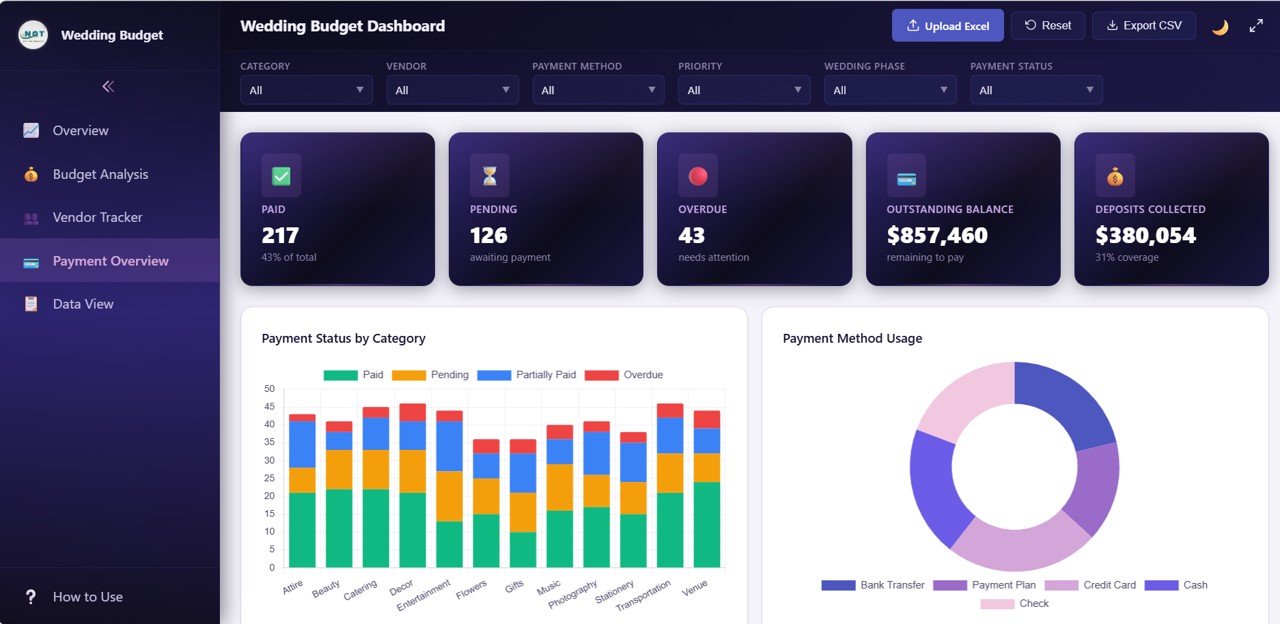
As the date gets closer, this is the page to check every week. The cards show Paid (217, 43% of total), Pending (126 awaiting payment), Overdue (43 needing attention), Outstanding Balance ($857,460 remaining to pay) and Deposits Collected ($380,054, 31% coverage).
Payment Status by Category stacks Paid, Pending, Partially Paid and Overdue counts for each category, and Payment Method Usage shows the mix of Bank Transfer, Payment Plan, Credit Card, Cash and Check. The product listing also mentions Outstanding Balance by Category, Deposit Coverage by Category and Monthly Payment Collection.
5. Data View
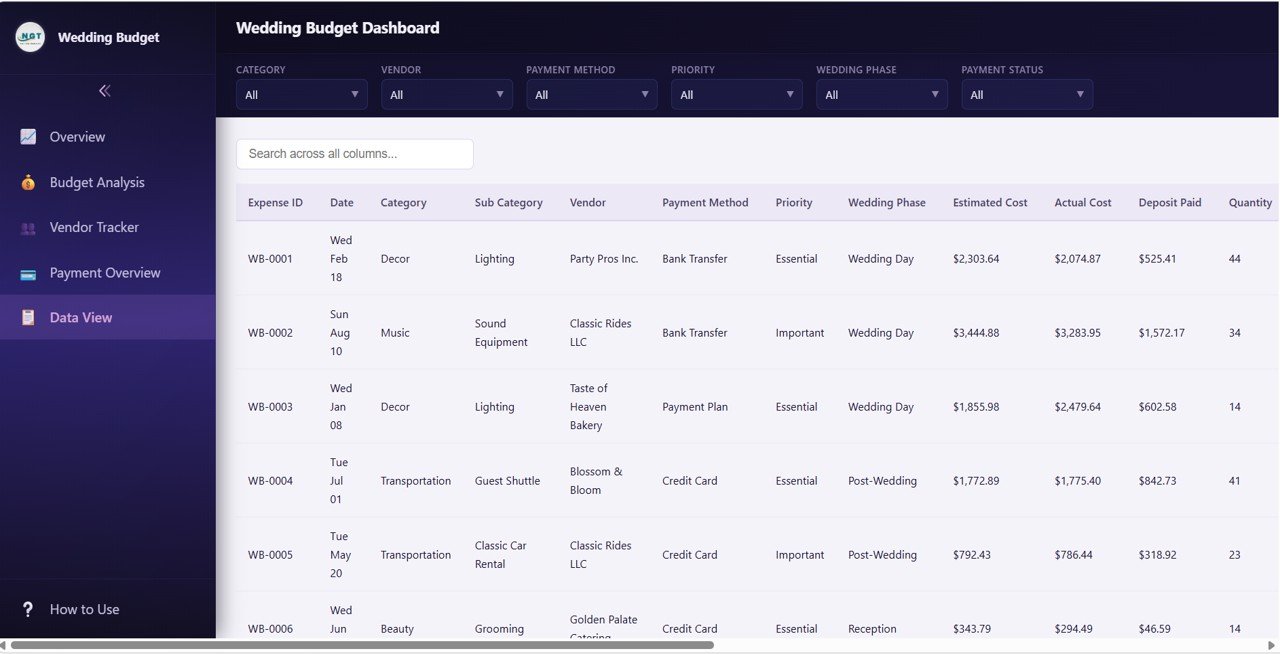
Data View is the full expense table with a Search across all columns box. The visible columns are Expense ID, Date, Category, Sub Category, Vendor, Payment Method, Priority, Wedding Phase, Estimated Cost, Actual Cost, Deposit Paid and Quantity, and the table scrolls sideways for more. The six filters still apply here. According to the product listing, the table is sortable and paginated, and the Export CSV button exports the filtered expense records – useful for sharing with a planner, a parent who is contributing, or your own records.
Key Wedding Budget Metrics and How They Are Calculated
Each figure below is checked against the sample numbers in the screenshots.
| Metric | What it tells you | Calculation (sample) | Better when |
|---|---|---|---|
| Total Estimated | Your planned budget | Sum of Estimated Cost = $1,191,892 | — |
| Total Actual Cost | What has been committed or spent | Sum of Actual Cost = $1,237,514 | Lower (at or under plan) |
| Budget Variance | How far over or under plan you are | Actual − Estimated = $45,622; ÷ $1,191,892 = +3.8% | Lower |
| Deposits Paid | Money already paid up front | Sum of Deposit Paid = $380,054 (31% of actual) | — |
| Outstanding Balance | Cash still needed | Actual − Deposits = $1,237,514 − $380,054 = $857,460 | Lower as the date nears |
| Over Budget Items | Line items above their estimate | Count where Actual > Estimated = 271 of 500 (54%) | Lower |
| Avg Spend/Vendor | Average spend per supplier | Total vendor spend ÷ 20 vendors = $61,876 | — |
| Avg Satisfaction | Average vendor rating | Average of the rating field = 3.7 out of 5.0 | Higher |
The sample data is deliberately large (500 lines) so every chart has something to show. A real wedding will usually have far fewer lines, and the cards will scale to whatever you load.
How to Use It With Your Own Wedding Budget
- Unzip the download and open index.html in Chrome, Edge, Firefox or Safari.
- Open How to Use in the sidebar for the built-in instructions.
- List your expenses in a spreadsheet using the same headers – Expense ID, Date, Category, Sub Category, Vendor, Payment Method, Priority, Wedding Phase, Estimated Cost, Actual Cost, Deposit Paid and the remaining fields.
- Enter the quote as Estimated Cost straight away; fill in Actual Cost and Deposit Paid as invoices and payments happen.
- Load the file with Upload Excel (the product listing also describes editing the included data file and refreshing the page).
- Check Payment Overview weekly in the final two months and clear anything marked Overdue first.
- Use Export CSV whenever you want a backup or need to share the numbers.
Real-World Use Cases
- Couples planning their own wedding – keep the estimate fixed, update actuals as you book, and watch the Budget Variance card so a creeping venue or catering bill is spotted early.
- Wedding planners with several clients – keep one copy of the dashboard per client and use the Vendor Tracker to show which suppliers delivered strong ratings for the money.
- Families sharing the cost – filter by Category or Wedding Phase to show each contributor exactly what their share covers, then export the filtered records as a CSV.
Best Practices
- Set your estimates before you book anything, and do not overwrite them later – the variance only means something if the plan stays fixed.
- Use the Priority field honestly. When you need to cut, filter to the lowest priority level first.
- Record deposits on the day you pay them so the Outstanding Balance card stays accurate.
- Keep vendor names identical across rows; “Bella Beauty Bar” and “Bella Beauty” will show up as two vendors.
- Export a CSV after each update as a simple backup.
Limitations
This is an analysis dashboard, not a payment app. It does not send reminders, connect to your bank or handle guest lists and RSVPs. It runs from a local file in your browser, so if two people update the budget you will need to agree whose copy is the master. Couples who prefer a spreadsheet they can edit directly may find a Google Sheets or Excel version more convenient.
Related Templates and Guides
Prefer a spreadsheet? The Wedding Budget Dashboard in Excel covers the same budget questions in Excel. On this blog you can also read about the Wedding Budget Dashboard in Google Sheets, the simpler Wedding Budget Tracker in Google Sheets, and the Wedding Checklist in Google Sheets for the non-financial to-do list. If you are budgeting a different kind of event, see how to use Google Sheets for event planning and budget tracking.
Frequently Asked Questions
Do I need any software to use the Wedding Budget Dashboard in HTML?
No. You open index.html in a modern browser such as Chrome, Edge, Firefox or Safari. Excel and Power BI are not required.
What filters does the dashboard have?
Every page has six drop-down filters: Category, Vendor, Payment Method, Priority, Wedding Phase and Payment Status, each set to All by default.
How is the budget variance calculated?
Budget Variance is Total Actual minus Total Estimated. In the sample that is $1,237,514 − $1,191,892 = $45,622, which is 3.8% over the planned budget.
Can I export my wedding expenses?
Yes. The Export CSV button downloads the expense records, which you can open in Excel or Google Sheets or send to your planner.
Can a wedding planner use it for several weddings?
Yes. Keep a separate copy of the dashboard folder and data file for each client so the budgets never mix.
Is my budget data uploaded anywhere?
There is no account or online database to sign up for. The dashboard is a set of files you open in your own browser, and you decide who you share those files or a CSV export with.
Wrapping Up
The Wedding Budget Dashboard in HTML turns a long list of quotes, invoices and deposits into answers you can act on: how far over plan you are, which categories and vendors are driving it, and how much still has to be paid. Start by entering your estimates for every category, load them with Upload Excel, and update the actuals each time you book or pay a vendor.
If you want to understand how budget dashboards like this are put together, the Excel Pivot Tables & Dashboards course on NextGenTemplates Academy works through the method with practice files.
Get the Wedding Budget Dashboard in HTML
📅 Last updated: October 2026