Aviation operations demand precision, safety, and efficiency. Airlines, airports, and aviation service providers manage hundreds of operational metrics every day, such as on-time performance, flight delays, aircraft utilization, and safety compliance. However, when teams track these metrics across multiple reports, decision-making becomes slow and reactive.Aviation Operations KPI Dashboard in Google Sheets
That is exactly why an Aviation Operations KPI Dashboard in Google Sheets becomes a powerful and practical solution.
This ready-to-use KPI dashboard helps aviation operations teams monitor key performance indicators in one centralized, visual, and easy-to-use Google Sheets dashboard.Aviation Operations KPI Dashboard in Google Sheets
In this article, you will learn what the dashboard is, how each worksheet works, which KPIs it tracks, and how it supports better operational decisions.Aviation Operations KPI Dashboard in Google Sheets
What Is an Aviation Operations KPI Dashboard in Google Sheets?
An Aviation Operations KPI Dashboard is a centralized reporting tool that tracks and analyzes operational KPIs related to flight performance, aircraft usage, safety, ground operations, and efficiency.Aviation Operations KPI Dashboard in Google Sheets
Because this dashboard is built in Google Sheets, it provides:
-
Real-time KPI visibility
-
Easy collaboration across teams
-
Automatic calculations and comparisons
-
Monthly and yearly performance tracking
-
No expensive aviation software required
This dashboard suits airline operations teams, airport authorities, ground handling teams, and aviation analysts.Aviation Operations KPI Dashboard in Google Sheets
Key Features of the Aviation Operations KPI Dashboard
Click to Buy Aviation Operations KPI Dashboard in Google Sheets
This dashboard is ready to use and structured across multiple worksheets, each designed for clarity and control.
Dashboard Sheet Tab – KPI Performance Overview
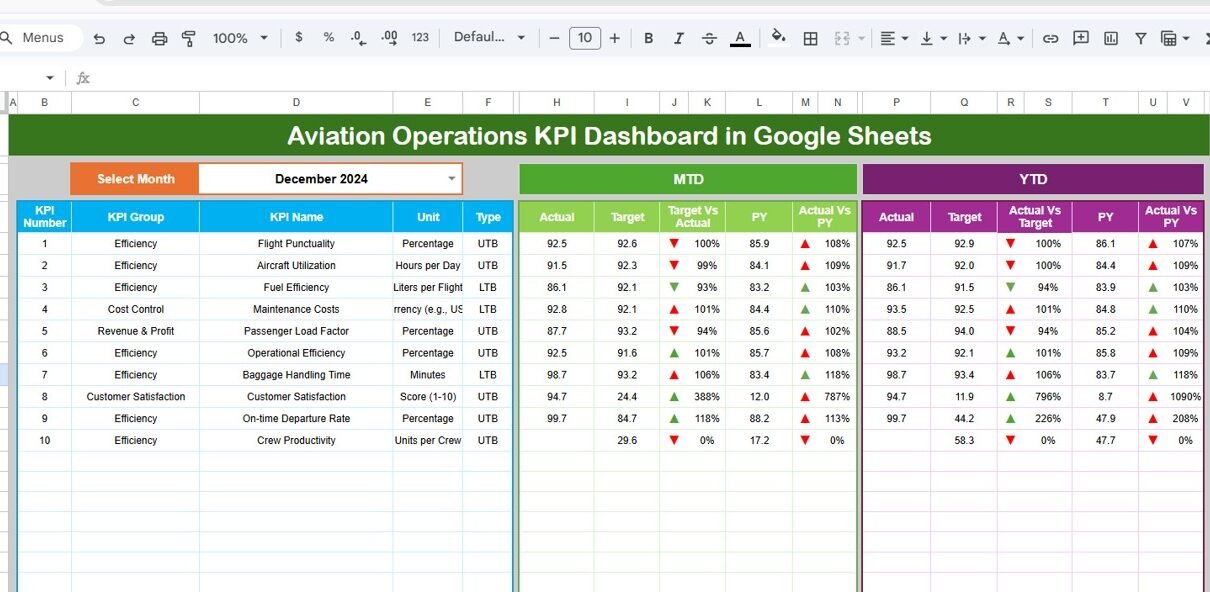
The Dashboard Sheet is the main page that shows all aviation KPIs at a glance.
🔹 Month Selection
-
A Month dropdown in cell D3 allows users to select any month.
-
Once selected, all KPIs update automatically.
🔹 KPI Metrics Displayed
For each KPI, the dashboard shows:
-
MTD Actual
-
MTD Target
-
MTD Previous Year
-
Target vs Actual variance
-
Previous Year vs Actual variance
All variances use conditional formatting with up/down arrows, making performance interpretation quick and intuitive.
🔹 YTD Performance
The dashboard also displays:
-
YTD Actual
-
YTD Target
-
YTD Previous Year
-
Conditional formatting indicators for trends
This structure helps teams track both short-term operational efficiency and long-term trends.

Click to Buy Aviation Operations KPI Dashboard in Google Sheets
KPI Trend Sheet Tab
The KPI Trend Sheet explains and contextualizes each KPI.
🔹 KPI Selection
-
Select a KPI from the dropdown in cell C3.
🔹 KPI Details Displayed
Once selected, the sheet shows:
-
KPI Group
-
Unit of Measurement
-
KPI Type (Lower the Better / Upper the Better)
-
KPI Formula
-
KPI Definition
This sheet ensures everyone understands how KPIs are calculated and why they matter.

Click to Buy Aviation Operations KPI Dashboard in Google Sheets
Actual Number Sheet Tab
This sheet is used to enter actual operational performance data.
🔹 How It Works
-
Enter MTD and YTD actual values for each KPI.
-
Change the reporting month using cell E1.
-
Enter the first month of the year to align YTD calculations.
All dashboard visuals update automatically.

Click to Buy Aviation Operations KPI Dashboard in Google Sheets
Target Sheet Tab
The Target Sheet stores planned KPI values.
🔹 What You Enter
-
Monthly MTD targets
-
Cumulative YTD targets
This sheet enables clear performance benchmarking.

Click to Buy Aviation Operations KPI Dashboard in Google Sheets
Previous Year Number Sheet Tab
This sheet captures last year’s KPI data.
🔹 Purpose
-
Enter previous year MTD and YTD values.
-
Enable year-over-year aviation performance comparison.
This is especially useful for seasonal aviation trends.

KPI Definition Sheet Tab
The KPI Definition Sheet acts as the KPI master reference.
🔹 Columns Included
- KPI Name
- KPI Group
- Unit
- Formula
- KPI Definition
- KPI Type (LTB / UTB)
This ensures KPI consistency across teams and reporting cycles.

Click to Buy Aviation Operations KPI Dashboard in Google Sheets
Why Aviation Teams Need This Dashboard
Without a structured KPI dashboard, aviation operations rely on fragmented reports. This dashboard helps teams:
-
Monitor operational efficiency in real time
-
Identify delays and bottlenecks early
-
Compare actual performance against targets
-
Analyze trends across months and years
-
Improve safety and reliability
A single dashboard brings clarity and control to complex operations.
Advantages of the Aviation Operations KPI Dashboard
Click to Buy Aviation Operations KPI Dashboard in Google Sheets
-
Centralized aviation KPI tracking
-
Clear MTD and YTD performance visibility
-
Automatic comparison with targets and prior year
-
Improved operational transparency
-
Fully customizable Google Sheets solution
-
No technical or coding expertise required
Opportunities for Improvement in Aviation Operations KPI Dashboard
You can enhance this dashboard further by adding:
-
Airport-wise or route-wise performance analysis
-
Aircraft type comparison
-
Crew productivity metrics
-
Fuel efficiency KPIs
-
Automated data integration from flight systems
These enhancements provide deeper operational insights.
Best Practices for Using the Aviation Operations KPI Dashboard
Click to Buy Aviation Operations KPI Dashboard in Google Sheets
-
Update actual KPI data regularly
-
Set realistic operational targets
-
Review critical KPIs daily or weekly
-
Focus on delay and safety KPIs proactively
-
Share insights with operations and leadership teams
-
Control access to sensitive operational data
Conclusion
An Aviation Operations KPI Dashboard in Google Sheets offers a simple yet powerful way to monitor flight performance, operational efficiency, and safety metrics. It replaces scattered reports with a single source of truth, improves decision-making, and supports continuous improvement. Because it is ready to use and cloud-based, aviation teams can start tracking KPIs immediately.
For airlines and aviation service providers, this dashboard becomes an essential operational management tool.
Frequently Asked Questions (FAQs)
Click to Buy Aviation Operations KPI Dashboard in Google Sheets
1. Who should use this dashboard?
Airline operations teams, airport authorities, and aviation analysts.
2. Can it track multiple KPIs and months?
Yes, it supports unlimited KPIs and time periods.
3. Is the dashboard customizable?
Yes, KPIs, formulas, and visuals can be modified easily.
4. Does it support year-over-year analysis?
Yes, through the previous year comparison sheet.
5. Is Google Sheets secure for aviation data?
Yes, with proper sharing and access controls.
6. Does it require advanced technical skills?
No, basic Google Sheets knowledge is enough.
Visit our YouTube channel to learn step-by-step video tutorials
Youtube.com/@NeotechNavigators
Watch the step-by-step video tutorial:
Click to Buy Aviation Operations KPI Dashboard in Google Sheets