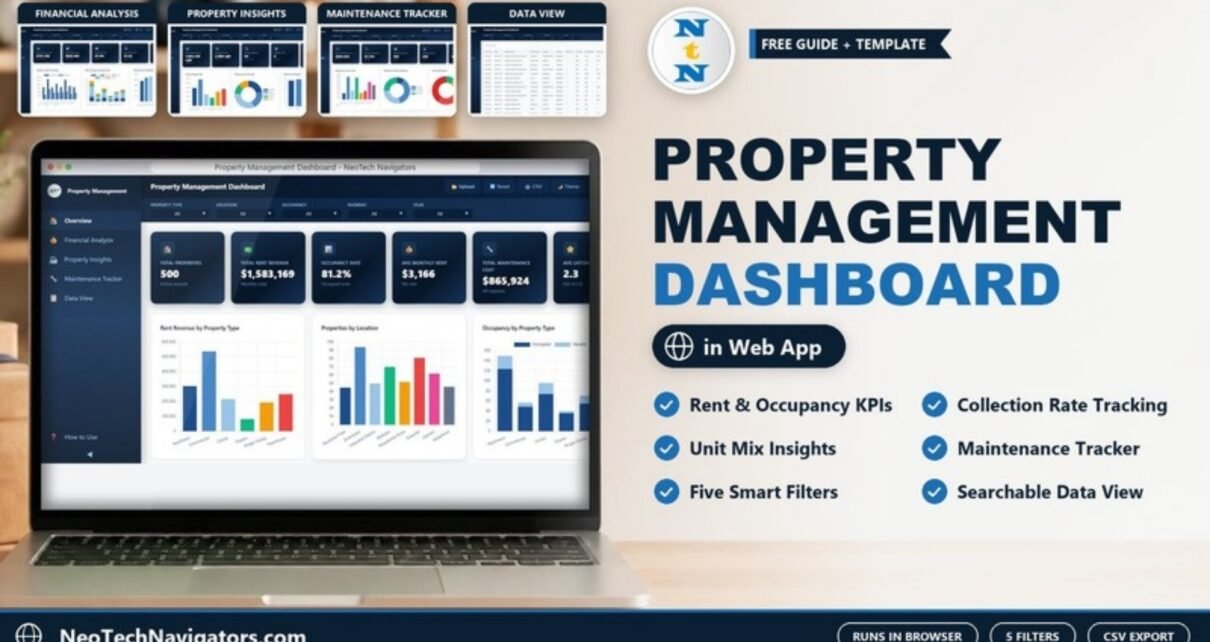
Rent that is billed is not the same as rent that is collected, and a portfolio that looks full can still be losing money on maintenance. The Property Management Dashboard in HTML puts rent, collections, occupancy, unit mix and maintenance on five browser pages, so a landlord or property manager can see where the portfolio stands without stitching reports together by hand.
It is built for property managers, landlords, small real estate investors and facility teams who keep a property or unit list and want a clear performance view with no software to install. This guide covers each page and its exact KPI cards, the filters, how to load your own property records, practical use cases and the template’s honest limits.
🎥 Watch the Video Tutorial
Get the Property Management Dashboard in HTML
What the Property Management Dashboard in HTML Solves
A typical property list has one row per unit: type, location, building, bedrooms, area, monthly rent, rent collected, occupancy status and payment status, plus maintenance details. Summarising that list by hand is slow, and the answers change every month. Which locations have the biggest collection gap? Which buildings cost the most to maintain? How many units are vacant, and of which type?
The dashboard reads that single table and builds every card and chart from it. It runs as an HTML file in Chrome, Edge, Firefox or Safari. A sidebar links Overview, Financial Analysis, Property Insights, Maintenance Tracker and Data View, plus a How to Use page. The header has Upload, Reset, CSV, Theme and Fullscreen buttons.
Filters
Five dropdown filters sit across the top of every page: Property Type, Location, Occupancy, Payment and Year. Choose Location = Downtown, for example, and every card and chart recalculates for Downtown units only. Reset clears the selection.
The Five Pages at a Glance
| Page | KPI cards | Charts / content |
|---|---|---|
| Overview | Total Properties, Total Rent Revenue, Occupancy Rate, Avg Monthly Rent, Total Maintenance Cost, Avg Satisfaction | Rent Revenue by Property Type, Properties by Location, Occupancy by Property Type, Payment Status Distribution, Monthly Rent Trend |
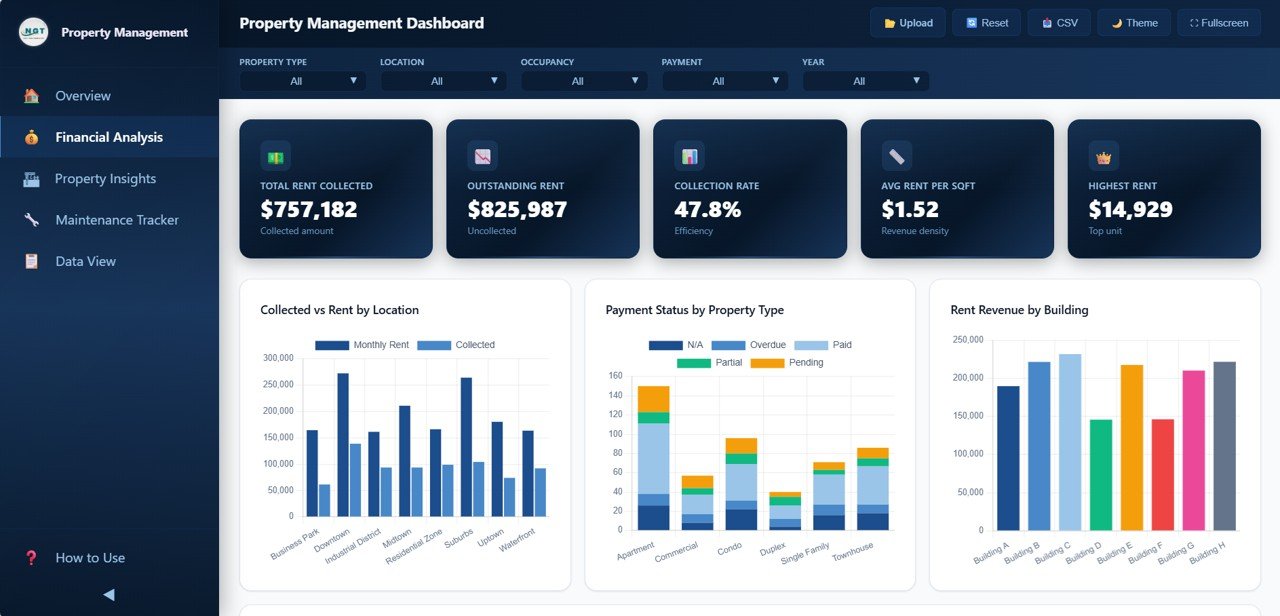
| Financial Analysis | Total Rent Collected, Outstanding Rent, Collection Rate, Avg Rent per Sqft, Highest Rent | Collected vs Rent by Location, Payment Status by Property Type, Rent Revenue by Building, Monthly Revenue Trend by Year |
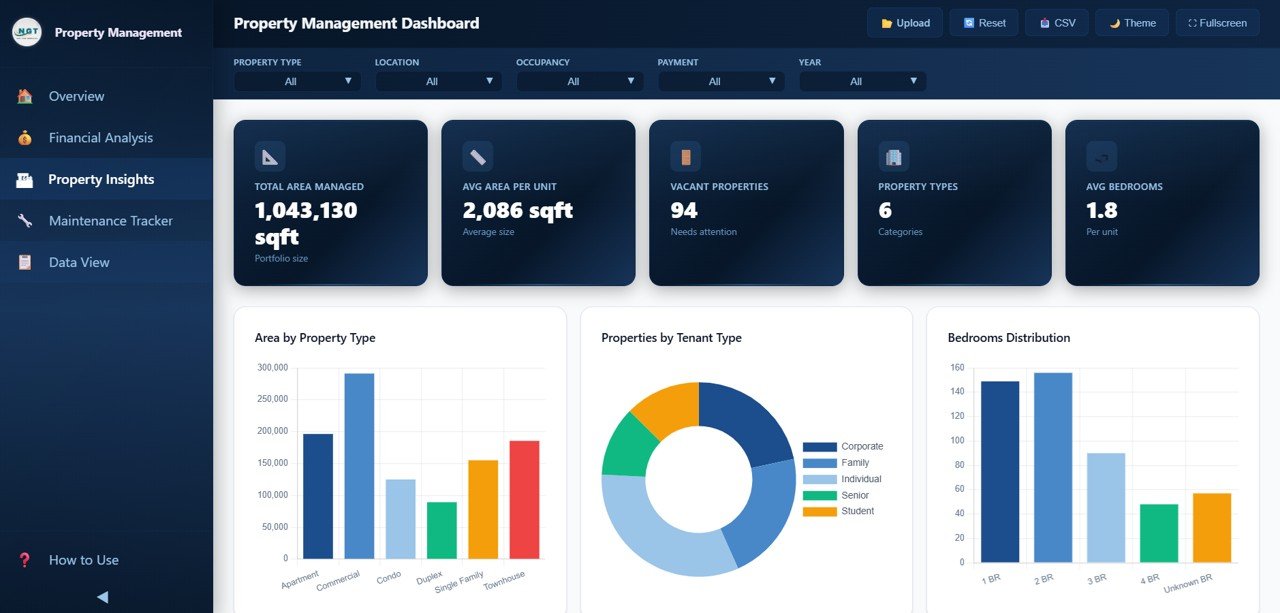
| Property Insights | Total Area Managed, Avg Area per Unit, Vacant Properties, Property Types, Avg Bedrooms | Area by Property Type, Properties by Tenant Type, Bedrooms Distribution, Occupancy by Location, Lease Status Distribution |
| Maintenance Tracker | Total Maintenance Cost, Avg Cost per Request, Completed Requests, Pending Requests, Critical Priority | Maintenance Cost by Type, Maintenance Status Distribution, Priority Distribution, Maintenance Cost by Building, Monthly Maintenance Trend |
| Data View | None | Searchable, sortable, paginated record table with CSV export |
Page 1: Overview
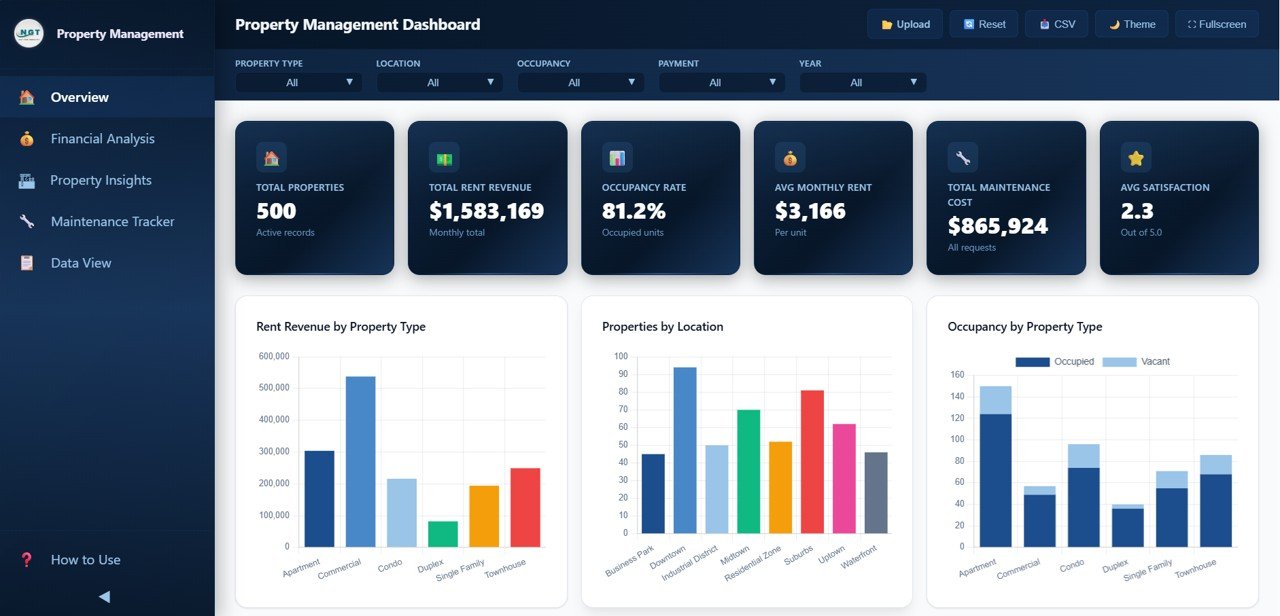
With the 500 sample records the Overview shows Total Properties 500, Total Rent Revenue $1,583,169 (monthly total), Occupancy Rate 81.2%, Avg Monthly Rent $3,166 per unit, Total Maintenance Cost $865,924 and Avg Satisfaction 2.3 out of 5.0.
Rent Revenue by Property Type compares Apartment, Commercial, Condo, Duplex, Single Family and Townhouse; in the sample, Commercial units earn the most. Properties by Location counts units across Business Park, Downtown, Industrial District, Midtown, Residential Zone, Suburbs, Uptown and Waterfront, with Downtown the largest. Occupancy by Property Type stacks occupied and vacant units for each type, so you can see at a glance where vacancies sit. Payment Status Distribution and Monthly Rent Trend follow below.
Key KPIs and how they relate
| KPI | What it measures | How it is calculated | Better when |
|---|---|---|---|
| Occupancy Rate | Share of units that are occupied | Occupied units ÷ total units (406 ÷ 500 = 81.2%, with 94 vacant) | Higher |
| Avg Monthly Rent | Average rent per unit | Total Rent Revenue ÷ Total Properties ($1,583,169 ÷ 500 ≈ $3,166) | Depends on unit mix |
| Total Rent Collected | Rent actually received | Sum of Rent Collected | Higher |
| Outstanding Rent | Monthly rent not collected (in the sample this also counts the listed rent of vacant units) | Total Rent Revenue − Total Rent Collected ($1,583,169 − $757,182 = $825,987) | Lower |
| Collection Rate | Share of rent that was collected | Total Rent Collected ÷ Total Rent Revenue ($757,182 ÷ $1,583,169 ≈ 47.8%) | Higher |
| Avg Rent per Sqft | Revenue density of the portfolio | Total Rent Revenue ÷ Total Area Managed ($1,583,169 ÷ 1,043,130 sqft ≈ $1.52) | Higher |
| Avg Cost per Request | Average maintenance spend per record | Total Maintenance Cost ÷ records ($865,924 ÷ 500 ≈ $1,732) | Lower |
| Avg Satisfaction | Tenant rating out of 5 | Average of the satisfaction scores | Higher |
Page 2: Financial Analysis
This is the cash page. The sample shows Total Rent Collected $757,182, Outstanding Rent $825,987, a Collection Rate of 47.8%, Avg Rent per Sqft $1.52 and a Highest Rent of $14,929 for the top unit.
Collected vs Rent by Location places monthly rent and collected rent side by side for each location, which makes collection gaps easy to spot (Downtown and Suburbs show the widest gaps in the sample). Payment Status by Property Type stacks N/A, Overdue, Paid, Partial and Pending for each type. Rent Revenue by Building compares Building A to Building H, and Monthly Revenue Trend by Year sits below.
Page 3: Property Insights
Property Insights describes what you manage. The cards show Total Area Managed 1,043,130 sqft, Avg Area per Unit 2,086 sqft, Vacant Properties 94 (flagged “Needs attention”), Property Types 6 and Avg Bedrooms 1.8.
Area by Property Type shows where the square footage is (Commercial again leads). Properties by Tenant Type is a donut split into Corporate, Family, Individual, Senior and Student tenants. Bedrooms Distribution counts 1 BR, 2 BR, 3 BR, 4 BR and Unknown BR units. Occupancy by Location and Lease Status Distribution complete the page.
Page 4: Maintenance Tracker
The Maintenance Tracker shows Total Maintenance Cost $865,924, Avg Cost per Request $1,732, Completed Requests 186, Pending Requests 268 and Critical Priority 46 urgent items.
Maintenance Cost by Type covers Appliance Repair, Electrical, Flooring, HVAC, Landscaping, Painting, Plumbing and Structural; Electrical and HVAC are the biggest costs in the sample. Maintenance Status Distribution splits work into Cancelled, Completed, In Progress and Pending, and Priority Distribution splits it into Critical, High, Low and Medium. Maintenance Cost by Building and Monthly Maintenance Trend help with budgeting.

Page 5: Data View
Data View lists every record with a Search records box, sorting and pagination. Columns include Record ID (PM-0001 onward), Date, Property Name, Property Type, Location, Building, Bedrooms, Area Sqft, Monthly Rent, Rent Collected, Occupancy Status and Payment Status, with more fields to the right. The top filters apply here, so you can, for example, show only Overdue units and export them with CSV for follow-up.

How to Use It With Your Own Property Data
- Download and extract the ZIP, then open index.html in your browser.
- Click through the five pages with the sample data to see what each card expects.
- Open How to Use in the sidebar and follow its steps for loading your own data.
- Prepare one row per unit with the same columns as the sample (Record ID, Date, Property Name, Property Type, Location, Building, Bedrooms, Area Sqft, Monthly Rent, Rent Collected, Occupancy Status, Payment Status and the maintenance and tenant fields shown in Data View).
- Load your records and refresh. Check that Total Properties equals your unit count and that Collected plus Outstanding equals Total Rent Revenue.
- Use the filters for each review and export the rows you need from Data View.
Three Real-World Use Cases
- Monthly arrears review. A property manager filters Payment = Overdue, checks which locations and buildings carry the most outstanding rent on Financial Analysis, and exports the list for tenant follow-up.
- Maintenance budgeting. A facilities lead compares Maintenance Cost by Type and by Building each quarter to decide where preventive work (for example HVAC servicing) would cut reactive spend.
- Owner reporting. A landlord with mixed residential and commercial units uses the Overview and Property Insights pages to show owners occupancy, revenue by type and vacant units in one screen.
Best Practices
- Update on the same day each month, right after rent is due, so collection figures are comparable.
- Keep location, building and property type names consistent; a typo becomes a separate bar in every chart.
- Watch Collection Rate and Outstanding Rent together. A rising occupancy rate means little if collections fall.
- Review Critical and High priority maintenance first, then check whether the same building keeps appearing.
- Do not share exported files that contain tenant personal data outside your team.
Limitations and Who Should Not Use It
This is a reporting dashboard, not property-management software. It does not collect rent, send reminders, manage leases or create work orders, and it only reflects the data you last loaded. Large portfolios that need live integration with accounting or tenant portals, user logins or audit history should use a dedicated property-management platform. If you prefer working in a spreadsheet, the Property Management Dashboard in Google Sheets covers the same topic, and the Tenant and Property Management Dashboard in Google Sheets focuses more on tenants.
Related Real Estate Dashboards
For investment returns rather than day-to-day operations, see the Rental Property Investment Dashboard in HTML. The Real Estate Dashboard in HTML covers sales-side metrics, and the Property Management KPI Dashboard in Google Sheets suits teams that track monthly KPI targets.
Related templates: Property Management Dashboard in Excel · Property Management Dashboard in Power BI
If you want to learn to build summaries like these from your own rent roll, the Excel Pivot Tables & Dashboards course on NextGenTemplates Academy teaches the process with structured lessons.
Frequently Asked Questions
What KPIs does the Property Management Dashboard in HTML track?
The Overview shows Total Properties, Total Rent Revenue, Occupancy Rate, Avg Monthly Rent, Total Maintenance Cost and Avg Satisfaction. Other pages add Total Rent Collected, Outstanding Rent, Collection Rate, Avg Rent per Sqft, Vacant Properties, Avg Cost per Request, Pending Requests and Critical Priority, among others.
Do I need any software to run it?
No. Extract the ZIP and open index.html in Chrome, Edge, Firefox or Safari. No installation or licence is needed.
Can I filter by building or location?
The filter bar includes Property Type, Location, Occupancy, Payment and Year. Buildings are compared in charts such as Rent Revenue by Building and Maintenance Cost by Building.
How is the collection rate calculated?
It is rent collected divided by total rent revenue. In the sample, $757,182 ÷ $1,583,169 gives 47.8%.
How do I use my own property data?
Follow the How to Use page inside the dashboard, keep the same columns as the sample records, load your data and refresh. Every card and chart updates from your records.
Can I export filtered records?
Yes. Filter or search on the Data View page, then use the CSV button to export.
Wrapping Up
The Property Management Dashboard in HTML gives landlords and property managers one place to check rent, collections, occupancy, unit mix and maintenance, straight from a browser. Load one month of your own unit list, check the Collection Rate and vacant units first, and use the Maintenance Tracker to plan the next quarter’s spend.
Get the Property Management Dashboard in HTML
📅 Last updated: October 2026