Forgetting a friend’s birthday or a parent’s anniversary usually happens for one simple reason: the dates are scattered across phones, calendars and memory. A Birthday and Anniversary Tracker in Google Sheets puts every date, contact detail and gift idea in one table and tells you how many days are left until each occasion.
This guide walks through a ready-made tracker with a search feature. It is useful for families, office admins and HR teams who look after staff celebrations, and small businesses that send wishes to customers. You will see each sheet, the Remaining Days formula with real sample numbers, and how to set it up with your own list.
🎥 Watch the Video Tutorial
Get the Birthday and Anniversary Tracker

What Is Inside the Birthday and Anniversary Tracker in Google Sheets
The tracker is built from three sheets that work together:
| Sheet | What it does | What you see in the sample |
|---|---|---|
| Search Occasion sheet | Lists every occasion coming up within the number of days you choose | Occasion in Next: 90 days, Birthday 8, Anniversary 2 |
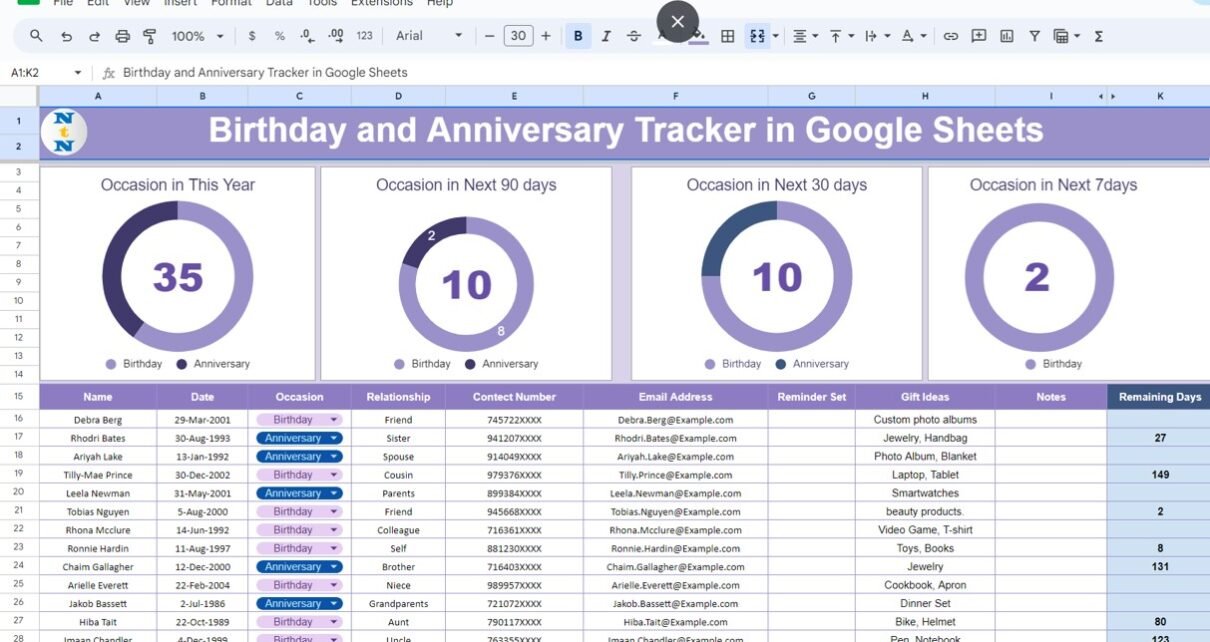
| Data sheet | Holds the master table of people and dates, plus four summary charts | 35 occasions this year |
| Support sheet | Holds supporting lists and calculations used by the other two sheets | Works in the background |
The Data Sheet
Four summary charts

- Occasion in This Year: total occasions in the current year, split into birthdays and anniversaries (35 in the sample).
- Occasion in Next 90 days: occasions coming up in the next three months (10 in the sample: 8 birthdays and 2 anniversaries).
- Occasion in Next 30 days: the short-term view for planning gifts and messages (10 in the sample).
- Occasion in Next 7days: what needs action this week (2 in the sample, both birthdays).
The occasion table

Each row stores one occasion with these columns:
- Name and Date (the original date of birth or wedding).
- Occasion: a drop-down with Birthday or Anniversary.
- Relationship: for example Friend, Sister, Spouse, Colleague or Self.
- Contact Number and Email Address, so you can call or write straight from the sheet.
- Reminder Set: a column to note that you have already scheduled a reminder.
- Gift Ideas and Notes: for example “Jewelry, Handbag” or “Toys, Books”.
- Remaining Days: the calculated number of days until the occasion.
How the Remaining Days Formula Works
The Remaining Days column uses this formula:
=IF(TODAY()>=J16,"",J16-TODAY())Column J is a hidden helper column (it sits between Notes and Remaining Days) that holds the occasion’s date in the current year. The formula reads like this:
| Part | Meaning |
|---|---|
TODAY() |
Today’s date, refreshed every time the sheet recalculates. |
TODAY()>=J16 |
Checks whether this year’s occasion is today or has already passed. |
"" |
If it has passed (or is today), the cell stays blank. |
J16-TODAY() |
Otherwise, subtracts today from the occasion date to give the days left. |
Worked example from the sample data
The screenshots were taken on 3 August 2024. Here is what the formula returns for a few rows:
| Name | Date | Occasion | This year’s date | Remaining Days |
|---|---|---|---|---|
| Tobias Nguyen | 5-Aug-2000 | Birthday | 5-Aug-2024 | 2 |
| Ronnie Hardin | 11-Aug-1997 | Birthday | 11-Aug-2024 | 8 |
| Rhodri Bates | 30-Aug-1993 | Anniversary | 30-Aug-2024 | 27 |
| Hiba Tait | 22-Oct-1989 | Birthday | 22-Oct-2024 | 80 |
| Debra Berg | 29-Mar-2001 | Birthday | 29-Mar-2024 | (blank, already passed) |
Tobias Nguyen’s birthday, two days away, is one of the two occasions counted in the “Next 7days” chart, while Debra Berg’s March birthday is skipped because it has already happened this year.
The Search Occasion Sheet

This is the sheet you will use most. At the top, Search Occasions by Remaining Days has three boxes:
- Occasion in Next: the number of days you want to look ahead, such as 7, 30 or 90.
- BIRTHDAY: how many birthdays fall inside that window.
- ANNIVERSARY: how many anniversaries fall inside that window.

Below the boxes, the matching occasions are listed with Name, Date, Occasion, Relationship, Contact Number, Email Address, Reminder Set, Gift Ideas and Notes. You get a ready-made to-do list for the period without filtering anything yourself.
How to Use It With Your Own Data
- Open the data sheet and clear the sample rows, keeping the Remaining Days formula and the helper column.
- Enter each person’s Name and original Date, then pick Birthday or Anniversary in the Occasion drop-down.
- Add Relationship, phone and email so you can act straight from the list.
- Note gift ideas whenever you hear one during the year.
- Go to the Search Occasion sheet, type 30 in Occasion in Next, and work through the list.
- Once you have set a phone or calendar reminder, mark it in Reminder Set.
Real-World Use Cases
- Families: one shared sheet for relatives’ birthdays and anniversaries, with gift ideas everyone can add to.
- HR and office admins: staff birthdays and work anniversaries, checked every Monday with a 7-day search.
- Small businesses and service providers: customer birthdays for wishes or offers, with phone and email in the same row.
Useful Formulas if You Want to Extend It
These are not part of the template. They are optional formulas you can add in your own copy.
To build “this year’s date” from an original date in column B:
=DATE(YEAR(TODAY()),MONTH(B16),DAY(B16))To get the next occurrence, rolling into next year once this year’s date has passed:
=IF(DATE(YEAR(TODAY()),MONTH(B16),DAY(B16))<TODAY(),DATE(YEAR(TODAY())+1,MONTH(B16),DAY(B16)),DATE(YEAR(TODAY()),MONTH(B16),DAY(B16)))To show the age or number of years being celebrated:
=DATEDIF(B16,TODAY(),"Y")Tips and Limitations
- Enter real dates: type dates as dates (for example 5-Aug-2000), not text, or the formula cannot calculate days.
- Past occasions show blank: the Remaining Days formula only counts forward within the current year. In late December, January birthdays will not appear until the new year starts, so check the list again in the first week of January.
- No automatic messages: the sheet counts and lists occasions; it does not send emails or phone notifications by itself. Use it alongside your calendar.
- Privacy: the sheet holds phone numbers and email addresses. Share it only with people who need it.
- Who should look elsewhere: if you need automatic greetings sent for hundreds of customers, a CRM or email tool is a better fit than a spreadsheet.
Related Guides and Templates
If you keep contacts in Google Sheets, the address book with WhatsApp and email buttons pairs well with this tracker. For a calendar view of dates, see the dynamic calendar with holidays and events. Planning the celebration itself? Try the event planning checklist in Google Sheets, and for everyday to-dos the task management tracker in Google Sheets.
If you want to get comfortable with date functions such as TODAY, DATE and DATEDIF, the Excel AI Mastery: 100 Formulas course on NextGenTemplates Academy explains them with practice files, and the same logic works in Google Sheets.
Frequently Asked Questions
How does the tracker know how many days are left?
It subtracts today’s date from the occasion’s date in the current year. If that date has already passed, the Remaining Days cell stays blank.
Can I search for a period other than 90 days?
Yes. Type any number of days in the Occasion in Next box on the Search Occasion sheet, for example 7 or 30, and the counts and list update.
Can I track other occasions, such as work anniversaries?
Yes. Enter the joining date with Anniversary as the occasion, and use Relationship or Notes to mark it as a work anniversary.
Will Google Sheets remind me automatically?
Not on its own. The tracker shows what is coming up; set the actual reminder in your phone or calendar and tick it off in the Reminder Set column.
Can my family or team update the same tracker?
Yes. Share the file with edit access and everyone can add dates and gift ideas in real time.
Wrapping Up
This Birthday and Anniversary Tracker in Google Sheets keeps dates, contacts and gift ideas together and turns them into a simple question: what is coming up in the next few days? Add your people to the data sheet, run a 30-day search on the Search Occasion sheet, and make checking it part of your Monday routine.
Get the Birthday and Anniversary Tracker
Prefer Excel? See the Staff Birthday and Anniversary Calendar in Excel.
📅 Last updated: October 2026